Rubrik with Azure: SLA domains and archive to Blob
-
Phase 0: Before you start
-
Phase 1: The foundation
-
Phase 2: Day-to-day operations
-
Phase 3: Enterprise architecture
-
Phase 4: Troubleshooting step by step
-
Phase 5: Final project and career
Rubrik Azure archiving sends older backups from a Rubrik cluster to an Azure Blob container, so the cluster keeps recent restore points on fast local storage and Azure keeps the long tail for months or years. Everything is driven by SLA Domains: one policy that says how often, how long, and where.
Rubrik is a paid product, so this is a concept lesson with a simulated lab. You learn how SLA Domains and Azure archival locations fit together, then use the CLI as a stand-in archiver to see the Azure behaviour Rubrik depends on, including how it breaks.
The two most common Rubrik-to-Azure tickets are an archival location that suddenly disconnects and a restore from archive that takes far longer than anyone promised. Both come from Azure settings.
| Time | You need | Cost | By the end you can |
|---|---|---|---|
| About 40 minutes | The storage account from Lesson 21, the CLI | Under one US cent: a few small blobs for a day | Design SLA Domains with Azure archive, and troubleshoot archival locations and archive restores |
What it is, in one line
A Rubrik SLA Domain backs up data on a schedule, keeps recent copies on the cluster, and archives older ones to an Azure Blob container.
In Simple Words
The school uniform shop’s stock room
The uniform shop keeps this week’s sizes on the shelves behind the counter, so a parent gets a shirt in seconds. Older stock goes to a warehouse across town, and fetching from there takes a day.
The shop manager writes one rule card for each type of item: “keep 2 weeks on the shelf, send to the warehouse after that, throw away after a year”. That card is an SLA Domain, and the warehouse is the archival location in Azure.
The warehouse gate needs the shop’s key. If the warehouse changes its lock and doesn’t tell the shop, deliveries pile up at the gate.
Engineer's View
SLA Domains and Azure archival locations
- Rubrik Security Cloud (RSC): the SaaS control plane that manages Rubrik clusters (CDM) on-premises or in Azure, and protects Azure workloads natively.
- SLA Domain: snapshot frequency (hourly, daily, weekly, monthly, yearly), retention for each, replication to another cluster, and archival: “archive after N days” to a target, optionally “instant archive” of every snapshot.
- Azure archival location: created with the storage account name, container name and the account access key, plus encryption with an RSA key or an Azure Key Vault key. It can have immutability settings and a retrieval tier for data in Archive.
- Consolidation: optional merging of incremental chains in the archive to keep restore chains short and storage lower.
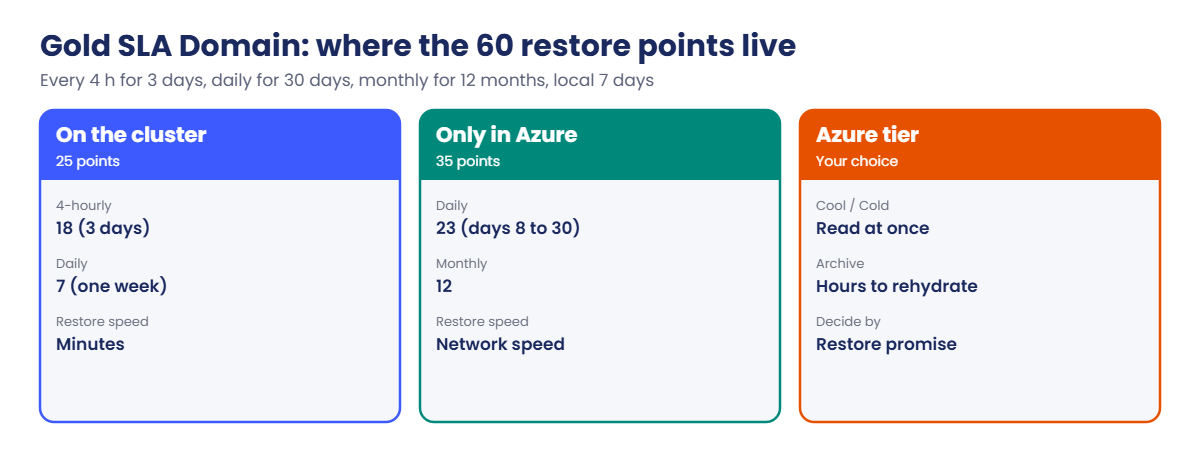
- Restores from archive: Rubrik reads back from Blob. Data in the Cool or Cold tier reads at once; data in the Archive tier must be rehydrated first, which takes hours (Lesson 23).
- Network: the cluster needs HTTPS to the storage account, through any proxy configured on the location, and past the storage firewall.
How it works, step by step
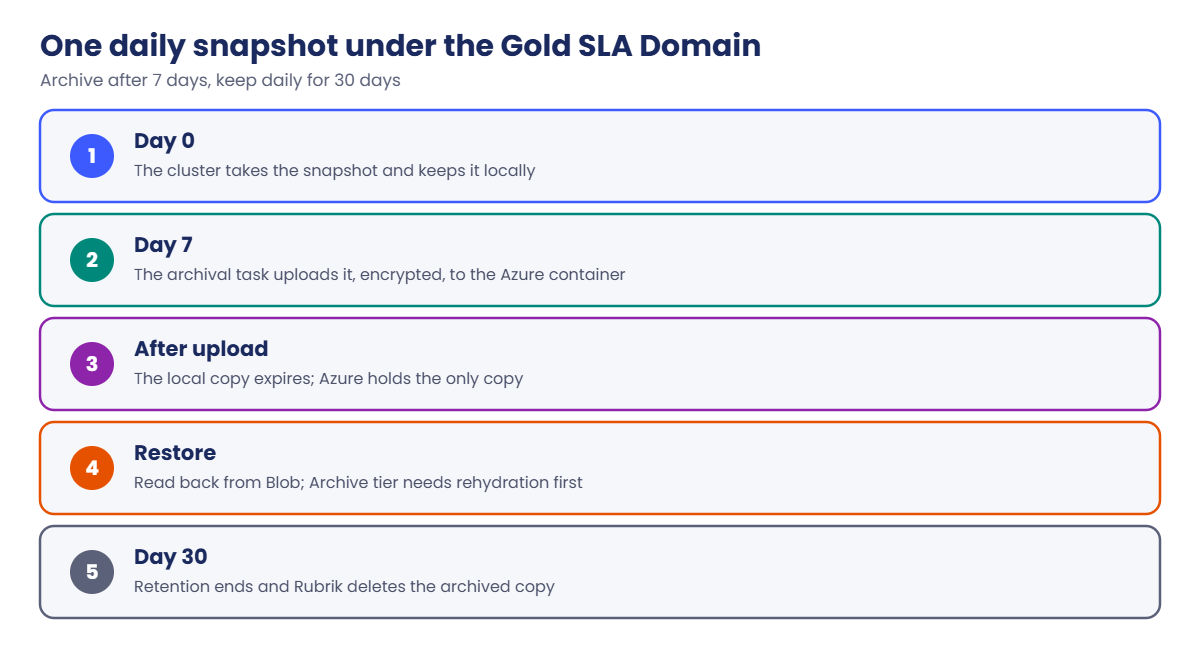
The life of one daily snapshot under a “Gold” SLA Domain (every 4 hours, keep 3 days; daily keep 30 days; monthly keep 12 months; archive after 7 days):
- The cluster takes the snapshot and keeps it locally.
- On day 7, the archival job uploads it to the Azure container, encrypted with the location’s key.
- The local copy expires on the cluster; Azure now holds the only copy.
- A restore of that day reads from Azure, slower than local but without rehydration if the tier is Cool.
- On day 30, retention ends and Rubrik deletes the archived copy, unless immutability says otherwise.
The local retention period is the line between “restore in minutes” and “restore at internet speed”. Pick it from how far back most restore requests go.
When Rubrik protects Azure VMs natively, it calls Azure snapshot APIs instead. Too many at once hit Azure Resource Manager throttling with HTTP 429, covered in Lesson 68.
Simulated lab: Rubrik Azure archive with an SLA Domain
This simulated lab plays the Rubrik cluster with PowerShell and the CLI. Load your account name and the current key, which is exactly what an archival location stores:
$st = (Get-Content C:\azure-lab\storage.txt)
$key = az storage account keys list --resource-group rg-saat-data --account-name $st --query "[?keyName=='key1'].value" -o tsv1Work out what an SLA Domain keeps, and where
Save a small helper that counts restore points for an SLA Domain, then run it for Gold:
$f = @'
function Get-SlaPoints {
param([int]$EveryHours, [int]$KeepHourlyDays, [int]$KeepDailyDays, [int]$KeepMonthly, [int]$LocalDays)
$hourly = [int](24 / $EveryHours) * $KeepHourlyDays
[pscustomobject]@{
RestorePoints = $hourly + $KeepDailyDays + $KeepMonthly
OnCluster = $hourly + [Math]::Min($KeepDailyDays, $LocalDays)
ArchivedToAzure = [Math]::Max(0, $KeepDailyDays - $LocalDays) + $KeepMonthly
}
}
'@
Set-Content -Path C:\azure-lab\Get-SlaPoints.ps1 -Value $f
. C:\azure-lab\Get-SlaPoints.ps1
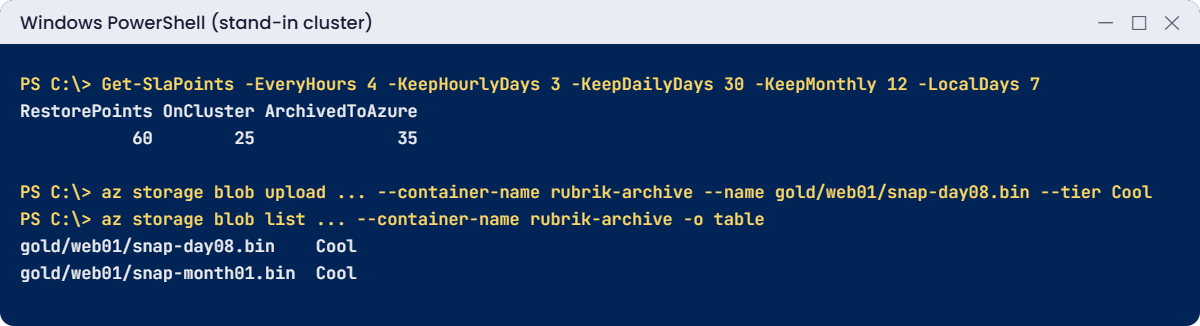
Get-SlaPoints -EveryHours 4 -KeepHourlyDays 3 -KeepDailyDays 30 -KeepMonthly 12 -LocalDays 7You should see this:
RestorePoints OnCluster ArchivedToAzure
------------- --------- ---------------
60 25 3518 four-hourly points plus 7 daily ones stay on the cluster; 23 daily and 12 monthly points live only in Azure. Most restores hit the 25 local points, so a slower Azure path is acceptable for the other 35.
2Create the archive container
Run this:
az storage container create --account-name $st --account-key $key --name rubrik-archive -o none
az storage container show --account-name $st --account-key $key --name rubrik-archive --query "{name:name, publicAccess:properties.publicAccess}" -o tableYou should see this:
Name PublicAccess
-------------- --------------
rubrik-archive3Archive two “snapshots” with the key, as the cluster does
Make two small stand-in snapshot files and upload them with the account key, in the Cool tier:
Set-Content -Path C:\azure-lab\snap-day08.bin -Value 'archived snapshot, day 8'
Set-Content -Path C:\azure-lab\snap-month01.bin -Value 'archived snapshot, month 1'
az storage blob upload --account-name $st --account-key $key --container-name rubrik-archive --name gold/web01/snap-day08.bin --file C:\azure-lab\snap-day08.bin --tier Cool -o none
az storage blob upload --account-name $st --account-key $key --container-name rubrik-archive --name gold/web01/snap-month01.bin --file C:\azure-lab\snap-month01.bin --tier Cool -o none
az storage blob list --account-name $st --account-key $key --container-name rubrik-archive --query "[].{name:name, tier:properties.blobTier}" -o tableYou should see this:
Name Tier
--------------------------- ------
gold/web01/snap-day08.bin Cool
gold/web01/snap-month01.bin CoolThe names are stand-ins; Rubrik uses its own internal layout and encrypts everything before upload. What matters here is the Azure behaviour: key-based access, tiers and reads.
4Note the archival location settings
These are the fields you’d fill in RSC for this account:
| Field | Value |
|---|---|
| Storage account name | your stsaat name |
| Container | rubrik-archive |
| Access key | key1 (stored by Rubrik) |
| Encryption | RSA key or Azure Key Vault key |
| Retrieval tier | Used only for blobs in the Archive tier |
| Immutability | Optional; lock period should match SLA retention |
✅ Checkpoint: Gold keeps 60 restore points, 35 of them only in Azure, and two stand-in snapshots sit in rubrik-archive in the Cool tier.
Break It, Then Fix It
Both breaks are ones a Rubrik admin sees as “archival location disconnected” and “restore stuck”.
1Break it: the security team rotates key1
Rotate the key, then archive the next snapshot with the key Rubrik still has stored:
az storage account keys renew --resource-group rg-saat-data --account-name $st --key primary -o none
Set-Content -Path C:\azure-lab\snap-day09.bin -Value 'archived snapshot, day 9'
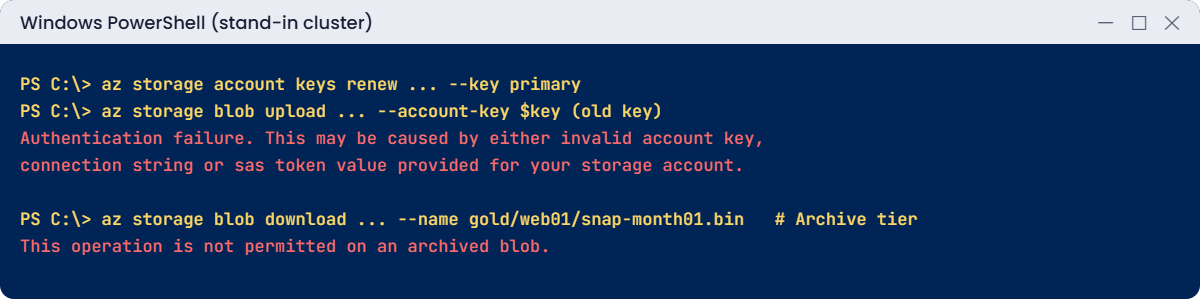
az storage blob upload --account-name $st --account-key $key --container-name rubrik-archive --name gold/web01/snap-day09.bin --file C:\azure-lab\snap-day09.bin --tier CoolYou’ll get this error:
Authentication failure. This may be caused by either invalid account key, connection string or sas token value provided for your storage account.Rubrik shows the archival location as disconnected and archival tasks fail. Local snapshots keep piling up past their archive date, so the cluster slowly fills. Nothing is wrong with Rubrik; it simply holds a key that no longer exists.
Fix it: get the new key, update the archival location in RSC (edit the location, paste the new key), then retry. Agree with the security team to rotate key2 first next time, and switch Rubrik to it:
$key = az storage account keys list --resource-group rg-saat-data --account-name $st --query "[?keyName=='key1'].value" -o tsv
az storage blob upload --account-name $st --account-key $key --container-name rubrik-archive --name gold/web01/snap-day09.bin --file C:\azure-lab\snap-day09.bin --tier Cool -o none
az storage blob list --account-name $st --account-key $key --container-name rubrik-archive --query "length([])"You should see this:
32Break it: the restore that takes all night
To save money, someone moves the monthly archive to the Archive tier. Then a restore of month 1 is needed:
az storage blob set-tier --account-name $st --account-key $key --container-name rubrik-archive --name gold/web01/snap-month01.bin --tier Archive
az storage blob download --account-name $st --account-key $key --container-name rubrik-archive --name gold/web01/snap-month01.bin --file C:\azure-lab\restore.binYou’ll get an error like this:
This operation is not permitted on an archived blob.
RequestId:...
Time:...
ErrorCode:BlobArchivedRubrik can restore from Archive-tier data, but it has to rehydrate first, using the location’s retrieval tier. That’s hours, not minutes (Lesson 23). If the business was promised a 2-hour restore, the tiering choice just broke that promise.
Fix it: decide tiers by restore promise. Keep data that may be needed quickly in Cool or Cold, and use Archive only for copies that can wait. For this lab, clean up:
az storage blob delete-batch --account-name $st --account-key $key --source rubrik-archive -o none
az storage container delete --account-name $st --account-key $key --name rubrik-archive -o none
Remove-Item C:\azure-lab\snap-*.bin
✅ Checkpoint: You reconnected an “archival location” after key rotation and saw why Archive-tier restores need planning. The container is gone.
Your key1 is now new again; nothing else in the course uses it.
This happened at work
Six weeks of snapshots stuck on the cluster
A hospital ran a Rubrik cluster that archived to Azure Blob after 14 days. One Monday, the cluster raised a capacity warning at 92% full, although its data hadn’t grown.
The archival location had been disconnected for six weeks. A cloud security review had rotated all storage account keys on one Friday afternoon. Rubrik held the old key, every archival task failed quietly, and snapshots that should have moved to Azure stayed local.
What they changed: Rubrik’s alerts for archival failures now go to the on-call engineer, not a shared mailbox. Key rotation for backup accounts is a change ticket with the backup team as approver, rotating key2 first and switching Rubrik before key1 changes. They are also testing Key Vault-based encryption to reduce how often shared keys are handled.
Common mistakes and troubleshooting
| Mistake | What you see | What to do |
|---|---|---|
| Rotating the key Rubrik uses | Archival location disconnected | Rotate the other key first; update RSC; then rotate. |
| Archive tier for “fast restore” data | Restores wait hours for rehydration | Pick tiers from the restore promise. |
| Ignoring archival failure alerts | Cluster fills with local snapshots | Route archival alerts to on-call. |
| Storage firewall without the cluster’s IP | Archival tasks fail with 403 | Allow the cluster’s network or use a private endpoint. |
| Local retention too short | Most restores come from Azure, slowly | Keep the common restore window on the cluster. |
| Losing the archival encryption key | Archived data unreadable | Store the RSA key safely, or use Key Vault. |
Interview questions
Click a question to open it. Each one is written the way an interviewer would ask it. Under it you will see why they ask it and one way you could answer, in your own words.
Fresher level
1. What is a Rubrik SLA Domain?
Why they ask this: The core Rubrik concept.
How you might answer: A policy that sets snapshot frequency and retention, replication, and archival for everything assigned to it, so protection is managed by assigning objects to a policy instead of building jobs.
2. What does a Rubrik archival location in Azure need?
Why they ask this: A setup check.
How you might answer: A storage account and container, the account access key, an encryption key such as an RSA key or Key Vault key, and network access from the cluster to the storage account.
3. Why archive to Azure instead of keeping everything on the cluster?
Why they ask this: They want the business reason.
How you might answer: Long-term retention on cluster storage is expensive. Azure Blob costs less per GB for data that’s rarely restored, and it gives an off-site copy.
2–5 years experience
4. Rubrik says the Azure archival location is disconnected. What do you check?
Why they ask this: A real ticket.
How you might answer: Whether the storage key was rotated, the storage firewall and private endpoint DNS, any proxy on the location, and the Activity log for recent changes. The upload errors usually show 403 with AuthenticationFailed or AuthorizationFailure.
5. How do you choose the Azure tier for Rubrik archives?
Why they ask this: They want restore-time thinking.
How you might answer: From the restore promise. Cool or Cold for data that might be restored within hours, Archive only for long-term copies where waiting for rehydration is fine. I’d also check early deletion minimums against SLA retention.
6. How do you size local versus archived retention in an SLA Domain?
Why they ask this: They want planning.
How you might answer: Look at how far back most restore requests go, often a week or two, and keep that on the cluster. Everything older goes to Azure. The cluster capacity, change rate and archive costs then set the exact numbers.
Senior level
7. How would you make Rubrik’s Azure archive resistant to ransomware?
Why they ask this: They want layers.
How you might answer: Immutability on the archival location with a lock matching retention, a separate storage account and subscription, access only from the cluster’s network, key rotation under change control, and alerts on archival failures and deletes.
8. What changes when Rubrik protects Azure VMs natively instead of archiving?
Why they ask this: They’re checking the two models.
How you might answer: Native protection uses Azure snapshots and copies through Azure APIs, so subscription limits and ARM throttling with HTTP 429 matter. Archival from a cluster is mostly Blob data traffic, where storage account limits and network matter.
9. How do you avoid storage key rotations breaking backup tools?
Why they ask this: They want process.
How you might answer: Rotate one key at a time, switch the tool to the other key first, track which tool uses which key, or move tools to managed identity or Key Vault-based auth where supported. Rotation should be a change with the backup owner as approver.
Quick quiz
Q1. What defines frequency, retention and archival in Rubrik?
- A storage policy
- An SLA Domain
- A NSG
- A DCR
Show answer
B — SLA Domains drive protection.
Q2. Which Azure credential does a Rubrik archival location store?
- A SAS token
- The storage account access key
- A VM password
- A Bastion key
Show answer
B — The access key is a required field.
Q3. After key1 is rotated, Rubrik uploads fail with:
- BlobArchived
- Authentication failure
- ShareHasSnapshots
- QuotaExceeded
Show answer
B — The stored key no longer matches.
Q4. Restoring from Archive-tier blobs requires:
- Nothing
- Rehydration first
- A new cluster
- A public container
Show answer
B — Archive data is offline until rehydrated.
Q5. Gold: 4-hourly for 3 days, 30 daily, 12 monthly. Total restore points?
- 45
- 60
- 72
- 90
Show answer
B — 18 + 30 + 12 = 60.
Quick recap
You can now design the Azure side of a Rubrik archive and keep it connected.
- SLA Domains set frequency, retention and archive timing.
- Archival locations use the storage key and an encryption key.
- Key rotation without updating Rubrik disconnects the location.
- Archive-tier data needs rehydration before restores.
- Keep the common restore window on the cluster.
Next lesson
Lesson 39: Azure Site Recovery: VM disaster recovery → You replicate web01 to another region and run a test failover without touching production.
Further reading: Rubrik Azure
Want to go deeper into Rubrik Azure? See Rubrik Security Cloud API: CreateAzureTargetInput and Microsoft’s Access tiers for blob data. You can also see the full plan for this course on the Azure Cloud Administration course page.
