Bicep in practice: modules, what-if, deployment stacks

Bicep modules let you build Azure templates from small, reusable pieces: one module for an NSG, one for a route table, and a main file that wires them together. Add what-if to preview every change, and deployment stacks to manage the full life of what you deployed, including deletes.

Lesson 41 got one resource into code. Real environments have hundreds, and the questions change: how do we reuse this, what will this change do before we run it, and what happens to resources we take out of the template?

In the lab you turn the NSG from Lesson 41 into a module, add a second one, preview a change with what-if, and deploy everything as a stack that deletes what you remove and blocks manual deletes.

TimeYou needCostBy the end you can
About 50 minutesThe files from Lesson 41 in C:\azure-lab\bicep, the CLI, VS CodeNo cost: an NSG and a route tableWrite and call Bicep modules, read what-if output, and manage resources with deployment stacks

What it is, in one line

A Bicep module is a .bicep file you call from another Bicep file, passing parameters in and getting outputs back.

In Simple Words

Lego sets and the building plan

A Lego house is built from ready-made parts: a door set, a window set, a roof set. You don’t design a door every time; you take the door set and say “blue, this size”. Those sets are modules, and the house plan that lists them is main.bicep.

Before you change the house, you hold the new plan next to the model and see what moves: that’s what-if.

A deployment stack is a glass case over the model. Nobody can pull a piece off by hand, and if you take a part out of the plan, it’s removed from the model for you.

Engineer's View

Modules, what-if and deployment stacks

  • Modules: module nsg 'modules/nsg.bicep' = { name: ..., params: {...} }. Each module becomes a nested deployment with its own name; outputs come back as nsg.outputs.nsgId. Conditions (if (...)) and loops (for) work on modules.
  • Sharing: local paths for one repo, a private Bicep registry (an Azure Container Registry) or template specs for many teams, and Azure Verified Modules from Microsoft.
  • What-if: az deployment group what-if compares the template with what exists and shows Create (+), Delete (-), Modify (~), NoChange (=) and Ignore (*). It changes nothing.
  • Deployment stacks: a resource (Microsoft.Resources/deploymentStacks) that remembers what it deployed. --action-on-unmanage says what happens to resources dropped from the template: detach, delete resources, or delete everything including resource groups. --deny-settings-mode can block deletes or writes outside the stack.
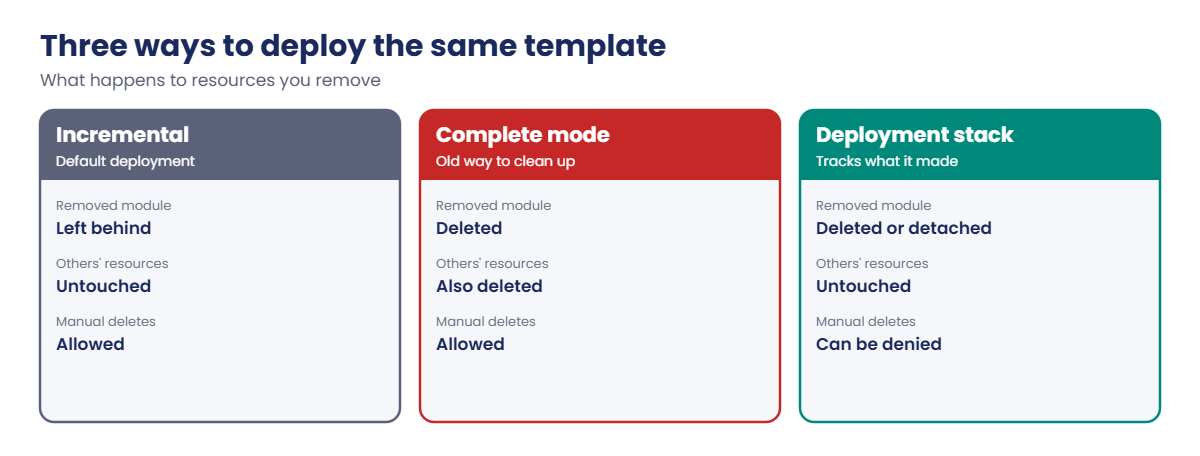
  • Complete mode vs stacks: complete mode deletes anything in the group not in the template, even resources it never created. Stacks only touch what they manage.

How it works, step by step

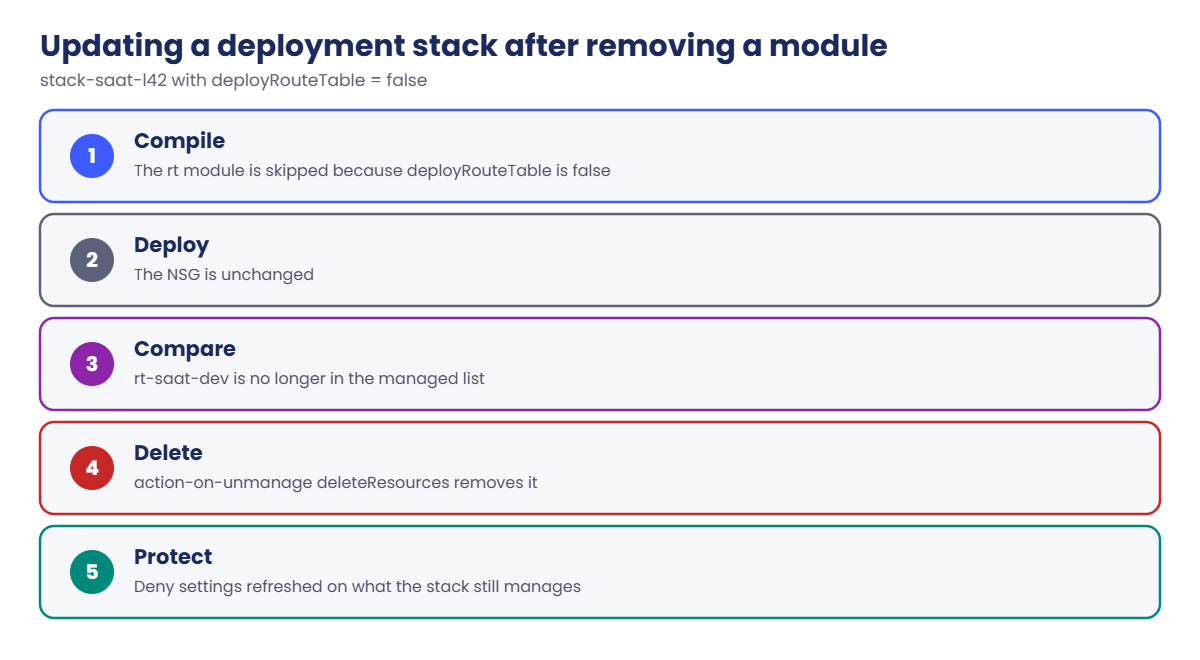
What happens when you update a stack after removing a module:

Bicep modules in a deployment stack: removing a module deletes its resource
  1. Bicep compiles main.bicep; the rt module is skipped because deployRouteTable is false.
  2. The stack deploys the template; the NSG is unchanged.
  3. The stack compares its list of managed resources with the new deployment: rt-saat-dev is no longer in it.
  4. Because action-on-unmanage is deleteResources, the stack deletes rt-saat-dev.
  5. The deny settings are refreshed on the resources it still manages.

Without a stack, removing a module from a template leaves the old resource behind, forgotten and still billing. That’s how most “orphaned” resources are born.

Bicep modules deployed incrementally, in complete mode, or as a stack

Always run what-if before a stack update in production. It’s the cheapest review you’ll ever do.

Hands-on lab: Bicep modules in a deployment stack

Make a folder for this lesson and copy the NSG file from Lesson 41 in as a module:

New-Item -ItemType Directory -Path C:\azure-lab\bicep42\modules -Force | Out-Null
Set-Location C:\azure-lab\bicep42
(Get-Content C:\azure-lab\bicep\nsg.bicep) -replace "lesson: '41'", "lesson: '42'" | Set-Content modules\nsg.bicep
az group create --name rg-saat-l42 --location centralindia --tags course=saatvedha-azure lesson=42 -o none

1Write a second module

Save the route table module:

$r = @'
@description('Name of the route table')
param rtName string

@description('Azure region for the route table')
param location string = resourceGroup().location

resource rt 'Microsoft.Network/routeTables@2024-05-01' = {
  name: rtName
  location: location
  tags: {
    course: 'saatvedha-azure'
    lesson: '42'
  }
  properties: {
    disableBgpRoutePropagation: false
    routes: [
      {
        name: 'drop-onprem-range'
        properties: {
          addressPrefix: '10.80.0.0/16'
          nextHopType: 'None'
        }
      }
    ]
  }
}

output rtId string = rt.id
'@
Set-Content -Path modules\rt.bicep -Value $r

The route sends 10.80.0.0/16 (the future “on-premises” range from the course plan) to None, which drops it. It’s harmless here because the route table isn’t attached to any subnet.

2Write main.bicep to call both modules

Save it, plus a parameters file, and build:

$m = @'
@description('Short environment name used in resource names')
@allowed([
  'dev'
  'prod'
])
param env string = 'dev'

@minValue(100)
@maxValue(4096)
param httpsPriority int = 110

@description('Deploy the route table module')
param deployRouteTable bool = true

module nsg 'modules/nsg.bicep' = {
  name: 'nsg-${env}'
  params: {
    nsgName: 'nsg-saat-${env}'
    httpsPriority: httpsPriority
  }
}

module rt 'modules/rt.bicep' = if (deployRouteTable) {
  name: 'rt-${env}'
  params: {
    rtName: 'rt-saat-${env}'
  }
}

output nsgId string = nsg.outputs.nsgId
output rtId string = deployRouteTable ? rt!.outputs.rtId : 'none'
'@
Set-Content -Path main.bicep -Value $m
Set-Content -Path dev.bicepparam -Value "using 'main.bicep'`n`nparam env = 'dev'`nparam httpsPriority = 110"
az bicep build --file main.bicep
(Get-Content main.bicep).Count

You should see this (no errors or warnings):

31

3Deploy it as a deployment stack

Run this:

az stack group create --resource-group rg-saat-l42 --name stack-saat-l42 --template-file main.bicep --parameters dev.bicepparam --action-on-unmanage deleteResources --deny-settings-mode denyDelete --yes -o none
az stack group show --resource-group rg-saat-l42 --name stack-saat-l42 --query "{state:provisioningState, onUnmanage:actionOnUnmanage.resources, deny:denySettings.mode, managed:length(resources)}" -o table

You should see something like this:

State      OnUnmanage    Deny        Managed
---------  ------------  ----------  ---------
succeeded  delete        denyDelete  2

4Preview a change with what-if

Change the priority to 120 in the parameters file and preview, without deploying:

Set-Content -Path dev.bicepparam -Value "using 'main.bicep'`n`nparam env = 'dev'`nparam httpsPriority = 120"
az deployment group what-if --resource-group rg-saat-l42 --template-file main.bicep --parameters dev.bicepparam

You should see something like this at the end:

  ~ Microsoft.Network/networkSecurityGroups/nsg-saat-dev [2024-05-01]
    ~ properties.securityRules: [
      ~ 0:
        ~ properties.priority: 110 => 120
      ]

  = Microsoft.Network/routeTables/rt-saat-dev [2024-05-01]

Resource changes: 1 to modify, 1 no change.

One property on one resource changes, nothing is created or deleted. That’s the review you want before every production deployment. If what-if shows a Delete you didn’t expect, stop.

5Remove a module and let the stack clean up

Turn the route table off and update the stack:

Set-Content -Path dev.bicepparam -Value "using 'main.bicep'`n`nparam env = 'dev'`nparam httpsPriority = 120`nparam deployRouteTable = false"
az stack group create --resource-group rg-saat-l42 --name stack-saat-l42 --template-file main.bicep --parameters dev.bicepparam --action-on-unmanage deleteResources --deny-settings-mode denyDelete --yes -o none
az resource list --resource-group rg-saat-l42 --query "[].{name:name, type:type}" -o table

You should see this:

Name          Type
------------  ---------------------------------------
nsg-saat-dev  Microsoft.Network/networkSecurityGroups

The route table is gone. The stack noticed it no longer manages it and deleted it, because you chose deleteResources. With a normal deployment it would still be there.
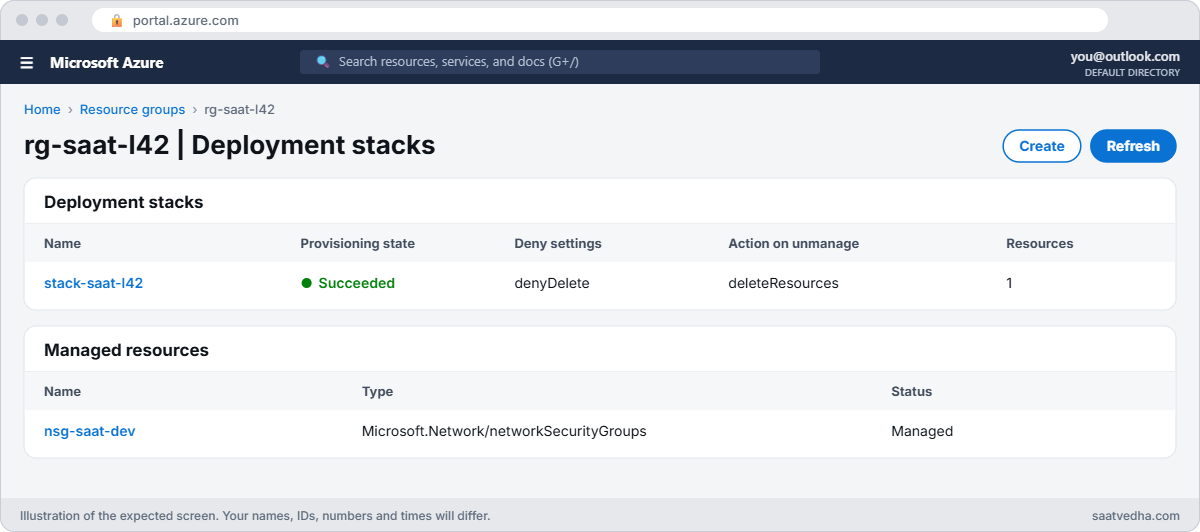
Bicep modules lab with a deployment stack in the portal
stack-saat-l42 now manages only the NSG; the route table was deleted.

Look at the files you now have: a main.bicep of 31 lines and two Bicep modules you can call from any other template. When a second team needs the same NSG standard, they call modules/nsg.bicep with their own name and priority instead of writing their own.

When many teams share Bicep modules, local paths stop working well. Publish the modules to a private Bicep registry with version numbers, so a team can stay on version 1.2 while you test 1.3. That one habit prevents most “it worked yesterday” template problems.
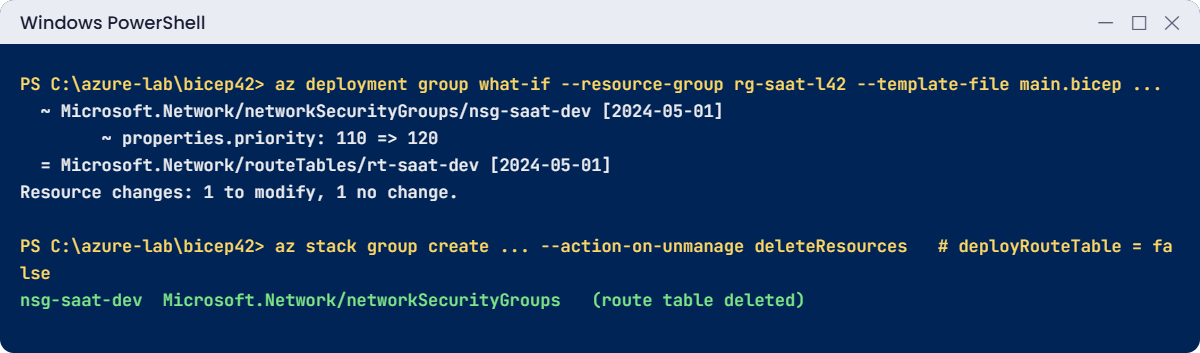
Bicep modules lab: what-if output and a stack cleaning up a removed module
What-if shows one change; the stack deletes the route table you removed.

✅ Checkpoint: main.bicep calls two modules, what-if showed one change, and the stack deleted the route table when you removed it.

Break It, Then Fix It

Both of these happen in the first week of using modules and stacks.

1Break it: the module that can’t be found

Someone renames the folder in the module path by mistake:

(Get-Content main.bicep) -replace "modules/rt.bicep", "module/rt.bicep" | Set-Content main-typo.bicep
az bicep build --file main-typo.bicep

You’ll get errors like these:

main-typo.bicep(23,11) : Error BCP091: An error occurred reading file. Could not find a part of the path 'C:\azure-lab\bicep42\module\rt.bicep'.
main-typo.bicep(31,41) : Error BCP062: The referenced declaration with name "rt" is not valid.

The first error is the real one: the path is wrong. The second follows from it: the output refers to a module that couldn’t load. Always fix the first error in the list first; many later ones disappear on their own.

Fix it: correct the path (module paths are relative to the file that calls them) and delete the broken copy:

Remove-Item main-typo.bicep
az bicep build --file main.bicep

No output means it builds again.

2Break it: “just delete it in the portal”

Someone tries to remove the NSG by hand:

az network nsg delete --resource-group rg-saat-l42 --name nsg-saat-dev

You’ll get an error like this:

(DenyAssignmentAuthorizationFailed) The client 'you@example.com' with object id '...' has permission to perform action 'Microsoft.Network/networkSecurityGroups/delete' on scope '.../nsg-saat-dev'; however, the access is denied because of the deny assignment with name '...' and Id '...' at scope '.../resourceGroups/rg-saat-l42'.

The stack’s denyDelete setting created a deny assignment (Lesson 8). Even an Owner can’t delete managed resources outside the stack. That’s the point: changes go through the template and its review, not through the portal.

Fix it: change things through the stack. To remove everything, delete the stack itself:

az stack group delete --resource-group rg-saat-l42 --name stack-saat-l42 --action-on-unmanage deleteAll --yes
az group delete --name rg-saat-l42 --yes
C:\azure-lab\Find-LabResources.ps1 -Lesson 42

You should see this:

Nothing tagged course=saatvedha-azure is left.
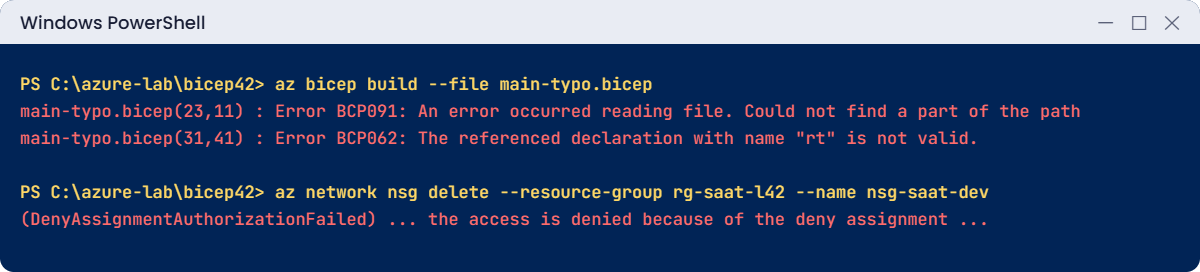
Bicep modules errors: BCP091 module path and a deny assignment
A wrong module path, and a manual delete blocked by the stack.

✅ Checkpoint: You fixed a broken module path and saw a stack block a manual delete. The stack and its resources are gone; the files stay in C:\azure-lab\bicep42.

This happened at work

The route table that outlived its app

A bank’s platform team retired an old integration app by removing its module from their main Bicep file and redeploying. The pipeline was green, and the app’s VMs stopped working, as planned.

Six months later, a network engineer found a route table still attached to a shared subnet, sending a range of addresses to a firewall that no longer existed. Normal deployments only add and update; removing the module had left its resources behind. A new app that reused that address range spent two days chasing a routing problem.

What they changed: every environment is now a deployment stack with deleteResources and denyDelete. Every pull request includes the what-if output, and any Delete in it needs a second approver. A monthly Resource Graph report lists resources not managed by any stack.

Common mistakes and troubleshooting

MistakeWhat you seeWhat to do
Wrong module pathBCP091, then BCP062Fix the path relative to the calling file.
Skipping what-ifSurprise deletes or changesRun what-if and read every Delete.
Removing a module without a stackOrphaned resources keep billingUse a stack with deleteResources.
Complete mode on a shared groupOther teams’ resources deletedUse stacks; they touch only what they manage.
Manual changes to stack resourcesDenyAssignmentAuthorizationFailedChange the template and update the stack.
Copy-pasting modules between reposVersions drift apartPublish modules to a registry or use template specs.

Interview questions

Click a question to open it. Each one is written the way an interviewer would ask it. Under it you will see why they ask it and one way you could answer, in your own words.

Fresher level

1. What is a Bicep module?

Why they ask this: The basic concept.

How you might answer: A Bicep file called from another Bicep file with parameters and outputs. It lets you reuse a building block, like an NSG or a VNet, across environments and teams.

2. What does what-if do?

Why they ask this: A safety habit check.

How you might answer: It compares a template with the resources that exist and shows what would be created, changed, deleted or left alone, without deploying anything.

3. What is a deployment stack?

Why they ask this: Newer feature knowledge.

How you might answer: A resource that deploys a template and keeps track of the resources it manages. It can delete resources removed from the template and block manual deletes or changes with deny settings.

2–5 years experience

4. How do you decide what goes into a module?

Why they ask this: They want design judgement.

How you might answer: Something with a clear purpose and parameters, reused at least twice, like a standard NSG, VNet or storage account with our defaults. Too many tiny modules make templates hard to follow; too few make them hard to reuse.

5. What-if shows a Delete you didn’t expect. What do you do?

Why they ask this: They want caution.

How you might answer: Stop and find out why: a renamed resource, a changed condition, or a different parameter file. Renames in Bicep often mean delete and create. I only continue when every change in the output is intended.

6. How do stacks compare with complete deployment mode?

Why they ask this: They want trade-offs.

How you might answer: Complete mode deletes everything in the resource group that isn’t in the template, including things deployed by others. Stacks only delete resources they manage, can span scopes, and add deny settings, so they’re safer.

Senior level

7. How would you share Bicep modules across 20 teams?

Why they ask this: They want platform engineering.

How you might answer: A private Bicep registry or template specs with versioned modules, built on Azure Verified Modules where possible, with tests and what-if in CI. Teams pin versions, and the platform team publishes changes with release notes.

8. How do you handle emergency changes when deny settings block the portal?

Why they ask this: They want operational realism.

How you might answer: Exclude a break-glass group in the stack’s deny settings, use it only through PIM, and make the same change in the template right after, so the next deployment doesn’t undo it.

9. How do you detect drift between templates and Azure?

Why they ask this: They’re checking ongoing governance.

How you might answer: Scheduled what-if runs in the pipeline that alert on changes, deny settings to prevent drift, Azure Policy for configuration rules, and Resource Graph reports for unmanaged resources.

Quick quiz

Q1. How do you call a module in Bicep?

  1. import
  2. module name ‘path’ = {…}
  3. include
  4. using
Show answer

B — module declares a call to another Bicep file.

Q2. Which command previews changes without deploying?

  1. az bicep build
  2. az deployment group what-if
  3. az stack group show
  4. az group export
Show answer

B — what-if shows changes only.

Q3. A module is removed; the stack uses deleteResources. Result?

  1. Resource kept
  2. Resource deleted
  3. Error
  4. Resource moved
Show answer

B — Unmanaged resources are deleted.

Q4. BCP091 means:

  1. A cycle
  2. The file can’t be read
  3. A bad value
  4. A deny assignment
Show answer

B — Usually a wrong path.

Q5. denyDelete on a stack causes manual deletes to fail with:

  1. BlobArchived
  2. DenyAssignmentAuthorizationFailed
  3. QuotaExceeded
  4. BCP080
Show answer

B — The stack creates a deny assignment.

Quick recap

You can now build environments from modules, preview every change, and keep deployments tidy.

  • Modules are reusable Bicep files with parameters and outputs.
  • what-if shows creates, changes and deletes before you deploy.
  • Stacks delete resources you remove from the template, if you ask them to.
  • Deny settings stop manual deletes outside the stack.
  • Fix the first Bicep error first.

Next lesson

Lesson 43: Azure Automation runbooks → You run PowerShell runbooks on a schedule with a managed identity to stop lab VMs every evening.

Further reading: Bicep modules

Want to go deeper into Bicep modules? See Microsoft’s Bicep modules and Deployment stacks. You can also see the full plan for this course on the Azure Cloud Administration course page.

Scroll to Top