Managed Identities and Service Principals

An Azure managed identity gives a script, VM or app its own identity in Entra ID, with no password or key for you to store. Azure creates the credential, rotates it, and hands the app a token when it asks.

Before managed identities, apps used service principals with client secrets: a password in a config file that expires, gets copied to laptops and ends up in Git. You’ll create one of those too, so you can see exactly what you’re avoiding.

In the lab a tiny container reads a file from a storage account using only a managed identity. Then you break it in the two ways that cause most “it worked yesterday” tickets.

TimeYou needCostBy the end you can
About 45 minutesThe CLI, signed in as the account ownerAbout USD 0.02 (a small storage account and a container that runs for a minute)Create a service principal and a managed identity, give them roles, and tell their failures apart

What it is, in one line

A managed identity is an Entra ID identity that Azure owns and looks after for your resource, so your code can sign in without any password.

In Simple Words

A staff badge instead of a borrowed key

Imagine a delivery robot that needs to get into the school store room. You could give it a copy of the caretaker’s key. But keys get copied, lost, and nobody remembers who has one.

A better way: the school gives the robot its own staff badge. The door reads the badge, the office decides which doors the badge opens, and the badge renews itself every day. Nobody ever sees a key.

The copied key is a client secret. The badge is a managed identity.

Engineer's View

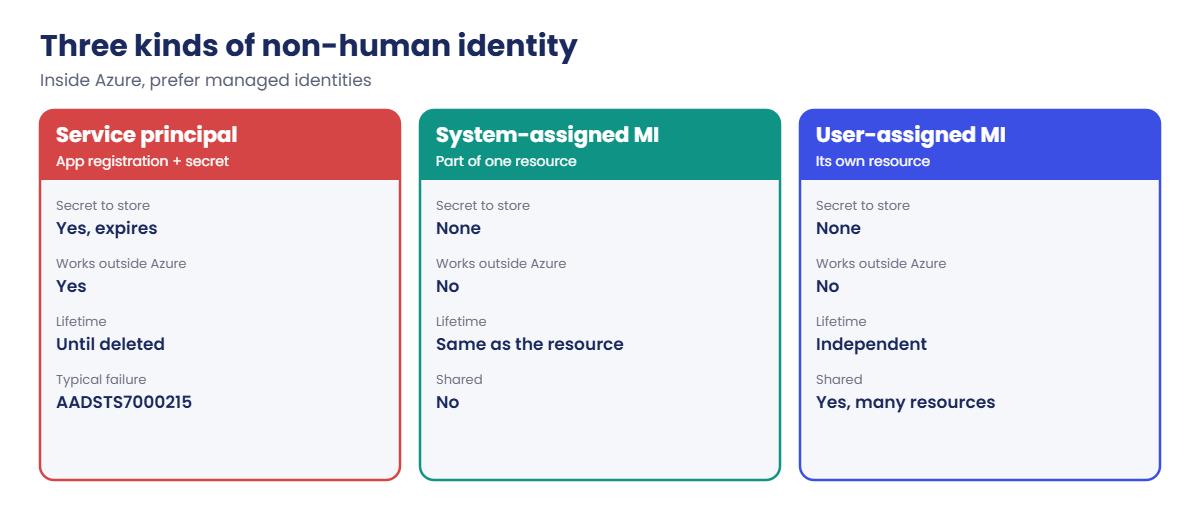
Three kinds of non-human identity

  • Service principal with a secret or certificate: created from an app registration. You get an app (client) ID and a secret that you must store and rotate yourself. The CLI’s az ad sp create-for-rbac gives secrets valid for one year by default. Works from anywhere, including outside Azure.
  • System-assigned managed identity: turned on for one resource (a VM, web app, function). It’s created and deleted with that resource and can’t be shared.
  • User-assigned managed identity: a standalone resource (Microsoft.ManagedIdentity/userAssignedIdentities) you can attach to many resources. It survives when they’re deleted, so its role assignments stay stable through rebuilds.

Inside Azure, code asks for a token from a local endpoint. On a VM that’s the Instance Metadata Service at 169.254.169.254; containers and app services have similar endpoints. No secret ever reaches the code or the disk.

Managed identities and service principals are workload identities, so mandatory MFA doesn’t apply to them; protect them with least-privilege roles instead.

Every identity has two IDs that people mix up. The client ID (app ID) is what you sign in with. The object ID (principal ID) is what role assignments point to.

When you see “PrincipalNotFound” right after creating an identity, it’s usually replication delay: wait a minute and retry, or pass --assignee-principal-type ServicePrincipal.

How it works, step by step

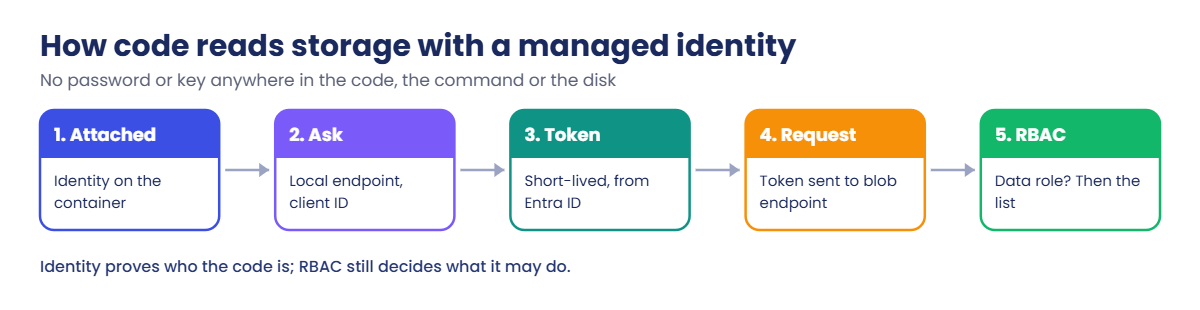
Here is what happens when the container in the lab reads a blob with its managed identity:

Azure managed identity token flow from container to storage
  1. The container starts with the user-assigned identity attached.
  2. Code (here, the Azure CLI) calls the local identity endpoint and asks for a token for Azure Storage, naming the identity’s client ID.
  3. Azure returns a short-lived token, signed by Entra ID, for that identity.
  4. The code sends the token to the storage account’s blob endpoint.
  5. Storage checks RBAC: does this identity have a data role, like Storage Blob Data Reader, on the account or container? If yes, it returns the list.

The identity proves who the code is; RBAC still decides what it can do. A managed identity with no role can sign in perfectly and still be refused everything.

Azure managed identity types compared with a service principal

So the default for anything running in Azure is: managed identity, smallest role, smallest scope. Service principals with secrets are for things outside Azure that can’t use federated credentials, and they need an owner, an expiry date and a rotation plan.

Hands-on lab: read storage with no secret

You set up a storage account with one file, read it with a service principal, then read it with a managed identity from a container. Run everything in your admin PowerShell window.

1Create a storage account with one file

Run this:

$rgName = 'rg-saat-l10'
az group create --name $rgName --tags course=saatvedha-azure lesson=10 -o none
$st = 'stsaat10' + (Get-Random -Maximum 999999)
az storage account create --name $st --resource-group $rgName --sku Standard_LRS --kind StorageV2 --allow-blob-public-access false --tags course=saatvedha-azure lesson=10 -o none
$stId = az storage account show --name $st --resource-group $rgName --query id -o tsv
$me = az ad signed-in-user show --query id -o tsv
az role assignment create --assignee-object-id $me --assignee-principal-type User --role "Storage Blob Data Contributor" --scope $stId -o none
'Quarterly report: all good.' | Set-Content C:\azure-lab\hello.txt
Start-Sleep -Seconds 60
az storage container create --name reports --account-name $st --auth-mode login -o none
az storage blob upload --container-name reports --name hello.txt --file C:\azure-lab\hello.txt --account-name $st --auth-mode login -o none
az storage blob list --container-name reports --account-name $st --auth-mode login --query "[].name" -o tsv

You should see this:

hello.txt

Even as Owner you needed a data role, as you saw in Lesson 7. The 60-second pause gives the new role time to apply.

2The old way: a service principal with a secret

Run this:

$sp = az ad sp create-for-rbac --name sp-saat-l10 --role "Storage Blob Data Reader" --scopes $stId | ConvertFrom-Json
$sp | Select-Object appId, displayName, tenant

You should see something like this:

WARNING: The output includes credentials that you must protect. Be sure that you do not include these credentials in your code or check the credentials into your source control. For more information, see https://aka.ms/azadsp-cli

appId                                displayName tenant
-----                                ----------- ------
4f3e2d1c-0b9a-4876-a5b4-c3d2e1f0a9b8 sp-saat-l10 9a8b7c6d-1e2f-4a3b-8c9d-0e1f2a3b4c5d

The secret is in $sp.password. That one string is now a key to your data for a whole year. Sign in with it in a separate CLI session and use it:

$env:AZURE_CONFIG_DIR = 'C:\azure-lab\sp-cli'
az login --service-principal --username $sp.appId --password $sp.password --tenant $sp.tenant --allow-no-subscriptions -o none
az storage blob list --container-name reports --account-name $st --auth-mode login --query "[].name" -o tsv
az logout
Remove-Item Env:AZURE_CONFIG_DIR

You should see this:

hello.txt

3The better way: a user-assigned managed identity

Run this:

$id = az identity create --name id-saat-l10 --resource-group $rgName --tags course=saatvedha-azure lesson=10 | ConvertFrom-Json
$id | Select-Object name, clientId, principalId
az role assignment create --assignee-object-id $id.principalId --assignee-principal-type ServicePrincipal --role "Storage Blob Data Reader" --scope $stId -o none

You should see something like this:

name        clientId                             principalId
----        --------                             -----------
id-saat-l10 7d6c5b4a-3928-4170-8e6f-5d4c3b2a1908 e1d2c3b4-a596-4877-8695-a4b3c2d1e0f9

Notice what’s missing: no password, nothing to store. clientId is for signing in; principalId (the object ID) is what the role points to.

4Let a container use the identity

Container Instances needs its resource provider registered once per subscription. Run this:

az provider register --namespace Microsoft.ContainerInstance --wait
az provider show --namespace Microsoft.ContainerInstance --query registrationState -o tsv

You should see this:

Registered

Now write the command the container will run, and start it:

$cmd = '/bin/sh -c "az login --identity --client-id CLIENTID --allow-no-subscriptions -o none && az storage blob list --account-name ACCOUNT --container-name reports --auth-mode login --query [].name -o tsv"'
$cmd.Replace('CLIENTID', $id.clientId).Replace('ACCOUNT', $st) | Set-Content C:\azure-lab\mi-test.txt
az container create --resource-group $rgName --name aci-saat-l10 --image mcr.microsoft.com/azure-cli:latest --os-type Linux --cpu 1 --memory 1.5 --restart-policy Never --assign-identity $id.id --command-line "@C:\azure-lab\mi-test.txt" --tags course=saatvedha-azure lesson=10 -o none
do { Start-Sleep 10; $state = az container show -g $rgName -n aci-saat-l10 --query "containers[0].instanceView.currentState.state" -o tsv; $state } while ($state -ne 'Terminated')
az container logs --resource-group $rgName --name aci-saat-l10

You should see something like this:

Waiting
Running
Terminated
hello.txt

The container signed in as id-saat-l10 and listed the file. No secret was written anywhere: not in the command file, not in the container settings. Passing the command with @file keeps PowerShell away from its quotes and &&.
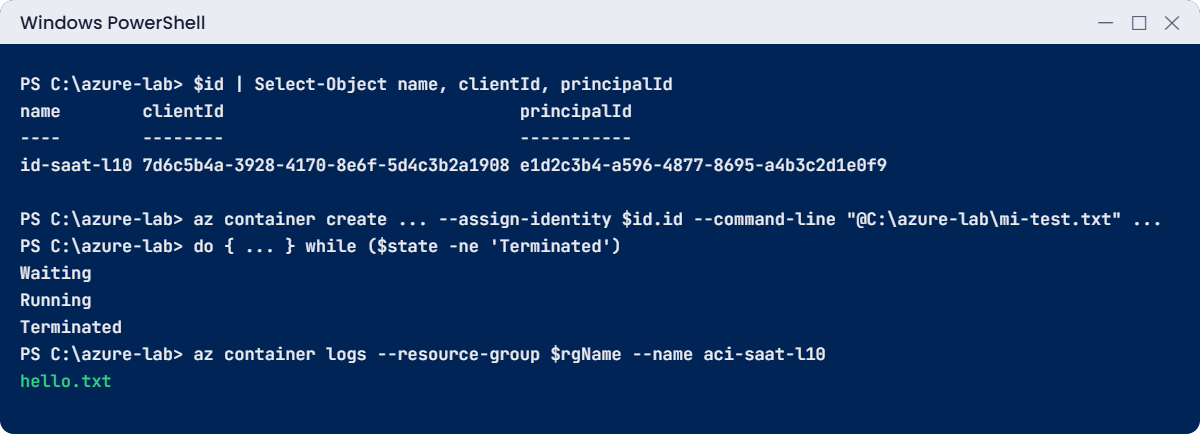
Azure managed identity lab: a container lists a blob with no secret
Example output. Your IDs will be different.

✅ Checkpoint: Both the service principal and the managed identity listed hello.txt, and the container’s command file contains no secret.

Break It, Then Fix It

Two failures look the same to an app (“can’t read storage”), but have completely different causes and fixes.

1Break it: a wrong or old client secret

Run this:

$env:AZURE_CONFIG_DIR = 'C:\azure-lab\sp-cli'
az login --service-principal --username $sp.appId --password 'not-the-real-secret' --tenant $sp.tenant --allow-no-subscriptions

You’ll get an error like this:

AADSTS7000215: Invalid client secret provided. Ensure the secret being sent in the request is the client secret value,
not the client secret ID, for a secret added to app '4f3e2d1c-0b9a-4876-a5b4-c3d2e1f0a9b8'.

This is the same error you get when a secret expires and someone pastes the old one, or pastes the secret’s ID from the portal instead of its value. Entra ID refused to issue a token, so storage never even saw the request.

Fix it here by using the real secret, then delete the service principal: this course won’t use secrets again.

Remove-Item Env:AZURE_CONFIG_DIR
Remove-Item C:\azure-lab\sp-cli -Recurse -Force -ErrorAction SilentlyContinue
az ad app delete --id $sp.appId
$sp = $null

Deleting the app registration also deletes its service principal and its secret. Setting $sp to null removes the secret from your PowerShell session.

2Break it: a managed identity with no role

Create a second identity, attach it to a new container, but skip the role assignment:

$id2 = az identity create --name id-saat-l10-norole --resource-group $rgName --tags course=saatvedha-azure lesson=10 | ConvertFrom-Json
$cmd.Replace('CLIENTID', $id2.clientId).Replace('ACCOUNT', $st) | Set-Content C:\azure-lab\mi-test2.txt
az container create --resource-group $rgName --name aci-saat-l10b --image mcr.microsoft.com/azure-cli:latest --os-type Linux --cpu 1 --memory 1.5 --restart-policy Never --assign-identity $id2.id --command-line "@C:\azure-lab\mi-test2.txt" --tags course=saatvedha-azure lesson=10 -o none
do { Start-Sleep 10; $state = az container show -g $rgName -n aci-saat-l10b --query "containers[0].instanceView.currentState.state" -o tsv } while ($state -ne 'Terminated')
az container logs --resource-group $rgName --name aci-saat-l10b

You’ll get output like this:

You do not have the required permissions needed to perform this operation.
Depending on your operation, you may need to be assigned one of the following roles:
    "Storage Blob Data Owner"
    "Storage Blob Data Contributor"
    "Storage Blob Data Reader"
    ...

Here the sign-in worked: az login --identity succeeded, because the identity exists. Storage then refused the request, because the identity has no data role. “Token OK, permission missing” is the most common managed identity problem at work.

Fix it: give the role, wait a minute, and run the same container again:

az role assignment create --assignee-object-id $id2.principalId --assignee-principal-type ServicePrincipal --role "Storage Blob Data Reader" --scope $stId -o none
Start-Sleep -Seconds 60
az container start --resource-group $rgName --name aci-saat-l10b
az container logs --resource-group $rgName --name aci-saat-l10b

You should see this:

hello.txt
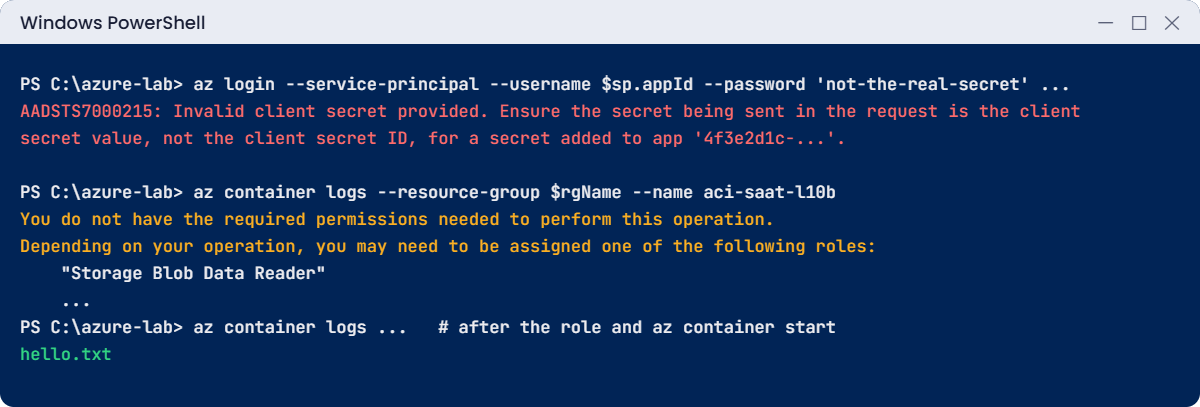
Azure managed identity errors: invalid client secret and missing data role
Example output of both failures.

3Clean up

Run this:

$stId | ForEach-Object { az role assignment delete --scope $_ }
az group delete --name $rgName --yes
C:\azure-lab\Find-LabResources.ps1

You should see this:

Nothing tagged course=saatvedha-azure is left.

Deleting the resource group deletes both user-assigned identities and the containers. The role assignments on the storage account were removed first, so no orphaned “Identity not found” entries are left behind.

✅ Checkpoint: Both failures reproduced and fixed, the service principal is deleted, and nothing tagged for the course is left.

This happened at work

The secret that expired on a public holiday

A bank’s nightly job copied card-transaction files from a partner’s SFTP server into Azure Storage. It ran on an on-premises server and signed in as a service principal whose client secret sat in a config file. The secret was created with the default one-year expiry by an engineer who had since left.

On a public holiday the secret expired. The job failed with AADSTS7000215 every night for three nights, but it only wrote errors to a local log nobody watched. On the fourth morning, settlement reports were missing and the reconciliation team escalated.

Creating a new secret took two minutes; finding where the old one was used took most of the day.

What they changed: the job moved to an Azure VM with a user-assigned managed identity, so there’s no secret at all. For the few apps that must run outside Azure, secrets were replaced by federated credentials or certificates stored in Key Vault, each with a named owner. A weekly script lists every app registration with a credential expiring in the next 60 days and opens a ticket for its owner.

Common mistakes and troubleshooting

MistakeWhat you seeWhat to do
Storing a client secret in code or configLeaked or expired secrets, AADSTS7000215Use a managed identity inside Azure; Key Vault and certificates outside.
Pasting the secret ID instead of the valueAADSTS7000215Copy the Value column when the secret is created; it is shown only once.
Giving the role to the client IDPrincipalNotFound or nothing worksRole assignments use the object (principal) ID.
Assigning a role right after creating the identityPrincipalNotFoundWait a minute, or pass --assignee-principal-type ServicePrincipal.
System-assigned identity on resources you rebuild oftenRoles lost after every rebuildUse a user-assigned identity, which outlives the resource.
Forgetting the data roleSign-in works, data access is refusedAdd a data role like Storage Blob Data Reader at the smallest scope.

Interview questions

Click a question to open it. Each one is written the way an interviewer would ask it. Under it you will see why they ask it and one way you could answer, in your own words.

Fresher level

1. What is a managed identity, and why use one?

Why they ask this: A basic modern-Azure concept.

How you might answer: It’s an identity in Entra ID that Azure creates and manages for a resource, like a VM or container. The code gets tokens from a local endpoint, so there’s no password or key to store, rotate or leak.

2. What’s the difference between system-assigned and user-assigned managed identities?

Why they ask this: A frequent exam and interview question.

How you might answer: System-assigned is tied to one resource and is deleted with it. User-assigned is its own resource that can be attached to several resources and survives when they’re deleted, so its role assignments stay in place across rebuilds.

3. What are the client ID and the object ID of an identity used for?

Why they ask this: They want to see you won’t mix them up in scripts.

How you might answer: The client ID, or app ID, is what you sign in with. The object ID, also called principal ID, is what role assignments refer to.

2–5 years experience

4. An app with a managed identity can’t read a storage account. How do you troubleshoot it?

Why they ask this: They want a clear split between sign-in problems and permission problems.

How you might answer: First I check whether it can get a token at all: if az login --identity or the SDK call fails, it’s the identity setup, like the wrong client ID or the identity not attached. If the token works but storage refuses, it’s RBAC: I check for a data role on the account or container, and that the role points to the right principal ID.

I also remember new role assignments can take a few minutes.

5. A nightly job suddenly fails with AADSTS7000215. What happened?

Why they ask this: They’re checking that you recognise an expired or wrong secret.

How you might answer: That’s an invalid client secret, usually because it expired or someone saved the secret ID instead of the value. I’d create a new secret, update wherever it’s used, and then plan to remove the secret entirely with a managed identity or a federated credential.

6. When would you still use a service principal with a certificate or secret?

Why they ask this: They want balanced judgement, not “never”.

How you might answer: When the workload runs outside Azure and can’t use workload identity federation, for example an old on-premises tool. I’d prefer a certificate in a secure store over a secret, give it the narrowest role, and track its expiry with an owner.

Senior level

7. How would you find and reduce long-lived secrets across a tenant?

Why they ask this: They want a concrete governance plan.

How you might answer: I’d list all app registrations with password or certificate credentials and their expiry dates through Microsoft Graph, and match them to owners and sign-in logs. Unused ones get removed; Azure-hosted ones move to managed identities; external ones move to federated credentials where possible.

A policy and a regular report then stop new long-lived secrets from appearing unnoticed.

8. Design identity for twenty microservices that each need different storage and Key Vault access.

Why they ask this: They want least privilege at scale.

How you might answer: One user-assigned managed identity per service, created with the service’s infrastructure code, each with only the data roles it needs on specific containers or vaults. I’d avoid one shared identity, because then one compromise reaches everything.

Role assignments live in the same Bicep as the resources, so they’re reviewed together.

9. What risks remain even with managed identities?

Why they ask this: They want you to see that “no secrets” isn’t “no risk”.

How you might answer: Anyone who can run code on the resource can use its identity, so a compromised VM or a bad deployment gets those permissions. Over-broad roles are the real danger.

So I keep roles narrow, watch sign-in logs for the identities, and restrict who can deploy to or log into those resources.

Quick quiz

Q1. Which identity is deleted together with its resource?

  1. User-assigned managed identity
  2. System-assigned managed identity
  3. Service principal
  4. Guest user
Show answer

B — System-assigned identities live and die with one resource.

Q2. Which ID does a role assignment point to?

  1. Client ID
  2. Object (principal) ID
  3. Tenant ID
  4. Subscription ID
Show answer

B — Role assignments use the object ID.

Q3. What does AADSTS7000215 mean?

  1. No role assigned
  2. Invalid client secret
  3. Conditional Access block
  4. Wrong tenant
Show answer

B — The secret is wrong, expired, or the secret ID was used instead of the value.

Q4. A managed identity signs in but storage says it needs a data role. What is missing?

  1. A secret
  2. The identity
  3. A data role like Storage Blob Data Reader
  4. MFA
Show answer

C — The token is fine; RBAC is refusing the data action.

Q5. Why did the lab pass the container command with @file?

  1. It’s faster
  2. It avoids PowerShell and az.cmd quoting problems
  3. Containers need files
  4. It hides the command from Azure
Show answer

B — The CLI reads any argument starting with @ from a file, so quotes and && arrive intact.

Quick recap

Your code can now prove who it is without carrying a password, and you can tell a sign-in failure from a permission failure.

  • Managed identities give Azure resources an identity with no secret to store.
  • System-assigned dies with its resource; user-assigned can be shared and survives.
  • Client ID signs in; object ID gets the roles.
  • AADSTS7000215 is a bad or expired secret; “required permissions” with a working sign-in is a missing role.
  • Use managed identities inside Azure, and keep any remaining secrets owned and tracked.

Next lesson

Lesson 11: Azure virtual networks and subnets → You plan an IP address range and build vnet-saat, the network you’ll use for the rest of the course.

Further reading: Azure managed identity

Want to go deeper into Azure managed identity? Microsoft’s overview is What are managed identities for Azure resources?, with guidance in Managed identity best practice recommendations. You can also see the full plan for this course on the Azure Cloud Administration course page.

Scroll to Top