NSG vs ASG: Network and Application Security Groups
-
Phase 0: Before you start
-
Phase 1: The foundation
-
Phase 2: Day-to-day operations
-
Phase 3: Enterprise architecture
-
Phase 4: Troubleshooting step by step
-
Phase 5: Final project and career
NSG vs ASG is one of the first questions on any Azure network team. A network security group (NSG) is the firewall rule list on a subnet or network card. An application security group (ASG) is a label you put on VMs, like “web servers” or “database servers”, so NSG rules can say “from web to app” instead of listing IP addresses.
Most people learn NSGs from the portal and never notice the default rules underneath. One of them lets every subnet in a VNet talk to every other subnet on every port. That surprises people the day a web server reaches a database directly.
In this lesson you build the course’s three-tier rules (web, app, data) with ASGs, check them with a small rule evaluator, and break them in the two common ways.
| Time | You need | Cost | By the end you can |
|---|---|---|---|
| About 45 minutes | vnet-saat from Lesson 11, the CLI | Nothing (NSGs and ASGs cost nothing) | Write NSG rules with ASGs, read default rules, and predict which rule wins |
What it is, in one line
An NSG is a list of allow and deny rules for traffic; an ASG is a name for a group of VMs that those rules can point to.
In Simple Words
Gate rules and colour-coded badges
A school has a guard at each building door with a rule card: “Students from Class 10 may enter the lab between 9 and 11. Nobody else.” That card is an NSG, checked from the top, first matching line wins.
Writing every student’s name on the card would be silly, so each class wears a badge colour. The card just says “blue badges may enter the lab”. The badge colour is an ASG.
When a new student joins Class 10, they get a blue badge and the rule works for them at once.
And watch out for the line printed at the bottom of every card: “anyone from inside the school may enter”. Unless you add your own line above it, everybody inside gets in.
Engineer's View
How NSG rules are evaluated
- An NSG can be attached to a subnet, a network interface, or both. For inbound traffic, the subnet NSG is checked first, then the NIC NSG; outbound is the other way round. Traffic must be allowed by both.
- Rules are checked by priority, lowest number first (100 to 4096 for your rules). The first rule that matches wins, allow or deny. Two rules can’t share a priority and direction.
- A rule matches on source, source port, destination, destination port and protocol. Sources and destinations can be IP ranges, service tags (
Internet,VirtualNetwork,AzureLoadBalancer,Storage.CentralIndia…) or ASGs. - NSGs are stateful: if inbound traffic is allowed, the reply goes out automatically, and the other way round.
Every NSG has six default rules you can’t delete, only override with a lower number:
- Inbound:
AllowVnetInBound(65000),AllowAzureLoadBalancerInBound(65001),DenyAllInBound(65500). - Outbound:
AllowVnetOutBound(65000),AllowInternetOutBound(65001),DenyAllOutBound(65500).
VirtualNetwork covers the whole VNet address space, peered VNets and connected on-premises ranges. So without a deny of your own, any subnet can reach any other on any port. ASGs must be in the same region as the NICs that join them, and a NIC can belong to several ASGs.
Rules that use ASGs on both sides only work when both ASGs are in the same VNet.
How it works, step by step
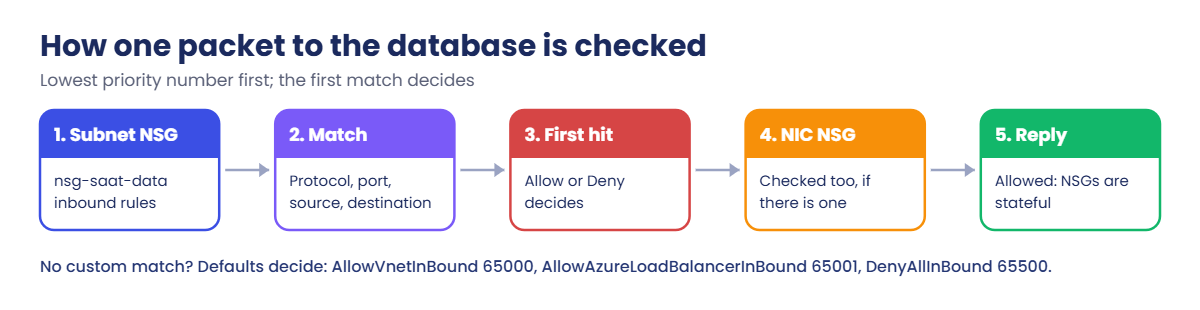
Here is how one inbound packet to a database VM in snet-data is checked:
- The packet arrives at the subnet. Azure takes the subnet NSG’s inbound rules, sorted by priority.
- It compares the packet with each rule in order: protocol, port, source (IP, tag or ASG membership of the sender’s NIC), destination.
- The first match decides. If it’s Allow, the packet moves on to the NIC’s NSG (if there is one) and the same check runs again.
- If no custom rule matches, the default rules decide: VNet traffic allowed, load balancer probes allowed, everything else denied.
- The reply is allowed automatically, because NSGs track connections.
Because the first match wins, the order of your priority numbers is the whole design. Leave gaps (100, 200, 300…) so you can slide a new rule in later without renumbering.
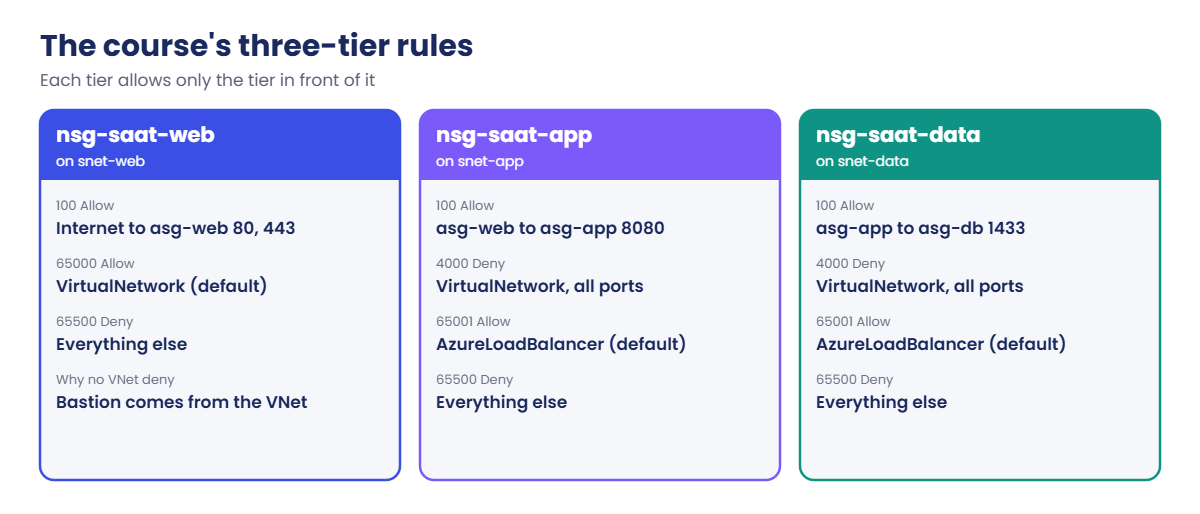
The pattern used in this course: each tier’s NSG allows exactly what it needs from the tier in front (web to app on 8080, app to data on 1433), then denies the rest of the VNet at priority 4000, above the default AllowVnetInBound.
Hands-on lab: three-tier rules with ASGs
You create three ASGs and three NSGs in rg-saat-core, attach the NSGs to subnets, and test them with a rule evaluator. Everything stays for the VM lessons and costs nothing.
1Create the ASGs
Run this:
foreach ($a in 'asg-web','asg-app','asg-db') {
az network asg create --resource-group rg-saat-core --name $a --tags course=saatvedha-azure lesson=12 keep=true -o none
}
az network asg list --resource-group rg-saat-core --query "[].name" -o tsvYou should see this:
asg-app
asg-db
asg-web2Create the NSGs and their rules
Paste this whole block:
foreach ($n in 'nsg-saat-web','nsg-saat-app','nsg-saat-data') {
az network nsg create --resource-group rg-saat-core --name $n --tags course=saatvedha-azure lesson=12 keep=true -o none
}
az network nsg rule create -g rg-saat-core --nsg-name nsg-saat-web -n allow-http-https-internet --priority 100 --direction Inbound --access Allow --protocol Tcp --source-address-prefixes Internet --destination-asgs asg-web --destination-port-ranges 80 443 -o none
az network nsg rule create -g rg-saat-core --nsg-name nsg-saat-app -n allow-8080-web-to-app --priority 100 --direction Inbound --access Allow --protocol Tcp --source-asgs asg-web --destination-asgs asg-app --destination-port-ranges 8080 -o none
az network nsg rule create -g rg-saat-core --nsg-name nsg-saat-data -n allow-1433-app-to-db --priority 100 --direction Inbound --access Allow --protocol Tcp --source-asgs asg-app --destination-asgs asg-db --destination-port-ranges 1433 -o none
foreach ($n in 'nsg-saat-app','nsg-saat-data') {
az network nsg rule create -g rg-saat-core --nsg-name $n -n deny-vnet-inbound --priority 4000 --direction Inbound --access Deny --protocol '*' --source-address-prefixes VirtualNetwork --destination-address-prefixes '*' --destination-port-ranges '*' -o none
}The web tier gets no “deny the VNet” rule on purpose: in later lessons you’ll reach web VMs through Bastion, which comes from inside the VNet.
3Attach each NSG to its subnet
Run this:
az network vnet subnet update -g rg-saat-core --vnet-name vnet-saat -n snet-web --network-security-group nsg-saat-web -o none
az network vnet subnet update -g rg-saat-core --vnet-name vnet-saat -n snet-app --network-security-group nsg-saat-app -o none
az network vnet subnet update -g rg-saat-core --vnet-name vnet-saat -n snet-data --network-security-group nsg-saat-data -o none
az network vnet subnet list -g rg-saat-core --vnet-name vnet-saat --query "[].{subnet:name, nsg:networkSecurityGroup.id}" -o tableYou should see something like this (shortened):
Subnet Nsg
--------- -------------------------------------------------------------------------
snet-web /subscriptions/.../resourceGroups/rg-saat-core/.../networkSecurityGroups/nsg-saat-web
snet-app /subscriptions/.../resourceGroups/rg-saat-core/.../networkSecurityGroups/nsg-saat-app
snet-data /subscriptions/.../resourceGroups/rg-saat-core/.../networkSecurityGroups/nsg-saat-data
snet-mgmt4Read the full rule list, defaults included
Run this:
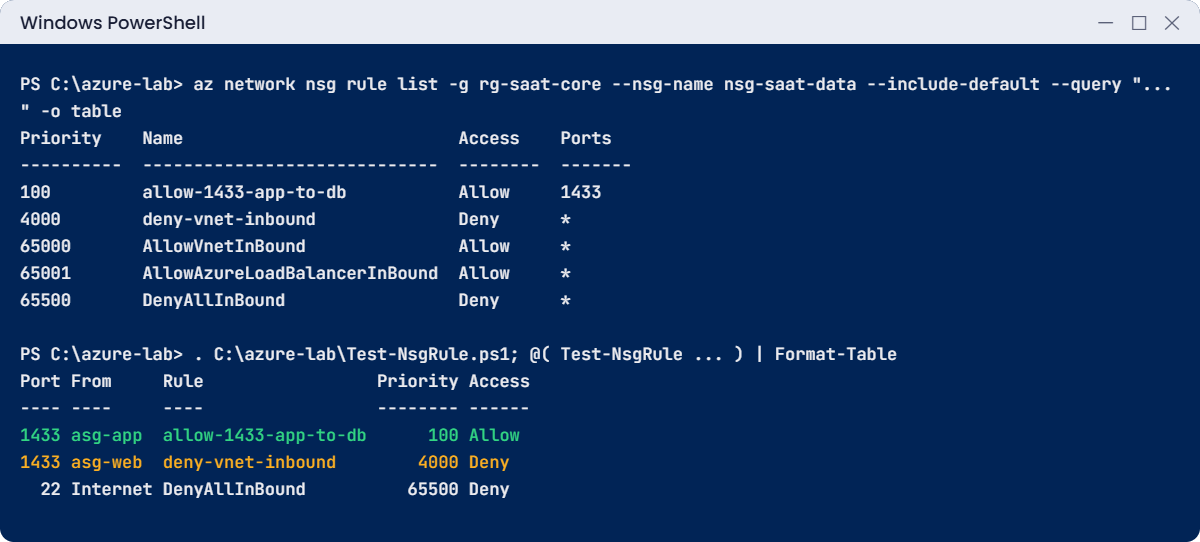
az network nsg rule list -g rg-saat-core --nsg-name nsg-saat-data --include-default --query "sort_by(@, &priority)[?direction=='Inbound'].{priority:priority, name:name, access:access, ports:destinationPortRange}" -o tableYou should see something like this:
Priority Name Access Ports
---------- ----------------------------- -------- -------
100 allow-1433-app-to-db Allow 1433
4000 deny-vnet-inbound Deny *
65000 AllowVnetInBound Allow *
65001 AllowAzureLoadBalancerInBound Allow *
65500 DenyAllInBound Deny *5Save a rule evaluator and test the design
This function reads an NSG’s rules and walks them the way Azure does, lowest priority first, to tell you which rule a connection would hit. It’s a simplified model (it handles ports, service tags and ASGs, not IP ranges), but it’s very good for checking a design before any VM exists.
Paste this whole block:
@'
function Test-NsgRule {
param(
[Parameter(Mandatory)][string]$Nsg,
[Parameter(Mandatory)][int]$Port,
[string]$SourceAsg,
[string]$SourceTag = 'VirtualNetwork',
[string]$DestAsg,
[string]$Protocol = 'Tcp'
)
$rules = az network nsg rule list --resource-group rg-saat-core --nsg-name $Nsg --include-default -o json | ConvertFrom-Json
$hasAsg = { param($list, $name) $list -and ($list | Where-Object { $_.id -like "*/$name" }) }
foreach ($r in ($rules | Where-Object direction -eq 'Inbound' | Sort-Object priority)) {
if ($r.protocol -ne '*' -and $r.protocol -ne $Protocol) { continue }
$ports = @($r.destinationPortRange) + @($r.destinationPortRanges) | Where-Object { $_ }
$portOk = $false
foreach ($p in $ports) {
if ($p -eq '*') { $portOk = $true }
elseif ($p -match '^(\d+)-(\d+)$') { if ($Port -ge [int]$Matches[1] -and $Port -le [int]$Matches[2]) { $portOk = $true } }
elseif ([int]$p -eq $Port) { $portOk = $true }
}
if (-not $portOk) { continue }
if ($r.sourceApplicationSecurityGroups) { if (-not (& $hasAsg $r.sourceApplicationSecurityGroups $SourceAsg)) { continue } }
elseif ($r.sourceAddressPrefix -ne '*' -and $r.sourceAddressPrefix -ne $SourceTag) { continue }
if ($r.destinationApplicationSecurityGroups) { if (-not (& $hasAsg $r.destinationApplicationSecurityGroups $DestAsg)) { continue } }
elseif ($r.destinationAddressPrefix -notin '*', 'VirtualNetwork') { continue }
return [pscustomobject]@{ Port = $Port; From = if ($SourceAsg) { $SourceAsg } else { $SourceTag }; Rule = $r.name; Priority = $r.priority; Access = $r.access }
}
}
'@ | Set-Content C:\azure-lab\Test-NsgRule.ps1
. C:\azure-lab\Test-NsgRule.ps1
@(
Test-NsgRule -Nsg nsg-saat-data -Port 1433 -SourceAsg asg-app -DestAsg asg-db
Test-NsgRule -Nsg nsg-saat-data -Port 1433 -SourceAsg asg-web -DestAsg asg-db
Test-NsgRule -Nsg nsg-saat-data -Port 22 -SourceTag Internet -DestAsg asg-db
) | Format-TableYou should see this:
Port From Rule Priority Access
---- ---- ---- -------- ------
1433 asg-app allow-1433-app-to-db 100 Allow
1433 asg-web deny-vnet-inbound 4000 Deny
22 Internet DenyAllInBound 65500 DenyApp servers reach the database; web servers can’t, because your rule 4000 catches them before the default 65000 would let them in; and nothing from the internet gets in. The leading dot in . C:\azure-lab\Test-NsgRule.ps1 loads the function into your session.
You’ll use it again in the troubleshooting phase next to Network Watcher.
✅ Checkpoint: Three NSGs are attached to snet-web, snet-app and snet-data, and Test-NsgRule gives Allow, Deny, Deny for the three tests.
Break It, Then Fix It
The first mistake Azure catches for you. The second one it doesn’t, and that’s the one that hurts.
1Break it: two rules with the same priority
Run this:
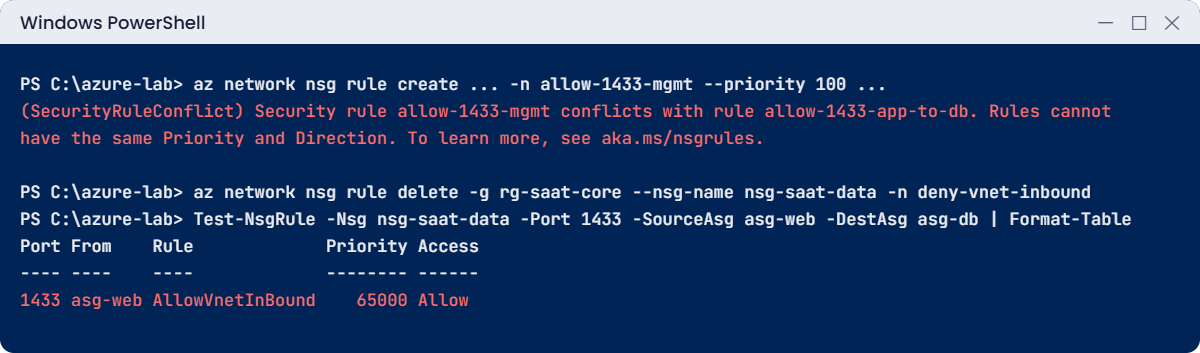
az network nsg rule create -g rg-saat-core --nsg-name nsg-saat-data -n allow-1433-mgmt --priority 100 --direction Inbound --access Allow --protocol Tcp --source-address-prefixes 10.30.10.0/24 --destination-asgs asg-db --destination-port-ranges 1433You’ll get an error like this:
(SecurityRuleConflict) Security rule allow-1433-mgmt conflicts with rule allow-1433-app-to-db. Rules cannot have the same Priority and Direction. To learn more, see aka.ms/nsgrules.
Code: SecurityRuleConflictFix it: use an unused number. Gaps of 10 or 100 make this easy:
az network nsg rule create -g rg-saat-core --nsg-name nsg-saat-data -n allow-1433-mgmt --priority 110 --direction Inbound --access Allow --protocol Tcp --source-address-prefixes 10.30.10.0/24 --destination-asgs asg-db --destination-port-ranges 1433 --query priority -o tsvYou should see this:
110Then remove it again; the management subnet doesn’t need database access yet:
az network nsg rule delete -g rg-saat-core --nsg-name nsg-saat-data -n allow-1433-mgmt2Break it: remove the VNet deny rule
Someone “tidies up” the NSG and deletes rule 4000 because it “looks scary”. No error, no warning. Test the web-to-database path again:
az network nsg rule delete -g rg-saat-core --nsg-name nsg-saat-data -n deny-vnet-inbound
Test-NsgRule -Nsg nsg-saat-data -Port 1433 -SourceAsg asg-web -DestAsg asg-db | Format-TableYou should see this:
Port From Rule Priority Access
---- ---- ---- -------- ------
1433 asg-web AllowVnetInBound 65000 AllowThe web tier can now reach the database directly, through the default AllowVnetInBound rule. If a web server is ever compromised, the attacker goes straight to the data. Nothing in Azure flags this; only a review or a test like this one catches it.
Fix it: put the deny back and test again:
az network nsg rule create -g rg-saat-core --nsg-name nsg-saat-data -n deny-vnet-inbound --priority 4000 --direction Inbound --access Deny --protocol '*' --source-address-prefixes VirtualNetwork --destination-address-prefixes '*' --destination-port-ranges '*' -o none
(Test-NsgRule -Nsg nsg-saat-data -Port 1433 -SourceAsg asg-web -DestAsg asg-db).AccessYou should see this:
Deny
✅ Checkpoint: Both mistakes reproduced and fixed. Nothing to clean up: the ASGs and NSGs stay in rg-saat-core for later lessons.
This happened at work
The “temporary” rule at priority 100
During a late-night outage, an engineer at a healthcare company couldn’t work out why the reporting server couldn’t reach the database. To rule out the firewall, he added an NSG rule on the database subnet: priority 100, allow, source *, all ports. The real problem turned out to be DNS, and the rule was forgotten.
Eight months later a penetration test reached the database port from a test VM in a completely different team’s subnet. The “temporary” rule at 100 was above every careful rule the team had written, so it beat all of them. An external auditor counted it as a high-severity finding, and the team had to prove nothing had used that path.
What they changed: emergency rules must use priorities 3000 to 3999, have “TEMP” and a ticket number in the name, and get removed by the end of the incident. A daily Azure Resource Graph query lists any rule with a source of * or Internet on non-web subnets. NSGs now live in Bicep, so a manual rule shows up as drift in the next deployment.
Common mistakes and troubleshooting
| Mistake | What you see | What to do |
|---|---|---|
| Relying on the defaults between tiers | Every subnet can reach every other on every port | Add your own deny for VirtualNetwork above 65000 on inner tiers. |
| Same priority for two rules | SecurityRuleConflict | Leave gaps (100, 200, 300) and pick an unused number. |
| Broad “temporary” rules at a low number | A test rule that beats every real rule | Use a reserved range for emergency rules, with a ticket, and remove them. |
| Rules full of IP addresses | Rules break when VMs are rebuilt with new IPs | Use ASGs and service tags instead of single IPs. |
| NSG on both subnet and NIC, edited in one place | “I allowed it, but it’s still blocked” | Traffic must pass both. Check effective rules on the NIC (Lesson 62). |
| Blocking AzureLoadBalancer | Load balancer health probes fail; backends show unhealthy | Keep the default AllowAzureLoadBalancerInBound, or allow that tag above your deny. |
Interview questions
Click a question to open it. Each one is written the way an interviewer would ask it. Under it you will see why they ask it and one way you could answer, in your own words.
Fresher level
1. What’s the difference between an NSG and an ASG?
Why they ask this: The most common Azure networking question; they want a crisp answer.
How you might answer: An NSG is the list of allow and deny rules that filters traffic for a subnet or network card. An ASG is a group of network cards, like “web servers”, that NSG rules can use as a source or destination instead of IP addresses.
2. How does Azure decide which NSG rule applies?
Why they ask this: They want priority and first-match understanding.
How you might answer: It checks rules in priority order, lowest number first, and the first rule that matches the packet decides, allow or deny. If none of my rules match, the default rules at 65000 and above decide.
3. Are NSGs stateful?
Why they ask this: A quick check on a basic behaviour.
How you might answer: Yes. If inbound traffic is allowed, the reply traffic is allowed automatically, so I don’t need a matching outbound rule for replies.
2–5 years experience
4. A web server can reach the database subnet even though you never allowed it. Why?
Why they ask this: They want to see you know the default AllowVnetInBound rule.
How you might answer: The default rule AllowVnetInBound at 65000 allows everything from the VirtualNetwork tag, which includes all subnets in the VNet and peered networks. Unless there’s a deny above it, every subnet can talk to every other.
I’d add a rule like “deny VirtualNetwork inbound” at 4000 on the database NSG, after the specific allows.
5. Why use ASGs instead of IP addresses in rules?
Why they ask this: They want to see you think about change and scale.
How you might answer: Because IPs change when VMs are rebuilt or scaled out, and long IP lists are hard to review. With ASGs, a new VM just joins asg-web and every rule about web servers applies to it immediately.
6. You have an NSG on the subnet and another on the NIC. How is traffic evaluated?
Why they ask this: They’re checking the order of the two layers.
How you might answer: Inbound traffic is checked by the subnet NSG first, then the NIC NSG, and it must be allowed by both. Outbound is the reverse. When troubleshooting I look at the effective security rules on the NIC, which combine both.
Senior level
7. How would you manage NSG rules for fifty subscriptions without them drifting?
Why they ask this: They want IaC and governance, not portal clicks.
How you might answer: NSGs and rules go into Bicep modules in Git, deployed by a pipeline with review. Azure Policy can deny NSG rules that allow management ports from the internet, and a Resource Graph query reports risky rules every day.
For organisation-wide rules that teams can’t override, I’d look at Azure Virtual Network Manager security admin rules.
8. Design NSG rules for a three-tier app: web, app and database.
Why they ask this: They want a concrete least-privilege design.
How you might answer: Web subnet: allow 80 and 443 from Internet, or from the Application Gateway subnet, to asg-web. App subnet: allow only asg-web to asg-app on the app port, then deny VirtualNetwork. Database subnet: allow only asg-app to asg-db on 1433, then deny VirtualNetwork.
Admin access comes through Bastion with its own allow rule, and outbound is restricted later with a firewall.
9. During an incident someone wants to open the database to “everything” for ten minutes. What do you say?
Why they ask this: They want calm judgement under pressure.
How you might answer: I’d offer a narrower test instead: allow only the one source IP and port we’re testing, with a TEMP name and a ticket, at a priority in the emergency range. Better still, run Network Watcher IP flow verify first, which tells us in seconds whether the NSG is even the problem.
And I’d make sure removing the rule is part of closing the incident.
Quick quiz
Q1. Which NSG rule is checked first?
- The highest priority number
- The lowest priority number
- The newest rule
- The default rules
Show answer
B — Lower numbers are checked first; the first match wins.
Q2. What does the default rule AllowVnetInBound allow?
- Only the same subnet
- All traffic from the VirtualNetwork tag, including other subnets and peered VNets
- Only traffic from the internet
- Nothing
Show answer
B — VirtualNetwork covers the VNet, peerings and connected on-premises ranges.
Q3. What is an ASG?
- A type of firewall
- A group of network cards that rules can refer to
- A subnet
- A route table
Show answer
B — An ASG is a label for NICs that NSG rules can use.
Q4. Two rules have priority 100 and direction Inbound. What happens?
- The newer one wins
- SecurityRuleConflict
- Both apply
- Azure renumbers them
Show answer
B — Priorities must be unique per direction.
Q5. Why did the web tier reach the database after rule 4000 was deleted?
- The NSG was detached
- The default AllowVnetInBound rule allowed it
- ASGs stopped working
- The database was public
Show answer
B — Without a deny above it, AllowVnetInBound allows VNet traffic.
Quick recap
Your network now has real rules between tiers, and you can predict which rule wins before you build a single VM.
- NSGs are rule lists; ASGs are named groups of NICs used in those rules.
- Lowest priority number wins; first match decides; NSGs are stateful.
- AllowVnetInBound opens the whole VNet unless you deny above it.
- Use ASGs and service tags instead of IPs; leave gaps between priorities.
- Kept for later: asg-web/app/db, nsg-saat-web/app/data, C:\azure-lab\Test-NsgRule.ps1.
Next lesson
Lesson 13: Public IPs, default outbound access and NAT Gateway → You give a private subnet a controlled way out to the internet, and see what happens without one.
Further reading: NSG vs ASG
Want to go deeper into NSG vs ASG? Microsoft explains both in Network security groups and Application security groups. You can also see the full plan for this course on the Azure Cloud Administration course page.