Network Watcher: IP flow verify and Next hop

Network Watcher IP flow verify and its sister tools answer the question every network ticket comes down to: will this packet get through, and if not, what stops it? Instead of guessing from rule lists, you ask Azure to evaluate a specific packet and it names the rule or route responsible.

You’ve used IP flow verify and next hop in earlier lessons. This lesson puts the whole Network Watcher toolkit together: IP flow verify for NSGs, next hop for routing, connection troubleshoot for an end-to-end test from a real VM, and VNet flow logs for a record of what actually happened.

In the lab you build two subnets with an NSG and a route table between them, then break each one and let the tools point at the cause.

TimeYou needCostBy the end you can
About 60 minutesA free account, law-saat in rg-saat-core, the CLIAbout 5 US cents: two small VMs and a storage account for an hour; flow log volume here is tinyUse IP flow verify, next hop, connection troubleshoot and VNet flow logs to prove where packets go

What it is, in one line

Network Watcher tests a specific packet against your NSGs and routes and tells you exactly which rule or route decides its fate.

In Simple Words

The traffic police control room

Your courier didn’t arrive. You could drive around the city looking for him, or you could call the traffic control room. They check the cameras and say, “He was stopped at the checkpoint on Ring Road” or “He took the flyover that’s closed for repairs”.

IP flow verify is the checkpoint camera: allowed or stopped, and by which rule. Next hop is the road sign camera: which way he was sent. Connection troubleshoot is a test courier sent along the whole route.

Flow logs are the recordings: who passed which checkpoint, and when, so you can answer questions about yesterday too.

Engineer's View

The Network Watcher tools

  • IP flow verify: evaluates one 5-tuple (direction, protocol, local and remote IP and port) against the effective NSG rules of a VM’s NIC and returns Allow or Deny with the rule name.
  • Next hop: returns the next hop type (VnetLocal, VNetPeering, VirtualAppliance, Internet, None) and the route table that decided it.
  • Connection troubleshoot: sends real probes from a source VM (with the Network Watcher agent extension) to a destination and reports reachable or unreachable, latency, and issues per hop, such as an NSG rule or a user route.
  • Effective security rules: the merged view of subnet and NIC NSGs for a NIC.
  • VNet flow logs: record flows for a whole VNet, subnet or NIC to a storage account; Traffic Analytics turns them into the NTANetAnalytics table in Log Analytics. NSG flow logs are being retired: new ones can’t be created since 30 June 2025, and they stop on 30 September 2027.
  • Network Watcher itself is enabled automatically per region when you create a VNet.

How it works, step by step

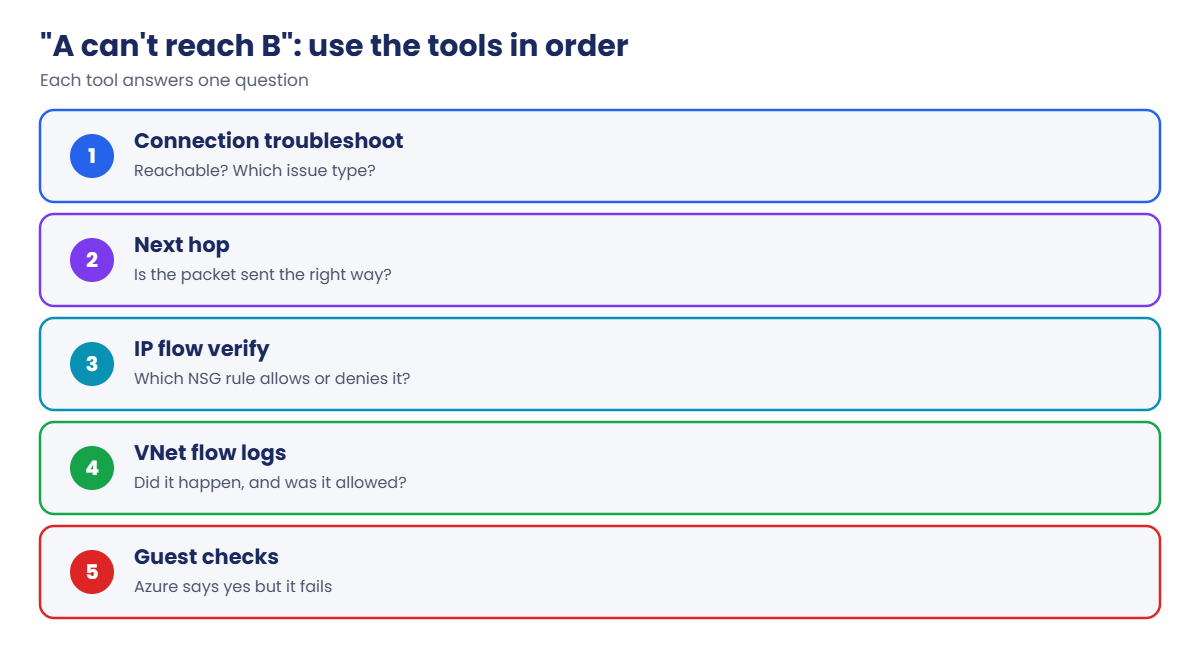
The order to use the tools for “A can’t talk to B”:

Network Watcher IP flow verify and the other tools, in order
  1. Connection troubleshoot from A to B on the real port: reachable or not, and the type of issue (NSG, route, or none, meaning the guest).
  2. Next hop from A to B: is the packet even sent the right way?
  3. IP flow verify on A outbound and B inbound: which NSG rule allows or denies it?
  4. Flow logs for history and proof: did these flows happen, and were they allowed or denied?
  5. If all of Azure says yes and it still fails, the guest is the problem (Lesson 61).

Each tool answers one question. Using them in this order means you never stare at 40 NSG rules trying to work it out by eye.

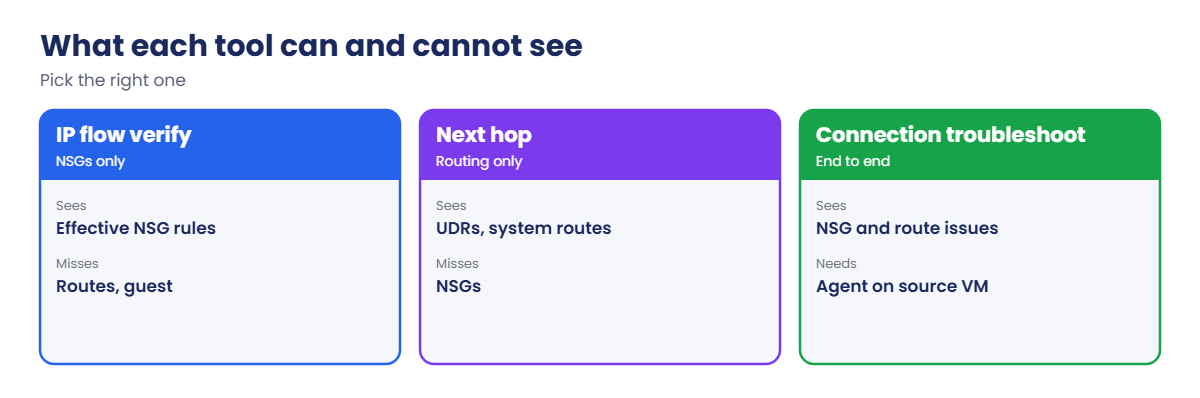
What each Network Watcher tool can and cannot see

Remember that IP flow verify only knows NSGs. It says Allow even if a route sends the packet nowhere, which is why next hop comes before it.

Test a path with three tools and record it with flow logs

1Two subnets, an NSG and two VMs

Create the network. snet-b gets an NSG that allows 8080 from snet-a and denies everything else from the VNet:

az group create --name rg-saat-l62 --location centralindia --tags course=saatvedha-azure lesson=62 -o none
az network nsg create --resource-group rg-saat-l62 --name nsg-b -o none
az network nsg rule create --resource-group rg-saat-l62 --nsg-name nsg-b --name allow-app --priority 100 --direction Inbound --access Allow --protocol Tcp --source-address-prefixes 10.62.1.0/24 --destination-port-ranges 8080 -o none
az network nsg rule create --resource-group rg-saat-l62 --nsg-name nsg-b --name deny-vnet --priority 4000 --direction Inbound --access Deny --protocol '*' --source-address-prefixes VirtualNetwork --destination-port-ranges '*' -o none
az network vnet create --resource-group rg-saat-l62 --name vnet-l62 --address-prefixes 10.62.0.0/16 --subnet-name snet-a --subnet-prefixes 10.62.1.0/24 -o none
az network vnet subnet create --resource-group rg-saat-l62 --vnet-name vnet-l62 --name snet-b --address-prefixes 10.62.2.0/24 --network-security-group nsg-b -o none
az vm create --resource-group rg-saat-l62 --name vm-a --image Canonical:ubuntu-24_04-lts:server:latest --size Standard_B1s --vnet-name vnet-l62 --subnet snet-a --private-ip-address 10.62.1.4 --public-ip-address '""' --nsg '""' --admin-username azureuser --generate-ssh-keys --tags course=saatvedha-azure lesson=62 -o none
az vm create --resource-group rg-saat-l62 --name vm-b --image Canonical:ubuntu-24_04-lts:server:latest --size Standard_B1s --vnet-name vnet-l62 --subnet snet-b --private-ip-address 10.62.2.4 --public-ip-address '""' --nsg '""' --admin-username azureuser --generate-ssh-keys --tags course=saatvedha-azure lesson=62 -o none
az vm run-command invoke --resource-group rg-saat-l62 --name vm-b --command-id RunShellScript --scripts 'mkdir -p /srv/www; echo app ok > /srv/www/index.html; systemd-run --unit web python3 -m http.server 8080 --directory /srv/www; sleep 2; systemctl is-active web' --query "value[0].message" -o tsv
az vm extension set --resource-group rg-saat-l62 --vm-name vm-a --name NetworkWatcherAgentLinux --publisher Microsoft.Azure.NetworkWatcher -o none

2Turn on VNet flow logs with Traffic Analytics

Create a storage account for the raw logs and send analytics to law-saat:

$sfx = Get-Random -Minimum 10000 -Maximum 99999
az storage account create --resource-group rg-saat-l62 --name stl62$sfx --sku Standard_LRS --min-tls-version TLS1_2 --allow-blob-public-access false -o none
$stId = az storage account show --resource-group rg-saat-l62 --name stl62$sfx --query id -o tsv
$lawId = az monitor log-analytics workspace show --resource-group rg-saat-core --workspace-name law-saat --query id -o tsv
az network watcher flow-log create --location centralindia --resource-group rg-saat-l62 --name fl-vnet-l62 --vnet vnet-l62 --storage-account $stId --workspace $lawId --traffic-analytics true --interval 10 -o none

3Test the path with all three tools

Run connection troubleshoot, next hop and IP flow verify:

az network watcher test-connectivity --resource-group rg-saat-l62 --source-resource vm-a --dest-address 10.62.2.4 --dest-port 8080 --protocol Tcp --query "{status:connectionStatus, sent:probesSent, failed:probesFailed, issues:hops[].issues[].type}" -o json
az network watcher show-next-hop --resource-group rg-saat-l62 --vm vm-a --source-ip 10.62.1.4 --dest-ip 10.62.2.4 -o table
az network watcher test-ip-flow --resource-group rg-saat-l62 --vm vm-b --direction Inbound --protocol TCP --local 10.62.2.4:8080 --remote 10.62.1.4:50000 -o table

You should see something like this:

{
  "failed": 0,
  "issues": [],
  "sent": 66,
  "status": "Reachable"
}
NextHopType    RouteTableId
-------------  ------------
VnetLocal      System Route
Access    RuleName
--------  ----------------------
Allow     securityRules/allow-app

All three agree: vm-a reaches vm-b on 8080, by the local VNet route, allowed by allow-app.
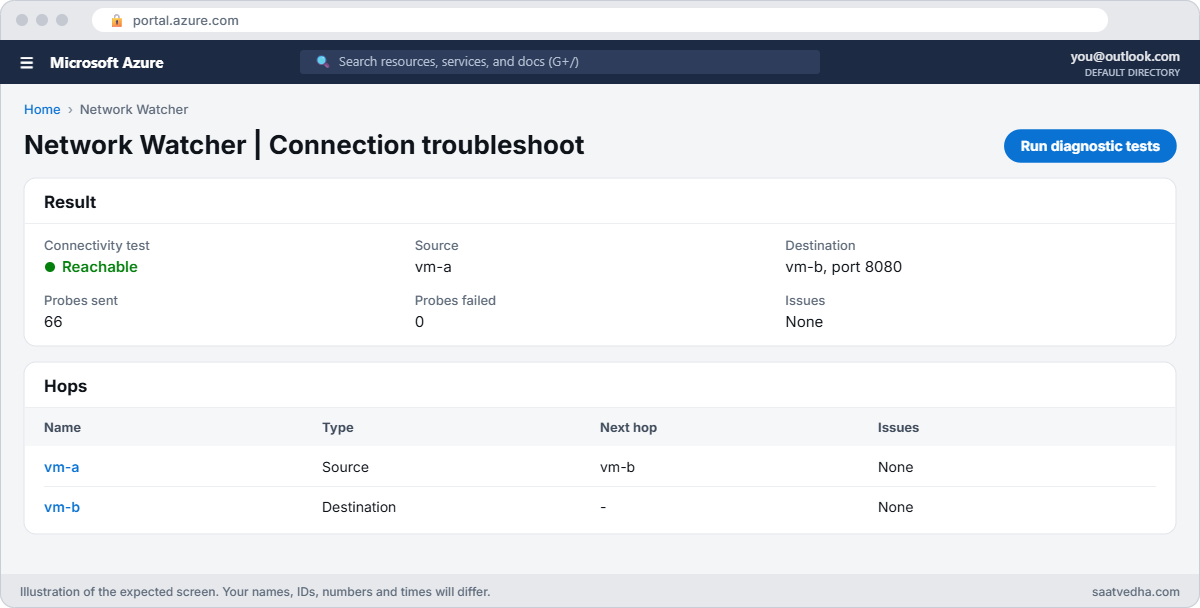
Network Watcher IP flow verify lab with connection troubleshoot showing Reachable
Connection troubleshoot: vm-a reaches vm-b on 8080.
Connection troubleshoot result showing Reachable
Reachable, no issues, zero failed probes.

✅ Checkpoint: vm-a reaches vm-b on 8080, and you have a VNet flow log sending data to law-saat.

Break It, Then Fix It

Keep everything running for both breaks.

1Break it: a rule change on the wrong port

Someone moves the app rule to 8443 for a “TLS project”, but the app still listens on 8080:

az network nsg rule update --resource-group rg-saat-l62 --nsg-name nsg-b --name allow-app --destination-port-ranges 8443 -o none
az network watcher test-connectivity --resource-group rg-saat-l62 --source-resource vm-a --dest-address 10.62.2.4 --dest-port 8080 --protocol Tcp --query "{status:connectionStatus, sent:probesSent, failed:probesFailed, issues:hops[].issues[].type}" -o json
az network watcher test-ip-flow --resource-group rg-saat-l62 --vm vm-b --direction Inbound --protocol TCP --local 10.62.2.4:8080 --remote 10.62.1.4:50000 -o table

You should see something like this:

{
  "failed": 66,
  "issues": [
    "NetworkSecurityRule"
  ],
  "sent": 66,
  "status": "Unreachable"
}
Access    RuleName
--------  ----------------------
Deny      securityRules/deny-vnet

Connection troubleshoot says the issue type is an NSG rule, and IP flow verify names it: deny-vnet catches 8080 now that allow-app covers 8443. After 10 to 20 minutes the same story is in Traffic Analytics:

$ws = az monitor log-analytics workspace show --resource-group rg-saat-core --workspace-name law-saat --query customerId -o tsv
az monitor log-analytics query --workspace $ws --analytics-query "NTANetAnalytics | where TimeGenerated > ago(1h) and SubType =~ 'FlowLog' and DestIp == '10.62.2.4' | summarize flows = count() by FlowStatus, DestPort, AclRule" -o table

You should see something like this:

AclRule                FlowStatus    DestPort    Flows
---------------------  ------------  ----------  -------
UserRule_allow-app     Allowed       8080        4
UserRule_deny-vnet     Denied        8080        3

Fix it: put the port back (or add 8443 alongside 8080), and test:

az network nsg rule update --resource-group rg-saat-l62 --nsg-name nsg-b --name allow-app --destination-port-ranges 8080 -o none
az network watcher test-connectivity --resource-group rg-saat-l62 --source-resource vm-a --dest-address 10.62.2.4 --dest-port 8080 --protocol Tcp --query "{status:connectionStatus, sent:probesSent, failed:probesFailed, issues:hops[].issues[].type}" -o json

status is Reachable again.

2Break it: a route that goes nowhere

A route table meant for another network is attached to snet-a, with a route that drops traffic to snet-b:

az network route-table create --resource-group rg-saat-l62 --name rt-l62 -o none
az network route-table route create --resource-group rg-saat-l62 --route-table-name rt-l62 --name to-b --address-prefix 10.62.2.0/24 --next-hop-type None -o none
az network vnet subnet update --resource-group rg-saat-l62 --vnet-name vnet-l62 --name snet-a --route-table rt-l62 -o none
az network watcher test-connectivity --resource-group rg-saat-l62 --source-resource vm-a --dest-address 10.62.2.4 --dest-port 8080 --protocol Tcp --query "{status:connectionStatus, sent:probesSent, failed:probesFailed, issues:hops[].issues[].type}" -o json
az network watcher show-next-hop --resource-group rg-saat-l62 --vm vm-a --source-ip 10.62.1.4 --dest-ip 10.62.2.4 -o table
az network watcher test-ip-flow --resource-group rg-saat-l62 --vm vm-b --direction Inbound --protocol TCP --local 10.62.2.4:8080 --remote 10.62.1.4:50000 -o table

You should see something like this:

{
  "failed": 66,
  "issues": [
    "UserDefinedRoute"
  ],
  "sent": 66,
  "status": "Unreachable"
}
NextHopType    RouteTableId
-------------  ----------------------------------------------
None           /subscriptions/.../routeTables/rt-l62
Access    RuleName
--------  ----------------------
Allow     securityRules/allow-app

Here IP flow verify says Allow, because the NSG is fine. Only next hop and connection troubleshoot show that the packet is dropped by a user route before it ever reaches the NSG. If you had checked NSGs alone, you’d have closed this ticket as “network OK”.

Fix it: detach the route table from the subnet, and test again:

az network vnet subnet update --resource-group rg-saat-l62 --vnet-name vnet-l62 --name snet-a --remove routeTable -o none
az network watcher show-next-hop --resource-group rg-saat-l62 --vm vm-a --source-ip 10.62.1.4 --dest-ip 10.62.2.4 -o table
az network watcher test-connectivity --resource-group rg-saat-l62 --source-resource vm-a --dest-address 10.62.2.4 --dest-port 8080 --protocol Tcp --query "{status:connectionStatus, sent:probesSent, failed:probesFailed, issues:hops[].issues[].type}" -o json

Next hop is VnetLocal and the status is Reachable.

Next hop None from a user route while IP flow verify allows
The NSG allows it; the route drops it.

3Clean up

Delete the flow log, then the resource group:

az network watcher flow-log delete --location centralindia --name fl-vnet-l62
az group delete --name rg-saat-l62 --yes

✅ Checkpoint: You found an NSG problem and a routing problem with the right tool for each, confirmed one with flow logs, and cleaned up.

This happened at work

The audit question nobody could answer

During a PCI audit, an assessor asked a payments company to prove that only the API subnet had talked to the card database subnet in the last 30 days. The team had NSG rules that should guarantee it, but no record of what actually happened.

They turned on VNet flow logs with Traffic Analytics that day and found two surprises within a week: a monitoring VM in another subnet regularly connected to the database on 1433, allowed by an old rule called temp-allow-monitoring, and a developer jump box had been allowed through a rule meant for a decommissioned server.

What they changed: flow logs are now on for every production VNet, with 90 days of retention. A monthly KQL report lists every source that reached the database subnet, with the AclRule that allowed it, and any rule that hasn’t matched a flow in 60 days is reviewed for removal.

Common mistakes and troubleshooting

MistakeWhat you seeWhat to do
Trusting IP flow verify alone“Allow” but traffic still failsCheck next hop and connection troubleshoot too.
No agent on the source VMConnection troubleshoot can’t runInstall the Network Watcher agent extension.
Expecting flow logs instantlyEmpty Traffic Analytics resultsWait 10 to 20 minutes after traffic.
Still planning NSG flow logsCreation fails on new setupsUse VNet flow logs.
Reading only the NIC NSGMissing a subnet NSG denyUse effective security rules for the NIC.
A route with next hop None left attachedSilent dropsCheck next hop and effective routes.

Interview questions

Click a question to open it. Each one is written the way an interviewer would ask it. Under it you will see why they ask it and one way you could answer, in your own words.

Fresher level

1. What is Network Watcher?

Why they ask this: The basic concept.

How you might answer: A regional Azure service with network diagnostics: IP flow verify, next hop, connection troubleshoot, packet capture, VPN troubleshoot and flow logs.

2. What does IP flow verify return?

Why they ask this: Tool knowledge.

How you might answer: Allow or Deny for a given 5-tuple on a VM’s NIC, with the name of the NSG rule that matched.

3. What does next hop tell you?

Why they ask this: Tool knowledge.

How you might answer: The next hop type and IP for a source and destination, and which route table or system route chose it.

2–5 years experience

4. IP flow verify says Allow, yet the connection fails. What next?

Why they ask this: A real troubleshooting path.

How you might answer: Check next hop for UDRs or appliances, run connection troubleshoot for the issue type, check the destination’s inbound and the return path, then the guest firewall and service.

5. What are VNet flow logs and why replace NSG flow logs?

Why they ask this: Current knowledge.

How you might answer: They log flows at VNet, subnet or NIC level regardless of NSGs, include more context, and replace NSG flow logs, which can’t be created since June 2025 and retire in September 2027.

6. How do you find denied traffic in the last hour?

Why they ask this: KQL skill.

How you might answer: Query NTANetAnalytics for FlowStatus denied with source, destination, port and AclRule, or read raw flow logs from storage.

Senior level

7. How would you prove network segmentation to an auditor?

Why they ask this: They want evidence thinking.

How you might answer: VNet flow logs with Traffic Analytics, retention that covers the audit period, KQL reports of flows into sensitive subnets by rule, and change history of NSGs and routes.

8. How do you troubleshoot intermittent packet loss?

Why they ask this: Advanced diagnostics.

How you might answer: Connection monitor for continuous tests, packet capture on both ends, check SNAT exhaustion, appliance health and throttling, and correlate with flow logs and metrics.

9. How do you keep flow log costs under control?

Why they ask this: FinOps.

How you might answer: Enable at VNet scope on what matters, choose processing interval and retention wisely, use lifecycle rules on the storage account, and avoid duplicate NSG and VNet flow logs.

Quick quiz

Q1. Which tool names the NSG rule that allows or denies a packet?

  1. Next hop
  2. IP flow verify
  3. Advisor
  4. Activity log
Show answer

B — It returns Allow or Deny with the rule.

Q2. IP flow verify Allow, connection Unreachable with UserDefinedRoute. Cause?

  1. NSG
  2. A route sending traffic elsewhere
  3. DNS
  4. Guest firewall
Show answer

B — A UDR drops or diverts the packet.

Q3. What does connection troubleshoot need on the source VM?

  1. A public IP
  2. The Network Watcher agent extension
  3. Bastion
  4. A load balancer
Show answer

B — The agent sends the test probes.

Q4. Which table holds Traffic Analytics for VNet flow logs?

  1. AzureActivity
  2. NTANetAnalytics
  3. Heartbeat
  4. Perf
Show answer

B — NTANetAnalytics holds the processed flows.

Q5. Can you create new NSG flow logs today?

  1. Yes
  2. No, use VNet flow logs
  3. Only in Premium
  4. Only with Firewall
Show answer

B — New NSG flow logs were blocked from June 2025.

Quick recap

You can now prove, with evidence, why a packet does or doesn’t arrive.

  • Connection troubleshoot tests end to end and names the issue type.
  • Next hop shows routing; IP flow verify shows NSGs.
  • IP flow verify alone can’t see route problems.
  • VNet flow logs and Traffic Analytics give history and proof.
  • NSG flow logs are being retired; use VNet flow logs.

Next lesson

Lesson 63: Peering and routing problems: effective routes → You fix peering and routing problems: overlapping ranges, missing routes and asymmetric paths, using effective routes.

Further reading: Network Watcher IP flow verify

Want to go deeper into Network Watcher IP flow verify? See Microsoft’s What is Azure Network Watcher? and VNet flow logs overview. You can also see the full plan for this course on the Azure Cloud Administration course page.

Scroll to Top
