Azure Site Recovery: VM disaster recovery

Azure Site Recovery (ASR) keeps a running copy of your VMs’ disks in another region, a few seconds to minutes behind. If the whole primary region fails, you fail over and start the VMs in the second region. Backups (Lesson 35) bring back data from yesterday; ASR brings back the service in minutes.

The part most teams skip is the test. ASR has a test failover that starts a copy in an isolated network without touching production, and that’s what auditors and real outages both ask about.

In the lab you replicate web01 from Central India to South India, run a test failover, and fix the two problems that quietly ruin DR plans: replication that stopped, and a test that was never cleaned up.

TimeYou needCostBy the end you can
About 2 hours (initial replication takes 30 to 60 minutes)web01, vnet-saat, the CLI and the portalAbout 20 US cents: the protected instance has no ASR charge for its first 31 days, but replica disks, cache storage, a NAT Gateway and the test VM bill for a few hoursReplicate VMs to another region, test failover safely, and troubleshoot replication health

What it is, in one line

Azure Site Recovery continuously copies a VM’s disks to another region so you can start it there if the primary region fails.

In Simple Words

The spare school building

A school keeps a spare building in the next town. Every few minutes, a clerk copies any change in the main register into the spare building’s register. That’s replication.

If the main building floods, classes move to the spare building and carry on, missing only the last few minutes of entries. That’s a failover.

Once a term, the school runs a fire drill in a separate hall of the spare building, so real classes aren’t disturbed. That’s a test failover. A drill that’s never cleared away blocks the next one and costs money.

Engineer's View

How Azure-to-Azure Site Recovery works

  • Vault: a Recovery Services vault in the target region (South India here), not the source.
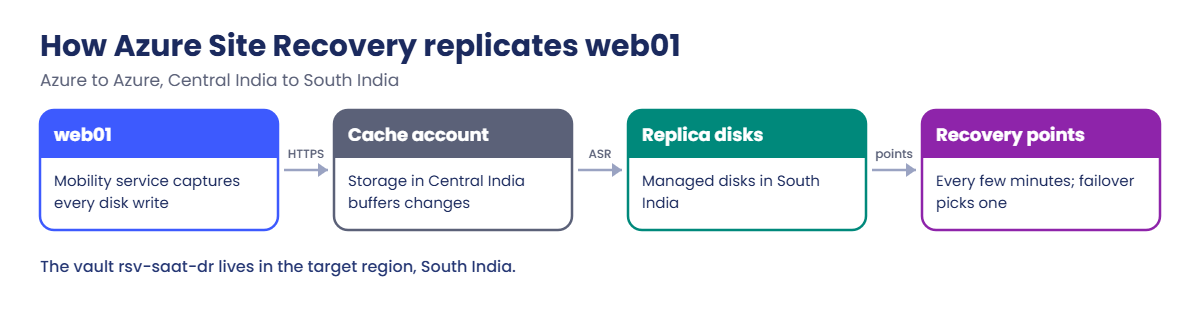
  • Mobility service: an extension on the VM that captures disk writes and sends them to a cache storage account in the source region. ASR then applies them to replica managed disks in the target region.
  • Network: the VM needs outbound HTTPS to Entra ID, the ASR service endpoints and the cache storage account. Private subnets need NAT, a firewall or service tags in an NSG.
  • Replication policy: how long recovery points are kept (up to 15 days) and how often app-consistent snapshots are taken. Crash-consistent points are created every few minutes.
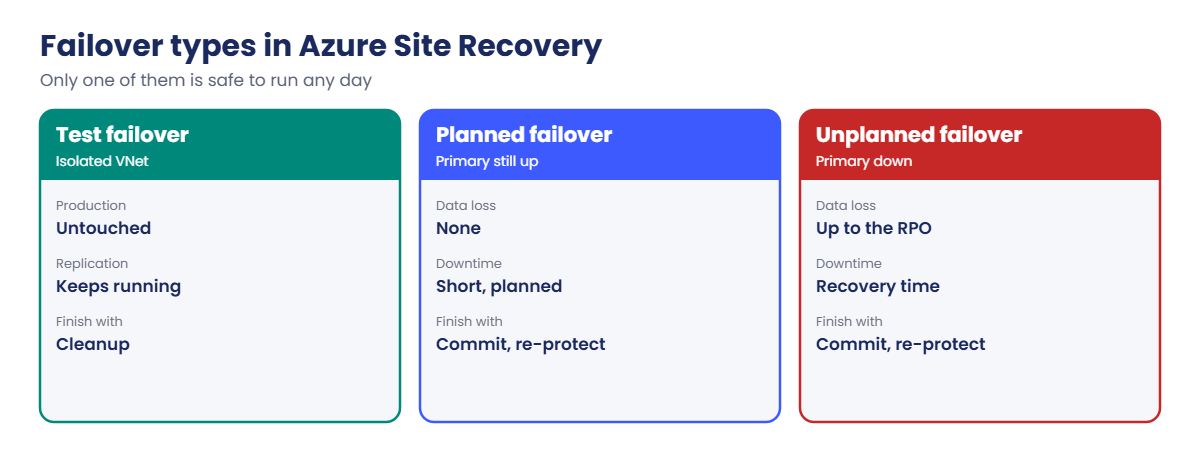
  • Failover types: test failover (a copy in an isolated VNet, production untouched), failover (planned or unplanned, start in the target), then commit and re-protect to replicate back.
  • Recovery plans: group VMs, set start order and add scripts or runbooks for multi-tier apps.
  • Cost: no ASR charge per protected instance for its first 31 days; replica storage, cache storage, transactions and any failover compute are billed.

How it works, step by step

What happens from the moment you enable replication on web01:

Azure Site Recovery replication flow for an Azure VM
  1. ASR installs the mobility service extension on web01 and creates a cache storage account in Central India.
  2. It copies every disk once to replica disks in South India (initial replication).
  3. From then on, every write on web01 is captured and sent through the cache account to the replicas.
  4. Every few minutes ASR creates a crash-consistent recovery point; the gap to now is the RPO.
  5. On failover, ASR builds a VM in South India from the chosen recovery point and attaches it to the target VNet.

If step 3 stops (network change, agent problem), the replicas stay frozen at the last good point. The RPO grows quietly unless you watch replication health.

Azure Site Recovery failover types: test, planned and unplanned

A DR plan is only real once a test failover has passed, the app worked in the test network, and the test was cleaned up.

Hands-on lab: Azure Site Recovery for web01

Load the network IDs, start web01, and give snet-web an outbound path for the mobility service:

$v = Get-Content C:\azure-lab\vnet-saat.json | ConvertFrom-Json
$sub = az account show --query id -o tsv
az vm start --resource-group rg-saat-vms --name web01
az network public-ip create --resource-group rg-saat-core --name pip-saat-natgw --sku Standard --location centralindia --tags course=saatvedha-azure lesson=39 -o none
az network nat gateway create --resource-group rg-saat-core --name natgw-saat --public-ip-addresses pip-saat-natgw --idle-timeout 4 --location centralindia --tags course=saatvedha-azure lesson=39 -o none
az network vnet subnet update --ids $v.'snet-web' --nat-gateway natgw-saat -o none

1Build the DR side in South India

A resource group, a DR VNet for real failovers, an isolated VNet for tests, and the vault in the target region:

az group create --name rg-saat-dr --location southindia --tags course=saatvedha-azure lesson=39 -o none
az network vnet create --resource-group rg-saat-dr --name vnet-saat-dr --location southindia --address-prefixes 10.50.0.0/16 --subnet-name snet-web --subnet-prefixes 10.50.1.0/24 -o none
az network vnet create --resource-group rg-saat-dr --name vnet-saat-drtest --location southindia --address-prefixes 10.51.0.0/16 --subnet-name snet-web --subnet-prefixes 10.51.1.0/24 -o none
az backup vault create --resource-group rg-saat-dr --name rsv-saat-dr --location southindia -o none
az resource list --resource-group rg-saat-dr --query "[].{name:name, type:type, location:location}" -o table

You should see something like this:

Name              Type                                  Location
----------------  ------------------------------------  ----------
vnet-saat-dr      Microsoft.Network/virtualNetworks     southindia
vnet-saat-drtest  Microsoft.Network/virtualNetworks     southindia
rsv-saat-dr       Microsoft.RecoveryServices/vaults     southindia

The test VNet isn’t peered or connected to anything. That’s the point: a test copy of web01 must never talk to production.

2Enable replication for web01

In the portal, open web01, then Disaster recovery. Set Target region to South India. On Advanced settings, choose resource group rg-saat-dr, virtual network vnet-saat-dr and subnet snet-web, keep the default cache storage and replication policy, and set the vault to rsv-saat-dr.

Review and start replication.
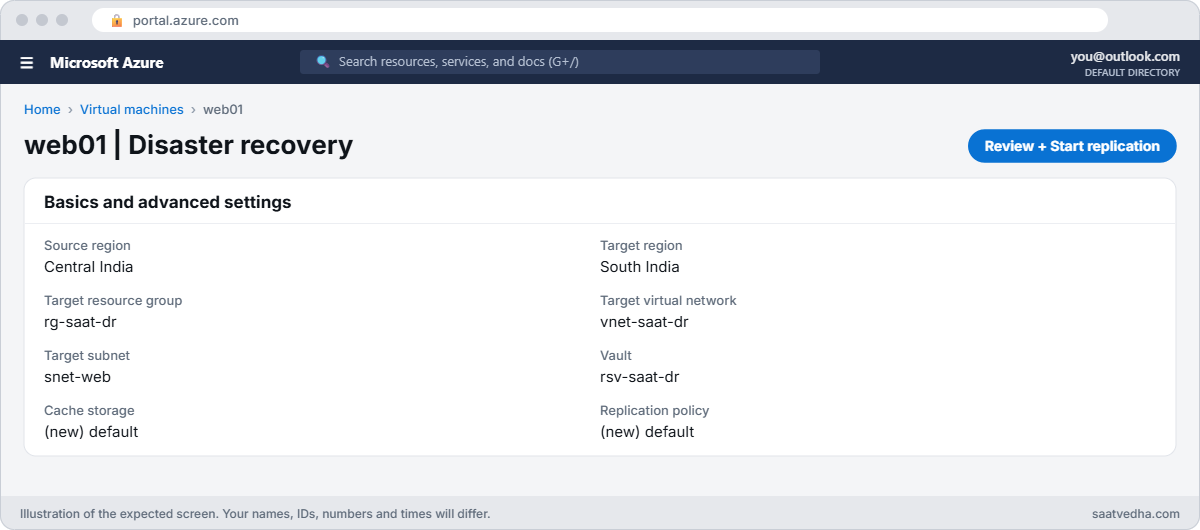
Azure Site Recovery enable replication settings
Replication settings for web01 to South India.

Check progress from the CLI (initial replication takes 30 to 60 minutes):

az rest --method get --url "https://management.azure.com/subscriptions/$sub/resourceGroups/rg-saat-dr/providers/Microsoft.RecoveryServices/vaults/rsv-saat-dr/replicationProtectedItems?api-version=2023-08-01" --query "value[].{vm:properties.friendlyName, health:properties.replicationHealth, state:properties.protectionStateDescription, testFailover:properties.testFailoverStateDescription}" -o table

When it’s done, you should see something like this:

Vm     Health    State      TestFailover
-----  --------  ---------  --------------
web01  Normal    Protected  None

3Run a test failover

In the vault, open Replicated items, web01, then Test failover. Choose Latest processed (low RTO) and Azure virtual network vnet-saat-drtest. Start it.

ASR creates a VM named web01-test in rg-saat-dr.
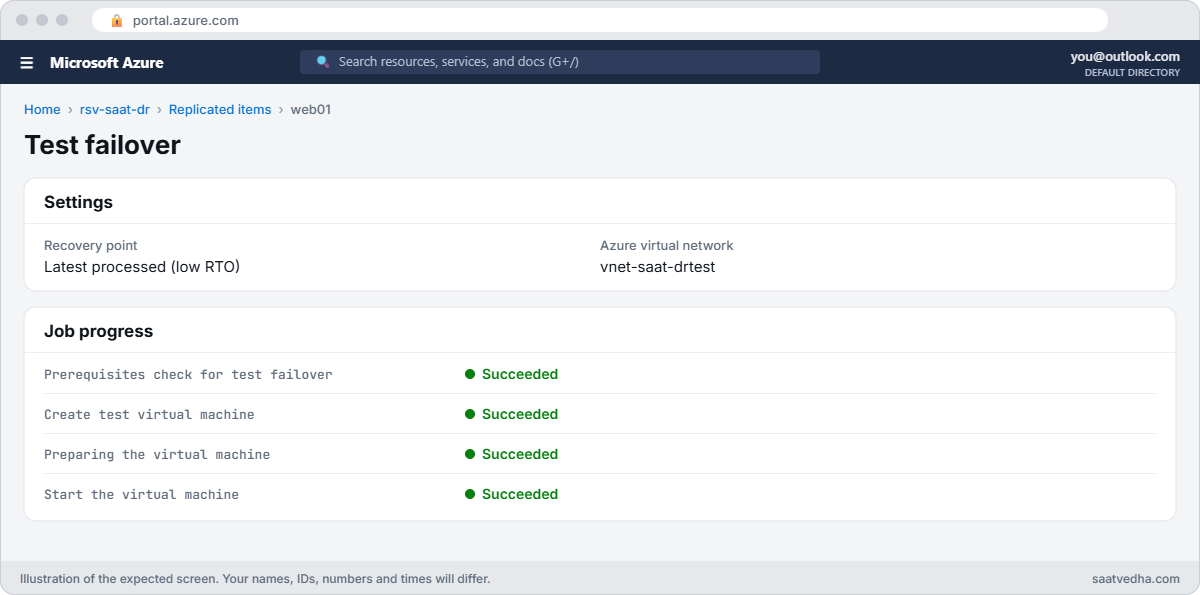
Azure Site Recovery test failover job
Test failover of web01 into the isolated vnet-saat-drtest.

When the job finishes, check the copy serves the page:

az vm run-command invoke --resource-group rg-saat-dr --name web01-test --command-id RunShellScript --scripts 'hostname -I; curl -s localhost' --query "value[0].message" -o tsv

You should see something like this:

Enable succeeded: 
[stdout]
10.51.1.4 
<h1>web01</h1>
<p>SaatVedha Azure course, Lesson 15</p>

[stderr]

Same app, a 10.51 address in the isolated test network, in another region. That’s the evidence a DR test is meant to produce.

4Clean up the test failover

In Replicated items, web01, choose Cleanup test failover, write a short note (“Lesson 39 drill passed”), tick Testing is complete, and confirm. ASR deletes web01-test.

az rest --method get --url "https://management.azure.com/subscriptions/$sub/resourceGroups/rg-saat-dr/providers/Microsoft.RecoveryServices/vaults/rsv-saat-dr/replicationProtectedItems?api-version=2023-08-01" --query "value[].{vm:properties.friendlyName, health:properties.replicationHealth, state:properties.protectionStateDescription, testFailover:properties.testFailoverStateDescription}" -o table

You should see something like this:

Vm     Health    State      TestFailover
-----  --------  ---------  --------------
web01  Normal    Protected  None
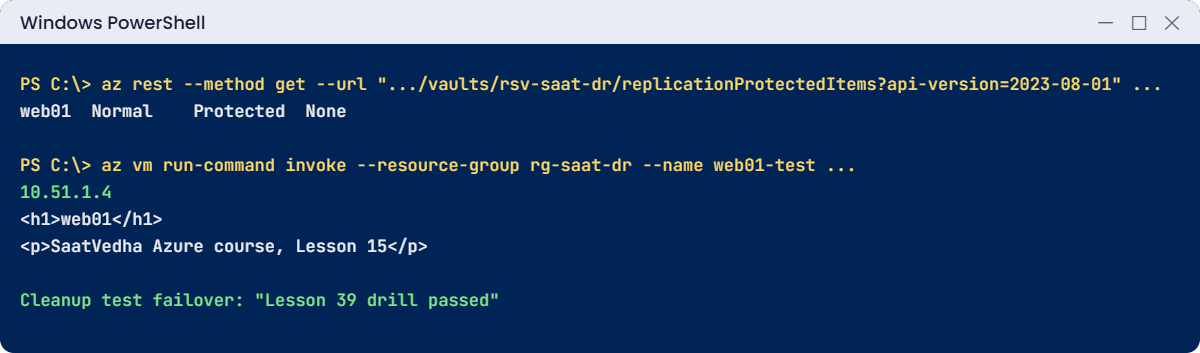
Azure Site Recovery lab: replication health and a test failover
Replication Normal, the test copy serving the page from 10.51.1.4, then cleanup.

✅ Checkpoint: web01 replicates to South India, a test failover served the page from the isolated network, and the test was cleaned up.

Break It, Then Fix It

Both of these leave a DR plan that looks fine on paper.

1Break it: replication quietly stops

Remove the NAT Gateway from snet-web, as a network cleanup might, and check again after 30 minutes:

az network vnet subnet update --ids $v.'snet-web' --remove natGateway -o none
Start-Sleep -Seconds 1800
az rest --method get --url "https://management.azure.com/subscriptions/$sub/resourceGroups/rg-saat-dr/providers/Microsoft.RecoveryServices/vaults/rsv-saat-dr/replicationProtectedItems?api-version=2023-08-01" --query "value[].{vm:properties.friendlyName, health:properties.replicationHealth, state:properties.protectionStateDescription, testFailover:properties.testFailoverStateDescription}" -o table

You should see something like this:

Vm     Health    State      TestFailover
-----  --------  ---------  --------------
web01  Critical  Protected  None

State still says Protected, but health is Critical: the mobility service can’t reach Azure, so no new writes reach South India and the RPO keeps growing. In the portal, the item’s errors point at connectivity from the VM to the Site Recovery endpoints. A failover now would lose everything since the NAT Gateway was removed.

Fix it: restore outbound access (NAT Gateway, firewall rules, or NSG rules allowing the Azure Site Recovery, Entra ID and Storage service tags), then wait for health to return to Normal:

az network vnet subnet update --ids $v.'snet-web' --nat-gateway natgw-saat -o none
Start-Sleep -Seconds 900
az rest --method get --url "https://management.azure.com/subscriptions/$sub/resourceGroups/rg-saat-dr/providers/Microsoft.RecoveryServices/vaults/rsv-saat-dr/replicationProtectedItems?api-version=2023-08-01" --query "value[].{vm:properties.friendlyName, health:properties.replicationHealth, state:properties.protectionStateDescription, testFailover:properties.testFailoverStateDescription}" -o table

You should see Health back to Normal. Alert on replication health with Azure Monitor, so you don’t find out during a disaster.

2Break it: the drill nobody cleaned up

Run another test failover (step 3), then “forget” the cleanup, as teams often do after a successful drill. Look at what’s running in South India:

az vm list --resource-group rg-saat-dr --query "[].{name:name, size:hardwareProfile.vmSize, power:powerState}" --show-details -o table
az rest --method get --url "https://management.azure.com/subscriptions/$sub/resourceGroups/rg-saat-dr/providers/Microsoft.RecoveryServices/vaults/rsv-saat-dr/replicationProtectedItems?api-version=2023-08-01" --query "value[].{vm:properties.friendlyName, health:properties.replicationHealth, state:properties.protectionStateDescription, testFailover:properties.testFailoverStateDescription}" -o table

You should see something like this:

Name        Size              Power
----------  ----------------  ----------
web01-test  Standard_B2ats_v2  VM running
Vm     Health    State      TestFailover
-----  --------  ---------  ------------------------
web01  Warning   Protected  Waiting for cleanup

The test VM bills every hour, the item shows a warning, and ASR won’t start the next test failover until this one is cleaned up. Weeks later, someone finds a “web01-test” VM nobody remembers.

Fix it: run Cleanup test failover as in step 4, then put the cleanup in the drill checklist. Finally, tear down the lab:

  1. In the vault, Replicated items, web01, choose Disable replication. This removes the replica disks and the mobility extension.
  2. Delete the cache storage account ASR created in Central India (its name ends in “asrcache”; find it with the first command below and delete it with az storage account delete).
az storage account list --query "[?contains(name, 'asrcache')].{name:name, group:resourceGroup}" -o table
az group delete --name rg-saat-dr --yes
az network vnet subnet update --ids $v.'snet-web' --remove natGateway -o none
az network nat gateway delete --resource-group rg-saat-core --name natgw-saat
az network public-ip delete --resource-group rg-saat-core --name pip-saat-natgw
az vm deallocate --resource-group rg-saat-vms --name web01
C:\azure-lab\Find-LabResources.ps1 -Lesson 39

After you delete the cache account the list shows, the last command prints this:

Nothing tagged course=saatvedha-azure is left.
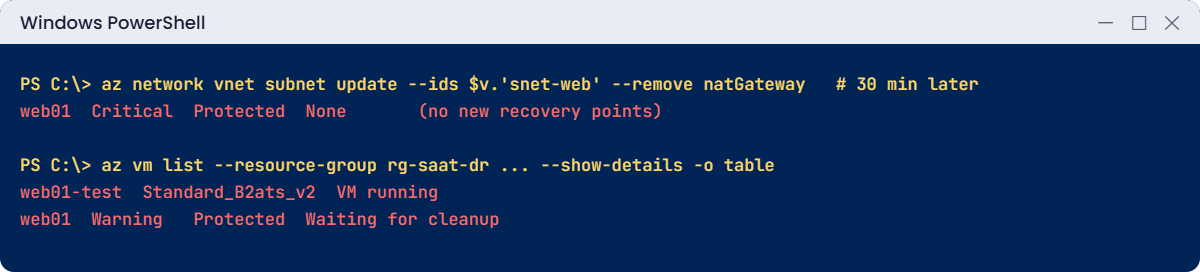
Azure Site Recovery problems: critical health and an uncleaned test
Replication stalls without outbound access, and a forgotten test VM keeps running.

✅ Checkpoint: You caught replication going Critical and a test failover left running, and removed every DR resource.

This happened at work

The DR test that passed every year

An insurer replicated 80 VMs to its paired region with ASR and ran a test failover every year for the auditors. Every test passed. Then a real regional networking incident forced a failover of the claims system.

The VMs came up in the DR region, but the claims app couldn’t reach its database: the recovery plan started the app before the database was ready, and DNS in the DR VNet still pointed at primary addresses. The annual test had only checked that VMs booted, not that the app worked.

What they changed: recovery plans now start VMs in groups (database, app, web) with scripts that update DNS. Each test failover ends with a scripted smoke test of real transactions in the isolated network. Replication health and RPO are alerted, and the drill checklist ends with cleanup and a written report.

Common mistakes and troubleshooting

MistakeWhat you seeWhat to do
VM can’t reach ASR endpointsReplication health Critical; RPO growsAllow outbound via NAT, firewall or service tags.
Testing into the production DR VNetIP clashes, test traffic hits real systemsAlways use an isolated test VNet.
Leaving test failovers runningTest VMs bill; next test blockedClean up as the last step of every drill.
Only checking that VMs bootApp fails in a real failoverSmoke-test the app in the test network.
No target-region quotaFailover fails to create VMsCheck vCPU quota in the target region.
Vault in the source regionCan’t select it for replicationCreate the vault in the target region.

Interview questions

Click a question to open it. Each one is written the way an interviewer would ask it. Under it you will see why they ask it and one way you could answer, in your own words.

Fresher level

1. What is Azure Site Recovery?

Why they ask this: The basic concept.

How you might answer: A disaster recovery service that continuously replicates VMs to another Azure region or from on-premises to Azure, so they can be started there if the primary site fails.

2. What is the difference between Azure Backup and Site Recovery?

Why they ask this: A classic comparison.

How you might answer: Backup keeps restore points to go back in time after data loss, with RPO of hours. Site Recovery keeps a near-live copy in another region to restore service quickly after a site failure, with RPO of minutes.

3. What is a test failover?

Why they ask this: They want to see you know it’s safe.

How you might answer: A failover into an isolated network that creates a copy of the VM from a recovery point, while replication and production keep running. You test, then clean it up.

2–5 years experience

4. Replication health for a VM went Critical. What do you check?

Why they ask this: A day-to-day ticket.

How you might answer: The error details on the replicated item, outbound connectivity from the VM to Site Recovery, Entra ID and storage endpoints, the mobility service extension status, disk churn limits, and any recent network or firewall change.

5. What do RPO and RTO mean for Site Recovery?

Why they ask this: They want the terms used correctly.

How you might answer: RPO is how much data you can lose, shown by the age of the latest recovery point, often minutes. RTO is how long it takes to be running again, which depends on recovery plans, VM start-up and app checks.

6. How do you fail back after a real failover?

Why they ask this: They want the full cycle.

How you might answer: Commit the failover, re-protect to replicate from the DR region back to the primary, then do a planned failover back when the primary is healthy, and re-protect again in the original direction.

Senior level

7. How would you design DR for a three-tier app with ASR?

Why they ask this: They want orchestration.

How you might answer: One recovery plan with groups for database, app and web, scripts or runbooks for DNS and connection strings, pre-created networking in the DR region, and regular test failovers with automated smoke tests. Databases may use their own replication instead of ASR.

8. How do you prove DR readiness to auditors?

Why they ask this: They want evidence.

How you might answer: Scheduled test failovers with reports showing RPO achieved, time to recover, smoke test results and cleanup. Alerts and dashboards for replication health, and a documented runbook that matches the recovery plans.

9. What are common reasons a real failover fails even though tests passed?

Why they ask this: They want experience.

How you might answer: Target-region quota, dependencies outside the replicated VMs like DNS, identity or licences, networking differences between test and DR VNets, and data stores replicated by other means that are behind or broken.

Quick quiz

Q1. Where must the Recovery Services vault for ASR be?

  1. Source region
  2. Target region
  3. Any region
  4. No vault needed
Show answer

B — The vault lives in the target region.

Q2. Which network should a test failover use?

  1. Production VNet
  2. An isolated test VNet
  3. The internet
  4. The hub VNet
Show answer

B — Isolation keeps tests away from production.

Q3. Health is Critical but state says Protected. Meaning?

  1. All good
  2. Replication has stopped making progress
  3. The VM is deleted
  4. The vault is full
Show answer

B — Recovery points are getting old.

Q4. For how long does a new protected instance have no ASR charge?

  1. 7 days
  2. 31 days
  3. 90 days
  4. Always
Show answer

B — The first 31 days per instance; storage still bills.

Q5. What must you do after a successful test failover?

  1. Nothing
  2. Cleanup test failover
  3. Delete the vault
  4. Rotate keys
Show answer

B — Cleanup removes the test VM and allows the next test.

Quick recap

You can now set up regional DR for a VM and prove it works.

  • ASR replicates disks continuously to another region.
  • The vault lives in the target region.
  • The VM needs outbound access to ASR, Entra ID and the cache account.
  • Test failover into an isolated VNet, then clean up.
  • Watch replication health and RPO, not just the Protected state.

Next lesson

Lesson 40: Azure Arc-enabled servers → You connect a server outside Azure to Azure Arc and manage it like an Azure VM.

Further reading: Azure Site Recovery

Want to go deeper into Azure Site Recovery? See Microsoft’s Azure to Azure disaster recovery architecture and Run a disaster recovery drill to another region. You can also see the full plan for this course on the Azure Cloud Administration course page.

Scroll to Top