Just-in-time VM access with Defender for Cloud
-
Phase 0: Before you start
-
Phase 1: The foundation
-
Phase 2: Day-to-day operations
-
Phase 3: Enterprise architecture
-
Phase 4: Troubleshooting step by step
-
Phase 5: Final project and career
Just-in-time VM access keeps management ports like 22 and 3389 closed all the time, and opens them only when someone asks, only for their IP, and only for a few hours. It’s part of Microsoft Defender for Cloud.
Bastion (Lesson 27) is the best answer for admin access, but many companies still have VMs with public IPs: vendor appliances, legacy apps, or servers reached from tools that can’t use Bastion. JIT is how you protect those.
In the lab you switch on the Defender plan JIT needs, protect web01, open SSH for one hour from your IP, and then see the two ways JIT quietly fails.
| Time | You need | Cost | By the end you can |
|---|---|---|---|
| About 45 minutes | web01, the CLI, a subscription that can start the Defender for Servers trial | About 1 US cent for a temporary public IP, if the Defender for Servers Plan 2 trial is active; without the trial, Plan 2 costs about 2 US cents per VM-hour | Enable JIT, request and audit access, and spot rules that bypass it |
What it is, in one line
Just-in-time VM access opens a management port for one IP and a set time, then closes it again by itself.
In Simple Words
The school gate during class hours
The school gate stays locked all day. A parent who needs to come in rings the office, says who they are and why, and the guard opens the gate for that parent only, for twenty minutes.
After twenty minutes the gate locks again, even if the parent forgets to say goodbye. The office book shows who came, when and why.
But if a teacher props the side door open with a chair, the locked gate doesn’t matter any more. That chair is the second break in today’s lab.
Engineer's View
How JIT works under the hood
- Licence: JIT is a feature of Defender for Servers Plan 2 (about USD 15 per server per month after a 30-day trial). Plan 1 doesn’t include it.
- Policy: for each VM you list the ports (for example 22 and 3389), the protocol, which source addresses may be requested, and the maximum time (up to 24 hours).
- Enforcement: Defender adds deny rules for those ports to the NSGs on the VM’s NIC and subnet (and to Azure Firewall if used). Rules that already allow those ports keep winning, because Defender doesn’t remove them.
- Request: a user with the right RBAC action (
Microsoft.Security/locations/jitNetworkAccessPolicies/initiate/action) asks for a port, source IP and duration. Defender adds an allow rule above the deny, then removes it when time is up. - Audit: every request lands in the Activity log with the requester, ports, source IP and justification.
- API:
Microsoft.Security/locations/{region}/jitNetworkAccessPolicies, version 2020-01-01. The CLI can list policies, andaz restdoes the rest.
How it works, step by step
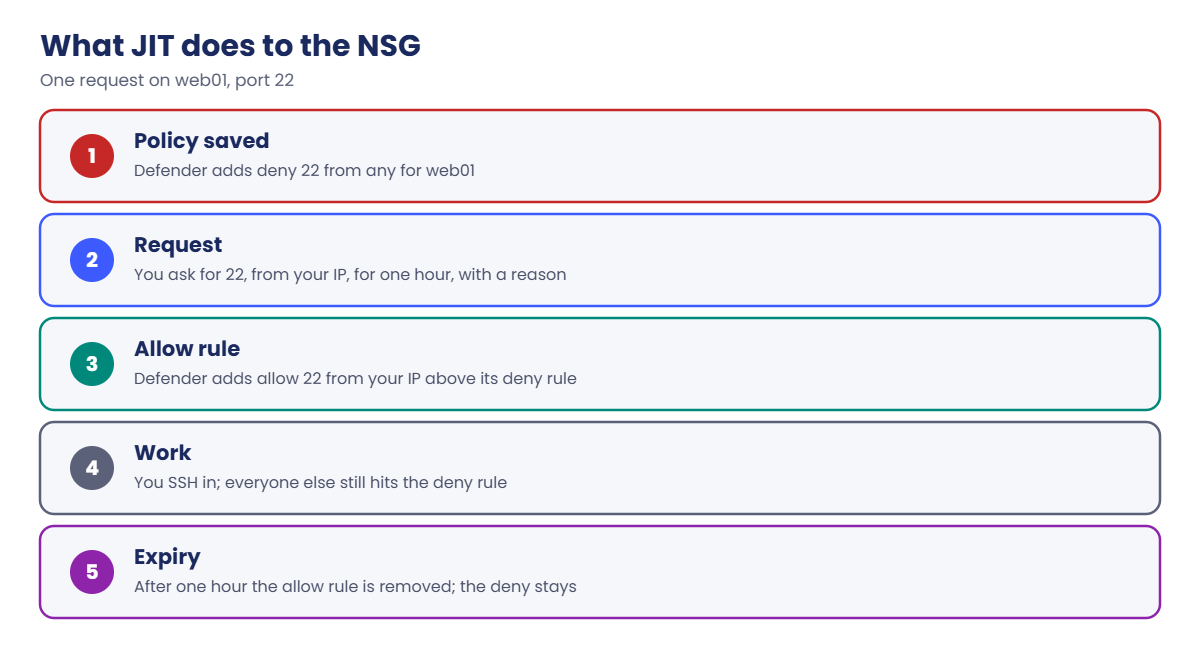
What happens to the NSG during one JIT request:
- Policy saved: Defender adds “deny 22 from any” for web01’s IP to nsg-saat-web.
- Request: you ask for 22, from your IP, for one hour, with a reason.
- Allow rule: Defender adds “allow 22 from your IP” with a higher priority than its deny rule.
- Work: you SSH in. Anyone else still hits the deny rule.
- Expiry: after one hour Defender deletes the allow rule. The deny rule stays.
JIT only touches the ports in its policy. Everything else in the NSG is your responsibility, including old rules that already allow the same ports.
Where you can, combine both: Bastion for admins, JIT only for the few VMs that truly need a public management port.
Hands-on lab: just-in-time VM access for web01
Set up the names you’ll use:
$sub = az account show --query id -o tsv
$vmId = az vm show --resource-group rg-saat-vms --name web01 --query id -o tsv
$jit = "https://management.azure.com/subscriptions/$sub/resourceGroups/rg-saat-vms/providers/Microsoft.Security/locations/centralindia/jitNetworkAccessPolicies/default"
$ip = Invoke-RestMethod -Uri https://api.ipify.org
az vm start --resource-group rg-saat-vms --name web011Turn on Defender for Servers Plan 2
Run this:
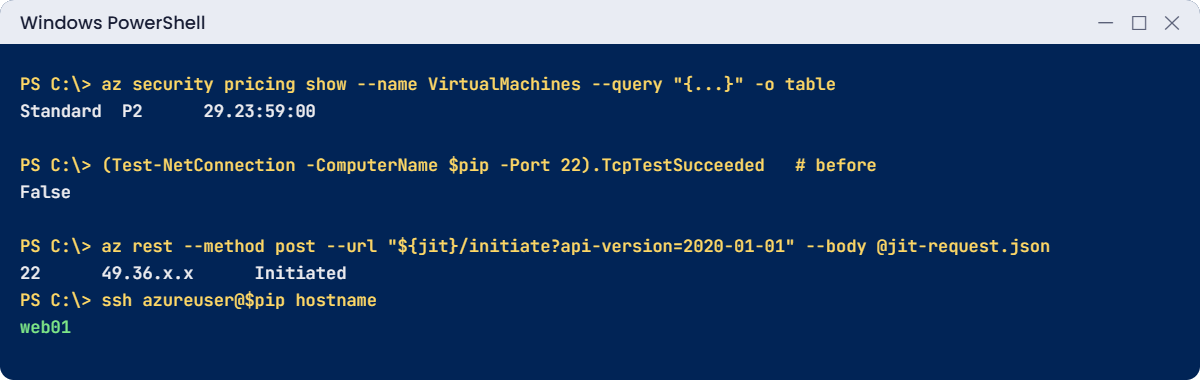
az security pricing create --name VirtualMachines --tier Standard --subplan P2 -o none
az security pricing show --name VirtualMachines --query "{tier:pricingTier, plan:subPlan, trialLeft:freeTrialRemainingTime}" -o tableYou should see something like this:
Tier Plan TrialLeft
-------- ------ -----------
Standard P2 29.23:59:00If TrialLeft shows zero, your subscription already used its trial and Plan 2 is billed per VM-hour. You’ll switch it back off at the end.
2Give web01 a temporary public IP
JIT is for VMs reached over a public IP, so add one just for this lesson:
az network public-ip create --resource-group rg-saat-vms --name pip-web01-tmp --sku Standard --location centralindia --tags course=saatvedha-azure lesson=28 -o none
$nic = az vm show --resource-group rg-saat-vms --name web01 --query "networkProfile.networkInterfaces[0].id" -o tsv
$ipc = az network nic show --ids $nic --query "ipConfigurations[0].id" -o tsv
az network nic ip-config update --ids $ipc --public-ip-address pip-web01-tmp -o none
$pip = az network public-ip show --resource-group rg-saat-vms --name pip-web01-tmp --query ipAddress -o tsv
(Test-NetConnection -ComputerName $pip -Port 22 -WarningAction SilentlyContinue).TcpTestSucceededYou should see this:
FalsePort 22 is already closed: nsg-saat-web only allows 80 and 443 from the internet. JIT will make that closure explicit and auditable.
3Create the JIT policy for web01
Run this:
$policy = @{ kind = 'Basic'; properties = @{ virtualMachines = @(@{ id = $vmId; ports = @(@{ number = 22; protocol = 'TCP'; allowedSourceAddressPrefix = '*'; maxRequestAccessDuration = 'PT3H' }) }) } }
$policy | ConvertTo-Json -Depth 6 | Set-Content -Path C:\azure-lab\jit-policy.json
az rest --method put --url "${jit}?api-version=2020-01-01" --body '@C:\azure-lab\jit-policy.json' -o none
Start-Sleep -Seconds 60
az network nsg rule list --resource-group rg-saat-core --nsg-name nsg-saat-web --query "[?contains(name, 'JIT')].{name:name, access:access, port:destinationPortRange, priority:priority}" -o tableYou should see something like this:
Name Access Port Priority
--------------------------------------------- -------- ------ ----------
SecurityCenter-JITRule-1347516193-B4FC8A3BAB Deny 22 40964Request access for one hour
Ask for port 22 from your current public IP:
$req = @{ virtualMachines = @(@{ id = $vmId; ports = @(@{ number = 22; duration = 'PT1H'; allowedSourceAddressPrefix = $ip }) }); justification = 'Lesson 28 test' }
$req | ConvertTo-Json -Depth 6 | Set-Content -Path C:\azure-lab\jit-request.json
az rest --method post --url "${jit}/initiate?api-version=2020-01-01" --body '@C:\azure-lab\jit-request.json' --query "virtualMachines[0].ports[0].{port:number, source:allowedSourceAddressPrefix, status:status}" -o table
Start-Sleep -Seconds 60
(Test-NetConnection -ComputerName $pip -Port 22 -WarningAction SilentlyContinue).TcpTestSucceeded
ssh azureuser@$pip hostnameYou should see something like this:
Port Source Status
------ ------------- ---------
22 49.36.x.x Initiated
True
web01Defender added an allow rule for your IP above its deny rule. In an hour it removes it, with no action from you.
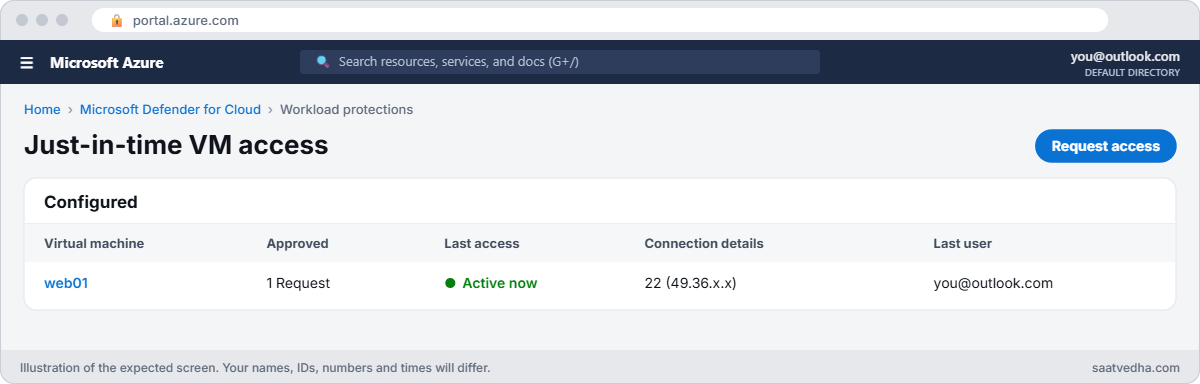
✅ Checkpoint: web01 is protected by JIT, your request opened port 22 for your IP only, and SSH works until the time runs out.
Break It, Then Fix It
JIT rarely fails with an error. It fails quietly, which is worse.
1Break it: the request for the wrong IP
A colleague requests access with the office IP while you work from home:
$req = @{ virtualMachines = @(@{ id = $vmId; ports = @(@{ number = 22; duration = 'PT1H'; allowedSourceAddressPrefix = '203.0.113.10' }) }); justification = 'Lesson 28 test' }
$req | ConvertTo-Json -Depth 6 | Set-Content -Path C:\azure-lab\jit-request.json
az rest --method post --url "${jit}/initiate?api-version=2020-01-01" --body '@C:\azure-lab\jit-request.json' --query "virtualMachines[0].ports[0].{port:number, source:allowedSourceAddressPrefix, status:status}" -o table
Start-Sleep -Seconds 60
az network nsg rule list --resource-group rg-saat-core --nsg-name nsg-saat-web --query "[?access=='Allow' && destinationPortRange=='22'].sourceAddressPrefix" -o tsvYou should see something like this:
Port Source Status
------ ------------- ---------
22 203.0.113.10 Initiated
49.36.x.x
203.0.113.10The request “worked”, and Defender shows it as approved. But if your first request had expired, your laptop would get False from Test-NetConnection: the allow rule is for an address you aren’t using. Home internet IPs also change, sometimes several times a day, which causes the same “JIT is broken” ticket.
Fix it: always request with your current public IP (the portal’s “My IP” option does this), and check what the server sees:
$ip = Invoke-RestMethod -Uri https://api.ipify.org
$req = @{ virtualMachines = @(@{ id = $vmId; ports = @(@{ number = 22; duration = 'PT1H'; allowedSourceAddressPrefix = $ip }) }); justification = 'Lesson 28 test' }
$req | ConvertTo-Json -Depth 6 | Set-Content -Path C:\azure-lab\jit-request.json
az rest --method post --url "${jit}/initiate?api-version=2020-01-01" --body '@C:\azure-lab\jit-request.json' --query "virtualMachines[0].ports[0].{port:number, source:allowedSourceAddressPrefix, status:status}" -o table2Break it: the old rule that makes JIT useless
Someone adds a “temporary” rule to fix a vendor issue, and forgets it:
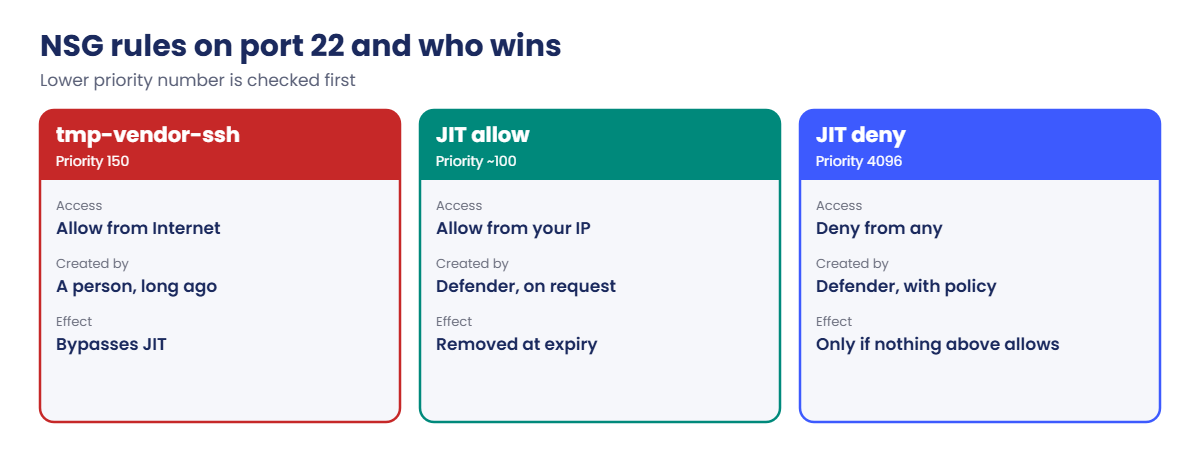
az network nsg rule create --resource-group rg-saat-core --nsg-name nsg-saat-web --name tmp-vendor-ssh --priority 150 --direction Inbound --access Allow --protocol Tcp --source-address-prefixes Internet --destination-port-ranges 22 -o none
az network nsg rule list --resource-group rg-saat-core --nsg-name nsg-saat-web --query "[?destinationPortRange=='22'].{name:name, access:access, source:sourceAddressPrefix, priority:priority}" -o tableYou should see something like this:
Name Access Source Priority
--------------------------------------------- -------- ------------ ----------
tmp-vendor-ssh Allow Internet 150
SecurityCenter-JITRule-1347516193-B4FC8A3BAB Allow 49.36.x.x 100
SecurityCenter-JITRule-... Allow 203.0.113.10 101
SecurityCenter-JITRule-1347516193-B4FC8A3BAB Deny * 4096Priority 150 sits far above JIT’s deny at 4096, so port 22 is open to the whole internet whether anyone requests access or not. Defender doesn’t delete rules it didn’t create; its recommendations will flag the open port, but JIT itself looks fine.
Fix it: delete the rule, and look for any other allow rule on JIT ports:
az network nsg rule delete --resource-group rg-saat-core --nsg-name nsg-saat-web --name tmp-vendor-ssh
az network nsg rule list --resource-group rg-saat-core --nsg-name nsg-saat-web --query "[?destinationPortRange=='22' && access=='Allow' && !contains(name, 'JIT')].name" -o tsvThe last command prints nothing: only JIT controls port 22 again.
Clean up: remove the JIT policy, the public IP and the Defender plan, then stop web01:
az rest --method delete --url "${jit}?api-version=2020-01-01"
az network nic ip-config update --ids $ipc --remove publicIPAddress -o none
az network public-ip delete --resource-group rg-saat-vms --name pip-web01-tmp
az security pricing create --name VirtualMachines --tier Free -o none
az vm deallocate --resource-group rg-saat-vms --name web01
az network nsg rule list --resource-group rg-saat-core --nsg-name nsg-saat-web --query "[?contains(name, 'JIT')].name" -o tsv
C:\azure-lab\Find-LabResources.ps1 -Lesson 28You should see this (the rule list may take a minute to empty):
Nothing tagged course=saatvedha-azure is left.
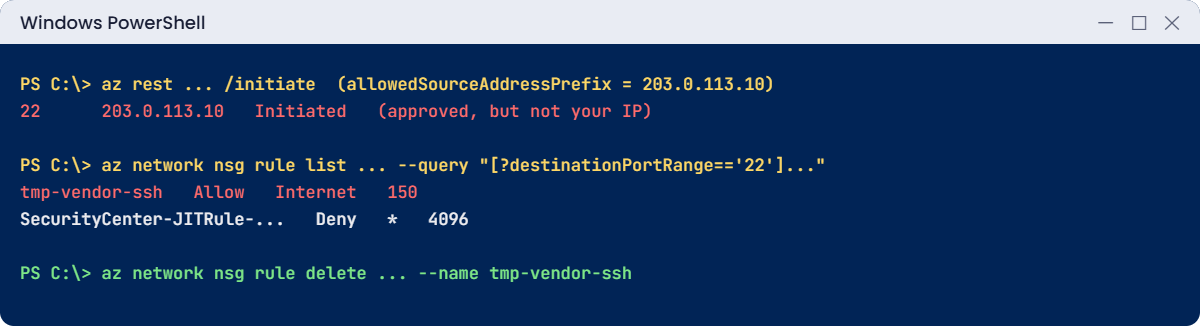
✅ Checkpoint: No JIT rules, no public IP and no tmp rule remain, Defender for Servers is back on Free, and web01 is deallocated.
This happened at work
JIT was on, and the server was still attacked
A logistics company had JIT enabled on all 120 VMs and passed its security audit. Three months later, a Windows server with a public IP was hit by a password-spraying attack on RDP.
The investigation found an NSG rule named “allow-rdp-vendor” at priority 200, created two years earlier for a printer vendor. JIT’s deny rule sat at 4096, below it, so RDP had been open to the internet the whole time. The JIT dashboard showed the VM as protected.
What they changed: an Azure Policy now denies NSG rules that allow 22 or 3389 from Internet or Any, except rules created by Defender. A weekly Resource Graph query lists every allow rule on management ports. And the audit checklist now asks “what else allows this port?”, not just “is JIT enabled?”.
Common mistakes and troubleshooting
| Mistake | What you see | What to do |
|---|---|---|
| Old allow rules on JIT ports | Port open without any request | Delete them; JIT doesn’t remove existing rules. |
| Requesting with the wrong source IP | JIT approved, connection still fails | Use “My IP” or check your public IP first. |
| Defender for Servers Plan 1 only | JIT option missing | JIT needs Plan 2. |
| VM without an NSG | JIT can’t be enabled | Attach an NSG to the NIC or subnet. |
| Using JIT instead of Bastion everywhere | Public IPs on many VMs | Bastion for admins; JIT only where needed. |
| Leaving the Plan 2 trial running after labs | Charges after 30 days | Switch the plan back to Free. |
Interview questions
Click a question to open it. Each one is written the way an interviewer would ask it. Under it you will see why they ask it and one way you could answer, in your own words.
Fresher level
1. What is just-in-time VM access?
Why they ask this: The basic concept.
How you might answer: A Defender for Cloud feature that keeps management ports closed with NSG deny rules and opens them only on request, for a specific source IP and a limited time.
2. Which licence does JIT need?
Why they ask this: A practical prerequisite check.
How you might answer: Microsoft Defender for Servers Plan 2 on the subscription or the servers. Plan 1 doesn’t include it.
3. What happens when a JIT request expires?
Why they ask this: They want to see you know it’s automatic.
How you might answer: Defender removes the allow rule it added, so the port is closed again by the deny rule. Nobody has to remember to close it.
2–5 years experience
4. JIT shows access approved, but the user still can’t connect. What do you check?
Why they ask this: A common support ticket.
How you might answer: That the requested source IP matches the user’s real public IP, that the allow rule exists in the NSG, any other NSG on the NIC or subnet, the OS firewall, and whether the VM is listening. Changing home IPs are the usual cause.
5. How does JIT work with existing NSG rules?
Why they ask this: They’re checking the bypass risk.
How you might answer: JIT adds deny rules for its ports but doesn’t remove existing rules. An older allow rule with a higher priority still lets traffic in, so JIT looks enabled while the port is open.
6. JIT or Bastion: which do you recommend?
Why they ask this: They want judgement.
How you might answer: Bastion for routine admin access, because VMs need no public IP at all. JIT for the few VMs that must keep a public IP, or where a tool needs a direct connection. Both together is common.
Senior level
7. How would you roll out JIT across hundreds of VMs?
Why they ask this: They want automation and governance.
How you might answer: Enable Plan 2 by policy, create JIT policies with ARM, Bicep or the REST API per resource group, and set maximum durations. Then add a policy that denies other allow rules on management ports, grant the initiate action to on-call groups through PIM, and alert on JIT requests.
8. How do you audit who opened which port and when?
Why they ask this: They want logging knowledge.
How you might answer: JIT requests are in the Activity log under Microsoft.Security jitNetworkAccessPolicies initiate, with the user, ports, source IP and justification. I’d export the Activity log to Log Analytics and keep it for the audit period.
9. What are JIT’s limits?
Why they ask this: They want honesty about the tool.
How you might answer: It only controls the ports in its policy, depends on NSGs or Azure Firewall, can be bypassed by other rules, and doesn’t stop someone who already has a session. It also needs a public path, which Bastion avoids.
Quick quiz
Q1. Which Defender plan includes JIT?
- Foundational CSPM only
- Defender for Servers Plan 1
- Defender for Servers Plan 2
- Defender for Storage
Show answer
C — JIT is part of Plan 2.
Q2. What does JIT add to the NSG when the policy is saved?
- Allow rules
- Deny rules for the chosen ports
- Nothing
- A public IP
Show answer
B — Deny rules keep the ports closed until requested.
Q3. An old rule allows 22 at priority 150; JIT deny is at 4096. Result?
- Port closed
- Port open to the rule’s sources
- JIT deletes the old rule
- The VM stops
Show answer
B — The lower number wins, so the old allow rule bypasses JIT.
Q4. When a JIT request expires, Defender:
- Deletes the VM
- Removes its allow rule
- Rotates keys
- Turns off the NSG
Show answer
B — The allow rule is removed automatically.
Q5. Where are JIT requests audited?
- Activity log
- Boot diagnostics
- Storage logs
- Nowhere
Show answer
A — Each request is recorded in the Activity log.
Quick recap
You can now open a management port safely and prove it closes again.
- JIT needs Defender for Servers Plan 2.
- The policy adds deny rules; requests add timed allow rules for one IP.
- Old allow rules with higher priority bypass JIT.
- Request with your current public IP.
- Bastion first; JIT for the VMs that must keep a public IP.
Next lesson
Lesson 29: VM tools: Run Command, extensions, Custom Script → You manage VMs from outside the OS with Run Command and extensions, and fix a stuck extension.
Further reading: just-in-time VM access
Want to go deeper into just-in-time VM access? See Microsoft’s Understand just-in-time VM access and Enable just-in-time access on VMs. You can also see the full plan for this course on the Azure Cloud Administration course page.
