What an Azure Administrator Really Does

An Azure administrator keeps a company’s systems running on Microsoft Azure. You decide who can sign in and what they can touch, you build the networks and servers, and you keep the data backed up and the bill under control. When something breaks, people call you first.

This first lesson shows you what that job looks like on a normal day. You will see how every click in Azure travels through the same few pieces, and why knowing them makes troubleshooting much faster.

Then you do a real task that admins get every week: “How much will this VM cost us per month, and is another region cheaper?” You answer it with PowerShell and Microsoft’s public price list. You don’t need an Azure account yet. You create it safely in Lesson 2.

TimeYou needCostBy the end you can
About 30 minutesA Windows laptop with PowerShell and internetNothing (public price list, no account)Explain what an Azure admin does day to day and price a VM size in any region

What it is, in one line

An Azure administrator builds, secures, watches and fixes the company’s resources in Azure, and keeps the cost sensible.

In Simple Words

The caretaker of a big apartment block

Think of Azure as a huge apartment block owned by Microsoft. Microsoft looks after the building: the walls, the lifts, the electricity and the water pipes.

Your company rents a few floors. You are the caretaker for those floors. You give out keys, decide which rooms each person can enter, fix the lights inside your flats, and check that nobody leaves the taps running all night.

If a tenant says “my door won’t open”, you don’t break the door. You check the key, the lock and the visitor list, one by one. That is most of an Azure admin’s day.

Engineer's View

What the job really covers

Microsoft runs the physical data centres, hosts and network. You run everything you create on top. Day to day, that usually means:

  • Identity: users, groups and app identities in Microsoft Entra ID (the new name for Azure AD), plus MFA and Conditional Access.
  • Access: Azure role-based access control (RBAC). A role such as Reader, Contributor or Owner is given to a person or group at a scope: a management group, subscription, resource group or single resource.
  • Networking: virtual networks, subnets, network security groups, NAT Gateway, private DNS, VPN and peering.
  • Compute and storage: virtual machines, managed disks, storage accounts, file shares and blob containers.
  • Operations: patching with Azure Update Manager, monitoring with Azure Monitor and KQL, backups with Azure Backup, and infrastructure as code with Bicep.
  • Cost: budgets, tags, right-sizing and shutting down what nobody uses.

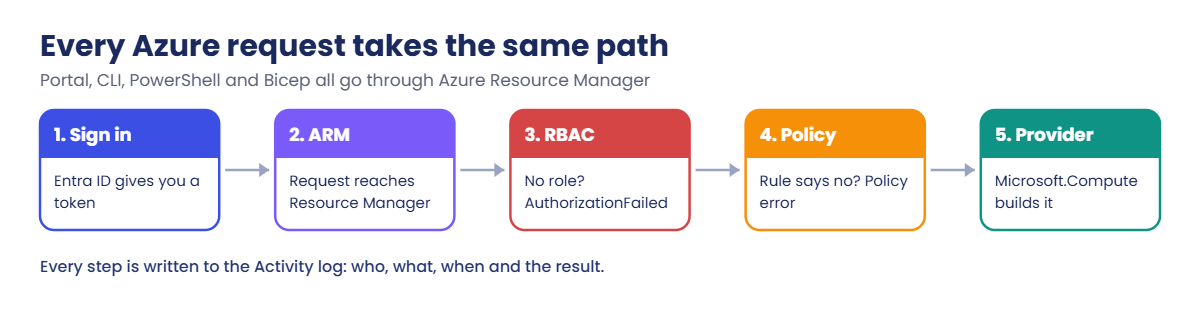
Every change you make, in the portal, the Azure CLI, PowerShell or Bicep, goes to the same front door: Azure Resource Manager (ARM) at management.azure.com. ARM checks your sign-in token, your RBAC role and any Azure Policy rules, then passes the request to the service that does the work. That is why a portal click and a CLI command behave the same, and why they fail with the same errors.

ARM writes each change to the Activity log of the subscription, which keeps 90 days by default. “Who changed this, and when?” is the first troubleshooting question, and the Activity log answers it. The job matches the Microsoft exam AZ-104: Azure Administrator, which this course covers along the way.

How it works, step by step

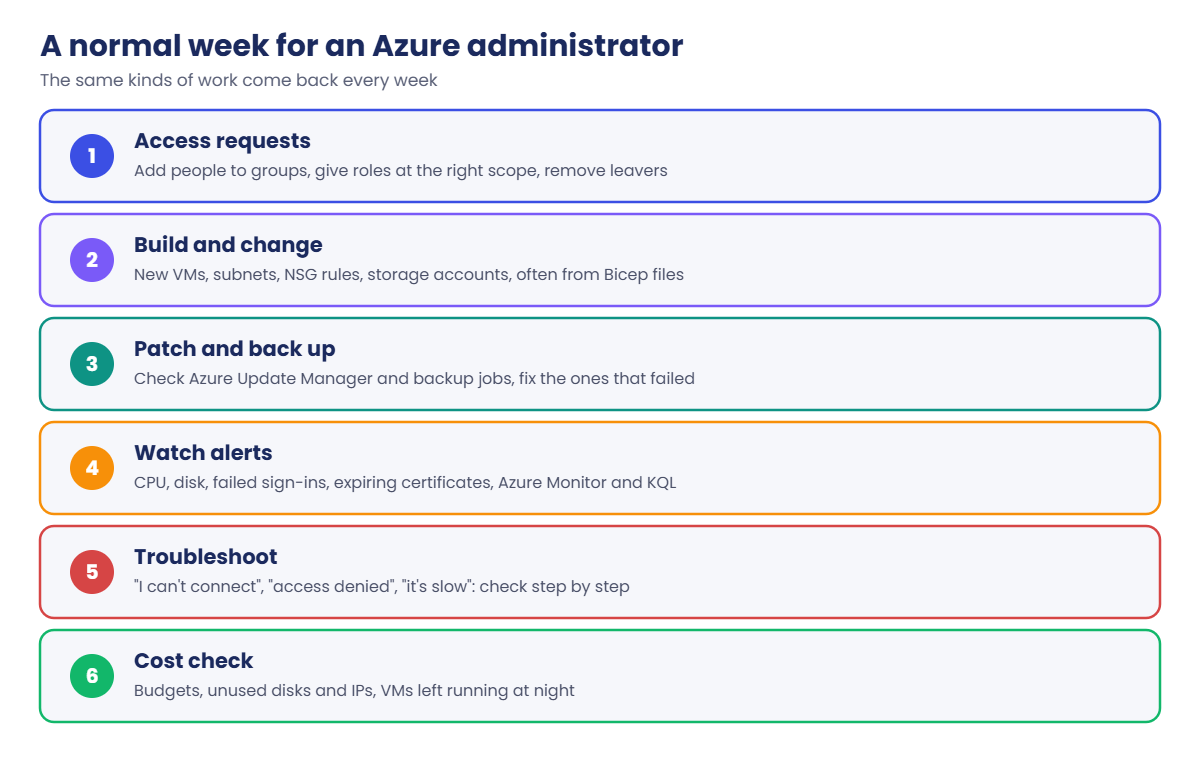
Here is what a normal week looks like for an Azure administrator in a company of a few hundred people. The exact list changes, but the same kinds of work come back again and again.

Azure administrator: a normal week of access, builds, patching, alerts, troubleshooting and cost

Behind all of that work, every request follows the same path. When you click “Create” in the portal, or type an az command, this is what happens:

  1. You sign in to Microsoft Entra ID and get a token. The token says who you are.
  2. Your request goes to Azure Resource Manager with that token. It doesn’t matter if you used the portal, the CLI or a Bicep file.
  3. ARM checks your role (RBAC). If your role doesn’t allow the action at that scope, you get AuthorizationFailed.
  4. ARM checks Azure Policy. If a company rule forbids it (for example, VMs outside India), you get RequestDisallowedByPolicy.
  5. The resource provider does the work. For a VM that is Microsoft.Compute; for a storage account it is Microsoft.Storage.
  6. The Activity log records it, with your name, the time and the result.

Once you know this path, error messages stop being scary. Each error tells you which step stopped your request, so you know where to look.

Azure administrator view of the request path: Entra ID, Resource Manager, RBAC, Policy, provider

One more thing shapes almost every decision you make: cost. In Azure you pay for most things by the hour or by the gigabyte, and the price depends on the size you pick and the region you put it in. A manager will often ask you “what will this cost per month?” before they approve a new server.

In the lab below, you answer that question with real prices from Microsoft.

Hands-on lab: your first Azure administrator task

A real request that lands on Azure admins all the time: the team wants a small Linux test server and asks what it will cost per month. They also ask whether a bigger D-series or E-series VM is much more expensive, and whether another region is cheaper.

Microsoft publishes all its prices through a public web address called the Azure Retail Prices API. You can read it without signing in, so it’s a good first lab. Prices come back in US dollars by default.

1Make a lab folder

Open Windows PowerShell from the Start menu and run this:

New-Item -ItemType Directory -Path C:\azure-lab -Force | Out-Null
Set-Location C:\azure-lab
$PSVersionTable.PSVersion

You should see something like this:

Major  Minor  Build  Revision
-----  -----  -----  --------
5      1      26100  4202

Any 5.1 build is fine. We use C:\azure-lab for every lab in this course.

2Ask Microsoft for the price of one VM size

The course uses the size Standard_B2ats_v2 for most lab VMs: 2 vCPUs, 1 GiB of memory, and part of the Azure free account’s 12-month free services. Let’s see its price in Central India (Pune), whose short name is centralindia.

Run this:

$f = "armRegionName eq 'centralindia' and armSkuName eq 'Standard_B2ats_v2' and priceType eq 'Consumption'"
$url = 'https://prices.azure.com/api/retail/prices?$filter=' + [uri]::EscapeDataString($f)
$r = Invoke-RestMethod -Uri $url
$r.Count
$r.Items | Select-Object productName, skuName, retailPrice

You should see something like this (prices change from time to time):

8
productName                           skuName               retailPrice
-----------                           -------               -----------
Virtual Machines Basv2 Series Windows B2ats v2                   0.0154
Virtual Machines Basv2 Series         B2ats v2 Spot            0.005535
Virtual Machines Basv2 Series Windows B2ats v2 Low Priority     0.00614
Basv2 Series Cloud Services           B2ats v2                   0.0154
Virtual Machines Basv2 Series         B2ats v2                  0.00615
Virtual Machines Basv2 Series         B2ats v2 Low Priority     0.00123
Virtual Machines Basv2 Series Windows B2ats v2 Spot             0.01386
Basv2 Series Cloud Services           B2ats v2 Low Priority     0.00614

Eight prices for one size? Each row is a different way to run it. The normal pay-as-you-go prices are the two plain “B2ats v2” rows: 0.00615 USD an hour for Linux and 0.0154 USD for Windows.

Windows costs more because the Windows Server licence is included. Spot and Low Priority are cheap, but Azure can take those VMs away at short notice, and “Cloud Services” is an older product you won’t use.

Notice the single quotes around $filter. Inside single quotes PowerShell leaves the dollar sign alone. You’ll see in “Break It” what happens if you forget.

3Turn it into a reusable price checker

Paste this whole block:

function Get-VmPrice {
    param([Parameter(Mandatory)][string]$Size, [string]$Region = 'centralindia')
    $f = "armRegionName eq '$Region' and armSkuName eq '$Size' and priceType eq 'Consumption'"
    $url = 'https://prices.azure.com/api/retail/prices?$filter=' + [uri]::EscapeDataString($f)
    $items = (Invoke-RestMethod -Uri $url).Items | Where-Object {
        $_.serviceName -eq 'Virtual Machines' -and
        $_.productName -notmatch 'Cloud Services' -and
        $_.skuName -notmatch 'Spot|Low Priority' }
    $linux = ($items | Where-Object productName -notmatch 'Windows').retailPrice
    $win   = ($items | Where-Object productName -match 'Windows').retailPrice
    [pscustomobject]@{
        Size = $Size; Region = $Region
        LinuxHour = $linux; LinuxMonth = [math]::Round($linux * 730, 2)
        WindowsHour = $win; WindowsMonth = [math]::Round($win * 730, 2)
    }
}
'Standard_B2ats_v2','Standard_D2s_v5','Standard_E2s_v5','Standard_F2s_v2' |
    ForEach-Object { Get-VmPrice -Size $_ } |
    Format-Table Size, LinuxHour, LinuxMonth, WindowsHour, WindowsMonth

You should see something like this:

Size              LinuxHour LinuxMonth WindowsHour WindowsMonth
----              --------- ---------- ----------- ------------
Standard_B2ats_v2   0.00615       4.49      0.0154        11.24
Standard_D2s_v5       0.101      73.73       0.193       140.89
Standard_E2s_v5        0.13       94.9       0.222       162.06
Standard_F2s_v2       0.085      62.05       0.177       129.21

Using PowerShell 7 instead? Its tables may round the hourly prices to two decimals, like 0.01. The function still keeps the full price; add | Format-List to see it.

Azure counts a month as 730 hours, so the function multiplies the hourly price by 730. Now you can answer the team in one line: the small B-series Linux VM is about 4.49 USD a month, while a D2s_v5 with the same 2 vCPUs is about 74 USD.

Why so different? The B-series is burstable: it runs at a low baseline and saves up credits for short bursts. The D-series is general purpose with full-time CPU and 8 GiB memory.

The E-series has the same 2 vCPUs with 16 GiB memory for databases and caches, and the F-series is compute-optimised. You’ll pick sizes properly in Lesson 17.

4Is another region cheaper?

Run this:

$regions = 'centralindia','southindia','westindia','eastus','southeastasia','westeurope'
$cmp = $regions | ForEach-Object { Get-VmPrice -Size 'Standard_B2ats_v2' -Region $_ }
$cmp | Sort-Object LinuxMonth | Format-Table Region, LinuxHour, LinuxMonth

You should see something like this:

Region        LinuxHour LinuxMonth
------        --------- ----------
centralindia    0.00615       4.49
eastus           0.0094       6.86
westeurope       0.0108       7.88
southeastasia    0.0118       8.61
westindia         0.012       8.76
southindia       0.0133       9.71

For this size, Central India is the cheapest region in the list. Its price is less than half of South India’s, even though both are in India. Prices are set per region, so never assume “nearest” or “biggest” means cheapest.

Always check.

Price isn’t the only thing that decides the region. You also think about where your users are, data rules (some data must stay in India), and which services and availability zones the region has. You’ll look at that in Lesson 4.
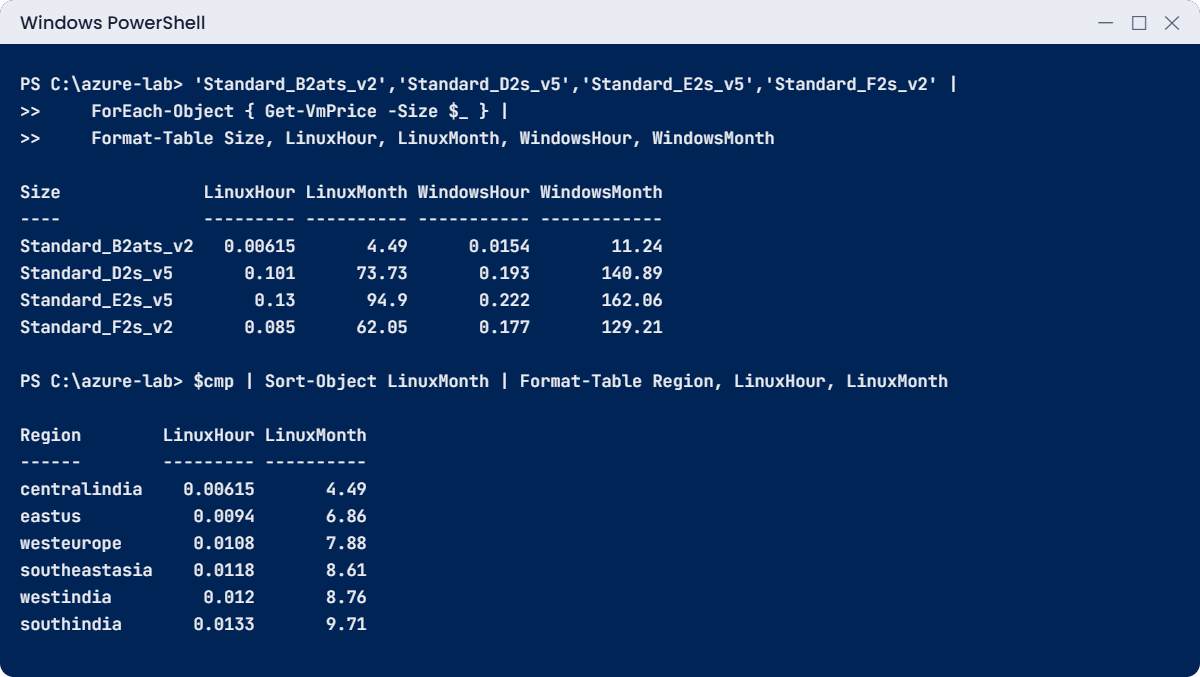
Azure administrator lab: Get-VmPrice table by VM size and by region
Example output. Prices change from time to time, so your numbers may be a little different.

5Save the answer for the team

Run this:

$cmp | Export-Csv C:\azure-lab\b2ats-prices.csv -NoTypeInformation
(Import-Csv C:\azure-lab\b2ats-prices.csv).Count

You should see this:

6

✅ Checkpoint: C:\azure-lab\b2ats-prices.csv exists with 6 rows, and you can say what a Standard_B2ats_v2 Linux VM costs per month in Central India.

Keep the Get-VmPrice function in mind. Before you build anything costly later in the course, you can run it to see the hourly price first.

Break It, Then Fix It

Two mistakes people make with this kind of script all the time. The first gives a strange error. The second gives no error at all, which is worse.

1Break it: double quotes around $filter

Run this:

$url = "https://prices.azure.com/api/retail/prices?$filter=" + [uri]::EscapeDataString($f)
$url
$r = Invoke-RestMethod -Uri $url

You’ll get this error (something like this):

https://prices.azure.com/api/retail/prices?=armRegionName%20eq%20%27centralindia%27%20and%20...
Invoke-RestMethod : {"Error":{"Code":"InternalServerError","Message":"ExchangeRate ARMREGIONNAME EQ
CENTRALINDIA AND ARMSKUNAME EQ STANDARD_B2ATS_V2 AND PRICETYPE EQ CONSUMPTION_2026-09-01 not found"}}
At line:3 char:6
+ $r = Invoke-RestMethod -Uri $url
+      ~~~~~~~~~~~~~~~~~~~~~~~~~~~

Look at the address that $url printed: the word $filter is gone. Inside double quotes, PowerShell treats $filter as a variable. That variable doesn’t exist, so it became empty.

The API got a nameless parameter and tried to read your filter as a currency name, hence the odd “ExchangeRate … not found” message.

Fix it: use single quotes for the part with the dollar sign, as in the lab:

$url = 'https://prices.azure.com/api/retail/prices?$filter=' + [uri]::EscapeDataString($f)
(Invoke-RestMethod -Uri $url).Count

You should see this:

8

The lesson for later: when an error message makes no sense, print the exact request you sent. Half the time the request isn’t what you think it is.

2Break it: the region name in the wrong case

Run this:

Get-VmPrice -Size 'Standard_B2ats_v2' -Region 'CentralIndia'

You should see something like this:

Size         : Standard_B2ats_v2
Region       : CentralIndia
LinuxHour    :
LinuxMonth   : 0
WindowsHour  :
WindowsMonth : 0

No error, and a monthly cost of 0. Someone could paste that into a cost plan. The price list compares names exactly, so CentralIndia matches nothing and the API returns an empty list. $null times 730 is 0, so the function happily reports a zero price.

Fix it: make the function clean up the input, and refuse to answer when it finds nothing. Paste this:

function Get-VmPrice {
    param([Parameter(Mandatory)][string]$Size, [string]$Region = 'centralindia')
    $Region = $Region.ToLower()
    $f = "armRegionName eq '$Region' and armSkuName eq '$Size' and priceType eq 'Consumption'"
    $url = 'https://prices.azure.com/api/retail/prices?$filter=' + [uri]::EscapeDataString($f)
    $items = (Invoke-RestMethod -Uri $url).Items | Where-Object {
        $_.serviceName -eq 'Virtual Machines' -and
        $_.productName -notmatch 'Cloud Services' -and
        $_.skuName -notmatch 'Spot|Low Priority' }
    if (-not $items) { throw "No price found for $Size in $Region. Check the size and region names." }
    $linux = ($items | Where-Object productName -notmatch 'Windows').retailPrice
    $win   = ($items | Where-Object productName -match 'Windows').retailPrice
    [pscustomobject]@{
        Size = $Size; Region = $Region
        LinuxHour = $linux; LinuxMonth = [math]::Round($linux * 730, 2)
        WindowsHour = $win; WindowsMonth = [math]::Round($win * 730, 2)
    }
}
(Get-VmPrice -Size 'Standard_B2ats_v2' -Region 'CentralIndia').LinuxMonth
Get-VmPrice -Size 'B2ats_v2'

You should see something like this:

4.49
No price found for B2ats_v2 in centralindia. Check the size and region names.
At line:10 char:21

The mixed-case region now works, and a wrong size name (it needs the Standard_ prefix) stops with a clear message instead of a fake zero. In Azure, many names are lowercase with no spaces: centralindia, not “Central India”. The portal shows the friendly name, but scripts, the CLI and Bicep use the short one.
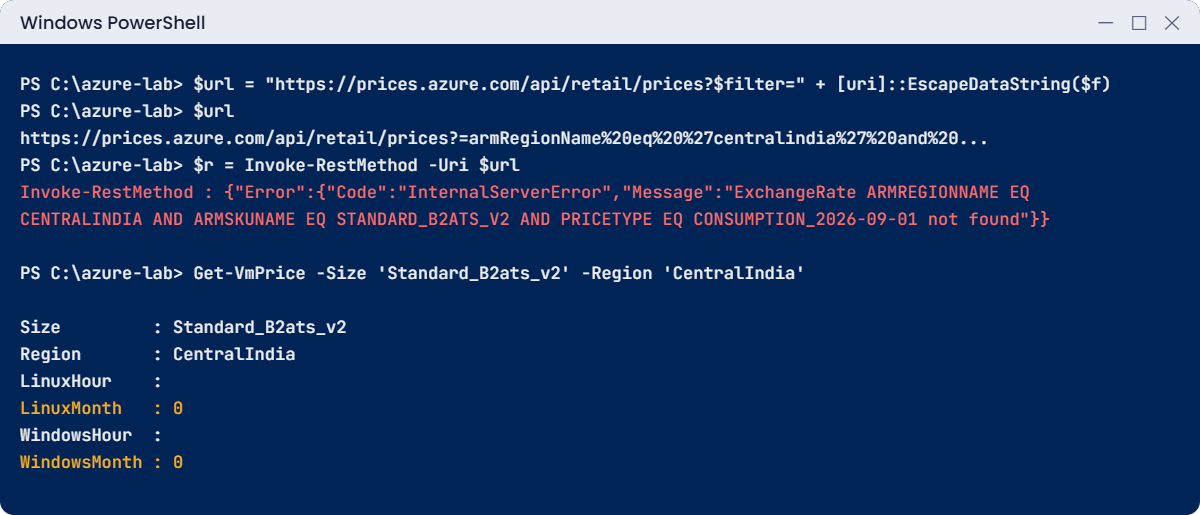
Azure administrator lab errors: missing $filter and a fake zero price
Example output of both mistakes. The date in the error message will be different for you.

✅ Checkpoint: Both mistakes reproduced and fixed, and Get-VmPrice now throws an error instead of returning 0.

This happened at work

The VM that “disappeared” on a Monday morning

A logistics company ran its warehouse app on one Azure VM. On a Monday at 8:15 a.m. the app was down, and the on-call engineer opened the portal. The VM wasn’t in the list.

He told his manager that someone had deleted the server and started creating a new VM from last night’s backup.

Forty minutes later a senior admin joined the call. She looked at the portal’s top bar and saw the engineer was signed in to the company’s test directory, with only the test subscription selected. She switched directory, and there was the VM: running, but with its disk full of logs.

Clearing the logs fixed the app in five minutes. The half-built restore then had to be deleted carefully, because it was about to start a second copy of the warehouse app.

What they changed: the first line of their runbook is now “Which tenant and which subscription am I in?” (in the CLI, az account show). Production and test subscriptions got clear names and tags, the portal’s default subscription filter was set to include everything the engineer could see, and nobody starts a restore without checking the Activity log for a delete first.

Common mistakes and troubleshooting

MistakeWhat you seeWhat to do
Looking in the wrong directory or subscriptionResources seem to be “gone”Check the account menu (top right) and the subscription filter. In the CLI, run az account show first.
Using friendly names in scriptsEmpty results, “not found” or a fake 0Use the short lowercase names: centralindia, Standard_B2ats_v2.
Picking a region only because it is closeHigher bills than planned, or a service you need is missingCompare price, data rules, available services and zones. Lesson 4 covers this.
Reading the wrong price rowA plan based on Spot or Windows pricesUse the plain pay-as-you-go row for the right OS. Spot VMs can be taken away by Azure.
Treating the portal as the only toolSlow, error-prone repeat workLearn the Azure CLI and PowerShell early (Lesson 3), so you can check and fix many things at once.
Guessing during an outageRestores and rebuilds that weren’t neededAsk “what changed?” first. The Activity log shows who changed what, and when.

Interview questions

Click a question to open it. Each one is written the way an interviewer would ask it. Under it you will see why they ask it and one way you could answer, in your own words.

Fresher level

1. In simple words, what does an Azure administrator do all day?

Why they ask this: They want to see that you understand the job is running and fixing things, not only creating them once.

How you might answer: I’d say I look after everything the company runs in Azure. I manage who can sign in and what they can do, build and maintain networks, VMs and storage, keep backups and patching on track, watch alerts, and keep an eye on cost.

When something breaks I’m usually the first one to look, so a lot of the job is checking logs and settings step by step.

2. What is the difference between Microsoft’s job and your job in Azure?

Why they ask this: This checks that you understand the shared responsibility model in plain terms.

How you might answer: Microsoft runs the physical side: data centres, hosts, the network and the platform services. I’m responsible for what we build on it, like who has access, how our networks and NSGs are set up, patching the OS inside our VMs, and our data and backups.

For managed services, Microsoft takes on more of the work, but access and data are always ours.

3. A colleague says a VM has vanished from the portal. What’s the first thing you check?

Why they ask this: They want a calm, simple first step instead of panic or a restore.

How you might answer: First I’d check which directory and subscription they’re looking at, because the portal only shows what’s selected in the filter. I’d run az account show or look at the account menu.

If the VM really is gone, the subscription’s Activity log will show a delete operation with who did it and when.

2–5 years experience

4. Walk me through what happens when you create a VM, from your click to the VM running.

Why they ask this: They want to know you understand Azure Resource Manager, because that explains most errors you’ll meet.

How you might answer: My portal or CLI request goes with my Entra ID token to Azure Resource Manager. ARM checks my RBAC role at that scope and any Azure Policy assignments, then sends the request to the Microsoft.Compute resource provider, which builds the VM, disk and network card.

The Activity log records the operation. So an AuthorizationFailed error points me to RBAC, and RequestDisallowedByPolicy points me to a policy.

5. Your manager asks what a new server will cost per month. How do you answer quickly and correctly?

Why they ask this: They’re checking that you think about cost as part of the job and know where real prices come from.

How you might answer: I’d confirm the size, OS, region and how many hours it runs, then check the price in the Azure pricing calculator or the Retail Prices API. In my lab I wrote a small PowerShell function that pulls the pay-as-you-go hourly price and multiplies by 730 hours.

I’d also mention the disk, backup and data transfer, and whether it could be shut down at night to cut the cost.

6. Why do you prefer the Azure CLI or PowerShell over the portal for some tasks?

Why they ask this: They want to see you can work at scale and repeat things without mistakes.

How you might answer: The portal is great for looking around, but scripts let me do the same check across fifty VMs in seconds, and the result is the same every time. I can also save a script in a repo so the team can review it.

For changes we repeat, like building environments, I’d go further and use Bicep templates.

Senior level

7. You join a team with ten subscriptions and nobody knows what runs where. What would you do in your first month?

Why they ask this: They want to see how you bring order: inventory, ownership, access and cost, in a sensible order.

How you might answer: First I’d get a full inventory with Azure Resource Graph, grouped by subscription, resource group and type, and find out who owns each workload. Then I’d review who has Owner and Contributor access, and set up tags for owner, app and environment with an Azure Policy that requires them on new resources.

After that, budgets and cost alerts per subscription, and a basic monitoring and backup check for anything that’s clearly production.

8. How would you explain to a new team member why an outage runbook starts with “what changed?”

Why they ask this: They want to see that you lead with evidence and teach good habits.

How you might answer: I’d tell them most outages come from a change: a new NSG rule, an expired secret, a deleted route, a resized disk. The Activity log and change history show those in minutes, so checking them first is faster than guessing.

I’d add that they must also confirm the tenant and subscription first, so they don’t investigate the wrong place.

9. A team wants every developer to have Owner on the production subscription “to move faster”. How do you respond?

Why they ask this: They’re checking your judgement on security versus speed, and whether you can offer something workable.

How you might answer: I’d say no to standing Owner, but I’d find what they actually need. Usually it’s Contributor on their own resource groups, Reader on production, and a short, approved path to higher access, like Privileged Identity Management with time-limited roles.

I’d explain the risk with a real example: one wrong delete or a leaked token with Owner can take down every app in the subscription.

Quick quiz

Q1. What does an Azure administrator mainly do?

  1. Build the physical data centres
  2. Build, secure, monitor and fix the company’s resources in Azure
  3. Write the Azure portal’s code
  4. Only reset user passwords
Show answer

B — Microsoft runs the physical side. You run what the company builds on top.

Q2. Every portal click, CLI command and Bicep deployment goes through which service first?

  1. Azure Monitor
  2. Azure Resource Manager
  3. Azure Backup
  4. Microsoft Defender for Cloud
Show answer

B — Azure Resource Manager is the front door. It checks RBAC and Azure Policy, then calls the resource provider.

Q3. Which error tells you that your role doesn’t allow an action?

  1. RequestDisallowedByPolicy
  2. AuthorizationFailed
  3. QuotaExceeded
  4. ResourceNotFound
Show answer

B — AuthorizationFailed comes from RBAC. RequestDisallowedByPolicy comes from Azure Policy.

Q4. In the lab, why did the double-quoted URL fail?

  1. The API was down
  2. PowerShell replaced $filter with an empty variable
  3. The region doesn’t exist
  4. You need an Azure account
Show answer

B — Inside double quotes PowerShell expands variables, so $filter became nothing.

Q5. How many hours does Azure use for one month when it shows monthly prices?

  1. 720
  2. 730
  3. 744
  4. 768
Show answer

B — Azure uses 730 hours, about the average month.

Quick recap

An Azure administrator looks after identity, access, networks, VMs, storage, monitoring, backups and cost. Every change goes through the same path, so errors tell you where to look.

  • Microsoft runs the physical platform; you run what your company builds on it.
  • Every request goes through Entra ID (who you are), Azure Resource Manager, RBAC, Azure Policy, then the resource provider.
  • The Activity log answers “who changed what, and when?” for 90 days.
  • Prices depend on size, OS and region. Azure counts a month as 730 hours.
  • In scripts, use short names like centralindia and Standard_B2ats_v2, and check empty results instead of trusting a 0.

Next lesson

Lesson 2: Set up your Azure free account safely → You create your own Azure account, protect it with MFA and add a budget alert before you build anything.

Further reading: Azure administrator

Want to go deeper into Azure administrator? Microsoft’s overview of the role and exam is on the Azure Administrator Associate certification page, and the price list you used is documented in the Azure Retail Prices API reference. You can also see the full plan for this course on the Azure Cloud Administration course page.

Scroll to Top