Azure Firewall for outbound inspection

Azure Firewall is a managed, stateful firewall that sits in your hub VNet and inspects traffic between spokes and out to the internet. You write rules once in a firewall policy, point the spokes’ routes at it, and every packet that leaves a spoke is allowed or denied by name, port or website.

In Lesson 47 a small Linux VM did the routing. It worked, but it had no rules, no logs and no high availability. Today you replace it with Azure Firewall Basic and see what a real hub firewall gives you.

This is one of the costlier labs in the course, because Azure Firewall is billed by the hour from the moment it’s created. Read the whole lesson first, then do it in one sitting and clean up at the end.

TimeYou needCostBy the end you can
About 90 minutesrg-saat-hub with rt-spoke1 and rt-spoke2 from Lesson 47, law-saat, the CLIAbout USD 0.70 if you finish and clean up within 90 minutes: Azure Firewall Basic is USD 0.395 per hour plus USD 0.065 per GB processed in Central India (Azure Retail Prices API, October 2026)Deploy Azure Firewall Basic, write network and application rules, read its logs, and fix the two most common rule problems

What it is, in one line

Azure Firewall is a managed firewall in your hub that allows or denies traffic by IP, port and website name, and logs every decision.

In Simple Words

The security desk in the lobby

Picture an office tower with many companies on different floors. Everyone who goes between floors or out to the street must pass the security desk in the lobby. The guard has a list: “Floor 4 may visit floor 7.

Anyone may go to the post office. Nobody goes to the casino.”

If your name isn’t on the list, the answer is no. The guard also writes down every visit in a logbook, so when someone asks “who went out at 3 pm?”, there’s an answer.

Azure Firewall is that guard. The route tables are the signs that send everyone to the lobby. The firewall policy is the list.

The logs are the logbook.

Engineer's View

What Azure Firewall is made of

  • Tiers: Basic (up to 250 Mbps, for small businesses), Standard (FQDN filtering in network rules, DNS proxy, web categories) and Premium (TLS inspection, IDPS, URL filtering).
  • Subnets: it lives in AzureFirewallSubnet (at least /26). Basic also needs AzureFirewallManagementSubnet (/26) and a second public IP for management traffic.
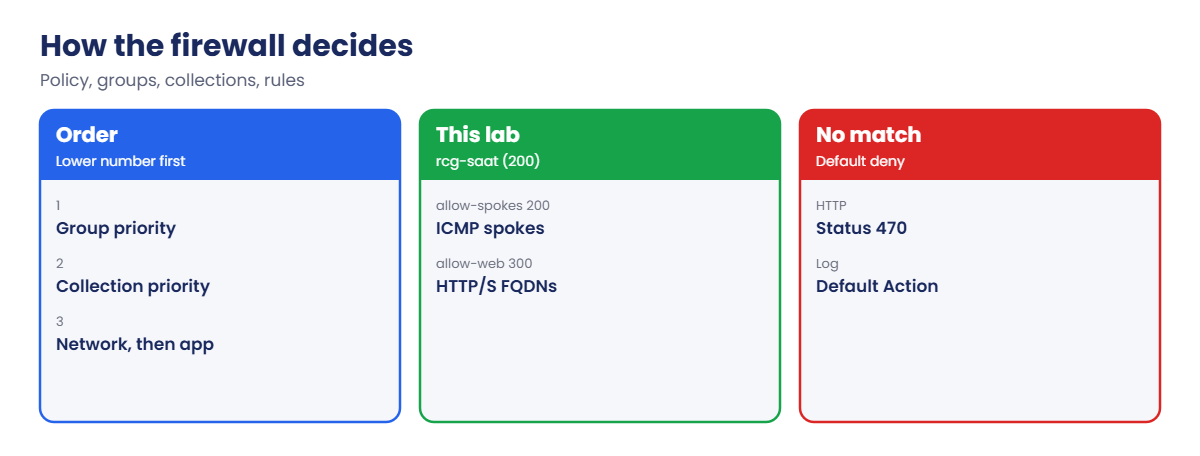
  • Firewall policy: holds rule collection groups, which hold rule collections, which hold rules. Lower priority number means processed first.
  • Rule types: DNAT (inbound port forwarding), network rules (IP, port, protocol) and application rules (FQDNs over HTTP and HTTPS). Network rules are checked before application rules, and the first match wins.
  • Default deny: anything no rule allows is dropped. That is why new firewalls break things.
  • SNAT: traffic to public IPs leaves with the firewall’s public IP. Traffic to private ranges keeps its source IP.
  • Logs: with resource-specific diagnostic settings, decisions land in tables such as AZFWNetworkRule and AZFWApplicationRule in Log Analytics.

How it works, step by step

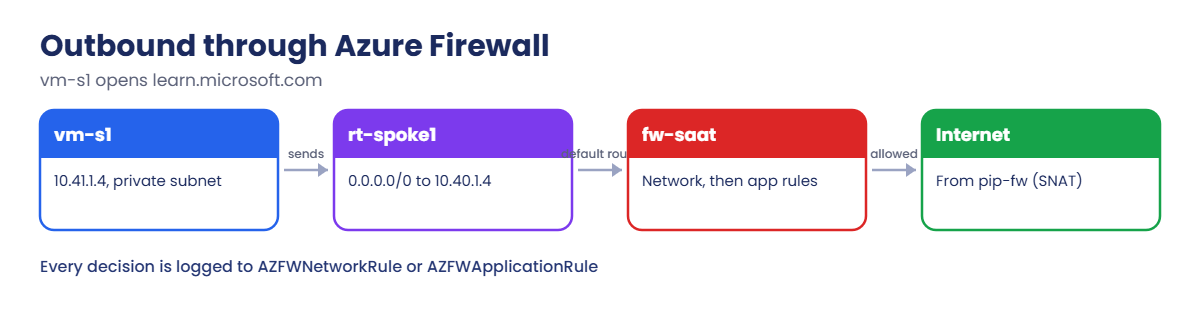
What happens when vm-s1 opens a website after this lab:

Outbound traffic from a spoke through Azure Firewall
  1. vm-s1 (10.41.1.4) connects to learn.microsoft.com on port 443.
  2. Its route table has 0.0.0.0/0 with next hop VirtualAppliance 10.40.1.4, the firewall’s private IP, so the packet crosses the peering to the hub.
  3. The firewall checks network rules first. None match, so it checks application rules and finds learn.microsoft.com allowed on HTTPS.
  4. It sends the request out from its own public IP (SNAT) and writes an Allow line to AZFWApplicationRule.
  5. The reply comes back to the firewall, which knows the session and passes it to vm-s1.

For spoke-to-spoke traffic the path is the same, but there’s no SNAT and a network rule has to allow it. Without one, the default deny drops the packet.

How Azure Firewall processes rule collection groups and rules

Because the firewall is stateful, both directions must pass through it. The route tables from Lesson 47 already do that for the spokes.

Deploy Azure Firewall Basic in the hub and route the spokes through it

Cost check: the clock starts when the firewall is created in step 2. Keep this lesson open and finish it in one go.

1Prepare the hub

Add the management subnet Basic needs, two public IPs and a Basic firewall policy:

az network vnet subnet create --resource-group rg-saat-hub --vnet-name vnet-hub --name AzureFirewallManagementSubnet --address-prefixes 10.40.1.64/26 -o none
az network public-ip create --resource-group rg-saat-hub --name pip-fw --sku Standard --tags course=saatvedha-azure lesson=48 -o none
az network public-ip create --resource-group rg-saat-hub --name pip-fw-mgmt --sku Standard --tags course=saatvedha-azure lesson=48 -o none
az network firewall policy create --resource-group rg-saat-hub --name fwp-saat --sku Basic --tags course=saatvedha-azure lesson=48 -o none
az network firewall policy rule-collection-group create --resource-group rg-saat-hub --policy-name fwp-saat --name rcg-saat --priority 200 -o none

The firewall commands live in the azure-firewall CLI extension. If the CLI asks to install it, answer yes.

2Create the firewall

This takes 5 to 10 minutes:

az network firewall create --resource-group rg-saat-hub --name fw-saat --sku AZFW_VNet --tier Basic --vnet-name vnet-hub --conf-name fw-ipconfig --public-ip pip-fw --m-conf-name fw-mgmt --m-public-ip pip-fw-mgmt --firewall-policy fwp-saat --tags course=saatvedha-azure lesson=48 -o none
$fwIp = az network firewall show --resource-group rg-saat-hub --name fw-saat --query "ipConfigurations[0].privateIPAddress" -o tsv
$fwIp

You should see this:

10.40.1.4

3Send the spokes through the firewall

Point the Lesson 47 routes at the firewall, and add a default route so internet traffic goes there too:

az network route-table route update --resource-group rg-saat-hub --route-table-name rt-spoke1 --name to-spoke2 --next-hop-ip-address $fwIp -o none
az network route-table route update --resource-group rg-saat-hub --route-table-name rt-spoke2 --name to-spoke1 --next-hop-ip-address $fwIp -o none
az network route-table route create --resource-group rg-saat-hub --route-table-name rt-spoke1 --name default-to-fw --address-prefix 0.0.0.0/0 --next-hop-type VirtualAppliance --next-hop-ip-address $fwIp -o none
az network route-table route create --resource-group rg-saat-hub --route-table-name rt-spoke2 --name default-to-fw --address-prefix 0.0.0.0/0 --next-hop-type VirtualAppliance --next-hop-ip-address $fwIp -o none

4Allow a few websites

Create an application rule collection that allows HTTPS to Microsoft Learn and the Ubuntu servers from both spokes:

az network firewall policy rule-collection-group collection add-filter-collection --resource-group rg-saat-hub --policy-name fwp-saat --rcg-name rcg-saat --name allow-web --collection-priority 300 --action Allow --rule-type ApplicationRule --rule-name web-https --source-addresses 10.41.0.0/16 10.42.0.0/16 --protocols Https=443 --target-fqdns learn.microsoft.com *.ubuntu.com -o none

5Send firewall logs to law-saat

Save the log categories in a file, then create the diagnostic setting:

'[{"category":"AZFWApplicationRule","enabled":true},{"category":"AZFWNetworkRule","enabled":true}]' | Set-Content C:\azure-lab\fwlogs.json
$fwId = az network firewall show --resource-group rg-saat-hub --name fw-saat --query id -o tsv
$lawId = az monitor log-analytics workspace show --resource-group rg-saat-core --workspace-name law-saat --query id -o tsv
az monitor diagnostic-settings create --name fw-to-law --resource $fwId --workspace $lawId --export-to-resource-specific true --logs '@C:\azure-lab\fwlogs.json' -o none

6Create two test VMs and try the internet

About 5 minutes for the VMs, then test an allowed site and a site with no rule:

az group create --name rg-saat-l48 --location centralindia --tags course=saatvedha-azure lesson=48 -o none
$s1Sub = az network vnet subnet show --resource-group rg-saat-hub --vnet-name vnet-spoke1 --name snet-app --query id -o tsv
$s2Sub = az network vnet subnet show --resource-group rg-saat-hub --vnet-name vnet-spoke2 --name snet-app --query id -o tsv
az vm create --resource-group rg-saat-l48 --name vm-s1 --image Canonical:ubuntu-24_04-lts:server:latest --size Standard_B1s --subnet $s1Sub --private-ip-address 10.41.1.4 --public-ip-address '""' --nsg '""' --admin-username azureuser --generate-ssh-keys --tags course=saatvedha-azure lesson=48 -o none
az vm create --resource-group rg-saat-l48 --name vm-s2 --image Canonical:ubuntu-24_04-lts:server:latest --size Standard_B1s --subnet $s2Sub --private-ip-address 10.42.1.4 --public-ip-address '""' --nsg '""' --admin-username azureuser --generate-ssh-keys --tags course=saatvedha-azure lesson=48 -o none
az vm run-command invoke --resource-group rg-saat-l48 --name vm-s1 --command-id RunShellScript --scripts 'curl -sI https://learn.microsoft.com/en-us/ | head -1; curl -s http://www.bing.com' --query "value[0].message" -o tsv

You should see something like this:

Enable succeeded:
[stdout]
HTTP/2 200
Action: Deny. Reason: No rule matched. Proceeding with default action.
[stderr]

vm-s1 has no public IP and sits in a private subnet, yet it reached Microsoft Learn through the firewall. Bing got a clear deny message from the firewall itself, because no rule allows it.
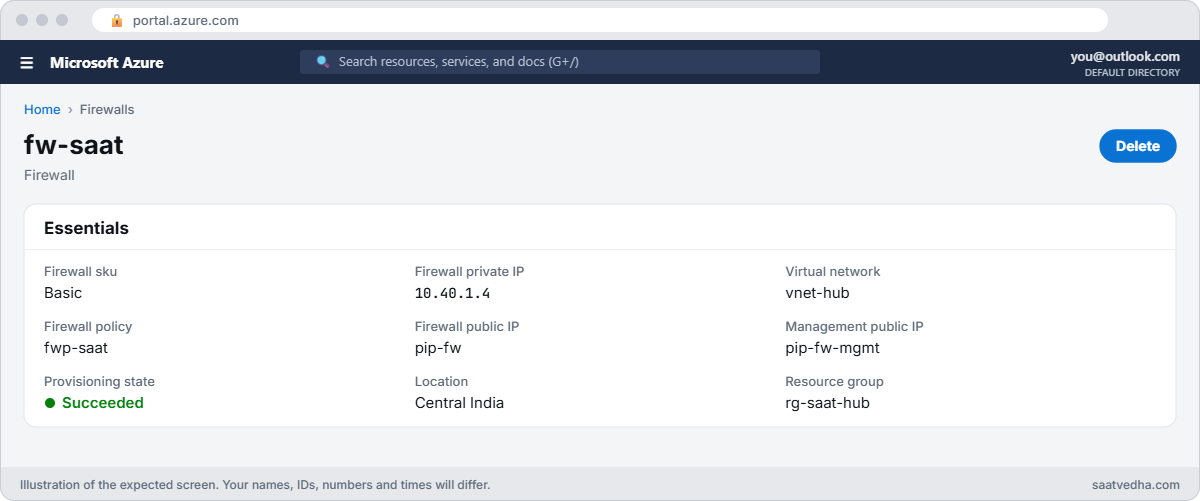

Azure Firewall overview with private IP and Basic tier
fw-saat overview: Basic tier, private IP 10.40.1.4.
Allowed HTTPS site and denied HTTP site through Azure Firewall
The firewall allows Microsoft Learn and denies a site with no rule.

✅ Checkpoint: fw-saat runs at 10.40.1.4, spoke routes point to it, an allowed site works and an unknown site is denied.

Break It, Then Fix It

Keep everything running for both breaks, then clean up at the end of this section.

1Break it: the spokes can’t talk any more

In Lesson 47, spoke 1 could ping spoke 2. Try it now:

az vm run-command invoke --resource-group rg-saat-l48 --name vm-s1 --command-id RunShellScript --scripts 'ping -c 2 -W 2 10.42.1.4 | tail -2' --query "value[0].message" -o tsv

You should see something like this:

[stdout]
2 packets transmitted, 0 received, 100% packet loss, time 1018ms

Nothing is broken in routing. The firewall received the pings and dropped them, because there’s no network rule for spoke-to-spoke traffic and the default is deny. Prove it from the logs (allow 5 to 10 minutes for them to arrive):

$ws = az monitor log-analytics workspace show --resource-group rg-saat-core --workspace-name law-saat --query customerId -o tsv
az monitor log-analytics query --workspace $ws --analytics-query "AZFWNetworkRule | where TimeGenerated > ago(30m) | project TimeGenerated, SourceIp, DestinationIp, Protocol, Action, ActionReason | take 5" -o table

You should see something like this:

Action    ActionReason    DestinationIp    Protocol    SourceIp    TimeGenerated
--------  --------------  ---------------  ----------  ----------  ----------------------------
Deny      Default Action  10.42.1.4        ICMP        10.41.1.4   2026-10-21T10:42:13.0000000Z

Fix it: add a network rule collection that allows ICMP between the spokes, wait a minute, and ping again:

az network firewall policy rule-collection-group collection add-filter-collection --resource-group rg-saat-hub --policy-name fwp-saat --rcg-name rcg-saat --name allow-spokes --collection-priority 200 --action Allow --rule-type NetworkRule --rule-name spoke-icmp --source-addresses 10.41.0.0/16 10.42.0.0/16 --destination-addresses 10.41.0.0/16 10.42.0.0/16 --ip-protocols ICMP --destination-ports * -o none
az vm run-command invoke --resource-group rg-saat-l48 --name vm-s1 --command-id RunShellScript --scripts 'ping -c 2 -W 2 10.42.1.4 | tail -2' --query "value[0].message" -o tsv

The ping now gets 2 received. In real life, allow only the ports the apps need, not everything.

2Break it: apt update fails behind the firewall

Patch the VM. The Ubuntu servers are allowed, so this should work:

az vm run-command invoke --resource-group rg-saat-l48 --name vm-s1 --command-id RunShellScript --scripts 'apt-get update 2>&1 | tail -3' --query "value[0].message" -o tsv

You should see something like this:

[stdout]
Err:1 http://azure.archive.ubuntu.com/ubuntu noble InRelease
  470  status code 470 [IP: ... 80]
E: Failed to fetch http://azure.archive.ubuntu.com/ubuntu/dists/noble/InRelease  470  status code 470

Status 470 is the firewall’s deny. The rule allows *.ubuntu.com on HTTPS only, but Azure’s Ubuntu images download packages over plain HTTP on port 80. The package signatures protect the files, so HTTP is normal here.

Fix it: add HTTP to the rule, wait a minute, and run the update again:

az network firewall policy rule-collection-group collection rule update --resource-group rg-saat-hub --policy-name fwp-saat --rcg-name rcg-saat --collection-name allow-web --name web-https --protocols Http=80 Https=443 -o none
az vm run-command invoke --resource-group rg-saat-l48 --name vm-s1 --command-id RunShellScript --scripts 'apt-get update 2>&1 | tail -3' --query "value[0].message" -o tsv

You should see something like this:

[stdout]
Hit:4 http://azure.archive.ubuntu.com/ubuntu noble-security InRelease
Reading package lists...

apt update failing with status code 470 behind Azure Firewall
Status 470 means the firewall denied the HTTP request.

3Clean up (the firewall bills by the hour)

Delete the test VMs and the diagnostic setting, then the firewall, its public IPs and the policy. Remove the default routes, which point at a firewall that no longer exists:

az group delete --name rg-saat-l48 --yes --no-wait
az monitor diagnostic-settings delete --name fw-to-law --resource $fwId
az network firewall delete --resource-group rg-saat-hub --name fw-saat
az network public-ip delete --resource-group rg-saat-hub --name pip-fw
az network public-ip delete --resource-group rg-saat-hub --name pip-fw-mgmt
az network firewall policy delete --resource-group rg-saat-hub --name fwp-saat
az network route-table route delete --resource-group rg-saat-hub --route-table-name rt-spoke1 --name default-to-fw
az network route-table route delete --resource-group rg-saat-hub --route-table-name rt-spoke2 --name default-to-fw
az resource list --resource-group rg-saat-hub --query "[?contains(type,'Firewall') || contains(type,'publicIP')].name" -o tsv

The last command should print nothing.

The spoke-to-spoke routes still point to 10.40.1.4, and the management subnet stays; both cost nothing. If you deploy a firewall into the hub again, it takes the same IP and the design works again.

✅ Checkpoint: You fixed a default deny with a network rule and a 470 with an HTTP protocol, and nothing billable is left from this lesson.

This happened at work

The Windows servers that stopped being activated

A manufacturing company moved its spokes behind Azure Firewall with a 0.0.0.0/0 route. Everything tested fine on the day. Six weeks later, the help desk started getting screenshots of a watermark on Windows servers: “Activate Windows”.

Azure Windows VMs activate against Azure’s KMS service on TCP port 1688. That traffic now went to the firewall, which had application rules for web traffic but nothing for port 1688, so the default deny dropped it. Activation renewals fail quietly until the grace period ends, which is why it took weeks to show.

What they changed: a network rule for azkms.core.windows.net on TCP 1688, using an FQDN in a network rule, which needs Standard tier with DNS proxy turned on. They also searched AZFWNetworkRule for every Deny over 30 days and added rules for the real needs they found, and a weekly report now lists the top denied destinations.

Common mistakes and troubleshooting

MistakeWhat you seeWhat to do
No network rule for spoke-to-spoke trafficPings and app traffic between spokes failAdd a network rule collection; log shows Default Action.
Ubuntu updates allowed on HTTPS onlyapt shows status code 470Allow Http=80 for the Ubuntu FQDNs.
Forgetting it bills while idleLab costs pile upDelete the firewall the same day; redeploy later.
A route table on AzureFirewallSubnet sending 0.0.0.0/0 elsewhereFirewall loses internetLeave the firewall subnet with its default route to Internet.
FQDN in a network rule on BasicRule doesn’t work as expectedUse application rules, or Standard with DNS proxy.
Reading logs too soonEmpty query resultsWait 5 to 10 minutes; check the diagnostic setting.

Interview questions

Click a question to open it. Each one is written the way an interviewer would ask it. Under it you will see why they ask it and one way you could answer, in your own words.

Fresher level

1. What is Azure Firewall?

Why they ask this: The basic concept.

How you might answer: A managed, stateful firewall service, usually in a hub VNet, that filters traffic with network, application and DNAT rules and logs decisions.

2. What are the three rule types?

Why they ask this: Basic vocabulary.

How you might answer: DNAT rules for inbound port forwarding, network rules for IP, port and protocol, and application rules for FQDNs over HTTP and HTTPS.

3. What happens to traffic that no rule allows?

Why they ask this: The default behaviour.

How you might answer: It’s denied. Azure Firewall is default deny, so you must allow everything you need.

2–5 years experience

4. Spokes can’t reach each other after you add Azure Firewall. Why?

Why they ask this: A real troubleshooting path.

How you might answer: Routes now send traffic to the firewall, which drops it by default. Check AZFWNetworkRule for Deny, add a network rule for the needed ports, and confirm both spokes route through the firewall.

5. How are rules processed?

Why they ask this: They want the order.

How you might answer: By rule collection group priority, then collection priority, lower number first. DNAT, then network, then application rules; the first match wins and later rules aren’t checked.

6. What does status code 470 mean?

Why they ask this: A practical detail.

How you might answer: The firewall denied an HTTP request. The body says which rule or that no rule matched.

Senior level

7. Basic, Standard or Premium for a 300-user company?

Why they ask this: They want trade-offs.

How you might answer: Basic is cheap but limited to 250 Mbps, alert-only threat intelligence and no DNS proxy. Standard adds FQDNs in network rules, DNS proxy and web categories. Premium adds TLS inspection and IDPS for regulated workloads. Most mid-size companies start on Standard.

8. How do you manage firewall rules for 20 teams?

Why they ask this: They want governance.

How you might answer: One parent policy with base rules owned by the network team, child policies per environment, rule collection groups per team, IP groups for address lists, everything in Bicep with pull request reviews, and deny reports from the logs.

9. How do you avoid asymmetric routing with a hub firewall and a VPN gateway?

Why they ask this: A design detail.

How you might answer: Put a route table on GatewaySubnet sending spoke ranges to the firewall, disable gateway route propagation on spokes, and route on-premises ranges to the firewall from the spokes, so both directions are inspected.

Quick quiz

Q1. Which extra subnet does Azure Firewall Basic need?

  1. GatewaySubnet
  2. AzureFirewallManagementSubnet
  3. AzureBastionSubnet
  4. snet-mgmt
Show answer

B — Basic needs a management subnet and IP.

Q2. Spoke-to-spoke ping fails after adding the firewall. Most likely?

  1. Peering broken
  2. No network rule allows it
  3. DNS
  4. VM size
Show answer

B — Default deny drops unmatched traffic.

Q3. apt shows status code 470. What does it mean?

  1. Server down
  2. Firewall denied the HTTP request
  3. Disk full
  4. Wrong route
Show answer

B — 470 is the firewall deny.

Q4. Which are checked first?

  1. Application rules
  2. Network rules
  3. Web categories
  4. Threat intel only
Show answer

B — Network rules before application rules.

Q5. Traffic from vm-s1 to a public site leaves with which IP?

  1. vm-s1’s private IP
  2. The firewall’s public IP
  3. A random IP
  4. The spoke’s gateway IP
Show answer

B — The firewall SNATs to its public IP.

Quick recap

You’ve run a real hub firewall: routed through it, written rules, read its logs, and removed it before it cost much.

  • Azure Firewall is stateful and default deny.
  • Basic needs a management subnet and second public IP.
  • Network rules are checked before application rules.
  • Read AZFWNetworkRule and AZFWApplicationRule to see denies.
  • Delete lab firewalls the same day; they bill by the hour.

Next lesson

Lesson 49: VPN Gateway: site-to-site to a simulated office → You connect the hub to a simulated office network with a site-to-site VPN and turn on gateway transit for the spokes.

Further reading: Azure Firewall

Want to go deeper into Azure Firewall? See Microsoft’s What is Azure Firewall? and Azure Firewall rule processing logic. You can also see the full plan for this course on the Azure Cloud Administration course page.

Scroll to Top