Azure Monitor Agent not sending data

“Azure Monitor Agent not reporting” is a quiet failure: no error pops up, dashboards just go flat and alerts stop firing. You usually find out when someone asks why there were no alerts during an outage.

Azure Monitor Agent (AMA) needs five things to send data: a running VM, the AMA extension, a managed identity to authenticate, a data collection rule (DCR) associated with the VM, and an outbound network path to Azure Monitor. And even when all five are fine, a DCR that collects the wrong things looks exactly like an agent that sends nothing.

In this lab you go back to web01 and the DCR you built in Lesson 32, find out why it has stopped reporting, then break the DCR’s scope and the identity, and fix each one in order.

TimeYou needCostBy the end you can
About 60 minutesweb01 in rg-saat-vms with AMA, dcr-saat-basic and law-saat from Lesson 32, the CLIAbout 10 US cents: web01 running for an hour and a temporary NAT gateway for its outbound accessCheck every link AMA depends on, find missing data in the DCR, and fix identity and network problems

What it is, in one line

Azure Monitor Agent sends data only when the VM, extension, identity, DCR association and network path are all in place.

In Simple Words

The newspaper delivery boy

A delivery boy brings the newspaper every morning. For it to arrive, he must be working that day (VM running), have his bicycle (the agent), carry his ID card to enter the printing press (managed identity), have your address on his list (DCR association), and the road must be open (network).

If any one is missing, no paper. But there’s a sneakier problem: he arrives every day with the paper, but your list says “sports page only”, so you never see the business news you wanted.

That’s a DCR that collects the wrong log levels: the agent is fine, the data you want was never ordered.

Engineer's View

What AMA depends on

  • Extension: AzureMonitorLinuxAgent or AzureMonitorWindowsAgent, provisioned Succeeded, installed through the VM agent.
  • Identity: AMA authenticates with the VM’s system-assigned (or a user-assigned) managed identity. No role is needed for sending data, but the identity must exist.
  • DCR association: without at least one association, AMA has nothing to collect and nowhere to send, not even a heartbeat.
  • DCR content: data sources (performance counters, syslog facilities and levels, Windows event XPath), destinations (workspaces) and data flows. Data not listed is never collected.
  • Network: HTTPS to the Azure Monitor control and ingestion endpoints (global.handler.control.monitor.azure.com, the region’s handler, and the workspace’s ods.opinsights.azure.com), or private link through an Azure Monitor Private Link Scope.
  • Workspace: a daily cap stops ingestion for the rest of the day once reached; law-saat has a 0.1 GB cap.
  • Logs on the VM: /var/opt/microsoft/azuremonitoragent/log/ on Linux (mdsd.err, mdsd.warn), C:\WindowsAzure\Resources\AMADataStore.* on Windows.

How it works, step by step

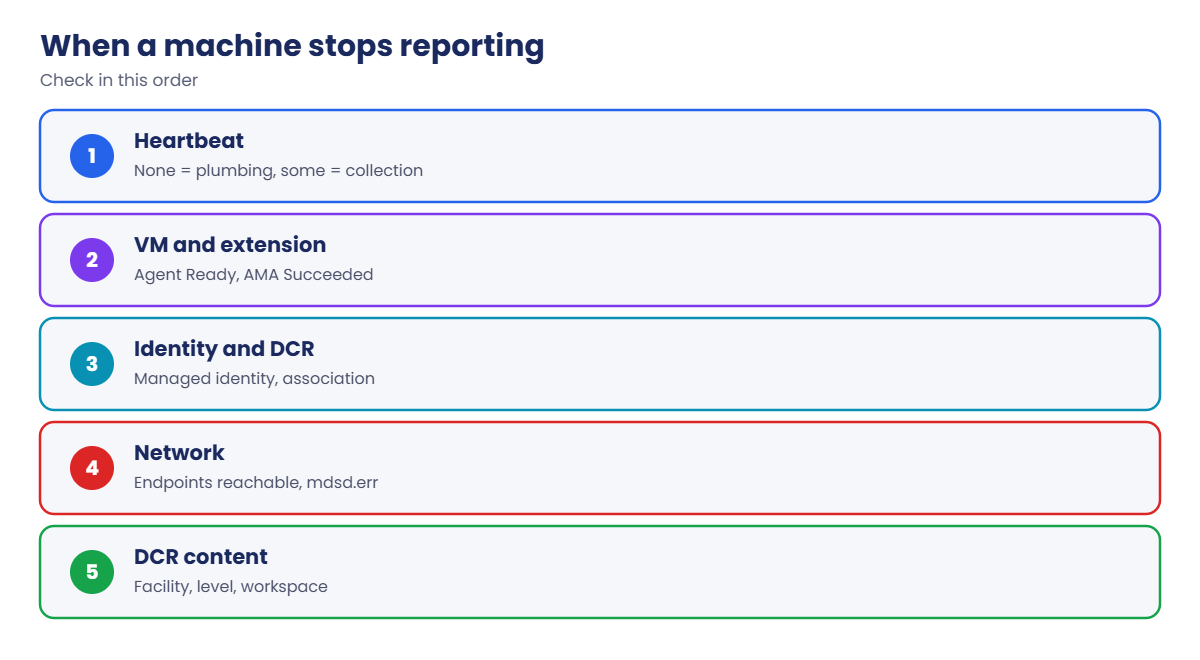
The order to check when a machine stops reporting:

Azure Monitor Agent not reporting: the checklist in order
  1. Heartbeat: query the workspace. No heartbeat means the agent isn’t sending anything; heartbeat but missing data points to the DCR.
  2. VM and extension: VM running, VM agent Ready, AMA extension Succeeded.
  3. Identity and association: the VM has a managed identity, and at least one DCR is associated.
  4. Network: the VM can reach the Azure Monitor endpoints; check mdsd.err for connection errors.
  5. DCR content: the data you expect is actually in a data source and flows to the workspace you’re querying.

Heartbeat splits the problem in two. That one query tells you whether to look at the agent’s plumbing (steps 2 to 4) or at what it was told to collect (step 5).

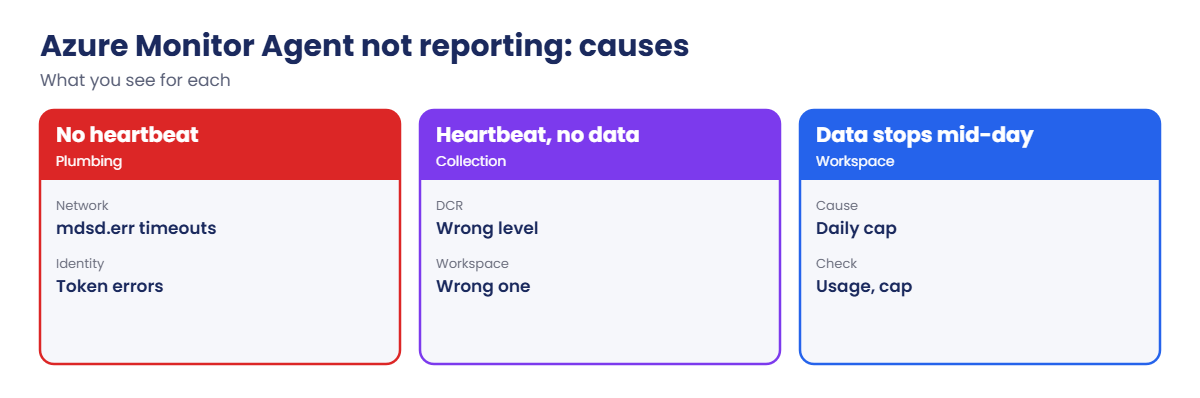
Causes of missing Azure Monitor Agent data

Also check the obvious: are you querying the same workspace the DCR sends to? Teams with several workspaces lose hours to this.

Find out why web01 stopped reporting

1Is web01 reporting?

Start web01 and look for its last heartbeat in law-saat:

az vm start --resource-group rg-saat-vms --name web01
$ws = az monitor log-analytics workspace show --resource-group rg-saat-core --workspace-name law-saat --query customerId -o tsv
az monitor log-analytics query --workspace $ws --analytics-query "Heartbeat | where Computer == 'web01' | summarize last_heartbeat = max(TimeGenerated)" -o table

You should see a last heartbeat from Lesson 32, days ago, or nothing at all. web01 isn’t reporting.

2Walk the checklist

Check the VM agent, the AMA extension, the identity and the DCR associations:

az vm get-instance-view --resource-group rg-saat-vms --name web01 --query "instanceView.vmAgent.statuses[0].displayStatus" -o tsv
az vm extension show --resource-group rg-saat-vms --vm-name web01 --name AzureMonitorLinuxAgent --query provisioningState -o tsv
az vm show --resource-group rg-saat-vms --name web01 --query identity.type -o tsv
$vmId = az vm show --resource-group rg-saat-vms --name web01 --query id -o tsv
az rest --method get --url "https://management.azure.com${vmId}/providers/Microsoft.Insights/dataCollectionRuleAssociations?api-version=2022-06-01" --query "value[].name" -o tsv

You should see something like this:

Ready
Succeeded
SystemAssigned
dcra-saat-basic

Agent, extension, identity and association are all fine. That leaves the network. web01 sits in a private subnet, and in Lesson 32 you removed the temporary NAT gateway, so the agent can’t reach Azure Monitor. Confirm it in the agent’s own log:

az vm run-command invoke --resource-group rg-saat-vms --name web01 --command-id RunShellScript --scripts 'tail -n 3 /var/opt/microsoft/azuremonitoragent/log/mdsd.err' --query "value[0].message" -o tsv

You should see recent lines about failed connections or timeouts to the Azure Monitor endpoints.

3Give web01 an outbound path

Add a temporary NAT gateway to snet-web, then wait about 5 minutes and check the heartbeat:

az network public-ip create --resource-group rg-saat-core --name pip-nat-l70 --sku Standard -o none
az network nat gateway create --resource-group rg-saat-core --name nat-l70 --public-ip-addresses pip-nat-l70 -o none
az network vnet subnet update --resource-group rg-saat-core --vnet-name vnet-saat --name snet-web --nat-gateway nat-l70 -o none
az monitor log-analytics query --workspace $ws --analytics-query "Heartbeat | where Computer == 'web01' | summarize last_heartbeat = max(TimeGenerated)" -o table

You should see a heartbeat from the last few minutes, for example:

Last_heartbeat
----------------------------
2026-10-21T09:41:03.0000000Z
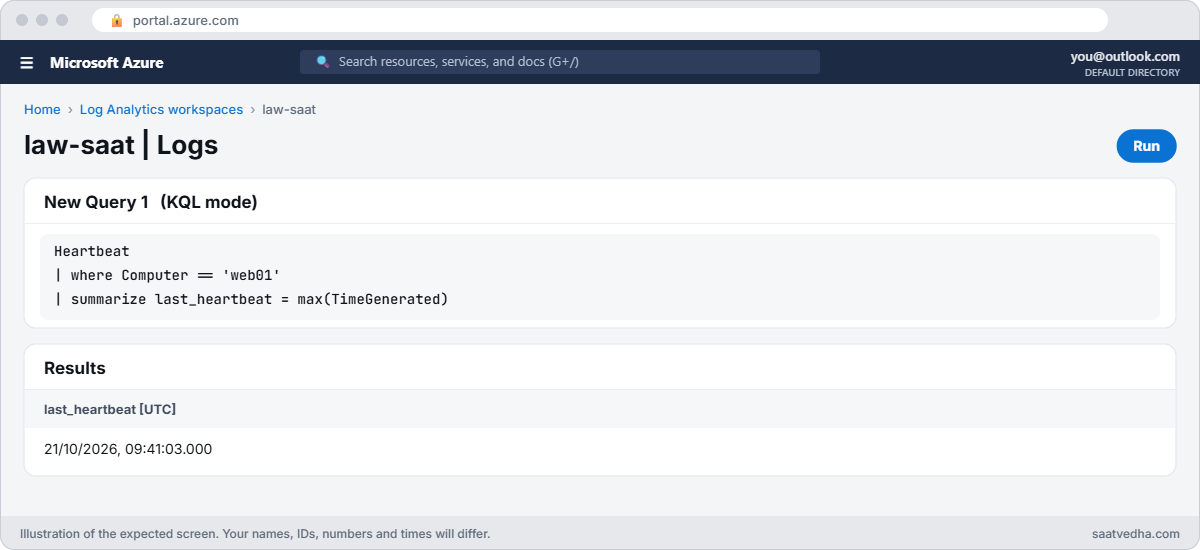

Azure Monitor Agent heartbeat query for web01 in Log Analytics
law-saat Logs: a fresh heartbeat from web01.
AMA checklist results for web01
Everything checks out except the network path.

✅ Checkpoint: You walked the AMA checklist, found the network gap from the agent’s log, and web01 is reporting again.

Break It, Then Fix It

Keep web01 running and the NAT gateway in place for both breaks.

1Break it: heartbeat is fine, but the app’s logs are missing

The app on web01 writes an informational message to syslog, and its team says it never shows up:

az vm run-command invoke --resource-group rg-saat-vms --name web01 --command-id RunShellScript --scripts 'logger -p user.info saatvedha app started; logger -p user.warning saatvedha disk almost full; echo sent' --query "value[0].message" -o tsv
Start-Sleep -Seconds 300
az monitor log-analytics query --workspace $ws --analytics-query "Syslog | where TimeGenerated > ago(30m) and SyslogMessage has 'saatvedha' | project TimeGenerated, SeverityLevel, SyslogMessage" -o table

You should see only the warning:

TimeGenerated                 SeverityLevel    SyslogMessage
----------------------------  ---------------  ---------------------------
2026-10-21T09:47:12.0000000Z  warning          saatvedha disk almost full

The agent works; the warning arrived. The info message was never collected. Look at what the DCR asks for:

$sub = az account show --query id -o tsv
$dcrId = "/subscriptions/$sub/resourceGroups/rg-saat-core/providers/Microsoft.Insights/dataCollectionRules/dcr-saat-basic"
az rest --method get --url "https://management.azure.com${dcrId}?api-version=2022-06-01" --query "properties.dataSources.syslog[].{name:name, facilities:join(',', facilityNames), levels:join(',', logLevels)}" -o table

You should see something like this:

Name         Facilities                Levels
-----------  ------------------------  ---------------------------------------
syslog-base  auth,daemon,syslog,user   Warning,Error,Critical,Alert,Emergency

Lesson 32’s DCR collects Warning and above. That was a good choice for cost, and it’s why the info message never left the VM.

Fix it with a careful read-modify-write: save the current DCR, add a source for user Info and Notice only, and put it back:

New-Item -ItemType Directory -Force C:\azure-lab\l70 | Out-Null
az rest --method get --url "https://management.azure.com${dcrId}?api-version=2022-06-01" -o json | Set-Content C:\azure-lab\l70\dcr-original.json
$dcr = Get-Content C:\azure-lab\l70\dcr-original.json -Raw | ConvertFrom-Json
$src = [pscustomobject]@{ name = 'syslog-user-info'; streams = @('Microsoft-Syslog'); facilityNames = @('user'); logLevels = @('Info', 'Notice') }
$dcr.properties.dataSources.syslog += $src
$body = @{ location = $dcr.location; properties = @{ dataSources = $dcr.properties.dataSources; destinations = $dcr.properties.destinations; dataFlows = $dcr.properties.dataFlows } }
$body | ConvertTo-Json -Depth 20 | Set-Content C:\azure-lab\l70\dcr-new.json
az rest --method put --url "https://management.azure.com${dcrId}?api-version=2022-06-01" --body '@C:\azure-lab\l70\dcr-new.json' --query "properties.provisioningState" -o tsv

You should see Succeeded. The agent picks up the change within a few minutes. Send a new info message and query again:

az vm run-command invoke --resource-group rg-saat-vms --name web01 --command-id RunShellScript --scripts 'logger -p user.info saatvedha app restarted; echo sent' --query "value[0].message" -o tsv
Start-Sleep -Seconds 300
az monitor log-analytics query --workspace $ws --analytics-query "Syslog | where TimeGenerated > ago(10m) and SyslogMessage has 'saatvedha app' | project TimeGenerated, SeverityLevel, SyslogMessage" -o table

The info message now appears.

2Break it: the identity is removed

Someone cleans up “unused” managed identities, including web01’s:

az vm identity remove --resource-group rg-saat-vms --name web01 -o none
Start-Sleep -Seconds 900
az monitor log-analytics query --workspace $ws --analytics-query "Heartbeat | where Computer == 'web01' | summarize last_heartbeat = max(TimeGenerated)" -o table
az vm run-command invoke --resource-group rg-saat-vms --name web01 --command-id RunShellScript --scripts 'tail -n 3 /var/opt/microsoft/azuremonitoragent/log/mdsd.err' --query "value[0].message" -o tsv

The last heartbeat stops moving forward, and the agent log shows errors about getting a token or authenticating, something like this:

Last_heartbeat
----------------------------
2026-10-21T09:53:40.0000000Z
[stdout]
... Failed to get access token from IMDS ... identity not found ...

Without an identity, AMA can’t prove which VM it is, so Azure Monitor refuses its data. Nothing changed in the DCR or the network. An identity can look “unused” because no role assignment refers to it, which is exactly the AMA case.

Fix it: give web01 a system-assigned identity again and wait for the heartbeat:

az vm identity assign --resource-group rg-saat-vms --name web01 -o none
Start-Sleep -Seconds 600
az monitor log-analytics query --workspace $ws --analytics-query "Heartbeat | where Computer == 'web01' | summarize last_heartbeat = max(TimeGenerated)" -o table

The heartbeat is current again.

Syslog info messages missing because of DCR log levels
The agent works; the DCR never asked for info messages.

3Clean up

Put the DCR back the way it was, remove the NAT gateway and deallocate web01:

$orig = Get-Content C:\azure-lab\l70\dcr-original.json -Raw | ConvertFrom-Json
@{ location = $orig.location; properties = @{ dataSources = $orig.properties.dataSources; destinations = $orig.properties.destinations; dataFlows = $orig.properties.dataFlows } } | ConvertTo-Json -Depth 20 | Set-Content C:\azure-lab\l70\dcr-restore.json
az rest --method put --url "https://management.azure.com${dcrId}?api-version=2022-06-01" --body '@C:\azure-lab\l70\dcr-restore.json' -o none
az network vnet subnet update --resource-group rg-saat-core --vnet-name vnet-saat --name snet-web --remove natGateway -o none
az network nat gateway delete --resource-group rg-saat-core --name nat-l70
az network public-ip delete --resource-group rg-saat-core --name pip-nat-l70
az vm deallocate --resource-group rg-saat-vms --name web01

✅ Checkpoint: You found three different reasons for “no data”: network, DCR content and identity, and you put everything back as it was.

This happened at work

The alert that never fired

An online retailer had a log search alert for “out of memory” messages from its Java services. During a sale, three servers ran out of memory and restarted repeatedly for 40 minutes. The alert never fired, and the incident review assumed Azure Monitor was broken.

Heartbeats were fine on every server. The Java services logged their memory errors to syslog facility local0, and the DCR only collected auth, daemon, syslog and user. The query was correct; the data had never been collected.

A new DCR applied by a platform team months earlier had quietly replaced an older one that included local0.

What they changed: every alert rule now has a “canary” test that writes a matching message once a day and checks it arrives, DCR changes go through review with a list of the alerts that depend on them, and a workbook compares heartbeat count with expected servers so silent agents are visible.

Common mistakes and troubleshooting

MistakeWhat you seeWhat to do
No DCR associationNo heartbeat at allAssociate at least one DCR with the VM.
No outbound path or private linkHeartbeat stops; network errors in mdsd.errNAT, proxy, or Azure Monitor Private Link Scope.
Identity removedHeartbeat stops; token errorsRestore the managed identity.
DCR collects the wrong levels or facilitiesHeartbeat fine, data missingAdd the facility and level to the DCR.
Querying a different workspace“No data” in the wrong placeCheck the DCR destination workspace.
Daily cap reachedData stops mid-dayReview the cap and ingestion volume.

Interview questions

Click a question to open it. Each one is written the way an interviewer would ask it. Under it you will see why they ask it and one way you could answer, in your own words.

Fresher level

1. What does Azure Monitor Agent need to send data?

Why they ask this: The basic concept.

How you might answer: The extension, a managed identity, an associated data collection rule, and network access to Azure Monitor endpoints.

2. What is a data collection rule?

Why they ask this: Basic vocabulary.

How you might answer: A resource that defines what to collect (counters, logs, events), how to transform it, and which destination to send it to; it’s associated with machines.

3. How do you check whether an agent is alive?

Why they ask this: A daily check.

How you might answer: Query the Heartbeat table for the computer and look at the latest time.

2–5 years experience

4. Heartbeat works but syslog data is missing. Why?

Why they ask this: A real troubleshooting path.

How you might answer: The DCR doesn’t include that facility or level, the data goes to another workspace, a transformation drops it, or the app writes somewhere else. Check the DCR content first.

5. No heartbeat from a VM. What do you check?

Why they ask this: Systematic method.

How you might answer: VM running and VM agent Ready, AMA extension state, managed identity, DCR association, outbound access or private link, and the agent logs on the VM.

6. How do you change a DCR safely?

Why they ask this: Change practice.

How you might answer: Export the current definition, change a copy, PUT it back, and keep the original to roll back. Better still, manage DCRs as code with reviews.

Senior level

7. How do you make sure monitoring itself is monitored?

Why they ask this: Senior thinking.

How you might answer: Alerts on missing heartbeats per server group, canary messages for critical alert rules, dashboards comparing expected and reporting machines, and alerts on ingestion caps.

8. How would you design DCRs for 1,000 servers?

Why they ask this: Architecture.

How you might answer: A small set of layered DCRs by role (base, web, database), associated by Azure Policy, stored as code, with transformations to cut noise and cost.

9. When do you need Azure Monitor Private Link Scope?

Why they ask this: Network design.

How you might answer: When agents have no internet path or policy forbids it: AMPLS gives private endpoints for ingestion and control, with DNS set up like other private endpoints.

Quick quiz

Q1. No heartbeat and no DCR association. Result?

  1. Data flows anyway
  2. Nothing is collected or sent
  3. Only performance data
  4. Only heartbeat
Show answer

B — AMA needs an association.

Q2. Heartbeat fine, info messages missing. Most likely?

  1. Network down
  2. DCR collects only Warning and above
  3. Identity removed
  4. Workspace deleted
Show answer

B — The DCR decides what is collected.

Q3. Where are AMA logs on Linux?

  1. /var/log/azure
  2. /var/opt/microsoft/azuremonitoragent/log
  3. /etc/ama
  4. /tmp
Show answer

B — mdsd.err and mdsd.warn live there.

Q4. Identity removed from the VM. Effect?

  1. None
  2. AMA can’t authenticate; data stops
  3. Only alerts stop
  4. The VM stops
Show answer

B — AMA uses the managed identity.

Q5. Safest way to change a DCR by hand?

  1. Delete and recreate
  2. Save, modify a copy, PUT back
  3. Edit on the VM
  4. Restart the agent
Show answer

B — Keep the original to roll back.

Quick recap

You can now find why any machine has gone quiet, and tell an agent problem from a collection problem in one query.

  • Heartbeat splits the problem: plumbing or collection.
  • AMA needs extension, identity, association and network.
  • A DCR only collects what it lists.
  • Removing a managed identity silently stops AMA.
  • Monitor the monitoring: heartbeat gaps and canary messages.

Next lesson

Lesson 71: Load Balancer and Application Gateway 502 errors → You fix 502 errors and unhealthy backends on Load Balancer and Application Gateway, from probes to certificates.

Further reading: Azure Monitor Agent not reporting

Want to go deeper into Azure Monitor Agent not reporting? See Microsoft’s Troubleshoot Azure Monitor Agent on Linux and Data collection rules in Azure Monitor. You can also see the full plan for this course on the Azure Cloud Administration course page.

Scroll to Top