VPN Gateway: site-to-site to a simulated office
-
Phase 0: Before you start
-
Phase 1: The foundation
-
Phase 2: Day-to-day operations
-
Phase 3: Enterprise architecture
-
Phase 4: Troubleshooting step by step
-
Phase 5: Final project and career
Azure VPN Gateway connects an Azure virtual network to another network, such as an office or a data centre, through an encrypted IPsec tunnel over the internet. It’s the most common way a company’s office reaches its Azure servers by private IP.
You don’t have an office router to practise with, so you’ll build one: a second VNet called vnet-onprem plays the office, with its own small gateway. Then you connect it to the hub, let spoke 1 use the hub’s gateway, and break the tunnel the way it breaks in real life.
This is a costlier lab. Gateways bill by the hour and take 30 to 45 minutes to create, so start them first, read while they build, and delete them the same day.
| Time | You need | Cost | By the end you can |
|---|---|---|---|
| About 2.5 hours (mostly waiting) | rg-saat-hub with GatewaySubnet and the Lesson 46 peerings, the CLI | About USD 0.80 if you finish within 2.5 hours: VpnGw1AZ USD 0.21 per hour plus Basic USD 0.036 per hour in Central India (Azure Retail Prices API, October 2026) | Build a site-to-site VPN, turn on gateway transit, and fix a shared key mismatch and a missing route |
What it is, in one line
A VPN gateway is a pair of managed routers in your VNet that build encrypted tunnels to other networks over the internet.
In Simple Words
A private tunnel under a busy road
Two schools sit on opposite sides of a busy road. Children could cross the road, but it’s noisy and anyone can watch. So the schools dig a tunnel under it, with a locked door at each end.
Both doors use the same secret code.
Now children walk between schools safely, and nobody on the road sees them. If one school changes its code and forgets to tell the other, the doors stay shut, even though the tunnel is fine.
The tunnel is the IPsec connection, the doors are the two gateways, and the secret code is the shared key.
Engineer's View
What a site-to-site VPN is made of
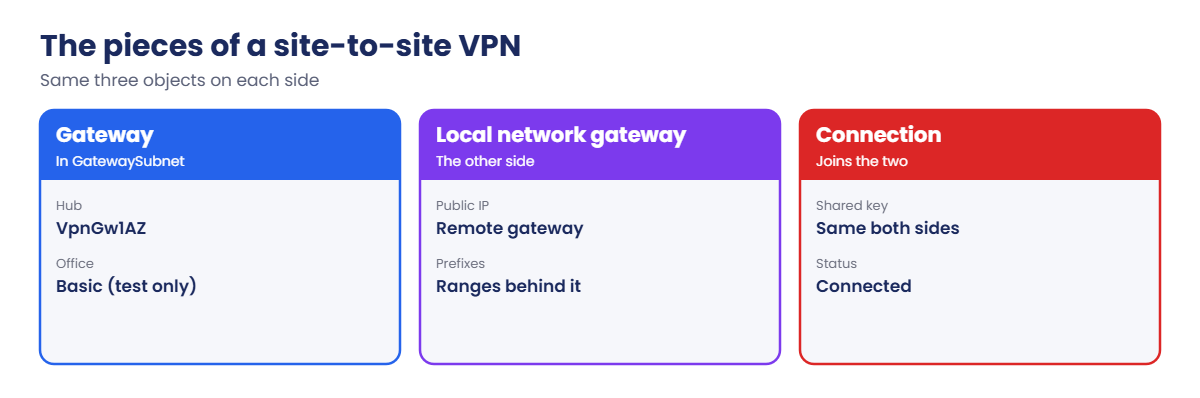
- Virtual network gateway: two managed instances in GatewaySubnet (/27 or larger). Route-based gateways use IKEv2 and are what you should build.
- SKUs: new gateways use the AZ SKUs (VpnGw1AZ to VpnGw5AZ), which are zone-redundant; the old non-AZ SKUs reached retirement in September 2026. Basic is for dev and test only: CLI or PowerShell, no BGP, no gateway transit, and it needs a Standard public IP.
- Local network gateway: Azure’s record of the other side: its public IP and the address ranges behind it.
- Connection: joins your gateway to a local network gateway with a shared key (pre-shared key) and IPsec settings. Both sides must match.
- Routing: without BGP, each side only knows the ranges you typed into its local network gateway. With BGP, the sides exchange routes automatically.
- Gateway transit: spokes peered to the hub use its gateway when the hub peering allows gateway transit and the spoke peering uses remote gateways.
How it works, step by step
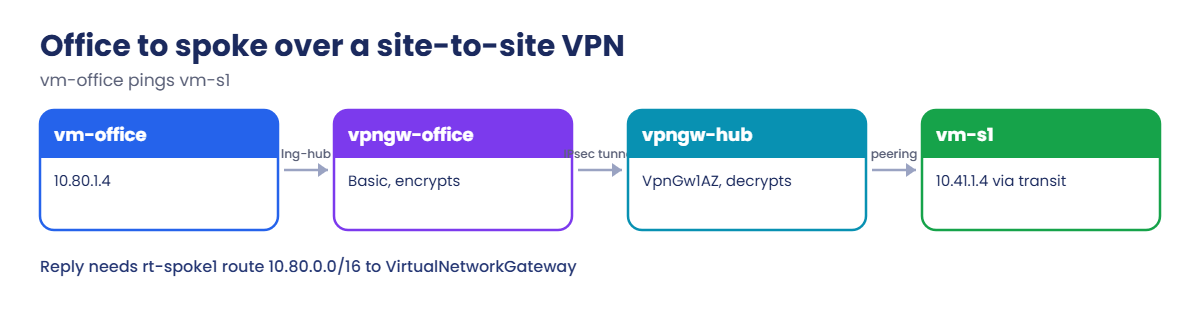
What happens when vm-office pings vm-s1 in spoke 1:
- vm-office (10.80.1.4) sends to 10.41.1.4. Its VNet learned 10.41.0.0/16 from lng-hub, so the next hop is vpngw-office.
- vpngw-office encrypts the packet and sends it over the internet to the hub gateway’s public IP.
- vpngw-hub decrypts it and forwards it across the hub-to-spoke1 peering, which allows gateway transit.
- vm-s1 replies to 10.80.1.4. Its route table sends 10.80.0.0/16 to the virtual network gateway.
- The reply goes back through the same tunnel.
Every hop needs a route: the office side needs the hub and spoke ranges, and the spoke needs the office range. Without BGP, you type those ranges in yourself.
When a tunnel is down, start with the connection status and the shared key on both sides. When the tunnel is up but traffic fails, check routes, exactly as in Lessons 46 and 47.
Connect a simulated office to the hub with a site-to-site VPN
Cost check: the gateways start billing as soon as they’re created. Delete them at the end of this lesson.
1Build the “office” network
Create vnet-onprem with its own GatewaySubnet and an office subnet:
az group create --name rg-saat-onprem --location centralindia --tags course=saatvedha-azure lesson=49 -o none
az network vnet create --resource-group rg-saat-onprem --name vnet-onprem --address-prefixes 10.80.0.0/16 --subnet-name GatewaySubnet --subnet-prefixes 10.80.0.0/27 --tags course=saatvedha-azure lesson=49 -o none
az network vnet subnet create --resource-group rg-saat-onprem --vnet-name vnet-onprem --name snet-office --address-prefixes 10.80.1.0/24 --default-outbound-access false -o none2Start both gateways (30 to 45 minutes)
Create a Standard public IP for each, then start the gateways without waiting:
az network public-ip create --resource-group rg-saat-hub --name pip-vpngw-hub --sku Standard --zone 1 2 3 --tags course=saatvedha-azure lesson=49 -o none
az network public-ip create --resource-group rg-saat-onprem --name pip-vpngw-office --sku Standard --tags course=saatvedha-azure lesson=49 -o none
az network vnet-gateway create --resource-group rg-saat-hub --name vpngw-hub --vnet vnet-hub --public-ip-addresses pip-vpngw-hub --gateway-type Vpn --vpn-type RouteBased --sku VpnGw1AZ --tags course=saatvedha-azure lesson=49 --no-wait
az network vnet-gateway create --resource-group rg-saat-onprem --name vpngw-office --vnet vnet-onprem --public-ip-addresses pip-vpngw-office --gateway-type Vpn --vpn-type RouteBased --sku Basic --tags course=saatvedha-azure lesson=49 --no-waitThe hub gets VpnGw1AZ because gateway transit doesn’t work with Basic. The office side is only a stand-in, so Basic keeps it cheap.
While they build, create one test VM in the office and one in spoke 1:
$offSub = az network vnet subnet show --resource-group rg-saat-onprem --vnet-name vnet-onprem --name snet-office --query id -o tsv
$s1Sub = az network vnet subnet show --resource-group rg-saat-hub --vnet-name vnet-spoke1 --name snet-app --query id -o tsv
az vm create --resource-group rg-saat-onprem --name vm-office --image Canonical:ubuntu-24_04-lts:server:latest --size Standard_B1s --subnet $offSub --private-ip-address 10.80.1.4 --public-ip-address '""' --nsg '""' --admin-username azureuser --generate-ssh-keys --tags course=saatvedha-azure lesson=49 -o none
az vm create --resource-group rg-saat-onprem --name vm-s1 --image Canonical:ubuntu-24_04-lts:server:latest --size Standard_B1s --subnet $s1Sub --private-ip-address 10.41.1.4 --public-ip-address '""' --nsg '""' --admin-username azureuser --generate-ssh-keys --tags course=saatvedha-azure lesson=49 -o noneThen wait for both gateways:
az network vnet-gateway wait --resource-group rg-saat-hub --name vpngw-hub --created
az network vnet-gateway wait --resource-group rg-saat-onprem --name vpngw-office --created
$hubIp = az network public-ip show --resource-group rg-saat-hub --name pip-vpngw-hub --query ipAddress -o tsv
$offIp = az network public-ip show --resource-group rg-saat-onprem --name pip-vpngw-office --query ipAddress -o tsv3Describe each side to the other
Each side gets a local network gateway: the other side’s public IP and the ranges behind it. The office must know the hub and both spokes:
az network local-gateway create --resource-group rg-saat-hub --name lng-office --gateway-ip-address $offIp --local-address-prefixes 10.80.0.0/16 --tags course=saatvedha-azure lesson=49 -o none
az network local-gateway create --resource-group rg-saat-onprem --name lng-hub --gateway-ip-address $hubIp --local-address-prefixes 10.40.0.0/16 10.41.0.0/16 10.42.0.0/16 --tags course=saatvedha-azure lesson=49 -o none4Connect them with a shared key
Generate one key and use it on both connections:
$key = -join ((65..90) + (97..122) + (48..57) | Get-Random -Count 24 | ForEach-Object { [char]$_ })
az network vpn-connection create --resource-group rg-saat-hub --name cn-hub-to-office --vnet-gateway1 vpngw-hub --local-gateway2 lng-office --shared-key $key -o none
az network vpn-connection create --resource-group rg-saat-onprem --name cn-office-to-hub --vnet-gateway1 vpngw-office --local-gateway2 lng-hub --shared-key $key -o none
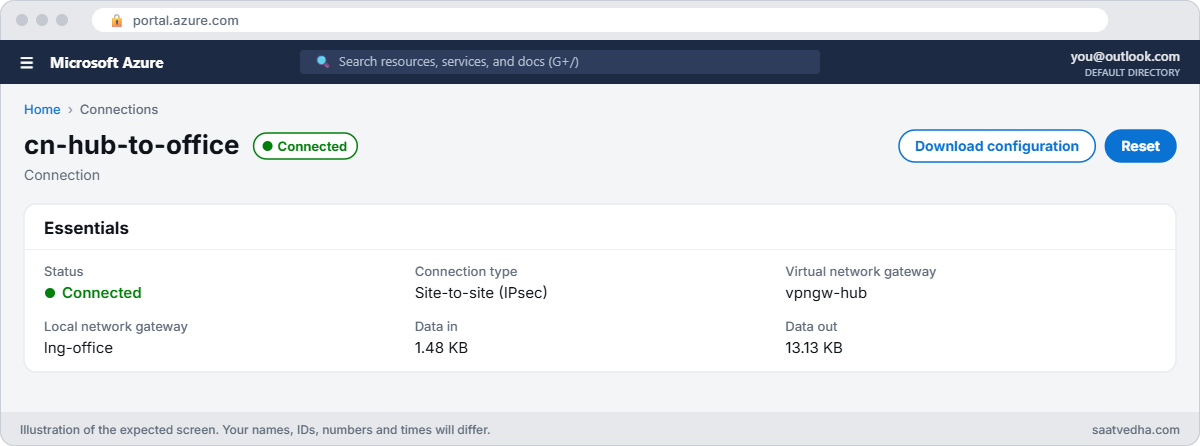
az network vpn-connection show --resource-group rg-saat-hub --name cn-hub-to-office --query "{status:connectionStatus, inBytes:ingressBytesTransferred, outBytes:egressBytesTransferred}" -o tableAfter a minute or two you should see something like this:
Status InBytes OutBytes
--------- --------- ----------
Connected 1480 13125Let spoke 1 use the hub gateway
Turn on gateway transit on the hub side and use remote gateways on the spoke side:
az network vnet peering update --resource-group rg-saat-hub --vnet-name vnet-hub --name hub-to-spoke1 --set allowGatewayTransit=true -o none
az network vnet peering update --resource-group rg-saat-hub --vnet-name vnet-spoke1 --name spoke1-to-hub --set useRemoteGateways=true -o none
az vm run-command invoke --resource-group rg-saat-onprem --name vm-office --command-id RunShellScript --scripts 'ping -c 2 -W 2 10.41.1.4 | tail -2' --query "value[0].message" -o tsvYou should see something like this:
[stdout]
2 packets transmitted, 0 received, 100% packet loss, time 1015msThe tunnel is up and the peering is right, yet the ping fails. Hold that thought: it’s the first break below.

✅ Checkpoint: Both gateways exist, cn-hub-to-office shows Connected with bytes moving, and spoke 1’s peering uses the hub’s gateway.
Break It, Then Fix It
Keep the gateways and VMs running for both breaks, then clean up.
1Break it: spoke 1 has no route to the office
Look at vm-s1’s effective routes:
az network nic show-effective-route-table --resource-group rg-saat-onprem --name vm-s1VMNic --query "value[?nextHopType!='None'].{source:source, prefix:addressPrefix[0], nextHop:nextHopType}" -o tableYou should see something like this:
Source Prefix NextHop
------- ------------ ----------------
Default 10.41.0.0/16 VnetLocal
Default 10.40.0.0/16 VNetPeering
Default 0.0.0.0/0 Internet
User 10.42.0.0/16 VirtualApplianceThere’s no 10.80.0.0/16 route. The office’s pings arrive at vm-s1, but the replies have nowhere to go. The reason is a setting from Lesson 47: rt-spoke1 has gateway route propagation turned off, so routes from the hub’s gateway never reach spoke 1.
Fix it: add a user route that sends the office range to the gateway, then test again:
az network route-table route create --resource-group rg-saat-hub --route-table-name rt-spoke1 --name to-office --address-prefix 10.80.0.0/16 --next-hop-type VirtualNetworkGateway -o none
az vm run-command invoke --resource-group rg-saat-onprem --name vm-office --command-id RunShellScript --scripts 'ping -c 2 -W 2 10.41.1.4 | tail -2' --query "value[0].message" -o tsvYou should see something like this:
[stdout]
2 packets transmitted, 2 received, 0% packet loss, time 1002ms
rtt min/avg/max/mdev = 4.912/5.106/5.301/0.194 msKeeping propagation off and adding the route yourself is deliberate: when a firewall comes back into the hub, you change this one route to point at it, and on-premises traffic is inspected too.
2Break it: someone changes the key on one side
An engineer rotates the key on the office side only:
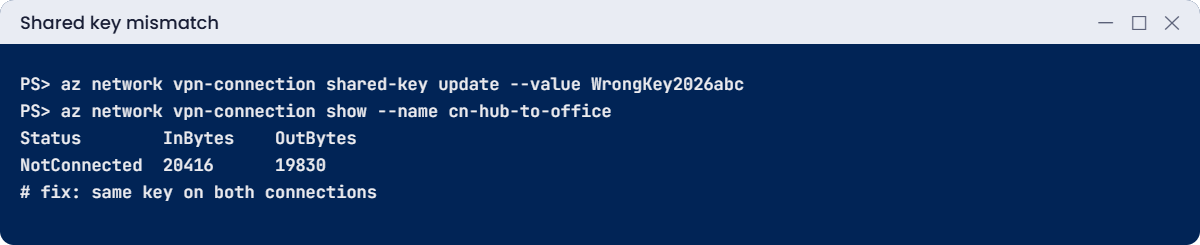
az network vpn-connection shared-key update --resource-group rg-saat-onprem --connection-name cn-office-to-hub --value WrongKey2026abc -o none
az network vpn-connection show --resource-group rg-saat-hub --name cn-hub-to-office --query "{status:connectionStatus, inBytes:ingressBytesTransferred, outBytes:egressBytesTransferred}" -o tableWithin a few minutes you should see something like this:
Status InBytes OutBytes
------------ --------- ----------
NotConnected 20416 19830The tunnel drops and the byte counters stop growing. The gateways, IPs and routes are all fine; the two ends simply can’t agree on the key. Compare the keys on both sides:
az network vpn-connection shared-key show --resource-group rg-saat-hub --connection-name cn-hub-to-office --query value -o tsv
az network vpn-connection shared-key show --resource-group rg-saat-onprem --connection-name cn-office-to-hub --query value -o tsvThe two values differ. Fix it: set the office side back to the real key, and check again:
az network vpn-connection shared-key update --resource-group rg-saat-onprem --connection-name cn-office-to-hub --value $key -o none
az network vpn-connection show --resource-group rg-saat-hub --name cn-hub-to-office --query "{status:connectionStatus, inBytes:ingressBytesTransferred, outBytes:egressBytesTransferred}" -o tableAfter a minute or two the status is Connected again.
3Clean up (gateways bill by the hour)
Turn gateway transit off, then delete the connections, gateways, local gateways and the office resource group:
az network vnet peering update --resource-group rg-saat-hub --vnet-name vnet-spoke1 --name spoke1-to-hub --set useRemoteGateways=false -o none
az network vnet peering update --resource-group rg-saat-hub --vnet-name vnet-hub --name hub-to-spoke1 --set allowGatewayTransit=false -o none
az network route-table route delete --resource-group rg-saat-hub --route-table-name rt-spoke1 --name to-office
az network vpn-connection delete --resource-group rg-saat-hub --name cn-hub-to-office
az network local-gateway delete --resource-group rg-saat-hub --name lng-office
az network vnet-gateway delete --resource-group rg-saat-hub --name vpngw-hub
az network public-ip delete --resource-group rg-saat-hub --name pip-vpngw-hub
az group delete --name rg-saat-onprem --yes
az resource list --tag lesson=49 -o tableThe last command should print nothing. Deleting a gateway takes 10 to 20 minutes.
✅ Checkpoint: You fixed a missing gateway route and a shared key mismatch, and no gateway is left billing.
This happened at work
The new spoke the office couldn’t see
An insurance company connected its head office to an Azure hub with a site-to-site VPN. There was no BGP, because the office firewall team found static routes simpler. It worked for two years.
Then a new spoke, 10.46.0.0/16, went live for a claims app. Azure engineers tested it from other spokes and from the hub: perfect. On launch morning, every office user got timeouts.
The office firewall had never been told that 10.46.0.0/16 lived behind the tunnel, so it sent that traffic to its internet link.
What they changed: they turned on BGP on both sides so new spokes are advertised automatically. Until then, the spoke checklist included “add the range to the office firewall and to the local network gateway”, and every new spoke was tested from an office PC before go-live, not only from Azure.
Common mistakes and troubleshooting
| Mistake | What you see | What to do |
|---|---|---|
| Different shared keys on each side | Status NotConnected, bytes frozen | Compare shared-key show on both sides; set the same key. |
| Basic SKU on the hub gateway | Gateway transit not available | Use an AZ SKU such as VpnGw1AZ for the hub. |
| Spoke route table with propagation off | Office traffic arrives, replies lost | Add a route to VirtualNetworkGateway or turn propagation on. |
| Missing ranges in the local network gateway | Some networks unreachable from the office | Add every range, or use BGP. |
| Gateway deleted while useRemoteGateways is on | Delete blocked or spokes lose routes | Turn off gateway transit first. |
| GatewaySubnet too small or with an NSG | Gateway creation fails or tunnel unstable | Use /27 or larger and no NSG on GatewaySubnet. |
Interview questions
Click a question to open it. Each one is written the way an interviewer would ask it. Under it you will see why they ask it and one way you could answer, in your own words.
Fresher level
1. What is a site-to-site VPN?
Why they ask this: The basic concept.
How you might answer: An encrypted IPsec tunnel over the internet between an Azure VPN gateway and an on-premises VPN device, so both networks talk by private IP.
2. What is a local network gateway?
Why they ask this: Basic vocabulary.
How you might answer: Azure’s object for the other side: its public IP and the address ranges behind it, or its BGP settings.
3. Which subnet does a VPN gateway use?
Why they ask this: A setup detail.
How you might answer: A subnet named exactly GatewaySubnet, /27 or larger, with nothing else in it.
2–5 years experience
4. The connection shows NotConnected. What do you check?
Why they ask this: A real troubleshooting path.
How you might answer: Shared keys on both sides, the public IPs in both local network gateways, IKE and IPsec settings, the on-premises device logs, and Network Watcher VPN troubleshoot. Then Resource Health for the gateway.
5. The tunnel is up but one subnet can’t reach on-premises. Why?
Why they ask this: Route thinking.
How you might answer: Routes: the on-premises side may not know that range, the local network gateway may be missing a prefix, or a spoke route table may block gateway routes. Check effective routes on the Azure VM first.
6. What do you need for spokes to use the hub’s VPN gateway?
Why they ask this: Gateway transit.
How you might answer: Allow gateway transit on the hub peering, use remote gateways on the spoke peering, a non-Basic gateway in the hub, and routes in the spoke if its route table doesn’t propagate gateway routes.
Senior level
7. BGP or static routes for a hybrid connection?
Why they ask this: They want trade-offs.
How you might answer: BGP advertises ranges automatically, supports failover across tunnels and active-active gateways, and avoids forgotten prefixes. Static is simpler for one small site. For anything growing, BGP.
8. How do you make a VPN connection highly available?
Why they ask this: They want design depth.
How you might answer: Active-active gateway with zone-redundant AZ SKU, two on-premises devices or tunnels, BGP so routes fail over, and optionally ExpressRoute with VPN as backup.
9. How do you rotate a VPN shared key without an outage?
Why they ask this: They want operations thinking.
How you might answer: Plan a short window, update the key on the on-premises device and the Azure connection together, watch the connection status, and keep the old key ready to roll back. With two tunnels, rotate one at a time.
Quick quiz
Q1. Which subnet name must a VPN gateway use?
- snet-gateway
- GatewaySubnet
- AzureVpnSubnet
- Any /27
Show answer
B — The name must be exactly GatewaySubnet.
Q2. Which SKU can’t be used for gateway transit?
- VpnGw1AZ
- Basic
- VpnGw2AZ
- VpnGw3AZ
Show answer
B — Basic doesn’t support gateway transit.
Q3. Status NotConnected right after a key change. First check?
- VM size
- Shared keys on both sides
- NSG on the VM
- DNS
Show answer
B — Mismatched keys stop the tunnel.
Q4. Spoke route table has propagation off. How does the spoke reach on-premises?
- It can’t
- Add a route with next hop VirtualNetworkGateway
- Add an NSG rule
- Restart the gateway
Show answer
B — A user route replaces the propagated one.
Q5. Without BGP, how does Azure know the office ranges?
- Automatically
- From the local network gateway prefixes
- From DNS
- From the NSG
Show answer
B — Static prefixes come from the local network gateway.
Quick recap
You’ve built a hybrid connection from scratch and fixed the two faults that cause most VPN tickets.
- A site-to-site VPN needs a gateway, a local network gateway and a connection.
- Both sides must use the same shared key.
- Basic is for testing only and has no gateway transit.
- Without BGP, every range is typed in by hand on both sides.
- Spokes with propagation off need a route to the gateway.
Next lesson
Lesson 50: ExpressRoute: design, peering and BGP → You learn how ExpressRoute circuits, peering and BGP work, and walk through a simulated circuit setup and failure.
Further reading: Azure VPN Gateway
Want to go deeper into Azure VPN Gateway? See Microsoft’s About gateway SKUs and Configure VPN gateway transit for virtual network peering. You can also see the full plan for this course on the Azure Cloud Administration course page.
