Commvault with Azure Blob storage

Commvault Azure Blob storage is one of the most common enterprise backup designs in Azure: Commvault protects servers, databases and VMs, and writes the backup data to an Azure storage account as a cloud library. Azure becomes the off-site copy, or the only copy.

Commvault is a paid product, so this lesson is a concept lesson with a simulated lab. You learn the architecture, the Azure settings Commvault depends on, and a real troubleshooting checklist. The lab uses the Azure CLI as a stand-in “MediaAgent” that writes Commvault-style chunks to Blob, so you can see and break exactly what Commvault would.

Most Commvault-to-Azure incidents aren’t Commvault bugs. They’re Azure settings: a rotated key, a firewall rule, an immutability policy longer than the retention, or a storage tier nobody planned for.

TimeYou needCostBy the end you can
About 45 minutesThe storage account from Lesson 21, the CLIUnder one US cent: 3 MB in the Cool tier for a dayDesign Commvault cloud libraries on Azure Blob and troubleshoot them from the Azure side

What it is, in one line

Commvault writes deduplicated backup chunks to an Azure Blob container, which it treats as a cloud storage library.

In Simple Words

The school’s storage room across town

The school office (Commvault) packs old exam papers into numbered boxes and drives them to a rented storage room across town (Azure Blob). A list at the office says which paper is in which box.

The storage company gives the office a key card. If the card is changed and nobody tells the office, the van arrives and can’t get in. If the storage company has a rule “no box leaves for 2 years”, the office can’t throw away old boxes, however much it wants to.

Almost every problem in this lesson is one of those two things: the key card, or the storage company’s rules.

Engineer's View

How Commvault uses Azure Blob

  • Components: the CommServe server runs the CommCell (jobs, catalog, schedules); MediaAgents move data and hold the deduplication database; Command Center is the web console. Commvault Cloud is the current product family name.
  • Cloud library: one storage account and container per library, added in Command Center as Microsoft Azure Storage. Commvault writes folders like CV_MAGNETIC/V_101/CHUNK_2001/SFILE_CONTAINER_001.
  • Authentication: access key and account name; IAM VM role assignment (the MediaAgent VM’s managed identity with Storage Blob Data Contributor, or Owner for WORM); or IAM AD application (a service principal with Storage Account Contributor and Storage Blob Data Contributor).
  • Storage class: Hot, Cool, Cold, Archive, or the container’s default. Archive needs a recall workflow before restores.
  • Network: the service host defaults to blob.core.windows.net; with private endpoints, use the privatelink host. MediaAgents must pass the storage firewall (Lesson 26).
  • WORM: Commvault can lock data with Azure immutability policies. Locked data can’t be pruned until the lock ends.
  • Defender for Storage: Commvault’s guidance is to exclude its containers or disable scanning there, because malware scanning on deduplicated chunks adds cost and noise.

How it works, step by step

What happens during a Commvault backup to Azure:

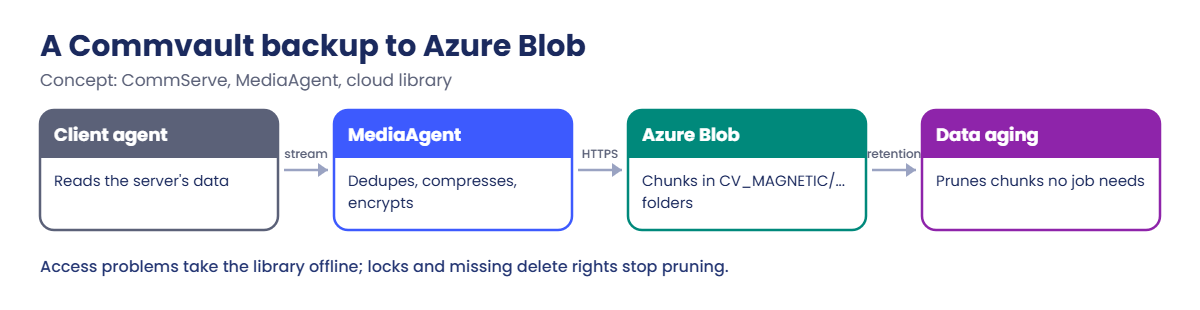
Commvault Azure Blob backup flow from client to cloud library
  1. The CommServe starts the job; the client agent reads the data and sends it to a MediaAgent.
  2. The MediaAgent deduplicates against its DDB, compresses and encrypts the new blocks.
  3. It writes them as chunk files to the container, using the library’s credentials and storage class.
  4. The catalog records which job lives in which chunks.
  5. Later, data aging prunes chunks no job needs any more. That needs delete rights, and no active lock.

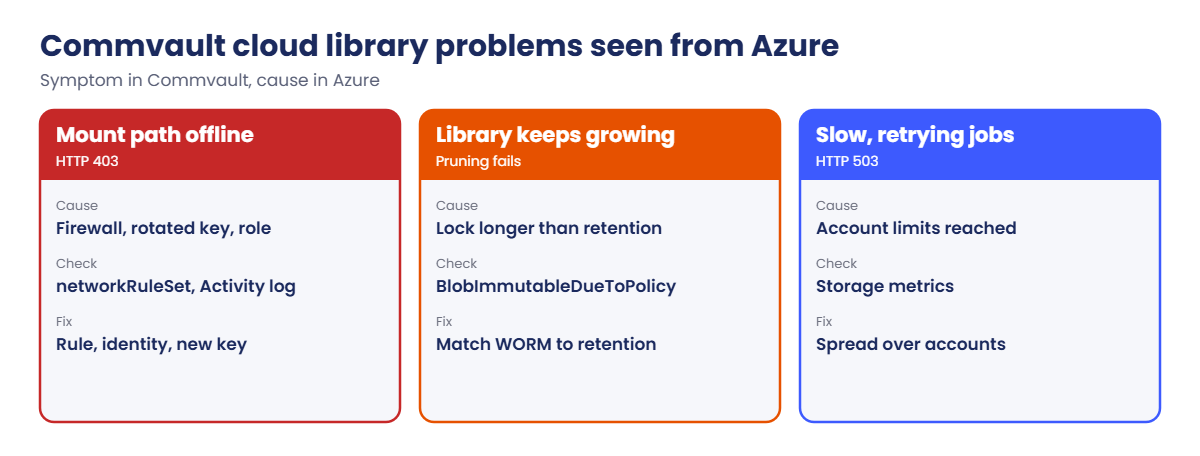
Step 3 and step 5 are where Azure settings bite: no access means the library goes offline; a lock or a missing delete permission means storage only ever grows.

Commvault Azure Blob library problems and their Azure causes

Throttling has two different sources. Blob storage returns HTTP 503 (ServerBusy) when one account is pushed past its limits; Azure Resource Manager returns HTTP 429 when snapshot-based VM backups make too many API calls (Lesson 68).

Simulated lab: a Commvault Azure Blob cloud library

This stand-in lab plays the MediaAgent with the CLI. Load your storage account name:

$st = (Get-Content C:\azure-lab\storage.txt)

1Create the library container with a retention lock

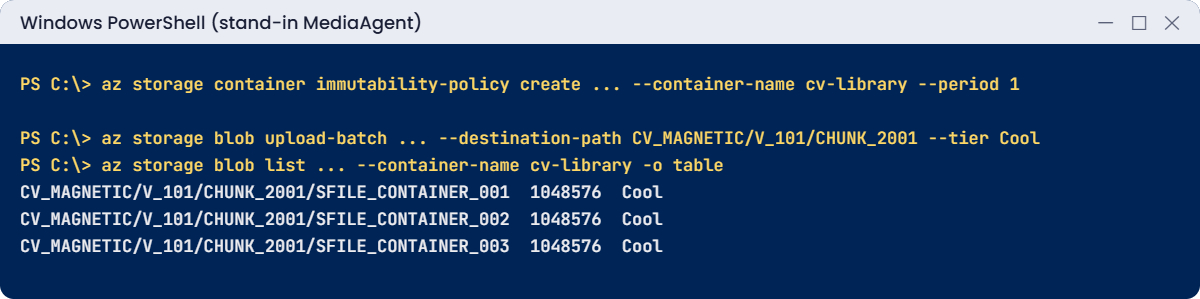
Create the container, then a time-based immutability policy (not locked) of 1 day (like Commvault WORM with a short lock):

az storage container create --account-name $st --auth-mode login --name cv-library -o none
az storage container immutability-policy create --resource-group rg-saat-data --account-name $st --container-name cv-library --period 1 -o none
az storage container immutability-policy show --resource-group rg-saat-data --account-name $st --container-name cv-library --query "immutabilityPeriodSinceCreationInDays" -o tsv

You should see this:

1

The policy isn’t locked yet, so you can still delete it. Commvault WORM locks it, after which nobody can shorten or remove it, not even Microsoft support.

2Write a “backup job” the way a MediaAgent does

Make three 1 MB chunk files and upload them in Commvault’s folder layout, in the Cool tier:

New-Item -ItemType Directory -Path C:\azure-lab\cv-chunks -Force | Out-Null
1..3 | ForEach-Object { $b = New-Object byte[] (1MB); (New-Object Random $_).NextBytes($b); [IO.File]::WriteAllBytes("C:\azure-lab\cv-chunks\SFILE_CONTAINER_00$_", $b) }
az storage blob upload-batch --account-name $st --auth-mode login --destination cv-library --source C:\azure-lab\cv-chunks --destination-path CV_MAGNETIC/V_101/CHUNK_2001 --tier Cool -o none
az storage blob list --account-name $st --auth-mode login --container-name cv-library --query "[].{name:name, bytes:properties.contentLength, tier:properties.blobTier}" -o table

You should see this:

Name                                              Bytes    Tier
------------------------------------------------  -------  ------
CV_MAGNETIC/V_101/CHUNK_2001/SFILE_CONTAINER_001  1048576  Cool
CV_MAGNETIC/V_101/CHUNK_2001/SFILE_CONTAINER_002  1048576  Cool
CV_MAGNETIC/V_101/CHUNK_2001/SFILE_CONTAINER_003  1048576  Cool

Random bytes, like encrypted and compressed backup data. Real libraries hold millions of these, which is why per-transaction costs matter as much as per-GB costs.

3Check what a MediaAgent identity needs

List your data roles on the account. A MediaAgent’s managed identity needs the same, at least on its container:

$id = az storage account show --resource-group rg-saat-data --name $st --query id -o tsv
$me = az ad signed-in-user show --query id -o tsv
az role assignment list --assignee $me --scope $id --query "[].roleDefinitionName" -o tsv

You should see something like this:

Storage Blob Data Contributor
Storage Queue Data Contributor
Storage Table Data Contributor

For WORM libraries, Commvault needs Storage Blob Data Owner, or a custom role with the immutability policy actions, because it sets the locks itself.

4Write down the Azure side of the library

These are the values you’d enter in Command Center:

Field in Command CenterValue from this lab
Cloud storage typeMicrosoft Azure Storage
Service hostblob.core.windows.net (or privatelink.blob.core.windows.net)
Account nameyour stsaat name
Containercv-library
AuthenticationIAM VM role assignment (managed identity)
Storage classCool
Commvault Azure Blob simulated lab: chunks written with a retention lock
The stand-in MediaAgent wrote three chunks in Commvault’s layout.

✅ Checkpoint: cv-library holds three Cool-tier chunks in Commvault’s layout, protected by a 1-day immutability policy that isn’t locked.

Break It, Then Fix It

Each break matches a real Commvault alert: “data aging didn’t free space” and “mount path offline”.

1Break it: data aging can’t prune

Commvault’s retention for this job has ended, so data aging tries to delete the chunks:

az storage blob delete --account-name $st --auth-mode login --container-name cv-library --name CV_MAGNETIC/V_101/CHUNK_2001/SFILE_CONTAINER_001

You’ll get an error like this:

This operation is not permitted as the blob is immutable due to a policy.
RequestId:...
Time:...
ErrorCode:BlobImmutableDueToPolicy

The Azure lock outlives the Commvault retention, so pruning fails and the bill keeps growing. In real libraries this shows up months later as a cloud library far bigger than the jobs it holds.

Fix it: lock periods must match retention. In Commvault, WORM is set from the storage policy so the lock follows retention plus a small buffer. In this lab, the policy is still not locked, so remove it and prune:

$etag = az storage container immutability-policy show --resource-group rg-saat-data --account-name $st --container-name cv-library --query etag -o tsv
az storage container immutability-policy delete --resource-group rg-saat-data --account-name $st --container-name cv-library --if-match $etag
az storage blob delete --account-name $st --auth-mode login --container-name cv-library --name CV_MAGNETIC/V_101/CHUNK_2001/SFILE_CONTAINER_001
az storage blob list --account-name $st --auth-mode login --container-name cv-library --query "length([])"

You should see this:

2

A locked policy can’t be removed. If one is ever set too long, you wait it out and pay for the storage; there is no undo.

2Break it: the mount path goes offline

Someone switches the storage firewall to Deny without adding the MediaAgent’s address:

az storage account update --resource-group rg-saat-data --name $st --default-action Deny -o none
Start-Sleep -Seconds 30
az storage blob list --account-name $st --auth-mode login --container-name cv-library -o table

You’ll get this error:

The request may be blocked by network rules of storage account. Please check network rule set using 'az storage account show -n accountname --query networkRuleSet'.
If you want to change the default action to apply when no rule matches, please use 'az storage account update'.

In Command Center this appears as the mount path going offline and backup jobs waiting for resources. Commvault logs show HTTP 403 with AuthorizationFailure. The fix is on the Azure side, not in Commvault.

Fix it: allow the MediaAgent’s network (a VNet rule, an IP rule, or a private endpoint with the privatelink service host). For the lab, open the account again and clean up:

az storage account update --resource-group rg-saat-data --name $st --default-action Allow -o none
az storage blob delete-batch --account-name $st --auth-mode login --source cv-library -o none
az storage container delete --account-name $st --auth-mode login --name cv-library -o none
Remove-Item C:\azure-lab\cv-chunks -Recurse
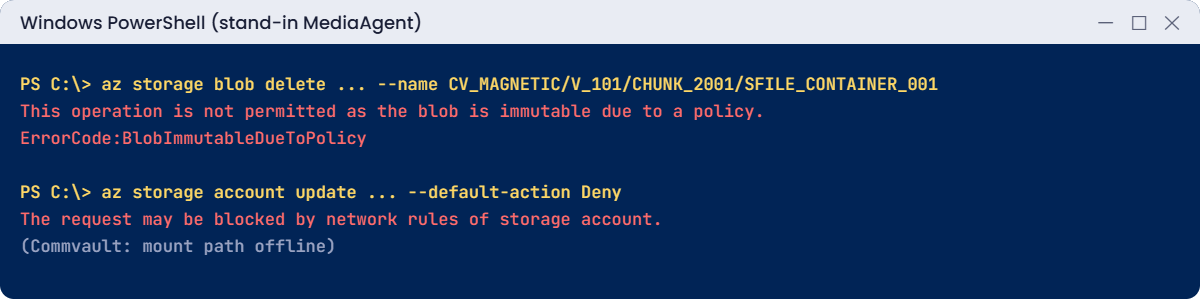
Commvault Azure Blob errors: immutable chunks and blocked network
A lock stops pruning, and the firewall takes the library offline.

✅ Checkpoint: You traced a pruning failure to an immutability policy and an offline library to the storage firewall, and removed the lab container.

This happened at work

The cloud library that kept growing

A manufacturing company moved its Commvault secondary copies to Azure Blob with WORM to protect against ransomware. Retention was 30 days. Eight months later, finance asked why the storage account had grown to 410 TB when the backups were about 60 TB.

An engineer had set the container’s immutability policy by hand to 365 days during the pilot, “to be safe”, and locked it. Commvault’s data aging ran every day and failed to prune every chunk older than 30 days with BlobImmutableDueToPolicy.

What they changed: new libraries use Commvault’s own WORM setting, so the lock follows the storage policy’s retention. The locked container is left to expire; its cost is booked as a lesson. A monthly report compares library size in Azure with the Commvault job total and flags gaps over 20%.

Common mistakes and troubleshooting

MistakeWhat you seeWhat to do
Rotating the access key Commvault usesLibrary offline, 403 AuthenticationFailedUse managed identity, or update the key in Command Center first.
Storage firewall without the MediaAgentMount path offline, AuthorizationFailureAdd a VNet or IP rule, or a private endpoint.
Immutability longer than retentionData aging fails; storage growsLet Commvault set WORM from the storage policy.
Archive class without a recall planRestores wait hoursUse the archive recall workflow; plan RTO.
Defender scanning backup containersExtra cost and scan noiseExclude Commvault containers, per Commvault guidance.
One account for many busy libraries503 ServerBusy, slow jobsSpread libraries over storage accounts.

Interview questions

Click a question to open it. Each one is written the way an interviewer would ask it. Under it you will see why they ask it and one way you could answer, in your own words.

Fresher level

1. How does Commvault store backups in Azure?

Why they ask this: The basic architecture.

How you might answer: A MediaAgent deduplicates and writes backup data as chunk files into an Azure Blob container, which Commvault manages as a cloud storage library. The CommServe keeps the catalog of which job is in which chunks.

2. What authentication options does Commvault support for Azure Blob?

Why they ask this: A configuration check.

How you might answer: Account name with access key, IAM VM role assignment using the MediaAgent VM’s managed identity, or an IAM AD application (service principal) with the right storage roles.

3. What is WORM storage in this context?

Why they ask this: They want the ransomware angle.

How you might answer: Write once, read many: Azure immutability policies stop chunks being changed or deleted until a lock expires, so an attacker or admin can’t destroy backup data early.

2–5 years experience

4. A Commvault cloud library went offline overnight. What do you check in Azure?

Why they ask this: A real troubleshooting path.

How you might answer: The storage account’s firewall and public network access, private endpoint DNS if used, whether the access key was rotated or the identity’s role removed, and the Activity log for changes. Commvault logs usually show the HTTP status and Azure error code.

5. The library in Azure is much bigger than the jobs it holds. Why?

Why they ask this: They’re checking WORM and pruning knowledge.

How you might answer: Most often immutability locks longer than Commvault retention, so pruning fails; or missing delete permissions; or orphaned data from deleted storage policies. I’d check data aging logs for BlobImmutableDueToPolicy or 403 on delete.

6. When would you choose Cool versus Archive for a Commvault cloud copy?

Why they ask this: They want cost and RTO trade-offs.

How you might answer: Cool for copies you may restore within days, with fast access. Archive for long-term compliance copies where a recall of hours is acceptable, and only with a tested recall workflow.

Senior level

7. How do you design a ransomware-resilient Commvault copy in Azure?

Why they ask this: They want a full design.

How you might answer: A separate subscription and storage account, private endpoint access only from MediaAgents, managed identity auth, WORM set from Commvault retention, soft delete on, Defender exclusions per vendor guidance, and an air-gapped admin path for the backup team.

8. How do you handle storage throttling with large Commvault libraries?

Why they ask this: They want scale knowledge.

How you might answer: Watch for HTTP 503 ServerBusy, spread libraries over several storage accounts, tune stream counts on the MediaAgents, and use larger chunk sizes to cut transaction counts. For snapshot-based VM backups, ARM throttling with HTTP 429 is a separate limit.

9. How would you prove a Commvault Azure copy is restorable?

Why they ask this: They want verification.

How you might answer: Scheduled restore tests to an isolated environment, Commvault data verification jobs on the cloud copy, and a periodic recall test for archive-class data. I’d also compare Azure storage size with Commvault reports to catch drift.

Quick quiz

Q1. Which Commvault component writes data to Azure Blob?

  1. CommServe
  2. MediaAgent
  3. Command Center
  4. Client agent
Show answer

B — MediaAgents move and store data.

Q2. Which role does a MediaAgent identity need for a normal library?

  1. Reader
  2. Storage Blob Data Contributor
  3. Network Contributor
  4. Owner of the subscription
Show answer

B — For WORM libraries it needs Storage Blob Data Owner.

Q3. Data aging fails with BlobImmutableDueToPolicy. Cause?

  1. Wrong tier
  2. An immutability lock still active
  3. Firewall
  4. Expired SAS
Show answer

B — Locked blobs can’t be deleted until the lock ends.

Q4. Library offline after a firewall change. Which error appears?

  1. AuthorizationFailure (403)
  2. BlobArchived
  3. ShareHasSnapshots
  4. QuotaExceeded
Show answer

A — The firewall blocks the MediaAgent.

Q5. Which status code means Blob storage is too busy?

  1. 200
  2. 404
  3. 409
  4. 503
Show answer

D — ServerBusy returns HTTP 503.

Quick recap

You can now design and troubleshoot the Azure side of a Commvault cloud library.

  • MediaAgents write deduplicated chunks to a Blob container.
  • Prefer managed identity; key rotation breaks key-based libraries.
  • WORM locks must match retention, or pruning fails.
  • Storage firewall and private endpoint DNS decide if the library is online.
  • 503 is storage throttling; 429 is API throttling.

Next lesson

Lesson 38: Rubrik with Azure: SLA domains and archive to Blob → You design Rubrik SLA domains that archive to Azure Blob and troubleshoot the archive location.

Further reading: Commvault Azure Blob

Want to go deeper into Commvault Azure Blob? See Commvault: Microsoft Azure Storage IAM VM role assignment and Microsoft’s Immutable storage for Azure Blob. You can also see the full plan for this course on the Azure Cloud Administration course page.

Scroll to Top