Shared access signatures and account keys
-
Phase 0: Before you start
-
Phase 1: The foundation
-
Phase 2: Day-to-day operations
-
Phase 3: Enterprise architecture
-
Phase 4: Troubleshooting step by step
-
Phase 5: Final project and career
An Azure SAS token is a signed link that gives someone limited access to your storage for a limited time, without giving them a password or a role. “Read this one file until 6 pm” is a typical SAS.
SAS links are everywhere: download links in apps, backup tools, partner uploads. They’re also behind many storage leaks, because a SAS signed with an account key can’t simply be switched off.
In the lab you make the safest kind of SAS, a revocable one, and an unsafe one that you then have to kill by rotating a key.
| Time | You need | Cost | By the end you can |
|---|---|---|---|
| About 40 minutes | The storage account from Lesson 21, the CLI | Nothing extra: a few reads and writes | Create user delegation and policy-based SAS links, read a SAS, and revoke access safely |
What it is, in one line
A SAS is a URL with a signature that grants specific permissions on storage until a set expiry time.
In Simple Words
The visitor pass at the school gate
The school’s master key opens every door. You’d never hand it to a visitor.
Instead the office writes a pass: “Room 4 only, today, until 3 pm”, and stamps it. That pass is a SAS.
Some passes are written in a register, so the office can cancel one with a line through it. Others are just stamped paper; the only way to cancel those is to change the stamp, which cancels every pass made with it.
The master key is the account key. Lose it, and you change every lock in the building.
Engineer's View
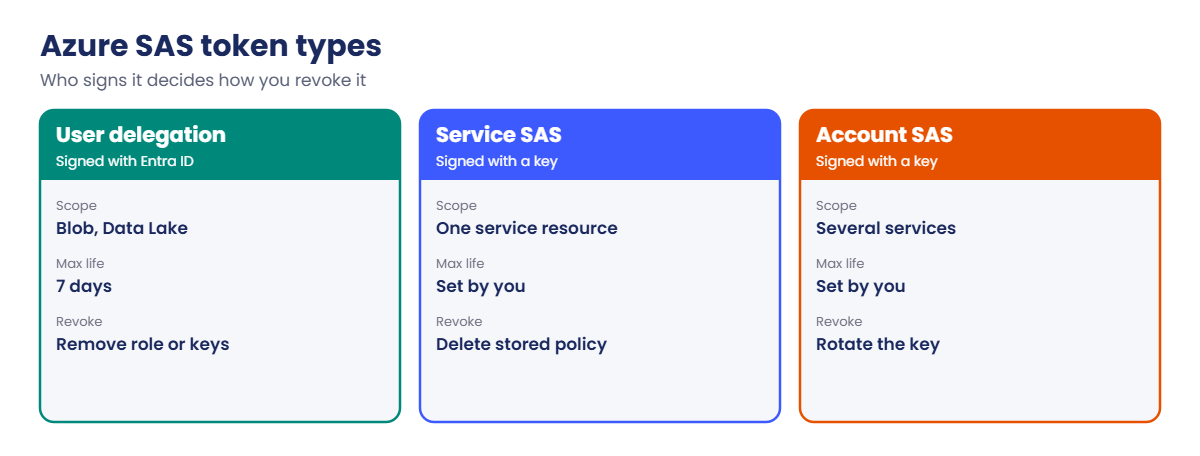
Three kinds of SAS, and the keys behind them
- User delegation SAS: signed with a key Azure issues to your Entra ID identity. Blob and Data Lake only, valid up to 7 days, and limited by your own RBAC rights. Microsoft’s recommended type.
- Service SAS: signed with an account key, for one service (a blob, container, share, queue or table). Can point at a stored access policy on the container, which you can change or delete to revoke it. Up to 5 policies per container.
- Account SAS: signed with an account key, can cover several services and even account operations. The widest and riskiest.
- Inside the token:
sppermissions,seexpiry,ststart,spr=https,srresource type,svversion andsig, the signature. User delegation tokens addskoid,sktidand othersk*fields about the signing identity. - Account keys: two of them (key1, key2) so you can rotate one while apps use the other. Each gives full control of the data.
- Revoking: a key-signed SAS dies only when it expires or its signing key is rotated. A policy-based SAS dies when the policy is removed. A user delegation SAS dies with
az storage account revoke-delegation-keysor when the signer loses the role. - Locking down: setting
--allow-shared-key-access falsestops account keys and every key-signed SAS; user delegation SAS keeps working. Account policies can also limit SAS lifetime and remind you to rotate keys.
How it works, step by step
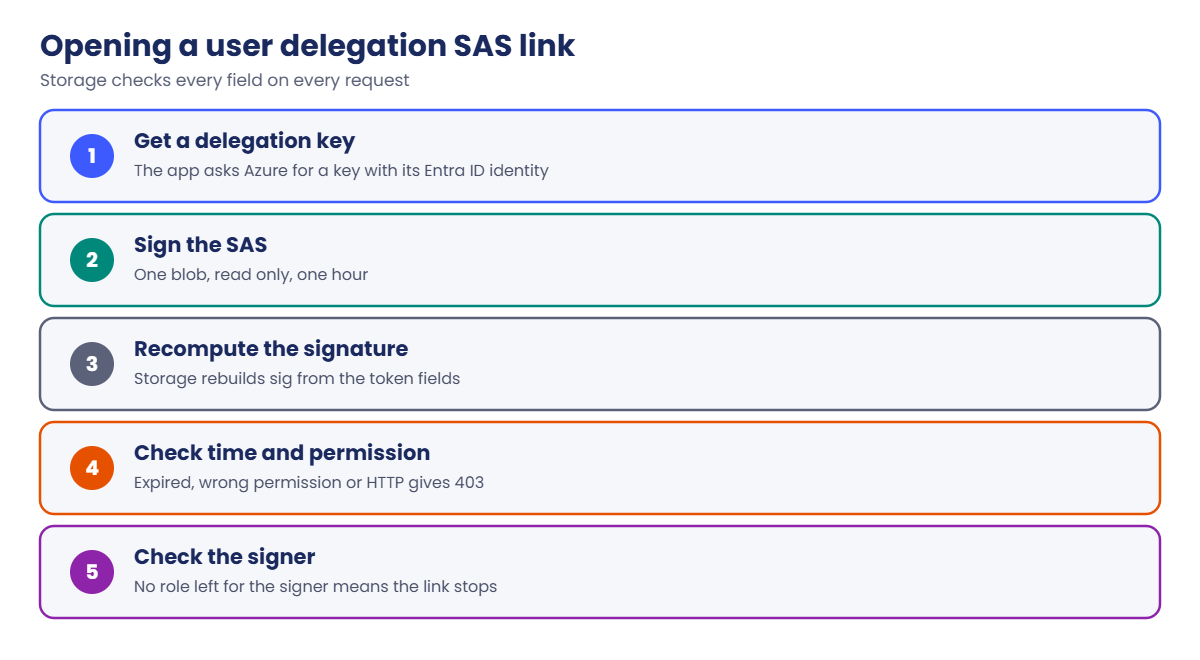
What happens when someone opens a user delegation SAS link:
- Your app asks Azure for a user delegation key, using its Entra ID identity.
- It signs a SAS for one blob, read only, for one hour, and hands out the URL.
- The recipient opens the URL. Storage recomputes the signature from the token fields.
- If the signature matches, the time is valid and the permission covers the request, the read succeeds. Anything else fails with 403.
- Storage also checks that the signing identity still has rights, so removing its role cuts the link.
A key-signed SAS skips the identity check. Anyone holding the URL has the access until expiry, even if the person who made it left the company a year ago.
Rule of thumb: user delegation SAS first, policy-based service SAS when you need longer life or a non-blob service, account SAS almost never, and account keys only in a vault.
Hands-on lab: create and revoke an Azure SAS token
Load your storage account name and make an expiry time one hour from now:
$st = (Get-Content C:\azure-lab\storage.txt)
$exp = (Get-Date).ToUniversalTime().AddHours(1).ToString('yyyy-MM-ddTHH:mmZ')1Look at the account keys, without printing them
Run this:
az storage account keys list --resource-group rg-saat-data --account-name $st --query "[].{name:keyName, permissions:permissions}" -o tableYou should see this:
Name Permissions
------ -------------
key1 FULL
key2 FULLNever print the values in a shared terminal or a ticket. Anyone who sees one has full control of the data in the account.
2Make a user delegation SAS for one file
Run this:
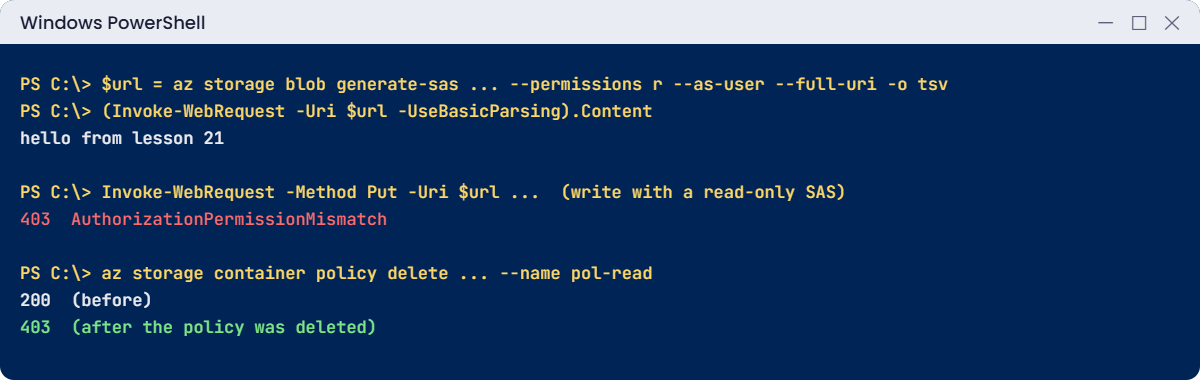
$url = az storage blob generate-sas --account-name $st --container-name lab --name hello.txt --permissions r --expiry $exp --https-only --auth-mode login --as-user --full-uri -o tsv
(Invoke-WebRequest -Uri $url -UseBasicParsing).ContentYou should see this:
hello from lesson 21Anyone with that URL can read hello.txt for an hour, from any browser. Your Storage Blob Data Contributor role (Lesson 21) is what let you sign it.
3Read what’s inside the token
List the fields, leaving out the signature:
([uri]$url).Query.TrimStart('?').Split('&') | Where-Object { $_ -notlike 'sig=*' }You should see something like this:
se=2026-10-20T17%3A30Z
sp=r
spr=https
sv=2026-04-06
sr=b
skoid=3f6a...
sktid=9b1c...
skt=2026-10-20T16%3A30%3A12Z
ske=2026-10-20T17%3A30%3A00Z
sks=b
skv=2026-04-06sp=r is read only, sr=b means one blob, and the sk* fields say which identity signed it. When a SAS fails, reading these fields is the first check.
4Prove the SAS is read only
Try to overwrite the file with it:
try { Invoke-WebRequest -Method Put -Uri $url -Headers @{'x-ms-blob-type'='BlockBlob'} -Body 'changed' -UseBasicParsing } catch { $_.Exception.Response.StatusCode.value__; $_.ErrorDetails.Message }You should see something like this:
403
<?xml version="1.0" encoding="utf-8"?><Error><Code>AuthorizationPermissionMismatch</Code><Message>This request is not authorized to perform this operation using this permission.
RequestId:...
Time:...</Message></Error>5Make a revocable SAS with a stored access policy
Create a policy on the container, sign a SAS that uses it, then delete the policy:
az storage container policy create --account-name $st --container-name lab --name pol-read --permissions r --expiry $exp -o none
$purl = az storage blob generate-sas --account-name $st --container-name lab --name hello.txt --policy-name pol-read --full-uri -o tsv
(Invoke-WebRequest -Uri $purl -UseBasicParsing).StatusCode
az storage container policy delete --account-name $st --container-name lab --name pol-read -o none
Start-Sleep -Seconds 40
try { Invoke-WebRequest -Uri $purl -UseBasicParsing } catch { $_.Exception.Response.StatusCode.value__ }You should see this:
200
403These commands use the account key in the background (the CLI warns you about that). Deleting the policy killed the link without touching the key. Policy changes can take up to 30 seconds to apply.
✅ Checkpoint: You read a file through a user delegation SAS, proved it can’t write, and revoked a policy-based SAS.
Break It, Then Fix It
Both of these happen when someone needs “a link that works for a month”.
1Break it: a user delegation SAS for 30 days
Run this:
$long = (Get-Date).ToUniversalTime().AddDays(30).ToString('yyyy-MM-ddTHH:mmZ')
az storage blob generate-sas --account-name $st --container-name lab --name hello.txt --permissions r --expiry $long --auth-mode login --as-user --full-uri -o tsvYou’ll get an error like this:
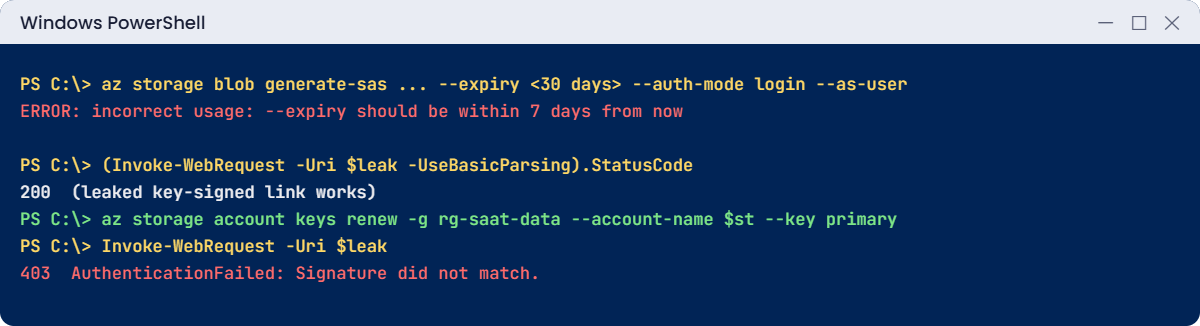
ERROR: incorrect usage: --expiry should be within 7 days from nowA user delegation key lives at most 7 days, so the SAS can’t outlive it. The CLI stops you before asking Azure.
Fix it: for long access, don’t stretch a SAS. Give the partner’s app its own identity and a data role, or issue a fresh short SAS from an app each time. If you truly need a long link, use a stored access policy so you can revoke it:
az storage container policy create --account-name $st --container-name lab --name pol-partner --permissions r --expiry $long -o none
az storage container policy list --account-name $st --container-name lab --query "keys(@)" -o tsvYou should see this:
pol-partner2Break it: the leaked link you can’t switch off
Make an ad hoc SAS signed with the account key, as many old scripts do, and pretend it ended up in a public chat:
$leak = az storage blob generate-sas --account-name $st --container-name lab --name hello.txt --permissions r --expiry $long --https-only --full-uri -o tsv
(Invoke-WebRequest -Uri $leak -UseBasicParsing).StatusCodeYou should see this:
200There’s no policy to delete and no identity to remove. This link works for 30 days for anyone who has it.
Fix it: rotate the key that signed it (the CLI signs with key1). Apps using key1 would break too, so in real life you move them to key2 first:
az storage account keys renew --resource-group rg-saat-data --account-name $st --key primary -o none
Start-Sleep -Seconds 30
try { Invoke-WebRequest -Uri $leak -UseBasicParsing } catch { $_.Exception.Response.StatusCode.value__; $_.ErrorDetails.Message }You should see something like this:
403
<?xml version="1.0" encoding="utf-8"?><Error><Code>AuthenticationFailed</Code><Message>Server failed to authenticate the request. Make sure the value of Authorization header is formed correctly including the signature.
RequestId:...
Time:...</Message><AuthenticationErrorDetail>Signature did not match. String to sign used was r ...</AuthenticationErrorDetail></Error>The leak is closed, but so is every other SAS and connection string that used key1. That blast radius is why key-signed SAS links are a last resort.
Clean up: remove the partner policy:
az storage container policy delete --account-name $st --container-name lab --name pol-partner -o none
az storage container policy list --account-name $st --container-name lab -o tsvThe last command prints nothing.

✅ Checkpoint: The 30-day user delegation SAS was refused, the leaked key-signed link now returns 403, and no stored access policies are left.
This happened at work
The SAS link in a support ticket
A software vendor’s support team asked customers to upload logs to a container. To make it easy, an engineer created an account SAS with read, write, list and delete on all services, valid for two years, and pasted it into a public help article.
Eighteen months later a security researcher reported it. The link could list and download every customer’s logs, some with passwords inside. There was no stored policy to delete, so the only fix was to rotate both account keys, which broke three internal apps for an afternoon.
What they changed: the upload page now calls a small function that issues a user delegation SAS for one new blob, create and write only, valid for 15 minutes. Shared key access was turned off on the account. An Azure Policy flags any storage account that still allows it, and SAS lifetime is capped by account policy.
Common mistakes and troubleshooting
| Mistake | What you see | What to do |
|---|---|---|
| Long-lived account SAS | Data leak you can’t revoke quickly | User delegation SAS, short expiry, narrow scope. |
| Printing account keys | Full access exposed | Never print; keep keys in Key Vault (Lesson 55). |
| SAS with write when read is enough | Files changed or deleted | Grant only the permission needed (sp=r). |
| user delegation SAS over 7 days | Error: --expiry should be within 7 days | Stored policy or an app identity instead. |
| Rotating key1 with apps still on it | Apps fail with AuthenticationFailed | Move apps to key2, rotate key1, then the other way. |
| Start time set to “now” | 403 on machines with a fast clock | Leave start out or set it 15 minutes earlier. |
| Wrong resource type in the SAS | 403 on the right file | Check sr (b for blob, c for container). |
Interview questions
Click a question to open it. Each one is written the way an interviewer would ask it. Under it you will see why they ask it and one way you could answer, in your own words.
Fresher level
1. What is a SAS token?
Why they ask this: The basic concept.
How you might answer: A signed URL query string that grants specific permissions on storage resources for a limited time, without sharing account keys or giving the user a role.
2. What are the three types of SAS?
Why they ask this: They want the names and the difference.
How you might answer: User delegation SAS, signed with an Entra ID based key; service SAS, signed with an account key for one service; and account SAS, signed with an account key and able to cover several services. User delegation is the recommended one.
3. Why are there two account keys?
Why they ask this: A rotation basics check.
How you might answer: So you can rotate without downtime. Apps move to key2, you regenerate key1, then later move back and regenerate key2.
2–5 years experience
4. A SAS link was leaked. How do you revoke it?
Why they ask this: They want to see you know it depends on the type.
How you might answer: If it uses a stored access policy, I delete or change the policy. If it’s a user delegation SAS, I revoke the delegation keys or remove the signer’s role. If it’s an ad hoc key-signed SAS, I have to rotate the signing key, after moving apps to the other key.
5. A SAS returns 403. How do you troubleshoot?
Why they ask this: A practical, frequent ticket.
How you might answer: I decode the token: expiry and start time, permissions, resource type, HTTPS only, and any IP range. Then I check whether the signing key was rotated, the stored policy still exists, the signer still has rights, and the storage firewall allows the caller.
6. What changes when you disable shared key access?
Why they ask this: They’re checking the knock-on effects.
How you might answer: Account keys, connection strings with keys, and every service or account SAS stop working. Entra ID access and user delegation SAS keep working. I’d check sign-in logs and app configs first, because older tools often still use keys.
Senior level
7. How would you design file sharing with external partners?
Why they ask this: They want a secure pattern.
How you might answer: A small service with a managed identity that issues user delegation SAS links for one blob, the minimum permission and a short expiry, after checking who is asking. The account blocks shared keys, uses the firewall or private endpoints where possible, and logs access to Log Analytics.
8. How would you manage storage keys across hundreds of accounts?
Why they ask this: They want governance at scale.
How you might answer: Prefer to remove the need: Entra ID and managed identities, shared key access off by policy. Where keys must exist, they live in Key Vault with rotation automated, key expiration policy set on each account, and alerts on keys older than the limit.
9. Is a SAS safe if it’s HTTPS only and expires in an hour?
Why they ask this: They want nuance.
How you might answer: Safer, not safe. Within that hour anyone with the URL has the access, so the permission and scope still matter. I’d also watch where URLs end up, such as logs, browser history and chat tools, and keep them out of query-string logging.
Quick quiz
Q1. Which SAS type does Microsoft recommend for blobs?
- Account SAS
- Service SAS
- User delegation SAS
- Anonymous access
Show answer
C — It’s signed with Entra ID credentials and limited by RBAC.
Q2. What is the maximum validity of a user delegation SAS?
- 1 hour
- 24 hours
- 7 days
- 1 year
Show answer
C — User delegation keys last up to 7 days.
Q3. How do you revoke an ad hoc service SAS signed with key1?
- Delete the blob
- Rotate key1
- Change the tier
- Remove soft delete
Show answer
B — Rotating the signing key invalidates it.
Q4. In a SAS token, sp=r means:
- Start time
- Read permission
- Resource is a page blob
- Region
Show answer
B — sp lists the permissions.
Q5. After shared key access is disabled, which still works?
- Account SAS
- Connection strings with keys
- User delegation SAS
- Service SAS with key1
Show answer
C — Only Entra ID based access keeps working.
Quick recap
You can now hand out storage access safely and take it back.
- User delegation SAS is the default choice; up to 7 days.
- Stored access policies make service SAS revocable.
- Key-signed ad hoc SAS links die only at expiry or key rotation.
- Rotate keys one at a time with apps on the other key.
- Decode the token fields when a SAS fails.
Next lesson
Lesson 25: Azure Files: SMB shares, snapshots, soft delete → You mount an Azure file share on win01, snapshot it and restore a deleted file.
Further reading: Azure SAS token
Want to go deeper into Azure SAS token? See Microsoft’s Grant limited access with shared access signatures and Create a user delegation SAS with the Azure CLI. You can also see the full plan for this course on the Azure Cloud Administration course page.