Azure Custom Roles, Deny Assignments and Conditions
-
Phase 0: Before you start
-
Phase 1: The foundation
-
Phase 2: Day-to-day operations
-
Phase 3: Enterprise architecture
-
Phase 4: Troubleshooting step by step
-
Phase 5: Final project and career
Azure custom roles are for the jobs that no built-in role fits. A network team that should edit firewall rules but never delete a whole security group. An operator who may start and stop VMs but not resize them.
When the built-in choice is “too little” or “far too much”, you write your own role.
This lesson covers three tools that make RBAC precise: custom roles, conditions on role assignments, and deny assignments, the one thing in Azure that can say no to an Owner.
In the lab Asha gets a custom “NSG Rule Editor” role, then permission to hand out only the Reader role, and finally you meet a deny assignment created by a deployment stack.
| Time | You need | Cost | By the end you can |
|---|---|---|---|
| About 50 minutes | The CLI, Asha’s login, the management groups from Lesson 6 | Nothing (network security groups and roles cost nothing) | Write and test a custom role, limit what an access admin can grant, and recognise a deny assignment |
What it is, in one line
A custom role is your own list of allowed actions; a condition narrows an assignment further; a deny assignment blocks actions even for Owners.
In Simple Words
A special key, a key with rules, and a sealed door
Back to the caretaker with his key ring. Sometimes no key on the ring fits the job, so he has a locksmith cut a special key that opens only the electricity cupboards. That’s a custom role.
Sometimes he gives the head cleaner a key-cutting machine, but with a rule: “you may only cut corridor keys”. That’s a condition.
And some doors are sealed by the building owner. Even the caretaker’s master key won’t open them. That’s a deny assignment.
Engineer's View
How the three tools work
- Custom role: a JSON definition with
Actions,NotActions,DataActions,NotDataActionsandAssignableScopes. Actions are provider operation strings likeMicrosoft.Network/networkSecurityGroups/securityRules/write; wildcards such assecurityRules/*are allowed. A tenant can have up to 5,000 custom roles. - Assignable scopes say where the role can be assigned. You can use subscriptions and resource groups, or one management group (a custom role with a management group scope can’t have
DataActions). - Conditions (ABAC) add a rule to a role assignment, written in a small expression language. The common admin use: give Role Based Access Control Administrator but allow only certain roles, or only certain principal types, to be granted. Conditions also work on blob data, for example “only blobs with this index tag”.
- Deny assignments block listed actions for everyone at a scope, except principals that are explicitly excluded. You can’t create them by hand; Azure creates them for features like deployment stacks with deny settings, managed applications and some managed services.
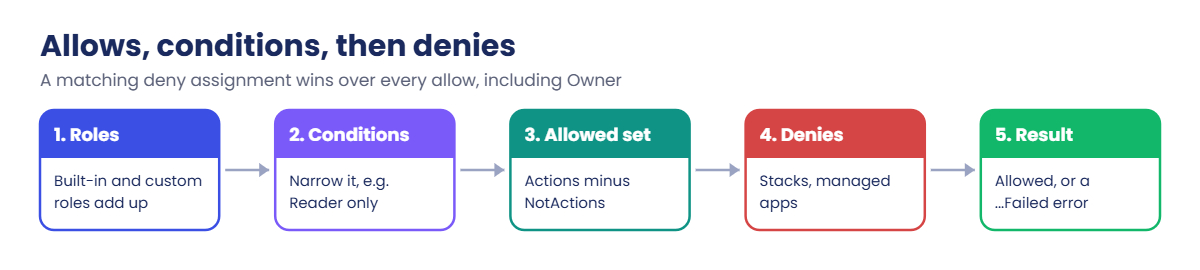
Evaluation order matters. Azure collects allows from role assignments (checking conditions), then checks deny assignments. A matching deny wins over any allow, including Owner.
That’s why DenyAssignmentAuthorizationFailed says you have permission but are denied anyway.
az role assignment list doesn’t show deny assignments. You see them in the portal under Access control (IAM) > Deny assignments, or through the API at Microsoft.Authorization/denyAssignments.
How it works, step by step
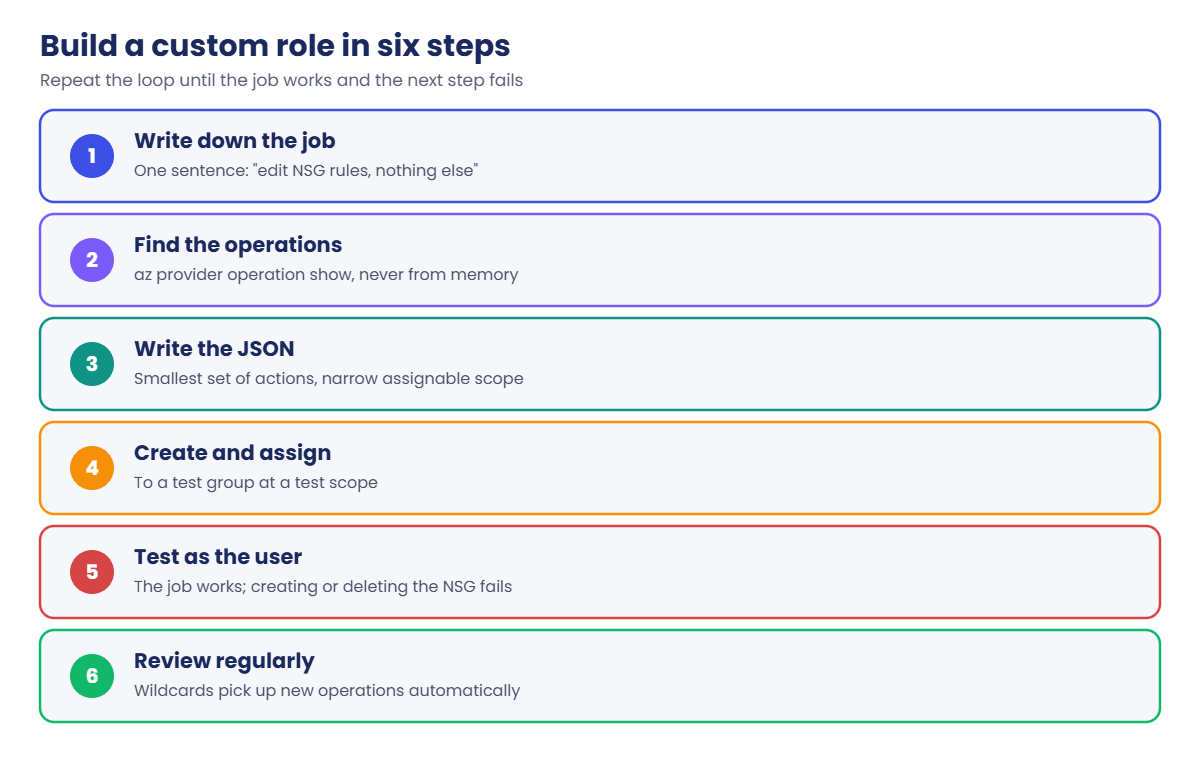
Building a custom role is a short loop you repeat until it’s right:
- Write down the job in one sentence: “edit NSG rules, nothing else”.
- Find the operations with
az provider operation show. Don’t guess the names. - Write the JSON with the smallest set of actions and a narrow assignable scope.
- Create and assign it to a test group at a test scope.
- Test as the user: the allowed job works, and the next obvious step fails.
- Review it when Azure adds new operations, because wildcards pick them up automatically.
The test step is the one people skip. A role that “should work” often misses a read action the portal needs, or allows something you didn’t expect because of a wildcard.
Conditions follow the same loop, but you test both sides: the allowed grant works, and a grant outside the rule fails.
Hands-on lab: a custom role, a condition and a deny
You use one network security group (NSG) as the test object; NSGs cost nothing. You need two PowerShell windows again: your admin window and Asha’s window with $env:AZURE_CONFIG_DIR = 'C:\azure-lab\asha-cli', signed in as Asha like in Lesson 7.
1Create a test NSG
In your admin window, run this:
az group create --name rg-saat-l08 --tags course=saatvedha-azure lesson=08 -o none
az network nsg create --resource-group rg-saat-l08 --name nsg-saat-l08 --tags course=saatvedha-azure lesson=08 -o none
$rg = az group show --name rg-saat-l08 --query id -o tsv
$grp = az ad group show --group grp-saat-helpdesk --query id -o tsv2Find the exact operation names
Run this:
az provider operation show --namespace Microsoft.Network --query "resourceTypes[?name=='networkSecurityGroups/securityRules'].operations[].name" -o tsvYou should see something like this:
Microsoft.Network/networkSecurityGroups/securityRules/read
Microsoft.Network/networkSecurityGroups/securityRules/write
Microsoft.Network/networkSecurityGroups/securityRules/delete3Write and create the custom role
Paste this whole block:
@'
{
"Name": "SaatVedha NSG Rule Editor",
"Description": "Read NSGs and add, change or remove their rules. Cannot create or delete NSGs.",
"Actions": [
"Microsoft.Network/networkSecurityGroups/read",
"Microsoft.Network/networkSecurityGroups/securityRules/*",
"Microsoft.Resources/subscriptions/resourceGroups/read"
],
"NotActions": [],
"DataActions": [],
"NotDataActions": [],
"AssignableScopes": [ "/providers/Microsoft.Management/managementGroups/mg-saatvedha" ]
}
'@ | Set-Content C:\azure-lab\role-nsg-rule-editor.json
az role definition create --role-definition "@C:\azure-lab\role-nsg-rule-editor.json" --query "{name:roleName, type:roleType}" -o tableYou should see something like this:
Name Type
------------------------- ----------
SaatVedha NSG Rule Editor CustomRoleBecause the assignable scope is the course management group, the role can be used on any subscription under mg-saatvedha, and nowhere else.
4Assign it and test as Asha
In your admin window, run this:
az role assignment create --assignee-object-id $grp --assignee-principal-type Group --role "SaatVedha NSG Rule Editor" --scope $rg -o noneWait two minutes. Then in Asha’s window, run this:
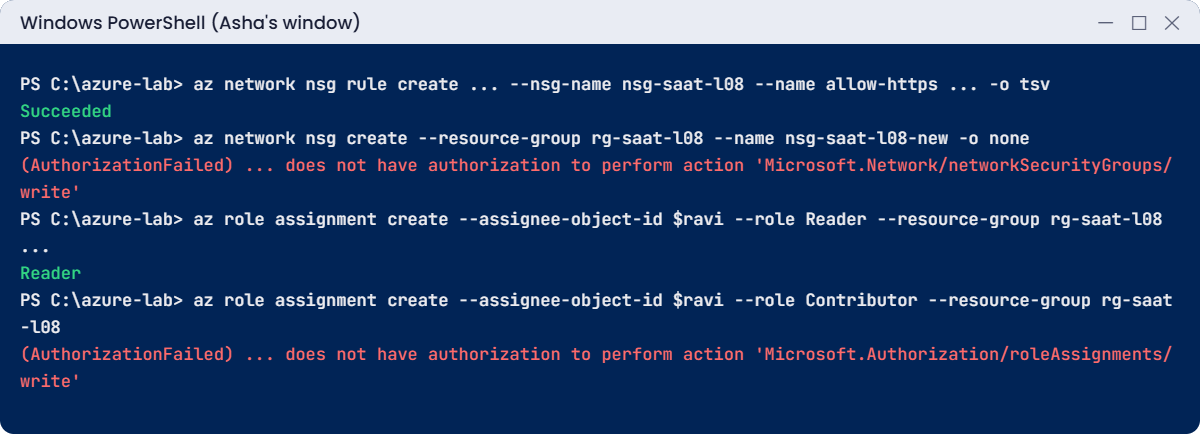
az network nsg rule create --resource-group rg-saat-l08 --nsg-name nsg-saat-l08 --name allow-https --priority 200 --direction Inbound --access Allow --protocol Tcp --destination-port-ranges 443 --query provisioningState -o tsv
az network nsg create --resource-group rg-saat-l08 --name nsg-saat-l08-new -o none
az network nsg delete --resource-group rg-saat-l08 --name nsg-saat-l08You should see something like this:
Succeeded
(AuthorizationFailed) The client 'asha.rao@priyakoutlook.onmicrosoft.com' ... does not have authorization to perform action
'Microsoft.Network/networkSecurityGroups/write' over scope '.../networkSecurityGroups/nsg-saat-l08-new' ...
(AuthorizationFailed) The client 'asha.rao@priyakoutlook.onmicrosoft.com' ... does not have authorization to perform action
'Microsoft.Network/networkSecurityGroups/delete' over scope '.../networkSecurityGroups/nsg-saat-l08' ...Exactly the job, nothing more: Asha can add a rule, but can’t create or delete security groups. This is the shape of a real “firewall change” role for a network operations team.
5Let Asha hand out Reader, and only Reader
In Lesson 7 Asha couldn’t give anyone access. Now give her group Role Based Access Control Administrator on the resource group, with a condition that allows only the Reader role (its ID is acdd72a7-3385-48ef-bd42-f606fba81ae7).
In your admin window, paste this:
@'
((!(ActionMatches{'Microsoft.Authorization/roleAssignments/write'})) OR (@Request[Microsoft.Authorization/roleAssignments:RoleDefinitionId] ForAnyOfAnyValues:GuidEquals {acdd72a7-3385-48ef-bd42-f606fba81ae7})) AND ((!(ActionMatches{'Microsoft.Authorization/roleAssignments/delete'})) OR (@Resource[Microsoft.Authorization/roleAssignments:RoleDefinitionId] ForAnyOfAnyValues:GuidEquals {acdd72a7-3385-48ef-bd42-f606fba81ae7}))
'@ | Set-Content C:\azure-lab\cond-reader-only.txt
az role assignment create --assignee-object-id $grp --assignee-principal-type Group --role "Role Based Access Control Administrator" --scope $rg --condition "@C:\azure-lab\cond-reader-only.txt" --condition-version "2.0" -o noneThe condition reads: “if you’re writing a role assignment, the role must be Reader; if you’re deleting one, it must be a Reader assignment”. Passing it with @file keeps PowerShell and the Windows az.cmd wrapper away from its brackets and quotes; the CLI reads any argument that starts with @ from the file.
Wait two minutes. In Asha’s window, run this:
$ravi = az ad user list --filter "startswith(displayName,'Ravi')" --query "[0].id" -o tsv
az role assignment create --assignee-object-id $ravi --assignee-principal-type User --role Reader --resource-group rg-saat-l08 --query roleDefinitionName -o tsv
az role assignment create --assignee-object-id $ravi --assignee-principal-type User --role Contributor --resource-group rg-saat-l08You should see something like this:
Reader
(AuthorizationFailed) The client 'asha.rao@priyakoutlook.onmicrosoft.com' ... does not have authorization to perform action
'Microsoft.Authorization/roleAssignments/write' over scope '.../resourceGroups/rg-saat-l08/providers/Microsoft.Authorization/roleAssignments/...' ...✅ Checkpoint: Asha can edit NSG rules but not create or delete NSGs, and she can grant Reader but not Contributor.
Break It, Then Fix It
The first mistake stops a custom role from being created at all. The second shows the only thing that beats an Owner.
1Break it: one missing letter in an action
In your admin window, run this:
(Get-Content C:\azure-lab\role-nsg-rule-editor.json -Raw).Replace('networkSecurityGroups/securityRules','networkSecurityGroup/securityRules').Replace('NSG Rule Editor','NSG Rule Editor 2') | Set-Content C:\azure-lab\role-typo.json
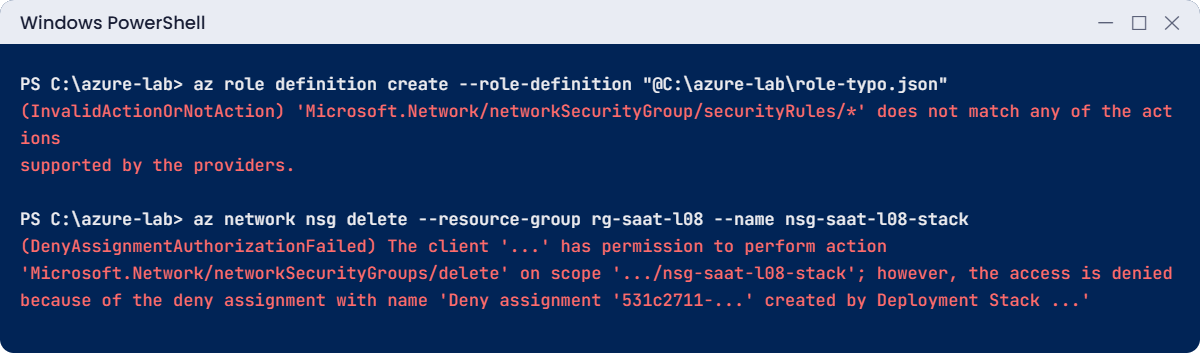
az role definition create --role-definition "@C:\azure-lab\role-typo.json"You’ll get an error like this:
(InvalidActionOrNotAction) 'Microsoft.Network/networkSecurityGroup/securityRules/*' does not match any of the actions supported by the providers.
Code: InvalidActionOrNotActionAzure checks every action against the list that resource providers publish, so a typo is caught here instead of failing quietly later. That’s why step 2 copies names from az provider operation show instead of typing them from memory.
Fix it: there is nothing to fix in Azure; the role wasn’t created. Delete the bad file:
Remove-Item C:\azure-lab\role-typo.json2Break it: an Owner meets a deny assignment
In your admin window, deploy an NSG through a deployment stack that denies deletes. Paste this:
@'
param location string = resourceGroup().location
resource nsg 'Microsoft.Network/networkSecurityGroups@2024-05-01' = {
name: 'nsg-saat-l08-stack'
location: location
tags: {
course: 'saatvedha-azure'
lesson: '08'
}
}
'@ | Set-Content C:\azure-lab\nsg-stack.bicep
az stack group create --name stk-saat-l08 --resource-group rg-saat-l08 --template-file C:\azure-lab\nsg-stack.bicep --deny-settings-mode denyDelete --action-on-unmanage deleteAll --yes -o none
az network nsg delete --resource-group rg-saat-l08 --name nsg-saat-l08-stackYou’ll get an error like this:
(DenyAssignmentAuthorizationFailed) The client 'priya.k_outlook.com#EXT#@...' with object id '...' has permission to perform
action 'Microsoft.Network/networkSecurityGroups/delete' on scope '.../networkSecurityGroups/nsg-saat-l08-stack'; however, the access
is denied because of the deny assignment with name 'Deny assignment '531c2711-...' created by Deployment Stack '/subscriptions/.../
resourceGroups/rg-saat-l08/providers/Microsoft.Resources/deploymentStacks/stk-saat-l08''.
Code: DenyAssignmentAuthorizationFailedYou are Owner, and the message even says you have permission. The deny assignment still wins. It wasn’t in az role assignment list, which only lists allows.
Find it like this:
az rest --method get --url "https://management.azure.com$rg/providers/Microsoft.Authorization/denyAssignments?api-version=2022-04-01" --query "value[].properties.denyAssignmentName" -o tsvYou should see something like this:
Deny assignment '531c2711-3f75-5170-ae80-6b06de7fc2e7' created by Deployment Stack '/subscriptions/.../stk-saat-l08'Fix it: remove the protection the way it was added, by deleting the stack. With deleteAll it also deletes the NSG it manages:
az stack group delete --name stk-saat-l08 --resource-group rg-saat-l08 --action-on-unmanage deleteAll --yes
az network nsg list --resource-group rg-saat-l08 --query "[].name" -o tsvYou should see this:
nsg-saat-l08
3Clean up
In Asha’s window:
az logout
Remove-Item Env:AZURE_CONFIG_DIR
Remove-Item C:\azure-lab\asha-cli -Recurse -ForceIn your admin window (the custom role can only be deleted after its assignments are gone):
az role assignment delete --scope $rg
az group delete --name rg-saat-l08 --yes
az role definition delete --name "SaatVedha NSG Rule Editor"
C:\azure-lab\Find-LabResources.ps1You should see this at the end:
Nothing tagged course=saatvedha-azure is left.✅ Checkpoint: You reproduced InvalidActionOrNotAction and DenyAssignmentAuthorizationFailed, and the custom role, assignments and group are gone.
This happened at work
The custom role that quietly grew
An insurance company created a custom role called “App Support” in 2023. To save time, someone gave it Microsoft.Web/* and Microsoft.Storage/storageAccounts/*, so support staff could restart web apps and check storage settings.
Two years later an auditor asked why support staff could read customer documents. Nobody had added that on purpose. The wildcard storageAccounts/* included listKeys/action, and with an account key you can read every blob in the account.
The support portal also showed a “Connection strings” page for web apps, readable through the same wildcard. Forty people had had this access the whole time.
What they changed: every custom role was rewritten with explicit actions, no /* on providers that hold data, and listKeys added to NotActions where a wildcard stayed. Storage accounts moved to Entra ID sign-in with key access turned off. Custom roles now live in Git with a reviewer, and a quarterly script diffs each role against the operations Azure has added since.
Common mistakes and troubleshooting
| Mistake | What you see | What to do |
|---|---|---|
| Typing operation names from memory | InvalidActionOrNotAction | Copy them from az provider operation show. |
| Wildcards on data-holding providers | People can list keys or secrets | Use explicit actions, or add listKeys and similar to NotActions. |
| Forgetting a read action | The portal shows “You don’t have access” on a page | Add the matching /read for the parent resource and the resource group. |
| Deleting a custom role that is still assigned | The delete fails | Remove its assignments first. |
| Looking for denies with az role assignment list | “Owner but still denied” and no clue why | Check Deny assignments in IAM, or the denyAssignments API. |
| Passing a long condition inline on Windows | Strange parse errors | Save it to a file and pass --condition "@file". |
Interview questions
Click a question to open it. Each one is written the way an interviewer would ask it. Under it you will see why they ask it and one way you could answer, in your own words.
Fresher level
1. When would you create a custom role instead of using a built-in one?
Why they ask this: They want to see you prefer built-in roles and know when they don’t fit.
How you might answer: Only when no built-in role matches the job closely enough. For example, a team that may edit NSG rules but must not create or delete NSGs: Network Contributor is too much and Reader is too little.
I’d still check the built-in list first, because Microsoft adds service-specific roles all the time.
2. What’s in a custom role definition?
Why they ask this: A basic structure question.
How you might answer: A name and description, Actions and NotActions for the control plane, DataActions and NotDataActions for data, and AssignableScopes, which say where the role may be assigned.
3. What is a deny assignment?
Why they ask this: They want to know you’ve heard of the one thing that overrides Owner.
How you might answer: It’s a rule that blocks certain actions at a scope for everyone except excluded principals, even Owners. You can’t create them directly; Azure creates them for things like deployment stacks with deny settings and managed applications.
2–5 years experience
4. An Owner gets DenyAssignmentAuthorizationFailed. Walk me through what you’d check.
Why they ask this: They want to see you go past role assignments to deny assignments.
How you might answer: The error usually names the deny assignment and who created it, for example a deployment stack. I’d look under Access control, Deny assignments, or query the denyAssignments API at that scope.
Then I’d talk to the owner of that stack or managed app. The fix is to change their deny settings or exclusions, not to add more roles.
5. How would you let a team lead grant access to their team without being able to grant Owner?
Why they ask this: They’re checking that you know role assignment conditions.
How you might answer: I’d give the lead Role Based Access Control Administrator at the team’s scope, with a condition that only allows writing assignments for a short list of roles, like Reader and Virtual Machine Contributor. In my lab the condition only allowed Reader, and an attempt to grant Contributor failed with AuthorizationFailed.
6. A custom role works in the CLI but users say the portal shows errors. Why?
Why they ask this: They want awareness of the extra reads the portal does.
How you might answer: The portal reads more than the CLI command needs, for example the resource group, related resources or diagnostic settings. The role is probably missing a /read action.
I’d ask for the exact page, check which call fails in the browser’s developer tools or the error message, and add only that read.
Senior level
7. How would you manage custom roles across many subscriptions?
Why they ask this: They want a scalable, reviewable approach.
How you might answer: I’d define them once with assignable scopes on a management group, so every subscription below can use them. The JSON lives in Git and is deployed by a pipeline, with a reviewer for every change.
A scheduled job compares the roles in Azure with Git, and also lists new provider operations that wildcards would pick up.
8. What are the risks of wildcards in custom roles?
Why they ask this: They want a real example, not a textbook answer.
How you might answer: Wildcards pick up new operations automatically. On providers that hold data, that can include actions like listKeys on storage, which effectively gives full data access.
I’d use explicit actions there, or add risky actions to NotActions, and review roles when providers change.
9. Design access for a VM operations team that may start, stop and restart VMs but not change them.
Why they ask this: They want a concrete least-privilege design.
How you might answer: A custom role with Microsoft.Compute/virtualMachines/read, start/action, restart/action, deallocate/action and powerOff/action, plus resource group read. No write, so they can’t resize or change disks.
I’d assign it to the team’s group at the resource groups they run, and use Azure Policy and tags to make sure new VMs land in those groups.
Quick quiz
Q1. What do AssignableScopes control?
- Who can use the role
- Where the role can be assigned
- How long the role lasts
- Which regions it works in
Show answer
B — They list the scopes where the role may be assigned.
Q2. Which error means a custom role uses an action name that doesn’t exist?
- AuthorizationFailed
- InvalidActionOrNotAction
- ScopeLocked
- RoleDefinitionNotFound
Show answer
B — Azure checks actions against the providers’ operation lists.
Q3. An Owner is blocked with DenyAssignmentAuthorizationFailed. What blocked them?
- A missing role
- A resource lock
- A deny assignment
- Azure Policy
Show answer
C — Deny assignments win over allows, even Owner.
Q4. Where can you see deny assignments?
- az role assignment list
- Access control (IAM) > Deny assignments, or the denyAssignments API
- Activity log only
- Azure Advisor
Show answer
B — They are separate from role assignments.
Q5. What did the condition in the lab allow Asha to do?
- Grant any role
- Grant only the Reader role
- Delete the resource group
- Create NSGs
Show answer
B — The condition only allowed writing and deleting Reader assignments.
Quick recap
You can now make access exactly as wide as the job, and you know the one rule that beats Owner.
- Custom roles are JSON lists of actions with assignable scopes; copy action names, don’t guess.
- Wildcards grow over time; avoid them on providers that hold data.
- Conditions narrow an assignment, for example “may grant Reader only”.
- Deny assignments win over every allow and are created by features like deployment stacks.
- Test every role as the user: the job works and the next step fails.
Next lesson
Lesson 9: MFA, security defaults and Conditional Access → You start an Entra ID P2 trial and build a Conditional Access policy for Asha, safely, in report-only mode first.
Further reading: Azure custom roles
Want to go deeper into Azure custom roles? See Microsoft’s Azure custom roles, Delegate Azure role assignment management to others with conditions and Understand Azure deny assignments. You can also see the full plan for this course on the Azure Cloud Administration course page.