iSCSI and MPIO on Azure VMs
-
Phase 0: Before you start
-
Phase 1: The foundation
-
Phase 2: Day-to-day operations
-
Phase 3: Enterprise architecture
-
Phase 4: Troubleshooting step by step
-
Phase 5: Final project and career
This iSCSI MPIO Azure lesson teaches block storage over the network: a server (the target) shares a disk, and another server (the initiator) uses it as if it were a local disk. MPIO, or multipath I/O, lets the initiator reach that disk over more than one path, so losing one path doesn’t stop the app.
On premises this is how SAN arrays serve databases and clusters. In Azure you meet it with Azure Elastic SAN, with storage appliances in the marketplace, and in every migration of a cluster that expects shared disks.
In this lab you build a real iSCSI target with targetcli on one Azure VM, connect to it from a second VM over two paths with Linux multipath, and then break the access list and one path.
| Time | You need | Cost | By the end you can |
|---|---|---|---|
| About 60 minutes | A free account and the CLI | About 5 US cents: two small VMs, their public IPs and a 4 GiB disk for an hour. For comparison, Elastic SAN Premium base capacity is about USD 115 per TiB per month in Central India (Azure Retail Prices API, October 2026) | Configure an iSCSI target and initiator, set up multipath, and fix ACL and path failures |
What it is, in one line
iSCSI carries disk commands over a normal IP network, and MPIO gives one disk several network paths so a single failure doesn’t stop it.
In Simple Words
Two roads to the same warehouse
A shop gets its stock from a warehouse across town. If there’s one road and it floods, the shop runs empty. So the shop uses two roads.
Trucks go on both, and if one road closes, every truck uses the other.
The warehouse guard also has a list of shops allowed to collect. A new shop with a different name is turned away, even on a perfect road.
The warehouse is the iSCSI target, the shop is the initiator, the two roads are the paths, and the guard’s list is the ACL of initiator names (IQNs).
Engineer's View
How iSCSI and multipath fit together
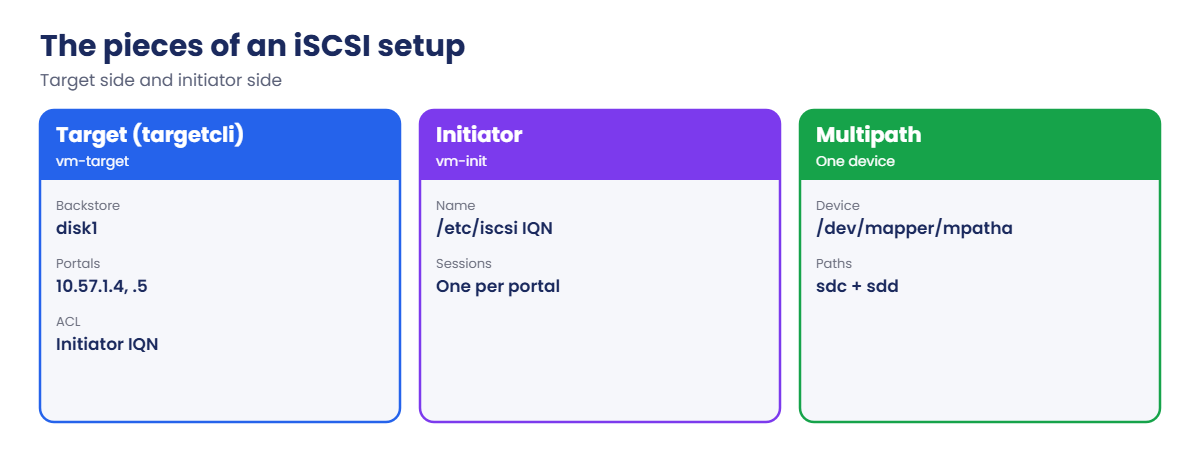
- Target: the server sharing storage. In Linux, LIO configured with targetcli: backstores (the disk), a target IQN, LUNs, portals (IP and port 3260) and ACLs.
- Initiator: the client. On Linux, open-iscsi with an initiator name (IQN) in /etc/iscsi/initiatorname.iscsi; on Windows, the iSCSI Initiator and the MPIO feature.
- Session: one login from initiator to a target portal. Two portals give two sessions and two SCSI disks (such as sdc and sdd) for the same LUN.
- Multipath: multipathd sees both disks have the same WWID and combines them into one device, /dev/mapper/mpatha. You format and mount that, never sdc or sdd.
- Timeouts: with multipath, set the iSCSI replacement timeout low (5 seconds) so a dead path fails fast and multipath moves I/O to the other path.
- In Azure: Elastic SAN provides iSCSI volumes in volume groups, secured by network rules or private endpoints instead of IQN ACLs. Microsoft recommends several sessions per volume to reach its performance.
How it works, step by step
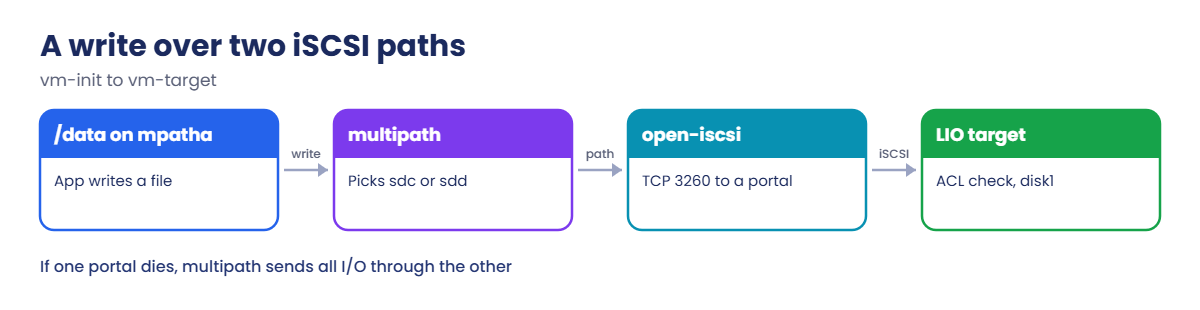
What happens when the app writes to /data:
- The app writes a file to /data, which is mounted from /dev/mapper/mpatha.
- multipath picks a path using its policy (service-time by default), for example sdc through portal 10.57.1.4.
- open-iscsi wraps the SCSI write in iSCSI and sends it over TCP port 3260.
- LIO on vm-target checks that the initiator IQN is in the ACL, then writes to the Azure data disk behind disk1.
- If the 10.57.1.5 path dies, its session fails after 5 seconds and multipath sends everything through 10.57.1.4.
Both portals here are on one VM, so this protects against a path failure, not a server failure. Real SAN arrays and Elastic SAN put the paths on different controllers or nodes.
If you remember one rule from this lesson, make it this: mount the multipath device, never a single path disk.
Build an iSCSI target and connect over two paths with multipath
1Network and two VMs
Create a VNet, a target VM with a 4 GiB data disk, and an initiator VM. Public IPs are only for apt; no inbound port is opened:
az group create --name rg-saat-l57 --location centralindia --tags course=saatvedha-azure lesson=57 -o none
az network vnet create --resource-group rg-saat-l57 --name vnet-l57 --address-prefixes 10.57.0.0/16 --subnet-name snet-san --subnet-prefixes 10.57.1.0/24 -o none
az vm create --resource-group rg-saat-l57 --name vm-target --image Canonical:ubuntu-24_04-lts:server:latest --size Standard_B1s --vnet-name vnet-l57 --subnet snet-san --private-ip-address 10.57.1.4 --public-ip-sku Standard --nsg-rule NONE --admin-username azureuser --generate-ssh-keys --tags course=saatvedha-azure lesson=57 -o none --data-disk-sizes-gb 4
az vm create --resource-group rg-saat-l57 --name vm-init --image Canonical:ubuntu-24_04-lts:server:latest --size Standard_B1s --vnet-name vnet-l57 --subnet snet-san --private-ip-address 10.57.1.10 --public-ip-sku Standard --nsg-rule NONE --admin-username azureuser --generate-ssh-keys --tags course=saatvedha-azure lesson=57 -o none
az network nic ip-config create --resource-group rg-saat-l57 --nic-name vm-targetVMNic --name ipconfig2 --private-ip-address 10.57.1.5 -o noneThe second IP config gives the target a second portal address. Azure only delivers traffic to an IP that’s on the NIC, and the OS must also have it, which the target script adds.
2Build the iSCSI target
Save this as C:\azure-lab\iscsi\target.sh:
#!/bin/bash
# iSCSI target on vm-target: one LUN, two portals, one allowed initiator
set -e
apt-get update -qq > /dev/null
DEBIAN_FRONTEND=noninteractive apt-get install -y -qq targetcli-fb > /dev/null
ip addr add 10.57.1.5/24 dev eth0 || true
T=iqn.2026-10.com.saatvedha:target1
targetcli /backstores/block create name=disk1 dev=/dev/disk/azure/scsi1/lun0
targetcli /iscsi create $T
targetcli /iscsi/$T/tpg1/luns create /backstores/block/disk1
targetcli /iscsi/$T/tpg1/portals delete 0.0.0.0 3260
targetcli /iscsi/$T/tpg1/portals create 10.57.1.4 3260
targetcli /iscsi/$T/tpg1/portals create 10.57.1.5 3260
targetcli /iscsi/$T/tpg1/acls create iqn.2026-10.com.saatvedha:vm-init
targetcli saveconfig > /dev/null
targetcli ls /iscsiRun it on vm-target:
az vm run-command invoke --resource-group rg-saat-l57 --name vm-target --command-id RunShellScript --scripts '@C:\azure-lab\iscsi\target.sh' --query "value[0].message" -o tsvThe end of the output should look something like this:
o- iscsi ............................................ [Targets: 1]
o- iqn.2026-10.com.saatvedha:target1 ............... [TPGs: 1]
o- tpg1 .............................. [no-gen-acls, no-auth]
o- acls .......................................... [ACLs: 1]
| o- iqn.2026-10.com.saatvedha:vm-init .... [Mapped LUNs: 1]
o- luns .......................................... [LUNs: 1]
| o- lun0 ............. [block/disk1 (/dev/disk/azure/scsi1/lun0)]
o- portals .................................... [Portals: 2]
o- 10.57.1.4:3260 ................................... [OK]
o- 10.57.1.5:3260 ................................... [OK]3Connect the initiator over two paths
Save this as C:\azure-lab\iscsi\initiator.sh:
#!/bin/bash
# iSCSI initiator with multipath on vm-init
apt-get update -qq > /dev/null
DEBIAN_FRONTEND=noninteractive apt-get install -y -qq open-iscsi multipath-tools > /dev/null
echo InitiatorName=iqn.2026-10.com.saatvedha:vm-init > /etc/iscsi/initiatorname.iscsi
sed -i 's/^node.session.timeo.replacement_timeout = .*/node.session.timeo.replacement_timeout = 5/' /etc/iscsi/iscsid.conf
cat > /etc/multipath.conf <<'EOF'
defaults {
user_friendly_names yes
find_multipaths yes
}
blacklist {
device {
vendor "Msft"
product "Virtual Disk"
}
}
EOF
systemctl restart iscsid multipathd
iscsiadm -m discovery -t sendtargets -p 10.57.1.4
iscsiadm -m node --login > /dev/null
sleep 5
iscsiadm -m session
multipath -llRun it on vm-init:
az vm run-command invoke --resource-group rg-saat-l57 --name vm-init --command-id RunShellScript --scripts '@C:\azure-lab\iscsi\initiator.sh' --query "value[0].message" -o tsvYou should see something like this:
10.57.1.4:3260,1 iqn.2026-10.com.saatvedha:target1
10.57.1.5:3260,1 iqn.2026-10.com.saatvedha:target1
tcp: [1] 10.57.1.4:3260,1 iqn.2026-10.com.saatvedha:target1 (non-flash)
tcp: [2] 10.57.1.5:3260,1 iqn.2026-10.com.saatvedha:target1 (non-flash)
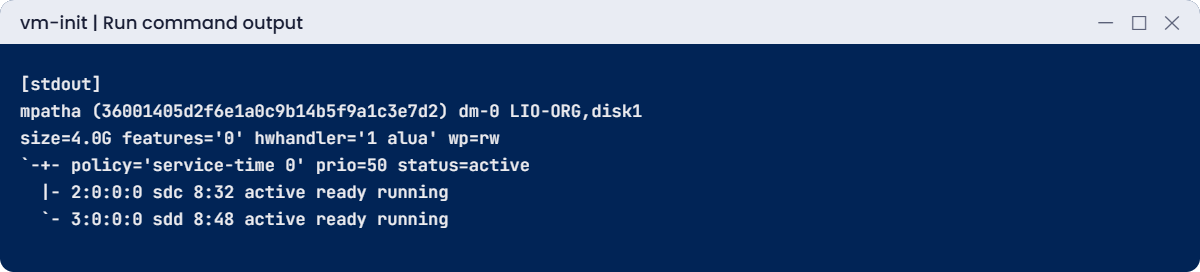
mpatha (36001405d2f6e1a0c9b14b5f9a1c3e7d2) dm-0 LIO-ORG,disk1
size=4.0G features='0' hwhandler='1 alua' wp=rw
`-+- policy='service-time 0' prio=50 status=active
|- 2:0:0:0 sdc 8:32 active ready running
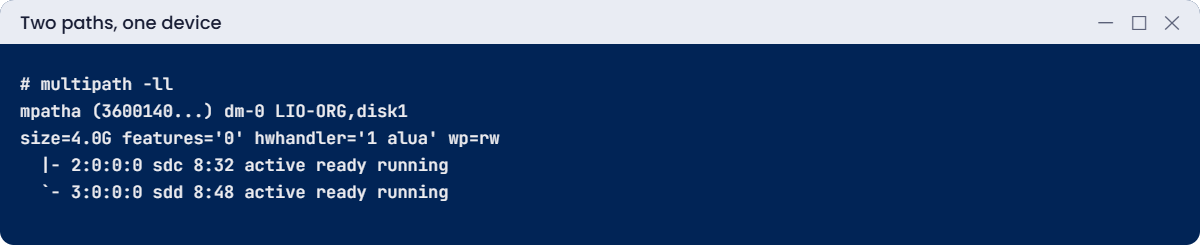
`- 3:0:0:0 sdd 8:48 active ready runningDiscovery found both portals, there are two sessions, and multipath joined sdc and sdd into mpatha. Your device letters and WWID will differ.
4Format and mount the multipath device
Run this:
az vm run-command invoke --resource-group rg-saat-l57 --name vm-init --command-id RunShellScript --scripts 'mkfs.ext4 -q /dev/mapper/mpatha; mkdir -p /data; mount /dev/mapper/mpatha /data; echo hello from iscsi > /data/test.txt; df -h /data | tail -1' --query "value[0].message" -o tsvYou should see something like this:
[stdout]
/dev/mapper/mpatha 3.9G 24K 3.7G 1% /data
✅ Checkpoint: vm-init has two iSCSI sessions, one multipath device mpatha, and a file system mounted on /data.
Break It, Then Fix It
Keep both VMs running for both breaks.
1Break it: a rebuilt initiator with a new name
vm-init is rebuilt from an image that generates a new initiator name. Simulate it:
az vm run-command invoke --resource-group rg-saat-l57 --name vm-init --command-id RunShellScript --scripts 'umount /data; iscsiadm -m node --logout > /dev/null; echo InitiatorName=iqn.2026-10.com.saatvedha:vm-init-new > /etc/iscsi/initiatorname.iscsi; systemctl restart iscsid; iscsiadm -m node --login 2>&1 | tail -3' --query "value[0].message" -o tsvYou should see something like this:
[stdout]
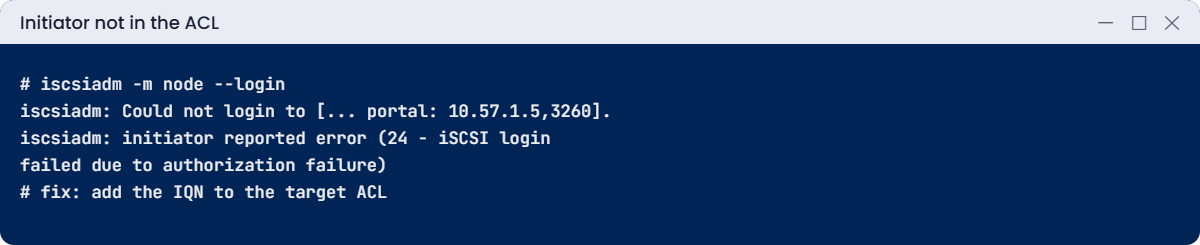
iscsiadm: Could not login to [iface: default, target: iqn.2026-10.com.saatvedha:target1, portal: 10.57.1.5,3260].
iscsiadm: initiator reported error (24 - iSCSI login failed due to authorization failure)
iscsiadm: Could not log into all portalsError 24 is the target refusing an initiator it doesn’t know. The network and portals are fine; the ACL lists only vm-init, not vm-init-new.
Fix it: allow the new initiator name on the target, then log in and mount again:
az vm run-command invoke --resource-group rg-saat-l57 --name vm-target --command-id RunShellScript --scripts 'targetcli /iscsi/iqn.2026-10.com.saatvedha:target1/tpg1/acls create iqn.2026-10.com.saatvedha:vm-init-new; targetcli saveconfig > /dev/null' --query "value[0].message" -o tsv
az vm run-command invoke --resource-group rg-saat-l57 --name vm-init --command-id RunShellScript --scripts 'iscsiadm -m node --login > /dev/null; sleep 5; mount /dev/mapper/mpatha /data; cat /data/test.txt' --query "value[0].message" -o tsvYou should see hello from iscsi. In a real change, you’d also remove the old ACL entry.
2Break it: one path goes down
Remove the second portal IP on the target, as if a switch port or NIC had failed, then write data and look at the paths:
az vm run-command invoke --resource-group rg-saat-l57 --name vm-target --command-id RunShellScript --scripts 'ip addr del 10.57.1.5/24 dev eth0' --query "value[0].message" -o tsv
az vm run-command invoke --resource-group rg-saat-l57 --name vm-init --command-id RunShellScript --scripts 'sleep 20; dd if=/dev/zero of=/data/big bs=1M count=50 oflag=direct 2>&1 | tail -1; multipath -ll | tail -2' --query "value[0].message" -o tsvYou should see something like this:
[stdout]
52428800 bytes (52 MB, 50 MiB) copied, 0.61 s, 86.0 MB/s
|- 2:0:0:0 sdc 8:32 active ready running
`- 3:0:0:0 sdd 8:48 failed faulty runningOne path is failed, yet the write finished. That’s MPIO doing its job. If the file system had been on /dev/sdd directly, it would have hung and then gone read-only.
Fix it: restore the IP and watch the path come back:
az vm run-command invoke --resource-group rg-saat-l57 --name vm-target --command-id RunShellScript --scripts 'ip addr add 10.57.1.5/24 dev eth0' --query "value[0].message" -o tsv
az vm run-command invoke --resource-group rg-saat-l57 --name vm-init --command-id RunShellScript --scripts 'sleep 20; multipath -ll | tail -2' --query "value[0].message" -o tsvBoth paths show active ready running again.
3Clean up
Delete the lab resource group:
az group delete --name rg-saat-l57 --yes
az resource list --tag lesson=57 -o tableThe last command should print nothing.
✅ Checkpoint: You fixed an iSCSI authorization failure and watched multipath survive a path failure, and the lab is gone.
This happened at work
The SQL cluster that froze during a network upgrade
A hospital ran a SQL Server failover cluster on VMs with shared iSCSI storage from a storage appliance. During a planned switch upgrade, one of the two storage networks went down for a few seconds. The SQL databases froze for two full minutes and the cluster failed over, which interrupted patient record lookups.
MPIO was installed, but each server had only one iSCSI session, through one network. The “second path” existed on paper. Also, the iSCSI timeout was the default, so even with two paths, I/O would have waited a long time before switching.
What they changed: two sessions per volume on two networks, MPIO policy and timeouts set to the storage vendor’s guide, and a quarterly test where one storage network is turned off during business hours while someone watches disk latency.
Common mistakes and troubleshooting
| Mistake | What you see | What to do |
|---|---|---|
| Formatting /dev/sdc instead of the multipath device | Hang or read-only file system when a path fails | Always use /dev/mapper/mpathX. |
| Initiator IQN not in the target ACL | Error 24, authorization failure | Add the IQN to the ACL or fix the initiator name. |
| Only one session per volume | “MPIO” that doesn’t fail over | Log in through at least two portals or sessions. |
| Default long iSCSI timeouts with multipath | I/O freezes for minutes | Set replacement_timeout low and follow vendor guidance. |
| Secondary IP only in the OS or only in Azure | Second portal unreachable | Add it to both the NIC and the OS. |
| Port 3260 blocked by NSG or firewall | Discovery or login times out | Allow TCP 3260 between initiator and target. |
Interview questions
Click a question to open it. Each one is written the way an interviewer would ask it. Under it you will see why they ask it and one way you could answer, in your own words.
Fresher level
1. What is iSCSI?
Why they ask this: The basic concept.
How you might answer: A protocol that carries SCSI disk commands over TCP/IP, so a server can use remote block storage as a local disk. It uses port 3260.
2. What are target and initiator?
Why they ask this: Basic vocabulary.
How you might answer: The target shares the storage; the initiator is the client that connects to it. Each is identified by an IQN.
3. What does MPIO do?
Why they ask this: Basic HA.
How you might answer: It combines several paths to the same LUN into one device, giving failover and sometimes load balancing across paths.
2–5 years experience
4. Login fails with error 24. What does it mean?
Why they ask this: A real troubleshooting path.
How you might answer: Authorization failure: the target doesn’t allow this initiator. Check the initiator IQN, the target ACL or host group, and CHAP settings if used.
5. How do you check multipath health on Linux?
Why they ask this: A daily ops check.
How you might answer: multipath -ll for path states, iscsiadm -m session for sessions, journalctl for path failures, and the dm device in /dev/mapper used by the file system.
6. Why lower iSCSI timeouts when using multipath?
Why they ask this: A tuning detail.
How you might answer: So a failed path is reported quickly and multipath moves I/O to a healthy path, instead of queuing I/O on the dead path for the default two minutes.
Senior level
7. When would you use Elastic SAN instead of managed disks?
Why they ask this: They want a design answer.
How you might answer: When you want pooled block storage shared across many VMs or AKS, consolidation of SAN-style workloads, or iSCSI for clustering, and the price per TiB fits. Managed disks are simpler for one disk per VM.
8. How do you design iSCSI networking for production?
Why they ask this: Network depth.
How you might answer: Separate storage subnets or NICs, two paths per volume, jumbo frames where supported, no NAT, NSGs that allow only 3260 between known hosts, and monitoring of path state and latency.
9. How do you migrate a SAN-based cluster to Azure?
Why they ask this: Migration thinking.
How you might answer: Check whether shared disks, Elastic SAN or ANF fit the cluster type, test failover and latency, plan IQNs or network rules, sessions and MPIO settings, and rehearse the cutover with a copy of real data.
Quick quiz
Q1. Which device should you format and mount with multipath?
- /dev/sdc
- /dev/mapper/mpatha
- /dev/sdd
- /dev/sda
Show answer
B — The multipath device survives path loss.
Q2. Error 24 at login means?
- Port blocked
- Authorization failure
- Disk full
- Wrong LUN size
Show answer
B — The target refused the initiator.
Q3. What port does iSCSI use by default?
- 445
- 3260
- 2049
- 443
Show answer
B — 3260 is the iSCSI port.
Q4. Two portals, two logins: how many sessions?
- One
- Two
- Four
- None
Show answer
B — One session per portal login.
Q5. How does Elastic SAN usually control access?
- IQN ACLs only
- Network rules or private endpoints
- Shared keys
- SAS tokens
Show answer
B — Volume groups use network rules or private endpoints.
Quick recap
You’ve built SAN-style block storage from scratch and proved what multipath is for.
- iSCSI uses targets, initiators, IQNs and port 3260.
- Two portals give two sessions; multipath joins them.
- Mount /dev/mapper devices, never a single path.
- Error 24 means the ACL doesn’t allow the initiator.
- Elastic SAN brings iSCSI to Azure with network rules.
Next lesson
Lesson 58: Ultra Disk and Premium SSD v2 → You create Ultra Disk and Premium SSD v2, tune IOPS and throughput live, and find the VM limit that caps them.
Further reading: iSCSI MPIO Azure
Want to go deeper into iSCSI MPIO Azure? See Microsoft’s What is Azure Elastic SAN? and Connect to Elastic SAN volumes from Linux. You can also see the full plan for this course on the Azure Cloud Administration course page.
