
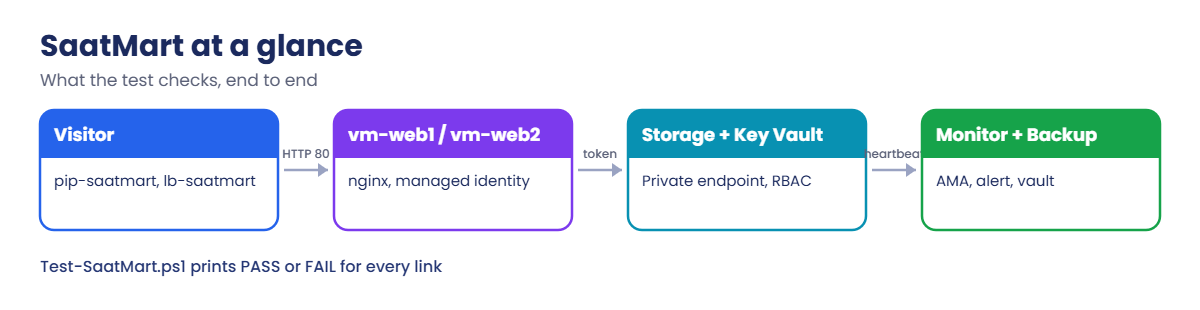
1Save the project files
Create C:\azure-lab\saatmart and save these four files in it. The Bicep file is long, so it’s folded:
Show saatmart.bicep (about 500 lines)
@description('Location for all resources')
param location string = resourceGroup().location

@description('Admin user name on both web VMs')
param adminUsername string = 'azureuser'

@description('SSH public key for the admin user')
param adminPublicKey string

@description('Object ID of the person running the lab (az ad signed-in-user show --query id)')
param adminObjectId string

@secure()
@description('Value stored in Key Vault as db-password')
param dbPassword string

var suffix = take(uniqueString(resourceGroup().id), 10)
var stName = 'stsm${suffix}'
var kvName = 'kv-sm-${suffix}'
var vmNames = [
  'vm-web1'
  'vm-web2'
]
var tags = {
  course: 'saatvedha-azure'
  lesson: '74'
  app: 'saatmart'
}
var cloudInit = '''
#cloud-config
package_update: true
packages:
  - nginx
runcmd:
  - hostname > /var/www/html/index.html
  - echo ok > /var/www/html/health
'''
var roles = {
  kvAdmin: '00482a5a-887f-4fb3-b363-3b7fe8e74483'
  kvSecretsUser: '4633458b-17de-408a-b874-0445c86b69e6'
  blobReader: '2a2b9908-6ea1-4ae2-8e65-a410df84e7d1'
}

// ---------- Network ----------
resource nsgWeb 'Microsoft.Network/networkSecurityGroups@2024-05-01' = {
  name: 'nsg-web'
  location: location
  tags: tags
  properties: {
    securityRules: [
      {
        name: 'allow-http'
        properties: {
          priority: 100
          direction: 'Inbound'
          access: 'Allow'
          protocol: 'Tcp'
          sourceAddressPrefix: 'Internet'
          sourcePortRange: '*'
          destinationAddressPrefix: '*'
          destinationPortRange: '80'
        }
      }
    ]
  }
}

resource vnet 'Microsoft.Network/virtualNetworks@2024-05-01' = {
  name: 'vnet-saatmart'
  location: location
  tags: tags
  properties: {
    addressSpace: {
      addressPrefixes: [
        '10.90.0.0/16'
      ]
    }
    subnets: [
      {
        name: 'snet-web'
        properties: {
          addressPrefix: '10.90.1.0/24'
          defaultOutboundAccess: false
          networkSecurityGroup: {
            id: nsgWeb.id
          }
        }
      }
      {
        name: 'snet-data'
        properties: {
          addressPrefix: '10.90.2.0/24'
          defaultOutboundAccess: false
        }
      }
    ]
  }
}

resource pipLb 'Microsoft.Network/publicIPAddresses@2024-05-01' = {
  name: 'pip-saatmart'
  location: location
  tags: tags
  sku: {
    name: 'Standard'
  }
  zones: [
    '1'
    '2'
    '3'
  ]
  properties: {
    publicIPAllocationMethod: 'Static'
  }
}

resource lb 'Microsoft.Network/loadBalancers@2024-05-01' = {
  name: 'lb-saatmart'
  location: location
  tags: tags
  sku: {
    name: 'Standard'
  }
  properties: {
    frontendIPConfigurations: [
      {
        name: 'fe-web'
        properties: {
          publicIPAddress: {
            id: pipLb.id
          }
        }
      }
    ]
    backendAddressPools: [
      {
        name: 'pool-web'
      }
    ]
    probes: [
      {
        name: 'probe-http'
        properties: {
          protocol: 'Http'
          port: 80
          requestPath: '/health'
          intervalInSeconds: 5
          numberOfProbes: 1
          probeThreshold: 1
        }
      }
    ]
    loadBalancingRules: [
      {
        name: 'rule-http'
        properties: {
          frontendIPConfiguration: {
            id: resourceId('Microsoft.Network/loadBalancers/frontendIPConfigurations', 'lb-saatmart', 'fe-web')
          }
          backendAddressPool: {
            id: resourceId('Microsoft.Network/loadBalancers/backendAddressPools', 'lb-saatmart', 'pool-web')
          }
          probe: {
            id: resourceId('Microsoft.Network/loadBalancers/probes', 'lb-saatmart', 'probe-http')
          }
          protocol: 'Tcp'
          frontendPort: 80
          backendPort: 80
          disableOutboundSnat: true
        }
      }
    ]
    outboundRules: [
      {
        name: 'out-web'
        properties: {
          frontendIPConfigurations: [
            {
              id: resourceId('Microsoft.Network/loadBalancers/frontendIPConfigurations', 'lb-saatmart', 'fe-web')
            }
          ]
          backendAddressPool: {
            id: resourceId('Microsoft.Network/loadBalancers/backendAddressPools', 'lb-saatmart', 'pool-web')
          }
          protocol: 'All'
          allocatedOutboundPorts: 10000
        }
      }
    ]
  }
}

// ---------- Web VMs ----------
resource nics 'Microsoft.Network/networkInterfaces@2024-05-01' = [for (vm, i) in vmNames: {
  name: '${vm}-nic'
  location: location
  tags: tags
  properties: {
    ipConfigurations: [
      {
        name: 'ipconfig1'
        properties: {
          subnet: {
            id: '${vnet.id}/subnets/snet-web'
          }
          privateIPAllocationMethod: 'Static'
          privateIPAddress: '10.90.1.${i + 4}'
          loadBalancerBackendAddressPools: [
            {
              id: lb.properties.backendAddressPools[0].id
            }
          ]
        }
      }
    ]
  }
}]

resource vms 'Microsoft.Compute/virtualMachines@2024-07-01' = [for (vm, i) in vmNames: {
  name: vm
  location: location
  tags: tags
  identity: {
    type: 'SystemAssigned'
  }
  properties: {
    hardwareProfile: {
      vmSize: 'Standard_B1s'
    }
    osProfile: {
      computerName: vm
      adminUsername: adminUsername
      customData: base64(cloudInit)
      linuxConfiguration: {
        disablePasswordAuthentication: true
        ssh: {
          publicKeys: [
            {
              path: '/home/${adminUsername}/.ssh/authorized_keys'
              keyData: adminPublicKey
            }
          ]
        }
      }
    }
    storageProfile: {
      imageReference: {
        publisher: 'Canonical'
        offer: 'ubuntu-24_04-lts'
        sku: 'server'
        version: 'latest'
      }
      osDisk: {
        createOption: 'FromImage'
        managedDisk: {
          storageAccountType: 'StandardSSD_LRS'
        }
      }
    }
    networkProfile: {
      networkInterfaces: [
        {
          id: nics[i].id
        }
      ]
    }
    diagnosticsProfile: {
      bootDiagnostics: {
        enabled: true
      }
    }
  }
}]

resource ama 'Microsoft.Compute/virtualMachines/extensions@2024-07-01' = [for (vm, i) in vmNames: {
  parent: vms[i]
  name: 'AzureMonitorLinuxAgent'
  location: location
  properties: {
    publisher: 'Microsoft.Azure.Monitor'
    type: 'AzureMonitorLinuxAgent'
    typeHandlerVersion: '1.0'
    autoUpgradeMinorVersion: true
    enableAutomaticUpgrade: true
  }
}]

// ---------- Monitoring ----------
resource law 'Microsoft.OperationalInsights/workspaces@2023-09-01' = {
  name: 'law-saatmart'
  location: location
  tags: tags
  properties: {
    sku: {
      name: 'PerGB2018'
    }
    retentionInDays: 30
    workspaceCapping: {
      dailyQuotaGb: json('0.1')
    }
  }
}

resource dcr 'Microsoft.Insights/dataCollectionRules@2022-06-01' = {
  name: 'dcr-saatmart'
  location: location
  tags: tags
  kind: 'Linux'
  properties: {
    dataSources: {
      syslog: [
        {
          name: 'syslog-warn'
          streams: [
            'Microsoft-Syslog'
          ]
          facilityNames: [
            'daemon'
            'syslog'
            'user'
          ]
          logLevels: [
            'Warning'
            'Error'
            'Critical'
            'Alert'
            'Emergency'
          ]
        }
      ]
    }
    destinations: {
      logAnalytics: [
        {
          name: 'law'
          workspaceResourceId: law.id
        }
      ]
    }
    dataFlows: [
      {
        streams: [
          'Microsoft-Syslog'
        ]
        destinations: [
          'law'
        ]
      }
    ]
  }
}

resource dcra 'Microsoft.Insights/dataCollectionRuleAssociations@2022-06-01' = [for (vm, i) in vmNames: {
  name: 'dcra-saatmart'
  scope: vms[i]
  properties: {
    dataCollectionRuleId: dcr.id
  }
}]

// ---------- Storage behind a private endpoint ----------
resource st 'Microsoft.Storage/storageAccounts@2023-05-01' = {
  name: stName
  location: location
  tags: tags
  sku: {
    name: 'Standard_LRS'
  }
  kind: 'StorageV2'
  properties: {
    minimumTlsVersion: 'TLS1_2'
    allowBlobPublicAccess: false
    publicNetworkAccess: 'Disabled'
  }
}

resource blobSvc 'Microsoft.Storage/storageAccounts/blobServices@2023-05-01' = {
  parent: st
  name: 'default'
}

resource docs 'Microsoft.Storage/storageAccounts/blobServices/containers@2023-05-01' = {
  parent: blobSvc
  name: 'docs'
}

resource pe 'Microsoft.Network/privateEndpoints@2024-05-01' = {
  name: 'pe-blob'
  location: location
  tags: tags
  properties: {
    subnet: {
      id: '${vnet.id}/subnets/snet-data'
    }
    privateLinkServiceConnections: [
      {
        name: 'pe-blob-conn'
        properties: {
          privateLinkServiceId: st.id
          groupIds: [
            'blob'
          ]
        }
      }
    ]
  }
}

resource zone 'Microsoft.Network/privateDnsZones@2024-06-01' = {
  name: 'privatelink.blob.${environment().suffixes.storage}'
  location: 'global'
  tags: tags
}

resource zoneLink 'Microsoft.Network/privateDnsZones/virtualNetworkLinks@2024-06-01' = {
  parent: zone
  name: 'link-saatmart'
  location: 'global'
  properties: {
    registrationEnabled: false
    virtualNetwork: {
      id: vnet.id
    }
  }
}

resource zoneGroup 'Microsoft.Network/privateEndpoints/privateDnsZoneGroups@2024-05-01' = {
  parent: pe
  name: 'default'
  properties: {
    privateDnsZoneConfigs: [
      {
        name: 'blob'
        properties: {
          privateDnsZoneId: zone.id
        }
      }
    ]
  }
}

// ---------- Key Vault ----------
resource kv 'Microsoft.KeyVault/vaults@2023-07-01' = {
  name: kvName
  location: location
  tags: tags
  properties: {
    tenantId: subscription().tenantId
    sku: {
      family: 'A'
      name: 'standard'
    }
    enableRbacAuthorization: true
    softDeleteRetentionInDays: 7
  }
}

resource secret 'Microsoft.KeyVault/vaults/secrets@2023-07-01' = {
  parent: kv
  name: 'db-password'
  properties: {
    value: dbPassword
  }
}

// ---------- Role assignments ----------
resource kvAdminRole 'Microsoft.Authorization/roleAssignments@2022-04-01' = {
  name: guid(kv.id, adminObjectId, roles.kvAdmin)
  scope: kv
  properties: {
    principalId: adminObjectId
    principalType: 'User'
    roleDefinitionId: subscriptionResourceId('Microsoft.Authorization/roleDefinitions', roles.kvAdmin)
  }
}

resource vmSecretRole 'Microsoft.Authorization/roleAssignments@2022-04-01' = [for (vm, i) in vmNames: {
  name: guid(secret.id, vm, roles.kvSecretsUser)
  scope: secret
  properties: {
    principalId: vms[i].identity.principalId
    principalType: 'ServicePrincipal'
    roleDefinitionId: subscriptionResourceId('Microsoft.Authorization/roleDefinitions', roles.kvSecretsUser)
  }
}]

resource vmBlobRole 'Microsoft.Authorization/roleAssignments@2022-04-01' = [for (vm, i) in vmNames: {
  name: guid(st.id, vm, roles.blobReader)
  scope: st
  properties: {
    principalId: vms[i].identity.principalId
    principalType: 'ServicePrincipal'
    roleDefinitionId: subscriptionResourceId('Microsoft.Authorization/roleDefinitions', roles.blobReader)
  }
}]

output lbIp string = pipLb.properties.ipAddress
output storageName string = st.name
output keyVaultName string = kv.name
output workspaceId string = law.properties.customerId
vm-check.sh, which Test-SaatMart runs inside vm-web1:
#!/bin/bash
# SaatMart checks from inside vm-web1: DNS, storage, Key Vault, outbound
ST=STNAME
KV=KVNAME
IP=$(getent hosts $ST.blob.core.windows.net | cut -d' ' -f1)
if [[ $IP == 10.90.* ]]; then echo "PASS  dns          storage resolves to $IP"; else echo "FAIL  dns          storage resolves to $IP"; fi
TOKS=$(curl -s -H Metadata:true 'http://169.254.169.254/metadata/identity/oauth2/token?api-version=2018-02-01&resource=https://storage.azure.com/' | python3 -c 'import sys,json; print(json.load(sys.stdin).get("access_token",""))')
OUT=$(curl -s --max-time 10 -H "Authorization: Bearer $TOKS" -H 'x-ms-version: 2021-08-06' "https://$ST.blob.core.windows.net/docs?restype=container&comp=list")
if echo "$OUT" | grep -q EnumerationResults; then echo "PASS  storage      container docs listed"; else echo "FAIL  storage      $(echo "$OUT" | grep -o '<Code>[^<]*' | head -1)"; fi
TOKV=$(curl -s -H Metadata:true 'http://169.254.169.254/metadata/identity/oauth2/token?api-version=2018-02-01&resource=https://vault.azure.net' | python3 -c 'import sys,json; print(json.load(sys.stdin).get("access_token",""))')
SEC=$(curl -s --max-time 10 -H "Authorization: Bearer $TOKV" "https://$KV.vault.azure.net/secrets/db-password?api-version=7.4")
if echo "$SEC" | grep -q '"value"'; then echo "PASS  keyvault     secret db-password readable"; else echo "FAIL  keyvault     $(echo "$SEC" | python3 -c 'import sys,json
try:
    e = json.load(sys.stdin).get("error", {})
    print(e.get("code"), e.get("innererror", {}).get("code", ""))
except Exception:
    print("no answer (network?)")')"; fi
if timeout 8 curl -sI http://azure.archive.ubuntu.com/ubuntu/ | head -1 | grep -q 200; then echo "PASS  outbound     Ubuntu mirror reachable"; else echo "FAIL  outbound     no internet access"; fi
Test-SaatMart.ps1:
param([string]$ResourceGroup = 'rg-saatmart')
# SaatVedha Azure Lesson 74: check that SaatMart works end to end
$o = az deployment group show --resource-group $ResourceGroup --name saatmart --query properties.outputs -o json | ConvertFrom-Json
$ip = $o.lbIp.value; $st = $o.storageName.value; $kv = $o.keyVaultName.value; $ws = $o.workspaceId.value
function Show([string]$Name, [bool]$Ok, [string]$Detail) { '{0,-5} {1,-12} {2}' -f $(if ($Ok) { 'PASS' } else { 'FAIL' }), $Name, $Detail }

foreach ($vm in 'vm-web1', 'vm-web2') {
    $state = az vm get-instance-view --resource-group $ResourceGroup --name $vm --query "instanceView.statuses[1].displayStatus" -o tsv
    Show 'power' ($state -eq 'VM running') "$vm is $state"
}
$names = @(1..8 | ForEach-Object { curl.exe -s --max-time 5 "http://$ip/" } | Where-Object { $_ } | Sort-Object -Unique)
Show 'website' ($names.Count -eq 2) ('answered by: ' + ($(if ($names) { $names -join ', ' } else { 'nobody' })))

(Get-Content "$PSScriptRoot\vm-check.sh" -Raw) -replace 'STNAME', $st -replace 'KVNAME', $kv | Set-Content "$PSScriptRoot\vm-check-now.sh"
$inside = az vm run-command invoke --resource-group $ResourceGroup --name vm-web1 --command-id RunShellScript --scripts "@$PSScriptRoot\vm-check-now.sh" --query "value[0].message" -o tsv
$inside -split "`n" | Where-Object { $_ -match '^(PASS|FAIL)' }

$hb = az monitor log-analytics query --workspace $ws --analytics-query "Heartbeat | where TimeGenerated > ago(15m) | distinct Computer" -o json | ConvertFrom-Json
foreach ($vm in 'vm-web1', 'vm-web2') { Show 'heartbeat' ([bool]($hb | Where-Object Computer -eq $vm)) "$vm in the last 15 minutes" }

$test = az network nsg create --resource-group $ResourceGroup --name nsg-deploytest -o none 2>&1
$ok = ($LASTEXITCODE -eq 0)
Show 'deploy' $ok $(if ($ok) { 'test NSG created and removed' } else { (($test | Out-String) -split "`n")[0].Trim() })
if ($ok) { az network nsg delete --resource-group $ResourceGroup --name nsg-deploytest }
Break-SaatMart.ps1. Save it, but try not to read the switch block until you’ve solved the scenarios:
Show Break-SaatMart.ps1
param(
    [string]$ResourceGroup = 'rg-saatmart',
    [Parameter(Mandatory)][ValidateRange(1, 10)][int]$Scenario
)
# SaatVedha Azure Lesson 74: break SaatMart in one of ten ways.
# Try to fix each one with Test-SaatMart.ps1 and the course tools before you read this switch.
$rg = $ResourceGroup
$o = az deployment group show --resource-group $rg --name saatmart --query properties.outputs -o json | ConvertFrom-Json
$kv = $o.keyVaultName.value
switch ($Scenario) {
    1 { az network nsg rule delete --resource-group $rg --nsg-name nsg-web --name allow-http }
    2 { az network lb probe update --resource-group $rg --lb-name lb-saatmart --name probe-http --path /status -o none }
    3 { az network private-dns link vnet delete --resource-group $rg --zone-name privatelink.blob.core.windows.net --name link-saatmart --yes }
    4 {
        $p = az vm show --resource-group $rg --name vm-web1 --query identity.principalId -o tsv
        $kvId = az keyvault show --name $kv --query id -o tsv
        az role assignment delete --assignee $p --role 'Key Vault Secrets User' --scope "$kvId/secrets/db-password"
    }
    5 {
        az network route-table create --resource-group $rg --name rt-saatmart -o none
        az network route-table route create --resource-group $rg --route-table-name rt-saatmart --name default-route --address-prefix 0.0.0.0/0 --next-hop-type None -o none
        az network vnet subnet update --resource-group $rg --vnet-name vnet-saatmart --name snet-web --route-table rt-saatmart -o none
    }
    6 { az vm stop --resource-group $rg --name vm-web2 -o none }
    7 {
        $id = az vm show --resource-group $rg --name vm-web2 --query id -o tsv
        az rest --method delete --url "https://management.azure.com${id}/providers/Microsoft.Insights/dataCollectionRuleAssociations/dcra-saatmart?api-version=2022-06-01"
    }
    8 {
        $rgId = az group show --name $rg --query id -o tsv
        '{"listOfAllowedLocations":{"value":["southindia"]}}' | Set-Content "$PSScriptRoot\break8.json"
        az policy assignment create --name allowed-loc-saatmart --policy e56962a6-4747-49cd-b67b-bf8b01975c4c --scope $rgId --params "@$PSScriptRoot\break8.json" -o none
    }
    9 { az keyvault secret delete --vault-name $kv --name db-password -o none }
    10 { az network lb outbound-rule delete --resource-group $rg --lb-name lb-saatmart --name out-web }
}
"Scenario $Scenario applied. Wait 5 to 10 minutes, then run Test-SaatMart.ps1."2Deploy SaatMart (about 15 minutes)
Build the file first, then deploy it with your SSH key, your object ID and a generated password:
az bicep build --file C:\azure-lab\saatmart\saatmart.bicep --stdout | Out-Null
$key = (Get-Content $HOME\.ssh\id_rsa.pub -Raw).Trim()
$me = az ad signed-in-user show --query id -o tsv
$pw = 'Sv-' + (-join ((65..90) + (97..122) + (48..57) | Get-Random -Count 14 | ForEach-Object { [char]$_ })) + '9!'
az group create --name rg-saatmart --location centralindia --tags course=saatvedha-azure lesson=74 -o none
az deployment group create --resource-group rg-saatmart --name saatmart --template-file C:\azure-lab\saatmart\saatmart.bicep --parameters adminPublicKey="$key" adminObjectId=$me dbPassword=$pw --query properties.provisioningState -o tsv
You should see Succeeded. Deploying with the name saatmart matters: the scripts read its outputs.
3Add backup and an alert
Set $email to your own address, then protect vm-web1 and alert when the load balancer has an unhealthy backend:
$email = 'you@example.com'
az backup vault create --resource-group rg-saatmart --name rsv-saatmart --location centralindia -o none
az backup vault backup-properties set --resource-group rg-saatmart --name rsv-saatmart --soft-delete-feature-state Disable -o none
az backup protection enable-for-vm --resource-group rg-saatmart --vault-name rsv-saatmart --vm vm-web1 --policy-name DefaultPolicy -o none
az monitor action-group create --resource-group rg-saatmart --name ag-saatmart --short-name saatmart --action email admin $email -o none
$lbId = az network lb show --resource-group rg-saatmart --name lb-saatmart --query id -o tsv
az monitor metrics alert create --resource-group rg-saatmart --name alert-lb-health --scopes $lbId --condition "avg DipAvailability < 100" --window-size 5m --evaluation-frequency 1m --action ag-saatmart --severity 2 -o none
Soft delete is off on this lab vault only, so clean-up is quick. Keep it on everywhere else.
4Prove it works
Wait 10 minutes for cloud-init and the first heartbeats, then run the test:
C:\azure-lab\saatmart\Test-SaatMart.ps1You should see something like this:
PASS  power        vm-web1 is VM running
PASS  power        vm-web2 is VM running
PASS  website      answered by: vm-web1, vm-web2
PASS  dns          storage resolves to 10.90.2.4
PASS  storage      container docs listed
PASS  keyvault     secret db-password readable
PASS  outbound     Ubuntu mirror reachable
PASS  heartbeat    vm-web1 in the last 15 minutes
PASS  heartbeat    vm-web2 in the last 15 minutes
PASS  deploy       test NSG created and removed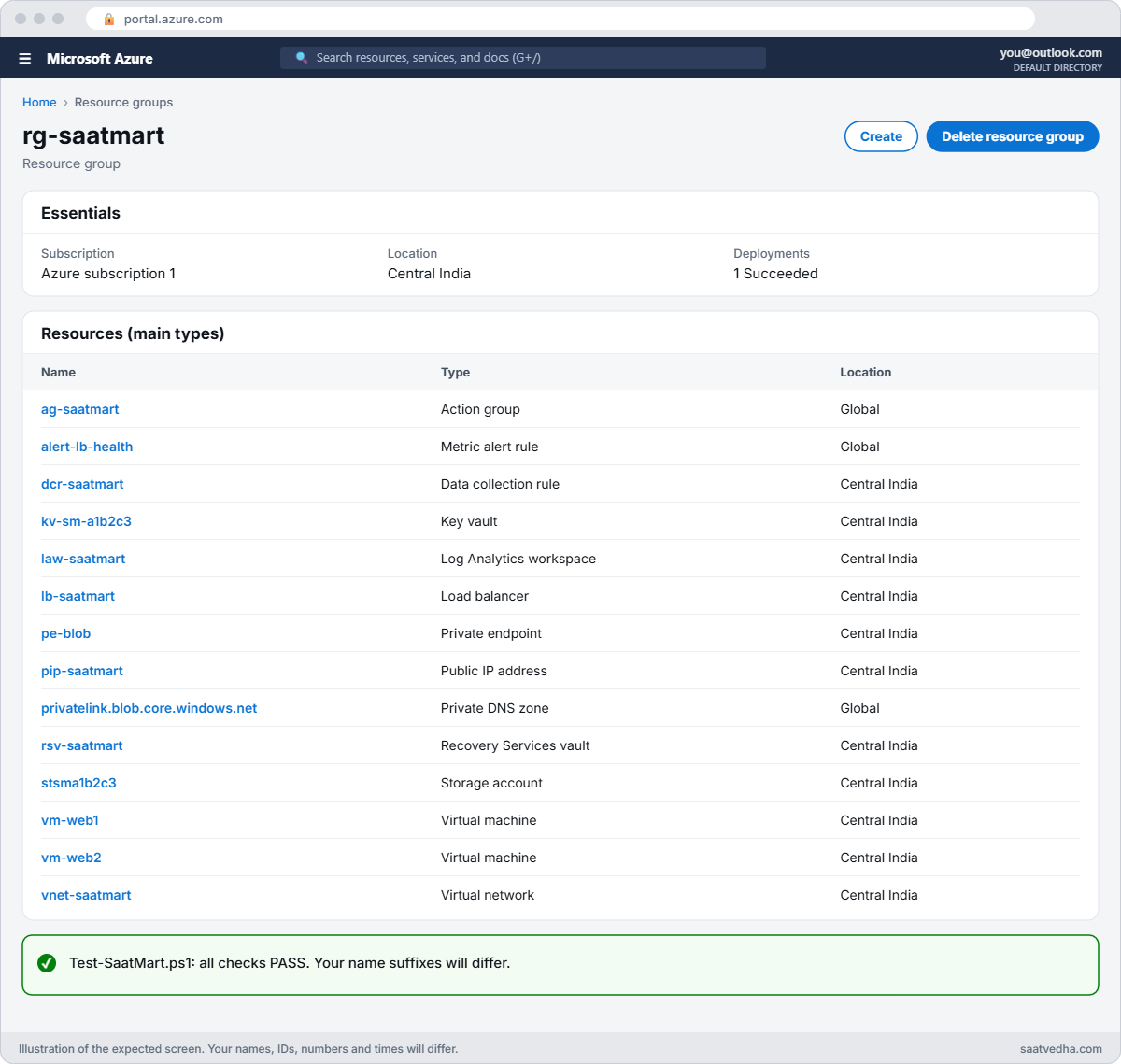
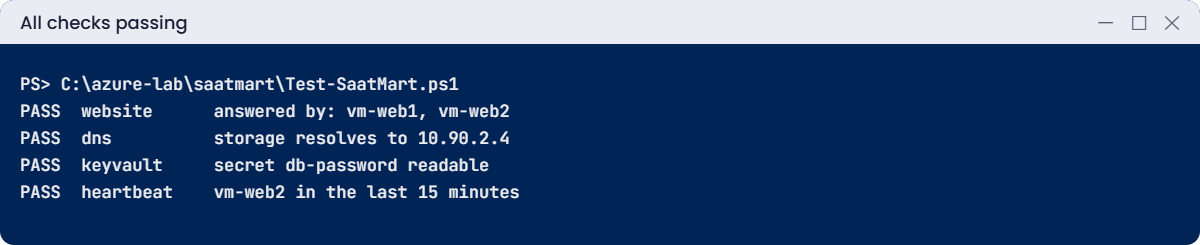
✅ Checkpoint: SaatMart is deployed from code, protected, monitored, and Test-SaatMart.ps1 shows ten PASS lines.
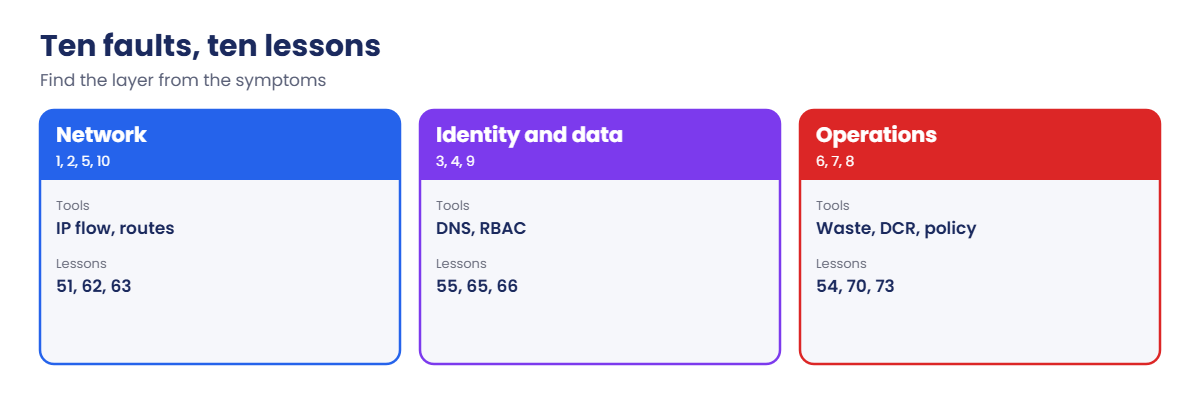
Now the real work. For each scenario: break it, wait, test, investigate, fix, and test again until everything passes. Do them in order, or pick a random one with Get-Random -Minimum 1 -Maximum 11 for a harder game.
C:\azure-lab\saatmart\Break-SaatMart.ps1 -Scenario 1
Start-Sleep -Seconds 300
C:\azure-lab\saatmart\Test-SaatMart.ps1
Your first move is always the same: run Get-RecentChanges.ps1 from Lesson 59 on rg-saatmart. Yes, it will often point straight at the change the break script made. That’s the point: in real incidents, “what changed?” solves most problems in minutes.
Try each scenario first from the symptoms alone, then confirm with the Activity log.
C:\azure-lab\Get-RecentChanges.ps1 -ResourceGroup rg-saatmart -Hours 1| # | Main symptom | Area |
|---|---|---|
| 1 | website FAIL | Network security |
| 2 | website FAIL | Load balancer |
| 3 | dns and storage FAIL | Private endpoint DNS |
| 4 | keyvault FAIL | RBAC |
| 5 | website, keyvault, outbound FAIL | Routing |
| 6 | power and website FAIL | Compute and cost |
| 7 | heartbeat FAIL for one VM | Monitoring |
| 8 | deploy FAIL | Governance |
| 9 | keyvault FAIL | Secrets |
| 10 | keyvault and outbound FAIL, website PASS | Outbound connectivity |
Open a solution only after you’ve fixed it or spent a real effort.
Scenario 1: the website is down for everyone
What Test-SaatMart shows: website FAIL, answered by nobody; everything else PASS.
Lessons that help: 51, 61, 62
How to find it: The load balancer metric DipAvailability stays at 100, so probes pass. IP flow verify for your IP to port 80 on vm-web1 names DenyAllInBound: the allow-http rule is gone.
The fix:
az network nsg rule create --resource-group rg-saatmart --nsg-name nsg-web --name allow-http --priority 100 --direction Inbound --access Allow --protocol Tcp --source-address-prefixes Internet --destination-port-ranges 80 -o noneScenario 2: the website is down, probes failing
What Test-SaatMart shows: website FAIL; inside checks PASS.
Lessons that help: 51, 71
How to find it: DipAvailability drops to 0. az network lb probe show shows the path /status, which nginx answers with 404.
The fix:
az network lb probe update --resource-group rg-saatmart --lb-name lb-saatmart --name probe-http --path /health -o noneScenario 3: the app can’t read its documents
What Test-SaatMart shows: dns FAIL (storage resolves to a public IP) and storage FAIL with AuthorizationFailure.
Lessons that help: 26, 64, 65
How to find it: The storage name resolves publicly from vm-web1. az network private-dns link vnet list on the privatelink.blob zone returns nothing.
The fix:
az network private-dns link vnet create --resource-group rg-saatmart --zone-name privatelink.blob.core.windows.net --name link-saatmart --virtual-network vnet-saatmart --registration-enabled false -o noneScenario 4: the app can’t read its secret
What Test-SaatMart shows: keyvault FAIL with Forbidden ForbiddenByRbac.
Lessons that help: 55, 66
How to find it: az role assignment list for vm-web1’s principal ID at the secret’s scope is empty; the Activity log shows a role assignment delete.
The fix:
$p = az vm show --resource-group rg-saatmart --name vm-web1 --query identity.principalId -o tsv
$kv = az deployment group show --resource-group rg-saatmart --name saatmart --query properties.outputs.keyVaultName.value -o tsv
$kvId = az keyvault show --name $kv --query id -o tsv
az role assignment create --assignee-object-id $p --assignee-principal-type ServicePrincipal --role "Key Vault Secrets User" --scope "$kvId/secrets/db-password" -o none
Scenario 5: several things fail at once
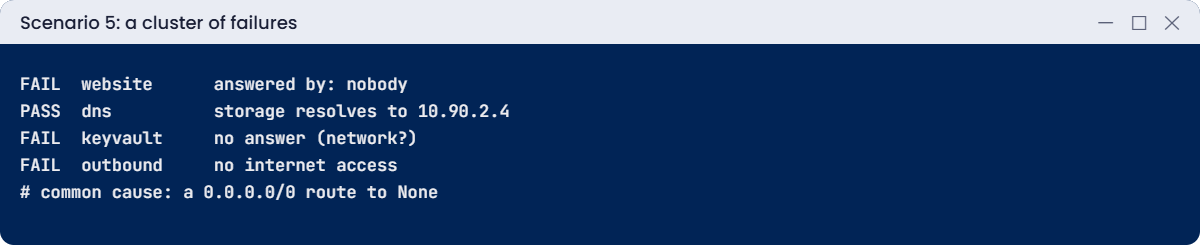
What Test-SaatMart shows: website, keyvault and outbound FAIL, often heartbeat later; dns and storage still PASS.
Lessons that help: 47, 62, 63
How to find it: A cluster of failures that all need traffic to leave the VNet, while private traffic works, points at routing. Effective routes on vm-web1-nic show a User route 0.0.0.0/0 with next hop None.
The fix:
az network vnet subnet update --resource-group rg-saatmart --vnet-name vnet-saatmart --name snet-web --remove routeTable -o none
az network route-table delete --resource-group rg-saatmart --name rt-saatmart
Scenario 6: half the capacity is gone, but it still costs money
What Test-SaatMart shows: power FAIL for vm-web2 (VM stopped) and website answered only by vm-web1; heartbeat for vm-web2 FAIL later.
Lessons that help: 15, 59, 73
How to find it: Find-AzureWaste.ps1 lists vm-web2 as “VM stopped, not deallocated”: it’s down and still billed for compute.
The fix:
az vm start --resource-group rg-saatmart --name vm-web2Scenario 7: one server has gone quiet
What Test-SaatMart shows: heartbeat FAIL for vm-web2 only; everything else PASS.
Lessons that help: 32, 70
How to find it: The VM, AMA extension and identity are fine. The DCR association list for vm-web2 is empty.
The fix:
$dcrId = az resource show --resource-group rg-saatmart --name dcr-saatmart --resource-type Microsoft.Insights/dataCollectionRules --query id -o tsv
@{ properties = @{ dataCollectionRuleId = $dcrId } } | ConvertTo-Json | Set-Content C:\azure-lab\saatmart\dcra.json
$id = az vm show --resource-group rg-saatmart --name vm-web2 --query id -o tsv
az rest --method put --url "https://management.azure.com${id}/providers/Microsoft.Insights/dataCollectionRuleAssociations/dcra-saatmart?api-version=2022-06-01" --body '@C:\azure-lab\saatmart\dcra.json' -o none
Scenario 8: nobody can deploy anything
What Test-SaatMart shows: deploy FAIL with RequestDisallowedByPolicy.
Lessons that help: 54, 67
How to find it: The error names the assignment allowed-loc-saatmart, which allows only southindia.
The fix:
$rgId = az group show --name rg-saatmart --query id -o tsv
az policy assignment delete --name allowed-loc-saatmart --scope $rgId
Scenario 9: the secret has disappeared
What Test-SaatMart shows: keyvault FAIL with SecretNotFound.
Lessons that help: 55
How to find it: az keyvault secret list-deleted shows db-password in the deleted state.
The fix:
$kv = az deployment group show --resource-group rg-saatmart --name saatmart --query properties.outputs.keyVaultName.value -o tsv
az keyvault secret recover --vault-name $kv --name db-password -o none
Scenario 10: the site works, but the servers can’t reach anything outside
What Test-SaatMart shows: website PASS, keyvault FAIL (no answer) and outbound FAIL.
Lessons that help: 13, 51
How to find it: Inbound is fine but outbound is dead. The load balancer has no outbound rule any more, and the subnet has no other outbound path.
The fix:
az deployment group create --resource-group rg-saatmart --name saatmart --template-file C:\azure-lab\saatmart\saatmart.bicep --parameters adminPublicKey="$key" adminObjectId=$me dbPassword=$pw --query properties.provisioningState -o tsvScenario 10’s fix is a redeploy of the same Bicep file. Because the template describes the whole load balancer, the deployment puts the outbound rule back. If you closed PowerShell since step 2, set $key, $me and $pw again first; a new $pw simply updates the secret.
A redeploy would also undo scenarios 1, 2 and 5, which is the strongest argument for keeping infrastructure in code; just make sure you understand the cause before you reach for it.
1Clean up
Stop backup and delete its data, delete the group, then purge the Key Vault so its name is released:
$kv = az deployment group show --resource-group rg-saatmart --name saatmart --query properties.outputs.keyVaultName.value -o tsv
az backup protection disable --resource-group rg-saatmart --vault-name rsv-saatmart --container-name vm-web1 --item-name vm-web1 --backup-management-type AzureIaasVM --delete-backup-data true --yes -o none
az group delete --name rg-saatmart --yes
az keyvault purge --name $kv
C:\azure-lab\Find-AzureWaste.ps1
The last command shows only what you deliberately kept from earlier lessons.
✅ Checkpoint: You fixed all ten scenarios and returned SaatMart to ten PASS lines each time, then removed everything.