Azure DNS: Public and Private DNS Zones
-
Phase 0: Before you start
-
Phase 1: The foundation
-
Phase 2: Day-to-day operations
-
Phase 3: Enterprise architecture
-
Phase 4: Troubleshooting step by step
-
Phase 5: Final project and career
An Azure private DNS zone lets servers in your virtual networks find each other by name, like app.saat.internal, instead of by IP addresses that change. Public DNS zones do the same job for names the whole internet uses, like www.example.com.
DNS problems look like everything else: “the app can’t connect”, “the site is down”, “storage says 403”. In Phase 4 you’ll see that half of private endpoint troubles are DNS. So it’s worth knowing exactly how Azure answers a name lookup.
In this lab you create a private zone, link it to vnet-saat, watch a VM register itself automatically, add your own records, and look up a public zone directly on Azure’s name servers.
| Time | You need | Cost | By the end you can |
|---|---|---|---|
| About 45 minutes | vnet-saat, the CLI | About USD 0.05 (two DNS zones for a day; the VM uses free hours) | Create and link private DNS zones, add records, and explain why a name does or doesn’t resolve |
What it is, in one line
A DNS zone is a list of names and the addresses they point to; private zones answer only inside linked VNets, public zones answer the whole internet.
In Simple Words
The school phone book
Nobody remembers phone numbers any more. You look up “Ravi” in your phone, and it dials the number for you. If Ravi changes his number, you update one entry and everyone who calls “Ravi” still gets through.
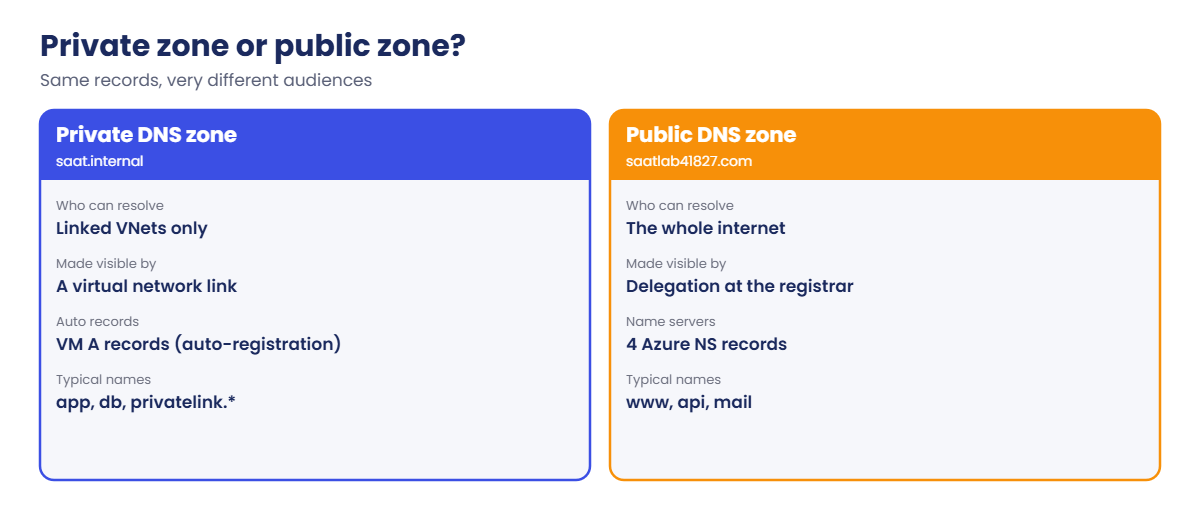
DNS is that phone book for computers. A private zone is the phone book on the staff-room wall: only people inside the school can read it. A public zone is the phone book printed for the whole city.
And the staff-room book only helps rooms that have a copy. If a new building has no copy, nobody there can find Ravi. That’s a VNet without a link to the zone.
Engineer's View
How Azure answers a name lookup
- Every VM in a VNet uses Azure’s resolver at
168.63.129.16by default (unless you set custom DNS servers on the VNet). - That resolver checks private DNS zones linked to the VM’s VNet first. If a linked zone owns the name, the answer comes from the zone, even if the same name exists on the internet.
- Otherwise it does a normal public lookup on the internet.
- A virtual network link connects a zone to a VNet. A zone can be linked to many VNets (up to 1,000). With auto-registration on, VMs in that VNet get A records automatically when they start and lose them when they’re deleted. A VNet can have only one zone with auto-registration, but many resolution-only links.
- Public zones get four Azure name servers (
ns1-xx.azure-dns.com,.net,.org,.info). They only answer the internet after you delegate the domain at your registrar by setting those NS records there.
Common record types: A (name to IPv4), AAAA (IPv6), CNAME (name to another name; not allowed at the zone apex), TXT, MX. Each record set has a TTL: how long resolvers may cache the answer.
.internal is reserved by ICANN for private use, so it will never clash with a real internet domain. That’s why the course uses saat.internal. Zones are charged per zone per month, counted daily, the same for public and private.
How it works, step by step
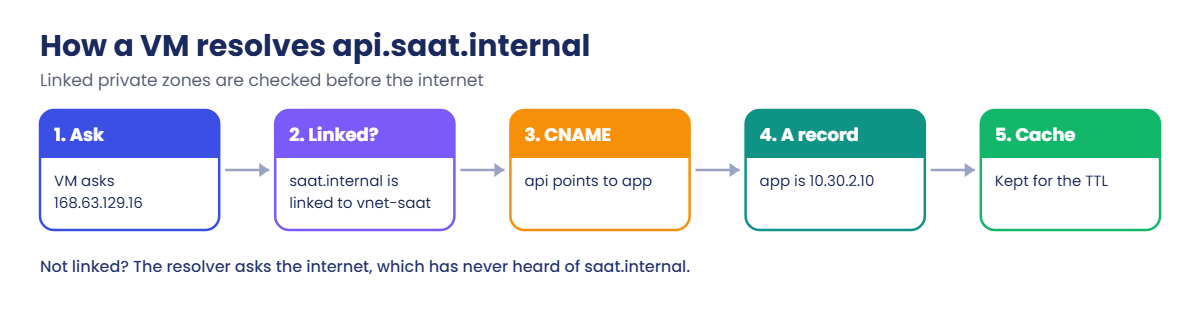
When vm-saat-l14 looks up api.saat.internal, this happens:
- The VM asks its resolver,
168.63.129.16. - The resolver sees that
saat.internalis linked tovnet-saat, so it answers from that zone. apiis a CNAME pointing toapp.saat.internal, so the resolver follows it in the same zone.appis an A record for10.30.2.10. The resolver returns both the CNAME and the A record.- The VM caches the answer for the TTL, then asks again next time.
If the VNet isn’t linked, step 2 never happens. The resolver asks the internet, which has never heard of saat.internal, and the answer is “no such name”. Nothing errors loudly; the app just can’t find its server.
The same logic explains private endpoints later: Azure creates zones like privatelink.blob.core.windows.net, and if a VNet isn’t linked, storage names resolve to public IPs and requests get blocked.
Hands-on lab: private names, public names
You create a private zone with a VM that registers itself, add records, test from the VM with Run Command, then create a public zone and ask Azure’s name servers directly.
$v = Get-Content C:\azure-lab\vnet-saat.json | ConvertFrom-Json
az group create --name rg-saat-l14 --tags course=saatvedha-azure lesson=14 -o none1Create a private zone and link it with auto-registration
Run this:
az network private-dns zone create --resource-group rg-saat-l14 --name saat.internal --tags course=saatvedha-azure lesson=14 -o none
az network private-dns link vnet create --resource-group rg-saat-l14 --zone-name saat.internal --name link-vnet-saat --virtual-network $v.VnetId --registration-enabled true --tags course=saatvedha-azure lesson=14 -o none
az network private-dns link vnet list --resource-group rg-saat-l14 --zone-name saat.internal --query "[].{name:name, autoRegister:registrationEnabled, state:virtualNetworkLinkState}" -o tableYou should see something like this:
Name AutoRegister State
-------------- -------------- ---------
link-vnet-saat True Completed2Create a VM and watch it register itself
Run this (about two minutes):
az vm create --resource-group rg-saat-l14 --name vm-saat-l14 --image Canonical:ubuntu-24_04-lts:server:latest --size Standard_B2ats_v2 --subnet $v.'snet-mgmt' --public-ip-address '""' --nsg '""' --admin-username azureuser --generate-ssh-keys --os-disk-size-gb 64 --tags course=saatvedha-azure lesson=14 -o none
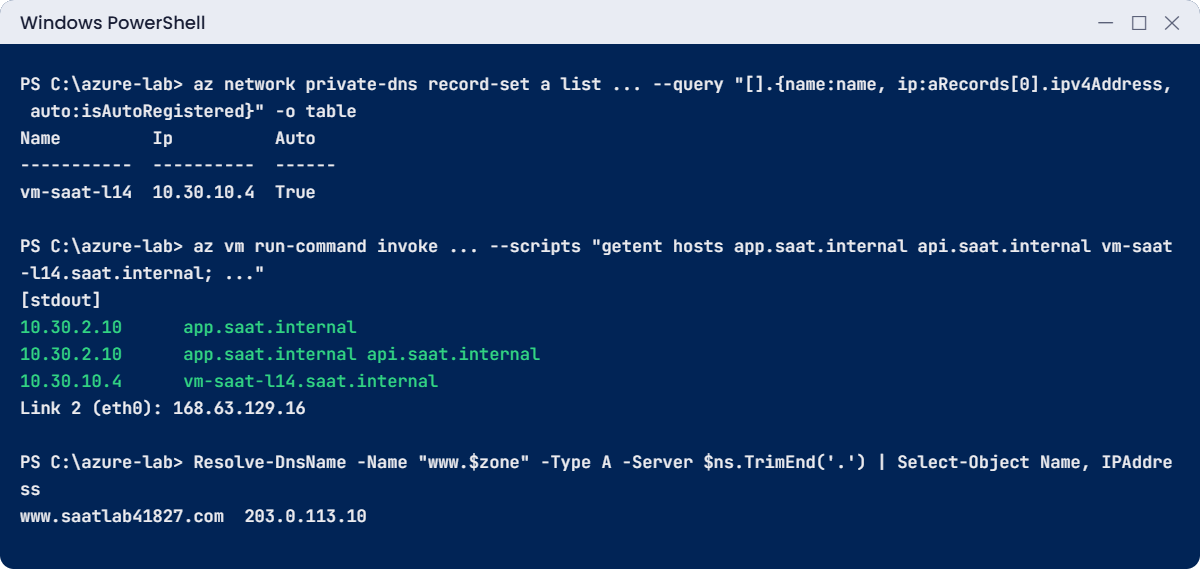
az network private-dns record-set a list --resource-group rg-saat-l14 --zone-name saat.internal --query "[].{name:name, ip:aRecords[0].ipv4Address, auto:isAutoRegistered}" -o tableYou should see something like this:
Name Ip Auto
----------- ---------- ------
vm-saat-l14 10.30.10.4 TrueYou didn’t create that record. Azure did it when the VM’s network card came up in a VNet with an auto-registration link.
3Add your own records
Run this:
az network private-dns record-set a add-record --resource-group rg-saat-l14 --zone-name saat.internal --record-set-name app --ipv4-address 10.30.2.10 -o none
az network private-dns record-set a add-record --resource-group rg-saat-l14 --zone-name saat.internal --record-set-name db --ipv4-address 10.30.3.10 -o none
az network private-dns record-set cname set-record --resource-group rg-saat-l14 --zone-name saat.internal --record-set-name api --cname app.saat.internal -o none
az network private-dns record-set list --resource-group rg-saat-l14 --zone-name saat.internal --query "[].{name:name, type:type, ttl:ttl}" -o tableYou should see something like this:
Name Type TTL
----------- ---------------------------------- -----
@ Microsoft.Network/privateDnsZones/SOA 3600
api Microsoft.Network/privateDnsZones/CNAME 3600
app Microsoft.Network/privateDnsZones/A 3600
db Microsoft.Network/privateDnsZones/A 3600
vm-saat-l14 Microsoft.Network/privateDnsZones/A 10Records you add get a TTL of 3600 seconds (one hour) by default; auto-registered ones get 10 seconds, because VMs come and go. For records you may change during a migration, lower the TTL a day before.
4Look the names up from inside the VNet
Run this:
az vm run-command invoke --resource-group rg-saat-l14 --name vm-saat-l14 --command-id RunShellScript --scripts "getent hosts app.saat.internal api.saat.internal vm-saat-l14.saat.internal; resolvectl dns eth0" --query "value[0].message" -o tsvYou should see something like this:
Enable succeeded:
[stdout]
10.30.2.10 app.saat.internal
10.30.2.10 app.saat.internal api.saat.internal
10.30.10.4 vm-saat-l14.saat.internal
Link 2 (eth0): 168.63.129.16
[stderr]
getent hosts uses the same lookup path as applications do. The CNAME shows up as an alias of app.saat.internal. The last line confirms the VM asks Azure’s resolver, 168.63.129.16.
5Create a public zone and ask Azure’s name servers
Run this on your laptop:
$zone = 'saatlab' + (Get-Random -Maximum 99999) + '.com'
az network dns zone create --resource-group rg-saat-l14 --name $zone --tags course=saatvedha-azure lesson=14 -o none
az network dns record-set a add-record --resource-group rg-saat-l14 --zone-name $zone --record-set-name www --ipv4-address 203.0.113.10 -o none
$ns = az network dns zone show --resource-group rg-saat-l14 --name $zone --query "nameServers[0]" -o tsv
Resolve-DnsName -Name "www.$zone" -Type A -Server $ns.TrimEnd('.') | Select-Object Name, IPAddressYou should see something like this:
Name IPAddress
---- ---------
www.saatlab41827.com 203.0.113.10203.0.113.10 is a documentation address, safe to use in labs. Azure’s name server answered, because you asked it directly. In “Break It” you’ll see why the rest of the internet doesn’t know this name yet.
✅ Checkpoint: Your private zone answers inside vnet-saat (including the auto-registered VM), and Azure’s public name server answers for www in your public zone.
Break It, Then Fix It
Both of these are “nothing is wrong, it just doesn’t resolve” problems, which are the hardest kind on a busy day.
1Break it: a public zone nobody has delegated
Run this on your laptop, without naming a server:
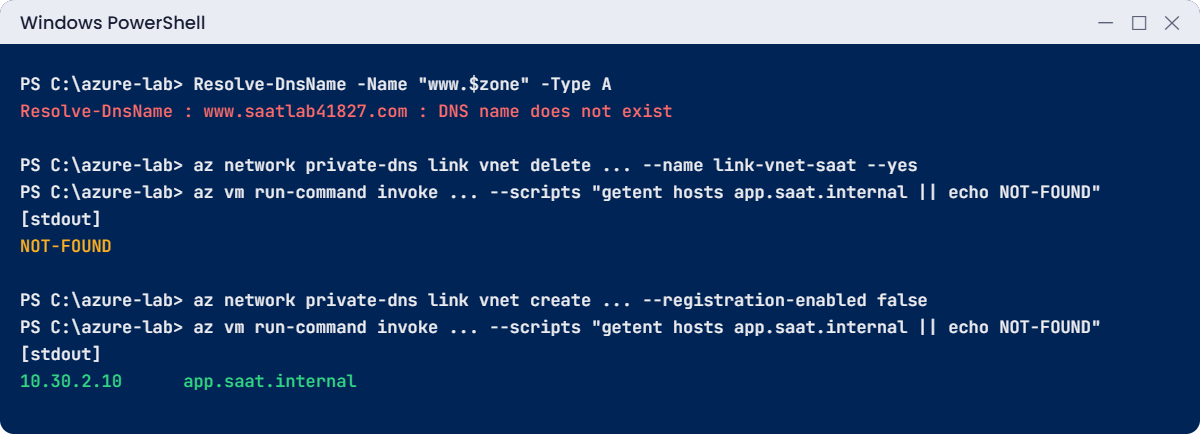
Resolve-DnsName -Name "www.$zone" -Type AYou’ll get an error like this:
Resolve-DnsName : www.saatlab41827.com : DNS name does not exist
At line:1 char:1
+ Resolve-DnsName -Name "www.$zone" -Type A
+ ~~~~~~~~~~~~~~~~~~~~~~~~~~~~~~~~~~~~~~~~~
+ CategoryInfo : ResourceUnavailable: (www.saatlab41827.com:String) [Resolve-DnsName], Win32Exception
+ FullyQualifiedErrorId : DNS_ERROR_RCODE_NAME_ERROR,Microsoft.DnsClient.Commands.ResolveDnsNameYour normal resolver asks the .com servers, and they’ve never been told that Azure hosts this domain. Creating a zone in Azure doesn’t publish it.
Fix it (for a real domain): copy the four name servers and set them as the NS records at your domain registrar:
az network dns zone show --resource-group rg-saat-l14 --name $zone --query nameServers -o tsvYou should see something like this:
ns1-07.azure-dns.com.
ns2-07.azure-dns.net.
ns3-07.azure-dns.org.
ns4-07.azure-dns.info.You don’t own this made-up domain, so you stop here. With a real domain, delegation can take from minutes to a couple of days, depending on the TTLs at the registrar and the TLD.
2Break it: remove the VNet link
Delete the link and look up the names again:
az network private-dns link vnet delete --resource-group rg-saat-l14 --zone-name saat.internal --name link-vnet-saat --yes
Start-Sleep -Seconds 30
az vm run-command invoke --resource-group rg-saat-l14 --name vm-saat-l14 --command-id RunShellScript --scripts "getent hosts app.saat.internal || echo NOT-FOUND" --query "value[0].message" -o tsvYou should see something like this:
Enable succeeded:
[stdout]
NOT-FOUND
[stderr]
The zone and its records still exist, but vnet-saat no longer has a copy of the phone book, so Azure’s resolver asks the internet and gets nothing. At work this happens when a new spoke VNet is created and nobody links the shared private zones to it.
Fix it: link the zone again (resolution only this time is fine), then test:
az network private-dns link vnet create --resource-group rg-saat-l14 --zone-name saat.internal --name link-vnet-saat --virtual-network $v.VnetId --registration-enabled false -o none
az vm run-command invoke --resource-group rg-saat-l14 --name vm-saat-l14 --command-id RunShellScript --scripts "getent hosts app.saat.internal || echo NOT-FOUND" --query "value[0].message" -o tsvYou should see something like this:
Enable succeeded:
[stdout]
10.30.2.10 app.saat.internal
[stderr]
3Clean up
Run this:
az group delete --name rg-saat-l14 --yes
C:\azure-lab\Find-LabResources.ps1 -Lesson 14You should see this:
Nothing tagged course=saatvedha-azure is left.✅ Checkpoint: Both problems reproduced and understood, and nothing from Lesson 14 is left.
This happened at work
The 24-hour TTL on migration night
A pharmacy chain moved its stock system from an old VM to a new one in Azure. The plan was simple: at 10 p.m. change stock.corp.internal from the old IP to the new one in the private DNS zone.
The record had a TTL of 86,400 seconds, one full day, set years earlier “to reduce DNS traffic”. After the change, about half of the store servers kept using the cached old IP. They wrote sales to the old system all night, while the other half used the new one.
The next morning stock counts didn’t match in 300 stores, and two days of reconciliation followed.
What they changed: a migration checklist now lowers the TTL to 60 seconds at least one full old-TTL period before cutover, and raises it back afterwards. The old system is set to read-only at cutover, so stale clients fail loudly instead of writing to the wrong place. Normal TTLs for internal app records are now one hour.
Common mistakes and troubleshooting
| Mistake | What you see | What to do |
|---|---|---|
| New VNet not linked to the private zone | Names don’t resolve only in that VNet | Link every VNet that needs the zone; check links during network builds. |
| Expecting a new public zone to work at once | DNS name does not exist | Delegate at the registrar with the four Azure NS records. |
| Long TTL during a change | Some clients keep the old IP for hours | Lower the TTL well before a change, raise it after. |
| CNAME at the zone apex | The record can’t be created | Use an A record or an alias record at the apex. |
| Two zones with auto-registration on one VNet | The second link is refused | Only one auto-registration zone per VNet; other links resolve only. |
| Custom DNS servers on the VNet that don’t forward | Private zones stop resolving | Forward unknown names to 168.63.129.16, or use Azure DNS Private Resolver. |
Interview questions
Click a question to open it. Each one is written the way an interviewer would ask it. Under it you will see why they ask it and one way you could answer, in your own words.
Fresher level
1. What is the difference between a public and a private DNS zone in Azure?
Why they ask this: A basic concept check.
How you might answer: A public zone answers queries from anywhere on the internet once the domain is delegated to Azure’s name servers. A private zone answers only for VNets that are linked to it, so internal names never leak outside.
2. What does 168.63.129.16 do for DNS?
Why they ask this: They want to see you know the Azure resolver.
How you might answer: It’s the Azure-provided DNS resolver that every VM uses by default. It answers from linked private zones first, then resolves public names on the internet.
3. What is auto-registration in a private DNS zone?
Why they ask this: A feature check with a useful limit.
How you might answer: When a VNet link has auto-registration on, VMs in that VNet automatically get A records in the zone and lose them when they’re deleted. A VNet can have only one zone with auto-registration.
2–5 years experience
4. An app in a new VNet can’t resolve db.corp.internal, but it works everywhere else. What do you check?
Why they ask this: They want the most likely cause first.
How you might answer: First whether the private zone is linked to the new VNet; that’s the usual reason. Then whether the VNet uses custom DNS servers that don’t forward to Azure. I’d test with getent hosts or nslookup from a VM in that VNet.
5. How do you plan a DNS change during a migration?
Why they ask this: They’re checking TTL awareness.
How you might answer: I’d lower the record’s TTL to a minute or so at least one full old-TTL period before the change, so caches expire quickly. After the cutover is stable, I raise it back. I’d also make the old system read-only so stale clients fail clearly.
6. You created a public zone in Azure but the domain doesn’t resolve on the internet. Why?
Why they ask this: They want delegation understanding.
How you might answer: The domain isn’t delegated yet. The registrar still points to the old name servers. I’d copy the four Azure name servers from the zone and set them as the NS records at the registrar, then wait for the TLD’s TTLs.
Senior level
7. How would you design DNS for a hub-and-spoke network with on-premises servers?
Why they ask this: They want a scalable, hybrid DNS design.
How you might answer: I’d keep private zones, including privatelink zones, in a central subscription and link them to the hub and every spoke. Azure DNS Private Resolver in the hub handles on-premises lookups for Azure names, with an inbound endpoint, and forwards Azure workloads’ lookups for on-premises names to the company DNS servers through an outbound endpoint.
Spokes use Azure DNS, and a policy or pipeline step links new spokes to the zones automatically.
8. What are the risks of every team creating their own private DNS zones?
Why they ask this: They’re testing governance thinking.
How you might answer: Duplicate zones for the same name, especially privatelink zones, cause split answers depending on which VNet asks. Links get forgotten, and nobody knows who owns which record.
I’d centralise shared zones, give teams write access to their own records, and use Azure Policy to stop duplicate privatelink zones.
9. Why is .internal a good choice for private zones?
Why they ask this: They want awareness of naming risks.
How you might answer: ICANN reserved .internal for private use, so it won’t ever become a public top-level domain and clash with real internet names. Made-up suffixes like .corp or .local have caused problems in the past.
Quick quiz
Q1. Which VNets can resolve names in a private DNS zone?
- Every VNet in the subscription
- Only VNets linked to the zone
- Only the VNet in the same resource group
- Any VNet in the region
Show answer
B — Only linked VNets get answers from the zone.
Q2. What is the default DNS resolver address for Azure VMs?
- 8.8.8.8
- 10.30.0.1
- 168.63.129.16
- 127.0.0.53 only
Show answer
C — 168.63.129.16 is the Azure-provided resolver.
Q3. A new public zone answers on Azure’s name servers but not on the internet. Why?
- TTL too long
- The domain isn’t delegated at the registrar
- Private zone conflict
- Wrong record type
Show answer
B — You must set Azure’s NS records at the registrar.
Q4. How many private zones with auto-registration can one VNet have?
- One
- Two
- Ten
- Unlimited
Show answer
A — Only one zone can auto-register a VNet’s VMs.
Q5. Why lower a TTL before a migration?
- To save money
- So caches expire quickly and clients pick up the new IP
- To make DNS more secure
- Azure requires it
Show answer
B — Short TTLs mean old answers don’t live long in caches.
Quick recap
You can now make names work inside Azure, and you know the two quiet reasons they stop working.
- Private zones answer only in linked VNets; public zones answer the internet after delegation.
- VMs ask 168.63.129.16, which checks linked private zones first.
- Auto-registration adds VM records for you; one such zone per VNet.
- Lower TTLs before a change; CNAMEs aren’t allowed at the apex.
- Missing VNet links cause many private endpoint and app problems later.
Next lesson
Lesson 15: Create your first Azure VM (Linux) → You build a proper Linux VM, connect to it safely and learn what each choice in az vm create means.
Further reading: Azure private DNS zone
Want to go deeper into Azure private DNS zone? See Microsoft’s What is an Azure private DNS zone? and Delegate a domain to Azure DNS. You can also see the full plan for this course on the Azure Cloud Administration course page.
