ExpressRoute: design, peering and BGP
-
Phase 0: Before you start
-
Phase 1: The foundation
-
Phase 2: Day-to-day operations
-
Phase 3: Enterprise architecture
-
Phase 4: Troubleshooting step by step
-
Phase 5: Final project and career
Azure ExpressRoute is a private connection between your data centre and Microsoft’s network, delivered by a telecom provider. It doesn’t cross the public internet, so it gives steadier latency and higher bandwidth than a VPN, and it’s how most large companies connect to Azure.
You can’t try a real circuit on a free account: a circuit is billed from the moment its service key is issued, and it needs a provider to connect it. So this is a concept lesson with a simulated lab. You run the real Azure CLI where it costs nothing, and you build the heart of ExpressRoute, a BGP session with Microsoft’s edge, on your own laptop with open-source FRRouting software.
Everything you practise here is what you’ll see on a real router during an ExpressRoute go-live: session state, prefixes received and sent, route policies and the errors that stop a session.
| Time | You need | Cost | By the end you can |
|---|---|---|---|
| About 60 minutes | The Azure CLI, and Ubuntu 24.04 in WSL or VirtualBox for the BGP part | Nothing: the Azure commands only read the provider list, and the BGP lab runs on your laptop | Explain circuits, peering and BGP for ExpressRoute, read a BGP summary, and fix a missing route policy and a wrong ASN |
What it is, in one line
ExpressRoute is a private, provider-delivered link to Microsoft, where your router and Microsoft’s routers exchange routes with BGP.
In Simple Words
A private road instead of the highway
Your company has a factory and a warehouse in another city. Trucks can use the public highway, but traffic jams make delivery times unpredictable. So you rent a private road from a road company.
Only your trucks use it, and it arrives at the warehouse’s back gate.
The private road is the ExpressRoute circuit, and the road company is the provider. At each end, a gatekeeper keeps a list of addresses that can be delivered through that gate, and the two gatekeepers swap their lists every few seconds. That list-swapping is BGP.
If a gatekeeper writes the other’s name wrong, or forgets to share his list, the road is open but no truck knows it can use it.
Engineer's View
How ExpressRoute fits together
- Circuit: an Azure resource with a bandwidth, a peering location (such as Chennai or Mumbai), a provider, a SKU (Local, Standard or Premium) and billing (metered or unlimited). It returns a service key you give to the provider.
- Two links: every circuit has a primary and a secondary connection to a pair of Microsoft Enterprise Edge routers (MSEEs). You need both for the SLA.
- Peerings: private peering reaches your VNets; Microsoft peering reaches Microsoft 365 and public PaaS endpoints and needs a route filter before anything is advertised.
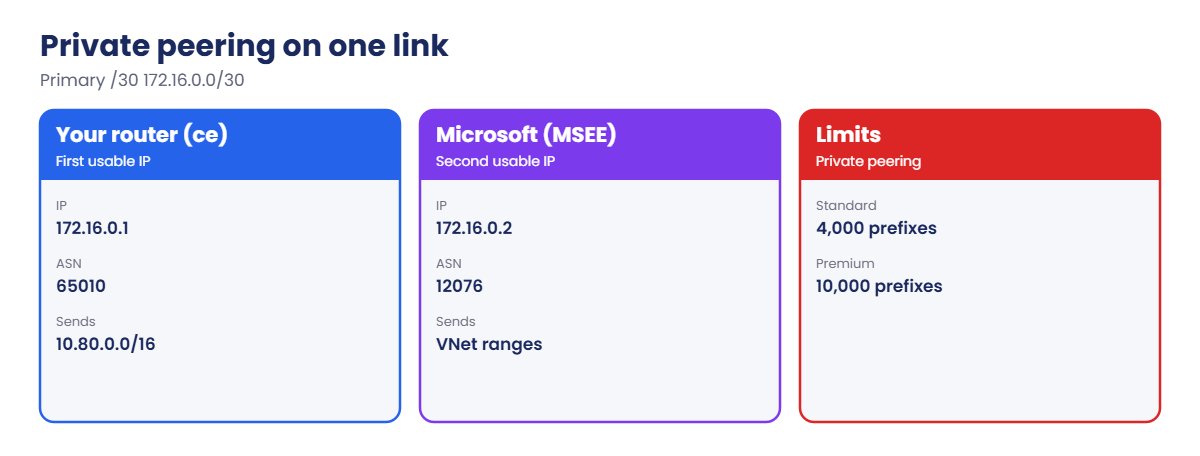
- Addressing: each peering uses two /30 subnets (primary and secondary). In each /30 you use the first usable IP and Microsoft uses the second. Each peering also has a VLAN ID.
- BGP: Microsoft uses ASN 12076. You use a public ASN or a private one (64512 to 65514). Private peering accepts up to 4,000 IPv4 prefixes on Standard, 10,000 on Premium; send more and the session drops.
- Into a VNet: an ExpressRoute gateway (such as ErGw1AZ) in the hub’s GatewaySubnet, plus a connection to the circuit. Spokes use it through gateway transit, as in Lesson 49.
How it works, step by step
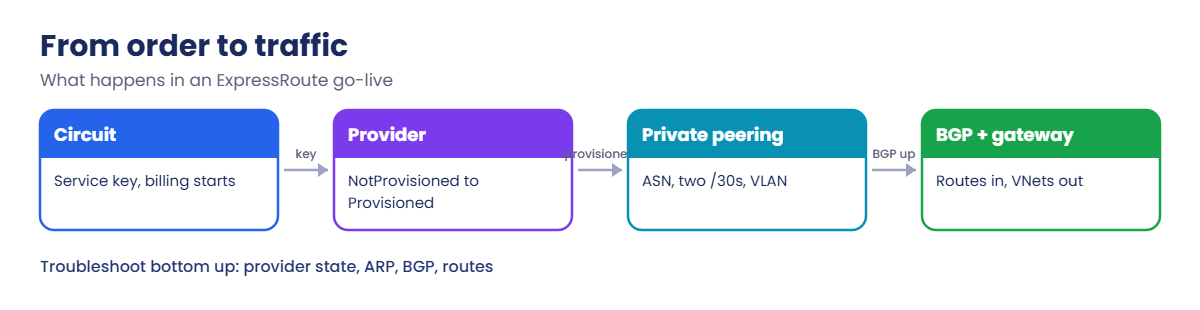
What happens between “we ordered a circuit” and “the office reaches Azure”:
- You create the circuit in Azure and get a service key. Billing starts now.
- The provider uses the key to connect your link to Microsoft. The circuit’s provider state moves from NotProvisioned to Provisioned.
- You configure private peering: your ASN, two /30 subnets and a VLAN ID.
- Your router and the MSEEs bring up BGP on both links and exchange routes: your on-premises ranges in, your VNet ranges out.
- You link the circuit to the hub’s ExpressRoute gateway. Spokes learn the on-premises routes through gateway transit.
Steps 3 and 4 are where most go-lives get stuck, and they’re exactly what the laptop lab rehearses.
When you troubleshoot a real circuit, you work bottom up: provider state, then the ARP table on each link (layer 2), then BGP state, then the routes received and advertised.
Simulate ExpressRoute private peering with BGP on your laptop
This lab has two parts. Part A uses the real Azure CLI and reads only public information at no cost. Part B builds a BGP session like ExpressRoute private peering on your laptop.
1Part A: find providers at a peering location
List the providers that offer ExpressRoute at Chennai:
az network express-route list-service-providers --query "[?contains(join(',', peeringLocations), 'Chennai')].name" -o tsvYou should see a list of provider names, something like this (the list changes over time):
Airtel
Sify
Tata Communications
...Picking a location close to your data centre and a provider that serves your building is the first real decision in any ExpressRoute project.
2Part A: what creating a circuit looks like (simulated)
Don’t run this on a free account; it starts billing at once. This is the command and the kind of output you’d see:
az network express-route create --resource-group rg-saat-hub --name er-saat --bandwidth 50 --peering-location Chennai --provider Airtel --sku-family MeteredData --sku-tier Standard --query "{key:serviceKey, provider:serviceProviderProvisioningState, status:circuitProvisioningState}"Simulated output:
{
"key": "a1b2c3d4-....-....-....-............",
"provider": "NotProvisioned",
"status": "Enabled"
}You send the key to the provider. When they finish, provider changes to Provisioned. Only then can you configure private peering with your ASN, two /30 subnets and a VLAN ID.
3Part B: build the BGP lab on your laptop
In Ubuntu 24.04 (WSL or VirtualBox), install FRRouting:
sudo apt update && sudo apt install -y frrSave this script as er-lab.sh. It creates two routers on your laptop: msee plays Microsoft’s edge (ASN 12076, advertising the hub and spokes) and ce plays your edge router (ASN 65010, advertising the office 10.80.0.0/16):
#!/bin/bash
# SaatVedha Azure Lesson 50: simulated ExpressRoute private peering (primary link)
# msee = Microsoft edge (ASN 12076, 172.16.0.2), ce = your router (ASN 65010, 172.16.0.1)
set -e
LAB=/var/lib/frrlab
ip addr add 172.16.0.1/32 dev lo 2>/dev/null || true
ip addr add 172.16.0.2/32 dev lo 2>/dev/null || true
mkdir -p $LAB/msee $LAB/ce
cat > $LAB/msee/frr.conf <<'CONF'
frr defaults traditional
hostname msee
router bgp 12076
bgp router-id 172.16.0.2
no bgp ebgp-requires-policy
no bgp network import-check
neighbor 172.16.0.1 remote-as 65010
neighbor 172.16.0.1 update-source 172.16.0.2
neighbor 172.16.0.1 disable-connected-check
address-family ipv4 unicast
network 10.40.0.0/16
network 10.41.0.0/16
network 10.42.0.0/16
exit-address-family
CONF
cat > $LAB/ce/frr.conf <<'CONF'
frr defaults traditional
hostname ce
ip prefix-list ONPREM seq 10 permit 10.80.0.0/16
route-map AZURE-OUT permit 10
match ip address prefix-list ONPREM
route-map AZURE-IN permit 10
router bgp 65010
bgp router-id 172.16.0.1
no bgp network import-check
neighbor 172.16.0.2 remote-as 12076
neighbor 172.16.0.2 description er-primary
neighbor 172.16.0.2 update-source 172.16.0.1
neighbor 172.16.0.2 disable-connected-check
address-family ipv4 unicast
network 10.80.0.0/16
neighbor 172.16.0.2 route-map AZURE-IN in
neighbor 172.16.0.2 route-map AZURE-OUT out
exit-address-family
CONF
chown -R frr:frr $LAB
for r in msee ce; do
ip=$([ $r = msee ] && echo 172.16.0.2 || echo 172.16.0.1)
/usr/lib/frr/bgpd -d -Z -l $ip -f $LAB/$r/frr.conf -i $LAB/$r/bgpd.pid --vty_socket $LAB/$r -P 0
done
echo "Lab started. Wait 10 seconds, then check the session."Look at the ce config: it only advertises what the ONPREM prefix list allows, which is how real routers stop you leaking your whole network to Microsoft. The disable-connected-check lines exist only because both routers live on one laptop.
Run it:
sudo bash er-lab.sh4Check the session like an engineer
Wait 10 seconds, then read the summary and the routes on your router:
sudo vtysh --vty_socket /var/lib/frrlab/ce -c 'show ip bgp summary'
sudo vtysh --vty_socket /var/lib/frrlab/ce -c 'show ip bgp'You should see this (timers and counters will differ):
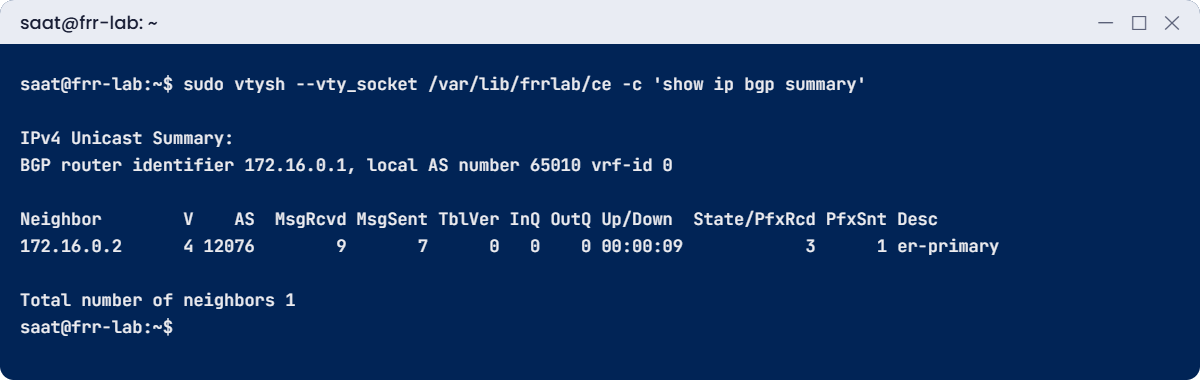
Neighbor V AS MsgRcvd MsgSent TblVer InQ OutQ Up/Down State/PfxRcd PfxSnt Desc
172.16.0.2 4 12076 9 7 0 0 0 00:00:09 3 1 er-primary
Network Next Hop Metric LocPrf Weight Path
*> 10.40.0.0/16 172.16.0.2 0 0 12076 i
*> 10.41.0.0/16 172.16.0.2 0 0 12076 i
*> 10.42.0.0/16 172.16.0.2 0 0 12076 i
*> 10.80.0.0/16 0.0.0.0 0 32768 iRead it like this: the session to 172.16.0.2 is up (a timer, not a state word), 3 prefixes received from AS 12076, 1 sent. The VNet routes have path “12076 i”, meaning they came from Microsoft.
5See what Microsoft sees
Check the msee side, which is what Azure shows you with list-route-tables:
sudo vtysh --vty_socket /var/lib/frrlab/msee -c 'show ip bgp'You should see this:
Network Next Hop Metric LocPrf Weight Path
*> 10.40.0.0/16 0.0.0.0 0 32768 i
*> 10.41.0.0/16 0.0.0.0 0 32768 i
*> 10.42.0.0/16 0.0.0.0 0 32768 i
*> 10.80.0.0/16 172.16.0.1 0 0 65010 iOn a real circuit, the same check from Azure is:
az network express-route list-route-tables --resource-group rg-saat-hub --name er-saat --peering-name AzurePrivatePeering --path primary -o tableIt lists the routes the MSEEs learned from you on the primary link, with your ASN in the path. Run it with secondary too; both links should match.

✅ Checkpoint: The session is up, ce receives 3 Azure prefixes and msee receives 10.80.0.0/16 from AS 65010.
Break It, Then Fix It
Keep both routers running.
1Break it: the outbound policy disappears
A colleague tidies up the router config and removes the outbound route map:
sudo vtysh --vty_socket /var/lib/frrlab/ce -c 'conf t' -c 'router bgp 65010' -c 'address-family ipv4 unicast' -c 'no neighbor 172.16.0.2 route-map AZURE-OUT out'
sudo vtysh --vty_socket /var/lib/frrlab/ce -c 'show ip bgp summary'
sudo vtysh --vty_socket /var/lib/frrlab/msee -c 'show ip bgp'You should see this:
Neighbor V AS MsgRcvd MsgSent TblVer InQ OutQ Up/Down State/PfxRcd PfxSnt Desc
172.16.0.2 4 12076 10 8 0 0 0 00:00:19 3 (Policy) er-primary
Network Next Hop Metric LocPrf Weight Path
*> 10.40.0.0/16 0.0.0.0 0 32768 i
*> 10.41.0.0/16 0.0.0.0 0 32768 i
*> 10.42.0.0/16 0.0.0.0 0 32768 iThe session is still up, but PfxSnt says (Policy): this router refuses to send anything to an external peer without an outbound policy. Microsoft no longer has 10.80.0.0/16, so in Azure every VM loses its route to the office while the circuit looks healthy.
Azure has the same idea on Microsoft peering: nothing is advertised until you attach a route filter. “Up but no routes” always means look at policies and filters.
Fix it: put the route map back and check:
sudo vtysh --vty_socket /var/lib/frrlab/ce -c 'conf t' -c 'router bgp 65010' -c 'address-family ipv4 unicast' -c 'neighbor 172.16.0.2 route-map AZURE-OUT out'
sudo vtysh --vty_socket /var/lib/frrlab/msee -c 'show ip bgp'10.80.0.0/16 from AS 65010 is back, and PfxSnt shows 1 again.
2Break it: a typo in Microsoft’s ASN
Someone types 12067 instead of 12076 while rebuilding the router:
sudo vtysh --vty_socket /var/lib/frrlab/ce -c 'conf t' -c 'router bgp 65010' -c 'neighbor 172.16.0.2 remote-as 12067'
sudo vtysh --vty_socket /var/lib/frrlab/ce -c 'show ip bgp summary'
sudo vtysh --vty_socket /var/lib/frrlab/ce -c 'show ip bgp neighbors 172.16.0.2' | grep -E 'BGP state|Last reset'After about 15 seconds you should see this:
Neighbor V AS MsgRcvd MsgSent TblVer InQ OutQ Up/Down State/PfxRcd PfxSnt Desc
172.16.0.2 4 12067 14 16 0 0 0 00:00:15 Idle 0 er-primary
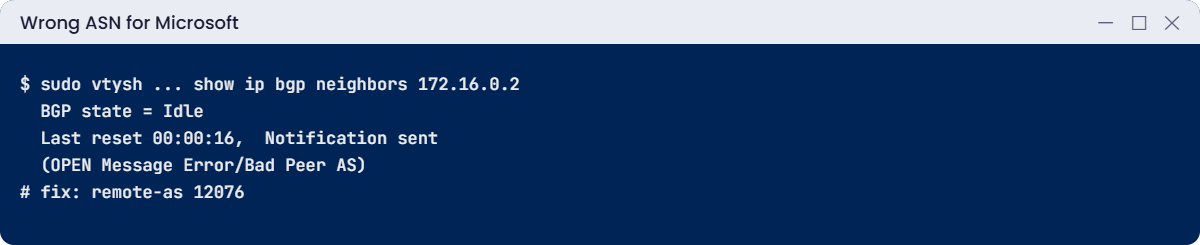
BGP state = Idle
Last reset 00:00:16, Notification sent (OPEN Message Error/Bad Peer AS)Your router expected AS 12067, Microsoft’s OPEN message said 12076, so your router rejected it. The state word (Idle, Active or Connect) replacing the prefix count means the session is down.
Fix it: set the right ASN and reset the session:
sudo vtysh --vty_socket /var/lib/frrlab/ce -c 'conf t' -c 'router bgp 65010' -c 'neighbor 172.16.0.2 remote-as 12076'
sudo vtysh --vty_socket /var/lib/frrlab/ce -c 'clear ip bgp 172.16.0.2'
sudo vtysh --vty_socket /var/lib/frrlab/ce -c 'show ip bgp summary'The prefix count of 3 is back.

3Clean up
Stop both routers and remove the lab addresses:
sudo pkill bgpd
sudo ip addr del 172.16.0.1/32 dev lo
sudo ip addr del 172.16.0.2/32 dev lo
sudo rm -rf /var/lib/frrlab✅ Checkpoint: You found a missing outbound policy and a wrong ASN from BGP output alone, and nothing was created in Azure.
This happened at work
Go-live day with an empty route table
A bank’s ExpressRoute circuit showed Provisioned, both BGP sessions were up, and the change ticket said “connected”. But no VM in Azure could reach the data centre, and nobody on the call could explain why.
The network engineer ran list-route-tables for the primary path: empty. The on-premises router had an outbound prefix list written for the old MPLS network, and none of the data centre ranges matched it. The sessions were healthy and carried nothing.
What they changed: the go-live checklist now has four checks per link: provider state, ARP table, BGP state, and the exact prefixes in list-route-tables compared against the IP plan. Prefix lists are reviewed by both the Azure and network teams before the change, and both links are tested separately by shutting one down.
Common mistakes and troubleshooting
| Mistake | What you see | What to do |
|---|---|---|
| Wrong Microsoft ASN on your router | Session Idle, Bad Peer AS | Use 12076 for Microsoft. |
| Missing or wrong outbound prefix list | Session up, Azure has no on-premises routes | Check list-route-tables; fix the policy. |
| Microsoft peering without a route filter | Session up, no Microsoft prefixes received | Attach a route filter with the service communities. |
| Only the primary link configured | Works until a provider fault; no SLA | Configure and test the secondary link too. |
| More than 4,000 prefixes on Standard private peering | BGP session drops | Summarise routes or move to Premium. |
| VLAN ID or /30 mismatch with the provider | ARP table empty, BGP never starts | Check list-arp-tables and the provider’s settings. |
Interview questions
Click a question to open it. Each one is written the way an interviewer would ask it. Under it you will see why they ask it and one way you could answer, in your own words.
Fresher level
1. What is ExpressRoute?
Why they ask this: The basic concept.
How you might answer: A private connection from your network to Microsoft through a connectivity provider, not over the public internet, using BGP to exchange routes.
2. What is the difference between private peering and Microsoft peering?
Why they ask this: Basic vocabulary.
How you might answer: Private peering connects to your VNets by private IP. Microsoft peering connects to Microsoft 365 and public Azure services over public IPs and needs a route filter.
3. What is Microsoft’s ASN for ExpressRoute?
Why they ask this: A detail they expect you to know.
How you might answer: 12076.
2–5 years experience
4. BGP is up but Azure can’t reach on-premises. What do you check?
Why they ask this: A real troubleshooting path.
How you might answer: list-route-tables on primary and secondary to see what Microsoft learned, the router’s outbound prefix list, prefix limits, the gateway connection to the circuit, and effective routes on the Azure VM.
5. Why does ExpressRoute need two /30 subnets?
Why they ask this: Design detail.
How you might answer: One for the primary link and one for the secondary, each to a different MSEE, so a single failure doesn’t take the connection down. You use the first usable IP, Microsoft the second.
6. ExpressRoute or VPN?
Why they ask this: They want trade-offs.
How you might answer: ExpressRoute: private, predictable latency, higher bandwidth, SLA, but costly and slow to order. VPN: cheap, quick, over the internet. Many companies use ExpressRoute with a VPN as backup.
Senior level
7. How do you design ExpressRoute for high availability across regions?
Why they ask this: They want architecture.
How you might answer: Two circuits in different peering locations, each with both links, zone-redundant ExpressRoute gateways, BGP path preference with AS path prepending or local preference, and VPN as a last resort. Global Reach or a second hub for region pairs.
8. How would you avoid asymmetric routing with two circuits?
Why they ask this: A senior routing check.
How you might answer: Influence both directions: weights or local preference on-premises for outbound, AS path prepending or more specific prefixes for traffic from Azure, and stateful firewalls placed so both directions pass them.
9. How do you migrate from VPN to ExpressRoute without downtime?
Why they ask this: Operations thinking.
How you might answer: Bring up ExpressRoute alongside VPN; Azure prefers ExpressRoute routes for the same prefix. Verify routes and traffic on ExpressRoute, then keep VPN as backup or remove it in a planned window.
Quick quiz
Q1. What does the provider need to connect your circuit?
- Your subscription ID
- The service key
- Your VNet name
- A shared key
Show answer
B — The service key identifies the circuit.
Q2. In the summary, PfxSnt shows (Policy). Meaning?
- Session down
- No outbound policy, nothing sent
- Too many prefixes
- Wrong VLAN
Show answer
B — FRR sends nothing to eBGP peers without policy.
Q3. Notification Bad Peer AS means?
- Wrong password
- The ASN configured doesn’t match the peer
- VLAN mismatch
- Prefix limit
Show answer
B — The OPEN carried a different ASN.
Q4. In each /30, which IP does Microsoft use?
- The first usable
- The second usable
- The network address
- Any
Show answer
B — You take the first; Microsoft the second.
Q5. When does a circuit start billing?
- When BGP comes up
- When the service key is issued
- After 30 days
- When a VM uses it
Show answer
B — Billing starts at creation.
Quick recap
You now understand ExpressRoute from circuit to BGP, and you can read the router output that decides whether a go-live works.
- A circuit bills from the moment the service key exists.
- Private peering uses two /30s, a VLAN and BGP with ASN 12076.
- Session up with no routes means policies or filters.
- Bad Peer AS means a wrong ASN on one side.
- Check provider state, ARP, BGP, then routes, per link.
Next lesson
Lesson 51: Azure Load Balancer (Layer 4) → You build a Layer 4 load balancer in front of two VMs and fix health probe and outbound problems.
Further reading: Azure ExpressRoute
Want to go deeper into Azure ExpressRoute? See Microsoft’s What is Azure ExpressRoute? and ExpressRoute routing requirements. You can also see the full plan for this course on the Azure Cloud Administration course page.