AuthorizationFailed and RBAC problems

Azure AuthorizationFailed is the error you get when an identity tries something its roles don’t allow. It’s probably the most common error in Azure, and also one of the most helpful, because the message tells you exactly who tried, which action, and at which scope.

Most people read only the first words and ask for “Contributor on the subscription”. That fixes the error and creates a security problem. The better habit is to read all three parts and grant exactly the missing action at exactly the right scope.

In this lab you create a service principal, run commands as it, and decode three different refusals: a missing role, a role at the wrong scope, and a deny assignment that beats any role.

TimeYou needCostBy the end you can
About 45 minutesA free account where you can create app registrations, the CLI and PowerShellNothing: service principals, roles, NSGs and deployment stacks are freeDecode AuthorizationFailed messages, fix scope and propagation issues, and recognise deny assignments

What it is, in one line

AuthorizationFailed means an identity lacks a role for a specific action at a specific scope, and the message names all three.

In Simple Words

The office access card

Your office access card opens some doors and not others. When a door stays shut, the reader beeps and shows: “Card 4471, Priya, no access to Server Room, Floor 3.” That one line tells security everything: who, which door, which floor.

If security gives you access to the Floor 2 server room by mistake, the Floor 3 door still beeps. Right permission, wrong place.

And some doors have a red sign: “No entry during audit, even for managers.” Your card might normally open it, but the sign wins. That’s a deny assignment.

Engineer's View

How Azure decides, and what the error tells you

  • Role assignment: security principal + role definition (a list of actions) + scope (management group, subscription, resource group or resource). Child scopes inherit.
  • The message: “The client X with object id Y does not have authorization to perform action A over scope S”. X and Y identify the caller; A is the exact operation, such as Microsoft.Network/networkSecurityGroups/write; S is where it was attempted.
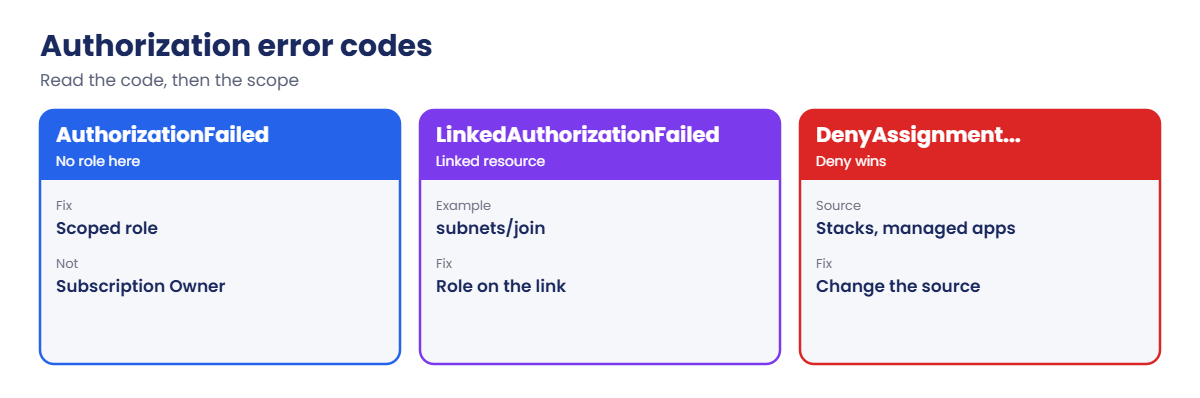
  • LinkedAuthorizationFailed: you have rights on the resource you’re creating but not on something it links to, for example joining a subnet in another resource group needs Microsoft.Network/virtualNetworks/subnets/join/action there.
  • Deny assignments: created by Azure, for example by deployment stacks or managed applications. They block actions even when a role allows them, and you can’t create them yourself.
  • Locks: CanNotDelete and ReadOnly locks return ScopeLocked, not AuthorizationFailed.
  • Propagation: new assignments usually apply within minutes; “please refresh your credentials” in the message hints at a cached token, often after group membership changes.

How it works, step by step

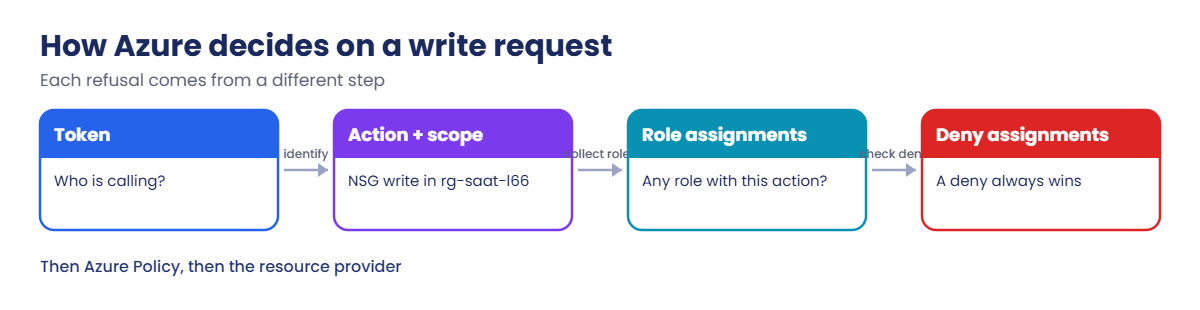
What Azure Resource Manager does with every write request:

Azure AuthorizationFailed: how Azure decides on a write request
  1. It reads the caller’s token: who is this?
  2. It works out the action, such as networkSecurityGroups/write, and the full scope of the target resource.
  3. It collects every role assignment for the caller (and their groups) at that scope and above, and checks whether any role includes the action.
  4. It checks deny assignments at that scope and above. A matching deny wins over any allow.
  5. If allowed, the request goes on to Azure Policy (Lesson 54) and then to the resource provider.

Each refusal comes from a different step: no matching role (step 3), the right role at the wrong scope (also step 3, but the scope in the message gives it away), or a deny (step 4).

Azure authorization error codes and what to do
Error codeWhich step said noWhat to check
AuthorizationFailedNo role with this action at this scopeAction and scope in the message; role assignments
LinkedAuthorizationFailedMissing right on a linked resourceThe linked resource’s scope, such as a subnet
DenyAssignmentAuthorizationFailedA deny assignment matchedDeny assignments at the scope; who created them
ScopeLockedA resource lockLocks on the resource, group or subscription

When no built-in role is small enough

Sometimes the action in the message belongs to a big role such as Network Contributor, but you only want to allow that one action. That’s what custom roles are for. This one lets a pipeline join VMs to existing subnets and nothing else, which is exactly the fix for the LinkedAuthorizationFailed case in the story below. Save it as C:\azure-lab\l66\subnet-joiner.json, with your subscription ID:

{
  "Name": "Subnet Joiner (SaatVedha)",
  "Description": "Join VMs and NICs to existing subnets only.",
  "Actions": [
    "Microsoft.Network/virtualNetworks/read",
    "Microsoft.Network/virtualNetworks/subnets/read",
    "Microsoft.Network/virtualNetworks/subnets/join/action"
  ],
  "AssignableScopes": [ "/subscriptions/<subscription-id>" ]
}
az role definition create --role-definition '@C:\azure-lab\l66\subnet-joiner.json'

Assign it at the scope of the shared VNet or subnet, never wider. To find the exact action names for a resource type, list its operations with az provider operation show, for example for the Microsoft.Network namespace. Custom roles are covered in depth in Lesson 8.

Run commands as a service principal and decode refusals

1Two resource groups and a service principal

Create the groups and a service principal with no roles yet. Keep the secret only in this window:

az group create --name rg-saat-l66 --location centralindia --tags course=saatvedha-azure lesson=66 -o none
az group create --name rg-saat-l66b --location centralindia --tags course=saatvedha-azure lesson=66 -o none
$rgId = az group show --name rg-saat-l66 --query id -o tsv
$sp = az ad sp create-for-rbac --name sp-saat-l66 --query "{appId:appId, secret:password, tenant:tenant}" -o json | ConvertFrom-Json
az role assignment create --assignee $sp.appId --role Reader --scope $rgId -o none

2A helper to run commands as the service principal

This function uses a separate CLI profile folder, so your own login is untouched:

function asSp { $env:AZURE_CONFIG_DIR = "$HOME\.azure-sp66"; try { az @args } finally { Remove-Item Env:AZURE_CONFIG_DIR } }
asSp login --service-principal --username $sp.appId --password=$($sp.secret) --tenant $sp.tenant -o none
asSp group show --name rg-saat-l66 --query name -o tsv

You should see rg-saat-l66. Reader can read the group.

The --password= form matters: a generated secret can start with a hyphen, and without the equals sign the CLI would read it as another option.

3The first AuthorizationFailed

Try to create an NSG as the service principal:

asSp network nsg create --resource-group rg-saat-l66 --name nsg-test -o none

You’ll get an error like this:

(AuthorizationFailed) The client '5b1c...' with object id '9e2f...' does not have authorization to perform action 'Microsoft.Network/networkSecurityGroups/write' over scope '/subscriptions/.../resourceGroups/rg-saat-l66/providers/Microsoft.Network/networkSecurityGroups/nsg-test' or the scope is invalid. If access was recently granted, please refresh your credentials.

Read it in three parts. Who: the client ID is $sp.appId. What: networkSecurityGroups/write.

Where: rg-saat-l66. Reader has no write actions, so the smallest fix is a network role on that group, not Contributor on the subscription.

Fix it: grant Network Contributor on the group, wait two minutes, and retry:

az role assignment create --assignee $sp.appId --role "Network Contributor" --scope $rgId -o none
asSp network nsg create --resource-group rg-saat-l66 --name nsg-test --query provisioningState -o tsv

You should see Succeeded. If you still get the error right away, wait a little longer: role assignments take a short time to apply.
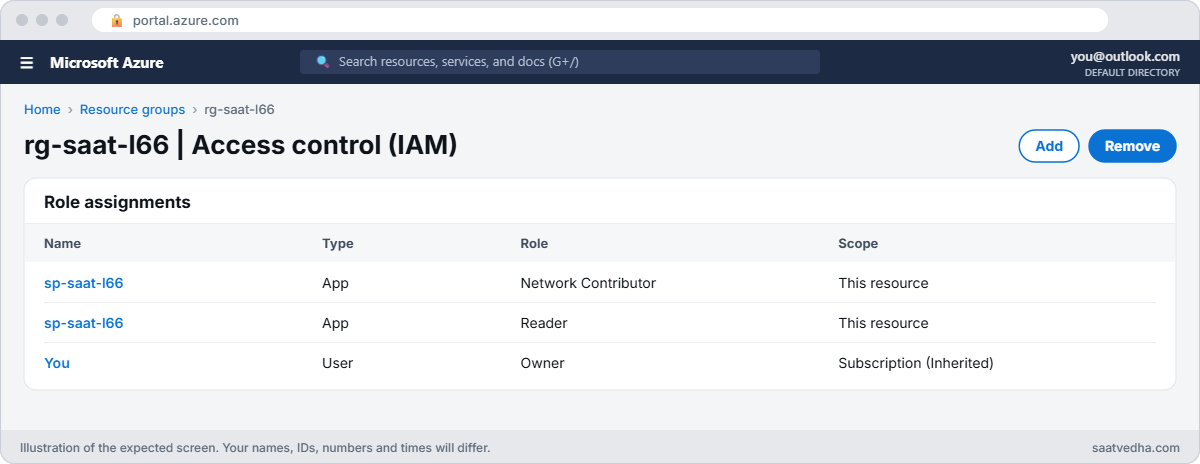

Azure AuthorizationFailed fix with role assignments on the resource group
rg-saat-l66 role assignments: sp-saat-l66 now has Network Contributor as well as Reader.
Reading an AuthorizationFailed message: who, what and where
Who, what and where, in one message.

✅ Checkpoint: You can read who, what and where from an AuthorizationFailed message and fixed it with a scoped role.

Break It, Then Fix It

Keep the service principal and both groups for both breaks.

1Break it: the right role, the wrong group

The pipeline is pointed at a second group for a new environment:

asSp network nsg create --resource-group rg-saat-l66b --name nsg-test -o none

You’ll get an error like this:

(AuthorizationFailed) The client '5b1c...' with object id '9e2f...' does not have authorization to perform action 'Microsoft.Network/networkSecurityGroups/write' over scope '/subscriptions/.../resourceGroups/rg-saat-l66b/providers/Microsoft.Network/networkSecurityGroups/nsg-test' or the scope is invalid. ...

Same action, same identity, and the role it needs exists, but on rg-saat-l66. The scope in the message is rg-saat-l66b. Comparing the message with the role list makes it obvious:

az role assignment list --assignee $sp.appId --all --query "[].{role:roleDefinitionName, scope:scope}" -o table

You should see something like this:

Role                 Scope
-------------------  ----------------------------------------
Reader               /subscriptions/.../resourceGroups/rg-saat-l66
Network Contributor  /subscriptions/.../resourceGroups/rg-saat-l66

Fix it: grant the role on the new group too, not on the whole subscription:

$rgbId = az group show --name rg-saat-l66b --query id -o tsv
az role assignment create --assignee $sp.appId --role "Network Contributor" --scope $rgbId -o none
asSp network nsg create --resource-group rg-saat-l66b --name nsg-test --query provisioningState -o tsv

After a short wait, Succeeded.

2Break it: a deny assignment beats the role

Save this as C:\azure-lab\l66\nsg.bicep and deploy it as a deployment stack that denies deletes (Lesson 42):

@description('Location for the protected NSG')
param location string = resourceGroup().location

resource nsg 'Microsoft.Network/networkSecurityGroups@2024-05-01' = {
  name: 'nsg-protected'
  location: location
  tags: {
    course: 'saatvedha-azure'
    lesson: '66'
  }
}
az stack group create --name stack-l66 --resource-group rg-saat-l66 --template-file C:\azure-lab\l66\nsg.bicep --deny-settings-mode denyDelete --action-on-unmanage deleteResources --yes -o none
asSp network nsg delete --resource-group rg-saat-l66 --name nsg-protected

You’ll get an error like this:

(DenyAssignmentAuthorizationFailed) The client '5b1c...' with object id '9e2f...' has permission to perform action 'Microsoft.Network/networkSecurityGroups/delete' on scope '/subscriptions/.../networkSecurityGroups/nsg-protected'; however, the access is denied because of the deny assignment with name '...' and Id '...' at scope '/subscriptions/.../resourceGroups/rg-saat-l66'.

The message even says the client has permission. Network Contributor allows the delete; the deny assignment created by the stack overrides it. Adding more roles can never fix this.

Find the deny assignment and who owns it:

az rest --method get --url "https://management.azure.com${rgId}/providers/Microsoft.Authorization/denyAssignments?api-version=2022-04-01" --query "value[].properties.{name:denyAssignmentName, description:description}" -o table

You should see a deny assignment that mentions deployment stack stack-l66.

Fix it the right way: change the stack, not the resource. Deploy the stack with a template that no longer contains the NSG, and let the stack delete it:

'output note string = ''nsg-protected removed from the stack''' | Set-Content C:\azure-lab\l66\empty.bicep
az stack group create --name stack-l66 --resource-group rg-saat-l66 --template-file C:\azure-lab\l66\empty.bicep --deny-settings-mode denyDelete --action-on-unmanage deleteResources --yes -o none
az network nsg list --resource-group rg-saat-l66 --query "[].name" -o tsv

You should see only nsg-test. nsg-protected was deleted by the stack that owns it.

DenyAssignmentAuthorizationFailed from a deployment stack
The role allows it; the deny assignment wins.

3Clean up

Delete the stack, both groups, the service principal and its CLI profile:

az stack group delete --name stack-l66 --resource-group rg-saat-l66 --action-on-unmanage deleteAll --yes
az group delete --name rg-saat-l66 --yes --no-wait
az group delete --name rg-saat-l66b --yes --no-wait
az ad app delete --id $sp.appId
Remove-Item -Recurse -Force "$HOME\.azure-sp66"

✅ Checkpoint: You fixed a missing role and a wrong scope from the message alone, and recognised a deny assignment that no role can beat.

This happened at work

The pipeline that suddenly needed Owner

A software company’s deployment pipeline started failing with AuthorizationFailed after a network redesign. The pipeline’s service principal had Contributor on the app’s resource group, which had always been enough. The quick fix suggested in the chat was “give it Owner on the subscription”.

The engineer on call read the full message instead. The error was LinkedAuthorizationFailed, for the action Microsoft.Network/virtualNetworks/subnets/join/action, at the scope of a subnet in the new shared network resource group. The app’s VMs now joined a central VNet, and the pipeline had no rights there.

What they changed: a custom role with only subnets/join/action and subnets/read, assigned to the pipeline on the shared subnets it uses. Owner was never needed, and the review process now asks for the full error text before any role change is approved.

Common mistakes and troubleshooting

MistakeWhat you seeWhat to do
Granting Contributor on the subscriptionError gone, security hole createdGrant the needed action at the scope in the message.
Role on the wrong scopeAuthorizationFailed with a different scopeCompare the message scope with role assignments.
Ignoring LinkedAuthorizationFailedFails despite rights on the targetGrant rights on the linked resource, such as subnet join.
Adding roles against a deny assignmentStill deniedFind who created the deny; change it there.
Testing seconds after assigningOld error repeatsWait a few minutes or refresh the token.
Confusing locks with RBACScopeLockedRemove or adjust the lock deliberately.

Interview questions

Click a question to open it. Each one is written the way an interviewer would ask it. Under it you will see why they ask it and one way you could answer, in your own words.

Fresher level

1. What does AuthorizationFailed mean?

Why they ask this: The basic concept.

How you might answer: The caller has no role that includes the requested action at that scope.

2. What three things does the message tell you?

Why they ask this: Reading skill.

How you might answer: Who (client and object ID), what (the action), and where (the scope).

3. What is a role assignment made of?

Why they ask this: RBAC basics.

How you might answer: A security principal, a role definition and a scope.

2–5 years experience

4. A pipeline fails with LinkedAuthorizationFailed. What do you do?

Why they ask this: A real troubleshooting path.

How you might answer: Read the linked action and scope, usually a join on a subnet, public IP or other linked resource, and grant the minimal role there, for example a custom role with join actions.

5. Role assigned but still AuthorizationFailed. Why?

Why they ask this: Experience question.

How you might answer: Wrong scope, wrong principal (app vs user, or another tenant), propagation delay, a cached token after group changes, or a deny assignment.

6. How do you see deny assignments?

Why they ask this: Tool knowledge.

How you might answer: In the portal under Access control, Deny assignments, or with the denyAssignments REST API at the scope.

Senior level

7. How would you design RBAC for 30 app teams?

Why they ask this: They want governance.

How you might answer: Groups, not users; built-in roles first, custom roles for narrow needs; assignments at resource group scope; PIM for elevated roles; access reviews; everything in code.

8. When would you use deny assignments or stacks?

Why they ask this: Advanced protection.

How you might answer: Deployment stacks with deny settings protect shared infrastructure from changes outside the pipeline, even by Contributors, while allowing changes through the stack.

9. How do you investigate who changed a role assignment?

Why they ask this: Audit thinking.

How you might answer: The Activity log for Microsoft.Authorization/roleAssignments/write and delete, with the caller, then Entra ID audit logs for group membership changes.

Quick quiz

Q1. Which part of the message tells you where access is missing?

  1. Client ID
  2. Scope
  3. Request ID
  4. Correlation ID
Show answer

B — The scope is where the action was attempted.

Q2. The message says the client has permission but a deny assignment blocks it. Fix?

  1. Add Owner
  2. Change whatever created the deny
  3. Wait 10 minutes
  4. Use another region
Show answer

B — Deny beats any role.

Q3. Joining a subnet in another group fails with?

  1. NotFound
  2. LinkedAuthorizationFailed
  3. ScopeLocked
  4. Conflict
Show answer

B — You need rights on the linked subnet.

Q4. A CanNotDelete lock returns?

  1. AuthorizationFailed
  2. ScopeLocked
  3. Forbidden
  4. InvalidTemplate
Show answer

B — Locks have their own error.

Q5. Best fix for a missing write on one group?

  1. Contributor on subscription
  2. A scoped role on that group
  3. Owner on tenant
  4. Disable RBAC
Show answer

B — Grant least privilege at the right scope.

Quick recap

You can now turn an AuthorizationFailed message into the smallest correct fix.

  • Read who, what and where in every message.
  • Grant the missing action at the scope in the message.
  • LinkedAuthorizationFailed points at a linked resource.
  • Deny assignments beat roles; change their source.
  • Allow a few minutes for new assignments to apply.

Next lesson

Lesson 67: Deployment failures: RequestDisallowedByPolicy and Bicep errors → You fix failed deployments: policy denials, Bicep and ARM errors, quota limits and how to read the deployment operations.

Further reading: Azure AuthorizationFailed

Want to go deeper into Azure AuthorizationFailed? See Microsoft’s Troubleshoot Azure RBAC and Understand Azure deny assignments. You can also see the full plan for this course on the Azure Cloud Administration course page.

Scroll to Top