From ARM templates to Bicep

Moving from an ARM template to Bicep is the first step to managing Azure as code. ARM templates are JSON files Azure deploys; Bicep is a shorter, cleaner language that compiles to the same JSON, with type checking and error messages before anything is deployed.

Most admins meet ARM templates through the portal’s “Export template” button, then find the exported JSON is long, full of hard-coded values and hard to reuse. Converting it to Bicep is the usual next move, and the converter has traps.

In the lab you build an NSG by hand, export it, write the clean Bicep version, deploy it with a parameters file, and fix the errors the decompiler and the compiler throw at you.

TimeYou needCostBy the end you can
About 45 minutesThe CLI with Bicep (Lesson 3), VS Code with the Bicep extensionNo cost: a network security group onlyRead ARM JSON, write and deploy Bicep with parameters, and fix decompile and parameter errors

What it is, in one line

Bicep is a simpler language for Azure Resource Manager templates that compiles into the same ARM JSON Azure deploys.

In Simple Words

The recipe card and the shopping list

An ARM template is like a recipe written as a long legal contract: every ingredient spelled out in full, with brackets and quotes everywhere. It works, but nobody enjoys reading it.

Bicep is the same recipe on a neat card: “2 eggs, 1 cup flour, bake 20 minutes”. A helper turns the card into the contract when needed, so the kitchen (Azure) gets exactly what it always got.

When you copy a recipe from someone else’s kitchen (export), you also copy their oven settings and their spelling mistakes. Today you clean those up.

Engineer's View

ARM JSON vs Bicep

ARM template (JSON)Bicep
Fileazuredeploy.jsonmain.bicep
References[parameters(‘x’)], [resourceId(…)]x, nsg.id
DependenciesdependsOn written by handWorked out from references
ErrorsMostly at deploymentMost at build time, in VS Code
Parametersparameters.json.bicepparam with type checking
Deployed asJSONCompiled to JSON first
  • Same engine: Bicep has no runtime of its own. az bicep build turns a .bicep file into ARM JSON, and Resource Manager deploys that.
  • Decorators: @description, @minValue, @maxValue, @allowed and @secure document and validate parameters.
  • Decompile: az bicep decompile converts ARM JSON to Bicep on a best-effort basis; expect warnings and errors to fix by hand.
  • Exported templates repeat child resources (like NSG rules) both inside the parent and as separate resources, and hard-code names and regions.
  • Deployment scopes: resource group, subscription, management group and tenant, with targetScope.

How it works, step by step

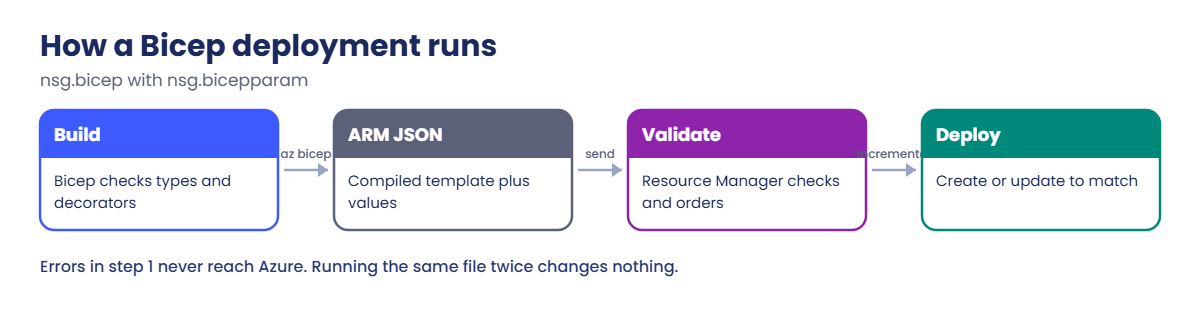
What happens when you deploy a Bicep file:

ARM template to Bicep: how a Bicep deployment runs
  1. The CLI compiles nsg.bicep to ARM JSON, checking types and decorators. Errors stop here.
  2. It sends the JSON and your parameter values to Resource Manager.
  3. Resource Manager validates the template and works out the order of resources.
  4. It creates or updates each resource to match the template (incremental mode by default).
  5. Outputs, like the NSG’s ID, come back in the deployment result.

Because templates describe the end state, deploying the same file twice changes nothing the second time. That’s what makes them safe to run from a pipeline.

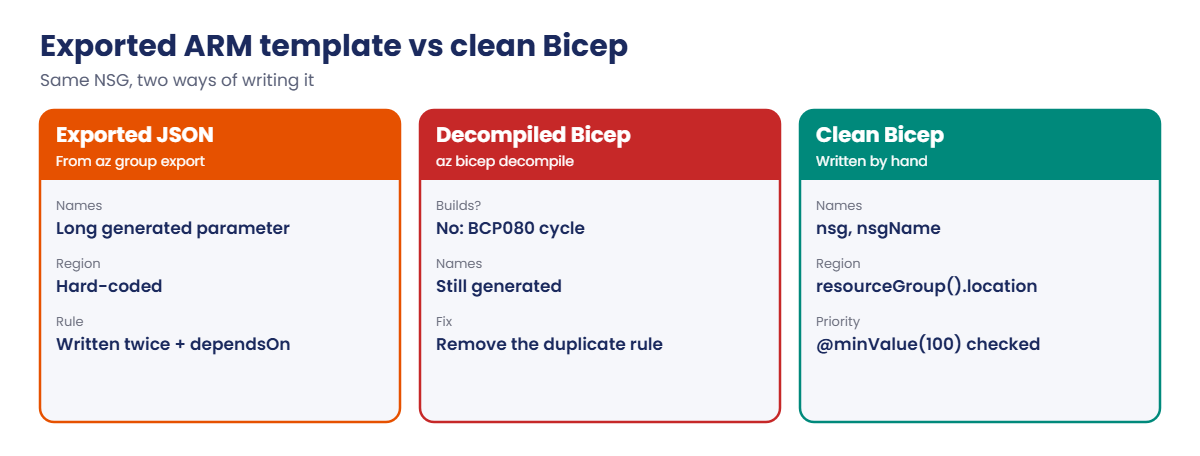
ARM template to Bicep: exported JSON, decompiled Bicep and clean Bicep

Never edit the compiled JSON. The .bicep file is the source; the JSON is a build output, like an .exe from source code.

Hands-on lab: ARM template to Bicep for an NSG

Make a folder for this lesson’s files:

New-Item -ItemType Directory -Path C:\azure-lab\bicep -Force | Out-Null
Set-Location C:\azure-lab\bicep

1Create an NSG by hand, the “click-ops” way

Run this:

az group create --name rg-saat-l41 --location centralindia --tags course=saatvedha-azure lesson=41 -o none
az network nsg create --resource-group rg-saat-l41 --name nsg-saat-demo --tags course=saatvedha-azure lesson=41 -o none
az network nsg rule create --resource-group rg-saat-l41 --nsg-name nsg-saat-demo --name allow-https-in --priority 100 --direction Inbound --access Allow --protocol Tcp --source-address-prefixes Internet --destination-port-ranges 443 -o none

2Export it as an ARM template

Run this, then open exported.json in VS Code:

az group export --name rg-saat-l41 > exported.json
(Get-Content exported.json).Count

You should see a number around 70: the line count of the exported JSON.

Look at what you got: a parameter called networkSecurityGroups_nsg_saat_demo_name, the region hard-coded, the rule written twice (inside the NSG and again as a separate resource), and dependsOn by hand. That’s typical of exported templates.

3Write the clean Bicep version

Save this as nsg.bicep (in VS Code, or with the here-string below), then build it:

$b = @'
@description('Name of the network security group')
param nsgName string = 'nsg-saat-demo'

@description('Azure region for the NSG')
param location string = resourceGroup().location

@description('Priority of the HTTPS rule (100 to 4096)')
@minValue(100)
@maxValue(4096)
param httpsPriority int = 100

resource nsg 'Microsoft.Network/networkSecurityGroups@2024-05-01' = {
  name: nsgName
  location: location
  tags: {
    course: 'saatvedha-azure'
    lesson: '41'
  }
  properties: {
    securityRules: [
      {
        name: 'allow-https-in'
        properties: {
          protocol: 'Tcp'
          sourcePortRange: '*'
          destinationPortRange: '443'
          sourceAddressPrefix: 'Internet'
          destinationAddressPrefix: '*'
          access: 'Allow'
          priority: httpsPriority
          direction: 'Inbound'
        }
      }
    ]
  }
}

output nsgId string = nsg.id
'@
Set-Content -Path nsg.bicep -Value $b
az bicep build --file nsg.bicep
(Get-Content nsg.bicep).Count

You should see this, and a new nsg.json next to it:

38

No output from the build means no errors and no warnings. 38 lines of Bicep compile to the same kind of JSON that took about 70 lines to export, and this version has a region parameter, a validated priority and an output.

4Deploy it with a parameters file

Create a .bicepparam file that changes the priority, and deploy:

Set-Content -Path nsg.bicepparam -Value "using 'nsg.bicep'`n`nparam httpsPriority = 200"
az deployment group create --resource-group rg-saat-l41 --name nsg-deploy --parameters nsg.bicepparam --query "{state:properties.provisioningState, nsgId:properties.outputs.nsgId.value}" -o yaml
az network nsg rule list --resource-group rg-saat-l41 --nsg-name nsg-saat-demo --query "[].{name:name, priority:priority, port:destinationPortRange}" -o table

You should see something like this:

nsgId: /subscriptions/.../resourceGroups/rg-saat-l41/providers/Microsoft.Network/networkSecurityGroups/nsg-saat-demo
state: Succeeded
Name            Priority    Port
--------------  ----------  ------
allow-https-in  200         443

The deployment updated the NSG you created by hand: same name, so Resource Manager changed the rule’s priority instead of creating a second NSG. From now on, this file is the source of truth.
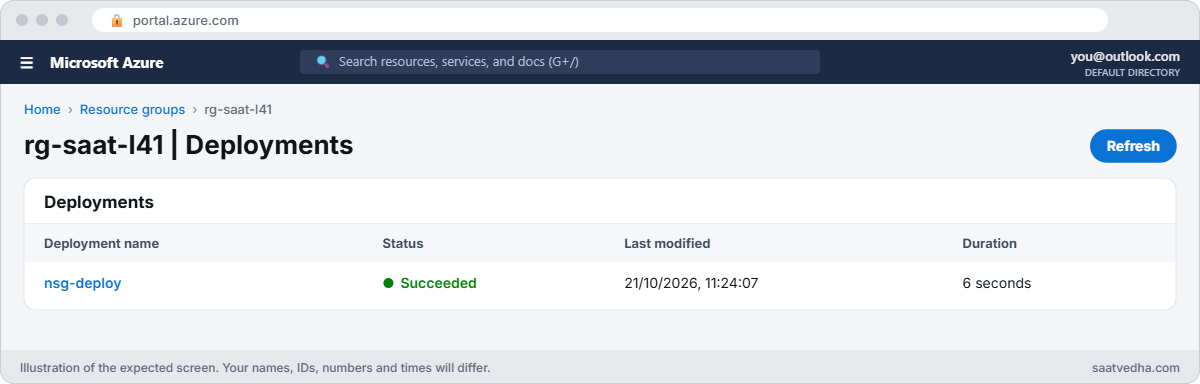
ARM template to Bicep deployment in the portal
rg-saat-l41 deployments: nsg-deploy Succeeded.

5Deploy again and see nothing change

Run the same deployment a second time:

az deployment group create --resource-group rg-saat-l41 --name nsg-deploy-2 --parameters nsg.bicepparam --query "properties.provisioningState" -o tsv

You should see this:

Succeeded

Same file, same result, no changes. Lesson 42 adds what-if, which shows you that before you deploy.

One more habit for every ARM template to Bicep conversion: read the warnings, not just the errors. If you misspell a property, for example secrityRules instead of securityRules, Bicep still builds and prints Warning BCP089: The property "secrityRules" is not allowed on objects of type "NetworkSecurityGroupPropertiesFormat". Did you mean "securityRules"?

A warning doesn’t stop the build, so a pipeline carries on, and depending on how the resource provider treats unknown properties, you can end up with an NSG without the rules you meant to add. Make your pipeline fail on any Bicep warning, and fix them in VS Code, where they show as yellow squiggles while you type.
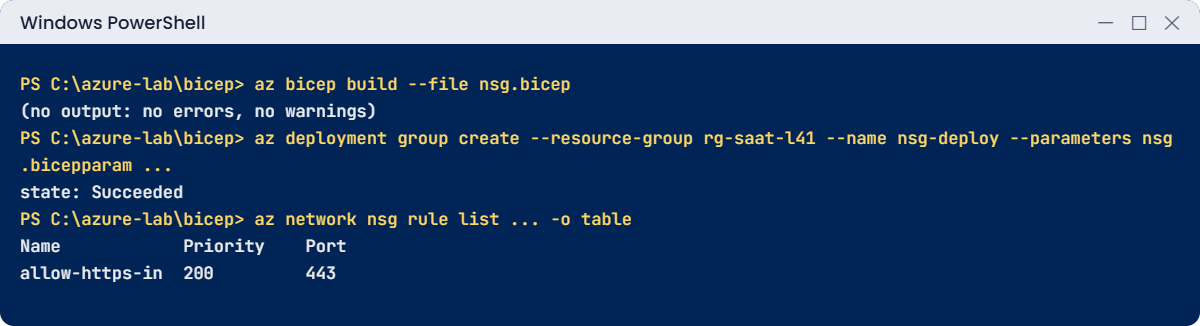
ARM template to Bicep lab: build and deploy with a bicepparam file
A clean build, a deployment with a parameters file, and the updated rule.

✅ Checkpoint: nsg.bicep builds with no warnings, deploys with nsg.bicepparam, and the rule now has priority 200.

Break It, Then Fix It

Both errors here are real Bicep compiler output; your line numbers may differ slightly.

1Break it: let the decompiler do the work

Convert the exported template automatically:

az bicep decompile --file exported.json

You’ll see something like this:

WARNING: Decompilation is a best-effort process, as there is no guaranteed mapping from ARM JSON to Bicep Template or Bicep Parameters.
...
exported.bicep(14,13) : Error BCP080: The expression is involved in a cycle ("networkSecurityGroups_nsg_saat_demo_name_allow_https_in" -> "networkSecurityGroups_nsg_saat_demo_name_resource").
exported.bicep(52,5) : Error BCP080: The expression is involved in a cycle ("networkSecurityGroups_nsg_saat_demo_name_resource" -> "networkSecurityGroups_nsg_saat_demo_name_allow_https_in").

The export lists the rule twice. The decompiler kept both, and the inline copy refers to the separate rule’s ID while the separate rule depends on the NSG. Each waits for the other, so Bicep refuses to build.

Fix it: in exported.bicep, delete the line starting with “id:” inside securityRules, and delete the whole separate securityRules resource at the bottom. Or better, define rules in one place only, as nsg.bicep does. Then build:

az bicep build --file exported.bicep

No output means it builds. Rename the long generated names to short ones like nsg while you’re there.

2Break it: a parameter value Bicep can catch early

Someone sets the HTTPS rule’s priority to 50 to put it “on top”:

Set-Content -Path nsg.bicepparam -Value "using 'nsg.bicep'`n`nparam httpsPriority = 50"
az deployment group create --resource-group rg-saat-l41 --name nsg-deploy-3 --parameters nsg.bicepparam

You’ll get an error like this:

nsg.bicepparam(3,23) : Error BCP328: The provided value (which will always be less than or equal to 50) is too small to assign to a target for which the minimum allowable value is 100.

NSG priorities run from 100 to 4096. Because nsg.bicep says so with @minValue(100), the mistake is caught on your laptop before anything reaches Azure. Without the decorator, Resource Manager would reject it later, mid-deployment.

Fix it: use a valid value and deploy, then clean up:

Set-Content -Path nsg.bicepparam -Value "using 'nsg.bicep'`n`nparam httpsPriority = 110"
az deployment group create --resource-group rg-saat-l41 --name nsg-deploy-4 --parameters nsg.bicepparam --query "properties.provisioningState" -o tsv
az group delete --name rg-saat-l41 --yes
C:\azure-lab\Find-LabResources.ps1 -Lesson 41

You should see this:

Succeeded
Nothing tagged course=saatvedha-azure is left.
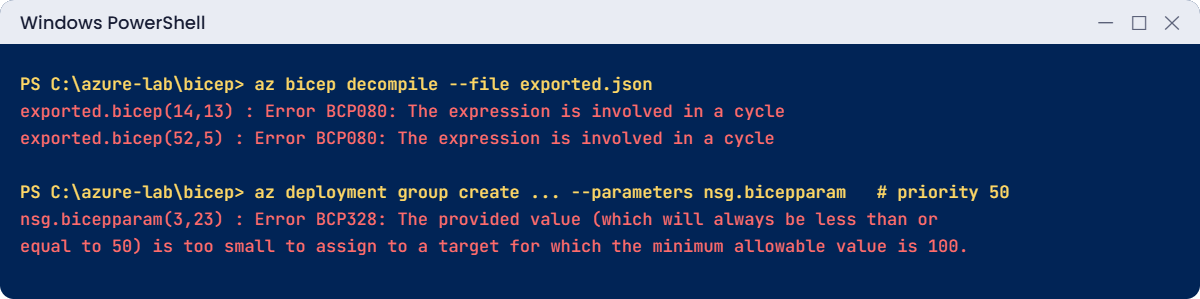
ARM template to Bicep errors: BCP080 cycle and BCP328 parameter value
Real Bicep errors: a decompile cycle and a value below @minValue.

✅ Checkpoint: You fixed a decompile cycle and a parameter caught at build time. Keep the files in C:\azure-lab\bicep for Lesson 42.

This happened at work

The firewall rule that came back every night

A software company’s ops team removed an old “allow RDP from anywhere” rule from an NSG during an audit. The next morning, the rule was back. They removed it again; it came back again.

Months earlier, someone had exported the NSG from the portal, decompiled it to Bicep, fixed the errors and added it to a nightly pipeline. The exported template included every rule as it existed that day, including the risky one. Each night the pipeline put the NSG back to the template, as designed.

What they changed: the Bicep file became the only place rules change, with pull requests and review. Portal changes to resources managed by the pipeline are blocked with a resource lock and Azure Policy. Exported templates are now treated as a starting draft, never deployed as they are.

Common mistakes and troubleshooting

MistakeWhat you seeWhat to do
Deploying a decompiled export as-isBCP080 cycles, hard-coded valuesClean it: one definition per rule, parameters for names and region.
Typo in a property nameWarning BCP089 (“Did you mean securityRules?”)Read warnings; fail your pipeline on them.
No decorators on parametersBad values fail late in AzureUse @minValue, @maxValue, @allowed.
Editing compiled JSONChanges lost on next buildEdit only the .bicep file.
Changing resources in the portal and in BicepChanges undone at next deployOne source of truth; lock or policy.
Hard-coded regionTemplate only works in one placeUse resourceGroup().location or a parameter.

Interview questions

Click a question to open it. Each one is written the way an interviewer would ask it. Under it you will see why they ask it and one way you could answer, in your own words.

Fresher level

1. What is Bicep?

Why they ask this: The basic concept.

How you might answer: A language for deploying Azure resources that compiles to ARM template JSON. It’s shorter, has type checking and editor support, and deploys through the same Resource Manager engine.

2. How does Bicep relate to ARM templates?

Why they ask this: They want the link.

How you might answer: Bicep is a layer on top. Every Bicep file compiles to an ARM template, and you can decompile ARM JSON to Bicep. Anything ARM can deploy, Bicep can too.

3. What is a parameters file in Bicep?

Why they ask this: A practical check.

How you might answer: A .bicepparam file that sets values for a Bicep file’s parameters, with a using line pointing to the template. Bicep checks the values against the parameter types and decorators at build time.

2–5 years experience

4. You decompiled an exported template and got BCP080 errors. Why?

Why they ask this: A real trap.

How you might answer: Exported templates often define child resources twice, inline and separately, with references both ways. The decompiler keeps both, which creates a dependency cycle. I remove one copy, usually keeping the rules inline or as separate child resources, not both.

5. How do you stop bad parameter values reaching Azure?

Why they ask this: They want shift-left thinking.

How you might answer: Decorators like @minValue, @maxValue and @allowed, types and user-defined types, .bicepparam files that Bicep checks at build, and a linter run in the pipeline before deployment.

6. Incremental vs complete deployment mode: what’s the difference?

Why they ask this: A classic question.

How you might answer: Incremental, the default, adds and updates resources in the template and leaves others alone. Complete deletes resources in the group that aren’t in the template, so it’s risky; deployment stacks (Lesson 42) are the safer modern way to manage deletions.

Senior level

7. How would you move a team from portal changes to Bicep?

Why they ask this: They want change management.

How you might answer: Start with new resources only, export existing ones as drafts and clean them into modules, put templates in Git with pull requests, deploy through a pipeline, and use locks and policy to stop drift. Train people on reading what-if output.

8. How do you structure Bicep for a large environment?

Why they ask this: They want design.

How you might answer: Small reusable modules per resource type, composed in environment files, parameter files per environment, a module registry or template specs for sharing, and naming and tagging handled centrally.

9. What would make you choose Terraform instead of Bicep?

Why they ask this: They want honest trade-offs.

How you might answer: Multi-cloud resources or providers outside Azure, or an existing Terraform estate and skills. For Azure-only work, Bicep has day-zero support for new resource types and no state file to manage.

Quick quiz

Q1. What does Bicep compile to?

  1. PowerShell
  2. ARM template JSON
  3. YAML
  4. Terraform
Show answer

B — Resource Manager deploys the compiled JSON.

Q2. Which command converts ARM JSON to Bicep?

  1. az bicep build
  2. az bicep decompile
  3. az deployment group create
  4. az group export
Show answer

B — Decompile is best-effort and may need fixes.

Q3. BCP080 after decompiling means:

  1. A typo
  2. A dependency cycle
  3. A quota problem
  4. A missing region
Show answer

B — Two resources reference each other.

Q4. Which decorator rejects priorities below 100?

  1. @description
  2. @minValue(100)
  3. @secure
  4. @allowed
Show answer

B — @minValue checks numbers at build time.

Q5. A typo like secrityRules gives:

  1. Nothing
  2. Warning BCP089
  3. An Azure outage
  4. A deleted NSG
Show answer

B — Bicep suggests the right name.

Quick recap

You can now turn click-ops into code you can review and redeploy.

  • Bicep compiles to ARM JSON; the engine is the same.
  • Exported templates are drafts: duplicated children, hard-coded values.
  • Decompile, then fix BCP errors by hand.
  • Decorators and .bicepparam catch bad values before Azure sees them.
  • The .bicep file is the source of truth; never edit the JSON.

Next lesson

Lesson 42: Bicep in practice: modules, what-if, deployment stacks → You split templates into modules, preview changes with what-if and manage deletions with deployment stacks.

Further reading: ARM template to Bicep

Want to go deeper into ARM template to Bicep? See Microsoft’s What is Bicep? and Decompile ARM template JSON to Bicep. You can also see the full plan for this course on the Azure Cloud Administration course page.

Scroll to Top