Blob access tiers and lifecycle rules
-
Phase 0: Before you start
-
Phase 1: The foundation
-
Phase 2: Day-to-day operations
-
Phase 3: Enterprise architecture
-
Phase 4: Troubleshooting step by step
-
Phase 5: Final project and career
Azure Blob access tiers let you pay less for data you rarely touch. The same file can live in Hot, Cool, Cold or Archive, and each step down cuts the storage price but adds a cost or a wait when you read it.
Most storage bills are full of logs and backups nobody has opened in months, all sitting in Hot. Lifecycle rules move them down automatically, and soft delete saves you when someone deletes the wrong thing.
In the lab you tier blobs by hand, write a lifecycle rule, get stuck on an archived file and bring it back, then recover a deleted blob.
| Time | You need | Cost | By the end you can |
|---|---|---|---|
| About 45 minutes, plus up to an hour waiting for a rehydrate | The storage account from Lesson 21, the CLI | Under one US cent: a few tiny blobs and one high-priority rehydrate | Choose tiers by access pattern, automate them, rehydrate from Archive and undelete blobs |
What it is, in one line
Access tiers trade a lower storage price for higher read costs and, for Archive, a wait of hours before you can read the data.
In Simple Words
The kitchen at home
Milk you use every day sits at the front of the fridge: Hot. The jam you open once a month is at the back: Cool. Frozen peas for special days are in the freezer: Cold.
Grandma’s big cooking pot is in the loft: Archive. It takes no space in the kitchen, but someone has to fetch the ladder, and you need to ask the day before.
A good home moves things to the right place on its own as they get used less. That’s a lifecycle rule.
Engineer's View
Tiers, prices and the rules behind them
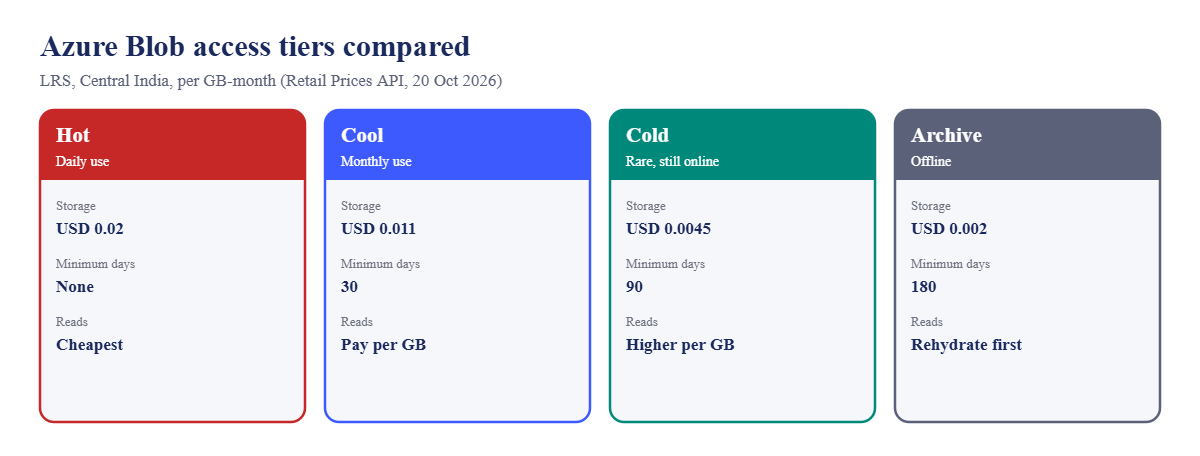
| Tier | Price per GB-month* | Minimum days | Reading the data |
|---|---|---|---|
| Hot | USD 0.02 | None | Cheapest reads |
| Cool | USD 0.011 | 30 | Pay per GB read |
| Cold | USD 0.0045 | 90 | Higher read cost |
| Archive | USD 0.002 | 180 | Offline; rehydrate first (up to 15 hours) |
*LRS, Central India, first 50 TB, from the Azure Retail Prices API on 20 Oct 2026. 1 TB for a month is about USD 20.48 in Hot and USD 2.05 in Archive.
- Early deletion: deleting, overwriting or moving a blob out of Cool, Cold or Archive before the minimum days charges the rest of the period.
- Account default tier (Hot, Cool or Cold) applies to blobs with no tier set, shown as “inferred”. Archive is only set per blob.
- Archive works with LRS, GRS and RA-GRS accounts, not ZRS or GZRS. Rehydrate with
set-tier(Standard: up to 15 hours; High: often under an hour for blobs under 10 GB) or copy to a new online blob. - Lifecycle management: JSON rules per account that tier or delete blobs by days since modification, creation or last access. Rules run about once a day, and a new policy can take up to 24 hours to start.
- Smart tier: a newer account setting that moves block blobs between Hot, Cool and Cold by access, with no early deletion or retrieval fees. It needs a ZRS, GZRS or RA-GZRS account and skips Archive.
- Soft delete: keeps deleted blobs or containers for 1 to 365 days so you can undelete them. Accounts made with the CLI start with it off.
How it works, step by step
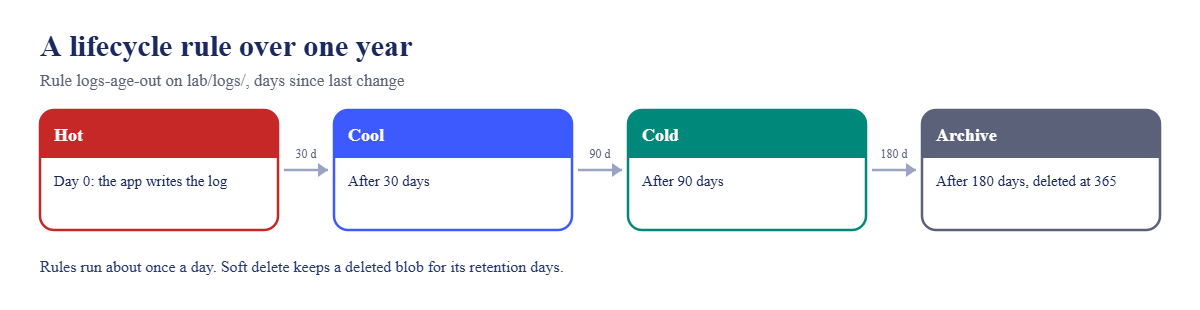
What a lifecycle rule does to one log file over a year:
- Day 0: the app writes logs/day1.log in Hot.
- Day 31: the daily lifecycle run moves it to Cool.
- Day 91: moved to Cold.
- Day 181: moved to Archive; it can no longer be read directly.
- Day 366: deleted. With soft delete on, it can still be undeleted for the retention period.
The thresholds line up with the minimum days, so each move happens after the previous tier’s minimum and no early deletion fee applies.
Don’t archive what someone may need in a hurry. An auditor asking for a file “today” and a 15-hour rehydrate don’t mix well.
Hands-on lab: Azure Blob access tiers and lifecycle
Load your storage account name:
$st = (Get-Content C:\azure-lab\storage.txt)1Upload three log files
Run this:
1..3 | ForEach-Object { Set-Content -Path "C:\azure-lab\day$_.log" -Value "log line from day $_" }
1..3 | ForEach-Object { az storage blob upload --account-name $st --auth-mode login --container-name lab --name "logs/day$_.log" --file "C:\azure-lab\day$_.log" -o none }2Move each one to a different tier
Run this:
az storage blob set-tier --account-name $st --auth-mode login --container-name lab --name logs/day1.log --tier Cool
az storage blob set-tier --account-name $st --auth-mode login --container-name lab --name logs/day2.log --tier Cold
az storage blob set-tier --account-name $st --auth-mode login --container-name lab --name logs/day3.log --tier Archive
az storage blob list --account-name $st --auth-mode login --container-name lab --query "[].{name:name, tier:properties.blobTier}" -o tableYou should see this:
Name Tier
------------- -------
hello.txt Hot
logs/day1.log Cool
logs/day2.log Cold
logs/day3.log Archivehello.txt has no tier of its own; it follows the account default (Hot). The other three have explicit tiers. Tier changes between Hot, Cool and Cold are instant.
3Write a lifecycle rule
Save the policy, apply it, and read it back:
$p = @'
{
"rules": [
{
"enabled": true,
"name": "logs-age-out",
"type": "Lifecycle",
"definition": {
"filters": { "blobTypes": [ "blockBlob" ], "prefixMatch": [ "lab/logs/" ] },
"actions": {
"baseBlob": {
"tierToCool": { "daysAfterModificationGreaterThan": 30 },
"tierToCold": { "daysAfterModificationGreaterThan": 90 },
"tierToArchive": { "daysAfterModificationGreaterThan": 180 },
"delete": { "daysAfterModificationGreaterThan": 365 }
}
}
}
}
]
}
'@
Set-Content -Path C:\azure-lab\lifecycle.json -Value $p
az storage account management-policy create --resource-group rg-saat-data --account-name $st --policy '@C:\azure-lab\lifecycle.json' -o none
az storage account management-policy show --resource-group rg-saat-data --account-name $st --query "policy.rules[].{name:name, enabled:enabled, prefix:join(', ', definition.filters.prefixMatch)}" -o tableYou should see this:
Name Enabled Prefix
------------ --------- ---------
logs-age-out True lab/logs/The prefix starts with the container name: lab/logs/, not logs/. Getting that wrong is the number one reason a lifecycle rule “does nothing”.
4Turn on soft delete
Keep deleted blobs and containers for 7 days:
az storage account blob-service-properties update --resource-group rg-saat-data --account-name $st --enable-delete-retention true --delete-retention-days 7 --enable-container-delete-retention true --container-delete-retention-days 7 -o none
az storage account blob-service-properties show --resource-group rg-saat-data --account-name $st --query "{blobSoftDelete:deleteRetentionPolicy.days, containerSoftDelete:containerDeleteRetentionPolicy.days}" -o tableYou should see this:
BlobSoftDelete ContainerSoftDelete
---------------- ---------------------
7 7
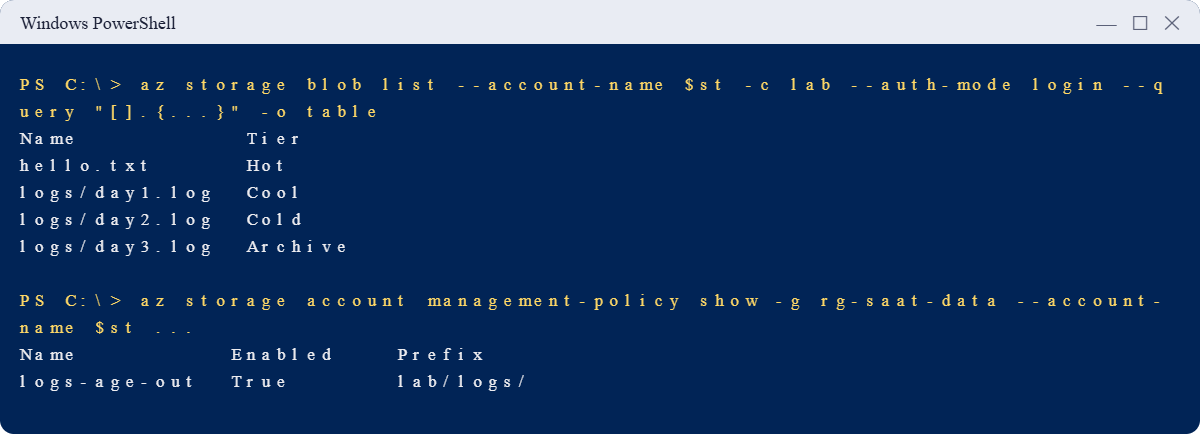
✅ Checkpoint: day1 to day3 are in Cool, Cold and Archive, the logs-age-out rule is on, and soft delete keeps deletes for 7 days.
Break It, Then Fix It
Both of these turn up as urgent tickets, usually on a Friday evening.
1Break it: “The file won’t download”
Try to read the archived log:
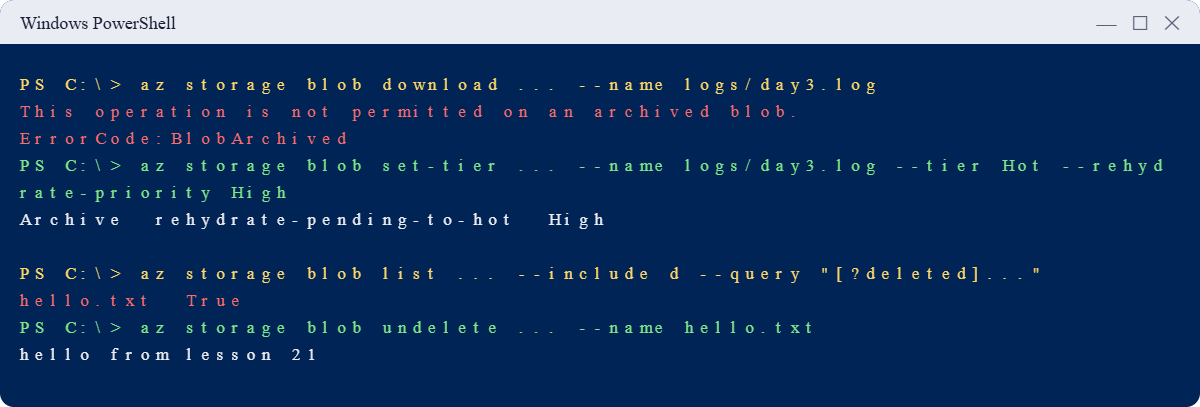
az storage blob download --account-name $st --auth-mode login --container-name lab --name logs/day3.log --file C:\azure-lab\day3-back.logYou’ll get an error like this:
This operation is not permitted on an archived blob.
RequestId:5b1e...
Time:2026-10-20T16:05:11.0000000Z
ErrorCode:BlobArchivedArchive blobs are offline. Nothing can read them, not even the account owner, until they are rehydrated to an online tier.
Fix it: rehydrate with High priority, then watch the status:
az storage blob set-tier --account-name $st --auth-mode login --container-name lab --name logs/day3.log --tier Hot --rehydrate-priority High
az storage blob show --account-name $st --auth-mode login --container-name lab --name logs/day3.log --query "{tier:properties.blobTier, status:properties.archiveStatus, priority:properties.rehydratePriority}" -o tableYou should see something like this:
Tier Status Priority
------- ------------------------ ----------
Archive rehydrate-pending-to-hot HighWhile it’s pending, any other tier change is refused. Try it once:
az storage blob set-tier --account-name $st --auth-mode login --container-name lab --name logs/day3.log --tier CoolThis operation is not permitted because the blob is being rehydrated.
ErrorCode:BlobBeingRehydratedWait for it (usually under an hour with High), then download:
do { Start-Sleep -Seconds 300; $t = az storage blob show --account-name $st --auth-mode login --container-name lab --name logs/day3.log --query properties.blobTier -o tsv; $t } until ($t -eq 'Hot')
az storage blob download --account-name $st --auth-mode login --container-name lab --name logs/day3.log --file C:\azure-lab\day3-back.log -o none
Get-Content C:\azure-lab\day3-back.logYou should see this at the end:
Hot
log line from day 3High priority costs more per GB than Standard. For big restores, plan ahead with Standard and tell people it may take until tomorrow.
2Break it: the blob deleted by mistake
Delete hello.txt, then look for it:
az storage blob delete --account-name $st --auth-mode login --container-name lab --name hello.txt
az storage blob list --account-name $st --auth-mode login --container-name lab --query "[].name" -o tsv
az storage blob list --account-name $st --auth-mode login --container-name lab --include d --query "[?deleted].{name:name, deleted:deleted}" -o tableYou should see something like this:
logs/day1.log
logs/day2.log
logs/day3.log
Name Deleted
--------- ---------
hello.txt TrueThe normal list doesn’t show it, but the list with deleted items does. Because you turned on soft delete in step 4, it’s still recoverable. Without step 4, it would be gone for good.
Fix it: undelete it:
az storage blob undelete --account-name $st --auth-mode login --container-name lab --name hello.txt
az storage blob download --account-name $st --auth-mode login --container-name lab --name hello.txt --file C:\azure-lab\hello-back.txt -o none
Get-Content C:\azure-lab\hello-back.txtYou should see this:
hello from lesson 21Clean up: remove the logs and the lifecycle rule, keep soft delete on:
az storage blob delete-batch --account-name $st --auth-mode login --source lab --pattern 'logs/*' -o none
az storage account management-policy delete --resource-group rg-saat-data --account-name $st
az storage blob list --account-name $st --auth-mode login --container-name lab --query "[].name" -o tsvYou should see this:
hello.txt
✅ Checkpoint: You brought back an archived blob and a deleted blob. Only hello.txt is left, and soft delete stays on.
The deleted logs stay as soft-deleted copies for 7 days, which costs a fraction of a cent. The archived one also has a tiny early deletion charge, because it left Archive before 180 days.
This happened at work
The audit request that took two days
A finance company archived its transaction exports after 30 days to cut costs. Storage dropped by 85%, and everyone was happy for a year.
Then auditors asked for six months of exports “by end of day”. The team found 40,000 small archived files.
Standard rehydration was queued for up to 15 hours, High priority was limited per account per hour, and the per-file cost added up. The audit slipped two days.
What they changed: exports now go to Cool at 30 days and Cold at 90, and only reach Archive after 13 months, when audits are rare. Files are zipped into monthly bundles before archiving, so a restore is a few large blobs instead of thousands of small ones. The runbook now says how long a restore takes, so nobody promises “today”.
Common mistakes and troubleshooting
| Mistake | What you see | What to do |
|---|---|---|
| Lifecycle prefix without the container | Rule runs, nothing moves | Write container/prefix, like lab/logs/. |
| Expecting a new rule to act at once | Nothing changes for a day | Rules run daily; allow up to 24 hours. |
| Reading an archived blob | BlobArchived (409) | Rehydrate with set-tier or copy to an online tier. |
| Archiving files that are needed urgently | Hours of waiting during an incident | Use Cold for “rare but urgent” data. |
| Moving blobs before the minimum days | Early deletion charges | Match rule days to the 30/90/180 minimums. |
| Archiving millions of tiny files | Slow, costly restores | Bundle small files before archiving. |
| Soft delete off | Deleted data gone for good | Enable blob and container soft delete. |
Interview questions
Click a question to open it. Each one is written the way an interviewer would ask it. Under it you will see why they ask it and one way you could answer, in your own words.
Fresher level
1. What are the Azure Blob access tiers?
Why they ask this: The basic concept.
How you might answer: Hot, Cool, Cold and Archive. Each lower tier has a lower storage price but higher costs to read, and Archive is offline until it’s rehydrated.
2. What happens when you try to read an archived blob?
Why they ask this: They want to see you know it’s offline.
How you might answer: It fails with BlobArchived. You first rehydrate it to Hot, Cool or Cold with Standard or High priority, which can take up to 15 hours, or copy it to a new blob in an online tier.
3. What does soft delete do?
Why they ask this: A basic data protection check.
How you might answer: It keeps deleted blobs or containers for a set number of days so you can undelete them. It protects against mistakes, not against someone deleting the whole storage account.
2–5 years experience
4. A lifecycle rule was created yesterday but no blobs moved. What do you check?
Why they ask this: They want real troubleshooting.
How you might answer: The prefix includes the container name, the blob type filter matches, the days condition is actually met, and the rule is enabled. Rules run about once a day, so I’d also allow 24 hours after creating or changing it.
5. How do you choose between Cool, Cold and Archive?
Why they ask this: They want access patterns and minimums.
How you might answer: By how often and how quickly the data is needed. Cool for monthly access with a 30-day minimum, Cold for rare access but still online with 90 days, Archive for data kept for compliance that can wait hours, with 180 days.
6. How do you bring back a large amount of archived data efficiently?
Why they ask this: They’re checking rehydration planning.
How you might answer: Standard priority for big batches, High only for small urgent items, because High has an account-level throughput limit. I’d rehydrate by copy into a new container so the archive stays intact, and use Event Grid to know when each blob is ready.
Senior level
7. How would you design a data retention strategy for logs and backups?
Why they ask this: They want cost, compliance and recovery together.
How you might answer: Map each data type to how often it’s read and how long it must be kept. Lifecycle rules move it Hot to Cool to Cold to Archive, then delete at the retention end. Soft delete and versioning cover mistakes, immutability policies cover compliance, and we test restores including rehydration times.
8. When would you use smart tier instead of lifecycle rules?
Why they ask this: They’re checking current features.
How you might answer: When access is unpredictable and the account is zone-redundant. Smart tier moves block blobs between Hot, Cool and Cold by actual access with no early deletion or retrieval fees. Lifecycle rules are still needed for Archive, deletes and LRS or GRS accounts.
9. Soft delete is on. Is the data safe from an attacker?
Why they ask this: They want layered protection thinking.
How you might answer: Not fully. An attacker with enough rights can delete the account or turn soft delete off. I’d add a delete lock on the account, least-privilege roles, immutable storage for critical data, and backups in a separate subscription.
Quick quiz
Q1. Which tier is offline until rehydrated?
- Hot
- Cool
- Cold
- Archive
Show answer
D — Archive blobs must be rehydrated first.
Q2. What is the minimum storage period for Cold?
- 30 days
- 60 days
- 90 days
- 180 days
Show answer
C — Cold has a 90-day minimum on general-purpose v2.
Q3. A lifecycle rule for lab/logs/ is written as logs/. Result?
- Works anyway
- Nothing matches
- All blobs deleted
- Error at save
Show answer
B — The prefix must include the container name.
Q4. Which error means the blob is archived?
- BlobArchived
- AuthorizationFailure
- PublicAccessNotPermitted
- QuotaExceeded
Show answer
A — BlobArchived (409) is returned for archived blobs.
Q5. Which feature lets you undelete a blob?
- Lifecycle rules
- Soft delete
- Archive
- RA-GRS
Show answer
B — Soft delete keeps deleted blobs for the retention period.
Quick recap
You can now cut storage costs without losing data or getting stuck.
- Hot, Cool, Cold and Archive trade storage price for read cost and speed.
- Minimum days: 30 Cool, 90 Cold, 180 Archive.
- Archive needs a rehydrate, up to 15 hours with Standard priority.
- Lifecycle rules use container/prefix and run about once a day.
- Soft delete turns a deleted blob into a quick undelete.
Next lesson
Lesson 24: Shared access signatures and account keys → You create SAS links with the right scope and expiry, and see why account keys are dangerous.
Further reading: Azure Blob access tiers
Want to go deeper into Azure Blob access tiers? See Microsoft’s Access tiers for blob data and Lifecycle management overview. You can also see the full plan for this course on the Azure Cloud Administration course page.