Azure Virtual Networks and Subnets

An Azure virtual network (VNet) is your own private network inside Azure. VMs, databases and private endpoints live in its subnets and talk to each other on private IP addresses, the same way servers do in an office network.

The address range you pick on day one is very hard to change later, because peering, VPNs and firewalls all depend on it. So this lesson starts with a small IP plan, then builds it.

You’ll create vnet-saat, the network you’ll use for the rest of the course, with private subnets that have no hidden internet access. That matches how Azure builds new networks since 31 March 2026.

TimeYou needCostBy the end you can
About 40 minutesThe CLI, signed inNothing (VNets and subnets cost nothing)Plan an address range, build a VNet with private subnets, and read subnet errors

What it is, in one line

A virtual network is a private, isolated network in one Azure region, split into subnets, where your resources get private IP addresses.

In Simple Words

Plots and houses in a new colony

Imagine a builder gets a big piece of land for a new colony and numbers every house: 10.30 is the colony, and each lane gets its own block of numbers. Lane 1 is for shops, lane 2 for homes, lane 3 for the water tank and the generator.

The colony is the VNet. Each lane is a subnet. If you number two lanes with the same house numbers, the postman gets confused.

If you make a lane too short, there’s no room for new houses later.

And the gate at the colony entrance stays closed unless you build one on purpose. That’s the “private subnet” idea.

Engineer's View

Address spaces, subnets and reserved IPs

  • Address space: one or more private CIDR blocks for the whole VNet, usually from RFC 1918 (10.0.0.0/8, 172.16.0.0/12, 192.168.0.0/16). It must not overlap with on-premises networks or any VNet you’ll ever connect to.
  • Subnets: slices of the address space. Each must fit inside it and not overlap another subnet. Resources in different subnets of one VNet can talk to each other by default; NSGs (Lesson 12) control that.
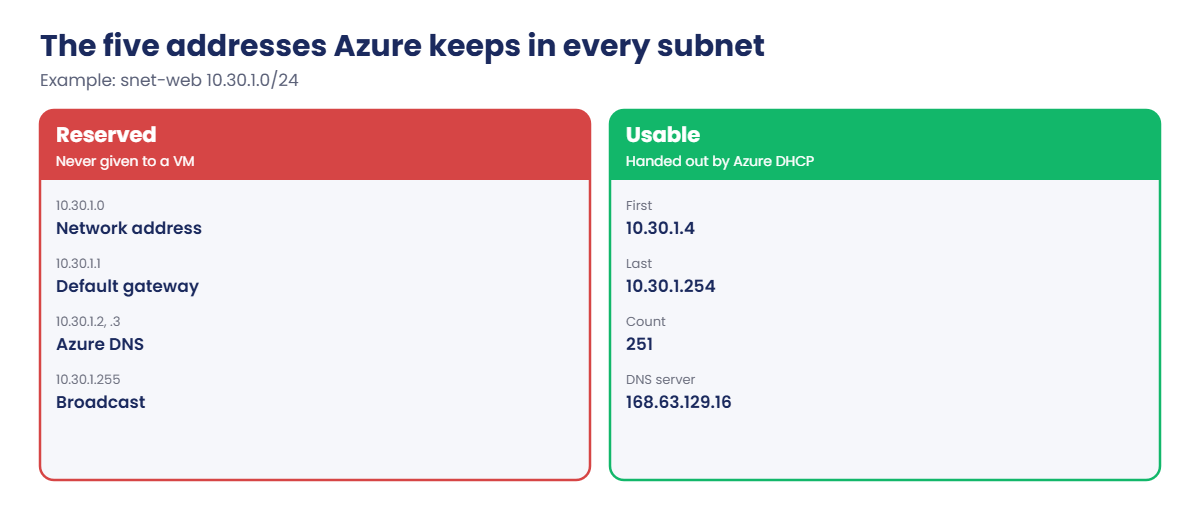
  • Five reserved addresses per subnet: the network address, .1 for the default gateway, .2 and .3 for Azure DNS, and the last address. A /24 gives 251 usable IPs, not 254. The smallest subnet is /29 (3 usable).
  • Special subnets need exact names: AzureBastionSubnet (/26 or larger), AzureFirewallSubnet (/26) and GatewaySubnet (/27 or larger is recommended).
  • Private subnets: since 31 March 2026, new VNets created with current API versions make subnets private by default (defaultOutboundAccess: false). VMs in them can reach same-region Azure Storage, but not the internet, until you add NAT Gateway, a public IP, a load balancer outbound rule or a firewall (Lesson 13). Existing VNets keep the old behaviour.

A VNet lives in one region and one subscription. Connecting VNets needs peering or a gateway, and both refuse overlapping ranges. Changing an address range that is in use, peered or connected to a VPN is painful, so a written IP plan is worth more than any template.

How it works, step by step

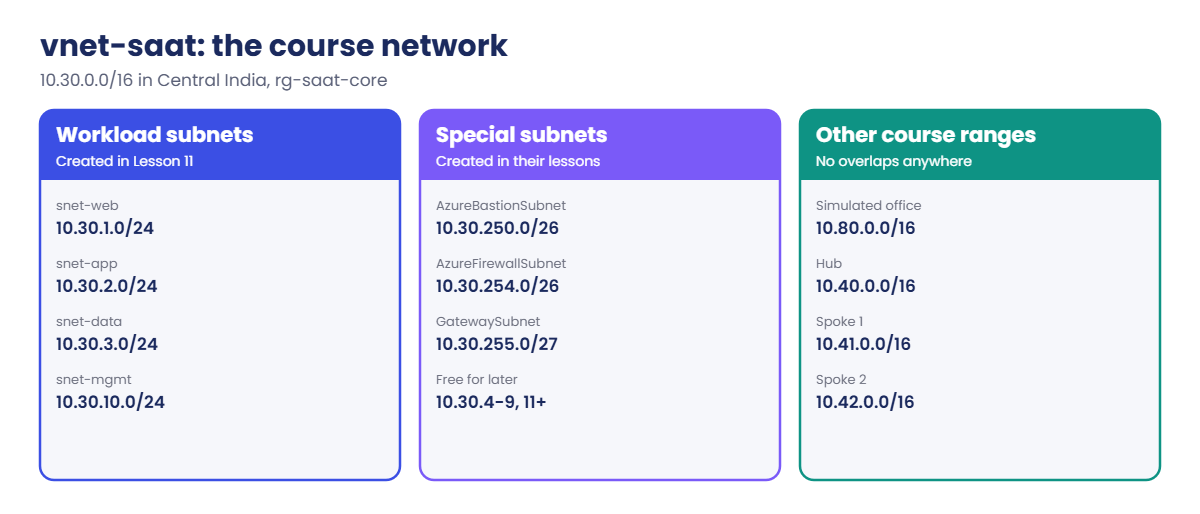
Here is the IP plan this course uses. It leaves room to grow and keeps the special subnets at the top of the range, so they’re easy to spot:

Azure virtual network IP plan for vnet-saat and other course ranges
SubnetRangeUsable IPsUsed for
snet-web10.30.1.0/24251Web servers, load balancer back ends
snet-app10.30.2.0/24251App servers
snet-data10.30.3.0/24251Databases, private endpoints
snet-mgmt10.30.10.0/24251Admin and automation VMs
AzureBastionSubnet10.30.250.0/2659Bastion Basic or Standard (Lesson 27)
AzureFirewallSubnet10.30.254.0/2659Azure Firewall (Lesson 48)
GatewaySubnet10.30.255.0/2727VPN Gateway (Lesson 49)

Ranges 10.30.4.0 to 10.30.9.255 and 10.30.11.0 upwards stay free for future subnets. The “office” network for hybrid labs later is 10.80.0.0/16, and the hub-and-spoke lessons use 10.40.0.0/16 to 10.42.0.0/16: no overlaps anywhere.

When a VM gets an IP, Azure’s own DHCP hands it the next free address in its subnet, starting at .4. The VM’s default gateway is .1, and its DNS server is Azure’s resolver at 168.63.129.16. You never configure a static IP inside the OS on Azure; you set it on the network interface instead.

Azure virtual network reserved addresses in every subnet

In the lab you build the four workload subnets now. The three special subnets are created in their own lessons, so they don’t sit empty and confuse anyone.

Hands-on lab: plan and build vnet-saat

You write a small calculator to check the plan, build vnet-saat in a long-lived resource group, check which IPs are taken, and save the IDs for later lessons.

1Check the plan with a subnet calculator

Paste this whole block:

function Get-SubnetInfo {
    param([Parameter(Mandatory)][string]$Cidr)
    $ip, $bits = $Cidr -split '/'
    $b = ([System.Net.IPAddress]$ip).GetAddressBytes()
    [int64]$n = ($b[0] * 16777216) + ($b[1] * 65536) + ($b[2] * 256) + $b[3]
    [int64]$size = [math]::Pow(2, 32 - [int]$bits)
    $start = [math]::Floor($n / $size) * $size
    $toIp = { param($v) '{0}.{1}.{2}.{3}' -f [math]::Floor($v / 16777216), ([math]::Floor($v / 65536) % 256), ([math]::Floor($v / 256) % 256), ($v % 256) }
    [pscustomobject]@{
        Cidr        = $Cidr
        Network     = & $toIp $start
        FirstUsable = & $toIp ($start + 4)
        LastUsable  = & $toIp ($start + $size - 2)
        Total       = $size
        Usable      = $size - 5
    }
}
'10.30.0.0/16','10.30.1.0/24','10.30.250.0/26','10.30.255.0/27' | ForEach-Object { Get-SubnetInfo $_ } | Format-Table

You should see this:

Cidr           Network     FirstUsable LastUsable    Total Usable
----           -------     ----------- ----------    ----- ------
10.30.0.0/16   10.30.0.0   10.30.0.4   10.30.255.254 65536  65531
10.30.1.0/24   10.30.1.0   10.30.1.4   10.30.1.254     256    251
10.30.250.0/26 10.30.250.0 10.30.250.4 10.30.250.62     64     59
10.30.255.0/27 10.30.255.0 10.30.255.4 10.30.255.30     32     27

This output is exact: it’s simple arithmetic. The first usable address is always .4 and the last is one below the broadcast address, because Azure keeps five.

2Create the core resource group and the VNet

Run this:

az group create --name rg-saat-core --tags course=saatvedha-azure lesson=11 keep=true -o none
az network vnet create --resource-group rg-saat-core --name vnet-saat --address-prefixes 10.30.0.0/16 --tags course=saatvedha-azure lesson=11 keep=true -o none
$subnets = @{ 'snet-web' = '10.30.1.0/24'; 'snet-app' = '10.30.2.0/24'; 'snet-data' = '10.30.3.0/24'; 'snet-mgmt' = '10.30.10.0/24' }
foreach ($name in $subnets.Keys) {
    az network vnet subnet create --resource-group rg-saat-core --vnet-name vnet-saat --name $name --address-prefixes $subnets[$name] --default-outbound-access false -o none
}
az network vnet subnet list --resource-group rg-saat-core --vnet-name vnet-saat --query "sort_by(@, &addressPrefix)[].{name:name, prefix:addressPrefix, defaultOutbound:defaultOutboundAccess}" -o table

You should see something like this:

Name       Prefix         DefaultOutbound
---------  -------------  -----------------
snet-web   10.30.1.0/24   False
snet-mgmt  10.30.10.0/24  False
snet-app   10.30.2.0/24   False
snet-data  10.30.3.0/24   False

sort_by sorts the text, so 10.30.10.0 comes before 10.30.2.0, the same as sorting words. --default-outbound-access false makes each subnet private explicitly, so the result is the same whichever API version your tools use. The tag keep=true marks resources that stay between lessons.

3Check which addresses are free

Run this:

az network vnet check-ip-address --resource-group rg-saat-core --name vnet-saat --ip-address 10.30.1.4
az network vnet check-ip-address --resource-group rg-saat-core --name vnet-saat --ip-address 10.30.1.2 --query available

You should see something like this:

{
  "available": true
}
false

.4 is the first address a VM can get. .2 belongs to Azure DNS, so it’s never available. This command is handy before you give a VM a static private IP.

4Save the IDs for later lessons

Run this:

$v = [ordered]@{ ResourceGroup = 'rg-saat-core'; VnetName = 'vnet-saat' }
$v.VnetId = az network vnet show -g rg-saat-core -n vnet-saat --query id -o tsv
foreach ($name in 'snet-web','snet-app','snet-data','snet-mgmt') {
    $v[$name] = az network vnet subnet show -g rg-saat-core --vnet-name vnet-saat -n $name --query id -o tsv
}
$v | ConvertTo-Json | Set-Content C:\azure-lab\vnet-saat.json
(Get-Content C:\azure-lab\vnet-saat.json | ConvertFrom-Json).'snet-web'

You should see something like this:

/subscriptions/6f1c2d3e-.../resourceGroups/rg-saat-core/providers/Microsoft.Network/virtualNetworks/vnet-saat/subnets/snet-web

From now on, labs load this file with $v = Get-Content C:\azure-lab\vnet-saat.json | ConvertFrom-Json instead of looking up IDs again.
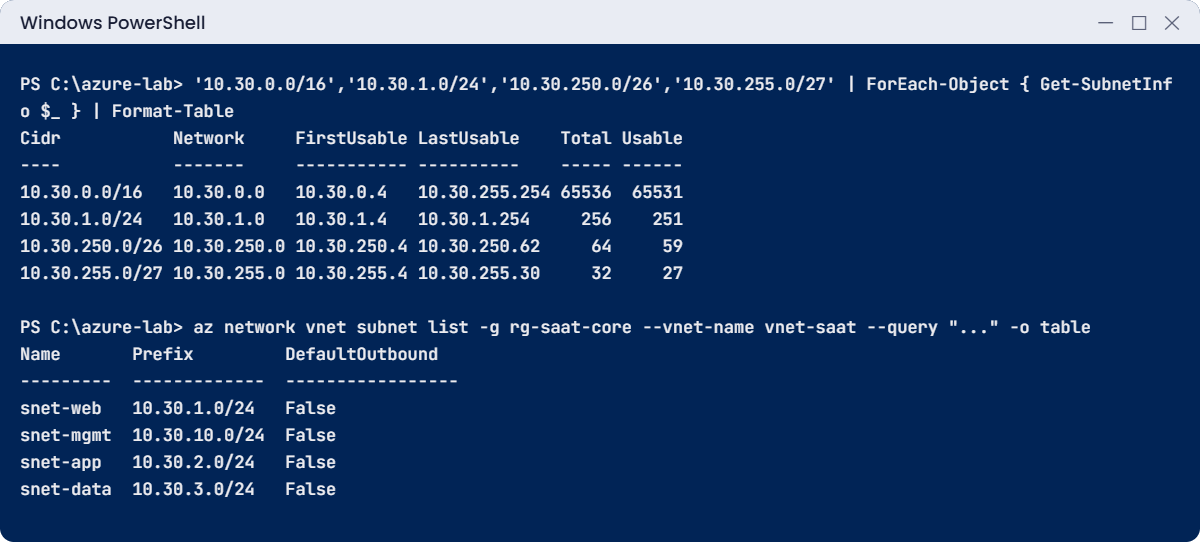
Azure virtual network lab: subnet calculator and four private subnets
The calculator output is exact; the subnet list is an example.

✅ Checkpoint: vnet-saat has four private subnets, and C:\azure-lab\vnet-saat.json holds their IDs. Keep both for the rest of the course.

Break It, Then Fix It

Azure checks every subnet against the VNet and against its neighbours. These are the two errors you’ll see most.

1Break it: a subnet that overlaps another

Run this:

az network vnet subnet create --resource-group rg-saat-core --vnet-name vnet-saat --name snet-test --address-prefixes 10.30.1.128/25 --default-outbound-access false

You’ll get an error like this:

(NetcfgSubnetRangesOverlap) Subnet 'snet-test' is not valid because its IP address range overlaps with that of an existing subnet in the virtual network.
Code: NetcfgSubnetRangesOverlap

10.30.1.128/25 is the top half of snet-web. Run Get-SubnetInfo 10.30.1.128/25 to see it starts at 10.30.1.128, inside snet-web’s 10.30.1.0 to 10.30.1.255.

Fix it: pick a free range from the plan:

az network vnet subnet create --resource-group rg-saat-core --vnet-name vnet-saat --name snet-test --address-prefixes 10.30.4.0/24 --default-outbound-access false --query addressPrefix -o tsv

You should see this:

10.30.4.0/24

2Break it: a subnet outside the VNet

Run this:

az network vnet subnet create --resource-group rg-saat-core --vnet-name vnet-saat --name snet-test2 --address-prefixes 10.31.1.0/24 --default-outbound-access false

You’ll get an error like this:

(NetcfgSubnetRangeOutsideVnet) Subnet 'snet-test2' is not valid because its IP address range is outside the IP address range of virtual network 'vnet-saat'.
Code: NetcfgSubnetRangeOutsideVnet

The VNet is 10.30.0.0/16; 10.31.1.0/24 is outside it. You could add a second address space to the VNet, but in a real network that range would also have to be free in every peered network and on-premises.

Fix it: there is nothing to fix in Azure; the subnet wasn’t created. Remove the test subnet from step 1:

az network vnet subnet delete --resource-group rg-saat-core --vnet-name vnet-saat --name snet-test
az network vnet subnet list --resource-group rg-saat-core --vnet-name vnet-saat --query "length(@)"

You should see this:

4
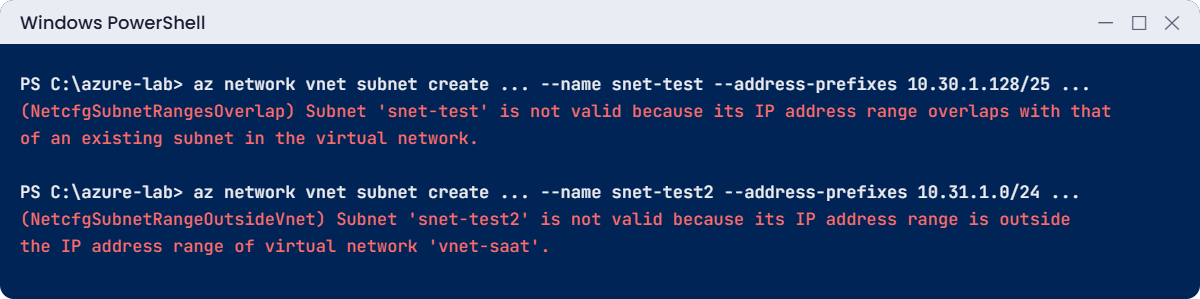
Azure virtual network errors: overlapping subnet and subnet outside the VNet
Example output of both errors.

✅ Checkpoint: Both errors reproduced, the test subnet removed, and vnet-saat has its four subnets again. Nothing to clean up: the VNet stays.

C:\azure-lab\Find-LabResources.ps1 will now always list rg-saat-core and vnet-saat. That’s expected: they carry keep=true and cost nothing.

This happened at work

The sale-day subnet that ran out of addresses

An online fashion store ran its web tier on a VM scale set in a subnet sized /27: 27 usable addresses. It looked plenty, because the scale set normally ran 8 VMs.

On the first morning of a big festival sale, autoscale tried to grow from 12 to 40 VMs. After 27 IPs (minus the load balancer’s own front end and two old test VMs nobody had removed), new instances failed with SubnetIsFull. The site slowed to a crawl for two hours while the team created a new /23 subnet and a second scale set by hand.

What they changed: subnets for anything that scales are sized for the peak plus room for rolling upgrades, which briefly need extra instances. A written IP plan lives next to the Bicep files, and an Azure Monitor alert fires when a subnet passes 70 percent of its addresses.

Common mistakes and troubleshooting

MistakeWhat you seeWhat to do
Using 10.0.0.0/16 everywhereCan’t peer or VPN later: ranges overlapKeep an IP plan; give every VNet a unique range.
Forgetting the five reserved IPsFewer addresses than expected; SubnetIsFullA /24 gives 251; plan for peaks.
Host bits in the prefix, like 10.30.1.10/24InvalidCIDRNotationUse the network address, 10.30.1.0/24; Get-SubnetInfo shows it.
Wrong special subnet nameBastion, Firewall or VPN Gateway can’t be createdUse AzureBastionSubnet, AzureFirewallSubnet, GatewaySubnet exactly.
Assuming new VMs have internetapt or Windows Update times outNew subnets are private: add NAT Gateway or another outbound method (Lesson 13).
Setting a static IP inside the OSThe VM loses network after a rebootSet static private IPs on the network interface in Azure.

Interview questions

Click a question to open it. Each one is written the way an interviewer would ask it. Under it you will see why they ask it and one way you could answer, in your own words.

Fresher level

1. What is a virtual network in Azure?

Why they ask this: A basic concept check.

How you might answer: It’s a private, isolated network in one region where Azure resources get private IP addresses and can talk to each other. You split it into subnets and control traffic with NSGs and route tables.

2. How many usable IPs are in a /24 subnet in Azure, and why?

Why they ask this: They want to see you know Azure’s reserved addresses.

How you might answer: 251. Azure reserves five: the network address, .1 for the gateway, .2 and .3 for DNS, and the last address.

3. What changed for new virtual networks in March 2026?

Why they ask this: They’re checking that your knowledge is current.

How you might answer: New VNets get private subnets by default, so VMs no longer get hidden default outbound internet access. You add an explicit outbound method like NAT Gateway, a public IP or a firewall. Existing networks weren’t changed.

2–5 years experience

4. How would you pick an address range for a new VNet?

Why they ask this: They want planning, not a random range.

How you might answer: I’d check the company’s IP plan for on-premises and every other VNet, then pick a free, private range big enough for growth, like a /16 or /20 per environment. Subnets get sized for peak use, and the special subnets for Bastion, Firewall and gateways get their own blocks.

5. A VM in a new subnet can’t download updates. What’s the likely cause?

Why they ask this: They want current knowledge of default outbound access.

How you might answer: If the subnet is private, which is the default for new VNets, the VM has no outbound path to the internet. I’d check the subnet’s defaultOutboundAccess setting and add NAT Gateway or another explicit outbound method.

Then I’d check NSGs and any route tables that send traffic elsewhere.

6. Can you change a subnet’s address range after it’s in use?

Why they ask this: They want practical knowledge of the limits.

How you might answer: You can change it only if the new range still contains every IP already used in the subnet and doesn’t overlap anything. Shrinking below what’s in use isn’t allowed. In practice it’s often easier to create a new subnet and move resources.

Senior level

7. Design the IP plan for a company with three environments, a hub network and two offices.

Why they ask this: They want a structured, non-overlapping design with room to grow.

How you might answer: I’d reserve a large block, for example 10.40.0.0/14, for Azure, and give the hub a /22 and each environment its own /16 or smaller from that block. Offices keep their existing ranges, which I’d record first so nothing overlaps.

Everything goes into a shared IP plan, ideally managed with an IPAM tool, and new VNets take their ranges from it.

8. Two companies merge and both used 10.0.0.0/16 in Azure. How do you connect them?

Why they ask this: They’re checking you know overlaps block peering and what the options are.

How you might answer: Peering and VPN routing won’t work with overlapping ranges. Options are to re-address one side, which is the clean fix but takes time, or to put NAT in between, for example with a firewall or NAT-capable gateway, for the few services that must talk.

For the long term I’d plan the re-addressing and stop new overlaps with a central IP plan.

9. How would you stop teams from creating VNets with overlapping ranges?

Why they ask this: They want governance, not just a document.

How you might answer: A central IP plan or Azure Virtual Network Manager IPAM pools that hand out ranges, plus Azure Policy that denies VNets outside allowed ranges. VNets are built from shared Bicep modules that take their range from the plan, and a regular report flags overlaps.

Quick quiz

Q1. How many usable addresses does a /26 subnet have in Azure?

  1. 64
  2. 62
  3. 59
  4. 27
Show answer

C — 64 minus the five Azure keeps is 59.

Q2. Which address in a subnet is Azure’s default gateway?

  1. .0
  2. .1
  3. .4
  4. .255
Show answer

B — .1 is the gateway; .2 and .3 are DNS.

Q3. What does defaultOutboundAccess false mean for a subnet?

  1. No traffic at all
  2. No hidden internet access; you need an explicit outbound method
  3. No DNS
  4. No private IPs
Show answer

B — Private subnets need NAT Gateway, a public IP, a load balancer rule or a firewall for internet access.

Q4. Which error means a new subnet overlaps an existing one?

  1. NetcfgSubnetRangeOutsideVnet
  2. NetcfgSubnetRangesOverlap
  3. InvalidCIDRNotation
  4. SubnetIsFull
Show answer

B — Subnets in one VNet can’t overlap.

Q5. What must the Bastion subnet be called?

  1. BastionSubnet
  2. snet-bastion
  3. AzureBastionSubnet
  4. GatewaySubnet
Show answer

C — Special subnets need exact names.

Quick recap

You have a planned, private network that every later lab will build on.

  • A VNet is a private network in one region; subnets slice its address space.
  • Azure keeps five IPs per subnet: a /24 gives 251.
  • New subnets are private by default since March 2026; outbound internet needs an explicit method.
  • Subnets can’t overlap each other or fall outside the VNet.
  • vnet-saat (10.30.0.0/16) and C:\azure-lab\vnet-saat.json stay for the course.

Next lesson

Lesson 12: NSG vs ASG: network security groups and application security groups → You control traffic between the subnets with NSG rules, and group servers by role with ASGs.

Further reading: Azure virtual network

Want to go deeper into Azure virtual network? Read Microsoft’s What is Azure Virtual Network? and Default outbound access in Azure. You can also see the full plan for this course on the Azure Cloud Administration course page.

Scroll to Top