Azure Backup failures

“Azure Backup failed” alerts usually arrive at night and the job error is a code such as UserErrorGuestAgentStatusUnavailable or UserErrorRequestDisallowedByPolicy. Each code points to a specific part of the backup chain: the VM agent, the snapshot, the network, a policy, or the restore target.

In Lesson 35 you set up VM backup and restored files and a whole VM. This lesson is about when it goes wrong: how to read a failed job, which layer each error belongs to, and how to fix it without waiting for the next night’s run.

In the lab you protect a VM, run a backup, then break the VM agent and a restore, and fix both from the job errors.

TimeYou needCostBy the end you can
About 90 minutes (mostly waiting for jobs)A free account and the CLIAbout 10 US cents: a small VM, its backup storage and a storage account for a couple of hoursRead Azure Backup job errors, fix VM agent and snapshot problems, and avoid common restore failures

What it is, in one line

An Azure Backup failure is decoded from the job’s error code, which points to the agent, snapshot, policy, network or restore target.

In Simple Words

The photographer at a school

A school photographer comes every evening to photograph each classroom. To do it, he needs the class monitor to open the door and say “ready”. If the monitor has gone home, the photographer waits, gives up, and writes “monitor not available” in his diary.

The next morning the principal reads the diary. She doesn’t blame the camera; she asks why the monitor left early.

The photographer is Azure Backup, the monitor is the VM agent, and the diary is the job error.

Engineer's View

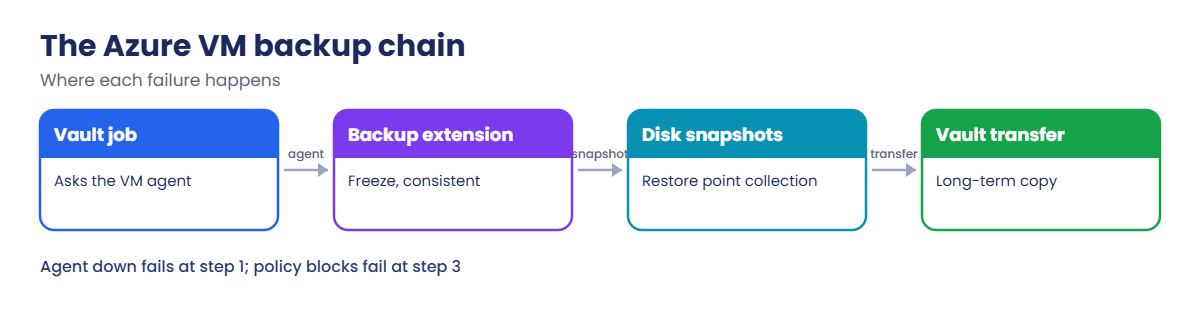
The Azure VM backup chain

  • VM agent: the Azure guest agent (walinuxagent on Linux, WindowsAzureGuestAgent on Windows) must be running and able to talk to the platform. Backup installs its extension through it.
  • Backup extension and snapshot: the extension coordinates an application-consistent or file-system-consistent snapshot, then the platform takes disk snapshots (the snapshot phase).
  • Restore points: snapshots are kept as instant restore points in a restore point collection, in a resource group named like AzureBackupRG_centralindia_1, then copied to the vault (the transfer phase).
  • Common job errors: UserErrorGuestAgentStatusUnavailable (agent not responding), UserErrorRequestDisallowedByPolicy (a policy blocks the snapshot or its resource group), UserErrorVmNotInDesirableState (VM in a Failed state), ExtensionFailedSnapshotLimitReachedError (too many snapshots on a disk).
  • Restore targets: restore disks needs a staging storage account in the same region as the vault; restoring a VM needs a valid size, network and resource group.
  • Where to look: az backup job list and job show, the vault’s Backup jobs blade, and Backup reports or diagnostics in Log Analytics.

How it works, step by step

What happens during a scheduled VM backup:

Azure Backup failed: the VM backup chain and where it breaks
  1. The vault starts a job and asks the VM’s backup extension, through the VM agent, to prepare.
  2. On Linux, the extension freezes file systems briefly (or runs pre and post scripts for apps); on Windows, VSS makes it application-consistent.
  3. The platform takes snapshots of every disk and stores them as a restore point in the restore point collection.
  4. The job’s snapshot phase completes; instant restore is now possible.
  5. Data is transferred to the vault for long-term retention, and the job completes.

If step 1 can’t reach the agent, the job fails before any snapshot is taken. If step 3 can’t create the restore point collection or its resource group, the job fails with a policy or permission error.

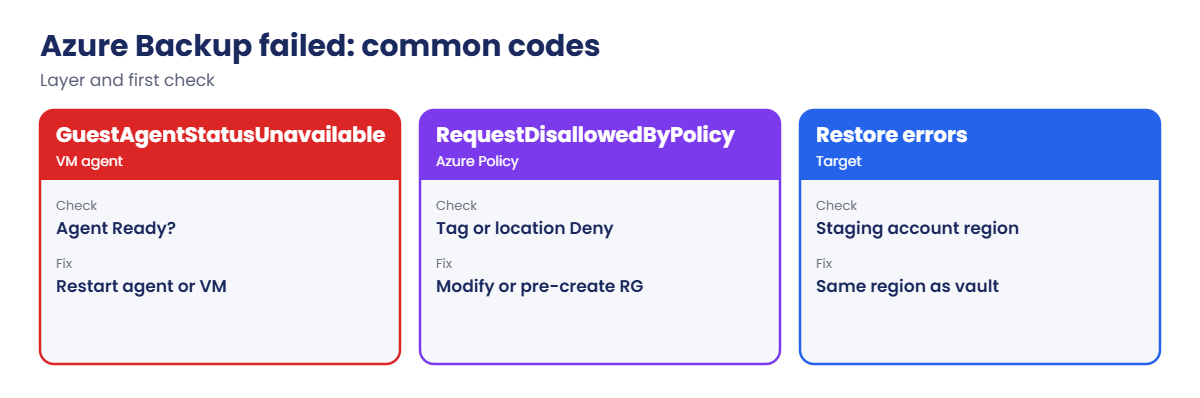
Common Azure Backup error codes and first checks
Error codeLayerFirst check
UserErrorGuestAgentStatusUnavailableVM agentAgent status in the instance view; restart the agent
UserErrorRequestDisallowedByPolicyAzure PolicyPolicies on the VM and the restore point resource group
UserErrorVmNotInDesirableStateVM stateVM provisioning state; fix Failed state
ExtensionFailedSnapshotLimitReachedErrorSnapshotsOther tools snapshotting the same disks (Lesson 68)
Restore: vault and storage account in different regionsRestore targetUse a staging account in the vault’s region

Protect a VM and read its backup jobs

1A VM and a vault

Create a small VM and a Recovery Services vault. Soft delete is turned off on this lab vault only, so clean-up is immediate:

az group create --name rg-saat-l69 --location centralindia --tags course=saatvedha-azure lesson=69 -o none
az vm create --resource-group rg-saat-l69 --name vm-bk --image Canonical:ubuntu-24_04-lts:server:latest --size Standard_B1s --public-ip-address '""' --nsg-rule NONE --admin-username azureuser --generate-ssh-keys --tags course=saatvedha-azure lesson=69 -o none
az backup vault create --resource-group rg-saat-l69 --name rsv-l69 --location centralindia -o none
az backup vault backup-properties set --resource-group rg-saat-l69 --name rsv-l69 --soft-delete-feature-state Disable -o none

In production, keep soft delete on (Lesson 35 explains why). Here it only makes the clean-up faster.

2Protect the VM and run a backup

Enable protection with the default policy and start a backup now:

az backup protection enable-for-vm --resource-group rg-saat-l69 --vault-name rsv-l69 --vm vm-bk --policy-name DefaultPolicy -o none
$until = (Get-Date).AddDays(30).ToString('dd-MM-yyyy')
az backup protection backup-now --resource-group rg-saat-l69 --vault-name rsv-l69 --container-name vm-bk --item-name vm-bk --backup-management-type AzureIaasVM --retain-until $until -o none
az backup job list --resource-group rg-saat-l69 --vault-name rsv-l69 --query "[0:3].{operation:properties.operation, status:properties.status, start:properties.startTime, error:properties.errorDetails[0].errorCode}" -o table

After 15 to 30 minutes you should see something like this:

Operation         Status      Start                             Error
----------------  ----------  --------------------------------  -------
Backup            Completed   2026-10-21T08:12:40.123456+00:00
ConfigureBackup   Completed   2026-10-21T08:10:02.654321+00:00

Completed means at least the snapshot phase finished and a recovery point exists.
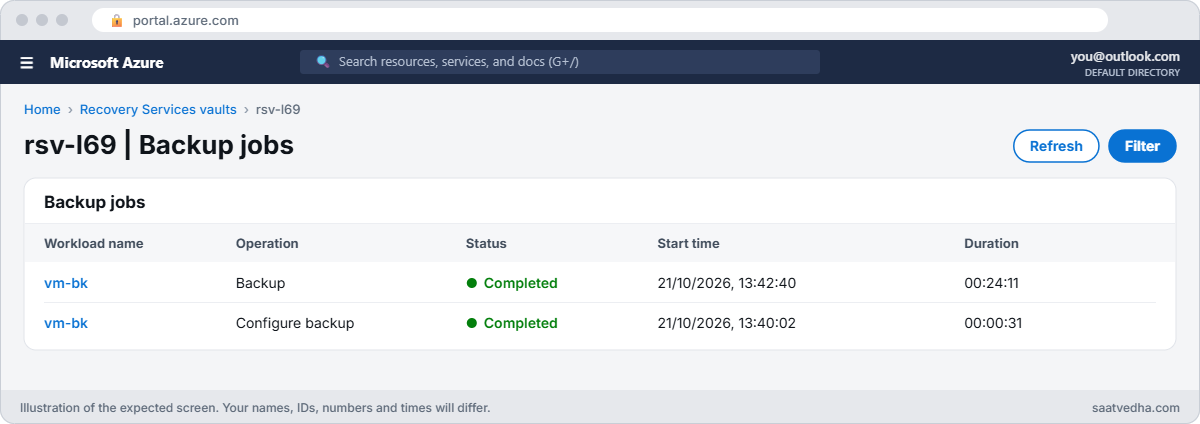
Azure Backup jobs list showing a completed VM backup
rsv-l69 backup jobs: the backup has Completed.
Completed Azure Backup jobs for a VM
Configure, then back up: both completed.

3Check the recovery point

List recovery points for the VM:

az backup recoverypoint list --resource-group rg-saat-l69 --vault-name rsv-l69 --container-name vm-bk --item-name vm-bk --backup-management-type AzureIaasVM --query "[].{name:name, time:properties.recoveryPointTime, type:properties.recoveryPointType}" -o table

You should see one recovery point, for example of type AppConsistent or FileSystemConsistent.

✅ Checkpoint: vm-bk is protected, one backup job completed, and a recovery point is listed.

Break It, Then Fix It

Keep the vault and VM for both breaks.

1Break it: the VM agent stops

A hardening script stops the Azure guest agent. Stop it with a 20-second delay, so this Run Command can still report back:

az vm run-command invoke --resource-group rg-saat-l69 --name vm-bk --command-id RunShellScript --scripts 'systemd-run --on-active=20 systemctl stop walinuxagent; echo scheduled' --query "value[0].message" -o tsv
Start-Sleep -Seconds 120
az vm get-instance-view --resource-group rg-saat-l69 --name vm-bk --query "instanceView.vmAgent.statuses[0].displayStatus" -o tsv
$until = (Get-Date).AddDays(30).ToString('dd-MM-yyyy')
az backup protection backup-now --resource-group rg-saat-l69 --vault-name rsv-l69 --container-name vm-bk --item-name vm-bk --backup-management-type AzureIaasVM --retain-until $until -o none

The agent shows Not Ready. Wait for the job to finish (it can take 30 minutes or more to give up), then look:

az backup job list --resource-group rg-saat-l69 --vault-name rsv-l69 --query "[0:3].{operation:properties.operation, status:properties.status, start:properties.startTime, error:properties.errorDetails[0].errorCode}" -o table

You should see something like this:

Operation    Status     Start                             Error
-----------  ---------  --------------------------------  -------------------------------------
Backup       Failed     2026-10-21T08:58:11.123456+00:00  UserErrorGuestAgentStatusUnavailable

The vault couldn’t reach the agent, so it never took a snapshot. Read the full message with az backup job show; it says the VM agent is unable to communicate with Azure Backup. Nothing is wrong with the vault or the policy.

To read the full error and the recommended action for any failed job, take its name from the list and show its error details:

$job = az backup job list --resource-group rg-saat-l69 --vault-name rsv-l69 --status Failed --query "[0].name" -o tsv
az backup job show --resource-group rg-saat-l69 --vault-name rsv-l69 --name $job --query "properties.errorDetails[0].{code:errorCode, message:errorString, fix:recommendations[0]}" -o json

Fix it: start the agent. Run Command needs the agent, so restart the VM instead (or start the service from the Serial Console, Lesson 60), then back up again:

az vm restart --resource-group rg-saat-l69 --name vm-bk -o none
az vm get-instance-view --resource-group rg-saat-l69 --name vm-bk --query "instanceView.vmAgent.statuses[0].displayStatus" -o tsv
$until = (Get-Date).AddDays(30).ToString('dd-MM-yyyy')
az backup protection backup-now --resource-group rg-saat-l69 --vault-name rsv-l69 --container-name vm-bk --item-name vm-bk --backup-management-type AzureIaasVM --retain-until $until -o none

The agent is Ready again and the new backup job completes.

2Break it: a restore to the wrong region

Someone restores the disks using a storage account they already had in South India:

$sfx = Get-Random -Minimum 10000 -Maximum 99999
az storage account create --resource-group rg-saat-l69 --name stl69s$sfx --location southindia --sku Standard_LRS -o none
$rp = az backup recoverypoint list --resource-group rg-saat-l69 --vault-name rsv-l69 --container-name vm-bk --item-name vm-bk --backup-management-type AzureIaasVM --query "[0].name" -o tsv
az backup restore restore-disks --resource-group rg-saat-l69 --vault-name rsv-l69 --container-name vm-bk --item-name vm-bk --rp-name $rp --storage-account stl69s$sfx --target-resource-group rg-saat-l69

The restore is rejected, with an error that says the vault and the storage account are in different regions, something like this:

The Recovery Services vault and target storage account are in two different regions.

The staging account holds the VM configuration and, for some restores, the disk data while it’s being restored. It must be in the vault’s region.

Fix it: create a staging account in Central India and restore again, then check the job:

az storage account create --resource-group rg-saat-l69 --name stl69c$sfx --location centralindia --sku Standard_LRS -o none
az backup restore restore-disks --resource-group rg-saat-l69 --vault-name rsv-l69 --container-name vm-bk --item-name vm-bk --rp-name $rp --storage-account stl69c$sfx --target-resource-group rg-saat-l69 -o none
az backup job list --resource-group rg-saat-l69 --vault-name rsv-l69 --query "[0:3].{operation:properties.operation, status:properties.status, start:properties.startTime, error:properties.errorDetails[0].errorCode}" -o table

After a while you should see a Restore job Completed, and new managed disks in rg-saat-l69.

Backup job failed with UserErrorGuestAgentStatusUnavailable
No agent, no snapshot, no backup.

3Clean up

Stop protection and delete the backup data, then delete the group (soft delete is off on this vault):

az backup protection disable --resource-group rg-saat-l69 --vault-name rsv-l69 --container-name vm-bk --item-name vm-bk --backup-management-type AzureIaasVM --delete-backup-data true --yes -o none
az group delete --name rg-saat-l69 --yes
az group list --query "[?starts_with(name, 'AzureBackupRG')].name" -o tsv

The last command lists Azure Backup’s restore point groups. Leave them if other VMs are protected; they hold instant restore snapshots.

✅ Checkpoint: You fixed a backup that failed because of the VM agent and a restore that failed because of the staging account region.

This happened at work

The policy that broke every backup on the first of the month

A university rolled out an Azure Policy that denied any resource group without a cost-centre tag. It was tested on new projects and worked well. On the 1st of the month, every VM backup in a new region failed with UserErrorRequestDisallowedByPolicy.

Azure Backup needed to create its restore point resource group, AzureBackupRG_southindia_1, the first time it backed up VMs in that region. The group had no cost-centre tag, so the policy denied it, and every job failed at the snapshot step.

What they changed: the tag policy now uses Modify on resource groups instead of Deny for system-created groups, Azure Backup’s restore point groups are pre-created with the right tags in each region before go-live, and backup failures alert the on-call engineer within an hour instead of in the morning report.

Common mistakes and troubleshooting

MistakeWhat you seeWhat to do
VM agent stopped or outdatedUserErrorGuestAgentStatusUnavailableRestart or update the agent; check its outbound access.
Tag Deny policy on resource groupsUserErrorRequestDisallowedByPolicyUse Modify or pre-create the backup resource group.
Staging account in another regionRestore rejectedUse a storage account in the vault’s region.
VM in a Failed stateUserErrorVmNotInDesirableStateFix the VM state, then retry the backup.
Another tool snapshotting the same disksSnapshot limit errorsOne backup product per disk (Lesson 68).
Waiting for the morning reportFailures unnoticed for hoursAlert on failed backup jobs.

Interview questions

Click a question to open it. Each one is written the way an interviewer would ask it. Under it you will see why they ask it and one way you could answer, in your own words.

Fresher level

1. What does the VM agent have to do with backup?

Why they ask this: The basic concept.

How you might answer: Azure Backup installs and runs its extension through the VM agent. If the agent is down, backup can’t coordinate the snapshot.

2. What is a recovery point?

Why they ask this: Basic vocabulary.

How you might answer: A point-in-time copy of the VM’s disks from one backup, used to restore files, disks or the whole VM.

3. Where do you see why a backup failed?

Why they ask this: Tool knowledge.

How you might answer: In the vault’s backup jobs, with az backup job list and job show, which give the error code and message.

2–5 years experience

4. Backups fail with UserErrorGuestAgentStatusUnavailable. What do you check?

Why they ask this: A real troubleshooting path.

How you might answer: Agent status in the instance view, whether the agent service runs, its version, outbound access to Azure endpoints, proxy settings, and disk space. Restart the agent or the VM, then rerun the backup.

5. Why might a policy break backups?

Why they ask this: A subtle cause.

How you might answer: Backup creates restore point collections and sometimes a resource group. A Deny policy on tags, locations or resource types can block that, giving UserErrorRequestDisallowedByPolicy.

6. Restore disks fails. What do you check?

Why they ask this: Restore skills.

How you might answer: Staging account region and type, permissions on the target group, quotas, VM size availability, and that the recovery point is still available.

Senior level

7. How would you monitor backup health for 500 VMs?

Why they ask this: They want operations design.

How you might answer: Backup center and Backup reports, diagnostics to Log Analytics, alerts on failed jobs and missed backups, and a weekly review of protected versus unprotected VMs.

8. How do you make policies and backup work together?

Why they ask this: Governance thinking.

How you might answer: Test policies against backup operations, use Modify for tags on system groups, pre-create backup resource groups with a naming convention, and exempt them where necessary.

9. How often should you test restores?

Why they ask this: Resilience.

How you might answer: Regularly and for every critical workload: restore files monthly and full VMs quarterly, measure time to restore, and record results.

Quick quiz

Q1. UserErrorGuestAgentStatusUnavailable points to?

  1. The vault
  2. The VM agent
  3. The storage account
  4. DNS
Show answer

B — The agent didn’t respond.

Q2. How do you fix an agent problem when Run Command doesn’t work?

  1. Delete the vault
  2. Restart the VM or use the Serial Console
  3. Change the policy
  4. Resize the disk
Show answer

B — Run Command needs the agent.

Q3. Staging storage account for restore must be?

  1. Premium
  2. In the same region as the vault
  3. Public
  4. In another subscription
Show answer

B — Different regions are rejected.

Q4. A tag Deny policy causes which backup error?

  1. UserErrorVmNotInDesirableState
  2. UserErrorRequestDisallowedByPolicy
  3. ResourceNotFound
  4. Conflict
Show answer

B — The policy blocks backup resources.

Q5. Where does Azure Backup keep instant restore snapshots?

  1. In the VM
  2. In a restore point collection resource group
  3. In Key Vault
  4. In the NSG
Show answer

B — For example AzureBackupRG_centralindia_1.

Quick recap

You can now take a failed backup job from error code to fix, and avoid the restore mistakes that cost time in a real incident.

  • Every failed job has an error code; start there.
  • Agent problems stop backup before any snapshot.
  • Policies can block backup’s own resources.
  • Restore staging accounts must match the vault’s region.
  • Alert on failures and test restores regularly.

Next lesson

Lesson 70: Azure Monitor Agent not sending data → You find out why Azure Monitor Agent stops sending data: heartbeat, data collection rules and network.

Further reading: Azure Backup failed

Want to go deeper into Azure Backup failed? See Microsoft’s Troubleshoot backup errors with Azure virtual machines and Troubleshoot agent and extension issues. You can also see the full plan for this course on the Azure Cloud Administration course page.

Scroll to Top
