Route tables and user-defined routes
-
Phase 0: Before you start
-
Phase 1: The foundation
-
Phase 2: Day-to-day operations
-
Phase 3: Enterprise architecture
-
Phase 4: Troubleshooting step by step
-
Phase 5: Final project and career
Azure user-defined routes (UDRs) tell Azure where to send traffic instead of the default path. You put them in a route table and attach the table to a subnet. That’s how hub-and-spoke networks push spoke-to-spoke and internet traffic through a firewall.
In Lesson 46 you proved that spoke 1 can’t reach spoke 2 through the hub, because peering isn’t transitive. Today you fix that properly, with a small Linux router in the hub and two route tables.
Then you break it twice, the way it breaks in real companies: the router stops forwarding, and one side loses its return route. You’ll learn to find both with the effective route table and Network Watcher’s next hop check.
| Time | You need | Cost | By the end you can |
|---|---|---|---|
| About 55 minutes | rg-saat-hub with the peerings from Lesson 46, the CLI | About 5 US cents: three small test VMs for under an hour; route tables cost nothing | Route spoke-to-spoke traffic through a hub appliance and fix the two most common UDR faults |
What it is, in one line
A user-defined route is a rule in a route table that overrides Azure’s default path for a range of addresses.
In Simple Words
The detour sign
Imagine two villages on either side of a town. There’s no direct road between the villages, but both have a road into town. Put up a sign at each village saying “To the other village: go via the town square.” Now people can travel, and a guard in the square checks everyone who passes.
The sign is the user-defined route. The town square is the hub router or firewall. The guard has to agree to pass people along, otherwise they just stand there.
And the sign must exist in both villages. If only one village has it, people get there but can’t find the way home.
Engineer's View
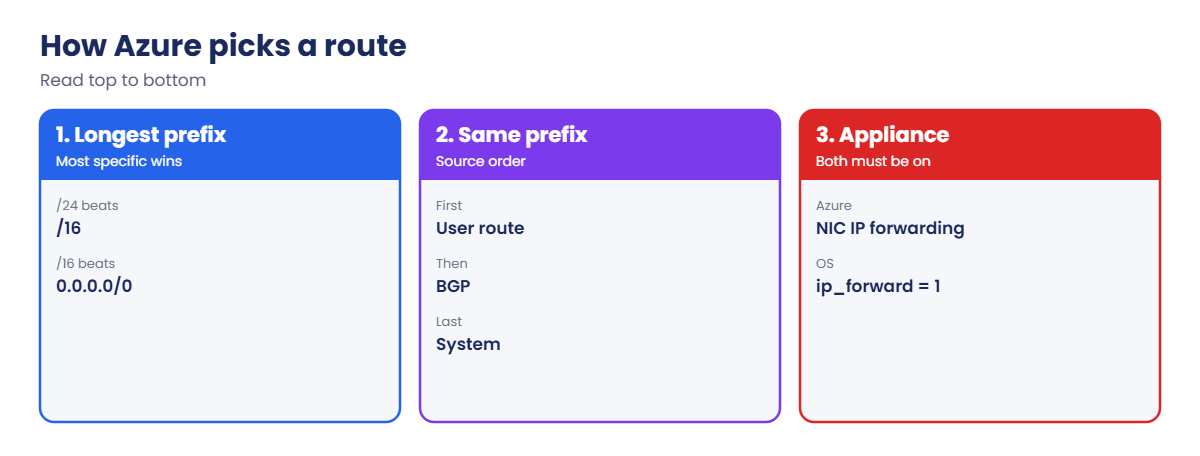
How Azure picks a route
- System routes exist by default: VnetLocal for the VNet’s own ranges, VNetPeering for peered ranges, Internet for 0.0.0.0/0, and None for a few reserved ranges.
- Route table: a resource holding up to 400 routes. Attach it to one or more subnets in the same region and subscription.
- Next hop types you can set: VirtualAppliance (with an IP), VirtualNetworkGateway, VnetLocal, Internet and None (drop).
- Selection: longest prefix wins first. For an identical prefix, a user route beats a BGP route, which beats a system route.
- IP forwarding: the appliance’s NIC must have IP forwarding turned on in Azure, and its operating system must forward packets too. Both, or packets die at the appliance.
- Propagate gateway routes: a route table setting. Turn it off on spoke subnets when everything must go through a hub firewall, so routes learned from VPN or ExpressRoute don’t bypass it.
- Symmetry: stateful firewalls need both directions on the same path. A route on one side only gives asymmetric routing and dropped sessions.
How it works, step by step
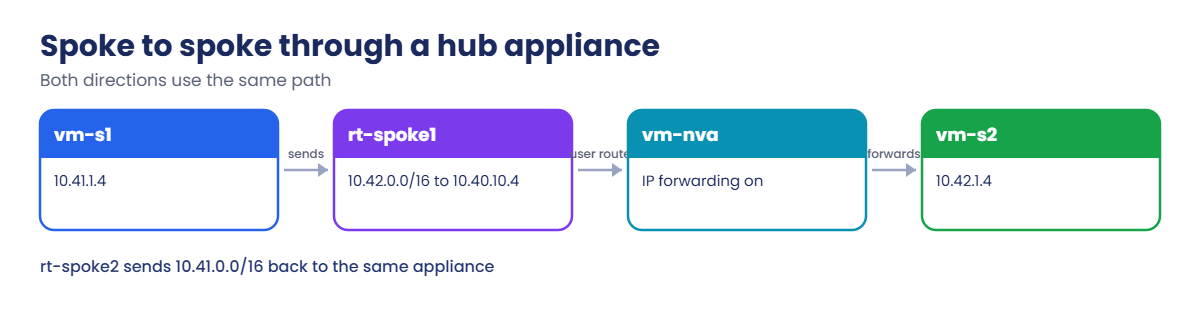
What happens when vm-s1 pings vm-s2 after you add the routes:
- vm-s1 (10.41.1.4) sends to 10.42.1.4.
- Azure checks the effective routes of vm-s1’s NIC. The user route 10.42.0.0/16 to VirtualAppliance 10.40.10.4 matches.
- The packet crosses the spoke 1 peering to vm-nva in the hub. The peering must allow forwarded traffic.
- vm-nva’s NIC accepts a packet that isn’t addressed to it, because IP forwarding is on, and Linux forwards it to 10.42.1.4 over the spoke 2 peering.
- vm-s2 replies to 10.41.1.4. Its own route table sends 10.41.0.0/16 back to the same appliance, so the reply takes the same path home.
Five things have to be right: the route on each side, IP forwarding in Azure, forwarding in the operating system, and allow forwarded traffic on each peering.
When it fails, Network Watcher’s next hop check tells you in one command which route Azure picked for a given source and destination, and from which route table.
Route spoke-to-spoke traffic through a hub appliance
Create the appliance and two test VMs in a temporary resource group (about 5 minutes). The appliance gets a fixed IP, 10.40.10.4, because routes point at it:
az group create --name rg-saat-l47 --location centralindia --tags course=saatvedha-azure lesson=47 -o none
$hubSub = az network vnet subnet show --resource-group rg-saat-hub --vnet-name vnet-hub --name snet-shared --query id -o tsv
$s1Sub = az network vnet subnet show --resource-group rg-saat-hub --vnet-name vnet-spoke1 --name snet-app --query id -o tsv
$s2Sub = az network vnet subnet show --resource-group rg-saat-hub --vnet-name vnet-spoke2 --name snet-app --query id -o tsv
az vm create --resource-group rg-saat-l47 --name vm-nva --image Canonical:ubuntu-24_04-lts:server:latest --size Standard_B1s --subnet $hubSub --private-ip-address 10.40.10.4 --public-ip-address '""' --nsg '""' --admin-username azureuser --generate-ssh-keys --tags course=saatvedha-azure lesson=47 -o none
az vm create --resource-group rg-saat-l47 --name vm-s1 --image Canonical:ubuntu-24_04-lts:server:latest --size Standard_B1s --subnet $s1Sub --private-ip-address 10.41.1.4 --public-ip-address '""' --nsg '""' --admin-username azureuser --generate-ssh-keys --tags course=saatvedha-azure lesson=47 -o none
az vm create --resource-group rg-saat-l47 --name vm-s2 --image Canonical:ubuntu-24_04-lts:server:latest --size Standard_B1s --subnet $s2Sub --private-ip-address 10.42.1.4 --public-ip-address '""' --nsg '""' --admin-username azureuser --generate-ssh-keys --tags course=saatvedha-azure lesson=47 -o noneAll three VMs have no public IP and no NSG on the NIC. The peerings from Lesson 46 already allow forwarded traffic, which this lab needs.
1Turn the appliance into a router
Turn on IP forwarding on the NIC (Azure side) and in Linux (operating system side):
az network nic update --resource-group rg-saat-l47 --name vm-nvaVMNic --ip-forwarding true --query enableIPForwarding
az vm run-command invoke --resource-group rg-saat-l47 --name vm-nva --command-id RunShellScript --scripts 'echo net.ipv4.ip_forward=1 > /etc/sysctl.d/99-forward.conf && sysctl -p /etc/sysctl.d/99-forward.conf' --query "value[0].message" -o tsvYou should see this:
true
Enable succeeded:
[stdout]
net.ipv4.ip_forward = 1
[stderr]The file in /etc/sysctl.d keeps forwarding on after a reboot. Without it, the router quietly stops routing the next time someone patches it.
2Create a route table for each spoke
Each spoke gets a route to the other spoke via the appliance:
az network route-table create --resource-group rg-saat-hub --name rt-spoke1 --disable-bgp-route-propagation true --tags course=saatvedha-azure -o none
az network route-table route create --resource-group rg-saat-hub --route-table-name rt-spoke1 --name to-spoke2 --address-prefix 10.42.0.0/16 --next-hop-type VirtualAppliance --next-hop-ip-address 10.40.10.4 -o none
az network route-table create --resource-group rg-saat-hub --name rt-spoke2 --disable-bgp-route-propagation true --tags course=saatvedha-azure -o none
az network route-table route create --resource-group rg-saat-hub --route-table-name rt-spoke2 --name to-spoke1 --address-prefix 10.41.0.0/16 --next-hop-type VirtualAppliance --next-hop-ip-address 10.40.10.4 -o none3Attach them to the spoke subnets
Run this:
az network vnet subnet update --resource-group rg-saat-hub --vnet-name vnet-spoke1 --name snet-app --route-table rt-spoke1 --query routeTable.id -o tsv
az network vnet subnet update --resource-group rg-saat-hub --vnet-name vnet-spoke2 --name snet-app --route-table rt-spoke2 --query routeTable.id -o tsvYou should see two IDs ending in rt-spoke1 and rt-spoke2.
4Check the route, then test
Read vm-s1’s effective routes, ask Network Watcher for the next hop, and ping spoke 2:
az network nic show-effective-route-table --resource-group rg-saat-l47 --name vm-s1VMNic --query "value[?nextHopType!='None'].{source:source, prefix:addressPrefix[0], nextHop:nextHopType, ip:nextHopIpAddress[0]}" -o table
az network watcher show-next-hop --resource-group rg-saat-l47 --vm vm-s1 --source-ip 10.41.1.4 --dest-ip 10.42.1.4 -o table
az vm run-command invoke --resource-group rg-saat-l47 --name vm-s1 --command-id RunShellScript --scripts 'ping -c 2 -W 2 10.42.1.4 | tail -2' --query "value[0].message" -o tsvYou should see something like this:
Source Prefix NextHop Ip
------- ------------ ---------------- ----------
Default 10.41.0.0/16 VnetLocal
Default 10.40.0.0/16 VNetPeering
Default 0.0.0.0/0 Internet
User 10.42.0.0/16 VirtualAppliance 10.40.10.4
NextHopIpAddress NextHopType RouteTableId
------------------ ---------------- ----------------------------------------
10.40.10.4 VirtualAppliance /subscriptions/.../routeTables/rt-spoke1
[stdout]
2 packets transmitted, 2 received, 0% packet loss, time 1002ms
rtt min/avg/max/mdev = 2.031/2.264/2.497/0.233 msSpoke 1 now reaches spoke 2 through the hub. The round trip is a little longer than the direct hub ping in Lesson 46, because every packet now passes through the appliance.
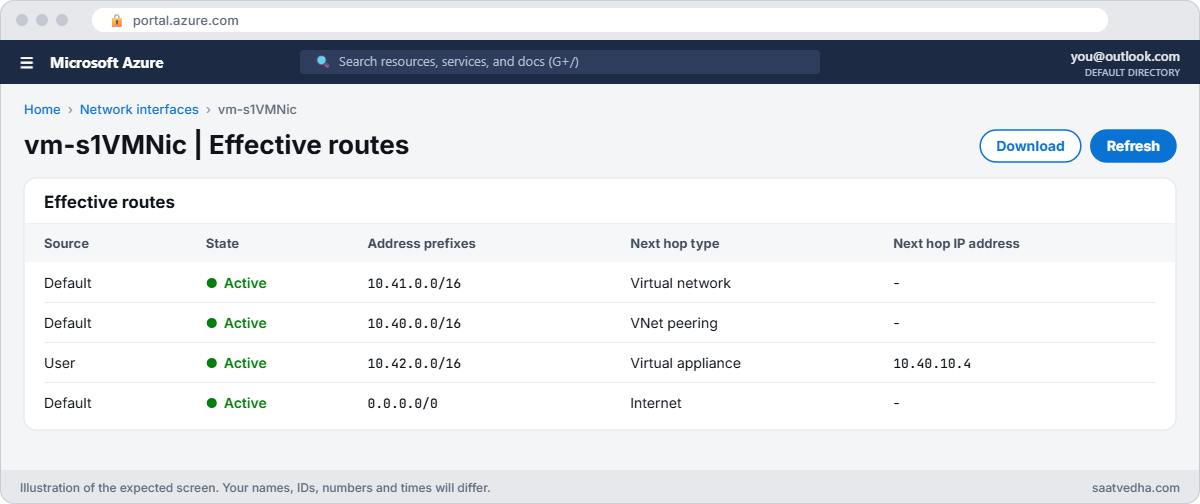
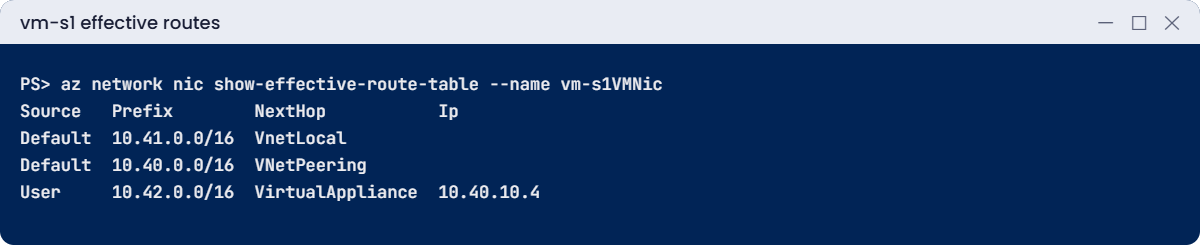
✅ Checkpoint: Both spokes have a route table, the effective routes show a User route to 10.40.10.4, and vm-s1 pings vm-s2.
Break It, Then Fix It
Keep the three VMs running for both breaks.
1Break it: the router stops forwarding
The appliance gets rebuilt from a standard template, which leaves IP forwarding off on its NIC. Simulate that:
az network nic update --resource-group rg-saat-l47 --name vm-nvaVMNic --ip-forwarding false -o none
az vm run-command invoke --resource-group rg-saat-l47 --name vm-s1 --command-id RunShellScript --scripts 'ping -c 2 -W 2 10.42.1.4 | tail -2' --query "value[0].message" -o tsv
az network watcher show-next-hop --resource-group rg-saat-l47 --vm vm-s1 --source-ip 10.41.1.4 --dest-ip 10.42.1.4 -o tableYou should see something like this:
[stdout]
2 packets transmitted, 0 received, 100% packet loss, time 1021ms
NextHopIpAddress NextHopType RouteTableId
------------------ ---------------- ----------------------------------------
10.40.10.4 VirtualAppliance /subscriptions/.../routeTables/rt-spoke1The routing looks perfect, which is exactly why this fault wastes hours. The route sends packets to the appliance, and Azure drops them at its NIC because the destination isn’t the appliance’s own IP.
Fix it: check forwarding on the appliance NIC, turn it on, and test again:
az network nic show --resource-group rg-saat-l47 --name vm-nvaVMNic --query enableIPForwarding
az network nic update --resource-group rg-saat-l47 --name vm-nvaVMNic --ip-forwarding true -o none
az vm run-command invoke --resource-group rg-saat-l47 --name vm-s1 --command-id RunShellScript --scripts 'ping -c 2 -W 2 10.42.1.4 | tail -2' --query "value[0].message" -o tsvThe first command shows false; after the fix the ping gets 2 received. If it still fails, check the operating system side with sysctl net.ipv4.ip_forward on the appliance.
2Break it: one side loses its return route
Someone tidies up rt-spoke2 and deletes the route back to spoke 1:
az network route-table route delete --resource-group rg-saat-hub --route-table-name rt-spoke2 --name to-spoke1
az vm run-command invoke --resource-group rg-saat-l47 --name vm-s1 --command-id RunShellScript --scripts 'ping -c 2 -W 2 10.42.1.4 | tail -2' --query "value[0].message" -o tsv
az network watcher show-next-hop --resource-group rg-saat-l47 --vm vm-s2 --source-ip 10.42.1.4 --dest-ip 10.41.1.4 -o tableYou should see something like this:
[stdout]
2 packets transmitted, 0 received, 100% packet loss, time 1019ms
NextHopType RouteTableId
------------- ------------
Internet System RouteThe request still reaches vm-s2 through the appliance. The reply has no route back to 10.41.0.0/16, so it follows the default route to the internet and is lost. Always check the next hop in both directions.
Fix it: put the return route back and test:
az network route-table route create --resource-group rg-saat-hub --route-table-name rt-spoke2 --name to-spoke1 --address-prefix 10.41.0.0/16 --next-hop-type VirtualAppliance --next-hop-ip-address 10.40.10.4 -o none
az network watcher show-next-hop --resource-group rg-saat-l47 --vm vm-s2 --source-ip 10.42.1.4 --dest-ip 10.41.1.4 -o table
az vm run-command invoke --resource-group rg-saat-l47 --name vm-s1 --command-id RunShellScript --scripts 'ping -c 2 -W 2 10.42.1.4 | tail -2' --query "value[0].message" -o tsvNext hop is VirtualAppliance 10.40.10.4 again, and the ping gets 2 received. Now clean up the VMs, but keep the route tables:
az group delete --name rg-saat-l47 --yes
az network route-table list --resource-group rg-saat-hub --query "[].{name:name, routes:length(routes), subnets:length(subnets)}" -o tableYou should see this:
Name Routes Subnets
--------- -------- ---------
rt-spoke1 1 1
rt-spoke2 1 1

Spoke-to-spoke traffic stops working once the appliance is gone. That’s fine: in Lesson 48 you point both routes at Azure Firewall instead.
✅ Checkpoint: You found a forwarding fault and a missing return route with next hop checks, and fixed both. rt-spoke1 and rt-spoke2 stay for Lesson 48.
This happened at work
The SQL connections that died after 4 minutes
A retail company routed all spoke traffic through Azure Firewall with a 0.0.0.0/0 user route. Office users reached the app servers over the VPN gateway, and SQL Server Management Studio connected fine, then froze a few minutes later, every time.
The traffic from the office came through the gateway straight to the spoke, because the GatewaySubnet had no route table. The replies from the server followed the 0.0.0.0/0 route to the firewall. The firewall saw replies for sessions it never saw start and dropped them; some handshakes slipped through before it did, which explained the odd timing.
What they changed: a route table on GatewaySubnet sends each spoke range to the firewall, so both directions take the same path. Every routing change now ends with a next hop check in both directions, and the network diagram shows the return path, not only the forward one.
Common mistakes and troubleshooting
| Mistake | What you see | What to do |
|---|---|---|
| IP forwarding off on the appliance NIC | Routes look right, traffic dropped | Turn on IP forwarding on the NIC. |
| Forwarding off in the operating system | Same symptom, NIC setting is true | Set net.ipv4.ip_forward=1 and make it persistent. |
| Route on one side only | Requests arrive, replies vanish | Add the return route; check next hop both ways. |
| Allow forwarded traffic off on a peering | Traffic dropped at the peering | Turn it on for peerings behind an appliance. |
| Gateway routes propagated to spokes | On-premises traffic skips the firewall | Turn off gateway route propagation on spoke route tables. |
| Route table never attached | No User route in effective routes | Associate the table with the subnet. |
Interview questions
Click a question to open it. Each one is written the way an interviewer would ask it. Under it you will see why they ask it and one way you could answer, in your own words.
Fresher level
1. What is a user-defined route?
Why they ask this: The basic concept.
How you might answer: A route you add to a route table, attached to a subnet, that overrides Azure’s default system route for a destination range.
2. Name three next hop types.
Why they ask this: Basic vocabulary.
How you might answer: VirtualAppliance, VirtualNetworkGateway, VnetLocal, Internet and None. VirtualAppliance needs an IP address.
3. How do you see which routes a VM uses?
Why they ask this: A practical check.
How you might answer: Look at the effective route table on the VM’s NIC in the portal or with az network nic show-effective-route-table, or run Network Watcher next hop.
2–5 years experience
4. Routes point to an NVA but traffic doesn’t pass. What do you check?
Why they ask this: A real troubleshooting path.
How you might answer: IP forwarding on the NVA NIC, forwarding in the NVA’s operating system or firewall rules, allow forwarded traffic on peerings, NSGs on the NVA subnet, and the return route on the destination side.
5. How does Azure choose between overlapping routes?
Why they ask this: A routing logic check.
How you might answer: Longest prefix match first. For the same prefix, user-defined routes win over BGP routes, which win over system routes.
6. What is asymmetric routing and why does it hurt?
Why they ask this: They want firewall awareness.
How you might answer: Forward and return traffic take different paths. A stateful firewall that sees only one direction drops the session. Fix it by making both directions route through the same firewall, including on GatewaySubnet.
Senior level
7. How would you force all spoke internet traffic through a central firewall?
Why they ask this: They want a design.
How you might answer: A 0.0.0.0/0 user route to the firewall on every spoke subnet, gateway route propagation off, spoke-to-spoke routes to the firewall, GatewaySubnet routes for spoke prefixes, and Azure Policy to stop route tables being removed. Or let Virtual WAN routing intent handle it.
8. How do you keep route tables consistent across 100 spokes?
Why they ask this: They want scale.
How you might answer: Bicep modules or Azure Virtual Network Manager routing configurations, deployed by pipeline, with Policy to audit subnets without the right route table and alerts on route table changes.
9. When would you set a next hop of None?
Why they ask this: A less common detail.
How you might answer: To drop traffic to a range deliberately, for example blocking a range that must never be reached from a subnet, as a routing-level guard alongside NSGs.
Quick quiz
Q1. Two routes match: 10.42.0.0/16 and 10.42.1.0/24. Which wins for 10.42.1.4?
- The /16
- The /24
- The oldest
- The system route
Show answer
B — Longest prefix match wins.
Q2. Routes point to an NVA but packets die there. First Azure setting to check?
- NSG flow logs
- NIC IP forwarding
- Peering sync
- Disk size
Show answer
B — The NIC must accept packets for other IPs.
Q3. Requests reach vm-s2 but replies are lost. Likely cause?
- DNS
- Missing return route
- Wrong VM size
- Bastion
Show answer
B — The reply needs a route back too.
Q4. Which tool shows the next hop for a source and destination?
- Azure Advisor
- Network Watcher next hop
- Cost Management
- Update Manager
Show answer
B — show-next-hop names the route and table.
Q5. Same prefix in a user route and a system route. Which wins?
- System
- User-defined
- BGP
- Random
Show answer
B — User beats BGP beats system.
Quick recap
You can now send traffic exactly where you want it and prove the path in both directions.
- Route tables hold user routes and attach to subnets.
- Longest prefix wins; then user, BGP, system.
- An appliance needs IP forwarding in Azure and in its OS.
- Every forward route needs a return route.
- Use effective routes and next hop to check the path.
Next lesson
Lesson 48: Azure Firewall → You replace the Linux router with Azure Firewall, write network and application rules, and read its logs.
Further reading: Azure user-defined routes
Want to go deeper into Azure user-defined routes? See Microsoft’s Virtual network traffic routing and Network Watcher next hop. You can also see the full plan for this course on the Azure Cloud Administration course page.
