Availability sets vs availability zones

Availability set vs availability zone is the first high-availability choice you make for VMs. Both keep your copies apart, so one hardware failure or maintenance event doesn’t take them all down. They protect against different sizes of failure, and they can’t be mixed on the same VM.

Two VMs “for high availability” are useless if they sit on the same rack or in the same building. Azure won’t spread them for you unless you ask, and you can only ask when you create them.

In the lab you build an availability set with two VMs and see their fault and update domains, compare a zonal VM, and meet the two errors that come from deciding too late.

TimeYou needCostBy the end you can
About 45 minutesvnet-saat, the CLICovered by the free account’s B2ats v2 hours (three small VMs for under an hour)Explain fault domains, update domains and zones, and place VMs so one failure can’t take them all

What it is, in one line

An availability set spreads VMs across racks inside one data centre; availability zones spread them across separate data centres in a region.

In Simple Words

Spreading the school’s exam papers

A school keeps two copies of the exam papers. If both copies sit in the same cupboard, one leaking pipe ruins both.

So the head teacher puts them in two different cupboards in the same building, each on its own wall socket. That’s an availability set.

A more careful head teacher keeps the second copy in a different building across town, with its own electricity and water tank. Now even a fire in one building doesn’t matter. That’s availability zones.

And you have to decide where the copies go when you file them. Moving a copy to a different cupboard later means making a new copy.

Engineer's View

Fault domains, update domains and zones

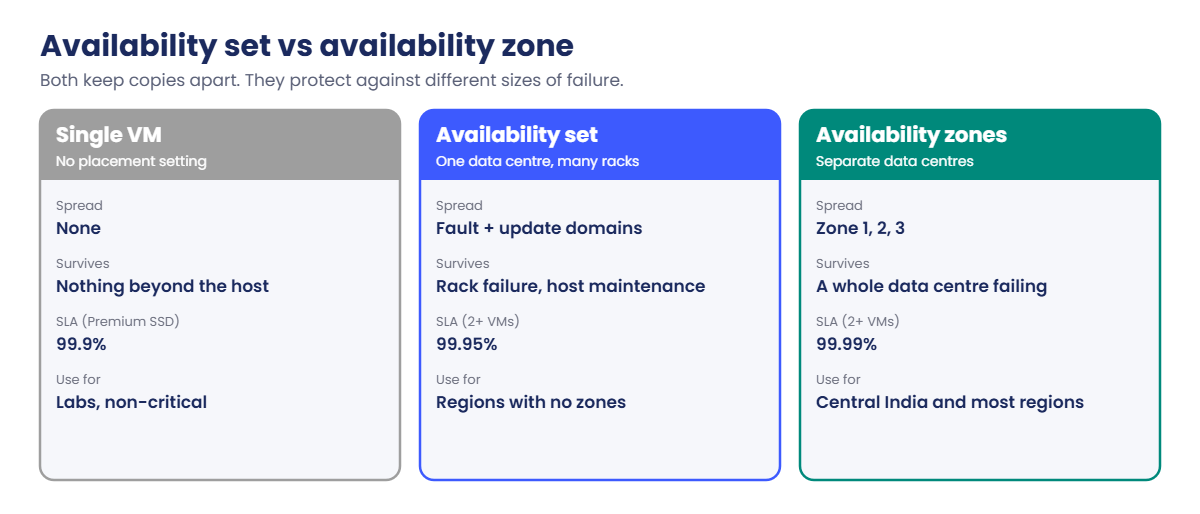
  • Fault domain (FD): a group of hardware that shares power and a network switch, roughly a rack. An availability set spreads VMs across up to 3 FDs (2 in some regions).
  • Update domain (UD): a group Azure reboots together during platform maintenance. An availability set has 5 UDs by default, up to 20. Only one UD is rebooted at a time.
  • Availability set: all VMs in one data centre. Protects against rack failures and planned host maintenance. Free. VMs must be added when they’re created and must be in the set’s resource group.
  • Availability zones: separate data centres in one region, each with independent power, cooling and network (Central India has three). Protects against a whole building failing. You pin each VM to a zone at creation (--zone 1).
  • A VM can be in an availability set or a zone, not both. Neither can be added or changed on an existing VM: you rebuild it, or redeploy from its disks.

SLA in short: one VM with Premium SSD disks is 99.9%; two or more VMs in an availability set are 99.95%; two or more VMs across two or more zones are 99.99%. The extra nine needs the app to cope with losing a copy, usually with a load balancer in front (Lesson 51).

Zones add a little network latency between copies. For chatty tiers, keep matching app and database copies in the same zone, and repeat that pair in each zone.

How it works, step by step

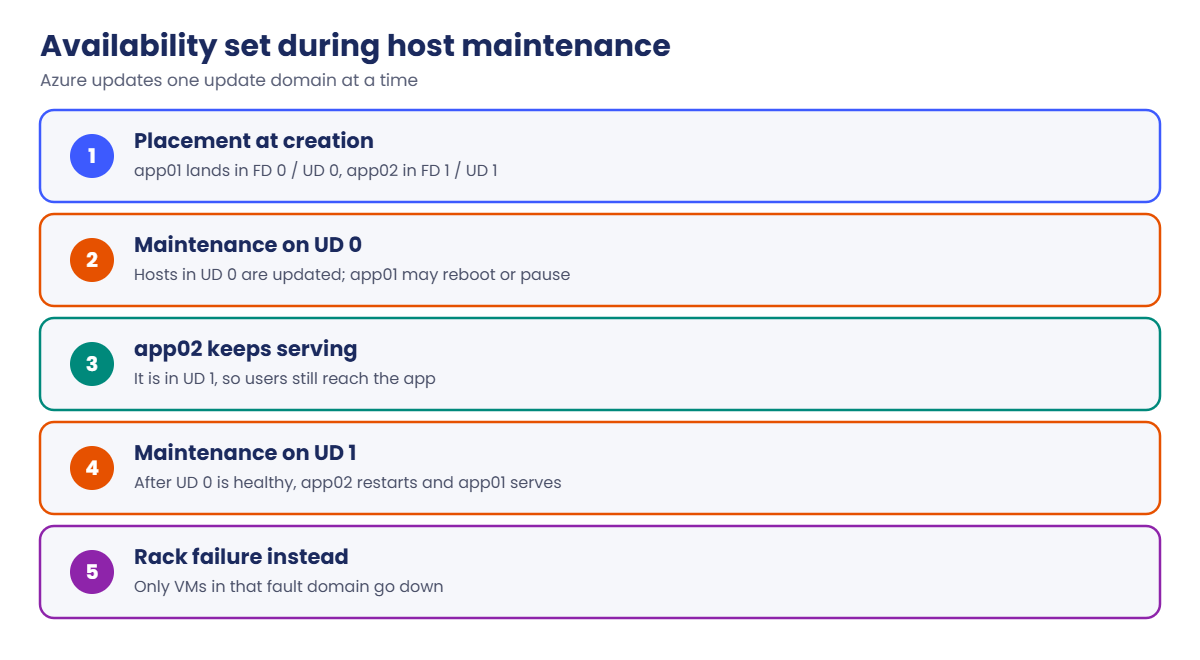
Here is what happens to two VMs in an availability set during Azure’s monthly host maintenance:

Availability set vs availability zone compared: spread, failures survived and SLA
  1. Azure places app01 in FD 0 / UD 0 and app02 in FD 1 / UD 1 when you create them.
  2. Maintenance starts on UD 0. Hosts in that group are updated and app01 may reboot or pause briefly.
  3. app02 is in UD 1, so it keeps serving users.
  4. When UD 0 is healthy again, Azure moves to UD 1, and app01 serves while app02 restarts.
  5. If a rack’s power supply fails instead, only the VMs in that FD go down; the others are on separate power.

With zones, the same idea works one level up: a whole data centre can fail and the VMs in the other zones keep running. Azure also does maintenance one zone at a time.

Availability set update domains during Azure host maintenance

Rule of thumb for 2026: use zones in regions that have them, like Central India. Use availability sets in regions without zones (South India and West India), or for legacy apps that need very low latency between VMs in one building.

Hands-on lab: availability set vs availability zone

You create an availability set with two VMs and one zonal VM, then compare where Azure put them. Load the network IDs and create the lab group:

$v = Get-Content C:\azure-lab\vnet-saat.json | ConvertFrom-Json
az group create --name rg-saat-l18 --tags course=saatvedha-azure lesson=18 -o none

1Check how many fault domains Central India offers

Run this:

az vm list-skus --location centralindia --resource-type availabilitySets --query "[?name=='Aligned'].capabilities[?name=='MaximumPlatformFaultDomainCount'].value" -o tsv

You should see something like this:

3

“Aligned” is the availability set type used with managed disks: disks are placed in storage fault domains that match the VM’s fault domain.

2Create an availability set and two VMs in it

Run this (about four minutes):

az vm availability-set create --resource-group rg-saat-l18 --name avset-saat-l18 --platform-fault-domain-count 2 --platform-update-domain-count 5 --tags course=saatvedha-azure lesson=18 -o none
az vm create --resource-group rg-saat-l18 --name app01 --image Canonical:ubuntu-24_04-lts:server:latest --size Standard_B2ats_v2 --subnet $v.'snet-app' --availability-set avset-saat-l18 --public-ip-address '""' --nsg '""' --admin-username azureuser --generate-ssh-keys --os-disk-size-gb 64 --tags course=saatvedha-azure lesson=18 -o none
az vm create --resource-group rg-saat-l18 --name app02 --image Canonical:ubuntu-24_04-lts:server:latest --size Standard_B2ats_v2 --subnet $v.'snet-app' --availability-set avset-saat-l18 --public-ip-address '""' --nsg '""' --admin-username azureuser --generate-ssh-keys --os-disk-size-gb 64 --tags course=saatvedha-azure lesson=18 -o none

3See which fault and update domain each VM got

Run this:

foreach ($n in 'app01','app02') {
    az vm get-instance-view --resource-group rg-saat-l18 --name $n --query "{vm:name, faultDomain:instanceView.platformFaultDomain, updateDomain:instanceView.platformUpdateDomain}" -o table
}

You should see something like this:

Vm     FaultDomain    UpdateDomain
-----  -------------  --------------
app01  0              0
Vm     FaultDomain    UpdateDomain
-----  -------------  --------------
app02  1              1

Different fault domain, different update domain: a rack failure or a maintenance reboot hits only one of them.

4Create a zonal VM and compare

Run this:

az vm create --resource-group rg-saat-l18 --name zvm2 --image Canonical:ubuntu-24_04-lts:server:latest --size Standard_B2ats_v2 --subnet $v.'snet-mgmt' --zone 2 --public-ip-address '""' --nsg '""' --admin-username azureuser --generate-ssh-keys --os-disk-size-gb 64 --tags course=saatvedha-azure lesson=18 -o none
az vm list --resource-group rg-saat-l18 --query "[].{vm:name, zone:zones[0], availabilitySet:availabilitySet.id}" -o table
az vm show --resource-group rg-saat-vms --name web01 --query "{vm:name, zone:zones[0]}" -o table

You should see something like this:

Vm     Zone    AvailabilitySet
-----  ------  ------------------------------------------------------------------------------------------
app01          /subscriptions/.../resourceGroups/RG-SAAT-L18/providers/Microsoft.Compute/availabilitySets/AVSET-SAAT-L18
app02          /subscriptions/.../resourceGroups/RG-SAAT-L18/providers/Microsoft.Compute/availabilitySets/AVSET-SAAT-L18
zvm2    2
Vm     Zone
-----  ------
web01  1

app01 and app02 have no zone, only a set. zvm2 is in zone 2 and web01 (from Lesson 15) is in zone 1: different data centres. Azure stores the set’s ID in upper case; that’s normal.
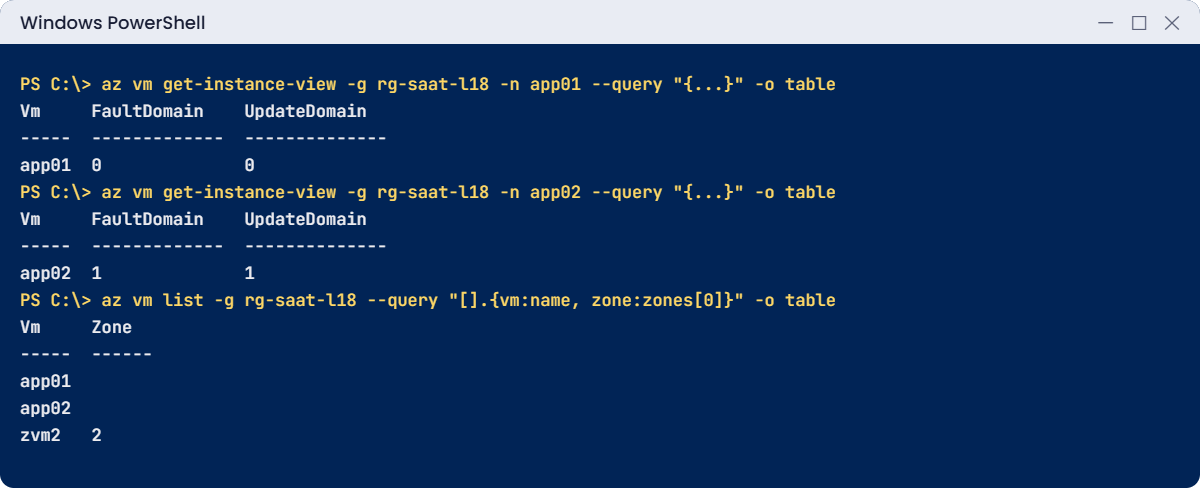
Availability set lab: fault domain and update domain of each VM
app01 and app02 got different fault and update domains; zvm2 sits in zone 2.

✅ Checkpoint: app01 and app02 are in different fault and update domains, and zvm2 and web01 are in different zones.

Break It, Then Fix It

Both errors come from the same root cause: placement is decided at creation time.

1Break it: move an existing VM into another availability set

Create a second, empty set and try to move app02 into it:

az vm availability-set create --resource-group rg-saat-l18 --name avset-saat-l18b --platform-fault-domain-count 2 --tags course=saatvedha-azure lesson=18 -o none
$newSet = az vm availability-set show --resource-group rg-saat-l18 --name avset-saat-l18b --query id -o tsv
az vm deallocate --resource-group rg-saat-l18 --name app02
az vm update --resource-group rg-saat-l18 --name app02 --set availabilitySet.id=$newSet

You’ll get an error like this:

(PropertyChangeNotAllowed) Changing property 'availabilitySet.id' is not allowed.
Code: PropertyChangeNotAllowed

Even deallocated, a VM can’t change its availability set or zone. The same goes for adding a set to a VM that was built without one. At work this usually shows up as “we’ll make it highly available later”, and later means a rebuild.

Fix it: rebuild the VM in the right set. The usual way keeps its disk: note the OS disk, delete the VM (not the disk), and create a new VM from that disk with the new set. For this lab, just delete the extra set:

az vm availability-set delete --resource-group rg-saat-l18 --name avset-saat-l18b

2Break it: ask for more fault domains than the region has

Run this:

az vm availability-set create --resource-group rg-saat-l18 --name avset-saat-l18c --platform-fault-domain-count 4 --tags course=saatvedha-azure lesson=18

You’ll get an error like this:

(InvalidParameter) The specified fault domain count 4 must fall in the range 1 to 3.
Code: InvalidParameter

Central India allows up to 3 fault domains, as step 1 showed. Templates copied from another region or an old blog post often carry a number that doesn’t fit.

Fix it: use the region’s maximum or less. Check it with step 1’s command first. Then clean up:

az group delete --name rg-saat-l18 --yes
C:\azure-lab\Find-LabResources.ps1 -Lesson 18

You should see this:

Nothing tagged course=saatvedha-azure is left.
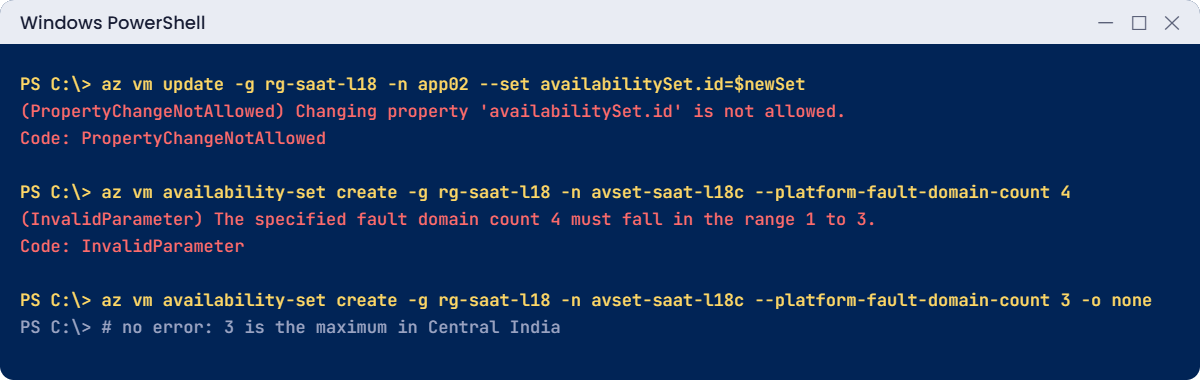
Availability set errors: PropertyChangeNotAllowed and fault domain count
Both errors come from deciding placement too late or copying a number from another region.

✅ Checkpoint: Both errors reproduced, and nothing from Lesson 18 is left. web01 is untouched in rg-saat-vms.

This happened at work

“Highly available” on paper, one rack in practice

A government services portal ran two web VMs and two app VMs behind load balancers, and the design said “N+1, highly available”. But the VMs were created one at a time over a year, by different people, with no availability set and no zones. Azure had happened to place both app VMs on hosts in the same rack.

When a top-of-rack switch failed, both app VMs lost their network at once. The load balancer had nowhere to send traffic, and citizens saw errors for about an hour until the switch was replaced. The post-incident review found the gap in five minutes: neither VM had any placement setting.

What they changed: every tier was rebuilt across zones 1, 2 and 3 of Central India from Bicep, with the zone set from each VM’s index. An Azure Policy now denies new production VMs that have neither a zone nor an availability set. And the architecture review checklist asks “where exactly does copy 2 live?” for every component.

Common mistakes and troubleshooting

MistakeWhat you seeWhat to do
“We’ll add HA later”PropertyChangeNotAllowed on availabilitySet.id or zoneChoose the set or zone at creation; plan for it from day one.
Two copies with no placement settingBoth fail togetherUse zones (or a set) for every copy of a tier.
Fault domain count from another region“must fall in the range 1 to …”Check MaximumPlatformFaultDomainCount for the region.
Trying to use a set and a zone togetherThe create failsPick one: zones where available, sets elsewhere.
Chatty tiers spread randomly across zonesSlow pages from extra round trips between zonesPair app and database copies in the same zone, repeated per zone.
Treating one VM as highly availableOutages during host maintenanceAt least two copies behind a load balancer.

Interview questions

Click a question to open it. Each one is written the way an interviewer would ask it. Under it you will see why they ask it and one way you could answer, in your own words.

Fresher level

1. What’s the difference between an availability set and availability zones?

Why they ask this: The core concept of this lesson.

How you might answer: An availability set spreads VMs across fault domains and update domains inside one data centre, so a rack failure or maintenance doesn’t hit them all. Availability zones spread VMs across separate data centres in the region, so even a building-level failure leaves the others running.

2. What are fault domains and update domains?

Why they ask this: A classic definition question.

How you might answer: A fault domain is a group of hardware that shares power and networking, like a rack. An update domain is a group Azure reboots together during planned maintenance. Availability sets spread VMs across both.

3. What SLA does Azure give for VMs across availability zones?

Why they ask this: They want the headline number and the condition.

How you might answer: 99.99 percent for two or more VMs spread across two or more zones in the same region. An availability set gives 99.95 percent, and a single VM with Premium SSD gives 99.9 percent.

2–5 years experience

4. Can you put an existing VM into an availability set or zone?

Why they ask this: They want to see you know it’s a create-time decision.

How you might answer: No. Both are set at creation and can’t be changed later; Azure returns PropertyChangeNotAllowed. The VM has to be recreated, usually by deleting it while keeping the disk and creating a new VM from that disk in the right set or zone.

5. Your app runs in a region without zones. How do you make it highly available?

Why they ask this: They want practical alternatives.

How you might answer: Two or more VMs per tier in an availability set, behind a load balancer, with data on a database that has its own replication. For bigger failures, I’d add disaster recovery to another region with Azure Site Recovery.

6. What trade-offs come with spreading tiers across zones?

Why they ask this: They’re checking awareness of latency.

How you might answer: Cross-zone traffic adds a little latency on every call, and a chatty app makes many calls. For chatty tiers I’d keep each app copy next to its database copy in the same zone, and repeat that pair in each zone, so normal traffic stays inside one zone.

Senior level

7. How would you enforce that production VMs are always spread out?

Why they ask this: They want governance at scale.

How you might answer: Bicep modules that set zones from the instance index, an Azure Policy that denies production VMs without a zone or availability set, and a regular Resource Graph report that groups VMs by tier and zone to catch any two copies sharing one.

8. A legacy app needs very low latency between three VMs. How do you balance that with availability?

Why they ask this: They want nuance: proximity versus spread.

How you might answer: I’d keep each group of three close together, using a proximity placement group with an availability set, so the latency stays low inside the group. For resilience I’d run a second group in another zone or region and fail over between groups, accepting a short switch-over time.

9. When would a scale set be better than individually placed VMs?

Why they ask this: They want to see you think ahead to Lesson 20.

How you might answer: When there are many identical instances, like web servers. A Virtual Machine Scale Set with zones spreads instances across zones automatically and can add or replace them, so I don’t place each VM by hand.

Quick quiz

Q1. What does an availability set protect against?

  1. A whole region failing
  2. Rack failures and planned maintenance in one data centre
  3. DNS failures
  4. Accidental deletion
Show answer

B — It spreads VMs across fault and update domains in one data centre.

Q2. Which gives the highest VM SLA?

  1. One VM with Standard HDD
  2. Two VMs in an availability set
  3. Two or more VMs across availability zones
  4. One VM with Premium SSD
Show answer

C — Two or more VMs across zones: 99.99 percent.

Q3. Can an existing VM be moved into an availability set?

  1. Yes, any time
  2. Only when deallocated
  3. No, it must be recreated
  4. Only with Premium disks
Show answer

C — The set and zone are fixed at creation.

Q4. What is an update domain?

  1. A group of VMs rebooted together during maintenance
  2. A DNS zone
  3. A backup copy
  4. A type of disk
Show answer

A — Azure updates one update domain at a time.

Q5. Which Indian region has availability zones?

  1. South India
  2. West India
  3. Central India
  4. All of them
Show answer

C — Central India has three zones; the others use availability sets.

Quick recap

You know how to keep copies apart, at the rack level and the building level, and why that decision comes first.

  • Availability sets spread VMs across fault and update domains in one data centre.
  • Availability zones spread VMs across separate data centres in a region.
  • SLA: 99.9% single Premium VM, 99.95% set, 99.99% zones.
  • Sets and zones are chosen at creation; changing them means rebuilding.
  • Use zones where the region has them; sets where it doesn’t.

Next lesson

Lesson 19: Azure managed disks: types, data disks, snapshots, resize → You add a data disk to web01, take a snapshot and grow the disk without losing data.

Further reading: availability set vs availability zone

Want to go deeper into availability set vs availability zone? See Microsoft’s Availability sets overview and Availability options for Azure Virtual Machines. You can also see the full plan for this course on the Azure Cloud Administration course page.

Scroll to Top