Azure Policy: allowed regions, tags, remediation

Azure Policy checks every resource against rules you set: which regions are allowed, which tags are required, which SKUs are forbidden. It can block a bad deployment, fix it on the way in, or report it for later.

Without policy, standards live in a wiki that nobody reads at 2 am during an incident. With policy, the subscription itself says no, or quietly adds the missing tag.

In this lab you allow only Indian regions, make every resource inherit its cost centre tag, read a RequestDisallowedByPolicy error like an engineer, and fix resources that were wrong before the policy existed.

TimeYou needCostBy the end you can
About 45 minutesA free account and the CLINothing: policies, assignments and network security groups are freeAssign built-in policies with parameters, read policy errors, and remediate existing resources

What it is, in one line

Azure Policy is a set of rules your subscription enforces on every resource, at creation time and afterwards.

In Simple Words

The housing society rules

A housing society has rules: no building beyond 3 floors, every flat must show its owner’s name on the door. The society office checks every new building plan. A plan for 5 floors is rejected at the desk; that’s a deny policy.

For the name plate, the office is kinder: if a new flat has no plate, the office puts one up using the name in the society register. That’s a modify policy.

Old flats built before the rules aren’t torn down. The office makes a list of flats without plates and sends a team to fix them. That’s a compliance scan and a remediation task.

Engineer's View

How Azure Policy works

  • Definition: a JSON rule with an if condition and a then effect. Hundreds are built in, such as Allowed locations and Inherit a tag from the resource group if missing.
  • Initiative: a group of definitions assigned together, such as a security benchmark.
  • Assignment: attaches a definition or initiative to a scope (management group, subscription or resource group) with parameter values. Child scopes inherit it; you can exclude some.
  • Effects: Deny blocks, Audit reports, Modify and Append change the request, DeployIfNotExists deploys something extra, Disabled turns it off. Modify runs before Deny.
  • Managed identity: Modify and DeployIfNotExists assignments need an identity with a role (often Contributor or Tag Contributor) to change resources.
  • Compliance: existing resources are evaluated about once every 24 hours or on demand; Deny and Modify never change them by themselves. A remediation task fixes existing resources.
  • Exemptions: a documented waiver or mitigation for one resource or scope, ideally with an expiry date.

How it works, step by step

What happens when someone creates a resource in a scope with policies:

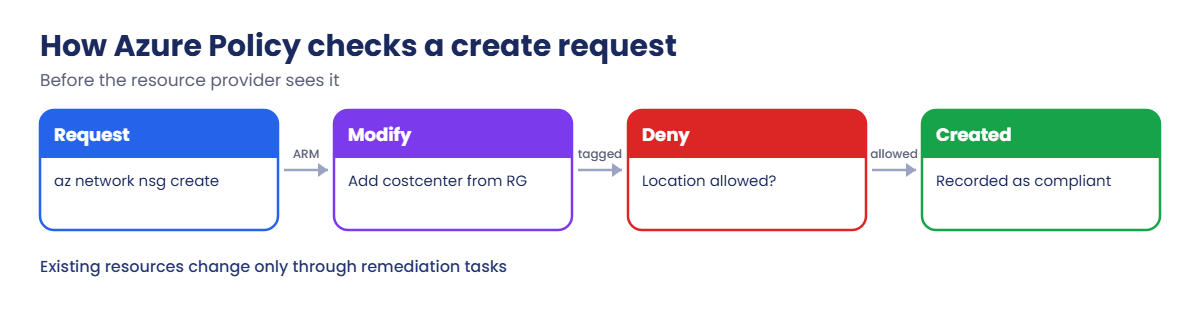
How Azure Policy evaluates a create request with Modify and Deny
  1. The request reaches Azure Resource Manager.
  2. Before the resource provider sees it, Azure Policy evaluates every assignment that covers the scope.
  3. Modify effects run first: a missing costcenter tag is added from the resource group.
  4. Deny effects run next: a location outside the allowed list stops the request with RequestDisallowedByPolicy.
  5. If nothing denies it, the resource is created and recorded as compliant.

Existing resources only appear in compliance results; they don’t change until you run a remediation task or someone updates them.

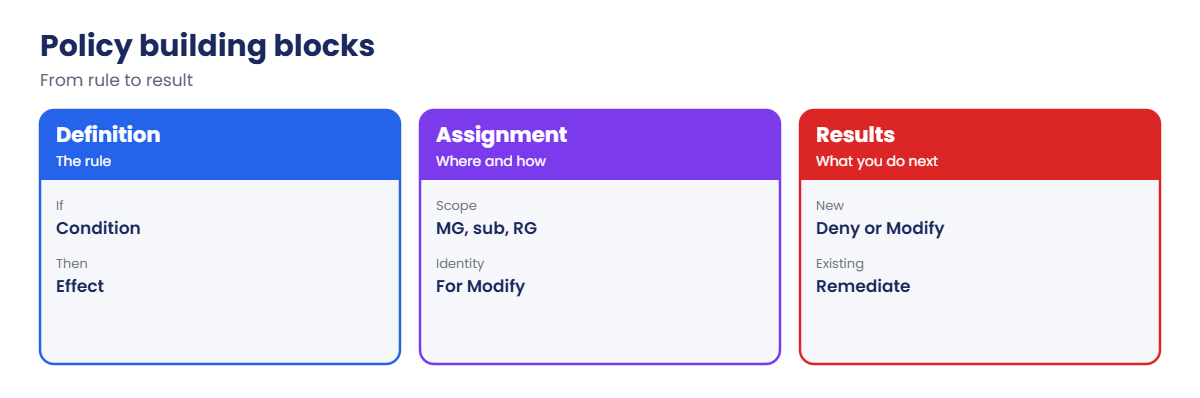
Azure Policy definitions, assignments and results

That’s why every policy rollout has two parts: guard the front door with Deny or Modify, then clean up what is already inside with remediation.

Choosing the right effect

EffectWhat it doesUse it when
AuditMarks the resource non-compliant, changes nothingYou are measuring before enforcing
DenyStops the create or update requestA mistake would be costly or unsafe, such as a wrong region
ModifyAdds, replaces or removes tags and some propertiesYou can fix the request instead of rejecting it
DeployIfNotExistsDeploys a related resource after creationSomething must exist alongside, such as a diagnostic setting
DisabledTurns the rule off in this assignmentYou need to pause a rule without deleting the assignment

A good habit is to put the effect in a parameter, so the same definition can be assigned as Audit in one place and Deny in another.

What a custom policy looks like

Built-in policies cover most needs, but sooner or later you’ll write one. This rule finds storage accounts that still allow anonymous blob access, which connects to what you learned about storage security in Lessons 21 to 26:

{
  "if": {
    "allOf": [
      { "field": "type", "equals": "Microsoft.Storage/storageAccounts" },
      { "field": "Microsoft.Storage/storageAccounts/allowBlobPublicAccess", "notEquals": false }
    ]
  },
  "then": { "effect": "[parameters('effect')]" }
}

The second field is an alias, a stable name for a resource property. You find aliases with az provider show and the aliases list for a resource type, or in the portal’s policy editor. Save the rule and a parameters file, then create it with az policy definition create, using @file for both so PowerShell doesn’t mangle the JSON.

Before you switch any custom policy to Deny, assign it in Audit, read the compliance results for a week, and talk to the teams that own the non-compliant resources. A policy that surprises people gets switched off; a policy people expected stays on for years.

Enforce regions and tags, then remediate old resources

1A resource group with a cost centre tag, and an old resource

Create the group and one NSG without a tag, before any policy exists:

az group create --name rg-saat-l54 --location centralindia --tags course=saatvedha-azure costcenter=cc-1001 -o none
az network nsg create --resource-group rg-saat-l54 --name nsg-old -o none
$rgId = az group show --name rg-saat-l54 --query id -o tsv

2Allow only Central India and South India

Save the parameter values in a file, then assign the built-in Allowed locations policy to the resource group:

'{"listOfAllowedLocations":{"value":["centralindia","southindia"]}}' | Set-Content C:\azure-lab\pol-loc.json
az policy assignment create --name allowed-loc-l54 --display-name "Allowed locations (L54)" --policy e56962a6-4747-49cd-b67b-bf8b01975c4c --scope $rgId --params '@C:\azure-lab\pol-loc.json' -o none

3Make new resources inherit the cost centre tag

This policy uses the Modify effect, so it needs a managed identity with a role:

'{"tagName":{"value":"costcenter"}}' | Set-Content C:\azure-lab\pol-tag.json
az policy assignment create --name inherit-cc-l54 --display-name "Inherit costcenter tag (L54)" --policy ea3f2387-9b95-492a-a190-fcdc54f7b070 --scope $rgId --params '@C:\azure-lab\pol-tag.json' --mi-system-assigned --location centralindia --role Contributor --identity-scope $rgId -o none
az policy assignment list --scope $rgId --query "[].{name:name, identity:identity.type}" -o table

You should see this:

Name             Identity
---------------  --------------
allowed-loc-l54
inherit-cc-l54   SystemAssigned

4Create a resource without the tag

Wait about 5 minutes for the assignments to take effect, then create an NSG with no tags:

az network nsg create --resource-group rg-saat-l54 --name nsg-new -o none
az network nsg show --resource-group rg-saat-l54 --name nsg-new --query tags

You should see this:

{
  "costcenter": "cc-1001"
}

Nobody typed the tag. Policy added it from the resource group while the request was on its way in.
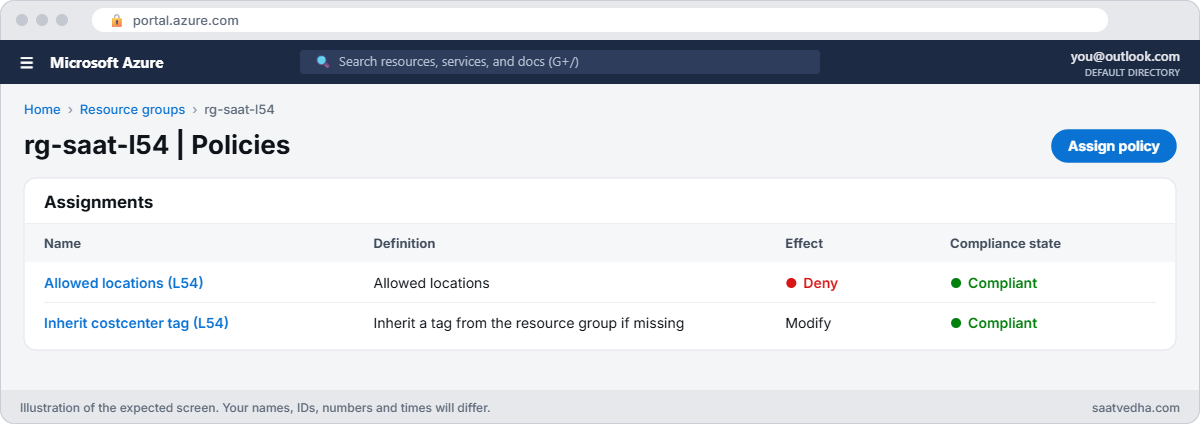
Azure Policy assignments on a resource group
rg-saat-l54 with both policy assignments.
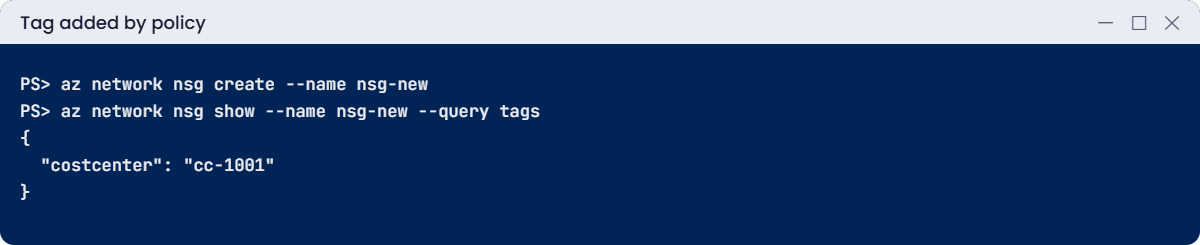
A new NSG with a cost centre tag added by policy
Policy added the tag while the request was on its way in.

✅ Checkpoint: Two assignments exist on rg-saat-l54, and a new NSG gets costcenter=cc-1001 automatically.

Break It, Then Fix It

1Break it: a deployment to the wrong region

A colleague copies a script written for a US project:

az network nsg create --resource-group rg-saat-l54 --name nsg-us --location eastus

You’ll get an error like this:

(RequestDisallowedByPolicy) Resource 'nsg-us' was disallowed by policy. Policy identifiers: '[{"policyAssignment":{"name":"Allowed locations (L54)","id":"/subscriptions/.../resourceGroups/rg-saat-l54/providers/Microsoft.Authorization/policyAssignments/allowed-loc-l54"},"policyDefinition":{"name":"Allowed locations","id":"/providers/Microsoft.Authorization/policyDefinitions/e56962a6-4747-49cd-b67b-bf8b01975c4c"}}]'.
Code: RequestDisallowedByPolicy

Read it from the inside out: the assignment name tells you which rule and at which scope, the definition tells you what it checks. You don’t need to guess or open a ticket with the cloud team to find out why.

Fix it: deploy to an allowed region, and check what the assignment allows if you’re unsure:

az policy assignment show --name allowed-loc-l54 --scope $rgId --query parameters
az network nsg create --resource-group rg-saat-l54 --name nsg-us --location southindia -o none

The NSG is created in South India and inherits the costcenter tag.

If a resource truly must live elsewhere, the right path is an exemption with a reason and an expiry date (az policy exemption create), not deleting the assignment.

2Break it: the old resource is still wrong

nsg-old was created before the policies. Force a compliance scan and list what isn’t compliant (the scan takes a few minutes):

az policy state trigger-scan --resource-group rg-saat-l54
az policy state list --resource-group rg-saat-l54 --filter "complianceState eq 'NonCompliant'" --query "[].{resource:resourceId, assignment:policyAssignmentName}" -o table

You should see something like this:

Resource                                                                                   Assignment
---------------------------------------------------------------------------------------  --------------
/subscriptions/.../resourceGroups/rg-saat-l54/providers/Microsoft.Network/networkSecurityGroups/nsg-old  inherit-cc-l54

The policy only acts on new or updated resources. nsg-old has been sitting there without a tag, and the cost report puts its spending under “untagged”.

Fix it: run a remediation task for the Modify assignment, then check the result:

az policy remediation create --resource-group rg-saat-l54 --name fix-cc-tags --policy-assignment inherit-cc-l54 -o none
az policy remediation show --resource-group rg-saat-l54 --name fix-cc-tags --query "{state:provisioningState, ok:deploymentStatus.successfulDeployments, failed:deploymentStatus.failedDeployments}" -o table
az network nsg show --resource-group rg-saat-l54 --name nsg-old --query tags

After a few minutes you should see something like this:

State      Ok    Failed
---------  ----  --------
Succeeded  1     0
{
  "costcenter": "cc-1001"
}

RequestDisallowedByPolicy error for a blocked region
The error names the assignment that blocked the request.

The remediation used the assignment’s managed identity and its Contributor role on the group. Without that role, remediation fails with an authorization error, which is the most common reason remediation tasks show failed deployments.

3Clean up

Delete the assignments, then the resource group:

az policy assignment delete --name allowed-loc-l54 --scope $rgId
az policy assignment delete --name inherit-cc-l54 --scope $rgId
az group delete --name rg-saat-l54 --yes

✅ Checkpoint: You read a policy denial, fixed a deployment, remediated an old resource, and removed everything from this lesson.

This happened at work

The policy that blocked a production fix

A retail company assigned a strict “Allowed resource types” policy at the management group, in Deny mode, on a Tuesday. On Thursday night, the on-call engineer tried to add a diagnostic setting during an outage and got RequestDisallowedByPolicy. The outage ran 50 minutes longer while people searched for who owned the policy.

Nobody had tested the policy in Audit mode first, and nobody had listed the resource types that runbooks actually use. The error itself named the assignment, but the on-call team had never been shown how to read it.

What they changed: every new policy starts in Audit (or with enforcement mode DoNotEnforce) for two weeks, compliance results are reviewed before switching to Deny, every assignment has an owner in its description, and the incident runbook now has a section called “Reading RequestDisallowedByPolicy”.

Common mistakes and troubleshooting

MistakeWhat you seeWhat to do
Going straight to DenyBlocked deployments, angry teamsStart in Audit or DoNotEnforce; review compliance.
Modify policy without a roleRemediation deployments failGive the assignment identity the needed role at the scope.
Expecting policy to fix old resourcesOld resources stay non-compliantRun a remediation task.
Deleting an assignment for one exceptionEveryone loses the guardCreate an exemption with an expiry date.
Testing right after assigningPolicy seems to do nothingWait for it to take effect; check the assignment scope.
Not reading the errorHours of guessingThe error names the assignment and definition.

Interview questions

Click a question to open it. Each one is written the way an interviewer would ask it. Under it you will see why they ask it and one way you could answer, in your own words.

Fresher level

1. What is Azure Policy?

Why they ask this: The basic concept.

How you might answer: A service that evaluates resources against rules and enforces or reports them with effects such as Deny, Audit and Modify.

2. Policy vs RBAC?

Why they ask this: A common confusion.

How you might answer: RBAC controls who can do something. Policy controls what can be created or how it must look, no matter who does it.

3. What is an initiative?

Why they ask this: Basic vocabulary.

How you might answer: A group of policy definitions assigned as one, such as a security or compliance baseline.

2–5 years experience

4. A deployment fails with RequestDisallowedByPolicy. What do you do?

Why they ask this: A real troubleshooting path.

How you might answer: Read the policy identifiers in the error to find the assignment, scope and definition, check its parameters, change the deployment to comply, or request an exemption if there’s a valid reason.

5. Why do existing resources still show non-compliant after you assign a Modify policy?

Why they ask this: A detail many people miss.

How you might answer: Modify only changes create or update requests. Existing resources need a remediation task, run with the assignment’s managed identity.

6. Which effects need a managed identity?

Why they ask this: A setup check.

How you might answer: Modify and DeployIfNotExists, because they change or deploy resources. The identity needs the roles listed in the definition at the right scope.

Senior level

7. How would you roll out policy across 50 subscriptions?

Why they ask this: They want governance design.

How you might answer: Management group hierarchy, initiatives as code in a pipeline, Audit first with compliance review, then Deny or Modify, exemptions with owners and expiry, and compliance dashboards for each team.

8. How do you write a custom policy safely?

Why they ask this: They want engineering practice.

How you might answer: Use aliases to target properties, test against sample resources, start with Audit, version the definition, assign at a small scope first, and keep it in source control with reviews.

9. How would you enforce tags without blocking engineers?

Why they ask this: Practical balance.

How you might answer: Inherit tags from resource groups with Modify, require tags only on resource groups, remediate old resources, and report on untagged costs instead of denying every resource.

Quick quiz

Q1. Which effect blocks a non-compliant request?

  1. Audit
  2. Deny
  3. Modify
  4. Disabled
Show answer

B — Deny stops the request.

Q2. Which runs first during a create request?

  1. Deny
  2. Modify
  3. Audit
  4. DeployIfNotExists
Show answer

B — Modify runs before Deny.

Q3. An old resource is non-compliant with a Modify policy. Fix?

  1. Wait 24 hours
  2. Run a remediation task
  3. Delete the assignment
  4. Change RBAC
Show answer

B — Remediation fixes existing resources.

Q4. What do Modify assignments need?

  1. A VNet
  2. A managed identity with a role
  3. A storage account
  4. A Key Vault
Show answer

B — The identity makes the changes.

Q5. A team has a valid reason to break a policy. Best approach?

  1. Delete the assignment
  2. Create an exemption with an expiry
  3. Switch to Audit forever
  4. Ignore it
Show answer

B — Exemptions keep the guard for everyone else.

Quick recap

You can now put guard rails on a subscription and clean up what was there before.

  • Assignments apply definitions to a scope with parameters.
  • Modify runs before Deny; Deny returns RequestDisallowedByPolicy.
  • The error names the assignment; read it before guessing.
  • Existing resources need a remediation task.
  • Use Audit first and exemptions for real exceptions.

Next lesson

Lesson 55: Azure Key Vault: secrets, certificates, soft delete → You store secrets and certificates in Key Vault with RBAC, read them with a managed identity, and recover a deleted secret.

Further reading: Azure Policy

Want to go deeper into Azure Policy? See Microsoft’s What is Azure Policy? and Remediate non-compliant resources. You can also see the full plan for this course on the Azure Cloud Administration course page.

Scroll to Top