The Azure Hierarchy: Management Groups to Resource Groups

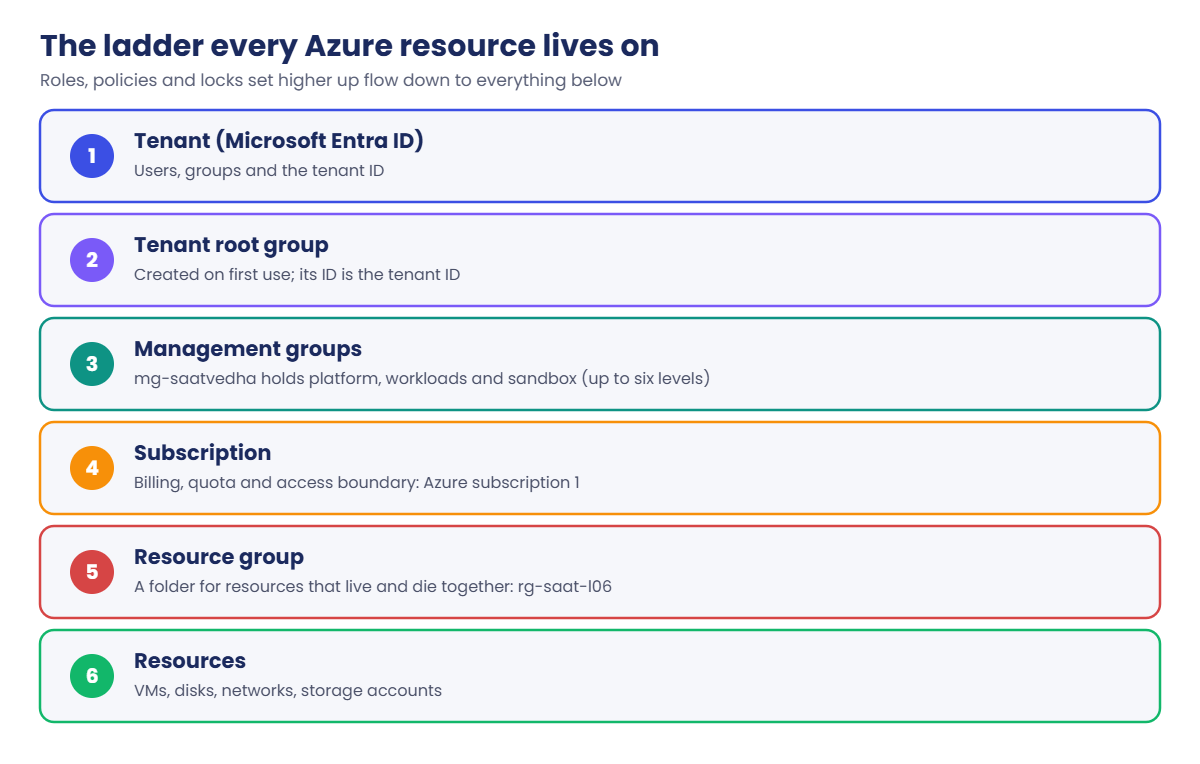
Azure management groups sit at the top of a ladder that every Azure resource lives on: tenant, management groups, subscriptions, resource groups, resources. Whatever you set high up, like a role or a policy, flows down to everything below it.

Get this ladder right and governance is easy: one policy at the top keeps every team in India, one role gives the auditors read access everywhere. Get it wrong and you end up setting the same thing by hand in forty places.

In this lesson you build a small management group tree for the course, move your subscription into it, watch a role flow down from the top, and protect a resource group with a lock.

TimeYou needCostBy the end you can
About 40 minutesThe Azure CLI, signed in as the account owner; the group from Lesson 5Nothing (management groups and locks cost nothing)Build a management group tree, explain inheritance, and use resource locks without surprises

What it is, in one line

Management groups are folders for subscriptions, so you can set access and rules once at the top and have them apply everywhere below.

In Simple Words

School, building, classroom, desk

Think of a big school. The school has rules for everyone, like “no phones in exams”. Each building may add its own rule, like “science labs need goggles”.

Each classroom then has desks, and each desk has a student’s books.

Azure works the same way. The tenant is the school. Management groups are the buildings.

Subscriptions are the classrooms, and resource groups are the desks holding the actual things, like VMs and disks.

A rule set for the whole school reaches every desk. You don’t walk to each desk to repeat it.

Engineer's View

The ladder and its limits

  • Tenant root group: created the first time anyone uses management groups. Its ID is the tenant ID, and it can’t be moved or deleted. Nobody has access to it by default; a Global Administrator can elevate to get User Access Administrator there.
  • Management groups: up to 10,000 per tenant, and up to six levels deep (not counting the root and the subscription level). Each one has an ID that never changes and a display name that can.
  • Subscriptions: the billing and quota boundary. Each subscription, and each management group, has exactly one parent.
  • Resource groups: live in one subscription, can’t be nested, and every resource belongs to exactly one. The group’s region only stores its metadata; resources inside can be in other regions.

Inheritance: Azure RBAC role assignments and Azure Policy assignments flow down. Reader at a management group means Reader on every subscription, resource group and resource below it. You can’t block an inherited allow lower down; you can only add more.

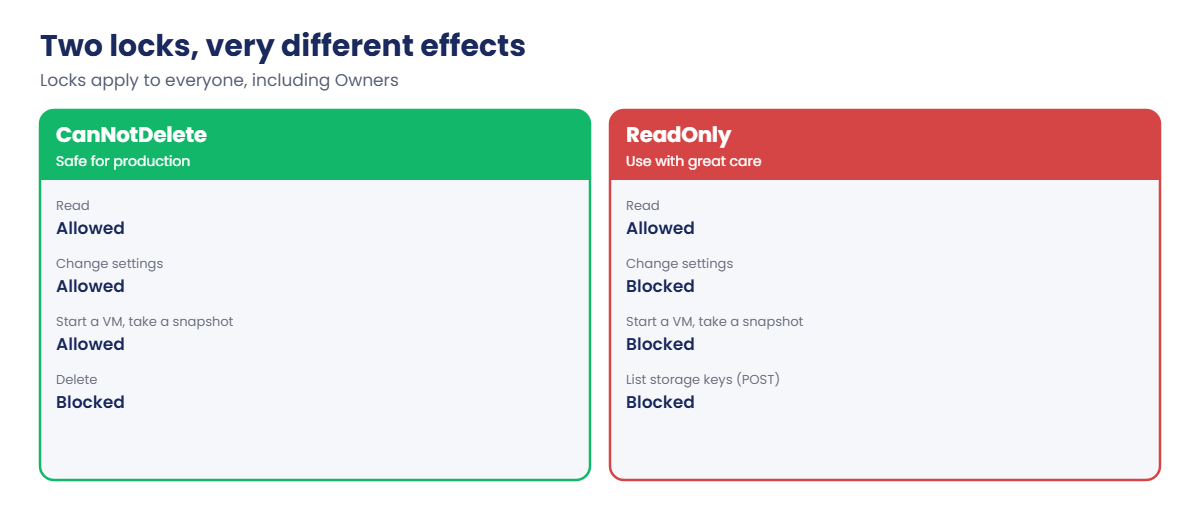
Resource locks also flow down. CanNotDelete lets people change things but not delete them. ReadOnly blocks every write, including some actions that look like reads but are really POST calls, such as listing storage account keys.

Locks apply even to Owners, which is the point: they stop mistakes, not just strangers.

To move a subscription between management groups you need Owner on the subscription and write access on both the old and new parent. Moves to or from the root group skip the parent checks.

How it works, step by step

A common, simple layout that many companies start with looks like this:

Azure management groups in the resource hierarchy from tenant to resources
  • Platform: shared networking, identity and monitoring subscriptions, run by the central IT team.
  • Workloads: one subscription per app or team, with production and non-production split, so a test mistake can’t touch production.
  • Sandbox: playground subscriptions with a budget and loose rules, for learning and quick experiments.

When you assign something at a level, Azure Resource Manager checks it on every request below that level. That’s why a policy at the top management group can block a VM in the wrong region, even if the person creating it is Owner of their own subscription.

Azure management groups and resource locks: CanNotDelete vs ReadOnly

In the lab you build exactly that tree under a course management group, put your subscription into “Sandbox”, and prove that a role given at the top really reaches the subscription.

Hands-on lab: build the tree, test inheritance, lock a group

You create four management groups, move your subscription, test inheritance with a Reader role, then lock a resource group. The management group tree stays for later lessons; the role, lock and resource group are cleaned up at the end.

1Create the management group tree

Run this:

$sub = az account show --query id -o tsv
az account management-group create --name mg-saatvedha --display-name "SaatVedha" -o none
foreach ($m in 'platform','workloads','sandbox') {
    az account management-group create --name "mg-saat-$m" --display-name "SaatVedha $m" --parent mg-saatvedha -o none
}
az account management-group list --query "[?starts_with(name,'mg-saat')].{name:name, display:displayName}" -o table

You should see something like this:

Name               Display
-----------------  ------------------
mg-saatvedha       SaatVedha
mg-saat-platform   SaatVedha platform
mg-saat-sandbox    SaatVedha sandbox
mg-saat-workloads  SaatVedha workloads

The first command can take a minute: if this is the first management group in your tenant, Azure also sets up the Tenant root group behind the scenes and puts your subscription under it.

2Move your subscription into Sandbox

Run this:

az account management-group subscription add --name mg-saat-sandbox --subscription $sub
az account management-group show --name mg-saatvedha --expand --recurse --query "children[].{group:displayName, inside:children[].displayName}" -o json

You should see something like this:

[
  {
    "group": "SaatVedha platform",
    "inside": null
  },
  {
    "group": "SaatVedha sandbox",
    "inside": [
      "Azure subscription 1"
    ]
  },
  {
    "group": "SaatVedha workloads",
    "inside": null
  }
]

Your subscription now sits at Tenant root group → SaatVedha → SaatVedha sandbox. Anything you assign to those levels reaches it.

3Prove inheritance with a Reader role

Give the helpdesk group from Lesson 5 Reader on the Sandbox management group, not on the subscription. Then ask the subscription who can read it.

Run this:

$grp = az ad group show --group grp-saat-helpdesk --query id -o tsv
az role assignment create --assignee-object-id $grp --assignee-principal-type Group --role Reader --scope /providers/Microsoft.Management/managementGroups/mg-saat-sandbox -o none
az role assignment list --scope "/subscriptions/$sub" --include-inherited --query "[?principalId=='$grp'].{who:principalName, role:roleDefinitionName, from:scope}" -o table

You should see something like this:

Who                Role    From
-----------------  ------  ------------------------------------------------------------
grp-saat-helpdesk  Reader  /providers/Microsoft.Management/managementGroups/mg-saat-sandbox

The subscription lists the role even though it was given two levels up. Optional: sign in as Asha in a private window. She can now see “Azure subscription 1” and its resource groups, read-only.

It can take a few minutes to appear.

Remove it again; Lesson 7 does roles properly:

az role assignment delete --assignee $grp --role Reader --scope /providers/Microsoft.Management/managementGroups/mg-saat-sandbox

4Create a resource group and lock it

Run this:

az group create --name rg-saat-l06 --tags course=saatvedha-azure lesson=06 -o none
az lock create --name lock-no-delete --lock-type CanNotDelete --resource-group rg-saat-l06 --notes "Course lab: protect from delete" -o none
az lock list --resource-group rg-saat-l06 --query "[].{name:name, level:level, notes:notes}" -o table

You should see something like this:

Name            Level         Notes
--------------  ------------  ------------------------------
lock-no-delete  CanNotDelete  Course lab: protect from delete
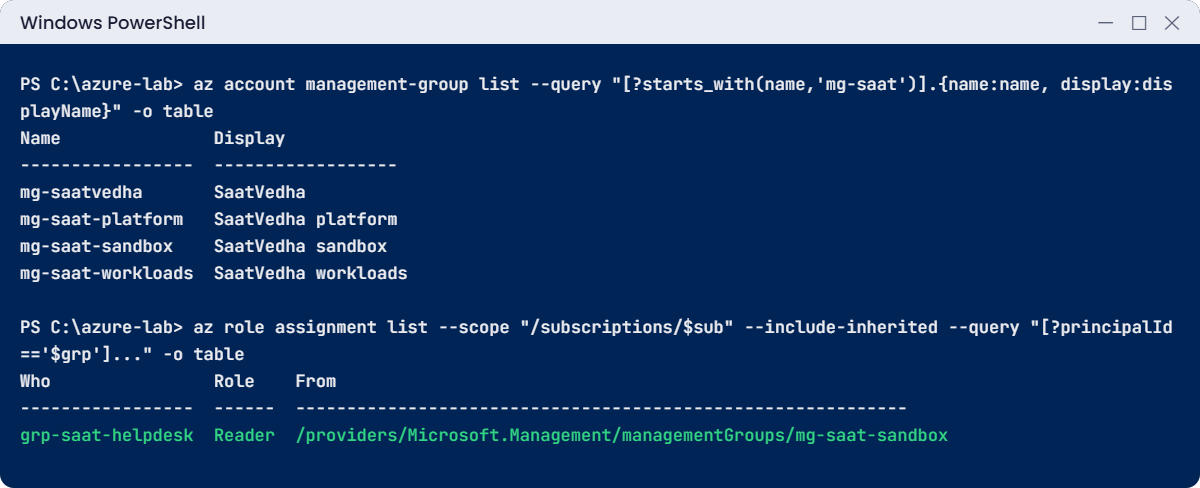
Azure management groups lab: course tree and an inherited Reader role
Example output. Your IDs will be different.

✅ Checkpoint: Your subscription is under mg-saat-sandbox, the Reader role is removed, and rg-saat-l06 has a CanNotDelete lock. Keep the lock for “Break It”.

Break It, Then Fix It

Locks do exactly what they promise, which surprises people at the worst moment. Here are both kinds.

1Break it: delete a locked resource group

Run this:

az group delete --name rg-saat-l06 --yes

You’ll get an error like this:

(ScopeLocked) The scope '/subscriptions/6f1c2d3e-.../resourcegroups/rg-saat-l06' cannot perform delete operation
because following scope(s) are locked: '/subscriptions/6f1c2d3e-.../resourceGroups/rg-saat-l06'.
Please remove the lock and try again.
Code: ScopeLocked

You are the Owner, and it still refused. A lock is checked before RBAC even matters. The error names the scope that holds the lock, which may be higher up than the thing you’re deleting.

2Break it: a ReadOnly lock that blocks more than you expect

Swap the lock for a ReadOnly one, then try to add a tag:

az lock delete --name lock-no-delete --resource-group rg-saat-l06
az lock create --name lock-read-only --lock-type ReadOnly --resource-group rg-saat-l06 -o none
az group update --name rg-saat-l06 --set tags.owner=Priya -o none

You’ll get an error like this:

(ScopeLocked) The scope '/subscriptions/6f1c2d3e-.../resourcegroups/rg-saat-l06' cannot perform write operation
because following scope(s) are locked: '/subscriptions/6f1c2d3e-.../resourceGroups/rg-saat-l06'.
Please remove the lock and try again.
Code: ScopeLocked

Adding a tag is a write. So is starting a VM, taking a disk snapshot, or listing storage account keys (a POST request). That’s why ReadOnly locks on production break backups and deployments in ways nobody predicts.

Fix it: remove the lock, then clean up:

az lock delete --name lock-read-only --resource-group rg-saat-l06
az group delete --name rg-saat-l06 --yes
C:\azure-lab\Find-LabResources.ps1

You should see this:

Nothing tagged course=saatvedha-azure is left.
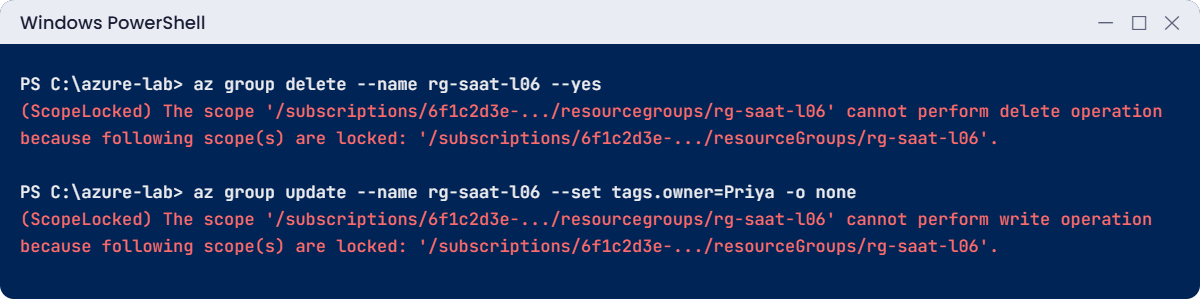
Azure management groups lab errors: ScopeLocked on delete and on write
Example output of both lock errors.

✅ Checkpoint: Both lock errors reproduced, the resource group is gone, and the management group tree is still there.

This happened at work

The audit freeze that stopped the backups

Before a yearly audit, a finance company wanted to make sure nobody “changed anything” in production for two weeks. Someone put a ReadOnly lock on every production resource group. It looked like a neat, safe idea.

The next morning the night’s VM backups had failed, because Azure Backup couldn’t write snapshots. The deployment pipeline failed too: it listed storage account keys, which is a POST call and counts as a write. On day three, a VM that needed a restart after a crash couldn’t be started.

The audit started with an incident review instead of a quiet week.

What they changed: production groups use CanNotDelete locks only, which stop deletes but allow normal work. Change freezes are handled with Azure Policy and PIM approval for higher roles, not with ReadOnly locks. And any new lock is announced in the operations channel, with the backup and pipeline owners tagged.

Common mistakes and troubleshooting

MistakeWhat you seeWhat to do
ReadOnly lock on productionBackups, VM starts and deployments fail with ScopeLockedUse CanNotDelete. Use Policy and PIM for change control.
Giving roles on each subscription one by oneDozens of assignments to reviewAssign once at a management group.
Expecting a lower level to block an inherited roleThe user still has accessInherited allows can’t be blocked below. Assign at the right level.
Using the display name in commandsManagement group not foundUse the ID (the name you chose), not the display name.
Thinking a resource group’s region limits its resourcesResources in other regions inside itThe group’s region only stores metadata. Use Policy to limit regions.
Deleting a resource “under” a lock higher upScopeLocked on a resource you didn’t lockThe error lists the locked scope. Check parent groups and subscriptions.

Interview questions

Click a question to open it. Each one is written the way an interviewer would ask it. Under it you will see why they ask it and one way you could answer, in your own words.

Fresher level

1. Can you walk me through the Azure resource hierarchy?

Why they ask this: A core concept they expect every admin to explain clearly.

How you might answer: From the top: the Entra tenant, then the Tenant root group, then management groups, which hold subscriptions. Each subscription holds resource groups, and each resource group holds the actual resources like VMs and storage accounts.

Roles and policies set at a higher level are inherited by everything below.

2. What is the difference between CanNotDelete and ReadOnly locks?

Why they ask this: They want to see you know the practical effect, not just the names.

How you might answer: CanNotDelete lets people read and change a resource but blocks deletes. ReadOnly blocks every write, which includes things like starting a VM or listing storage keys, so it often breaks normal operations.

I use CanNotDelete on important production resources and avoid ReadOnly unless there’s a very specific reason.

3. Why would a company use more than one subscription?

Why they ask this: They want reasons tied to billing, limits and safety.

How you might answer: Subscriptions separate billing, quotas and access. Splitting production from test means a test mistake or a test admin can’t touch production, and each team’s cost is clear.

Some limits are per subscription too, so large companies spread workloads to stay within them.

2–5 years experience

4. You assigned Reader at a management group, but a user says they can’t see a subscription. What do you check?

Why they ask this: They want a methodical access check that includes propagation and hierarchy.

How you might answer: First, that the subscription is really under that management group, with az account management-group show --expand --recurse. Then that the user is in the group that got the role, and that enough time has passed, because new assignments and group changes can take a few minutes.

I’d also ask them to sign out and in again, and check they’re looking at the right directory in the portal.

5. How would you organise management groups for a company with three business units and production and test environments?

Why they ask this: They’re checking design sense: not too deep, not too flat.

How you might answer: I’d keep it shallow: a top company group, then Platform for shared services, Landing zones split into Production and Non-production, and a Sandbox. Business units would be separate subscriptions or tags, rather than extra levels, unless they truly need different policies.

Policies that differ between production and test then go on those two groups.

6. A colleague can’t delete an empty resource group even though they’re Owner. What’s going on?

Why they ask this: They want to see you think of locks before RBAC.

How you might answer: Most likely a lock, either on the group or higher up on the subscription. The ScopeLocked error names the scope that holds it. I’d check with az lock list, agree with the lock’s owner, and remove it if it’s no longer needed.

Senior level

7. What are the risks of moving a subscription to a different management group?

Why they ask this: They want awareness that inheritance changes instantly.

How you might answer: Everything inherited changes: the old group’s policies and roles stop applying and the new group’s start. That can remove access people rely on, or make new deny policies block deployments that worked yesterday.

Before a move I compare the role and policy assignments of both parents, tell the affected teams, and do it at a quiet time.

8. How do you protect critical production resources from accidental deletion without slowing the team down?

Why they ask this: They want layered controls that still allow normal work.

How you might answer: CanNotDelete locks on the critical resource groups, a small number of people with Owner, and PIM so even admins activate higher roles for a short time. Backups with soft delete cover what slips through.

I’d make lock removal part of a documented change, so it’s visible when someone does it.

9. Someone wants to give an external auditor read access to everything in Azure. How would you do it?

Why they ask this: They’re checking least privilege, the use of high scopes, and guest identities.

How you might answer: I’d invite the auditor as a guest in Entra ID, put them in an auditors group, and assign Reader on the top company management group, so every subscription is covered. If they don’t need data access, Reader is enough; I’d avoid any role that can read secrets or keys.

I’d set an end date with an access review and remove the role when the audit ends.

Quick quiz

Q1. What is the ID of the Tenant root group?

  1. mg-root
  2. The subscription ID
  3. The tenant ID
  4. The domain name
Show answer

C — The root management group’s ID is the Microsoft Entra tenant ID.

Q2. You give Reader at a management group. Who gets it?

  1. Only the management group
  2. Every subscription, resource group and resource below it
  3. Only new resources
  4. Only Owners
Show answer

B — Role assignments are inherited by everything below.

Q3. Which lock still allows changes but blocks deletes?

  1. ReadOnly
  2. CanNotDelete
  3. NoChange
  4. Freeze
Show answer

B — CanNotDelete blocks deletes only.

Q4. Why can a ReadOnly lock break a deployment that only lists storage keys?

  1. Keys are deleted
  2. Listing keys is a POST, which counts as a write
  3. ReadOnly locks block reads
  4. The lock expires
Show answer

B — Some read-like actions are POST calls, which ReadOnly blocks.

Q5. How many levels deep can management groups go?

  1. Three
  2. Six (not counting root and subscriptions)
  3. Ten
  4. No limit
Show answer

B — Up to six levels below the root.

Quick recap

You now have a small governance tree, and you know how settings and locks flow down it.

  • Tenant → root group → management groups → subscriptions → resource groups → resources.
  • Roles, policies and locks set high up are inherited below.
  • Use management group IDs in commands, not display names.
  • CanNotDelete stops deletes; ReadOnly stops every write, including some that look like reads.
  • Your subscription now lives in mg-saat-sandbox; the tree stays for later lessons.

Next lesson

Lesson 7: Azure RBAC: roles, scopes and role assignments → You give Asha exactly the access she needs, at the right scope, and prove it by signing in as her.

Further reading: Azure management groups

Want to go deeper into Azure management groups? Read Microsoft’s What are Azure management groups? and Lock your resources to protect your infrastructure. You can also see the full plan for this course on the Azure Cloud Administration course page.

Scroll to Top