Azure Regions, Availability Zones and Billing

Choosing Azure regions and availability zones is one of the first decisions in any project, and one of the hardest to change later. It decides how close you are to your users, what it costs, which services you can use, and what survives when a data centre has a bad day.

In this lesson you list the regions in India, see which ones have availability zones and which region each is paired with, and learn why “zone 1” in your subscription may not be the same building as “zone 1” in someone else’s.

Then you look at the money side: how Azure meters what you use, why a stopped VM can still cost money, and how to ask Cost Management “what did each lesson cost me?” using tags.

TimeYou needCostBy the end you can
About 40 minutesThe Azure CLI from Lesson 3, signed inNothing (only queries and an empty resource group)Pick a region and zone for a workload with reasons, and report cost by tag

What it is, in one line

A region is a city full of Azure data centres; an availability zone is one separate building in that city, with its own power and cooling.

In Simple Words

Three school buildings in one town

Imagine your school has three buildings in the same town, each with its own electricity and water tank. If one building loses power, classes move to the other two and the day goes on.

The town is the region. Each building is an availability zone. A second town far away, where the school keeps copies of important records, is the paired region.

If you put all your classes in one building, a single power cut stops everything. Spreading them out costs a little more effort, but it saves the day.

Engineer's View

Regions, zones, pairs and meters

  • Region: a set of data centres in one area, connected by a low-latency network. You choose it with names like centralindia (Pune), southindia (Chennai) and westindia (Mumbai).
  • Availability zones: physically separate locations inside a region, each with independent power, cooling and networking. Regions with zones have three. In India, only Central India has zones today; South India and West India don’t.
  • Zone numbers are logical. Your subscription’s zone 1 is mapped to a physical zone, and another subscription’s zone 1 may be mapped to a different one. The mapping is visible through the API as availabilityZoneMappings.
  • Paired regions: Central India is paired with South India, and West India with South India. Microsoft rolls out platform updates to one region of a pair at a time, and geo-redundant storage (GRS) copies data to the paired region.
  • Not every service is in every region, and some VM sizes are restricted for new or trial subscriptions. Always check before you design.

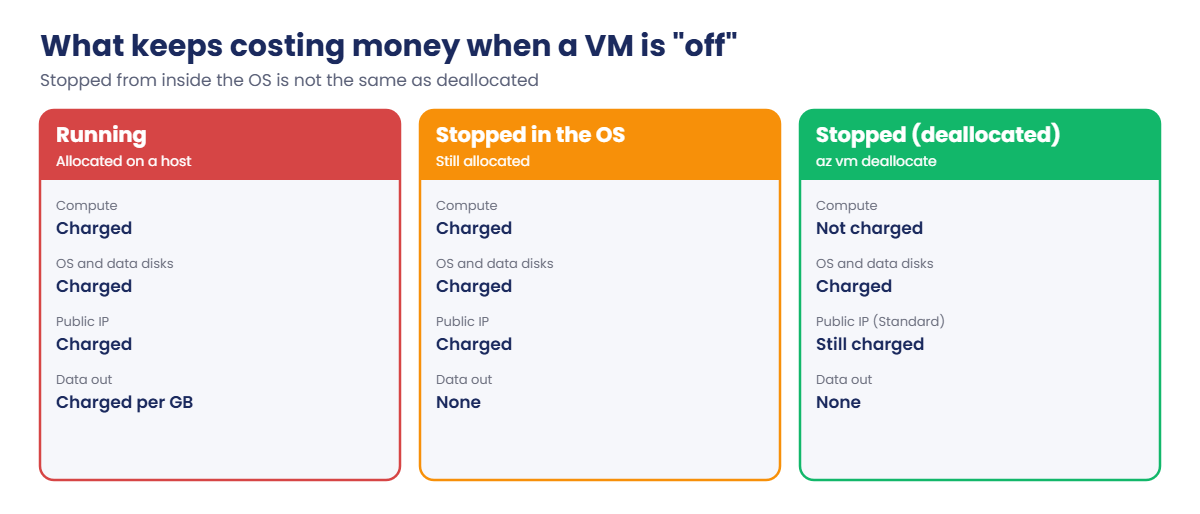
Billing works by meters. A VM is charged for compute while it is running and allocated, rounded to the minute. Its disks are charged by size for every hour they exist, even when the VM is off.

A public IP is charged hourly, and data leaving Azure or crossing regions is charged per GB. Data coming in is free.

That gives the most important billing rule for admins: “Stopped” is not “Stopped (deallocated)”. Shutting down Windows or Linux from inside the VM leaves it allocated, and you keep paying for compute. Stopping it from the portal or with az vm deallocate releases the hardware and stops the compute meter.

How it works, step by step

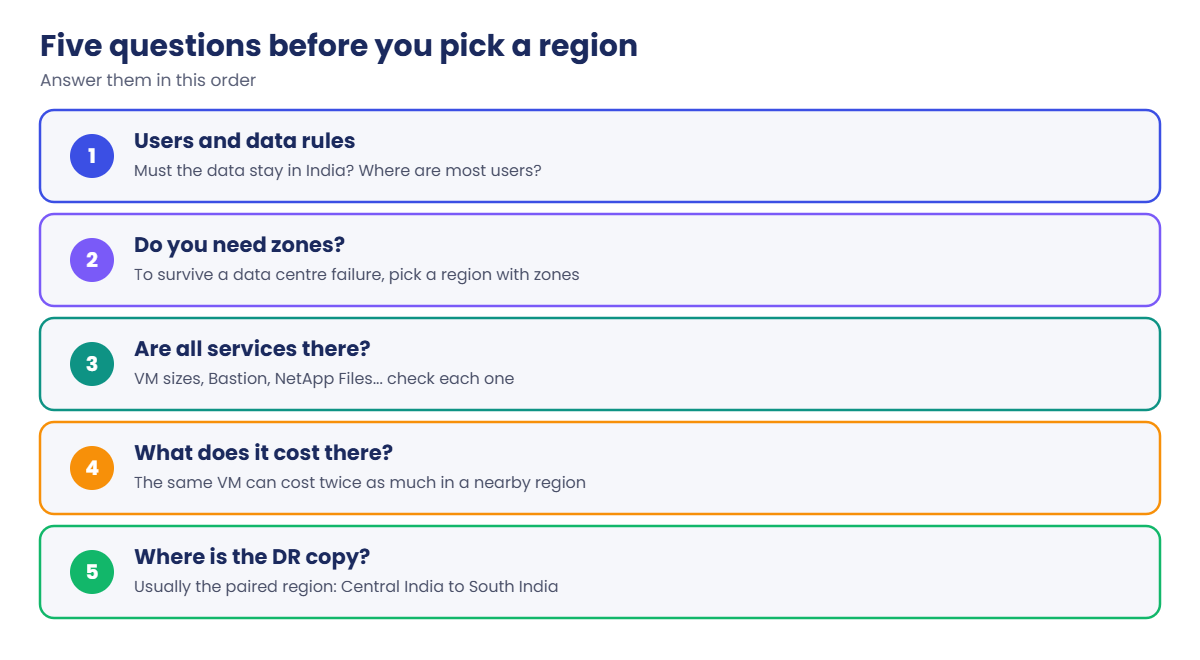
When you decide where something runs, go through these questions in order:

Azure regions and availability zones: five questions before you pick a region
  1. Where are the users and the data rules? If customer data must stay in India, only Indian regions are on the table.
  2. Do you need zones? If the app must survive a data centre failure, you need a region with zones, such as Central India, and you place copies in different zones.
  3. Is every service you need available there? Check VM sizes, Bastion, NetApp Files, and anything else in the design.
  4. What does it cost there? Lesson 1 showed the same VM can cost twice as much in a nearby region.
  5. Where is the disaster recovery copy? Usually the paired region, unless data rules or service gaps say otherwise.

Once things are running, the money side is a loop: tag every resource, let Cost Management collect the meters (up to 72 hours late on pay-as-you-go), then group the cost by tag to see who and what is spending.

Azure regions and availability zones billing: running, stopped in the OS and deallocated VMs

The lab follows the same order. First you look at regions and zones, then you ask Cost Management for your spend grouped by the lesson tag you’ve been adding since Lesson 3.

Hands-on lab: regions, zones and cost by tag

Everything here is read-only except one empty resource group, so it costs nothing. Open Windows PowerShell, go to C:\azure-lab, and make sure az account show shows your subscription.

1List the regions in India and their pairs

Run this:

az account list-locations --query "[?contains(name,'india') && metadata.regionType=='Physical'].{name:name, display:displayName, paired:metadata.pairedRegion[0].name}" -o table

You should see something like this:

Name             Display            Paired
---------------  -----------------  ---------------
centralindia     Central India      southindia
southindia       South India        centralindia
westindia        West India         southindia
jioindiawest     Jio India West     jioindiacentral
jioindiacentral  Jio India Central  jioindiawest

The Jio regions are for specific customers, so most subscriptions can’t create resources there. The useful three are Central, South and West India. Notice that South India is the pair for both of the others.

2Check which regions have zones for your VM size

Run this:

foreach ($r in 'centralindia','southindia','westindia') {
    $z = az vm list-skus --location $r --size Standard_B2ats_v2 --query "[0].locationInfo[0].zones" -o tsv
    "{0,-13} zones: {1}" -f $r, ($z -join ' ')
}

You should see something like this (the order of the numbers may differ):

centralindia  zones: 1 2 3
southindia    zones:
westindia     zones:

Only Central India offers zones for this size. If a design says “spread the VMs across three zones” and someone picks West India because it’s in Mumbai, the design can’t work there.

3See how your zone numbers map to physical zones

Run this:

$sub = az account show --query id -o tsv
az rest --method get --url "https://management.azure.com/subscriptions/$($sub)/locations?api-version=2022-12-01" --query "value[?name=='centralindia'].availabilityZoneMappings[]" -o table

You should see something like this:

LogicalZone    PhysicalZone
-------------  ----------------
1              centralindia-az2
2              centralindia-az3
3              centralindia-az1

In this example, your zone 1 is physical zone az2. A partner company’s zone 1 could be az1. When two companies say “we’re both in zone 1”, they may be in different buildings.

This matters when you connect to a partner’s service or plan with a vendor across subscriptions.

4Create a tagged group and ask for cost by lesson

Run this:

az group create --name rg-saat-l04 --tags course=saatvedha-azure lesson=04 -o none
@'
{
  "type": "ActualCost",
  "timeframe": "MonthToDate",
  "dataset": {
    "granularity": "None",
    "aggregation": { "totalCost": { "name": "Cost", "function": "Sum" } },
    "grouping": [ { "type": "TagKey", "name": "lesson" } ]
  }
}
'@ | Set-Content C:\azure-lab\cost-by-lesson.json
az rest --method post --url "https://management.azure.com/subscriptions/$($sub)/providers/Microsoft.CostManagement/query?api-version=2023-03-01" --body "@C:\azure-lab\cost-by-lesson.json" --query "properties.rows"

You should see something like this:

[
  [
    0.0,
    "lesson",
    "",
    "USD"
  ]
]

Each row is cost, tag name, tag value and currency. So far you’ve only created things that cost nothing, so there is one row with zero cost and an empty tag value. As labs start creating VMs and disks, rows like [0.12, "lesson", "15", "USD"] will appear, a day or so after you use them.

Writing the JSON to a file and passing it with --body "@file" avoids PowerShell’s quoting problems with JSON on the command line. Keep this file: you’ll run it again in Lesson 44.
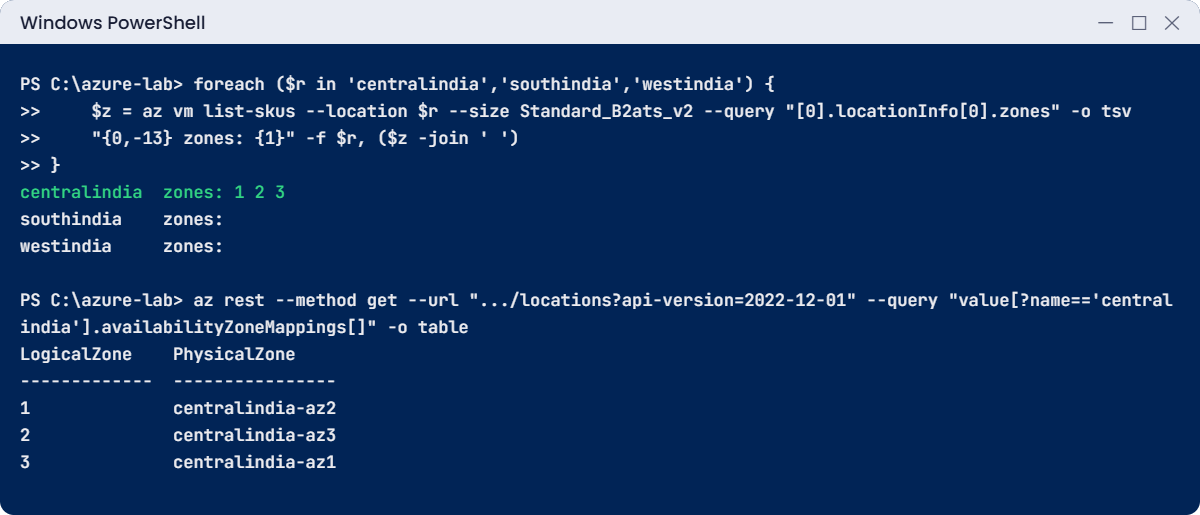
Azure regions and availability zones lab: zones per Indian region and logical zone mapping
Example output. Your zone mapping will be different.

5Clean up

Run this:

az group delete --name rg-saat-l04 --yes
C:\azure-lab\Find-LabResources.ps1

You should see this:

Nothing tagged course=saatvedha-azure is left.

✅ Checkpoint: You can name the paired region for Central India, say which Indian region has zones, and you have cost-by-lesson.json saved in C:\azure-lab.

Break It, Then Fix It

One mistake comes from Azure, the other from PowerShell. Both happen on real projects every week.

1Break it: a typo in the region name

Run this:

az group create --name rg-saat-l04 --location centralinda --tags course=saatvedha-azure lesson=04

You’ll get an error like this:

(LocationNotAvailableForResourceGroup) The provided location 'centralinda' is not available for resource group.
List of available regions is 'eastasia,southeastasia,australiaeast,...,centralindia,southindia,westindia,...'.
Code: LocationNotAvailableForResourceGroup

The CLI passes your text straight to Azure Resource Manager, which rejects it and helpfully lists what it accepts. One small detail: if you type the display name with a space, like "Central India", the CLI converts it to centralindia for you. A typo can’t be converted.

Fix it: copy the exact name from the list in step 1, or use your default:

az group create --name rg-saat-l04 --tags course=saatvedha-azure lesson=04 --query location -o tsv

You should see this:

centralindia

2Break it: backticks inside a PowerShell query

Many CLI examples on the internet are written for bash and use backticks for text values in JMESPath. Try one in PowerShell:

az account list-locations --query "[?metadata.geographyGroup==`Asia Pacific`].name" -o tsv

You’ll get this error:

ERROR: argument --query: invalid jmespath_type value: '[?metadata.geographyGroup==Asia Pacific].name'
To learn more about --query, please visit: 'https://learn.microsoft.com/cli/azure/query-azure-cli'

Look at what the CLI received: the backticks are gone. In PowerShell the backtick is the escape character, so inside double quotes it ate them. The query became invalid.

Fix it: use single quotes for text values inside the query, as this course does everywhere:

az account list-locations --query "[?metadata.geographyGroup=='Asia Pacific'].name" -o tsv | Select-Object -First 3

You should see something like this:

eastasia
southeastasia
australiaeast

Clean up:

az group delete --name rg-saat-l04 --yes
C:\azure-lab\Find-LabResources.ps1
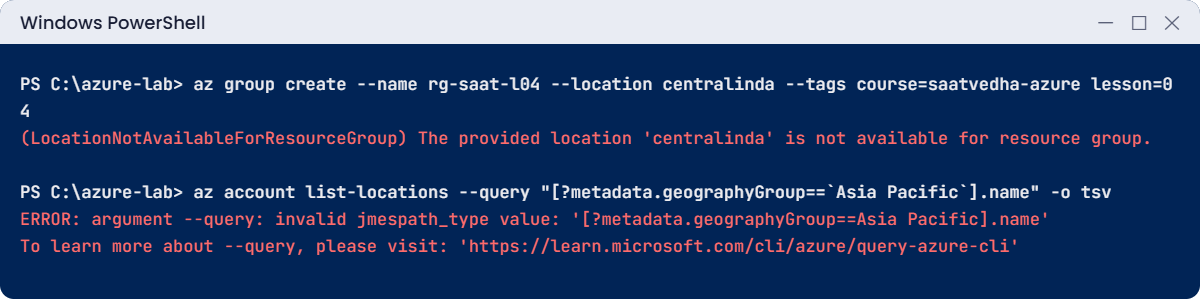
Azure regions and availability zones errors: location typo and backticks in a PowerShell query
Example output of both mistakes. The real region list in the first error is much longer.

✅ Checkpoint: Both errors reproduced and fixed, and nothing tagged for the course is left.

This happened at work

Two VMs “for high availability”, both in zone 1

A ticket-booking company in Pune ran its web front end on two VMs in Central India behind a load balancer. The design document said “highly available across zones”. The Bicep file that built them, copied from an old project, had zones: [ '1' ] hard-coded for every VM.

During a cooling problem in one physical zone, Azure moved and restarted the affected VMs. Both web VMs were in that zone, so both went down at the same time, in the middle of ticket sales for a cricket match. The site was down for about half an hour while the other two zones were perfectly healthy.

What they changed: the template now takes the zone from the VM’s index, so VM 1 goes to zone 1, VM 2 to zone 2, and so on. A pipeline check fails any pull request where all instances share one zone. They also added a monthly review that lists VM zones with Azure Resource Graph, so drift is caught early.

Common mistakes and troubleshooting

MistakeWhat you seeWhat to do
Assuming every region has zonesZone settings fail or are ignoredCheck with az vm list-skus. In India, only Central India has zones today.
Thinking zone 1 is the same for everyoneCross-subscription designs that aren’t really spread outCheck availabilityZoneMappings for each subscription.
Shutting down the OS to save moneyThe compute meter keeps runningStop from the portal or with az vm deallocate.
Picking a region for one service onlyA later service isn’t available thereCheck every service in the design before choosing.
Ignoring data leaving the regionEgress charges on the billKeep chatty parts of an app in the same region; data in is free, out is charged.
Bash examples in PowerShellinvalid jmespath_type valueUse single quotes for text inside the query.

Interview questions

Click a question to open it. Each one is written the way an interviewer would ask it. Under it you will see why they ask it and one way you could answer, in your own words.

Fresher level

1. What is the difference between a region and an availability zone?

Why they ask this: It’s a core concept, and they want a clear, simple answer.

How you might answer: A region is a geographic area with several data centres, like Central India in Pune. Availability zones are separate locations inside a region, each with its own power, cooling and network, so one can fail while the others keep running.

2. Which Azure regions in India would you consider, and why?

Why they ask this: They want local knowledge and practical reasons.

How you might answer: Central India, South India and West India. Central India has availability zones, so I’d use it for anything that needs zone redundancy, with South India, its paired region, for disaster recovery.

I’d still compare prices and check that every service we need exists in the region.

3. A VM was shut down from inside Windows, but we’re still paying for it. Why?

Why they ask this: This checks a very common billing misunderstanding.

How you might answer: Shutting down the OS leaves the VM allocated on the host, so the compute meter keeps running. You have to stop it from Azure, in the portal or with az vm deallocate, to release the hardware.

The disks are still charged either way, because they keep existing.

2–5 years experience

4. Why might “zone 1” not mean the same place for two different subscriptions?

Why they ask this: They want to see you know zones are logical per subscription, which matters for multi-subscription designs.

How you might answer: Azure maps each subscription’s logical zones to physical zones separately, so my zone 1 could be another subscription’s zone 2. You can see the mapping in the locations API under availabilityZoneMappings.

If two subscriptions must line up, for example for latency to a partner, I’d check the mappings rather than trust the numbers.

5. How would you show a manager which project is spending the most in Azure?

Why they ask this: They want practical cost reporting, not just “look at the bill”.

How you might answer: I’d make sure resources are tagged by project, then group cost by that tag in Cost analysis, or query the Cost Management API from a script. In my lab I post a query that groups month-to-date actual cost by tag.

I’d also mention that cost data can lag by up to a few days, and that untagged resources show up with an empty tag value, which tells us what to fix.

6. What would you check before choosing a region for a new workload?

Why they ask this: They’re testing whether you think beyond distance.

How you might answer: Data rules first, then whether the region has zones if we need them, whether every service and VM size we need is there, the price, and where the disaster recovery copy will go, usually the paired region.

Senior level

7. Design a simple setup in India that survives both a zone failure and a full region outage.

Why they ask this: They want a layered answer with trade-offs.

How you might answer: I’d run the app in Central India across three zones behind a zone-redundant load balancer, with data on zone-redundant storage or a database with zone redundancy. For a region outage I’d replicate to South India with Azure Site Recovery or geo-replication, and keep DNS ready to switch, for example with Traffic Manager.

I’d agree the recovery time and data loss targets with the business first, because a hot standby costs much more than a cold one.

8. A developer hard-coded zone 1 for all VMs in a template. How do you stop this happening again?

Why they ask this: They want process and guardrails, not blame.

How you might answer: I’d fix the template to spread instances by index, then add a check in the pull request pipeline that fails when all instances share a zone. A regular Resource Graph report of VM zones would catch anything built outside the pipeline.

9. Finance asks you to cut the Azure bill by 20 percent. Where do you start?

Why they ask this: They want a structured plan based on data.

How you might answer: I’d start with Cost analysis grouped by service and tag to find the biggest items. Then the quick wins: deallocate or delete idle VMs, remove unattached disks and unused public IPs, add auto-shutdown to dev and test, and right-size busy VMs.

For steady workloads I’d look at reservations or savings plans, and I’d check data transfer between regions, which is often a hidden cost.

Quick quiz

Q1. Which Indian region has availability zones today?

  1. West India
  2. South India
  3. Central India
  4. All three
Show answer

C — Central India has three zones. South and West India have none.

Q2. What is Central India’s paired region?

  1. West India
  2. South India
  3. Southeast Asia
  4. Jio India West
Show answer

B — Central India is paired with South India.

Q3. You shut down a VM from inside Linux. What still costs money?

  1. Nothing
  2. Only the disks
  3. Compute and disks, because it is still allocated
  4. Only the public IP
Show answer

C — It stays allocated, so compute is charged. Deallocate it from Azure to stop that.

Q4. Why can’t you trust “zone 1” to be the same building for two subscriptions?

  1. Zones move every day
  2. Logical zones are mapped to physical zones per subscription
  3. Zones are only labels in the portal
  4. Zone 1 is always the oldest
Show answer

B — Each subscription has its own logical-to-physical mapping.

Q5. In PowerShell, what breaks a JMESPath query that uses backticks?

  1. The CLI version
  2. PowerShell treats the backtick as an escape and removes it
  3. JMESPath doesn’t support text
  4. The region name
Show answer

B — Use single quotes for text values inside the query instead.

Quick recap

You can now place a workload with reasons, not guesses, and you know how Azure turns what you run into a bill.

  • A region is an area; a zone is a separate building in it. In India only Central India has zones.
  • Central India and West India are paired with South India.
  • Zone numbers are logical and mapped per subscription.
  • Disks, IPs and data out cost money even when a VM is off; deallocate to stop compute charges.
  • Tag everything and group cost by tag; data can be up to 72 hours late.

Next lesson

Lesson 5: Microsoft Entra ID basics: tenant, users, groups → You start Phase 1 with identity: users, groups and how Entra ID decides who you are.

Further reading: Azure regions and availability zones

Want to go deeper into Azure regions and availability zones? Microsoft’s region table, with zones and pairs, is in Azure regions list, and the zone concepts are in What are availability zones?. You can also see the full plan for this course on the Azure Cloud Administration course page.

Scroll to Top