Peering and routing problems: effective routes
-
Phase 0: Before you start
-
Phase 1: The foundation
-
Phase 2: Day-to-day operations
-
Phase 3: Enterprise architecture
-
Phase 4: Troubleshooting step by step
-
Phase 5: Final project and career
Azure effective routes are the routes a network interface actually uses: system routes, routes learned from gateways, and your user-defined routes, merged into one table. When traffic between VNets fails, this table is where the answer usually is.
In Phase 3 you built a hub with two spokes, peerings and route tables. In Lesson 48 you deleted the firewall but left the spokes’ routes pointing at its address. That’s exactly how a real network ends up broken months after a change, and it’s what you’ll troubleshoot today.
You’ll read effective routes like an engineer, find a route pointing at nothing, fix it, and then hit the overlap error that blocks a new peering.
| Time | You need | Cost | By the end you can |
|---|---|---|---|
| About 50 minutes | rg-saat-hub with vnet-hub, vnet-spoke1, vnet-spoke2, the peerings and rt-spoke1 and rt-spoke2 from Phase 3, the CLI | About 5 US cents: three small test VMs for under an hour | Read effective routes, find black-holed traffic, and fix overlapping address spaces for peering |
What it is, in one line
Effective routes are the merged routing table a NIC really uses, and the first place to look when traffic between networks disappears.
In Simple Words
Road signs that point to a demolished bridge
A town once had a bridge to the next village, and every road had a sign: “To the village: take the bridge.” The bridge was demolished last year, but nobody took down the signs. Drivers follow them, reach the river, and stop.
Nothing is wrong with the cars, the drivers or the village. The signs are wrong.
A user-defined route to a firewall that no longer exists is that sign. Effective routes show you every sign a VM follows, so you can see which one leads to the river.
Engineer's View
How effective routes are built
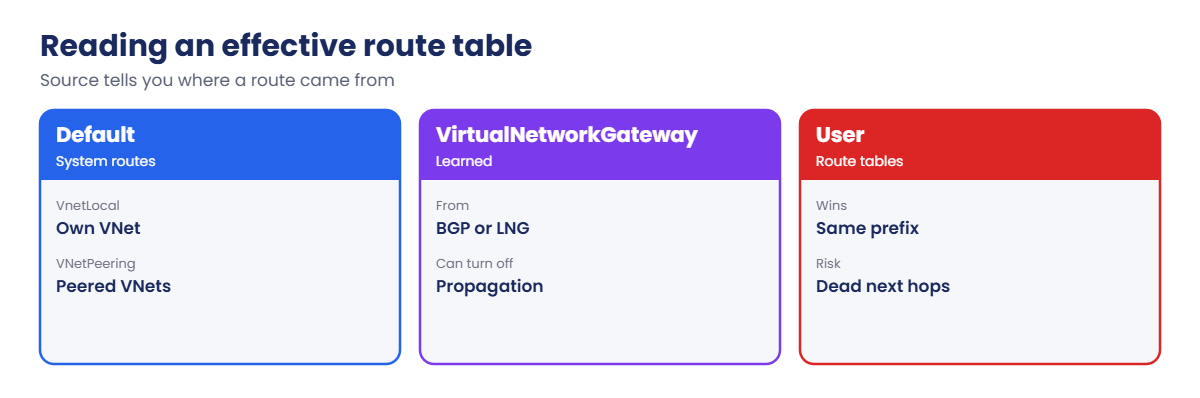
- Sources: Default (system routes: VnetLocal, VNetPeering, Internet, None), VirtualNetworkGateway (learned by BGP or from local network gateways), and User (route tables on the subnet).
- Selection: longest prefix wins; for the same prefix, User beats VirtualNetworkGateway beats Default.
- Peering routes: each peered VNet’s address space appears as VNetPeering. Not transitive (Lesson 46).
- No validation: Azure accepts a VirtualAppliance route to any IP, even one where nothing exists. Traffic to it is silently dropped.
- Overlaps: two VNets with overlapping address spaces can’t be peered; the request fails with VnetAddressSpacesOverlap.
- Where to read them: the NIC’s Effective routes blade, az network nic show-effective-route-table (VM must be running), or Network Watcher next hop for one destination.
How it works, step by step
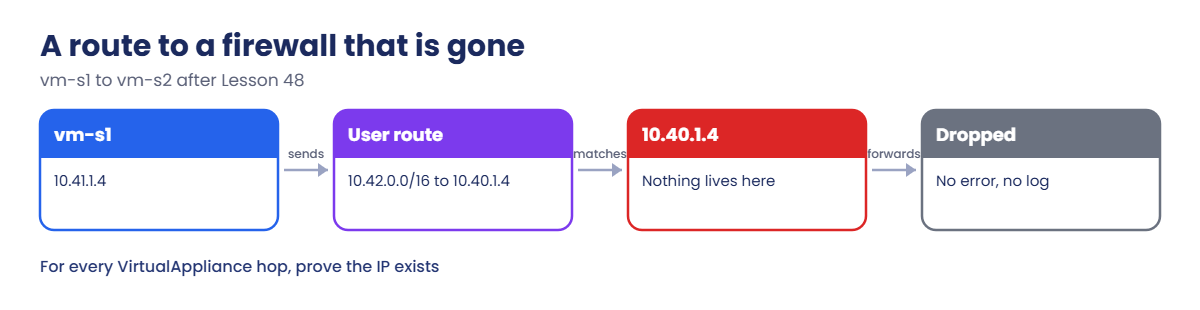
What happens to vm-s1’s ping to spoke 2 with the routes left from Lesson 48:
- vm-s1 (10.41.1.4) sends to 10.42.1.4.
- Its effective routes contain a User route 10.42.0.0/16 to VirtualAppliance 10.40.1.4.
- Azure forwards the packet over the peering towards 10.40.1.4, the address Azure Firewall had.
- Nothing owns 10.40.1.4 any more, so the packet is dropped. No error, no reset, no log entry.
- The ping times out. NSGs, peerings and the destination VM are all fine.
Black holes like this are hard to see because every individual piece looks healthy. Only the combination is broken.
The habit that catches them: for every VirtualAppliance next hop in effective routes, prove something actually lives at that IP.
A query that finds dead next hops for you
Checking one route by hand is fine in a lab. In a real estate with dozens of route tables, let Resource Graph do it. Save this as C:\azure-lab\dead-hops.kql:
resources
| where type =~ 'microsoft.network/routetables'
| mv-expand r = properties.routes
| where r.properties.nextHopType == 'VirtualAppliance'
| project routeTable = name, route = tostring(r.name), nextHop = tostring(r.properties.nextHopIpAddress)
| join kind=leftouter (
resources
| where type =~ 'microsoft.network/networkinterfaces'
| mv-expand ip = properties.ipConfigurations
| project nextHop = tostring(ip.properties.privateIPAddress), owner = name
) on nextHop
| where isempty(owner)
| project routeTable, route, nextHopRun it as one line, because line breaks don’t survive the trip into az.cmd:
az graph query -q ((Get-Content C:\azure-lab\dead-hops.kql -Raw) -replace "`r?`n", ' ') --query "data" -o tableIt lists every route whose next hop IP isn’t on any NIC. Firewalls and internal load balancer frontends aren’t NICs, so check any hits against them before you change anything; you can extend the query with the azurefirewalls and loadbalancers types later. Run it after every firewall or appliance change.
Read effective routes in the hub and spokes
1Three test VMs in the hub and spokes
Create one VM in the hub’s shared subnet and one in each spoke (about 6 minutes):
az group create --name rg-saat-l63 --location centralindia --tags course=saatvedha-azure lesson=63 -o none
$sub = az network vnet subnet show --resource-group rg-saat-hub --vnet-name vnet-hub --name snet-shared --query id -o tsv
az vm create --resource-group rg-saat-l63 --name vm-hub --image Canonical:ubuntu-24_04-lts:server:latest --size Standard_B1s --subnet $sub --private-ip-address 10.40.10.4 --public-ip-address '""' --nsg '""' --admin-username azureuser --generate-ssh-keys --tags course=saatvedha-azure lesson=63 -o none
$sub = az network vnet subnet show --resource-group rg-saat-hub --vnet-name vnet-spoke1 --name snet-app --query id -o tsv
az vm create --resource-group rg-saat-l63 --name vm-s1 --image Canonical:ubuntu-24_04-lts:server:latest --size Standard_B1s --subnet $sub --private-ip-address 10.41.1.4 --public-ip-address '""' --nsg '""' --admin-username azureuser --generate-ssh-keys --tags course=saatvedha-azure lesson=63 -o none
$sub = az network vnet subnet show --resource-group rg-saat-hub --vnet-name vnet-spoke2 --name snet-app --query id -o tsv
az vm create --resource-group rg-saat-l63 --name vm-s2 --image Canonical:ubuntu-24_04-lts:server:latest --size Standard_B1s --subnet $sub --private-ip-address 10.42.1.4 --public-ip-address '""' --nsg '""' --admin-username azureuser --generate-ssh-keys --tags course=saatvedha-azure lesson=63 -o none2Read vm-s1’s effective routes
Run this:
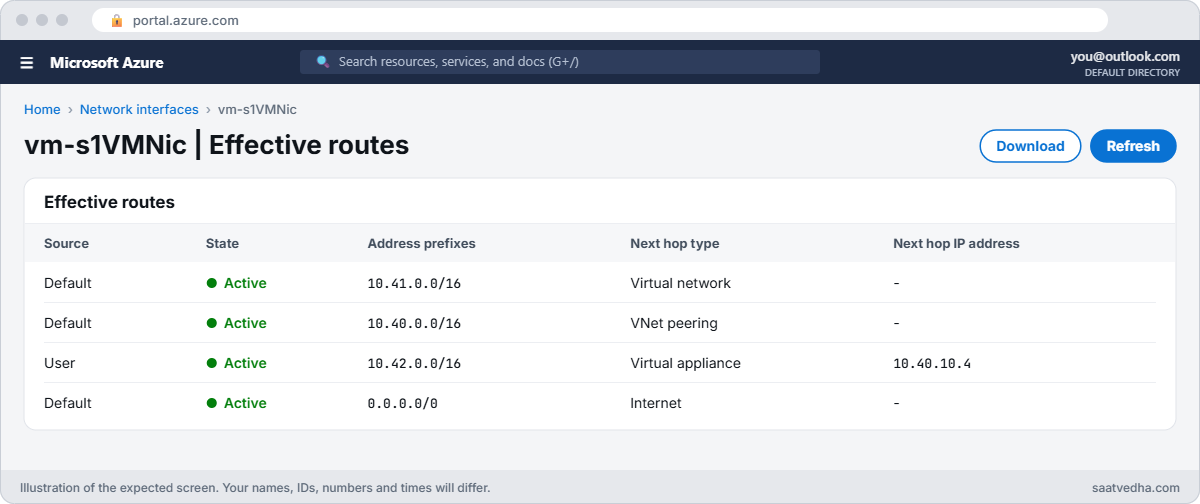
az network nic show-effective-route-table --resource-group rg-saat-l63 --name vm-s1VMNic --query "value[?nextHopType!='None'].{source:source, prefix:addressPrefix[0], nextHop:nextHopType, ip:nextHopIpAddress[0]}" -o tableYou should see something like this:
Source Prefix NextHop Ip
------- ------------ ---------------- ----------
Default 10.41.0.0/16 VnetLocal
Default 10.40.0.0/16 VNetPeering
Default 0.0.0.0/0 Internet
User 10.42.0.0/16 VirtualAppliance 10.40.1.4Read each line as “to reach this prefix, go here”. The spoke reaches its own VNet locally and the hub through peering. Spoke 2 goes through an appliance at 10.40.1.4.
3Test the paths
Ping the hub, then spoke 2:
az vm run-command invoke --resource-group rg-saat-l63 --name vm-s1 --command-id RunShellScript --scripts 'ping -c 2 -W 2 10.40.10.4 | tail -2' --query "value[0].message" -o tsv
az vm run-command invoke --resource-group rg-saat-l63 --name vm-s1 --command-id RunShellScript --scripts 'ping -c 2 -W 2 10.42.1.4 | tail -2' --query "value[0].message" -o tsvYou should see something like this:
[stdout]
2 packets transmitted, 2 received, 0% packet loss, time 1001ms
rtt min/avg/max/mdev = 1.180/1.244/1.308/0.064 ms
[stdout]
2 packets transmitted, 0 received, 100% packet loss, time 1019msThe hub works through peering. Spoke 2 doesn’t. Before reading on, try to explain why from the table above.

✅ Checkpoint: You can read every line of vm-s1’s effective routes and you’ve found a path that fails.
Break It, Then Fix It
1Break it: a route to a firewall that no longer exists
This break already happened in Lesson 48. Prove what lives at 10.40.1.4:
az graph query -q "Resources | where type =~ 'microsoft.network/networkinterfaces' | mv-expand ip = properties.ipConfigurations | where ip.properties.privateIPAddress == '10.40.1.4' | project name" --query "data[].name" -o tsv
az network firewall list --query "[].{name:name, ip:ipConfigurations[0].privateIPAddress}" -o table
az network watcher show-next-hop --resource-group rg-saat-l63 --vm vm-s1 --source-ip 10.41.1.4 --dest-ip 10.42.1.4 -o tableYou should see something like this (the first two commands print nothing):
NextHopIpAddress NextHopType RouteTableId
------------------ ---------------- ---------------------------------------
10.40.1.4 VirtualAppliance /subscriptions/.../routeTables/rt-spoke1No NIC and no firewall owns 10.40.1.4, yet rt-spoke1 sends spoke 2 traffic there. Azure didn’t warn when the firewall was deleted, and it never will.
Fix it: point both routes at an appliance that exists. Turn vm-hub into a router as in Lesson 47, then update the routes:
az network nic update --resource-group rg-saat-l63 --name vm-hubVMNic --ip-forwarding true -o none
az vm run-command invoke --resource-group rg-saat-l63 --name vm-hub --command-id RunShellScript --scripts 'sysctl -w net.ipv4.ip_forward=1' -o none
az network route-table route update --resource-group rg-saat-hub --route-table-name rt-spoke1 --name to-spoke2 --next-hop-ip-address 10.40.10.4 -o none
az network route-table route update --resource-group rg-saat-hub --route-table-name rt-spoke2 --name to-spoke1 --next-hop-ip-address 10.40.10.4 -o none
az vm run-command invoke --resource-group rg-saat-l63 --name vm-s1 --command-id RunShellScript --scripts 'ping -c 2 -W 2 10.42.1.4 | tail -2' --query "value[0].message" -o tsvYou should see 2 received. Both directions now use a router that exists.
2Break it: a new VNet that overlaps the hub
A team creates a VNet for a new app and asks for it to be peered to the hub. They chose 10.40.128.0/17 because “10.40 is our Azure range”:
az network vnet create --resource-group rg-saat-l63 --name vnet-newapp --address-prefixes 10.40.128.0/17 --subnet-name snet-app --subnet-prefixes 10.40.129.0/24 -o none
$newId = az network vnet show --resource-group rg-saat-l63 --name vnet-newapp --query id -o tsv
az network vnet peering create --resource-group rg-saat-hub --name hub-to-newapp --vnet-name vnet-hub --remote-vnet $newId --allow-vnet-access true -o noneYou’ll get an error like this:
(VnetAddressSpacesOverlap) Cannot create or update peering /subscriptions/.../virtualNetworks/vnet-hub/virtualNetworkPeerings/hub-to-newapp. Virtual networks /subscriptions/.../virtualNetworks/vnet-hub and /subscriptions/.../virtualNetworks/vnet-newapp cannot be peered because their address spaces overlap. Overlapping address prefixes: 10.40.128.0/17vnet-hub owns all of 10.40.0.0/16, so 10.40.128.0/17 sits inside it. Peering can never work with this plan. Run C:\azure-lab\Test-IpPlan.ps1 from Lesson 45 to check a plan before anyone builds it.
Fix it: the VNet has no resources yet, so re-address it to the next free spoke range (10.43.0.0/16 in the Lesson 45 plan), then peer:
az network vnet subnet delete --resource-group rg-saat-l63 --vnet-name vnet-newapp --name snet-app
az network vnet update --resource-group rg-saat-l63 --name vnet-newapp --address-prefixes 10.43.0.0/16 -o none
az network vnet subnet create --resource-group rg-saat-l63 --vnet-name vnet-newapp --name snet-app --address-prefixes 10.43.1.0/24 -o none
az network vnet peering create --resource-group rg-saat-hub --name hub-to-newapp --vnet-name vnet-hub --remote-vnet $newId --allow-vnet-access true -o none
az network vnet peering show --resource-group rg-saat-hub --vnet-name vnet-hub --name hub-to-newapp --query peeringState -o tsvYou should see Initiated, because only one side exists; that’s fine for this test.

3Clean up
Remove the test peering from the hub side, put the routes back on the firewall address for the Phase 3 design, and delete the test resources:
az network vnet peering delete --resource-group rg-saat-hub --vnet-name vnet-hub --name hub-to-newapp
az network route-table route update --resource-group rg-saat-hub --route-table-name rt-spoke1 --name to-spoke2 --next-hop-ip-address 10.40.1.4 -o none
az network route-table route update --resource-group rg-saat-hub --route-table-name rt-spoke2 --name to-spoke1 --next-hop-ip-address 10.40.1.4 -o none
az group delete --name rg-saat-l63 --yes✅ Checkpoint: You found a black-holed route by proving nothing lived at its next hop, fixed it, and resolved an address overlap before peering.
This happened at work
The firewall migration that broke one subnet
A logistics company replaced a pair of third-party firewall VMs with Azure Firewall. The cut-over plan updated route tables for 12 spokes. A week later, the warehouse scanning system in one spoke stopped syncing with the ERP in another spoke, but only at night.
That spoke had a second route table, attached to a batch subnet, which nobody had listed. Its routes still pointed at the old firewall’s internal load balancer IP. The batch jobs ran at night, so the failure only showed up then.
Every individual check during the day passed.
What they changed: a Resource Graph query now lists every route with a VirtualAppliance next hop and checks whether that IP belongs to a NIC, load balancer or firewall. It runs daily and alerts on any route pointing at nothing. Firewall changes now start from that query, not from a spreadsheet of route tables.
Common mistakes and troubleshooting
| Mistake | What you see | What to do |
|---|---|---|
| Route to a deleted appliance | Silent packet loss | Prove the next hop IP exists; update routes. |
| Overlapping VNet ranges | VnetAddressSpacesOverlap on peering | Re-address before deploying resources; use an IP plan. |
| Reading routes on a stopped VM | Effective routes unavailable | Start the VM or use next hop instead. |
| Missing a second route table | One subnet fails, others work | List route tables per subnet across the VNet. |
| Expecting transitive peering | Spoke to spoke fails without a route | Route through a hub appliance or peer directly. |
| Forgetting the return path | One-way traffic | Check effective routes on both ends. |
Interview questions
Click a question to open it. Each one is written the way an interviewer would ask it. Under it you will see why they ask it and one way you could answer, in your own words.
Fresher level
1. What are effective routes?
Why they ask this: The basic concept.
How you might answer: The merged set of system, gateway and user-defined routes a NIC uses, after Azure applies its selection rules.
2. What does a next hop of VirtualAppliance mean?
Why they ask this: Vocabulary.
How you might answer: Traffic for that prefix is sent to a specific IP, usually a firewall or router, which must forward it.
3. Can you peer VNets with overlapping ranges?
Why they ask this: A classic rule.
How you might answer: No. Peering fails with VnetAddressSpacesOverlap.
2–5 years experience
4. Spoke to spoke traffic fails but both reach the hub. What do you check?
Why they ask this: A real troubleshooting path.
How you might answer: Effective routes on both spokes for the other spoke’s prefix, whether the next hop appliance exists and forwards traffic, allow forwarded traffic on peerings, NSGs, and the return route.
5. How do you find routes that point at nothing?
Why they ask this: Operations skill.
How you might answer: Query all route tables for VirtualAppliance next hops and compare the IPs against NIC, load balancer and firewall private IPs with Resource Graph.
6. How do you fix an overlap when the VNet already has resources?
Why they ask this: Practical judgement.
How you might answer: You can’t simply change it; add a new non-overlapping address space and migrate subnets and resources, or rebuild. That’s why IP planning comes first.
Senior level
7. How would you prevent routing mistakes across 50 spokes?
Why they ask this: They want governance.
How you might answer: Route tables in code, Azure Virtual Network Manager routing configurations, Policy to require route tables on subnets, daily validation queries, and change reviews for appliance IPs.
8. How do you handle overlapping ranges after a merger?
Why they ask this: Senior design.
How you might answer: NAT on firewalls or Azure Virtual WAN with NAT rules, gradual re-addressing, or private link patterns for specific services, while keeping a long-term plan to remove overlaps.
9. When would you use Virtual Network Manager instead of manual peering?
Why they ask this: Scale thinking.
How you might answer: When you have many VNets: it manages hub-and-spoke or mesh connectivity, security admin rules and routing configurations centrally, and adds new VNets by tag.
Quick quiz
Q1. A User route sends 10.42.0.0/16 to 10.40.1.4, which nothing owns. Result?
- Error message
- Silent drop
- Automatic reroute
- Peering fails
Show answer
B — Azure accepts the route and drops the traffic.
Q2. Which wins for the same prefix?
- Default
- User
- VirtualNetworkGateway
- Random
Show answer
B — User routes win.
Q3. Peering fails with VnetAddressSpacesOverlap. Fix?
- Restart the gateway
- Re-address one VNet
- Add an NSG rule
- Use Basic SKU
Show answer
B — The address spaces must not overlap.
Q4. Effective routes need the VM to be?
- Deallocated
- Running
- In a zone
- Windows
Show answer
B — They are read from the running NIC.
Q5. Best proof that a next hop is valid?
- The route exists
- An appliance owns that IP and forwards
- The NSG allows it
- The VM is large
Show answer
B — Something must live at that IP.
Quick recap
You can now find routing faults that hide behind healthy-looking components.
- Effective routes merge system, gateway and user routes.
- Longest prefix, then User over gateway over system.
- Routes to non-existent appliances drop traffic silently.
- Peering refuses overlapping address spaces.
- Check both directions and every route table.
Next lesson
Lesson 64: Storage account 403 errors → You fix storage account 403 errors caused by firewalls, service endpoints, SAS tokens and missing data roles.
Further reading: Azure effective routes
Want to go deeper into Azure effective routes? See Microsoft’s Diagnose a virtual machine routing problem and Virtual network traffic routing. You can also see the full plan for this course on the Azure Cloud Administration course page.
