Storage networking: firewall, service endpoints, private endpoints

An Azure private endpoint gives a storage account a private IP address inside your VNet, so your servers reach it without touching the internet. Together with the storage firewall and service endpoints, it decides who can reach your data over the network.

This is where many “403” and “it worked yesterday” tickets come from. Most of them aren’t permission problems at all: they’re network rules or DNS pointing at the wrong address.

In the lab you lock the course storage account down in three stages, then break DNS the way it breaks in real companies and fix it.

TimeYou needCostBy the end you can
About 60 minutesThe storage account from Lesson 21, web01 and vnet-saat, the CLIAbout 2 US cents: a private endpoint and a private DNS zone for an hour, web01 on free hoursUse the storage firewall, service endpoints and private endpoints, and troubleshoot private endpoint DNS

What it is, in one line

A private endpoint is a network card in your subnet with a private IP that leads straight to one Azure service.

In Simple Words

Three ways to guard a school library

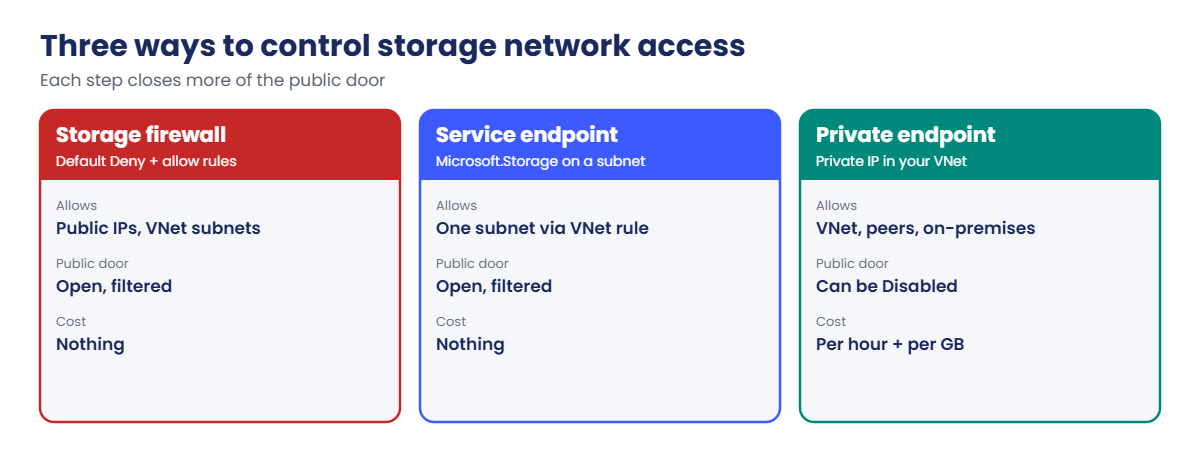
The firewall is a guard at the front door with a list: “only children from these classes, and this one visitor”. The door still faces the main road.

A service endpoint is a covered walkway from your classroom straight to that front door. Your class doesn’t walk on the road any more, but the library still has its public door.

A private endpoint builds a new door to the library inside your own corridor, with a room number of your own. You can then brick up the front door completely. But everyone must know the new room number; if the school map still shows the old door, they walk to a wall.

Engineer's View

Firewall, service endpoints and private endpoints

  • Storage firewall: --default-action Deny plus allow rules for public IPs or ranges (your office) and for VNet subnets. IP rules don’t apply to requests from the same Azure region; use VNet rules for those. Trusted Microsoft services can be allowed as an exception.
  • Service endpoint (Microsoft.Storage on a subnet): traffic from that subnet reaches the storage account’s public address over the Azure backbone, with the VM’s private IP as the source, so a VNet rule can allow it. Free. The account still has a public endpoint.
  • Private endpoint: a NIC in your subnet with a private IP, mapped to one sub-service (blob, file, queue, table, dfs, web). Priced per hour and per GB. Reachable from peered VNets and on-premises over VPN or ExpressRoute. You can then set --public-network-access Disabled.
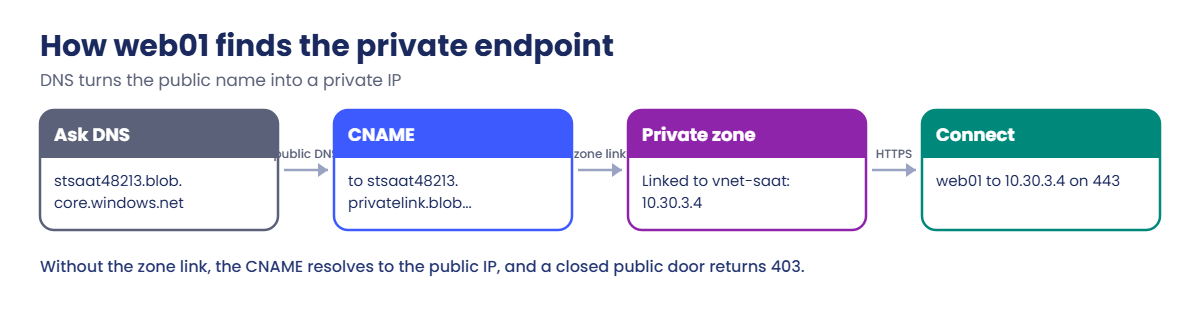
  • DNS makes or breaks it: the public name <account>.blob.core.windows.net is a CNAME to <account>.privatelink.blob.core.windows.net. A private DNS zone privatelink.blob.core.windows.net, linked to the VNet, answers that with the private IP. Without the link or the record, clients get the public IP and are refused.
  • The control plane isn’t affected: creating, changing and deleting the account through Azure Resource Manager still works from anywhere. Only data access is filtered.

How it works, step by step

What happens when web01 reads a blob after the private endpoint is set up:

Azure private endpoint vs service endpoint vs storage firewall
  1. web01 asks Azure DNS for stsaat48213.blob.core.windows.net.
  2. Public DNS answers with a CNAME to stsaat48213.privatelink.blob.core.windows.net.
  3. Because privatelink.blob.core.windows.net is linked to vnet-saat, Azure DNS answers that name from the private zone: 10.30.3.4.
  4. web01 connects to 10.30.3.4 on 443. The private endpoint passes the traffic to the storage account over Microsoft’s network.
  5. Storage checks authentication and permissions as usual. Public network access can be fully off.

Anyone outside the VNet, like your laptop, gets the same CNAME but resolves it through public DNS to the public IP. With public access disabled, that request is refused.

Azure private endpoint DNS: CNAME to privatelink and the private IP

So the first two questions for any storage 403 are: what IP does the client resolve, and which network rule should let that IP in?

Hands-on lab: Azure private endpoint for blob storage

Load the names you need and start web01:

$st = (Get-Content C:\azure-lab\storage.txt)
$v = Get-Content C:\azure-lab\vnet-saat.json | ConvertFrom-Json
$id = az storage account show --resource-group rg-saat-data --name $st --query id -o tsv
az vm start --resource-group rg-saat-vms --name web01

1Baseline: what web01 sees today

Ask web01 to resolve the blob endpoint and make an anonymous request:

az vm run-command invoke --resource-group rg-saat-vms --name web01 --command-id RunShellScript --scripts "getent hosts $st.blob.core.windows.net; curl -sS https://$st.blob.core.windows.net/lab/hello.txt | grep -o '<Code>[A-Za-z]*</Code>'" --query "value[0].message" -o tsv

You should see something like this:

[stdout]
20.60.x.x   blob.pnq21prdstr05a.store.core.windows.net stsaat48213.blob.core.windows.net
<Code>PublicAccessNotPermitted</Code>

A public IP, and an answer from storage itself: the network let the request in, and the account refused anonymous access. That second line is how this lab tells “network OK” from “network blocked” without any keys.

2Turn on the firewall with a service endpoint

Add your laptop’s public IP first, so you don’t lock yourself out, then allow snet-web and deny everything else:

$ip = Invoke-RestMethod -Uri https://api.ipify.org
az network vnet subnet update --ids $v.'snet-web' --service-endpoints Microsoft.Storage -o none
az storage account network-rule add --resource-group rg-saat-data --account-name $st --ip-address $ip -o none
az storage account network-rule add --resource-group rg-saat-data --account-name $st --subnet $v.'snet-web' -o none
az storage account update --resource-group rg-saat-data --name $st --default-action Deny -o none
az storage account show --resource-group rg-saat-data --name $st --query "{default:networkRuleSet.defaultAction, ips:length(networkRuleSet.ipRules), subnets:length(networkRuleSet.virtualNetworkRules)}" -o table
az vm run-command invoke --resource-group rg-saat-vms --name web01 --command-id RunShellScript --scripts "getent hosts $st.blob.core.windows.net; curl -sS https://$st.blob.core.windows.net/lab/hello.txt | grep -o '<Code>[A-Za-z]*</Code>'" --query "value[0].message" -o tsv

You should see something like this:

Default    Ips    Subnets
---------  -----  ---------
Deny       1      1
[stdout]
20.60.x.x   blob.pnq21prdstr05a.store.core.windows.net stsaat48213.blob.core.windows.net
<Code>PublicAccessNotPermitted</Code>

web01 still gets through: the VNet rule matches its subnet through the service endpoint. The IP rule is for your laptop; it would do nothing for web01, because IP rules ignore same-region traffic.

3Create a private endpoint for blob

Put it in snet-data and give it a private DNS zone linked to vnet-saat:

$vnetId = az network vnet show --resource-group rg-saat-core --name vnet-saat --query id -o tsv
az network private-endpoint create --resource-group rg-saat-data --name pe-saat-blob --location centralindia --subnet $v.'snet-data' --private-connection-resource-id $id --group-id blob --connection-name pec-saat-blob --tags course=saatvedha-azure lesson=26 -o none
az network private-dns zone create --resource-group rg-saat-data --name privatelink.blob.core.windows.net --tags course=saatvedha-azure lesson=26 -o none
az network private-dns link vnet create --resource-group rg-saat-data --zone-name privatelink.blob.core.windows.net --name link-vnet-saat --virtual-network $vnetId --registration-enabled false -o none
az network private-endpoint dns-zone-group create --resource-group rg-saat-data --endpoint-name pe-saat-blob --name default --private-dns-zone privatelink.blob.core.windows.net --zone-name blob -o none
az network private-dns record-set a list --resource-group rg-saat-data --zone-name privatelink.blob.core.windows.net --query "[].{name:name, ip:aRecords[0].ipv4Address, ttl:ttl}" -o table

You should see something like this:

Name         Ip         Ttl
-----------  ---------  -----
stsaat48213  10.30.3.4  10

The zone group wrote the A record for you, and will remove it if the endpoint is deleted. 10.30.3.4 is the first usable address in snet-data.

4Switch off public access and test again

Run this:

az storage account update --resource-group rg-saat-data --name $st --public-network-access Disabled -o none
az vm run-command invoke --resource-group rg-saat-vms --name web01 --command-id RunShellScript --scripts "getent hosts $st.blob.core.windows.net; curl -sS https://$st.blob.core.windows.net/lab/hello.txt | grep -o '<Code>[A-Za-z]*</Code>'" --query "value[0].message" -o tsv

You should see something like this:

[stdout]
10.30.3.4       stsaat48213.privatelink.blob.core.windows.net stsaat48213.blob.core.windows.net
<Code>PublicAccessNotPermitted</Code>

Same name, private IP, and storage still answers. The account now has no public door at all; only the private endpoint reaches it.
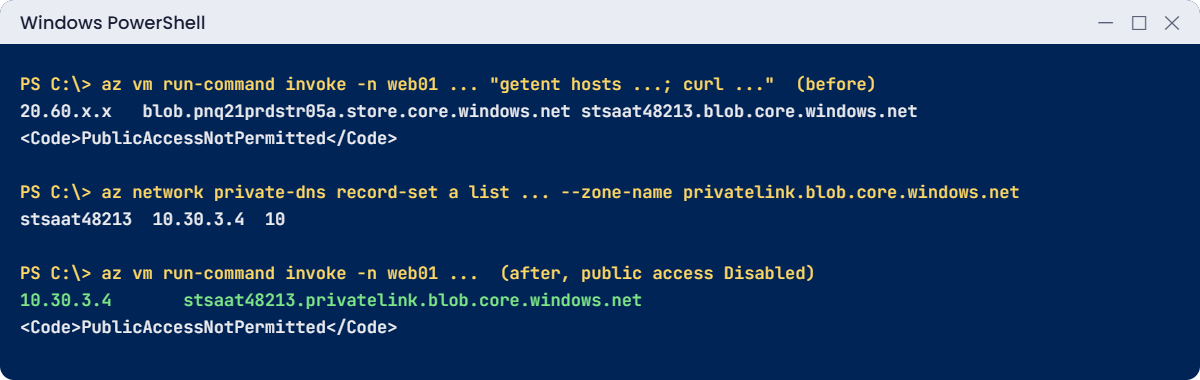
Azure private endpoint lab: web01 resolves the storage account to 10.30.3.4
Before: public IP. After: the private endpoint IP, with public access off.

✅ Checkpoint: web01 resolves the account to 10.30.3.4 and reaches it, and public network access is Disabled.

Break It, Then Fix It

These two are the most common storage network tickets there are.

1Break it: the VNet link goes missing

Delete the DNS zone’s link to vnet-saat, as happens when someone “tidies up” DNS, and test from web01:

az network private-dns link vnet delete --resource-group rg-saat-data --zone-name privatelink.blob.core.windows.net --name link-vnet-saat --yes
Start-Sleep -Seconds 60
az vm run-command invoke --resource-group rg-saat-vms --name web01 --command-id RunShellScript --scripts "getent hosts $st.blob.core.windows.net; curl -sS https://$st.blob.core.windows.net/lab/hello.txt | grep -o '<Code>[A-Za-z]*</Code>'" --query "value[0].message" -o tsv

You’ll see something like this:

[stdout]
20.60.x.x   blob.pnq21prdstr05a.store.core.windows.net stsaat48213.blob.core.windows.net
<Code>AuthorizationFailure</Code>

The private endpoint is fine and the A record is still in the zone. But vnet-saat no longer uses the zone, so web01 resolves the public IP, and the public door is closed: 403 AuthorizationFailure, “This request is not authorized to perform this operation.” Apps report this as a permission error, which sends people to check roles instead of DNS.

Fix it: link the zone again, then check the IP first:

az network private-dns link vnet create --resource-group rg-saat-data --zone-name privatelink.blob.core.windows.net --name link-vnet-saat --virtual-network $vnetId --registration-enabled false -o none
Start-Sleep -Seconds 60
az vm run-command invoke --resource-group rg-saat-vms --name web01 --command-id RunShellScript --scripts "getent hosts $st.blob.core.windows.net; curl -sS https://$st.blob.core.windows.net/lab/hello.txt | grep -o '<Code>[A-Za-z]*</Code>'" --query "value[0].message" -o tsv

You should see something like this:

[stdout]
10.30.3.4       stsaat48213.privatelink.blob.core.windows.net stsaat48213.blob.core.windows.net
<Code>PublicAccessNotPermitted</Code>

2Break it: “the CLI stopped working on my laptop”

List blobs from your laptop, as you did in Lesson 21:

az storage blob list --account-name $st --container-name lab --auth-mode login -o table

You’ll get this error:

The request may be blocked by network rules of storage account. Please check network rule set using 'az storage account show -n accountname --query networkRuleSet'.
If you want to change the default action to apply when no rule matches, please use 'az storage account update'.

Your Entra ID role is fine; the network isn’t. Public access is Disabled, so the IP rule you added in step 2 doesn’t apply any more. In a company, admins reach data like this over a VPN, from a jump box in the VNet, or through Bastion.

Fix it for the lab: set the account back to the open default, so later lessons work from your laptop, and remove the private endpoint pieces:

az storage account update --resource-group rg-saat-data --name $st --public-network-access Enabled --default-action Allow -o none
az storage account network-rule remove --resource-group rg-saat-data --account-name $st --ip-address $ip -o none
az storage account network-rule remove --resource-group rg-saat-data --account-name $st --subnet $v.'snet-web' -o none
az network private-endpoint delete --resource-group rg-saat-data --name pe-saat-blob
az network private-dns link vnet delete --resource-group rg-saat-data --zone-name privatelink.blob.core.windows.net --name link-vnet-saat --yes
az network private-dns zone delete --resource-group rg-saat-data --name privatelink.blob.core.windows.net --yes
az vm deallocate --resource-group rg-saat-vms --name web01
az storage blob list --account-name $st --container-name lab --auth-mode login --query "[].name" -o tsv
C:\azure-lab\Find-LabResources.ps1 -Lesson 26

You should see this:

hello.txt
Nothing tagged course=saatvedha-azure is left.
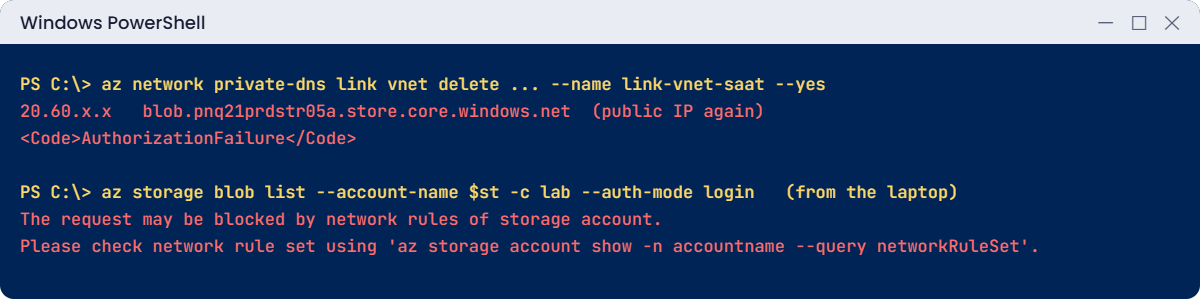
Azure private endpoint errors: missing VNet link and blocked laptop
A missing zone link sends web01 to the closed public door; the laptop is blocked by network rules.

✅ Checkpoint: You fixed a private endpoint DNS failure and a laptop blocked by network rules. The account is open again for the next lessons, and web01 is deallocated.

The Microsoft.Storage service endpoint stays on snet-web. It costs nothing, and Lesson 64 uses it again.

This happened at work

The backup that failed every night after a “security fix”

A bank’s security team disabled public access on 40 storage accounts and created private endpoints for each. The change was tested from the main VNet, and it worked. The next morning, every nightly backup from the DR region had failed with HTTP 403.

The DR VNet was peered with the main VNet, so the private endpoints were reachable. But the privatelink.blob.core.windows.net zone was only linked to the main VNet. Backup servers in DR resolved the public IPs and hit the closed door.

What they changed: private DNS zones moved to a central hub subscription and are linked to every VNet by Azure Policy when the VNet is created. On-premises DNS forwards privatelink names to an Azure DNS Private Resolver. The change checklist now includes “resolve the name from every client network” before anyone flips public access off.

Common mistakes and troubleshooting

MistakeWhat you seeWhat to do
Private DNS zone not linked to the client VNet403 AuthorizationFailure; public IP resolvedLink the privatelink zone to every client VNet.
Endpoint created without a DNS zone groupName never resolves privatelyAdd a zone group or create the A record.
IP rule for an Azure VM in the same regionVM still blockedUse a VNet rule with a service endpoint.
Disabling public access before testing all clientsBackups and apps fail overnightResolve and test from every network first.
On-premises DNS not forwarding privatelink namesOffice users get the public IPForward to Azure DNS Private Resolver.
Endpoint for blob only, app uses dfs or fileSome calls failOne endpoint per sub-service the app uses.
Assuming 403 means RBACHours spent on rolesCheck the resolved IP and network rules first.

Interview questions

Click a question to open it. Each one is written the way an interviewer would ask it. Under it you will see why they ask it and one way you could answer, in your own words.

Fresher level

1. What is a private endpoint?

Why they ask this: The basic definition.

How you might answer: A network interface with a private IP in my subnet that connects to one Azure service resource, such as the blob service of a storage account, over Microsoft’s network instead of a public address.

2. What is the difference between a service endpoint and a private endpoint?

Why they ask this: A classic comparison question.

How you might answer: A service endpoint lets a subnet reach the service’s public address over the Azure backbone, and the storage firewall can allow that subnet. A private endpoint gives the service a private IP inside the VNet, reachable from peered and on-premises networks, and lets you switch the public endpoint off.

3. What does the storage firewall do?

Why they ask this: A basic configuration check.

How you might answer: It sets a default action, usually Deny, and allows listed public IPs, VNet subnets with service endpoints, private endpoints and optionally trusted Microsoft services. It filters data access only, not management through Azure Resource Manager.

2–5 years experience

4. An app gets 403 from storage after private endpoints were added. How do you troubleshoot?

Why they ask this: The Phase 4 classic.

How you might answer: First, from the app’s server, resolve the storage name and check it returns the private endpoint IP. If it returns a public IP, the privatelink zone isn’t linked to that VNet or on-premises DNS isn’t forwarding. Then I check the account’s network rules, and only then RBAC or SAS.

5. Why don’t IP rules work for a VM in the same region?

Why they ask this: They want the detail that trips people up.

How you might answer: Same-region traffic from Azure doesn’t arrive from the VM’s public IP, so the storage firewall ignores IP rules for it. You allow it with a VNet rule and a service endpoint, or with a private endpoint.

6. How do on-premises users reach a storage account that only has a private endpoint?

Why they ask this: They want hybrid DNS knowledge.

How you might answer: Over VPN or ExpressRoute to the VNet, with on-premises DNS forwarding the privatelink zones to Azure DNS Private Resolver or a DNS server in Azure. They keep using the normal blob.core.windows.net name; DNS returns the private IP.

Senior level

7. How would you design private endpoint DNS for a large hub-and-spoke network?

Why they ask this: They want an enterprise pattern.

How you might answer: Central privatelink zones in the hub, linked to every spoke, with Azure Policy creating the DNS zone group whenever a private endpoint is made. A Private Resolver in the hub serves on-premises forwarding. Teams aren’t allowed to create their own privatelink zones, to avoid split answers.

8. What are the cost and limit trade-offs of private endpoints?

Why they ask this: They’re checking practical sense.

How you might answer: Each endpoint costs per hour and per GB processed, and you need one per sub-service per account. With hundreds of accounts that adds up, so I’d use them for sensitive data and service endpoints with the firewall for less sensitive cases.

9. How do you roll out “public access disabled” across many storage accounts safely?

Why they ask this: They want change management.

How you might answer: Inventory who connects to each account from the logs, create endpoints and DNS first, test resolution and access from every client network, switch to firewall Deny with logging, watch for failures, and only then disable public access. An Azure Policy keeps new accounts compliant.

Quick quiz

Q1. Which feature gives a storage account a private IP in your VNet?

  1. Service endpoint
  2. Private endpoint
  3. IP rule
  4. SAS token
Show answer

B — A private endpoint is a NIC with a private IP.

Q2. Which DNS zone does a blob private endpoint use?

  1. blob.core.windows.net
  2. privatelink.blob.core.windows.net
  3. saat.internal
  4. core.windows.net
Show answer

B — privatelink.blob.core.windows.net holds the private A records.

Q3. A VM in the same region is blocked despite an IP rule for its public IP. Why?

  1. Wrong tier
  2. IP rules ignore same-region traffic
  3. SAS expired
  4. Soft delete is on
Show answer

B — Use a VNet rule or a private endpoint.

Q4. After the zone’s VNet link is deleted, clients get:

  1. The private IP
  2. The public IP and a 403
  3. A new SAS
  4. A 404 always
Show answer

B — They resolve publicly and hit the closed public door.

Q5. Does the storage firewall block az storage account update?

  1. Yes
  2. No, management goes through Resource Manager
  3. Only from laptops
  4. Only on GRS
Show answer

B — The firewall filters data access only.

Quick recap

You can now lock down storage networking and troubleshoot it when it bites.

  • Firewall: default Deny plus IP and VNet rules.
  • Service endpoints let a subnet through the firewall; the public door stays.
  • Private endpoints give a private IP and let you close the public door.
  • DNS must return the private IP from every client network.
  • For any storage 403: resolved IP first, network rules next, permissions last.

Next lesson

Lesson 27: Azure Bastion: no more public RDP and SSH → You connect to web01 and win01 through Bastion, with no public IPs and no open ports.

Further reading: Azure private endpoint

Want to go deeper into Azure private endpoint? See Microsoft’s Use private endpoints for Azure Storage and Azure private endpoint DNS configuration. You can also see the full plan for this course on the Azure Cloud Administration course page.

Scroll to Top