Azure RBAC: Roles, Scopes and Role Assignments

Azure RBAC (role-based access control) decides what each person can do with Azure resources. Entra ID told Azure who Asha is in Lesson 5; RBAC now decides that she may manage one resource group, and nothing else.

Every RBAC grant has three parts: who, which role, and where (the scope). Once you think in those three parts, most “access denied” tickets take two minutes to solve.

In this lab you give the helpdesk group Contributor on one resource group, sign in as Asha in a separate CLI session, and see exactly where her access starts and stops. Then you hit the two RBAC surprises that catch almost every new admin.

TimeYou needCostBy the end you can
About 50 minutesThe CLI, Asha’s password from Lesson 5, a private browser windowLess than USD 0.01 (one small storage account for a few minutes)Grant, test and remove Azure roles at the right scope, and read AuthorizationFailed errors

What it is, in one line

Azure RBAC gives a role (what you can do) to a person, group or app (who) at a scope (where), and Azure checks that on every request.

In Simple Words

Keys for a block of flats

A caretaker has a big ring of keys. To a plumber, he gives the key to flat 12 only, for the day. To the building manager, he gives a key that opens every flat.

To the cleaner, he gives keys to the corridors but not to any flat.

The key is the role, the person is the who, and the flats it opens are the scope. Nobody gets the master key just because it’s easier.

One more detail: the plumber’s key opens the door to flat 12, but not the locked drawer inside where the owner keeps documents. That drawer needs a separate key. In Azure, that’s the difference between managing a storage account and reading the files inside it.

Engineer's View

Role definitions, assignments and the data plane

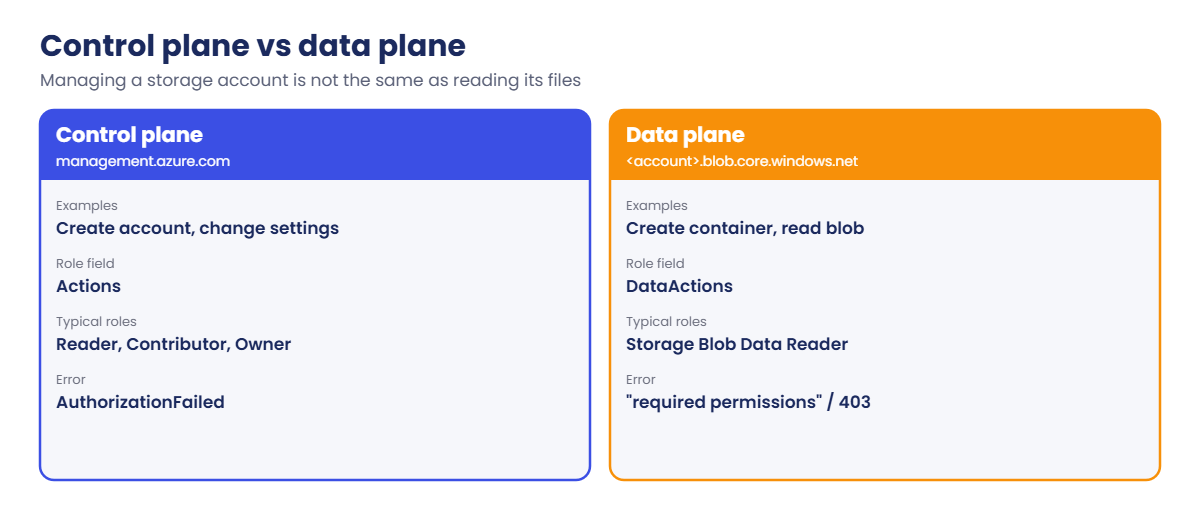
  • Role definition: a list of allowed operations. Actions cover the control plane (create, change, delete resources), DataActions cover the data inside some services (blobs, queues, Key Vault secrets). NotActions subtract from Actions.
  • Built-in roles to know: Reader (look at everything), Contributor (manage everything, but no access grants), Owner (everything, including granting access), User Access Administrator and Role Based Access Control Administrator (manage access only). Plus many service roles like Virtual Machine Contributor and Storage Blob Data Reader.
  • Role assignment: principal (user, group, service principal or managed identity) + role + scope. Scopes are management group, subscription, resource group or a single resource, and they’re inherited downward.
  • Permissions add up. If Asha gets Reader at the subscription and Contributor on one group, she has Contributor there and Reader everywhere else. Only deny assignments, which Azure creates for some managed features, can take an allow away (Lesson 8).

Contributor has Actions: * but its NotActions include Microsoft.Authorization/*/Write and Microsoft.Authorization/*/Delete. So a Contributor can build a whole environment but can’t give anyone else access. That is by design.

Built-in control-plane roles have no DataActions for blob data. A Contributor can create a storage account and even list its keys, but with Entra ID sign-in (--auth-mode login) they can’t read or write blobs until they get a data role such as Storage Blob Data Contributor.

Limits worth knowing: up to 4,000 role assignments per subscription, and changes usually apply within a few minutes. When someone is added to a group, they often need to sign out and in again, because group membership travels inside the token.

How it works, step by step

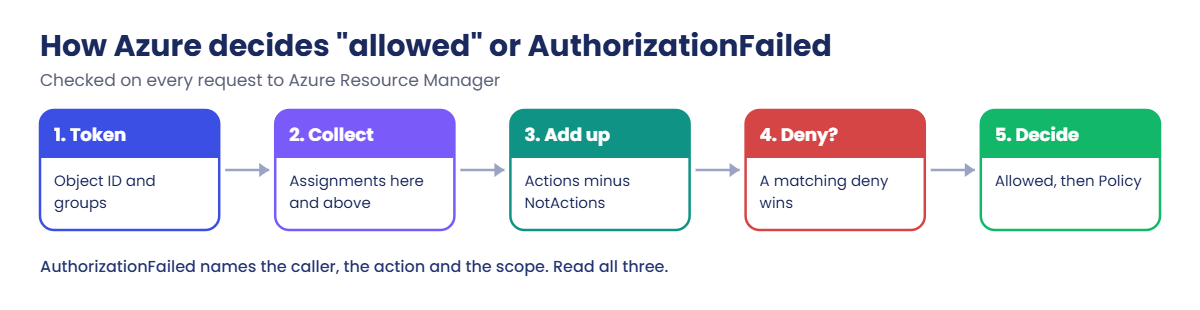
Every time a request reaches Azure Resource Manager, RBAC does this:

Azure RBAC decision flow from token to AuthorizationFailed
  1. Read the caller’s object ID and group memberships from the token.
  2. Collect every role assignment for those principals at the target scope and every parent scope.
  3. Add up the allowed Actions (or DataActions for data requests) from those roles, minus their NotActions.
  4. Check deny assignments. A matching deny wins.
  5. If the requested operation, for example Microsoft.Network/networkSecurityGroups/write, is in the allowed set, continue to Azure Policy. Otherwise return AuthorizationFailed.

The AuthorizationFailed message names the caller, the exact operation and the exact scope. Read it slowly: it tells you which role is missing and where it needs to be.

Azure RBAC control plane vs data plane roles for storage

The rule that keeps this sane: least privilege, through groups, at the smallest scope that works. Give Contributor on a resource group rather than a subscription, give it to a group rather than a person, and review it regularly.

Hands-on lab: give Asha exactly the access she needs

You work in two CLI sessions: your own (the admin) and Asha’s. The trick is the AZURE_CONFIG_DIR variable, which makes the CLI keep a second, separate sign-in in another folder. Run every block in your normal admin window unless it says Asha’s window.

1Create two resource groups

Run this:

$sub = az account show --query id -o tsv
$tenant = az account show --query tenantId -o tsv
foreach ($g in 'rg-saat-l07','rg-saat-l07b') { az group create --name $g --tags course=saatvedha-azure lesson=07 -o none }
$rg = az group show --name rg-saat-l07 --query id -o tsv
$rg

You should see something like this:

/subscriptions/6f1c2d3e-4a5b-4c6d-8e9f-0a1b2c3d4e5f/resourceGroups/rg-saat-l07

2Look inside the Contributor role

Run this:

az role definition list --name Contributor --query "[0].permissions[0].{actions:actions, notActions:notActions}" -o json

You should see something like this (the notActions list is longer):

{
  "actions": [
    "*"
  ],
  "notActions": [
    "Microsoft.Authorization/*/Delete",
    "Microsoft.Authorization/*/Write",
    "Microsoft.Authorization/elevateAccess/Action",
    ...
  ]
}

Everything, minus anything under Microsoft.Authorization that writes or deletes. Those are the role assignment operations.

3Give the helpdesk group Contributor on one resource group

Run this:

$grp = az ad group show --group grp-saat-helpdesk --query id -o tsv
az role assignment create --assignee-object-id $grp --assignee-principal-type Group --role Contributor --scope $rg -o none
az role assignment list --scope $rg --query "[].{who:principalName, role:roleDefinitionName}" -o table

You should see something like this:

Who                Role
-----------------  -----------
grp-saat-helpdesk  Contributor

--assignee-principal-type Group tells Azure what kind of object it is, which avoids a lookup that can fail just after a group is created.

4Sign in as Asha in her own CLI session

Open a second PowerShell window (Asha’s window) and run this:

$env:AZURE_CONFIG_DIR = 'C:\azure-lab\asha-cli'
az login --tenant <your-tenant-id>
az group list --query "[].name" -o tsv

Replace <your-tenant-id> with the value of $tenant from your admin window. In the sign-in window choose Use another account, sign in as Asha and approve MFA.

You should see this:

rg-saat-l07

Asha sees only the group she was given. rg-saat-l07b doesn’t even appear in her list.

5Asha builds something where she is allowed, and tries where she isn’t

In Asha’s window, run this:

az network nsg create --resource-group rg-saat-l07 --name nsg-saat-l07 --tags course=saatvedha-azure lesson=07 --query "NewNSG.provisioningState" -o tsv
az network nsg create --resource-group rg-saat-l07b --name nsg-saat-l07b --tags course=saatvedha-azure lesson=07

You should see something like this:

Succeeded
(AuthorizationFailed) The client 'asha.rao@priyakoutlook.onmicrosoft.com' with object id '3c2b1a09-...'
does not have authorization to perform action 'Microsoft.Network/networkSecurityGroups/write' over scope
'/subscriptions/6f1c2d3e-.../resourceGroups/rg-saat-l07b/providers/Microsoft.Network/networkSecurityGroups/nsg-saat-l07b'
or the scope is invalid. If access was recently granted, please refresh your credentials.
Code: AuthorizationFailed

A network security group costs nothing, so it’s a safe thing to test with. The first one succeeds; the second fails, and the message names the action and scope. That’s least privilege working as planned.
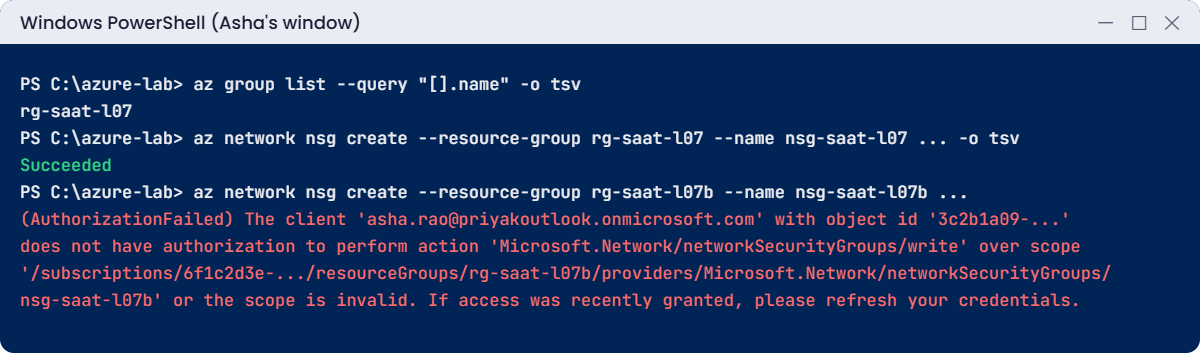
Azure RBAC lab: Asha succeeds in rg-saat-l07 and gets AuthorizationFailed in rg-saat-l07b
Example output in Asha’s window. Your IDs and domain will be different.

6See all of Asha’s access in one view

Back in your admin window, run this:

$domain = az rest --method get --url "https://graph.microsoft.com/v1.0/domains" --query "value[?isDefault].id" -o tsv
az role assignment list --assignee "asha.rao@$domain" --all --include-groups --query "[].{role:roleDefinitionName, scope:scope}" -o table

You should see something like this:

Role         Scope
-----------  --------------------------------------------------------------------------
Contributor  /subscriptions/6f1c2d3e-4a5b-4c6d-8e9f-0a1b2c3d4e5f/resourceGroups/rg-saat-l07

--include-groups shows roles that come from her group membership, which is how most access arrives at work. Without it you’d see nothing and think she has no access at all.

✅ Checkpoint: Asha can create things in rg-saat-l07 and gets AuthorizationFailed in rg-saat-l07b.

Break It, Then Fix It

Asha is Contributor, so surely she can do anything in her group? Not quite. These are the two limits that generate the most tickets.

1Break it: a Contributor tries to give someone access

In Asha’s window, run this:

$ravi = az ad user list --filter "startswith(displayName,'Ravi')" --query "[0].id" -o tsv
az role assignment create --assignee-object-id $ravi --assignee-principal-type User --role Reader --resource-group rg-saat-l07

You’ll get an error like this:

(AuthorizationFailed) The client 'asha.rao@priyakoutlook.onmicrosoft.com' with object id '3c2b1a09-...'
does not have authorization to perform action 'Microsoft.Authorization/roleAssignments/write' over scope
'/subscriptions/6f1c2d3e-.../resourceGroups/rg-saat-l07/providers/Microsoft.Authorization/roleAssignments/...'
or the scope is invalid. If access was recently granted, please refresh your credentials.
Code: AuthorizationFailed

Microsoft.Authorization/roleAssignments/write is in Contributor’s NotActions. To hand out access, a person needs Owner, User Access Administrator, or the narrower Role Based Access Control Administrator (which Lesson 8 limits with conditions).

Fix it: in your admin window, do it yourself, or decide that Asha shouldn’t do it at all. Here you do it:

$ravi = az ad user list --filter "startswith(displayName,'Ravi')" --query "[0].id" -o tsv
az role assignment create --assignee-object-id $ravi --assignee-principal-type User --role Reader --scope $rg -o none

2Break it: Contributor can’t read the data inside storage

In Asha’s window, create a small storage account and try to add a container with her Entra ID sign-in:

$st = 'stsaat07' + (Get-Random -Maximum 999999)
az storage account create --name $st --resource-group rg-saat-l07 --sku Standard_LRS --kind StorageV2 --tags course=saatvedha-azure lesson=07 -o none
az storage container create --name reports --account-name $st --auth-mode login
$st

You’ll get an error like this:

You do not have the required permissions needed to perform this operation.
Depending on your operation, you may need to be assigned one of the following roles:
    "Storage Blob Data Owner"
    "Storage Blob Data Contributor"
    "Storage Blob Data Reader"
    "Storage Queue Data Contributor"
    "Storage Queue Data Reader"
    "Storage Table Data Contributor"
    "Storage Table Data Reader"

If you want to use the old authentication method and allow querying for the right account key, please use the "--auth-mode" parameter and "key" value.
stsaat07418273

Creating the account was a control-plane action, which Contributor allows. Creating a container with --auth-mode login is a data action, which needs a data role. The CLI even suggests the old shortcut: use the account key instead.

Don’t; keys give full access to everything in the account (Lesson 24).

Fix it: in your admin window, give the group a data role on just that storage account. Use the name Asha’s window printed:

$st = 'stsaat07418273'
$stId = az storage account show --name $st --resource-group rg-saat-l07 --query id -o tsv
az role assignment create --assignee-object-id $grp --assignee-principal-type Group --role "Storage Blob Data Contributor" --scope $stId -o none

Wait two minutes, then in Asha’s window run this again:

az storage container create --name reports --account-name $st --auth-mode login

You should see this:

{
  "created": true
}
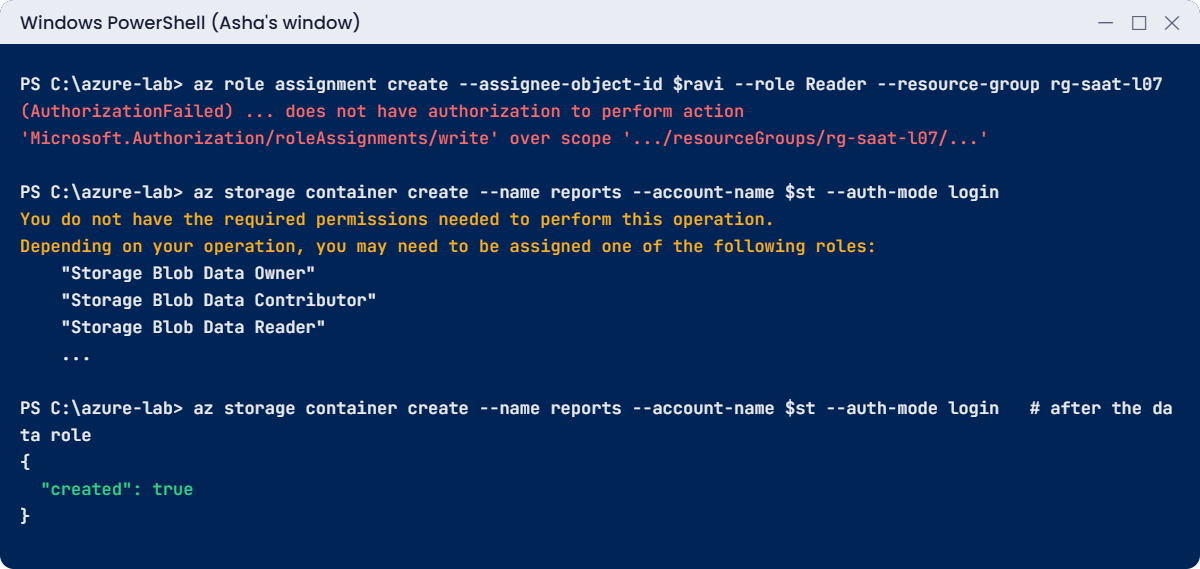
Azure RBAC errors: Contributor cannot assign roles and needs a data role for blobs
Example output of both RBAC limits.

3Clean up

In Asha’s window, sign her out and close it:

az logout
Remove-Item Env:AZURE_CONFIG_DIR
Remove-Item C:\azure-lab\asha-cli -Recurse -Force

In your admin window, remove the roles and the groups:

$stId, $rg | ForEach-Object { az role assignment delete --scope $_ }
az group delete --name rg-saat-l07 --yes
az group delete --name rg-saat-l07b --yes
C:\azure-lab\Find-LabResources.ps1

You should see this:

Nothing tagged course=saatvedha-azure is left.

az role assignment delete --scope without a principal removes every assignment at exactly that scope, which is what you want here. Be careful with it at work.

✅ Checkpoint: Both RBAC limits reproduced and fixed, Asha signed out, and nothing tagged for the course is left.

This happened at work

“Just make them Owner” on a Friday

A retail company’s new data team needed to deploy a reporting app quickly. Their Azure admin was on leave, so a manager asked the cloud lead to “just make the team Owner on the subscription for now”. The lead did it at 6 p.m. on a Friday.

Over the weekend a data engineer followed an online guide and, as an Owner, gave a third-party analytics tool’s service principal Contributor on the subscription, the same subscription that held the payment API. Nothing bad happened that week. A month later, the security team found the tool’s credentials in a public code repository, still with Contributor on production.

What they changed: no standing Owner below the platform team. Teams get Contributor on their own resource groups, granted to Entra groups, and anything else goes through PIM with approval and a time limit. Access to hand out roles is given only through Role Based Access Control Administrator with conditions, so it can’t grant Owner.

And a weekly report lists every Owner and every service principal with Contributor or higher.

Common mistakes and troubleshooting

MistakeWhat you seeWhat to do
Giving Owner because “it works”People who can hand out access to anyoneGive Contributor plus narrow access roles only when needed.
Assigning roles to single usersHundreds of assignments, impossible to reviewAssign to groups.
Forgetting data rolesContributor can’t read blobs, queues or secretsAdd the data role at the smallest scope, for example Storage Blob Data Reader.
Testing right after adding someone to a groupAuthorizationFailed for a few minutesSign out and in so the token gets the new group; wait a few minutes.
Looking for access without --include-groups“This user has no roles” when they doList with --all --include-groups.
Using account keys to “fix” accessFull access to all data, shared secretsUse Entra ID sign-in and data roles instead of keys.

Interview questions

Click a question to open it. Each one is written the way an interviewer would ask it. Under it you will see why they ask it and one way you could answer, in your own words.

Fresher level

1. What three things make up an Azure role assignment?

Why they ask this: A basic RBAC concept they expect you to know cold.

How you might answer: A security principal, which is the who, like a user, group or managed identity; a role definition, which is what they can do; and a scope, which is where: a management group, subscription, resource group or single resource.

2. What’s the difference between Owner and Contributor?

Why they ask this: They want to see you know the access-management boundary.

How you might answer: Both can create and manage resources. Owner can also grant access to others, while Contributor can’t, because role assignment writes are in Contributor’s NotActions.

3. Why give roles to groups instead of users?

Why they ask this: They want good habits around scale and reviews.

How you might answer: Groups make joiners and leavers a membership change instead of a hunt through assignments. It’s also far easier to review a handful of group assignments than hundreds of individual ones.

2–5 years experience

4. A user is Contributor on a storage account but gets “permission” errors uploading a blob with the CLI. Why?

Why they ask this: They’re checking control plane vs data plane, a very common real issue.

How you might answer: Contributor is a control-plane role. Uploading with --auth-mode login is a data action, which needs a data role such as Storage Blob Data Contributor at the account or container scope.

I’d assign that role to their group and wait a couple of minutes, rather than give them the account key.

5. How do you read an AuthorizationFailed error?

Why they ask this: They want to see you use the error’s details instead of guessing.

How you might answer: It names the client, the exact action, like Microsoft.Network/networkSecurityGroups/write, and the exact scope. I check which role assignments that principal has at that scope or above, including through groups, and whether any role includes that action.

If access was just granted, I have them sign in again, since group changes need a fresh token.

6. Someone was added to the right group but still gets access denied. What do you check?

Why they ask this: They want propagation and token awareness.

How you might answer: First, that they’re in the group that actually has the role, and that the role’s scope covers the resource. Then timing: role and group changes can take a few minutes, and group membership is in the token, so they should sign out and in.

I’d also check for a deny assignment on that scope, which az role assignment list won’t show.

Senior level

7. How would you let a team lead manage access for their own team, without risking Owner-level grants?

Why they ask this: They want delegation with guardrails.

How you might answer: I’d give the lead Role Based Access Control Administrator on the team’s resource groups, with a condition that only allows assigning a few roles, like Reader and Virtual Machine Contributor, and only to members of the team’s groups.

That lets them handle daily requests while making Owner or User Access Administrator impossible for them to hand out.

8. How would you find and reduce excessive access in a subscription that has grown for years?

Why they ask this: They want a practical review plan.

How you might answer: I’d export all role assignments with az role assignment list --all --include-inherited, highlight Owner and User Access Administrator, assignments to single users, and service principals with Contributor or more. Unknown or orphaned identities get removed after checking sign-in logs.

Then I’d move people to groups, use PIM for high roles, and run access reviews every quarter.

9. An app’s service principal needs to write blobs to one container. What would you grant?

Why they ask this: They’re checking least privilege at the right scope and the right plane.

How you might answer: Storage Blob Data Contributor on that one container, not the storage account and certainly not Contributor on the resource group. If the app runs in Azure, I’d use a managed identity instead of a service principal with a secret.

Quick quiz

Q1. Which role can create resources but can’t grant access?

  1. Owner
  2. Contributor
  3. User Access Administrator
  4. Reader
Show answer

B — Contributor’s NotActions remove role assignment writes.

Q2. Asha has Reader on the subscription and Contributor on rg-saat-l07. What can she do in rg-saat-l07?

  1. Only read
  2. Contributor actions
  3. Nothing
  4. Owner actions
Show answer

B — Permissions add up; she gets Contributor there.

Q3. What does reading blob data with --auth-mode login need?

  1. Contributor
  2. A data role such as Storage Blob Data Reader
  3. Owner on the subscription
  4. A storage account key
Show answer

B — Blob data is the data plane and needs a data role.

Q4. Which option shows roles a user gets through groups?

  1. --include-inherited
  2. --include-groups
  3. --all-users
  4. --expand
Show answer

B — The --include-groups option adds assignments to groups the user belongs to.

Q5. Why did AZURE_CONFIG_DIR let you sign in as Asha separately?

  1. It changes the tenant
  2. It makes the CLI store its sign-in in another folder
  3. It disables MFA
  4. It creates a new subscription
Show answer

B — The CLI keeps tokens in that folder, so two folders give two separate sessions.

Quick recap

You can now give access with precision and read RBAC errors like a map.

  • A role assignment is who + role + scope, and it is inherited downward.
  • Contributor manages resources but can’t grant access; Owner can.
  • Control-plane roles don’t give data access; add data roles like Storage Blob Data Reader.
  • Permissions add up; AuthorizationFailed names the missing action and scope.
  • Use groups, the smallest scope, and --include-groups when you check access.

Next lesson

Lesson 8: Azure custom roles, deny assignments and conditions → You build a custom role that does exactly one job, and see the two ways Azure can still say no.

Further reading: Azure RBAC

Want to go deeper into Azure RBAC? Microsoft’s overview is What is Azure role-based access control (Azure RBAC)?, and every built-in role is listed in Azure built-in roles. You can also see the full plan for this course on the Azure Cloud Administration course page.

Scroll to Top