Azure Automation runbooks
-
Phase 0: Before you start
-
Phase 1: The foundation
-
Phase 2: Day-to-day operations
-
Phase 3: Enterprise architecture
-
Phase 4: Troubleshooting step by step
-
Phase 5: Final project and career
An Azure Automation runbook is a PowerShell or Python script that runs in Azure on a schedule, on a webhook, or when an alert fires, without a server of your own. Stopping dev VMs every evening, rotating a secret, cleaning old snapshots: these are classic runbook jobs.
Runbooks are where many teams first automate their own work. They’re also where old internet scripts break, because the “Run As account” most of them use was retired in 2023 in favour of managed identities.
In the lab you build an Automation account with a managed identity, write a runbook that stops your lab VMs, schedule it for 19:30 IST, and fix a permissions error and a legacy Run As script.
| Time | You need | Cost | By the end you can |
|---|---|---|---|
| About 40 minutes | The CLI and the portal, web01 and win01 | No charge within the first 500 job minutes a month; this lab uses a few minutes | Create runbooks that authenticate with a managed identity, schedule them, and troubleshoot failed jobs |
What it is, in one line
A runbook is a script Azure Automation runs for you, on a schedule or trigger, using the Automation account’s identity.
In Simple Words
The school caretaker’s evening checklist
Every evening at 7:30, the caretaker walks round with a checklist: lights off in empty rooms, windows shut, doors locked. Nobody has to remind him; it’s on his schedule. That’s a runbook with a schedule.
He carries his own keys, issued by the school. He doesn’t borrow the head teacher’s keys. That’s the managed identity.
If the school changes a lock and forgets to give him the new key, he still walks round, but he can’t switch off the lights in that room. That’s this lesson’s first break.
Engineer's View
How Azure Automation runs your scripts
- Automation account: holds runbooks, schedules, variables, credentials, modules and the account’s managed identity.
- Runbook types: PowerShell (5.1 and 7.x runtimes, including 7.4), Python 3, and graphical. Pick the runtime when you create the runbook.
- Authentication:
Connect-AzAccount -Identitywith the account’s system-assigned or a user-assigned managed identity, plus Azure RBAC on what it touches. Run As accounts (certificates) were retired on 30 September 2023. - Triggers: schedules (with a time zone), webhooks, Azure Monitor alerts through action groups, or manual starts.
- Where it runs: on Azure-managed sandboxes by default, or on a Hybrid Runbook Worker (a VM or Arc server) to reach private networks.
- Limits and cost: jobs on sandboxes have a fair-share limit of about 3 hours before they’re unloaded; the first 500 job minutes each month have no charge.
- Output: each job keeps its output, errors and warnings as streams you can read in the portal or by API.
How it works, step by step
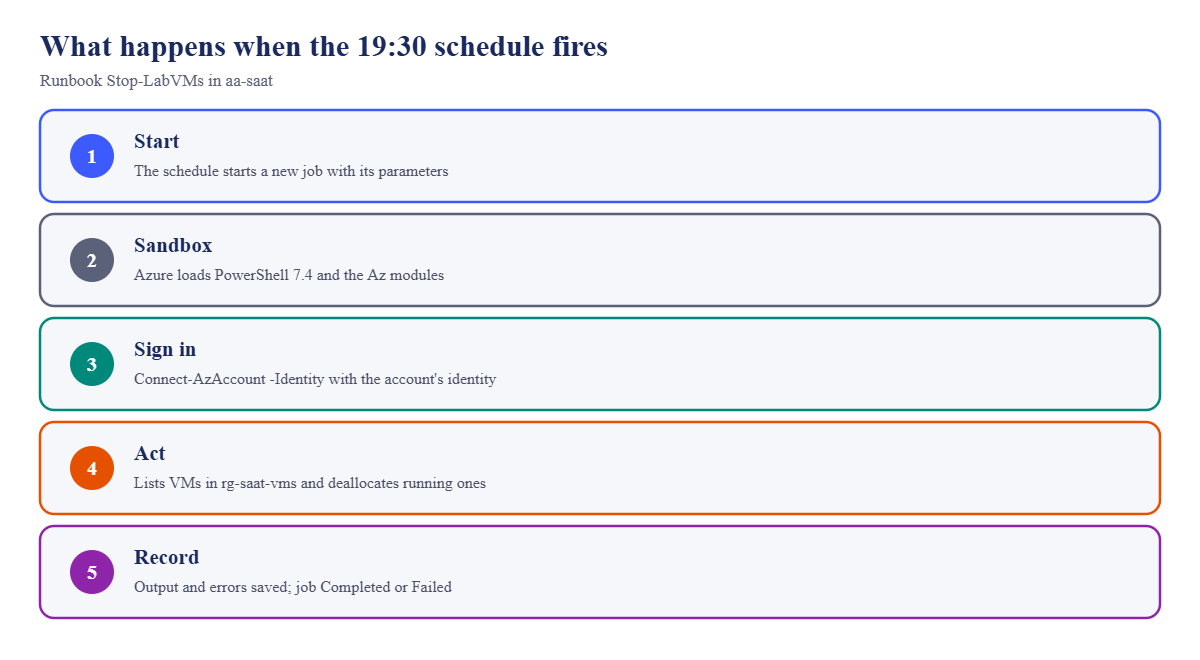
What happens at 19:30 IST when the schedule fires:
- The schedule starts a new job of Stop-LabVMs with its parameters.
- Azure loads a sandbox with the runbook’s runtime and modules.
- The script signs in with the account’s managed identity.
- It lists VMs in rg-saat-vms and deallocates the running ones, using the identity’s RBAC rights.
- Output and errors are saved with the job; the job ends as Completed, Failed or Suspended.
Step 3 and step 4 are where most failures happen: no identity, or an identity with no rights where the script tries to act.
Give the identity the smallest role at the smallest scope: Virtual Machine Contributor on one resource group, not Contributor on the subscription.
Hands-on lab: an Azure Automation runbook that stops lab VMs
Load your subscription ID:
$sub = az account show --query id -o tsv1Create the Automation account with a managed identity
Run this:
az automation account create --resource-group rg-saat-core --name aa-saat --location centralindia -o none
$aaId = az automation account show --resource-group rg-saat-core --name aa-saat --query id -o tsv
az resource update --ids $aaId --set identity.type=SystemAssigned -o none
$aaPid = az resource show --ids $aaId --query identity.principalId -o tsv
$aaPidYou should see a GUID: the principal ID of the account’s identity.
2Create the runbook
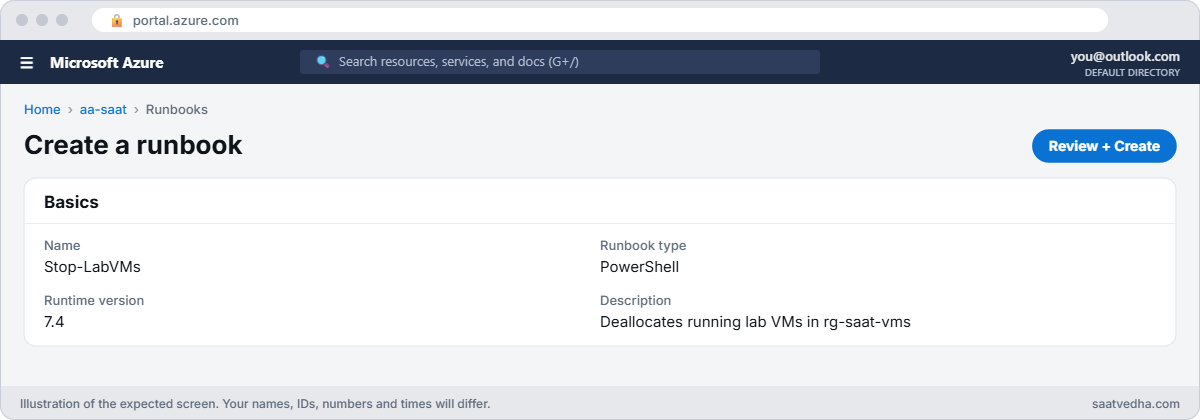
In the portal, open aa-saat, Process Automation, Runbooks, Create a runbook. Name it Stop-LabVMs, type PowerShell, runtime version 7.4. Paste this script, Save, then Publish.
param([string]$ResourceGroup = 'rg-saat-vms')
Connect-AzAccount -Identity | Out-Null
$vms = Get-AzVM -ResourceGroupName $ResourceGroup -Status
foreach ($vm in $vms) {
if ($vm.PowerState -eq 'VM running') {
Write-Output "Stopping $($vm.Name)"
Stop-AzVM -ResourceGroupName $ResourceGroup -Name $vm.Name -Force -NoWait | Out-Null
}
else {
Write-Output "$($vm.Name) is already $($vm.PowerState)"
}
}3Start it once by hand
Click Start, keep the default parameter, and open the job. After about a minute it ends. Your VMs are deallocated from Lesson 42, so you might expect two “already deallocated” lines.
Read on.
Check the job from the CLI:
az automation job list --resource-group rg-saat-core --automation-account-name aa-saat --query "[0].{runbook:runbook.name, status:status}" -o tableYou should see something like this:
Runbook Status
------------ --------
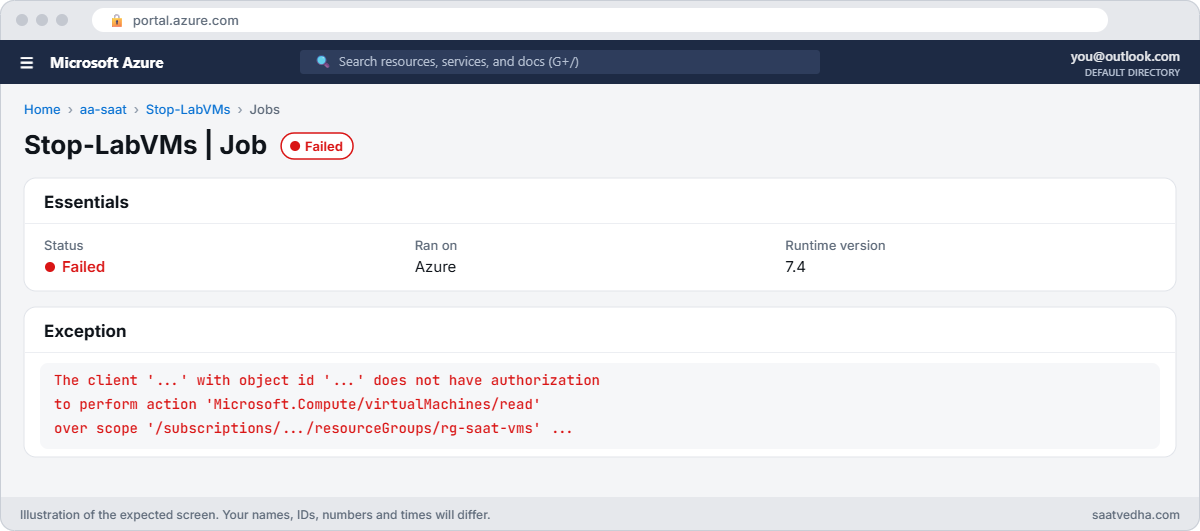
Stop-LabVMs FailedFailed, on the very first run. That’s Break It step 1, and it’s worth fixing before the schedule. Go there now, then come back to step 4.
4Schedule it every evening at 19:30 IST
After the fix, in Stop-LabVMs choose Link to schedule, Create a new schedule: name daily-1930-ist, starts tomorrow at 19:30, time zone India Standard Time (UTC+05:30), recurring every 1 day. Save.
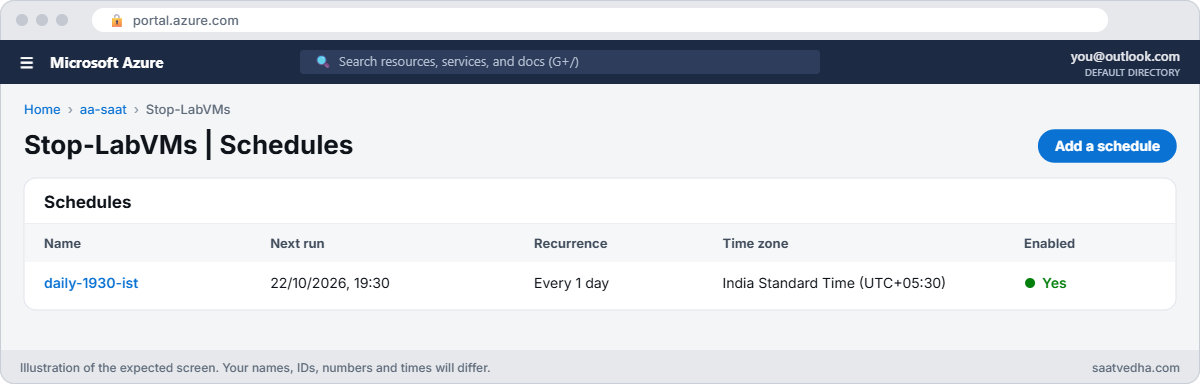
Check the next run time:
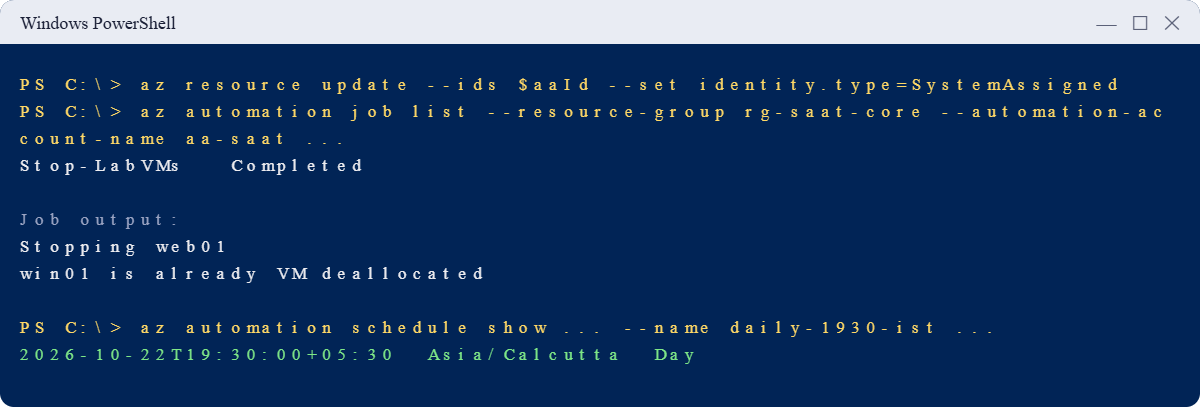
az automation schedule show --resource-group rg-saat-core --automation-account-name aa-saat --name daily-1930-ist --query "{next:nextRun, timeZone:timeZone, frequency:frequency}" -o tableYou should see something like this:
Next TimeZone Frequency
------------------------- ------------- -----------
2026-10-22T19:30:00+05:30 Asia/Calcutta DayThe time zone matters: a schedule saved in UTC would run at 01:00 IST, after the VMs had run six extra hours. Azure may show the zone as Asia/Calcutta; that’s the same as India Standard Time.
✅ Checkpoint: Stop-LabVMs runs with the account’s managed identity, completes, and is scheduled daily at 19:30 IST.
Break It, Then Fix It
Both breaks come from identity: one missing a role, one from before managed identities existed.
1Break it: the identity with no rights
Open the failed job from step 3 and read its Errors tab, or ask the CLI for the exception:
$job = az automation job list --resource-group rg-saat-core --automation-account-name aa-saat --query "[0].name" -o tsv
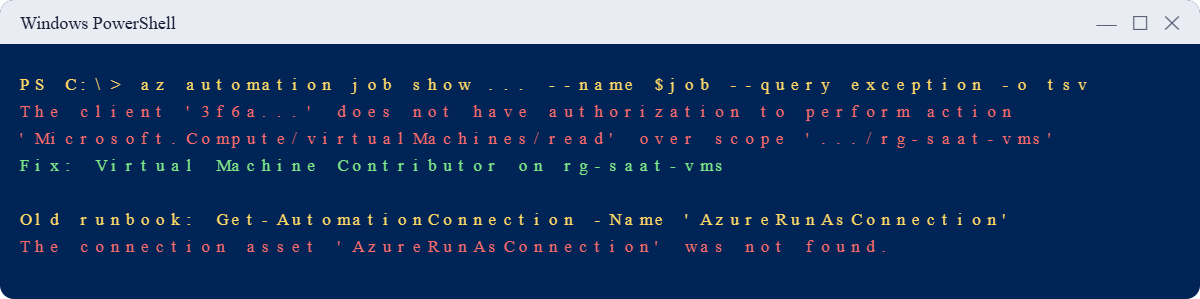
az automation job show --resource-group rg-saat-core --automation-account-name aa-saat --name $job --query exception -o tsvYou’ll see something like this:
The client '3f6a...' with object id '3f6a...' does not have authorization to perform action 'Microsoft.Compute/virtualMachines/read' over scope '/subscriptions/.../resourceGroups/rg-saat-vms' or the scope is invalid. If access was recently granted, please refresh your credentials.The sign-in worked; the identity exists. But it has no role on rg-saat-vms, so even listing the VMs is refused (AuthorizationFailed, Lesson 7). Runbooks fail like this every time someone forgets the role assignment, or moves the target resource group.
Fix it: grant the smallest role that does the job, at the resource group, then start the runbook again in the portal:
az role assignment create --assignee-object-id $aaPid --assignee-principal-type ServicePrincipal --role "Virtual Machine Contributor" --scope "/subscriptions/$sub/resourceGroups/rg-saat-vms" -o none
az vm start --resource-group rg-saat-vms --name web01Start Stop-LabVMs again. The Output tab should show something like this:
Stopping web01
win01 is already VM deallocatedA minute later web01 is deallocated. Role changes can take a few minutes to apply; if it still fails, wait and run it again.
To see exactly what an Azure Automation runbook is allowed to do, list the roles of its identity: az role assignment list --assignee $aaPid --all --query "[].{role:roleDefinitionName, scope:scope}" -o table. You should see one line: Virtual Machine Contributor on rg-saat-vms.
Before you publish changes to a runbook, use the Test pane in the portal editor. It runs the draft version against real resources, so treat it like production, but it lets you see output and errors without replacing the published runbook that the schedule uses. Publish only when the test run is clean.
2Break it: the Run As script from the internet
Create a second runbook, Get-LabVMs-Old (PowerShell, 7.4), with this script copied from an old blog post. Publish and start it.
$conn = Get-AutomationConnection -Name 'AzureRunAsConnection'
Connect-AzAccount -ServicePrincipal -Tenant $conn.TenantId -ApplicationId $conn.ApplicationId -CertificateThumbprint $conn.CertificateThumbprint
Get-AzVM -ResourceGroupName 'rg-saat-vms' -Status | Select-Object Name, PowerStateThe job fails with something like this:
Get-AutomationConnection: The connection asset 'AzureRunAsConnection' was not found.
Connect-AzAccount: ... (no valid credentials)Run As accounts were retired in 2023 and can’t be created any more. Thousands of published scripts still start with these lines, and they fail on every new Automation account.
Fix it: replace the first two lines with the managed identity sign-in, publish, and start again:
Connect-AzAccount -Identity | Out-Null
Get-AzVM -ResourceGroupName 'rg-saat-vms' -Status | Select-Object Name, PowerStateThe output should list web01 and win01 with their power state.
Clean up: keep aa-saat and Stop-LabVMs with its schedule (they stop your lab VMs every evening from now on), and delete the old runbook:
az automation runbook delete --resource-group rg-saat-core --automation-account-name aa-saat --name Get-LabVMs-Old --yes
✅ Checkpoint: Your runbook signs in with a managed identity, has the right role, and runs every evening. The legacy Run As script is fixed and deleted.
This happened at work
The cleanup runbook that stopped on 1 October 2023
An engineering company ran a nightly runbook that deleted VM snapshots older than 30 days. It had worked for four years. In early 2024, finance asked why snapshot costs had tripled.
The runbook had failed every night since the Run As accounts were retired on 30 September 2023. Its first line looked for AzureRunAsConnection, which no longer existed. Nobody watched the job history, and no alert was set on failed jobs.
What they changed: all runbooks moved to managed identities with roles scoped to one resource group. Failed jobs now send diagnostic logs to Log Analytics, with an alert on any failed or suspended job. Every runbook owner reviews job history monthly, and new runbooks need a test run before their schedule is linked.
Common mistakes and troubleshooting
| Mistake | What you see | What to do |
|---|---|---|
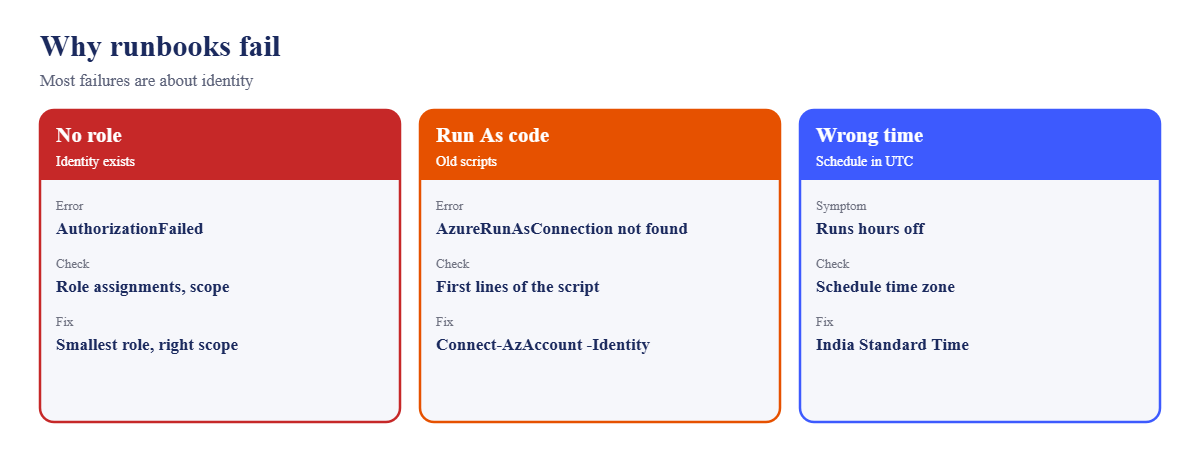
| No role for the managed identity | AuthorizationFailed in the Error stream | Assign the smallest role at the right scope. |
| Old Run As code | “AzureRunAsConnection” not found | Use Connect-AzAccount -Identity. |
| Schedule saved in UTC | Runbook runs hours off | Set the schedule’s time zone. |
| Contributor on the subscription | Runbook could break anything | Scope roles to one resource group. |
| No alert on failed jobs | Silent failures for months | Send job logs to Log Analytics and alert. |
| Long jobs on sandboxes | Jobs unloaded around 3 hours | Use checkpoints, split jobs, or a Hybrid Worker. |
Interview questions
Click a question to open it. Each one is written the way an interviewer would ask it. Under it you will see why they ask it and one way you could answer, in your own words.
Fresher level
1. What is an Azure Automation runbook?
Why they ask this: The basic concept.
How you might answer: A PowerShell or Python script stored in an Automation account and run by Azure on a schedule, webhook, alert or on demand, without managing a server.
2. How should a runbook authenticate to Azure?
Why they ask this: A current best-practice check.
How you might answer: With the Automation account’s managed identity, using Connect-AzAccount -Identity, and Azure RBAC roles for what it needs. Run As accounts were retired in 2023.
3. What triggers can start a runbook?
Why they ask this: They want the options.
How you might answer: Schedules, webhooks, Azure Monitor alerts through action groups, other runbooks, and manual starts from the portal, CLI or API.
2–5 years experience
4. A runbook job failed. How do you find out why?
Why they ask this: A real troubleshooting path.
How you might answer: Open the job’s Errors and All Logs streams, check the exception, then the identity’s role assignments and scope, module versions in the runtime, and whether the target resources moved or were renamed.
5. When would you use a Hybrid Runbook Worker?
Why they ask this: They want architecture sense.
How you might answer: When a runbook must reach resources in a private network or on-premises, needs local tools, or runs longer than sandboxes allow. The worker is a VM or Arc server registered to the Automation account.
6. How do you migrate old Run As runbooks?
Why they ask this: A common real task.
How you might answer: Enable a managed identity on the account, grant it the roles the Run As principal had (ideally fewer), replace the Get-AutomationConnection and service principal sign-in with Connect-AzAccount -Identity, test, then delete the old certificates and app registrations.
Senior level
7. How do you make automation safe at scale?
Why they ask this: They want governance.
How you might answer: Runbooks in source control, deployed by pipeline, least-privilege identities per account or purpose, approval for destructive actions, logs and alerts for failures, and regular reviews of roles and schedules.
8. Automation runbooks, Functions or Logic Apps: how do you choose?
Why they ask this: They want trade-offs.
How you might answer: Runbooks for admin scripts in PowerShell with schedules. Functions for event-driven code with low latency and scale. Logic Apps for workflows that connect many services with little code. I pick by trigger, language, and who maintains it.
9. How would you auto-remediate an alert with a runbook?
Why they ask this: They want end-to-end.
How you might answer: An alert rule calls an action group with an Automation runbook action, passing the alert payload. The runbook parses it, checks safety conditions, fixes the issue with a scoped identity, and logs or notifies the result. I’d test with a fake alert first.
Quick quiz
Q1. How should a runbook sign in to Azure today?
- Run As account
- Managed identity
- A user’s password
- A storage key
Show answer
B — Connect-AzAccount -Identity.
Q2. When were Run As accounts retired?
- 2020
- 30 September 2023
- 2026
- Never
Show answer
B — They were retired on 30 September 2023.
Q3. A runbook fails with AuthorizationFailed on virtualMachines/read. Fix?
- Restart the account
- Give the identity a role on the scope
- Use Python
- Change the schedule
Show answer
B — The identity needs RBAC rights.
Q4. How many job minutes a month have no charge?
- 50
- 100
- 500
- Unlimited
Show answer
C — The first 500 minutes each month.
Q5. Why set a time zone on a schedule?
- It’s required for Python
- So it runs at the local time you mean
- To save cost
- To use webhooks
Show answer
B — Otherwise times are in UTC.
Quick recap
You now have automation running in your subscription, and you know why runbooks fail.
- Runbooks run scripts in Azure on schedules, webhooks or alerts.
- Sign in with Connect-AzAccount -Identity; Run As is retired.
- Give the identity the smallest role at the smallest scope.
- Set the schedule’s time zone.
- Alert on failed jobs; read the Error stream first.
Next lesson
Lesson 44: Azure cost management: budgets, Advisor, savings → You find what costs money in your subscription and cut it with budgets, Advisor and reservations.
Further reading: Azure Automation runbook
Want to go deeper into Azure Automation runbook? See Microsoft’s Azure Automation overview and Use a system-assigned managed identity for an Automation account. You can also see the full plan for this course on the Azure Cloud Administration course page.
