Application Gateway with WAF (Layer 7)

Azure Application Gateway is a Layer 7 load balancer for web traffic. It reads each HTTP request, so it can route by URL path or host name, end TLS, rewrite headers, and, with the WAF_v2 SKU, block attacks such as SQL injection and cross-site scripting with a Web Application Firewall (WAF).

Lesson 51’s load balancer only saw IPs and ports. Application Gateway sees the request itself, which is why it’s the usual front door for business web apps that stay in one region.

It also produces two errors that fill support queues: 502 Bad Gateway and WAF 403 blocks on perfectly normal requests. You’ll cause and fix both. This is a costlier lab, so do it in one sitting.

TimeYou needCostBy the end you can
About 2 hoursA free account, law-saat in rg-saat-core, the CLIAbout USD 1.20 if you finish and clean up within 2 hours: WAF_v2 is USD 0.504 per hour plus USD 0.0144 per capacity unit hour in Central India (Azure Retail Prices API, October 2026)Deploy Application Gateway WAF_v2 with a WAF policy, read backend health and WAF logs, and fix a 502 and a false positive

What it is, in one line

Application Gateway is a web traffic manager that reads every request, sends it to the right servers, and can block attacks with a built-in firewall.

In Simple Words

The receptionist who reads every letter

Lesson 51’s load balancer was like a post office sorting by address only. Application Gateway is a receptionist who opens each letter. Letters about “billing” go to the accounts team, letters about “jobs” go to HR.

She also has a list of known tricks: letters with hidden instructions, fake signatures, strange attachments. Those go straight in the bin. That’s the Web Application Firewall.

Sometimes she bins an honest letter that only looks suspicious, like a teacher’s letter quoting a scam example. You don’t fire the receptionist; you tell her “letters to the teaching team may quote scams”. That’s a WAF exclusion.

Engineer's View

What Application Gateway is made of

  • SKUs: Standard_v2 and WAF_v2 (autoscaling, zone-redundant), plus a low-cost Basic SKU without WAF. The v1 SKUs are retired.
  • Subnet: a dedicated subnet; Microsoft recommends /24 for v2. Only application gateways can live in it.
  • Listener: a frontend IP, port and protocol (and optional host name) that receives requests.
  • Rule: connects a listener to a backend pool and backend settings; v2 rules need a priority. Path-based rules send /api and /images to different pools.
  • Backend settings: the port, protocol, timeout and host name used to talk to the servers. The default probe uses the same port.
  • Backend health: if no server in the pool is healthy, users get 502 Bad Gateway.
  • WAF policy: the Microsoft Default Rule Set (DRS 2.1) scores each request with anomaly scoring. In Prevention mode, a high score returns 403; in Detection mode it only logs. Exclusions and custom rules tune it.

How it works, step by step

What happens to a request in this lab:

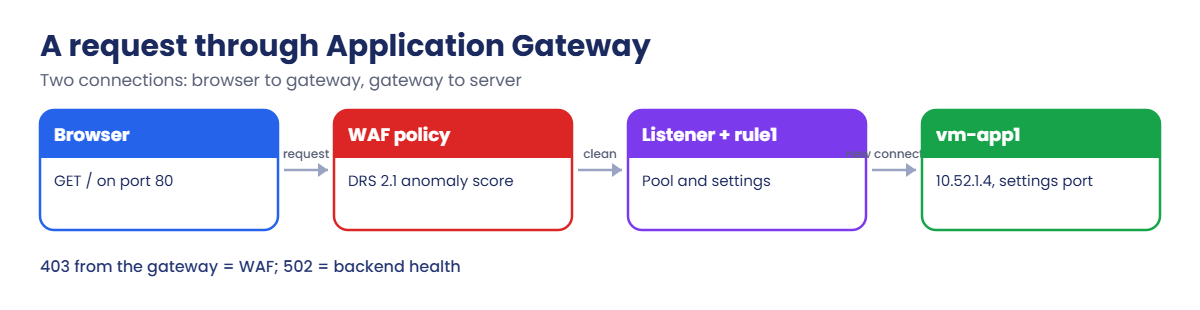
A request through Application Gateway and its WAF policy
  1. Your browser sends GET / to pip-agw on port 80, and the listener accepts it.
  2. The WAF policy inspects the URL, headers and body. Each matching rule adds to an anomaly score; if it reaches the threshold, rule 949110 blocks it with 403.
  3. If the request is clean, rule1 picks the backend pool and settings.
  4. The gateway opens its own connection to vm-app1 on the settings port and forwards the request, adding X-Forwarded-For with your IP.
  5. The answer comes back through the gateway to you.

Notice the two separate connections: browser to gateway, gateway to server. That’s why the server sees the gateway’s private IP, and why backend problems show up as 502 instead of a timeout.

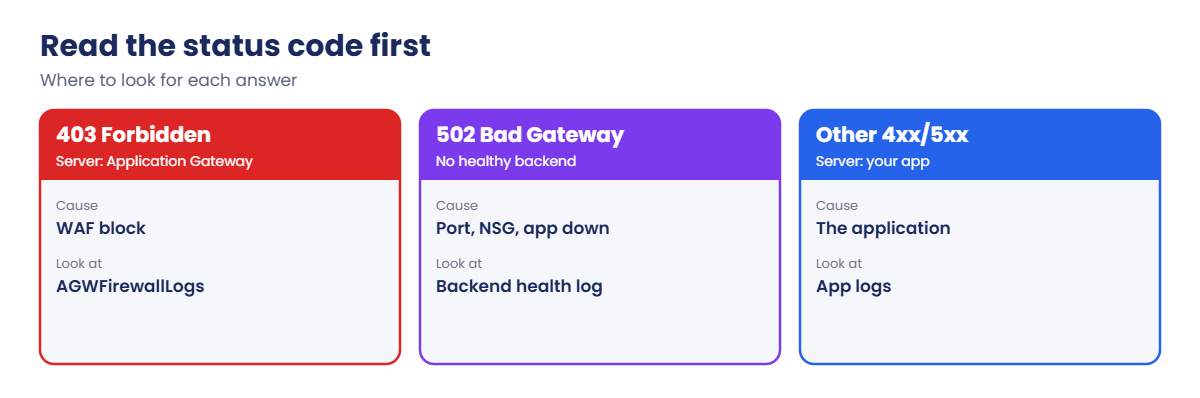
Application Gateway 403 and 502 troubleshooting by status code

When something fails, the response code tells you where to look: 403 from the gateway means WAF, 502 means backend health, and a 4xx or 5xx from the app itself passes straight through.

Deploy Application Gateway WAF_v2 in front of a web server

Cost check: the gateway bills from creation in step 3. Keep going until the clean-up step.

1Network and a backend server

Create a VNet with a gateway subnet and a private web subnet, and one VM:

az group create --name rg-saat-l52 --location centralindia --tags course=saatvedha-azure lesson=52 -o none
az network vnet create --resource-group rg-saat-l52 --name vnet-l52 --address-prefixes 10.52.0.0/16 --subnet-name snet-agw --subnet-prefixes 10.52.0.0/24 -o none
az network vnet subnet create --resource-group rg-saat-l52 --vnet-name vnet-l52 --name snet-web --address-prefixes 10.52.1.0/24 --default-outbound-access false -o none
az vm create --resource-group rg-saat-l52 --name vm-app1 --image Canonical:ubuntu-24_04-lts:server:latest --size Standard_B1s --vnet-name vnet-l52 --subnet snet-web --private-ip-address 10.52.1.4 --public-ip-address '""' --nsg '""' --admin-username azureuser --generate-ssh-keys --tags course=saatvedha-azure lesson=52 -o none

Start a small web server. Ubuntu already has Python, so the private VM needs no internet:

az vm run-command invoke --resource-group rg-saat-l52 --name vm-app1 --command-id RunShellScript --scripts 'mkdir -p /srv/www; echo Hello from vm-app1 > /srv/www/index.html; systemd-run --unit web python3 -m http.server 80 --directory /srv/www; sleep 2; systemctl is-active web' --query "value[0].message" -o tsv

You should see:

[stdout]
active

2Create a WAF policy in Prevention mode

Run this:

az network application-gateway waf-policy create --resource-group rg-saat-l52 --name wafp-saat --type Microsoft_DefaultRuleSet --version 2.1 --tags course=saatvedha-azure lesson=52 -o none
az network application-gateway waf-policy policy-setting update --resource-group rg-saat-l52 --policy-name wafp-saat --mode Prevention --state Enabled -o none

3Create the application gateway (about 8 minutes)

Run this:

az network public-ip create --resource-group rg-saat-l52 --name pip-agw --sku Standard --zone 1 2 3 -o none
az network application-gateway create --resource-group rg-saat-l52 --name agw-saat --sku WAF_v2 --min-capacity 0 --max-capacity 2 --vnet-name vnet-l52 --subnet snet-agw --public-ip-address pip-agw --servers 10.52.1.4 --frontend-port 80 --http-settings-port 80 --http-settings-protocol Http --priority 100 --waf-policy wafp-saat --tags course=saatvedha-azure lesson=52 -o none

The CLI creates a listener, a backend pool with 10.52.1.4, backend settings called appGatewayBackendHttpSettings and a rule called rule1.

4Send logs to law-saat

Save the categories in a file, then create the diagnostic setting:

'[{"category":"ApplicationGatewayAccessLog","enabled":true},{"category":"ApplicationGatewayFirewallLog","enabled":true}]' | Set-Content C:\azure-lab\agwlogs.json
$agwId = az network application-gateway show --resource-group rg-saat-l52 --name agw-saat --query id -o tsv
$lawId = az monitor log-analytics workspace show --resource-group rg-saat-core --workspace-name law-saat --query id -o tsv
az monitor diagnostic-settings create --name agw-to-law --resource $agwId --workspace $lawId --export-to-resource-specific true --logs '@C:\azure-lab\agwlogs.json' -o none

5Test a normal request and an attack

Run this:

$agwIp = az network public-ip show --resource-group rg-saat-l52 --name pip-agw --query ipAddress -o tsv
curl.exe -s http://$agwIp/
curl.exe -sI "http://$agwIp/?q=%3Cscript%3Ealert(1)%3C/script%3E"

You should see something like this:

Hello from vm-app1
HTTP/1.1 403 Forbidden
Server: Microsoft-Azure-Application-Gateway/v2
Content-Type: text/html

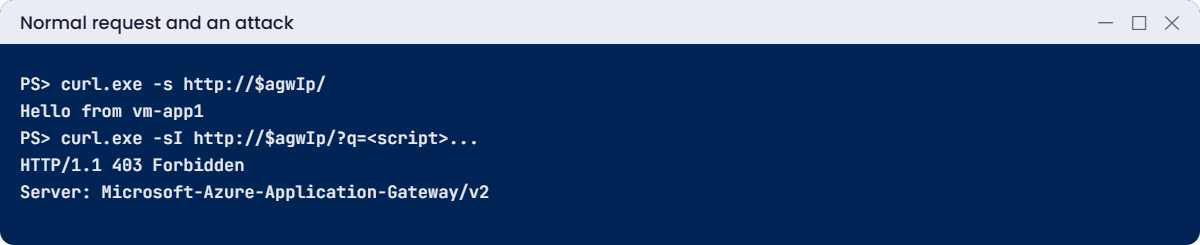
The normal request reached the VM. The script in the query string was blocked by the WAF before the VM ever saw it.
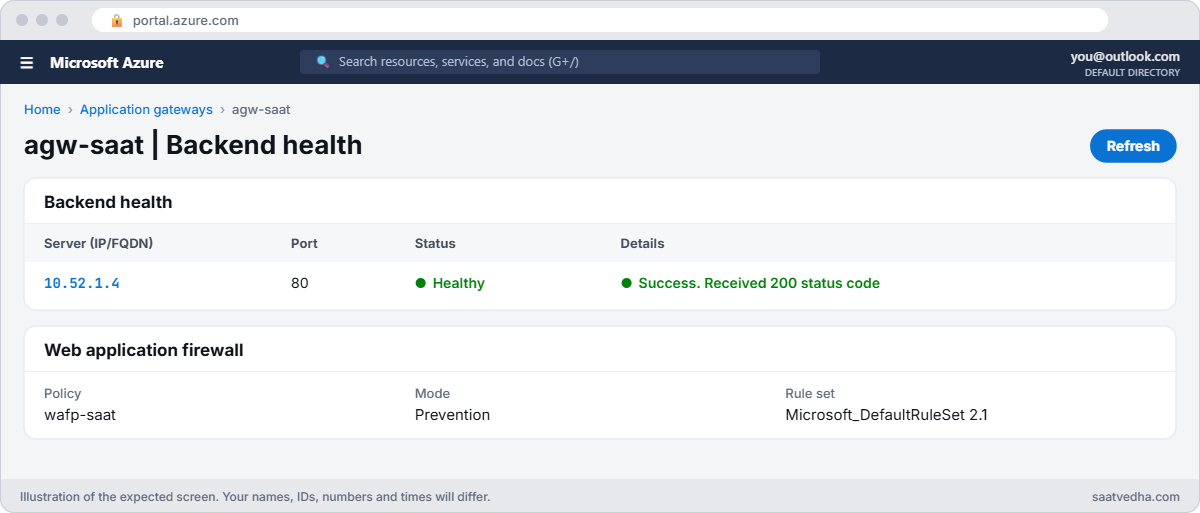
Azure Application Gateway backend health with WAF policy
agw-saat backend health: 10.52.1.4 is Healthy.
Application Gateway serving a page and blocking an XSS attempt
The page loads; the script attempt gets 403 from the WAF.

✅ Checkpoint: agw-saat serves the page through pip-agw, blocks a cross-site scripting attempt with 403, and sends logs to law-saat.

Break It, Then Fix It

Keep the gateway running for both breaks, then clean up.

1Break it: 502 after an app change

The app team moves the web server to port 8080 and tells nobody:

az vm run-command invoke --resource-group rg-saat-l52 --name vm-app1 --command-id RunShellScript --scripts 'systemctl stop web; systemd-run --unit web8080 python3 -m http.server 8080 --directory /srv/www; sleep 2; systemctl is-active web8080' --query "value[0].message" -o tsv
curl.exe -sI http://$agwIp/

After about a minute you should see something like this:

HTTP/1.1 502 Bad Gateway
Server: Microsoft-Azure-Application-Gateway/v2

Ask the gateway why:

az network application-gateway show-backend-health --resource-group rg-saat-l52 --name agw-saat --query "backendAddressPools[0].backendHttpSettingsCollection[0].servers[].{address:address, health:health, log:healthProbeLog}" -o json

You should see something like this:

[
  {
    "address": "10.52.1.4",
    "health": "Unhealthy",
    "log": "Cannot connect to backend server. Check whether any NSG/UDR/Firewall is blocking access to the server. Check if application is running on correct port."
  }
]

502 is the gateway saying “I have no healthy server to send this to”. The backend health log points to the port. On the VM, the app now listens on 8080 while the backend settings still use 80.

Fix it: point the backend settings at the new port, then check health and the site:

az network application-gateway http-settings update --resource-group rg-saat-l52 --gateway-name agw-saat --name appGatewayBackendHttpSettings --port 8080 -o none
az network application-gateway show-backend-health --resource-group rg-saat-l52 --name agw-saat --query "backendAddressPools[0].backendHttpSettingsCollection[0].servers[].{address:address, health:health, log:healthProbeLog}" -o json
curl.exe -s http://$agwIp/

Health shows Healthy and the page says Hello from vm-app1 again.

2Break it: the WAF blocks a real user

A SQL course on your site lets students submit code. A student sends a normal SQL homework answer:

curl.exe -sI "http://$agwIp/submit?code=SELECT+name+FROM+students+UNION+SELECT+name+FROM+teachers"

You should see this:

HTTP/1.1 403 Forbidden
Server: Microsoft-Azure-Application-Gateway/v2

That’s a false positive: the WAF is doing its job, but on this site SQL in the code field is expected. Find which rules fired (allow 5 to 10 minutes for logs):

$ws = az monitor log-analytics workspace show --resource-group rg-saat-core --workspace-name law-saat --query customerId -o tsv
az monitor log-analytics query --workspace $ws --analytics-query "AGWFirewallLogs | where TimeGenerated > ago(30m) and RequestUri has 'submit' | project RuleId, Action, Message | take 10" -o table

You should see something like this (rule numbers can differ):

Action    Message                                          RuleId
--------  -----------------------------------------------  --------
Matched   SQL Injection Attack Detected via libinjection   942100
Matched   Detects MySQL comment-/space-obfuscated ...      942190
Blocked   Mandatory rule. Cannot be disabled. Inbound ...  949110

949110 only adds up the score; the real triggers are the Matched SQLI rules. Don’t switch the whole WAF to Detection. Exclude only the code parameter from only those rules:

Fix it: add a per-rule exclusion with the rule IDs from your log, wait a minute, and retry:

az network application-gateway waf-policy managed-rule exclusion rule-set add --resource-group rg-saat-l52 --policy-name wafp-saat --type Microsoft_DefaultRuleSet --version 2.1 --group-name SQLI --rule-ids 942100 942190 --match-variable RequestArgNames --match-operator Equals --selector code -o none
curl.exe -sI "http://$agwIp/submit?code=SELECT+name+FROM+students+UNION+SELECT+name+FROM+teachers"
curl.exe -sI "http://$agwIp/?q=%3Cscript%3Ealert(1)%3C/script%3E"

You should see something like this:

HTTP/1.0 404 File not found
Server: SimpleHTTP/0.6 Python/3.12.3

HTTP/1.1 403 Forbidden
Server: Microsoft-Azure-Application-Gateway/v2

The homework request now passes the WAF and reaches the VM, which answers 404 because the lab server has no /submit page; in a real app that’s where the form handler runs. The script attack is still blocked, because the exclusion only covers SQLI rules on one field.

WAF firewall log showing a false positive on a SQL form field
Find the Matched rules, then exclude only that field from them.

3Clean up (the gateway bills by the hour)

Delete the diagnostic setting, then the resource group:

az monitor diagnostic-settings delete --name agw-to-law --resource $agwId
az group delete --name rg-saat-l52 --yes
az resource list --tag lesson=52 -o table

The last command should print nothing.

✅ Checkpoint: You fixed a 502 with backend health and a WAF false positive with a narrow exclusion, and nothing from this lab is left.

This happened at work

The password reset page that stopped working

An online learning company switched its WAF from Detection to Prevention mode on a Friday after a month of “no problems in the logs”. On Saturday, users couldn’t reset passwords. The gateway returned 403 for every reset request.

The reset link carried a long random token in the URL. Some tokens happened to contain character patterns that matched SQL injection rules, so a share of users were blocked and the rest were fine. Nobody had read the Detection logs; they had only counted errors from the app, and in Detection mode there were none.

What they changed: before any switch to Prevention, they now query AGWFirewallLogs for Matched rules by URL over two weeks and add narrow exclusions first. The reset token parameter got a per-rule exclusion, and an alert fires when 403s from the gateway jump above normal.

Common mistakes and troubleshooting

MistakeWhat you seeWhat to do
App port changed, settings not502, backend UnhealthyMatch backend settings and probe to the app port.
NSG or UDR blocks the gateway subnet502 or failed deploymentAllow the gateway subnet to reach backends; follow subnet rules.
Turning the whole WAF to Detection to stop a false positiveAttacks get throughAdd a per-rule exclusion for the one field.
Switching to Prevention without reading logsSudden 403s for real usersReview Matched rules in Detection mode first.
Wrong host header to the backendBackend returns 404 or wrong siteSet the host name in backend settings or the probe.
Backend timeout too shortSlow pages return 502 or 504Raise the backend settings timeout.

Interview questions

Click a question to open it. Each one is written the way an interviewer would ask it. Under it you will see why they ask it and one way you could answer, in your own words.

Fresher level

1. What is Application Gateway?

Why they ask this: The basic concept.

How you might answer: A regional Layer 7 load balancer for HTTP and HTTPS that can route by path or host, end TLS, rewrite headers and run a Web Application Firewall.

2. Load Balancer or Application Gateway?

Why they ask this: Basic comparison.

How you might answer: Load Balancer is Layer 4 for any TCP or UDP traffic. Application Gateway is Layer 7 for web traffic with URL routing and WAF.

3. What does a 502 from Application Gateway mean?

Why they ask this: A daily support question.

How you might answer: The gateway couldn’t get a valid response from any backend, usually because backends are unhealthy, unreachable or slow.

2–5 years experience

4. How do you troubleshoot a 502?

Why they ask this: A real troubleshooting path.

How you might answer: Check backend health and its probe log, the backend settings port, protocol and host name, NSGs and UDRs on both subnets, DNS for FQDN backends, certificates for HTTPS backends, and the timeout.

5. What is the difference between Detection and Prevention mode?

Why they ask this: WAF basics.

How you might answer: Detection logs matches without blocking. Prevention blocks requests whose anomaly score reaches the threshold and returns 403.

6. A WAF blocks a legitimate request. What do you do?

Why they ask this: They want a safe fix.

How you might answer: Find the matching rule IDs in the firewall logs, confirm it’s a false positive, and add the narrowest exclusion or custom rule, scoped to the field and rules involved. Never disable the WAF globally.

Senior level

7. Application Gateway or Front Door?

Why they ask this: They want architecture.

How you might answer: Application Gateway is regional and sits in your VNet, good for private backends and internal apps. Front Door is global at the edge with caching and global failover. Many designs use Front Door in front of Application Gateway or private origins.

8. How do you handle TLS end to end?

Why they ask this: Security depth.

How you might answer: TLS termination at the gateway with a certificate from Key Vault, then TLS again to the backend with trusted root or well-known CAs, matching host names, and a minimum TLS policy.

9. How do you roll out WAF safely for 50 apps?

Why they ask this: Operations at scale.

How you might answer: A base WAF policy with per-site or per-URI policies, Detection first with log review, exclusions in code, then Prevention, with alerting on blocked request spikes and a rollback plan.

Quick quiz

Q1. Users get 502 from the gateway. First thing to check?

  1. WAF mode
  2. Backend health
  3. DNS zone
  4. Pricing tier
Show answer

B — 502 means no healthy backend answered.

Q2. Which rule ID shows the total anomaly score blocked the request?

  1. 942100
  2. 949110
  3. 920350
  4. 100
Show answer

B — 949110 blocks once the score threshold is reached.

Q3. Best fix for a false positive on one form field?

  1. Switch to Detection
  2. Per-rule exclusion for that field
  3. Delete the WAF policy
  4. Use Load Balancer
Show answer

B — Keep protection, narrow the exclusion.

Q4. Which SKU includes the WAF?

  1. Basic
  2. WAF_v2
  3. Standard_v2
  4. Standard
Show answer

B — WAF_v2 includes the firewall.

Q5. Why does the backend see the gateway’s IP?

  1. NAT on the VM
  2. The gateway opens its own connection
  3. DNS
  4. Peering
Show answer

B — It’s a reverse proxy; the client IP is in X-Forwarded-For.

Quick recap

You’ve run a real web front door with a firewall, and you can tell a backend problem from a WAF problem in one look.

  • Application Gateway works at Layer 7 and is a reverse proxy.
  • 502 means backend health; read the probe log.
  • 403 from the gateway means WAF; read AGWFirewallLogs.
  • Fix false positives with narrow, per-rule exclusions.
  • WAF_v2 bills hourly; delete lab gateways the same day.

Next lesson

Lesson 53: Traffic Manager: DNS-based global routing → You route users to the closest healthy region with DNS and watch failover happen.

Further reading: Azure Application Gateway

Want to go deeper into Azure Application Gateway? See Microsoft’s What is Azure Application Gateway? and WAF exclusion lists. You can also see the full plan for this course on the Azure Cloud Administration course page.

Scroll to Top