Deployment failures: RequestDisallowedByPolicy and Bicep errors
-
Phase 0: Before you start
-
Phase 1: The foundation
-
Phase 2: Day-to-day operations
-
Phase 3: Enterprise architecture
-
Phase 4: Troubleshooting step by step
-
Phase 5: Final project and career
“Azure deployment failed” is the message every engineer who uses Bicep, ARM templates or pipelines sees sooner or later. The outer error almost never says what went wrong; it says “DeploymentFailed, at least one resource deployment operation failed”. The real reason is one level down.
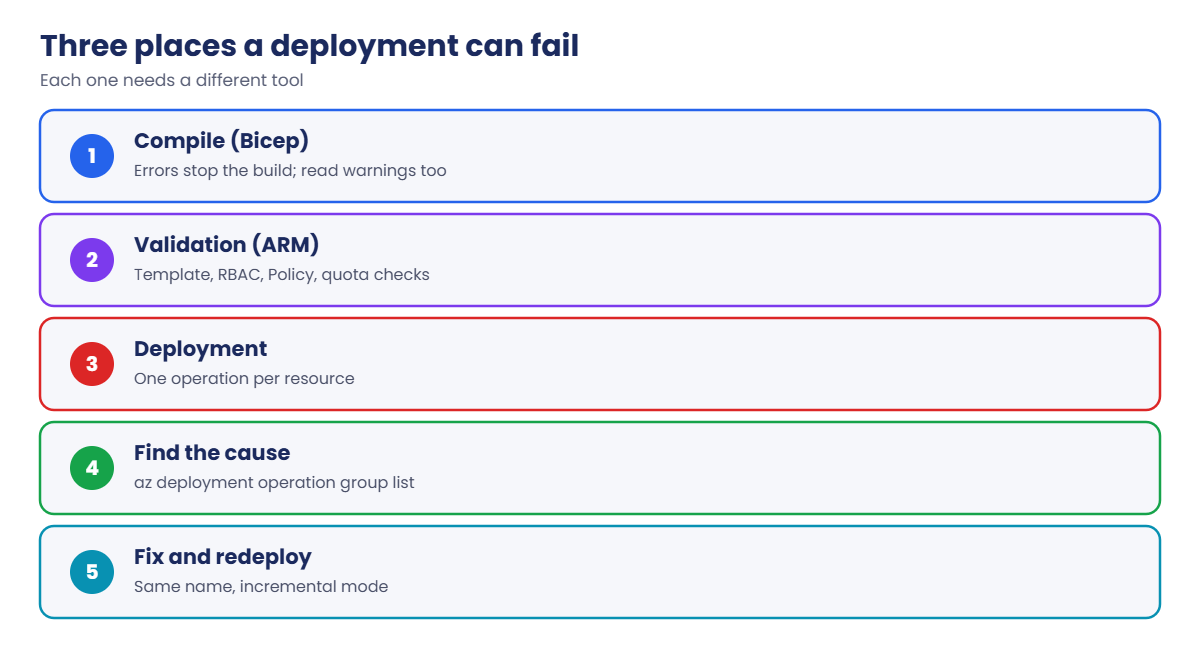
Deployments fail at three different moments, and each needs a different tool. Before Azure sees anything, Bicep can stop you with a compile error. During validation, Azure can refuse the whole template: policy, quota, invalid values.
During the deployment, individual resources fail, and you find out which one from the deployment operations.
In this lab you deploy a small Bicep file, then break it at compile time and at deployment time, and learn to go straight to the real error each time.
| Time | You need | Cost | By the end you can |
|---|---|---|---|
| About 40 minutes | A free account, the CLI and the Bicep CLI (az bicep install) | Nothing: an NSG and a route table are free | Read Bicep errors and warnings, find the failed operation in a deployment, and recognise policy and quota failures |
What it is, in one line
A failed deployment hides the real error inside its operations; you find it by asking which resource failed and why.
In Simple Words
The wedding caterer’s order
A caterer gets an order for a wedding: 200 plates of biryani, 200 sweets, 10 tables. The order can fail at three points. The clerk can reject the form itself because a field is blank (compile error).
The manager can refuse the order because the kitchen can’t cook 2,000 plates (validation, quota). Or the kitchen can start and fail on one dish because the sweet shop ran out of milk (a resource failing during deployment).
When the customer calls, the front desk only says “order failed”. The useful answer is in the kitchen’s notes: which dish failed and why.
Deployment operations are the kitchen’s notes.
Engineer's View
Where deployments fail
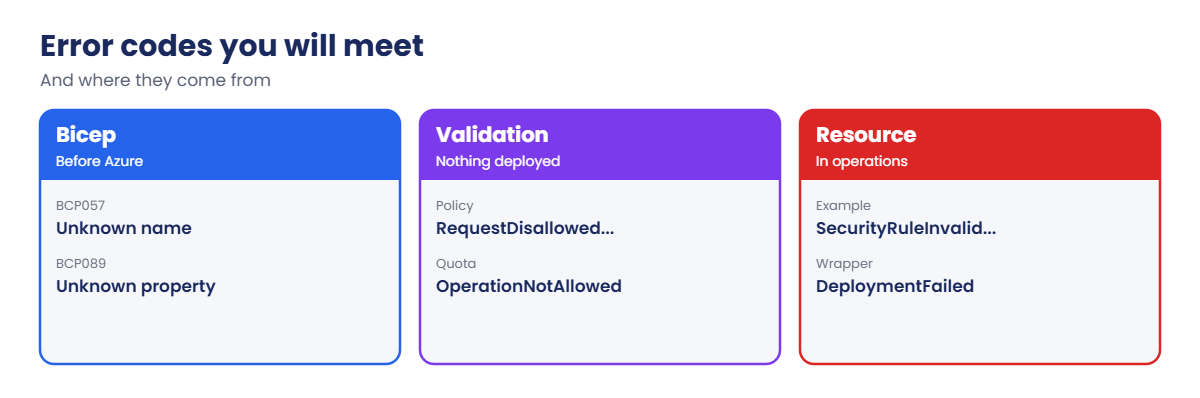
- Compile (Bicep): Bicep turns your file into an ARM template. Errors such as BCP057 (unknown name) stop it. Warnings such as BCP035 (missing required property), BCP036 (wrong type) and BCP089 (unknown property, “did you mean”) don’t stop it, but usually mean Azure will reject the resource.
- Validation: Azure Resource Manager checks the template, permissions (Lesson 66), Azure Policy (RequestDisallowedByPolicy, Lesson 54) and quotas before creating anything. Errors here mean nothing was deployed.
- Deployment: resources are created in dependency order. One failure marks the deployment Failed with code DeploymentFailed; resources already created stay.
- Deployment operations: one operation per resource, each with its own state and status message. The real error code, such as SecurityRuleInvalidPriority, lives here.
- Quota: errors such as OperationNotAllowed with “exceeding approved … Cores quota” mean the subscription’s vCPU limit for that family or region is too low. Check with az vm list-usage.
- Incremental mode: fixing the file and deploying again with the same name is normal; existing correct resources are left as they are.
How it works, step by step
What happens when you run az deployment group create with a Bicep file:
- The CLI runs Bicep to build an ARM template. Errors stop here; warnings are printed and the build continues.
- The template is sent to Azure Resource Manager, which validates it, checks your rights, evaluates Azure Policy and checks quotas.
- ARM creates a deployment and starts one operation per resource, in dependency order.
- Each resource provider accepts or rejects its resource. A rejection becomes a failed operation with a specific error.
- ARM marks the whole deployment Failed if any operation failed, and returns the generic DeploymentFailed message.
The habit that saves time: never stop at DeploymentFailed. Ask for the failed operations and read their codes.
Warnings deserve attention too. Here is what Bicep prints for a simple typo, acess instead of access, in a security rule:
main.bicep(14,9) : Warning BCP035: The specified "object" declaration is missing the following required properties: "access". ...
main.bicep(17,11) : Warning BCP089: The property "acess" is not allowed on objects of type "SecurityRulePropertiesFormat". Did you mean "access"? ...The build succeeds, the deployment starts, and Azure rejects the rule a minute later. Reading warnings would have caught it in a second.
Check quota before you deploy VMs
Quota failures are the ones that hurt most in a release window, because nothing you change in the file fixes them. Each subscription has a vCPU limit per region and per VM family, and a free account’s limits are small. Check them before any deployment that adds VMs:
az vm list-usage --location centralindia --query "[?name.value=='cores' || contains(name.value, 'DSv5')].{name:name.localizedValue, used:currentValue, limit:limit}" -o tableName Used Limit
---------------------------- ------ -------
Total Regional vCPUs 2 10
Standard DSv5 Family vCPUs 0 10Your numbers will differ. If used plus what the template adds is above the limit, the deployment fails with OperationNotAllowed and a message about exceeding the approved quota. Request an increase in the portal under Quotas, or choose another family or region.
Nested deployments hide one level deeper
Bicep modules become nested deployments. When a module fails, the parent’s failed operation is of type Microsoft.Resources/deployments, and its message is again DeploymentFailed. List the operations of that nested deployment, using its name from the parent’s targetResource, and repeat until you reach a real resource. Pipelines can do this walk automatically and print the deepest error.
Deploy a Bicep file and read its operations
1A small Bicep file
Save this as C:\azure-lab\l67\main.bicep:
@description('Location for all resources')
param location string = resourceGroup().location
@description('Port the app listens on')
param appPort int = 8080
resource nsg 'Microsoft.Network/networkSecurityGroups@2024-05-01' = {
name: 'nsg-app67'
location: location
properties: {
securityRules: [
{
name: 'allow-app'
properties: {
priority: 200
direction: 'Inbound'
access: 'Allow'
protocol: 'Tcp'
sourceAddressPrefix: 'VirtualNetwork'
sourcePortRange: '*'
destinationAddressPrefix: '*'
destinationPortRange: string(appPort)
}
}
]
}
}
resource rt 'Microsoft.Network/routeTables@2024-05-01' = {
name: 'rt-app67'
location: location
properties: {
disableBgpRoutePropagation: true
}
}
output nsgId string = nsg.id2Build, preview, deploy
Build it to see any errors and warnings, preview with what-if, then deploy:
az bicep build --file C:\azure-lab\l67\main.bicep --stdout | Out-Null
az group create --name rg-saat-l67 --location centralindia --tags course=saatvedha-azure lesson=67 -o none
az deployment group what-if --resource-group rg-saat-l67 --template-file C:\azure-lab\l67\main.bicep --result-format ResourceIdOnly
az deployment group create --resource-group rg-saat-l67 --name d67 --template-file C:\azure-lab\l67\main.bicep --query properties.provisioningState -o tsvYou should see something like this:
Resource and property changes are indicated with this symbol:
+ Create
The deployment will update the following scope:
Scope: /subscriptions/.../resourceGroups/rg-saat-l67
+ Microsoft.Network/networkSecurityGroups/nsg-app67
+ Microsoft.Network/routeTables/rt-app67
Resource changes: 2 to create.
Succeeded3Read the deployment history
Every deployment is recorded on the resource group:
az deployment group list --resource-group rg-saat-l67 --query "[].{name:name, state:properties.provisioningState, time:properties.timestamp}" -o table
az deployment operation group list --resource-group rg-saat-l67 --name d67 --query "[].{resource:properties.targetResource.resourceName, state:properties.provisioningState}" -o tableYou should see something like this:
Name State Time
------ --------- --------------------------------
d67 Succeeded 2026-10-21T07:41:12.123456+00:00
Resource State
---------- ---------
nsg-app67 Succeeded
rt-app67 SucceededOne operation per resource. When something fails, this is the list you’ll read.
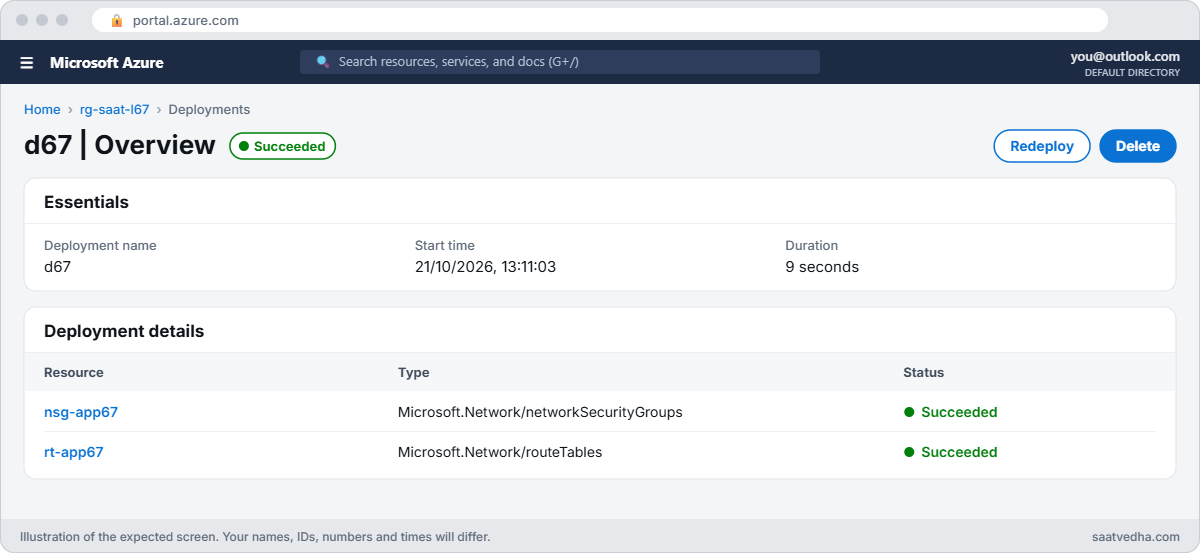

✅ Checkpoint: You deployed a Bicep file and can list its deployments and per-resource operations.
Break It, Then Fix It
Keep the resource group for both breaks.
1Break it: a typo Bicep catches
Someone edits the port line and mistypes the parameter name. Change string(appPort) to string(appPortt), then deploy:
(Get-Content C:\azure-lab\l67\main.bicep -Raw) -replace 'string\(appPort\)', 'string(appPortt)' | Set-Content C:\azure-lab\l67\main.bicep
az deployment group create --resource-group rg-saat-l67 --name d67 --template-file C:\azure-lab\l67\main.bicep -o noneYou’ll get output like this:
C:\azure-lab\l67\main.bicep(5,7) : Warning no-unused-params: Parameter "appPort" is declared but never used. [https://aka.ms/bicep/linter-diagnostics#no-unused-params]
C:\azure-lab\l67\main.bicep(22,40) : Error BCP057: The name "appPortt" does not exist in the current context. [https://aka.ms/bicep/core-diagnostics#BCP057]Nothing reached Azure. The error gives file, line, column and a code, and the warning above it is a strong hint: the real parameter is now unused. This is the cheapest kind of failure; run az bicep build in your pipeline before every deployment to catch it there.
Fix it: correct the name and build again:
(Get-Content C:\azure-lab\l67\main.bicep -Raw) -replace 'appPortt', 'appPort' | Set-Content C:\azure-lab\l67\main.bicep
az bicep build --file C:\azure-lab\l67\main.bicep --stdout | Out-NullNo errors or warnings are printed.
2Break it: a value Azure rejects
A colleague moves the rule “to the end of the list” by giving it priority 5000. Bicep doesn’t know the allowed range, so the build passes:
(Get-Content C:\azure-lab\l67\main.bicep -Raw) -replace 'priority: 200', 'priority: 5000' | Set-Content C:\azure-lab\l67\main.bicep
az deployment group create --resource-group rg-saat-l67 --name d67 --template-file C:\azure-lab\l67\main.bicep -o noneYou’ll get an error like this:
{"status":"Failed","error":{"code":"DeploymentFailed","target":"/subscriptions/.../deployments/d67","message":"At least one resource deployment operation failed. Please list deployment operations for details. Please see https://aka.ms/arm-deployment-operations for usage details.","details":[...]}}DeploymentFailed tells you only that something failed. Ask which operation failed and why:
az deployment operation group list --resource-group rg-saat-l67 --name d67 --query "[?properties.provisioningState=='Failed'].{resource:properties.targetResource.resourceName, code:properties.statusMessage.error.code, message:properties.statusMessage.error.message}" -o jsonYou should see something like this:
[
{
"code": "SecurityRuleInvalidPriority",
"message": "Security rule has invalid Priority. Value provided: 5000 Allowed range 100-4096.",
"resource": "nsg-app67"
}
]The real error is on nsg-app67: NSG priorities must be between 100 and 4096. rt-app67 isn’t in the list because it didn’t fail.
Fix it: use a valid priority, and redeploy with the same name:
(Get-Content C:\azure-lab\l67\main.bicep -Raw) -replace 'priority: 5000', 'priority: 4000' | Set-Content C:\azure-lab\l67\main.bicep
az deployment group create --resource-group rg-saat-l67 --name d67 --template-file C:\azure-lab\l67\main.bicep --query properties.provisioningState -o tsvYou should see Succeeded.

To stop this kind of mistake earlier, add a decorator to the parameter or a check in your module, for example @minValue(100) and @maxValue(4096) on a priority parameter. Then Bicep refuses the value before anything is sent.
Policy failures behave differently from this one. A RequestDisallowedByPolicy error comes back during validation, before any resource is created, and the deployment has no failed resource operations to read. The error itself names the policy assignment, as you saw in Lesson 54. If your pipeline reports a failure with no failed operations, look for a policy or quota message in the deployment’s own error first.
3Clean up
Delete the lab resource group:
az group delete --name rg-saat-l67 --yes✅ Checkpoint: You stopped a compile error before Azure and found a deploy-time error in the deployment operations.
This happened at work
The release that failed at 2 am with “DeploymentFailed”
A healthcare company’s nightly release pipeline deployed 40 resources with one Bicep file. One night it failed with DeploymentFailed, and the on-call engineer saw only that line in the pipeline log. He re-ran it twice, then rolled back the app release, which had nothing to do with the failure.
In the morning, a teammate listed the deployment operations. One VM had failed with OperationNotAllowed: the new VM size pushed the subscription past its DSv5 family vCPU quota in Central India. Every other resource had succeeded.
What they changed: the pipeline now prints failed deployment operations automatically when a deployment fails, a pre-deployment step checks az vm list-usage against the VM sizes in the template, and quota increases are requested as part of capacity planning, not during an outage.
Common mistakes and troubleshooting
| Mistake | What you see | What to do |
|---|---|---|
| Stopping at DeploymentFailed | No idea what broke | List failed deployment operations. |
| Ignoring Bicep warnings | Resource rejected at deploy time | Treat BCP035, BCP036 and BCP089 as errors. |
| Not running what-if | Surprise changes or deletions | Run what-if before deploying. |
| Quota too low | OperationNotAllowed, cores quota | Check az vm list-usage; request an increase. |
| Policy denial | RequestDisallowedByPolicy | Read the assignment in the error (Lesson 54). |
| Re-running blindly | Same failure, wasted time | Fix the cause, then redeploy with the same name. |
Interview questions
Click a question to open it. Each one is written the way an interviewer would ask it. Under it you will see why they ask it and one way you could answer, in your own words.
Fresher level
1. A deployment says DeploymentFailed. What do you do first?
Why they ask this: The basic method.
How you might answer: List the deployment operations and read the error code and message of the failed resource.
2. Bicep error vs warning?
Why they ask this: Tool knowledge.
How you might answer: Errors stop the build, so nothing is deployed. Warnings let it continue, but often mean Azure will reject the resource.
3. What is what-if?
Why they ask this: Safety tool.
How you might answer: A preview of the changes a deployment would make: create, modify, delete or no change, without deploying.
2–5 years experience
4. A deployment fails on one VM with OperationNotAllowed. Why?
Why they ask this: A real troubleshooting path.
How you might answer: Usually a vCPU quota for the VM family or region. Check az vm list-usage, pick another size or region, or request a quota increase.
5. How do you find which resource failed in a nested deployment?
Why they ask this: Depth.
How you might answer: List operations of the parent, find the failed Microsoft.Resources/deployments operation, then list operations of that nested deployment.
6. What happens to resources that succeeded before a failure?
Why they ask this: ARM behaviour.
How you might answer: They stay. In incremental mode, redeploying after a fix leaves them as they are and creates the rest.
Senior level
7. How would you make a pipeline catch deployment problems early?
Why they ask this: They want a strong pipeline.
How you might answer: bicep build with warnings as errors, linter rules, what-if review, policy compliance checks, quota checks, test deployments to a sandbox, and automatic printing of failed operations.
8. How do you handle partial failures in production?
Why they ask this: Operations maturity.
How you might answer: Idempotent templates, the same deployment rerun after the fix, deployment stacks for clean-up, and rollback plans that don’t assume all-or-nothing.
9. How do you avoid quota surprises?
Why they ask this: Capacity planning.
How you might answer: Track usage against limits per family and region, alert near limits, request increases ahead of projects, and spread workloads across families or regions.
Quick quiz
Q1. Where is the real error for a DeploymentFailed?
- The outer message
- Deployment operations
- Activity log only
- Bicep warnings
Show answer
B — Each resource operation has its own error.
Q2. BCP057 means?
- Quota exceeded
- Unknown name in the Bicep file
- Policy denial
- Wrong region
Show answer
B — A name doesn’t exist in scope.
Q3. NSG rule priority 5000 fails with?
- QuotaExceeded
- SecurityRuleInvalidPriority
- AuthorizationFailed
- Conflict
Show answer
B — Priorities must be 100 to 4096.
Q4. Do Bicep warnings stop the build?
- Yes
- No
- Only in pipelines
- Only for VMs
Show answer
B — Warnings print but the build continues.
Q5. Which command checks vCPU quota use?
- az quota show-all
- az vm list-usage
- az deployment what-if
- az bicep lint
Show answer
B — It lists usage and limits per family.
Quick recap
You can now take any failed deployment from “DeploymentFailed” to the exact resource and reason in under a minute.
- Deployments fail at compile, validation or deployment time.
- Bicep errors stop the build; warnings still matter.
- DeploymentFailed is a wrapper; read the failed operations.
- Quota and policy failures happen before resources are created.
- Fix the cause and redeploy with the same name.
Next lesson
Lesson 68: Throttling and quotas: HTTP 429 and snapshot limits → You meet throttling (HTTP 429), snapshot limits and backup tool concurrency, and learn to back off instead of retrying harder.
Further reading: Azure deployment failed
Want to go deeper into Azure deployment failed? See Microsoft’s Find error codes for Azure deployments and Bicep core diagnostics. You can also see the full plan for this course on the Azure Cloud Administration course page.

