Set Up Your Azure Free Account Safely

Good Azure free account setup takes about an hour, and it decides whether your learning month is calm or stressful. You create the account, protect the sign-in with MFA, and set a budget alert before you build anything.

Most people skip the last two steps. Then a VM is left running over a weekend, or a password leaks, and they only find out when the credit is gone.

In this lesson you create the account the safe way, check exactly what kind of subscription you got, and set up a budget that emails you early. You’ll also learn what happens when the credit or the 30 days run out, so nothing surprises you later in the course.

TimeYou needCostBy the end you can
About 60 minutesA personal email address, a phone, and a debit or credit card for identity checksNothing (no resources are created)Sign in with MFA, read your subscription type and spending limit, and get budget emails before you spend real money

What it is, in one line

A safe Azure free account is one where sign-in needs MFA, you know your credit and limits, and a budget emails you long before money is lost.

In Simple Words

A prepaid phone card with a warning beep

Think of the Azure free account like a prepaid phone card your parents give you for one month. It has 200 dollars on it, and some calls are free all year.

The card has a lock (MFA), so nobody else can use it if they learn your PIN. It also has a warning beep that tells you “you have used 80 percent” before it runs out (the budget alert).

When the month ends or the money is used up, the card simply stops. If you want to keep calling, you switch to a normal monthly plan, and then the warning beep matters even more, because now it’s real money.

Engineer's View

What you actually get, and the rules that come with it

  • USD 200 credit for 30 days. Most services can use it. Whatever is left after 30 days is gone.
  • 12 months of free amounts for popular services. The ones this course uses most: 750 hours a month each of B2ats v2 and B2pts v2 VMs (Linux and Windows), two 64 GB Premium SSD (P6) managed disks, 5 GB of hot LRS blob storage, 100 GB of Azure Files and 15 GB of outbound data.
  • Always-free services, such as 500 minutes a month of Azure Automation jobs and Azure Policy.
  • Spending limit: On. The free account can’t charge your card. When the credit runs out or 30 days pass, your resources are stopped and the subscription is disabled.
  • Upgrading to pay-as-you-go removes the spending limit. You keep the 12-month free amounts, and you pay only for what goes beyond them. Microsoft’s terms say you must move to pay-as-you-go within 30 days to keep those 12-month amounts.

Behind the scenes, sign-up creates three things: a Microsoft Entra tenant (usually called “Default Directory”), a subscription (usually “Azure subscription 1”), and a billing account. Inside the subscription, the offer shows as FreeTrial_2014-09-01 with spendingLimit: On. You’ll read those values yourself in the lab.

Two more facts that trip people up:

  • MFA is mandatory. Since October 2024, Microsoft requires MFA for the Azure portal. Since 1 October 2025, create, update and delete actions from the Azure CLI, PowerShell and other tools need it too. There’s no opt-out for normal users.
  • Cost data is late. For pay-as-you-go and free accounts, cost data can take up to 72 hours to show in Cost Management. A budget alert is an early warning, not a brake. It never stops or deletes anything.

How it works, step by step

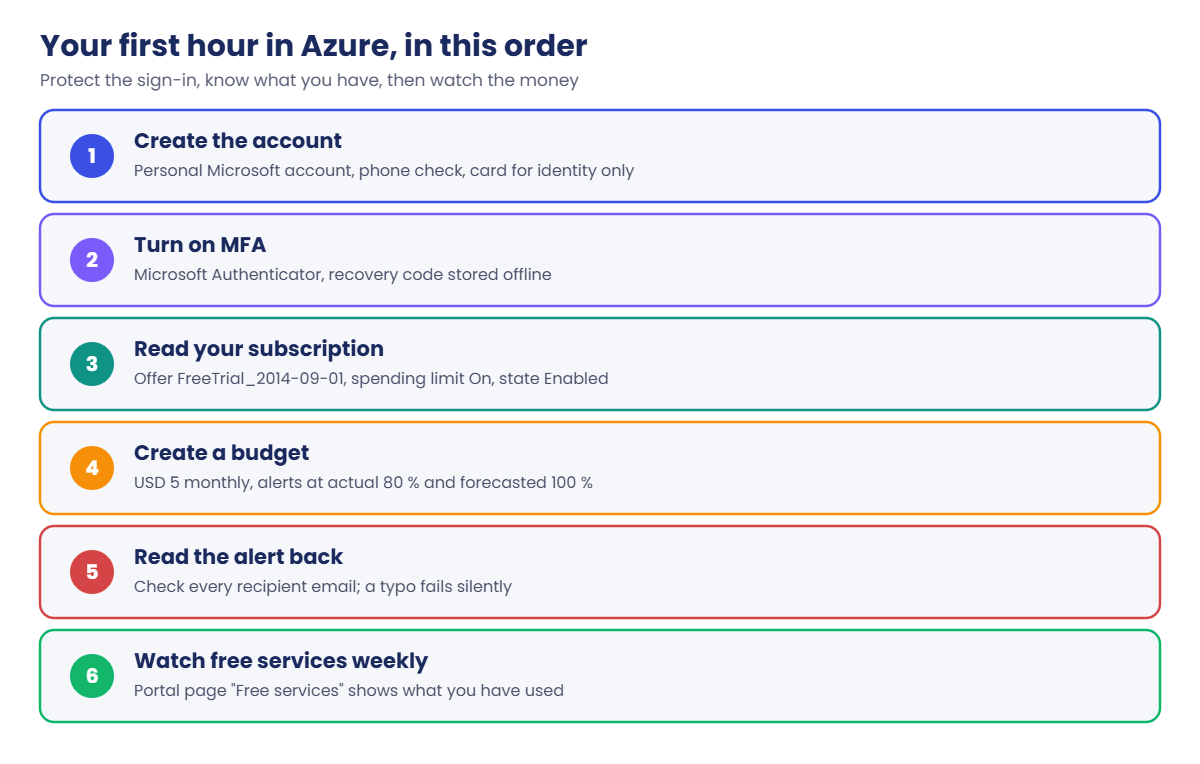
Here is the order to do things in during your first hour. The order matters: protect the sign-in first, then know what you have, then watch the money.

Azure free account setup: the first hour in order, from sign-up to budget alerts

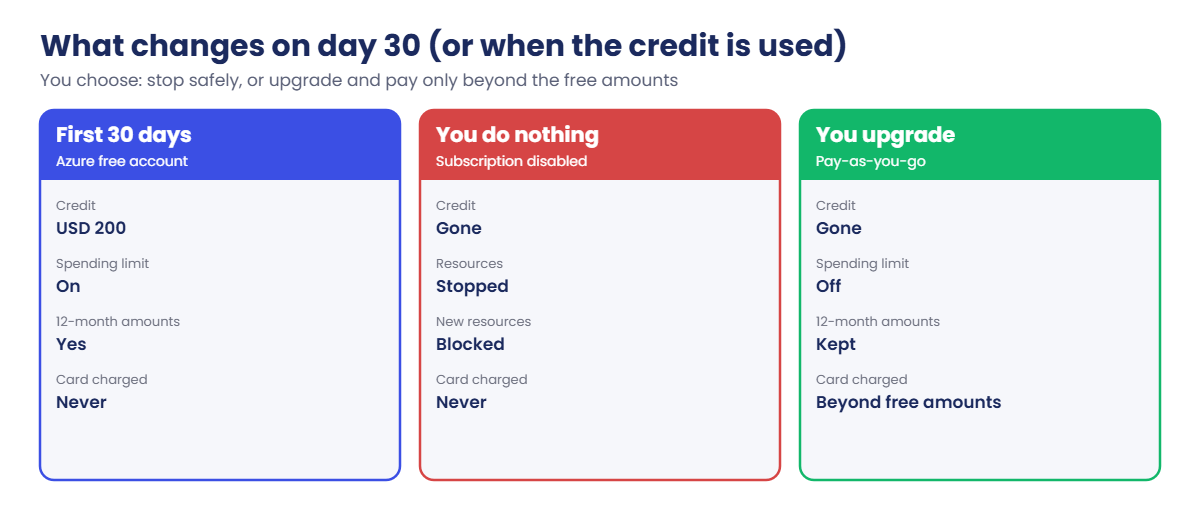
The free account changes once, at the 30-day mark or when the credit is used up, whichever comes first. What happens next depends on one choice:

  1. You do nothing. The subscription is disabled. VMs stop, and you can’t create anything. This is safe for your wallet, but your labs pause.
  2. You upgrade to pay-as-you-go. The spending limit goes away. The 12-month free amounts continue, and anything beyond them is charged to your card each month.

This course is built so that most labs fit inside the free amounts or cost a few cents. The few labs that cost more (Azure Firewall, Application Gateway, VPN Gateway, Ultra Disk) say so at the top, with the price per hour. Do those within your first 30 days, or after you upgrade with your budget alerts in place.

Azure free account setup: what changes on day 30, disabled or pay-as-you-go

One more rule for the whole course: tag and delete. Every lab puts the tags course=saatvedha-azure and lesson=NN on what it creates, and ends with a cleanup step. If you follow that, the budget alert should never fire.

Hands-on lab: create and protect your Azure account

You create the account, lock the sign-in, read what Microsoft gave you, and set up a budget. Steps 1 to 3 are in the browser. Steps 4 to 6 use Cloud Shell, a command line that runs inside the Azure portal, so you don’t need to install anything yet.

1Create the Azure free account

  1. Go to azure.microsoft.com/free and start the sign-up for the Azure free account.
  2. Sign in with a Microsoft account, or create one. Use a personal email that you will keep for years. Don’t use your work email: your company may already have its own Azure tenant, and you’d end up in the wrong place.
  3. Verify your phone number, then add a debit or credit card. Microsoft uses the card only to check your identity; the free account can’t charge it because the spending limit is on.
  4. Accept the agreement and wait for the portal to open at portal.azure.com.
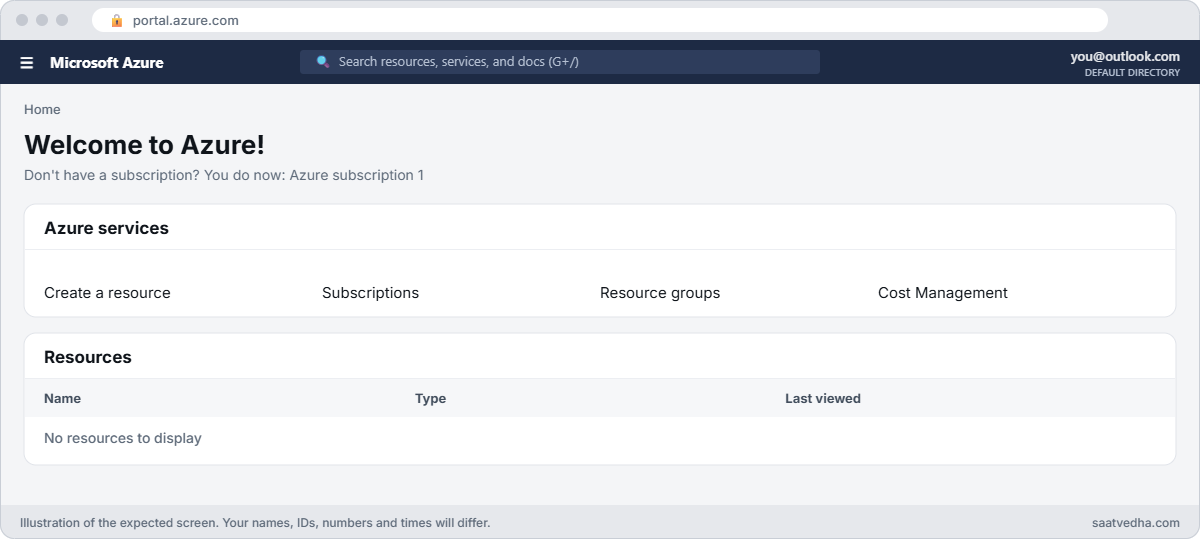
Azure free account setup: portal home page after sign-up
The portal home page right after sign-up, with your account at the top right.

2Turn on MFA for your sign-in

Azure will ask for MFA anyway, but set it up properly now, with an app rather than SMS.

  • Personal Microsoft account (outlook.com, hotmail, or another email you registered with Microsoft): open account.microsoft.com/security, turn on two-step verification, and add the Microsoft Authenticator app.
  • Work or school style account (it ends in .onmicrosoft.com): open mysignins.microsoft.com/security-info and add Microsoft Authenticator.

Then save the recovery code Microsoft gives you somewhere safe, offline. If you lose your phone, that code is how you get back in.

✅ Checkpoint: Sign out and sign back in to the portal. You are asked for a number match or code in Microsoft Authenticator.

3Create a budget that emails you early

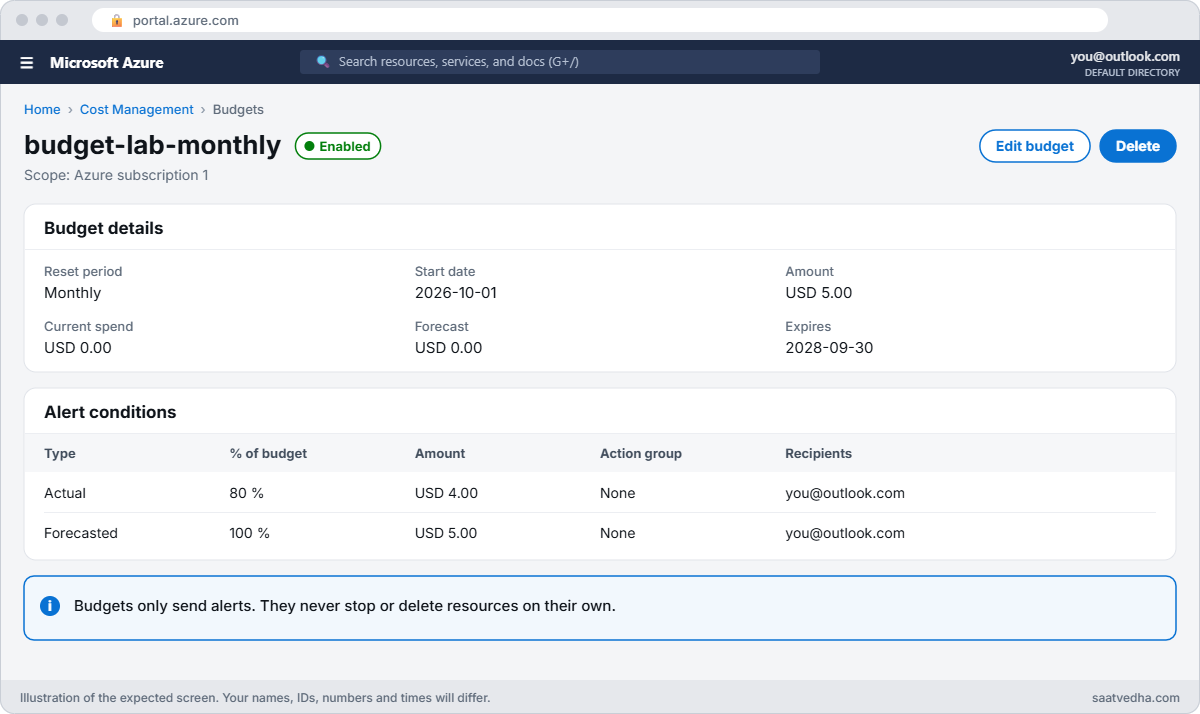
  1. In the portal search bar, type Budgets and open it. Check that the scope at the top is your subscription (for example “Azure subscription 1”).
  2. Choose Add. Name: budget-lab-monthly. Reset period: Monthly. Start date: the first day of this month. Amount: 5 (USD).
  3. On the alerts page, add two conditions: Actual, 80 % and Forecasted, 100 %.
  4. Under Alert recipients (email), type your email address. Check the spelling twice; you’ll see why in “Break It”.
  5. Create the budget.
Azure budget with actual and forecast alerts
budget-lab-monthly with the two alert conditions.

Why only 5 dollars when you have 200? Cost Management shows your usage before credits are taken off. A 5 dollar budget means you hear about it the moment labs start costing more than a few cents, while the credit still protects you.

4Open Cloud Shell in PowerShell mode

Select the Cloud Shell icon (a small >_ in the top bar). Choose PowerShell. When it asks about storage, choose No storage account required and pick your subscription.

You’ll set up the full toolkit in Lesson 3.

Run this:

az account show --query "{name:name, state:state, tenant:tenantDisplayName, user:user.name}" -o table

You should see something like this:

Name                  State    Tenant             User
--------------------  -------  -----------------  ---------------------------
Azure subscription 1  Enabled  Default Directory  live.com#priya.k@outlook.com

Enabled means the subscription is active. The live.com# part means you signed in with a personal Microsoft account.

5Read your offer and spending limit

Run this:

$sub = az account show --query id -o tsv
az rest --method get --url "https://management.azure.com/subscriptions/$($sub)?api-version=2022-12-01" --query subscriptionPolicies

You should see something like this:

{
  "locationPlacementId": "Public_2014-09-01",
  "quotaId": "FreeTrial_2014-09-01",
  "spendingLimit": "On"
}

az rest sends a raw request to Azure Resource Manager, the same front door you met in Lesson 1. FreeTrial_2014-09-01 is the free account offer, and spendingLimit On confirms your card can’t be charged. After an upgrade to pay-as-you-go you’d see a different quota ID and the spending limit Off.

6Check the budget from the command line

Run this:

az consumption budget show --budget-name budget-lab-monthly --query "{amount:amount, period:timeGrain, emails:notifications.*.contactEmails}"

You should see something like this:

{
  "amount": "5.0",
  "emails": [
    [
      "priya.k@outlook.com"
    ],
    [
      "priya.k@outlook.com"
    ]
  ],
  "period": "Monthly"
}

Two alert conditions, each with your email. Last, type Free services in the portal search bar and open that page. It lists every 12-month free service with how much you’ve used.

Look at it once a week while you study.
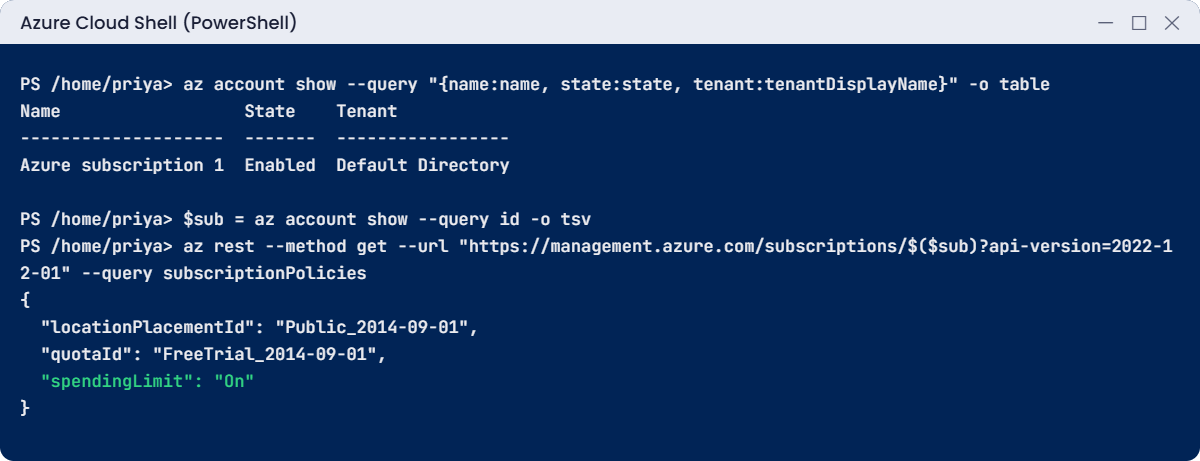
Azure free account setup check in Cloud Shell: FreeTrial quota ID and spending limit On
Example output. Your names and IDs will be different.

✅ Checkpoint: MFA works at sign-in, spendingLimit shows On, and budget-lab-monthly has your correct email on both alert conditions.

Break It, Then Fix It

Two mistakes that cost people money or time. The first gives a clear error. The second gives no error at all.

1Break it: pick a subscription by a name that isn’t quite right

Run this in Cloud Shell:

az account set --subscription "Azure subscription"

You’ll get this error:

ERROR: The subscription of 'Azure subscription' doesn't exist in cloud 'AzureCloud'.

The real name is “Azure subscription 1”. The CLI matches the full name or ID exactly, so a near miss fails. At work, people have many subscriptions with similar names, and this mistake is very common.

Fix it: list what you can see, then use the ID, which never changes:

az account list --query "[].{name:name, id:id, state:state}" -o table
$sub = az account list --query "[?name=='Azure subscription 1'].id" -o tsv
az account set --subscription $sub
az account show --query name -o tsv

You should see something like this:

Name                  Id                                    State
--------------------  ------------------------------------  -------
Azure subscription 1  6f1c2d3e-4a5b-4c6d-8e9f-0a1b2c3d4e5f  Enabled
Azure subscription 1

In scripts, always set the subscription by ID. Names can be changed by anyone with the right role; IDs can’t.

2Break it: a typo in the alert email

Open the budget in the portal, choose Edit, and change one alert email to a typo, for example priya.k@outlok.com. Save. Then run step 6 again.

You should see something like this:

{
  "amount": "5.0",
  "emails": [
    [
      "priya.k@outlok.com"
    ],
    [
      "priya.k@outlook.com"
    ]
  ],
  "period": "Monthly"
}

Azure accepted it without a word. It doesn’t check that the mailbox exists. If this were your only recipient, the 80 % alert would go nowhere and you’d learn about the cost from your card statement.

Fix it: edit the budget, correct the address, save, and run step 6 once more. Both lists must show the right email.

The habit to keep: after you set up any alert, read it back and check where it goes. Later in the course you’ll send alerts to an action group with more than one person, so a single typo can’t silence them.
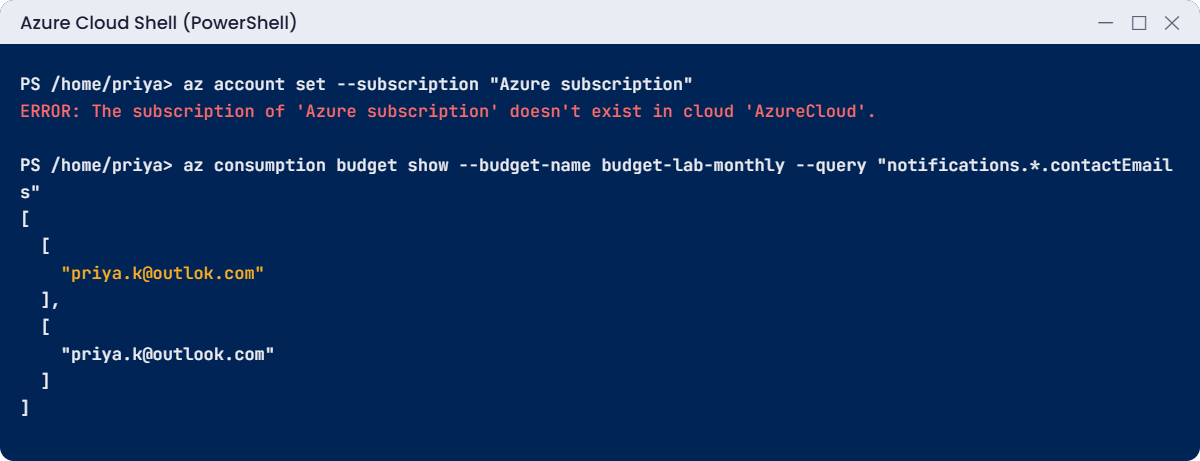
Azure free account setup errors: wrong subscription name and a typo in the budget email
Example output of both mistakes.

✅ Checkpoint: Both alert conditions show your correct email again, and you set the subscription by ID.

This happened at work

The weekend the shop went offline

A small online shop started on its founder’s Azure free account “just to try things”. It worked well, so the developers kept adding to it, and after three weeks the live website, its database and a test VM with a GPU were all in that one subscription.

Nobody had set a budget. On a Saturday the GPU VM, which someone forgot to stop after a test, used the last of the 200 dollars. The spending limit did exactly what it promises: it stopped everything, including the live website.

Orders failed for most of the weekend until the founder got the email, upgraded the account and started the VMs again.

What they changed: production moved to its own pay-as-you-go subscription, separate from test. Every subscription got a budget with alerts to a shared team mailbox, not one person’s inbox. Test VMs got auto-shutdown at 7 p.m.

And the founder’s personal account was removed as the only Owner, with two named admins added with MFA.

Common mistakes and troubleshooting

MistakeWhat you seeWhat to do
Signing up with a work emailYou land in the company tenant, or sign-up is blockedUse a personal Microsoft account for your own lab.
No MFA, or SMS onlySign-in prompts you can’t complete, or a stolen accountUse Microsoft Authenticator and keep the recovery code offline.
Expecting a budget to stop spendingThe alert arrives, but resources keep runningBudgets only email. Stop or delete resources yourself; later you’ll automate it.
Waiting for today’s cost to showCost analysis looks too lowCost data can take up to 72 hours. Watch what is running, not only the bill.
Not knowing the 30-day ruleLabs suddenly stop workingCheck the days left on the subscription page. Upgrade, or plan the costly labs inside the 30 days.
Using production and lab in one subscriptionA lab mistake breaks something realKeep your learning subscription separate from anything real.

Interview questions

Click a question to open it. Each one is written the way an interviewer would ask it. Under it you will see why they ask it and one way you could answer, in your own words.

Fresher level

1. Can you explain what you get with the Azure free account?

Why they ask this: They want to see you know the limits, not only the credit amount.

How you might answer: New accounts get 200 US dollars of credit for 30 days, 12 months of free amounts for popular services like B2ats v2 VMs and two 64 GB P6 disks, and some services that are always free.

The spending limit is on, so when the credit or the 30 days run out the subscription is disabled unless you upgrade to pay-as-you-go.

2. Does an Azure budget stop resources when you go over it?

Why they ask this: This is a very common misunderstanding, and they want to see you don’t rely on budgets as a brake.

How you might answer: No. A budget only sends alerts when actual or forecasted cost passes a threshold. Nothing is stopped or deleted.

If I need an automatic action, I connect the budget alert to an action group that runs something, like a runbook that shuts down test VMs.

3. Why should MFA be on for an Azure admin account?

Why they ask this: They’re checking basic security awareness and whether you know MFA is now required.

How you might answer: An admin account can create, change or delete everything, so a stolen password alone shouldn’t be enough to sign in. Microsoft now enforces MFA for the portal, and for create, update and delete actions from the CLI and PowerShell.

I use an authenticator app instead of SMS and keep a recovery method stored safely.

2–5 years experience

4. Your budget alert didn’t fire, but the bill was high. What could have gone wrong?

Why they ask this: They want a structured check, not a guess.

How you might answer: I’d check the alert recipients first, because a typo there fails silently, then the thresholds and the scope of the budget. It might also be a timing issue: cost data can lag up to 72 hours, so the spike may not have reached the budget yet when I looked.

Finally I’d check whether the cost was in a different subscription that the budget didn’t cover.

5. How do you check which subscription a script will run against?

Why they ask this: They want to see safe CLI habits before you change anything.

How you might answer: I run az account show before anything else, and in scripts I set the subscription explicitly with az account set --subscription and the ID, not the name.

Names can be duplicated or renamed, but the ID is unique and fixed.

6. How would you set up cost alerts for a team of ten developers sharing one subscription?

Why they ask this: They want to see you think beyond one person’s inbox.

How you might answer: I’d create a budget on the subscription and smaller budgets on each team’s resource group, with alerts at actual 80 percent and forecasted 100 percent. The alerts go to an action group with a shared mailbox and the team chat, so one person being on leave doesn’t hide them.

I’d also turn on cost anomaly alerts and add auto-shutdown to dev VMs.

Senior level

7. A company wants to give each new trainee their own Azure free account for practice. What advice would you give?

Why they ask this: They’re checking that you see the governance and data risks, not just the cost.

How you might answer: For learning it’s fine, but trainees shouldn’t use their work identity, and no company data or real systems should ever go into those accounts. If the company wants control and visibility, I’d suggest a sandbox subscription under the company’s management groups instead, with budgets, Azure Policy and auto-delete of old resources.

That way, the security team can see what’s there, and nothing depends on a personal account.

8. How would you design emergency access for a tenant now that MFA is mandatory everywhere?

Why they ask this: They want to see you know break-glass accounts still need strong authentication.

How you might answer: I’d keep two cloud-only emergency accounts with Global Administrator, excluded from normal Conditional Access policies but protected with passkeys or FIDO2 keys, because mandatory MFA applies to them too.

The keys are stored in separate safes, the accounts are monitored with an alert on every sign-in, and we test them a few times a year.

9. Someone says “it’s only a test subscription, we don’t need budgets.” How do you respond?

Why they ask this: They want to see you can explain risk in money terms and offer a light process.

How you might answer: I’d point out that test subscriptions are where most surprise costs come from: forgotten VMs, large disks and public IPs that nobody owns. A budget takes two minutes and costs nothing.

I’d suggest a small budget per test subscription, auto-shutdown on VMs, and a weekly check of untagged resources.

Quick quiz

Q1. How long can you use the USD 200 credit?

  1. 7 days
  2. 30 days
  3. 90 days
  4. 12 months
Show answer

B — The credit is for the first 30 days. Unused credit is lost.

Q2. What does the spending limit do on the free account?

  1. Deletes your data at 50 %
  2. Stops resources and disables the subscription when credit or time runs out
  3. Charges your card automatically
  4. Turns off MFA
Show answer

B — With the spending limit on, Azure can’t charge your card, so it stops instead.

Q3. A budget alert fires at 80 %. What happens to your VMs?

  1. They stop
  2. They are deleted
  3. Nothing; you only get an email
  4. They are resized
Show answer

C — Budgets only send alerts. They never stop or delete anything.

Q4. Which value in subscriptionPolicies shows it is a free account?

  1. locationPlacementId
  2. quotaId FreeTrial_2014-09-01
  3. state Enabled
  4. tenantId
Show answer

B — The quota ID names the offer. FreeTrial_2014-09-01 is the free account.

Q5. Why set the subscription by ID in scripts?

  1. IDs are shorter
  2. Names can be similar or renamed; the ID is unique and fixed
  3. The CLI only accepts IDs
  4. IDs are secret
Show answer

B — Names can be duplicated or changed, which leads to running a script in the wrong place.

Quick recap

You now have an Azure account that is locked with MFA and watched by a budget. You know exactly what you got and what happens on day 30.

  • Free account: USD 200 for 30 days, 12 months of free amounts, and some always-free services.
  • Spending limit On means Azure stops your resources instead of charging your card.
  • MFA is mandatory for the portal and for changes from the CLI and PowerShell.
  • Budgets email you; they never stop anything. Cost data can be up to 72 hours late.
  • Check alert recipients after you set them, and set subscriptions by ID in scripts.

Next lesson

Lesson 3: Your Azure lab toolkit: Azure CLI, PowerShell, Cloud Shell → You install the Azure CLI and Az PowerShell on your laptop and learn the commands you’ll use in every lab.

Further reading: Azure free account setup

Want to go deeper into Azure free account setup? Microsoft explains the limits and how to avoid charges in Avoid charges with your Azure free account, and budgets in Create and manage budgets. You can also see the full plan for this course on the Azure Cloud Administration course page.

Scroll to Top