Public IPs, Default Outbound Access and NAT Gateway
-
Phase 0: Before you start
-
Phase 1: The foundation
-
Phase 2: Day-to-day operations
-
Phase 3: Enterprise architecture
-
Phase 4: Troubleshooting step by step
-
Phase 5: Final project and career
Azure NAT Gateway gives a private subnet one controlled way out to the internet. Every VM in the subnet goes out through the same fixed public IP, while nothing on the internet can start a connection back in.
This matters more than ever, because new subnets are private by default since March 2026. A new VM can’t run apt update or Windows Update until you give its subnet an outbound method. Many guides written before 2026 never mention this, so people think their VM is broken.
In the lab you build a small VM in a private subnet, prove it has no internet, add a NAT Gateway, and see the same VM go out through your own fixed IP. Then you meet two surprises: a public IP that won’t delete, and a VM public IP that isn’t used for outbound at all.
| Time | You need | Cost | By the end you can |
|---|---|---|---|
| About 45 minutes | vnet-saat, the CLI, Run Command (built in) | About USD 0.05 if you clean up within 1 hour (NAT Gateway USD 0.045/hour, public IP USD 0.005/hour; the VM is covered by the 12-month free hours) | Explain default outbound access, add NAT Gateway to a subnet, and check which IP a VM really uses |
What it is, in one line
NAT Gateway is a managed, outbound-only exit for a subnet: VMs share its fixed public IP to reach the internet, and the internet can’t reach them back.
In Simple Words
One gate with a guard, for going out only
Imagine a hostel where students may go out to the shops, but strangers may not walk in. The warden builds one exit gate with a guard. Every student leaves through it, and the shopkeepers always see the hostel’s address on the visitor book, never each student’s room number.
The hostel is your private subnet. The gate is the NAT Gateway, and the hostel’s address is its public IP. Replies from the shops come back through the same gate, but nobody can walk in uninvited.
Before 2026, many hostels had a hidden side door nobody had planned. Now that side door is gone by default, so you build the gate on purpose.
Engineer's View
Outbound methods and who wins
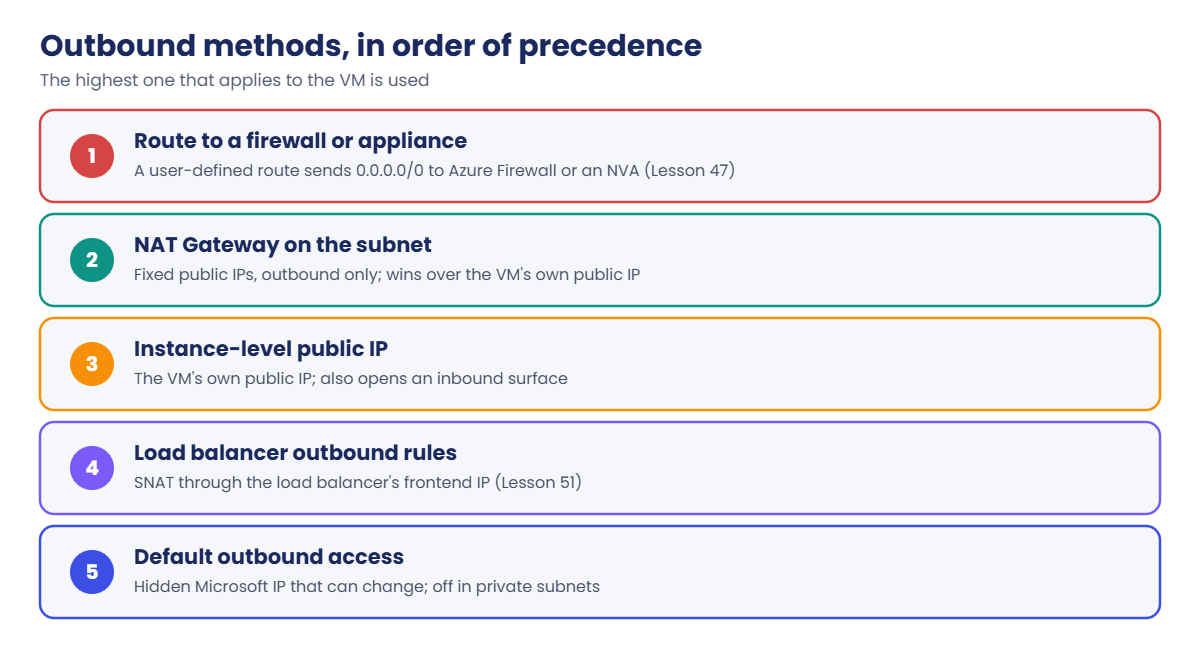
A VM can reach the internet in one of these ways. Azure uses them in this order of precedence:
- A route to a firewall or appliance (user-defined route, Lesson 47).
- NAT Gateway on the VM’s subnet. It takes precedence over the VM’s own public IP and load balancer outbound rules.
- Instance-level public IP on the VM’s network card.
- Load balancer outbound rules (Lesson 51).
- Default outbound access: a hidden, Microsoft-owned IP that can change. Not available in private subnets, which is the default for new VNets since 31 March 2026.
NAT Gateway facts worth remembering:
- One NAT Gateway serves subnets in one VNet, up to 16 public IPs or a
/28prefix. Each IP gives roughly 64,000 SNAT ports, used on demand. - The Standard SKU is zonal (or no zone). StandardV2 is zone-redundant, supports IPv6, needs StandardV2 public IPs, costs the same, and isn’t offered in West India. You can’t upgrade Standard to StandardV2 in place.
- Price (Standard, Central India): about USD 0.045 per hour plus 0.045 per GB processed, plus USD 0.005 per hour for each Standard public IP.
- Default TCP idle timeout is 4 minutes, adjustable up to 120.
VMs in a private subnet can still reach Azure Storage in the same region and the Azure platform address 168.63.129.16, which is why the VM agent and Run Command keep working without any internet path.
How it works, step by step
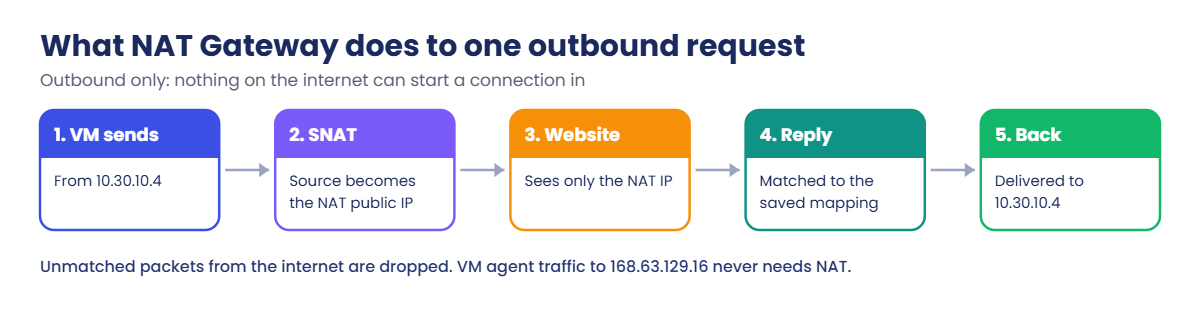
Here is what happens when a VM behind a NAT Gateway calls a website:
- The VM sends a packet from its private IP, for example 10.30.10.4, to the website.
- The subnet’s NAT Gateway catches it and swaps the source to its public IP and an unused source port (SNAT).
- The website sees only the NAT Gateway’s public IP and replies to it.
- NAT Gateway matches the reply to the saved mapping and sends it back to 10.30.10.4.
- Anything arriving that doesn’t match an existing mapping is dropped: there’s no way in.
Because every VM shares the same public IP, partners can allow-list one address for your whole subnet. That’s the most common business reason to use NAT Gateway, beyond simply “making the internet work”.
The design rule: give each subnet that needs internet an explicit outbound path, prefer NAT Gateway for plain outbound traffic, and use a firewall when you need to inspect or filter it.
Hands-on lab: a private VM gets a way out
You build one small Ubuntu VM in snet-mgmt with no public IP, test it with Run Command (which needs no SSH and no internet), then add a NAT Gateway. Load the network IDs first:
$v = Get-Content C:\azure-lab\vnet-saat.json | ConvertFrom-Json
az group create --name rg-saat-l13 --tags course=saatvedha-azure lesson=13 -o none1Create a test VM in the private subnet
Run this (it takes about two minutes):
az vm create --resource-group rg-saat-l13 --name vm-saat-l13 --image Canonical:ubuntu-24_04-lts:server:latest --size Standard_B2ats_v2 --subnet $v.'snet-mgmt' --public-ip-address '""' --nsg '""' --admin-username azureuser --generate-ssh-keys --os-disk-size-gb 64 --tags course=saatvedha-azure lesson=13 --query "{name:name, privateIp:privateIpAddress, publicIp:publicIpAddress}" -o tableYou should see something like this:
Name PrivateIp PublicIp
----------- ----------- ----------
vm-saat-l13 10.30.10.4'""' passes an empty value through Windows PowerShell to the CLI, which means “no public IP” and “no NSG on the network card”. Without the quotes, PowerShell drops the empty value and the CLI would create both. Standard_B2ats_v2 with a 64 GB disk stays inside the free account’s 12-month amounts.
You’ll learn VMs properly in Lesson 15.
2Prove the VM has no internet
Run this:
az vm run-command invoke --resource-group rg-saat-l13 --name vm-saat-l13 --command-id RunShellScript --scripts "curl -s -m 10 https://ifconfig.me || echo NO-OUTBOUND" --query "value[0].message" -o tsvYou should see something like this:
Enable succeeded:
[stdout]
NO-OUTBOUND
[stderr]
The VM can’t reach the internet. Run Command still worked because it talks to the VM agent through the Azure platform, not the internet. Check why:
az network vnet subnet show --ids $v.'snet-mgmt' --query "{defaultOutbound:defaultOutboundAccess, natGateway:natGateway.id}" -o tableYou should see something like this:
DefaultOutbound
-----------------
False3Create a public IP and a NAT Gateway
Run this:
az network public-ip create --resource-group rg-saat-l13 --name pip-saat-nat --sku Standard --allocation-method Static --tags course=saatvedha-azure lesson=13 -o none
az network nat gateway create --resource-group rg-saat-l13 --name nat-saat-l13 --public-ip-addresses pip-saat-nat --idle-timeout 4 --tags course=saatvedha-azure lesson=13 -o none
$natId = az network nat gateway show --resource-group rg-saat-l13 --name nat-saat-l13 --query id -o tsv
az network vnet subnet update --ids $v.'snet-mgmt' --nat-gateway $natId -o none
az network public-ip show --resource-group rg-saat-l13 --name pip-saat-nat --query ipAddress -o tsvYou should see something like this:
20.204.118.57The NAT Gateway is in your lab resource group, but it’s attached to snet-mgmt in rg-saat-core. That cross-group link matters at cleanup time.
4Test again
Wait about a minute, then run the same test:
az vm run-command invoke --resource-group rg-saat-l13 --name vm-saat-l13 --command-id RunShellScript --scripts "curl -s -m 10 https://ifconfig.me || echo NO-OUTBOUND" --query "value[0].message" -o tsvYou should see something like this:
Enable succeeded:
[stdout]
20.204.118.57
[stderr]
The website now sees the NAT Gateway’s public IP, the same one you printed in step 3. Every VM in snet-mgmt will use it. Try sudo apt-get update through Run Command if you like: it works now.
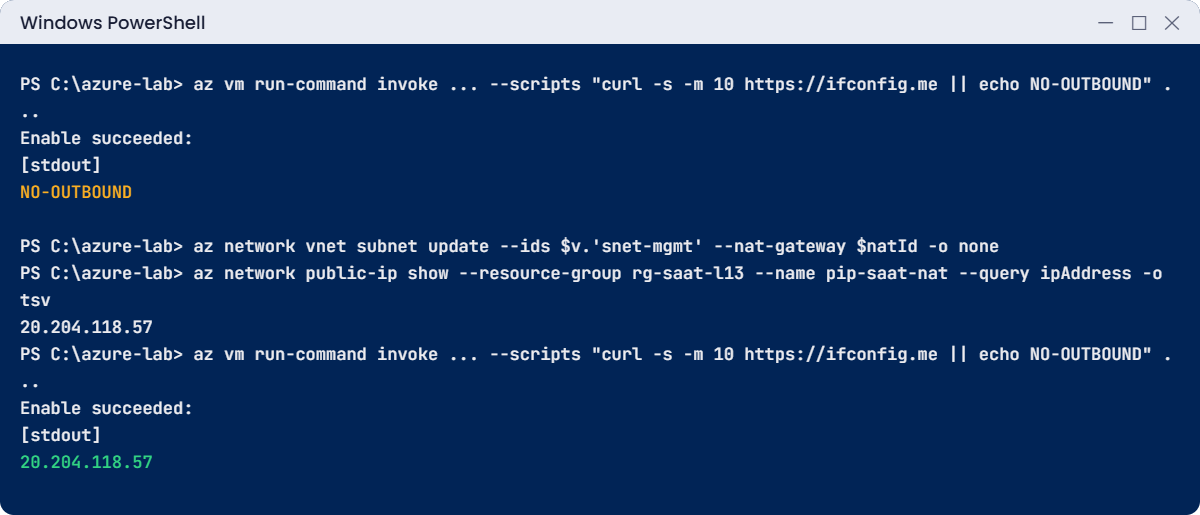
✅ Checkpoint: The VM printed NO-OUTBOUND before the NAT Gateway, and the NAT Gateway’s public IP after.
Break It, Then Fix It
Two surprises from real teams: one blocks your cleanup, the other changes which IP your partners see.
1Break it: delete the public IP while it’s in use
Run this:
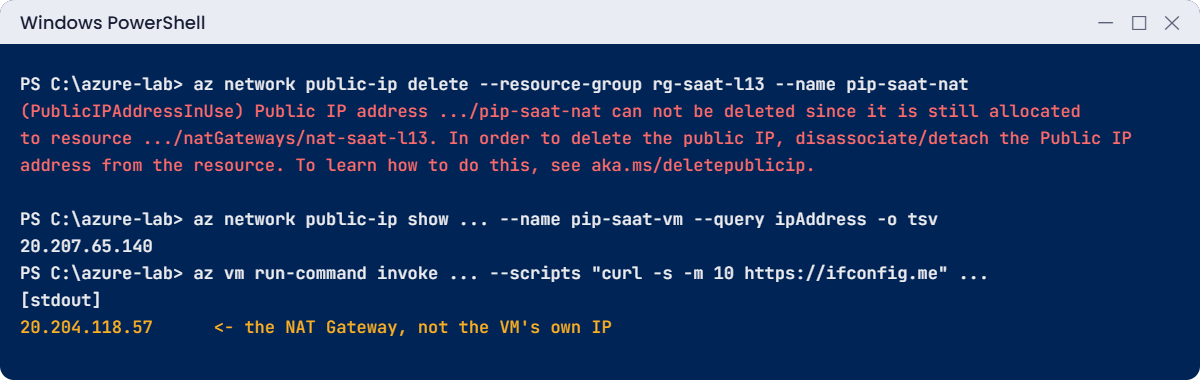
az network public-ip delete --resource-group rg-saat-l13 --name pip-saat-natYou’ll get an error like this:
(PublicIPAddressInUse) Public IP address /subscriptions/.../publicIPAddresses/pip-saat-nat can not be deleted since it is still
allocated to resource /subscriptions/.../natGateways/nat-saat-l13. In order to delete the public IP, disassociate/detach the
Public IP address from the resource. To learn how to do this, see aka.ms/deletepublicip.
Code: PublicIPAddressInUseAzure won’t delete something another resource depends on. The same chain applies one level up: the NAT Gateway is attached to a subnet in another resource group. Clean up in reverse order: subnet link, NAT Gateway, then the IP.
You’ll do that at the end.
2Break it: give the VM its own public IP and expect it to be used
A partner says “we’ll allow-list your VM’s public IP”. Someone adds a public IP to the VM’s network card and sends that address to the partner:
az network public-ip create --resource-group rg-saat-l13 --name pip-saat-vm --sku Standard --allocation-method Static --tags course=saatvedha-azure lesson=13 -o none
$nic = az vm show --resource-group rg-saat-l13 --name vm-saat-l13 --query "networkProfile.networkInterfaces[0].id" -o tsv
az network nic ip-config update --ids "$nic/ipConfigurations/ipconfigvm-saat-l13" --public-ip-address pip-saat-vm -o none
az network public-ip show --resource-group rg-saat-l13 --name pip-saat-vm --query ipAddress -o tsv
az vm run-command invoke --resource-group rg-saat-l13 --name vm-saat-l13 --command-id RunShellScript --scripts "curl -s -m 10 https://ifconfig.me" --query "value[0].message" -o tsvYou should see something like this:
20.207.65.140
Enable succeeded:
[stdout]
20.204.118.57
[stderr]
The VM’s own public IP is 20.207.65.140, but outbound traffic still leaves from the NAT Gateway’s 20.204.118.57. NAT Gateway takes precedence over an instance-level public IP for outbound. The partner allow-lists the wrong address, and the integration fails with timeouts on their side, with no error on yours.
Fix it: give partners the NAT Gateway’s IP, and remove the VM’s public IP, which only adds risk:
az network nic ip-config update --ids "$nic/ipConfigurations/ipconfigvm-saat-l13" --remove publicIpAddress -o none
az network public-ip delete --resource-group rg-saat-l13 --name pip-saat-vm
3Clean up in the right order
Run this:
az network vnet subnet update --ids $v.'snet-mgmt' --remove natGateway -o none
az group delete --name rg-saat-l13 --yes
az network vnet subnet show --ids $v.'snet-mgmt' --query natGateway
C:\azure-lab\Find-LabResources.ps1 -Lesson 13You should see this:
Nothing tagged course=saatvedha-azure is left.The natGateway query prints nothing, which means the subnet is private again. If you skip the first line, deleting the resource group fails, because the NAT Gateway is still attached to a subnet in rg-saat-core.
✅ Checkpoint: Both surprises reproduced, the subnet is back to private, and nothing from Lesson 13 is left.
This happened at work
The payment partner who saw a different IP every week
A travel company built its booking servers in 2023, before private subnets were the default. The VMs had no public IPs and no NAT Gateway, and still reached the internet, so nobody thought about outbound. Their card payment partner required an allow-listed source IP, so the team checked one server, saw it leave from a Microsoft address, and sent that to the partner.
It worked for months. Then, after routine maintenance moved some VMs to new hosts, payments failed for part of the fleet. The “default outbound” IP had changed, as Microsoft warns it can.
Half the servers left from the old address and half from a new one, and the partner’s firewall dropped the new one. Bookings failed for hours before anyone linked it to outbound IPs.
What they changed: every subnet got an explicit outbound path: NAT Gateway with a public IP prefix for app subnets, and Azure Firewall for subnets that need filtering. Partners received the prefix, not single IPs. The subnets were switched to private so no VM could ever use default outbound again, and a Resource Graph query in their monthly review lists any subnet without an explicit outbound method.
Common mistakes and troubleshooting
| Mistake | What you see | What to do |
|---|---|---|
| New VM in a private subnet with no outbound method | apt or Windows Update times out | Add NAT Gateway (or another explicit method) to the subnet. |
| Giving partners the VM’s public IP | Their firewall drops your traffic | NAT Gateway wins for outbound; give them the NAT IP or prefix. |
| Relying on default outbound IPs | IP changes break allow-lists | Make subnets private and use an explicit outbound method. |
| Deleting resources in the wrong order | PublicIPAddressInUse, NAT still attached | Detach from the subnet, delete NAT Gateway, then its IPs. |
| Empty PowerShell arguments | The CLI creates a public IP you didn’t want | Use ‘””‘ to pass an empty value in Windows PowerShell. |
| One IP for very busy outbound | SNAT port exhaustion, random connection failures | Add more IPs or a /28 prefix to the NAT Gateway; check the SNAT metrics. |
Interview questions
Click a question to open it. Each one is written the way an interviewer would ask it. Under it you will see why they ask it and one way you could answer, in your own words.
Fresher level
1. What does NAT Gateway do in Azure?
Why they ask this: A basic networking service question.
How you might answer: It gives a subnet outbound internet access through one or more fixed public IPs. VMs share those IPs through source NAT, and nothing on the internet can start a connection back in.
2. Why can a new VM in Azure suddenly not reach the internet when older ones could?
Why they ask this: They’re checking that your knowledge is current for 2026.
How you might answer: Since 31 March 2026 new VNets get private subnets, so there’s no hidden default outbound access. You need an explicit method like NAT Gateway, a public IP, a load balancer outbound rule or a firewall. Older VNets kept the old behaviour.
3. How can a VM with no public IP still run Run Command or report to Azure?
Why they ask this: They want to know about the platform address.
How you might answer: The VM agent talks to the Azure platform through 168.63.129.16, which works without internet access. Run Command goes through the agent, so it works even in a fully private subnet.
2–5 years experience
4. A VM has both its own public IP and a NAT Gateway on its subnet. Which IP do websites see?
Why they ask this: They want the outbound precedence rules.
How you might answer: The NAT Gateway’s IP. NAT Gateway takes precedence over an instance-level public IP for outbound traffic. The VM’s public IP is then only useful for inbound connections, which usually we don’t want anyway.
5. Users report random connection failures to an external API from many VMs behind one NAT Gateway. What do you check?
Why they ask this: They’re testing SNAT exhaustion awareness.
How you might answer: I’d check the NAT Gateway metrics for SNAT connection counts and dropped packets. If one IP is running out of ports for that destination, I’d add more public IPs or a prefix, and check whether the app reuses connections instead of opening a new one per request.
6. When would you choose Azure Firewall over NAT Gateway for outbound traffic?
Why they ask this: They want trade-off thinking.
How you might answer: When I need to inspect or filter outbound traffic, like allowing only certain domains, logging what’s accessed, or blocking threats. NAT Gateway just translates and doesn’t filter. Firewall costs much more, so for subnets that only need plain outbound access, NAT Gateway is the simpler choice.
Senior level
7. How would you plan outbound connectivity for a company moving 200 VMs into new VNets in 2026?
Why they ask this: They want an end-to-end plan that includes partners and governance.
How you might answer: Every subnet gets an explicit outbound path at design time: NAT Gateway with a public IP prefix for app tiers, and a firewall in the hub for subnets that need filtering. I’d give partners the prefix early and test allow-lists before migration day.
I’d also add a policy or report that flags subnets without an outbound method, so nobody discovers it during a cutover.
8. Standard or StandardV2 NAT Gateway for a new production design?
Why they ask this: They want you to know the newer SKU and its limits.
How you might answer: StandardV2 if the region supports it: it’s zone-redundant by default, supports IPv6 and costs the same. It needs StandardV2 public IPs, and you can’t upgrade a Standard one in place, so it’s best chosen at the start.
Standard is zonal, so for zone resilience you’d need one per zone and matching subnets.
9. A team wants every VM to have a public IP “so outbound works”. How do you respond?
Why they ask this: They want security judgement and a better alternative.
How you might answer: I’d explain that public IPs on VMs open an inbound attack surface and give us many outbound addresses to manage. A NAT Gateway on the subnet gives outbound access through one controlled address, with no way in.
For admin access they’d use Bastion, which we cover next in the course.
Quick quiz
Q1. Since 31 March 2026, what do new VNets do by default?
- Give every VM a public IP
- Use private subnets with no default outbound access
- Block all traffic inside the VNet
- Create a NAT Gateway
Show answer
B — New VNets get private subnets; you add an explicit outbound method.
Q2. A VM has a public IP and its subnet has a NAT Gateway. Which IP is used for outbound?
- The VM’s public IP
- The NAT Gateway’s public IP
- A random Microsoft IP
- Both alternately
Show answer
B — NAT Gateway takes precedence for outbound traffic.
Q3. Why did deleting pip-saat-nat fail?
- It was a Basic IP
- It was still attached to the NAT Gateway
- The VM was running
- Wrong region
Show answer
B — Detach it first, or delete the NAT Gateway first.
Q4. How did Run Command work in a subnet with no internet?
- Through SSH
- Through the VM agent and the platform address 168.63.129.16
- Through the NAT Gateway
- Through Bastion
Show answer
B — The agent talks to the platform without internet access.
Q5. Which NAT Gateway SKU is zone-redundant?
- Basic
- Standard
- StandardV2
- Premium
Show answer
C — StandardV2 is zone-redundant; Standard is zonal.
Quick recap
You’ve given a private subnet a controlled way out, and you know exactly which IP the world sees.
- New subnets are private since March 2026: no internet without an explicit outbound method.
- NAT Gateway gives a subnet outbound access through fixed public IPs, with no way in.
- NAT Gateway wins over a VM’s own public IP for outbound traffic.
- Clean up in order: detach from the subnet, delete NAT Gateway, then its IPs.
- StandardV2 is zone-redundant, needs StandardV2 IPs, and costs the same as Standard.
Next lesson
Lesson 14: Azure DNS: public and private DNS zones → You give your servers friendly names inside the VNet with a private DNS zone.
Further reading: Azure NAT Gateway
Want to go deeper into Azure NAT Gateway? Read Microsoft’s What is Azure NAT Gateway? and Default outbound access in Azure. You can also see the full plan for this course on the Azure Cloud Administration course page.
