Private endpoint DNS problems
-
Phase 0: Before you start
-
Phase 1: The foundation
-
Phase 2: Day-to-day operations
-
Phase 3: Enterprise architecture
-
Phase 4: Troubleshooting step by step
-
Phase 5: Final project and career
Almost every private endpoint DNS ticket has the same root cause: the app resolves the service’s name to its public IP instead of the private endpoint’s IP. The private endpoint is healthy, the network is fine, and still the app gets 403 or a timeout, because it never used the private path.
Private endpoints change nothing about the name you use. mystorage.blob.core.windows.net stays the same; DNS is supposed to return the private IP to clients inside your network. If any link in that DNS chain is missing, clients silently fall back to the public answer.
In this lab you build a storage account reachable only through a private endpoint, prove the name resolves privately from a VM, and then break the DNS chain twice: once by unlinking the private DNS zone and once with a custom DNS server.
| Time | You need | Cost | By the end you can |
|---|---|---|---|
| About 50 minutes | A free account, the CLI and PowerShell | About 5 US cents: a small VM, a public IP for its outbound access, a private endpoint and a storage account for an hour | Trace how a private endpoint name resolves, and fix private DNS zone links and custom DNS settings |
What it is, in one line
A private endpoint only works when DNS returns its private IP for the service’s normal name, from every client that should use it.
In Simple Words
The shop with a back door for staff
A big store has a public front door on the main road and a private back door for staff. Both lead to the same store. Staff are told: “When you ask the security desk for the store’s address, they’ll give you the back door.”
If a new staff member asks a stranger on the street instead of the security desk, the stranger gives the front door address. The staff member walks to the front, finds it locked for non-customers, and thinks the store is closed.
The private DNS zone is the security desk, the private endpoint is the back door, and a custom DNS server that doesn’t know the zone is the stranger on the street.
Engineer's View
How private endpoint DNS works
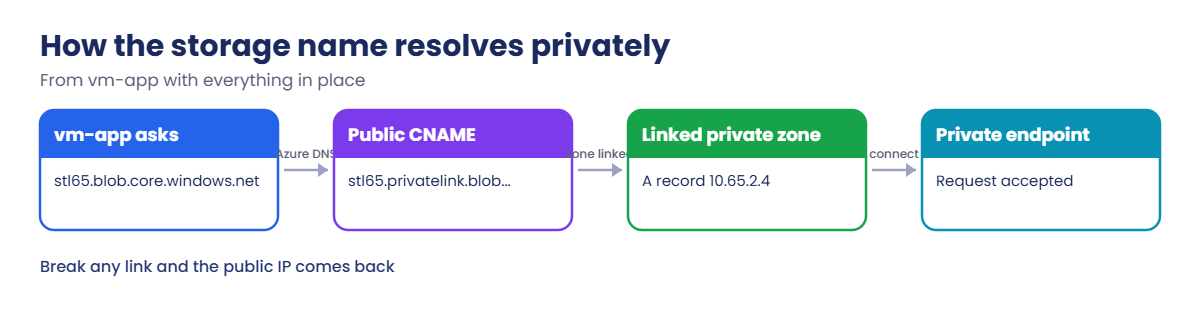
- The CNAME: once a private endpoint exists, public DNS answers mystorage.blob.core.windows.net with a CNAME to mystorage.privatelink.blob.core.windows.net. That name resolves publicly to the public IP.
- The private zone: a private DNS zone called privatelink.blob.core.windows.net holds an A record for mystorage pointing to the private endpoint’s IP. A DNS zone group on the endpoint keeps that record up to date.
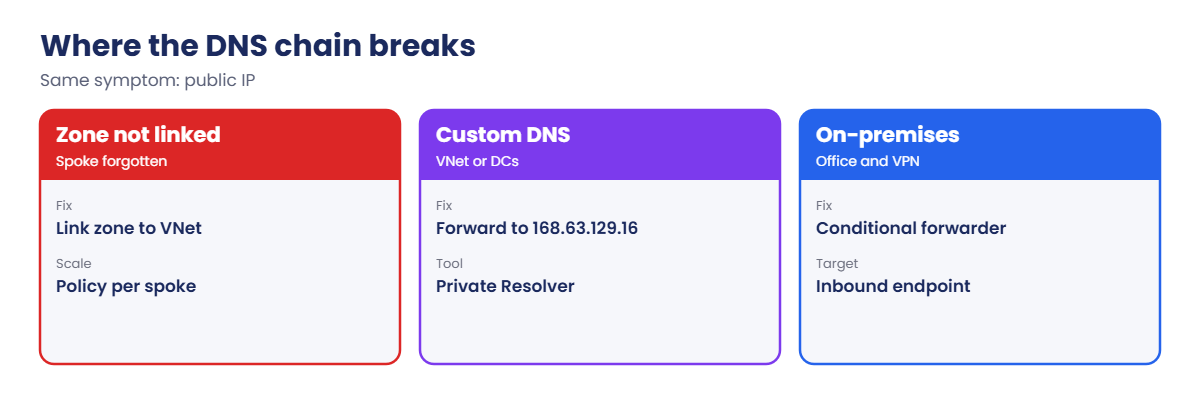
- The link: the zone only answers for VNets linked to it. A VM in an unlinked VNet gets the public answer.
- Azure DNS (168.63.129.16): the default resolver for VMs. It checks linked private zones first. Custom DNS servers must forward privatelink zones to it, usually through Azure DNS Private Resolver.
- On-premises: on-premises DNS needs a conditional forwarder for the privatelink zones to a Private Resolver inbound endpoint.
- Each service has its own zone: blob, file, queue, table, dfs, vault, database and so on all use different privatelink zone names.
How it works, step by step
What happens when vm-app resolves the storage name with everything set up correctly:
- vm-app asks 168.63.129.16 for stl65xxxxx.blob.core.windows.net.
- Public DNS returns a CNAME to stl65xxxxx.privatelink.blob.core.windows.net.
- Azure DNS sees that vnet-l65 is linked to the private zone privatelink.blob.core.windows.net and answers from it: 10.65.2.4.
- The VM connects to 10.65.2.4, the private endpoint’s NIC, over the VNet. The TLS certificate still matches, because the name never changed.
- The storage account, which has public network access disabled, accepts the request because it arrived through its private endpoint.
Remove any link in that chain, and step 3 returns the public IP instead. Then the request goes to the public endpoint, where public access is disabled, and fails with 403.
That’s why the first command in every private endpoint ticket is a DNS lookup from the client that fails, not from your laptop and not from the portal.
Build a private-only storage account and prove its DNS
1Network, VM and a storage account
Create the VNet with an app subnet and an endpoint subnet, a VM with a managed identity, and a storage account with one blob:
$sfx = Get-Random -Minimum 10000 -Maximum 99999
$st = "stl65$sfx"
az group create --name rg-saat-l65 --location centralindia --tags course=saatvedha-azure lesson=65 -o none
az network vnet create --resource-group rg-saat-l65 --name vnet-l65 --address-prefixes 10.65.0.0/16 --subnet-name snet-app --subnet-prefixes 10.65.1.0/24 -o none
az network vnet subnet create --resource-group rg-saat-l65 --vnet-name vnet-l65 --name snet-pe --address-prefixes 10.65.2.0/24 -o none
az vm create --resource-group rg-saat-l65 --name vm-app --image Canonical:ubuntu-24_04-lts:server:latest --size Standard_B1s --vnet-name vnet-l65 --subnet snet-app --public-ip-sku Standard --nsg-rule NONE --assign-identity --admin-username azureuser --generate-ssh-keys --tags course=saatvedha-azure lesson=65 -o none
az storage account create --resource-group rg-saat-l65 --name $st --sku Standard_LRS --min-tls-version TLS1_2 --allow-blob-public-access false -o none
$stId = az storage account show --resource-group rg-saat-l65 --name $st --query id -o tsv
$me = az ad signed-in-user show --query id -o tsv
az role assignment create --assignee-object-id $me --assignee-principal-type User --role "Storage Blob Data Contributor" --scope $stId -o none
$vmPid = az vm show --resource-group rg-saat-l65 --name vm-app --query identity.principalId -o tsv
az role assignment create --assignee-object-id $vmPid --assignee-principal-type ServicePrincipal --role "Storage Blob Data Reader" --scope $stId -o noneWait two minutes for the roles, upload a blob from your laptop, then close the public door:
az storage container create --account-name $st --name lab --auth-mode login -o none
az storage blob upload --account-name $st --container-name lab --name hello.txt --data "hello through the back door" --auth-mode login -o none
az storage account update --resource-group rg-saat-l65 --name $st --public-network-access Disabled -o none2The private endpoint and its DNS
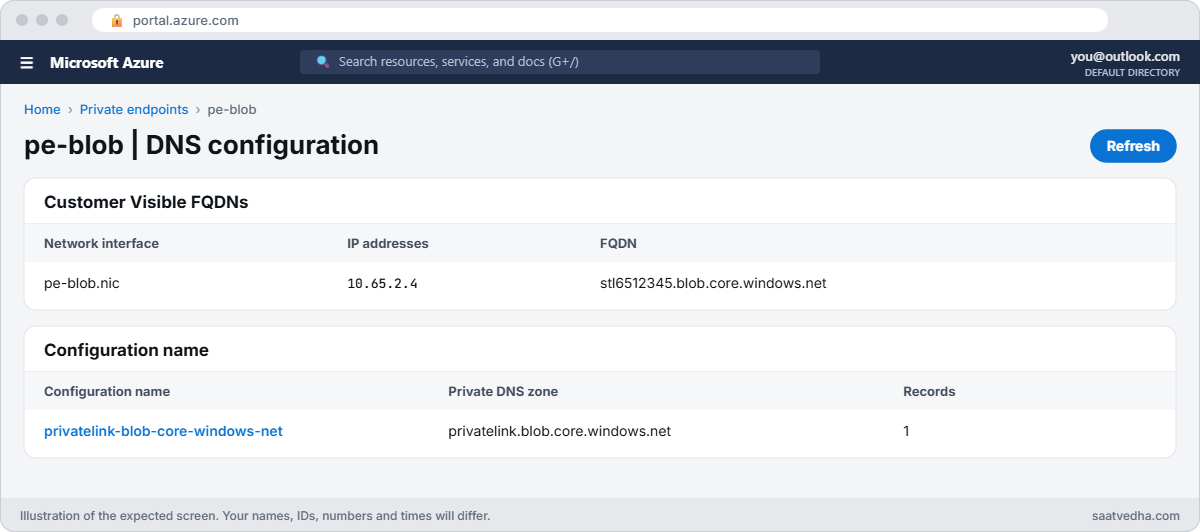
Create the endpoint, the private zone, the VNet link and the zone group that writes the A record:
az network private-endpoint create --resource-group rg-saat-l65 --name pe-blob --vnet-name vnet-l65 --subnet snet-pe --private-connection-resource-id $stId --group-id blob --connection-name pe-blob-conn -o none
az network private-dns zone create --resource-group rg-saat-l65 --name privatelink.blob.core.windows.net -o none
az network private-dns link vnet create --resource-group rg-saat-l65 --zone-name privatelink.blob.core.windows.net --name link-l65 --virtual-network vnet-l65 --registration-enabled false -o none
az network private-endpoint dns-zone-group create --resource-group rg-saat-l65 --endpoint-name pe-blob --name default --private-dns-zone privatelink.blob.core.windows.net --zone-name blob -o none
az network private-dns record-set a list --resource-group rg-saat-l65 --zone-name privatelink.blob.core.windows.net --query "[].{name:name, ip:aRecords[0].ipv4Address}" -o tableYou should see something like this:
Name Ip
---------- ---------
stl6512345 10.65.2.43Prove it from the VM
Save this as C:\azure-lab\pe\check-blob.sh. STNAME is replaced before each run:
#!/bin/bash
# Resolve the blob endpoint and list the lab container with the VM's managed identity
ST=STNAME
getent hosts $ST.blob.core.windows.net
TOKEN=$(curl -s -H Metadata:true 'http://169.254.169.254/metadata/identity/oauth2/token?api-version=2018-02-01&resource=https://storage.azure.com/' | python3 -c 'import sys,json; print(json.load(sys.stdin)["access_token"])')
curl -s -H "Authorization: Bearer $TOKEN" -H 'x-ms-version: 2021-08-06' "https://$ST.blob.core.windows.net/lab?restype=container&comp=list" | grep -o -E '<Name>[^<]+|<Code>[^<]+'Run it:
(Get-Content C:\azure-lab\pe\check-blob.sh -Raw) -replace 'STNAME', $st | Set-Content C:\azure-lab\pe\check-now.sh
az vm run-command invoke --resource-group rg-saat-l65 --name vm-app --command-id RunShellScript --scripts '@C:\azure-lab\pe\check-now.sh' --query "value[0].message" -o tsvYou should see something like this:
[stdout]
10.65.2.4 stl6512345.privatelink.blob.core.windows.net stl6512345.blob.core.windows.net
<Name>hello.txtThe normal blob name resolves to 10.65.2.4 through the privatelink CNAME, and the VM lists the container with its managed identity, even though public access is disabled.

✅ Checkpoint: vm-app resolves the storage name to the private endpoint and reads the container; public network access is disabled.
Break It, Then Fix It
Keep everything running for both breaks.
1Break it: the zone isn’t linked to this VNet
In real companies the private zone usually lives in a central hub subscription, and new spokes are often forgotten. Simulate a VNet that isn’t linked:
az network private-dns link vnet delete --resource-group rg-saat-l65 --zone-name privatelink.blob.core.windows.net --name link-l65 --yes
(Get-Content C:\azure-lab\pe\check-blob.sh -Raw) -replace 'STNAME', $st | Set-Content C:\azure-lab\pe\check-now.sh
az vm run-command invoke --resource-group rg-saat-l65 --name vm-app --command-id RunShellScript --scripts '@C:\azure-lab\pe\check-now.sh' --query "value[0].message" -o tsvAfter a minute you should see something like this:
[stdout]
20.x.x.x blob.xxx.store.core.windows.net stl6512345.blob.core.windows.net
<Code>AuthorizationFailureSame name, but now Azure DNS has no linked private zone, so the public chain wins and the VM gets the public IP. The request hits the public endpoint, where public access is disabled, and gets AuthorizationFailure. The private endpoint itself is perfectly healthy.
Fix it: link the zone to the VNet again, wait a minute, and check:
az network private-dns link vnet create --resource-group rg-saat-l65 --zone-name privatelink.blob.core.windows.net --name link-l65 --virtual-network vnet-l65 --registration-enabled false -o none
(Get-Content C:\azure-lab\pe\check-blob.sh -Raw) -replace 'STNAME', $st | Set-Content C:\azure-lab\pe\check-now.sh
az vm run-command invoke --resource-group rg-saat-l65 --name vm-app --command-id RunShellScript --scripts '@C:\azure-lab\pe\check-now.sh' --query "value[0].message" -o tsvThe name resolves to 10.65.2.4 again and the container lists hello.txt.
2Break it: a custom DNS server that doesn’t know the zone
A network team sets the VNet to use a public DNS resolver “for consistency”. VMs pick up DNS settings when they renew their lease, so restart the VM:
az network vnet update --resource-group rg-saat-l65 --name vnet-l65 --dns-servers 8.8.8.8 -o none
az vm restart --resource-group rg-saat-l65 --name vm-app -o none
(Get-Content C:\azure-lab\pe\check-blob.sh -Raw) -replace 'STNAME', $st | Set-Content C:\azure-lab\pe\check-now.sh
az vm run-command invoke --resource-group rg-saat-l65 --name vm-app --command-id RunShellScript --scripts '@C:\azure-lab\pe\check-now.sh' --query "value[0].message" -o tsvYou should see something like this:
[stdout]
20.x.x.x blob.xxx.store.core.windows.net stl6512345.blob.core.windows.net
<Code>AuthorizationFailureThe zone is linked, but the VM no longer asks Azure DNS. A public resolver has never heard of your private zone, so it returns the public IP. The same thing happens with domain controllers or on-premises DNS that don’t forward privatelink zones.
Fix it: go back to Azure-provided DNS (or, with your own DNS servers, forward privatelink zones to 168.63.129.16 through Azure DNS Private Resolver), restart and check:
az network vnet update --resource-group rg-saat-l65 --name vnet-l65 --set dhcpOptions.dnsServers=[] -o none
az vm restart --resource-group rg-saat-l65 --name vm-app -o none
(Get-Content C:\azure-lab\pe\check-blob.sh -Raw) -replace 'STNAME', $st | Set-Content C:\azure-lab\pe\check-now.sh
az vm run-command invoke --resource-group rg-saat-l65 --name vm-app --command-id RunShellScript --scripts '@C:\azure-lab\pe\check-now.sh' --query "value[0].message" -o tsvThe private IP and hello.txt are back.

3Clean up
Delete the lab resource group:
az group delete --name rg-saat-l65 --yes✅ Checkpoint: You found two broken links in the DNS chain from the client’s own lookup, and fixed both without touching the private endpoint.
This happened at work
The SQL migration that worked from Azure and failed from the office
A manufacturer moved its ERP database to Azure SQL with a private endpoint and public access disabled. Application servers in Azure connected fine. On Monday morning, 200 office users running reports through ODBC got “Login failed” and connection errors.
The office PCs used on-premises domain controllers for DNS. Those servers resolved erp-sql.database.windows.net through public DNS, got the public IP, and tried to connect over the internet to a server that refused public connections. From Azure, VMs used Azure DNS with the linked privatelink zone, so the Azure tests all passed.
What they changed: an Azure DNS Private Resolver in the hub with an inbound endpoint, and conditional forwarders on the domain controllers for privatelink.database.windows.net and the other privatelink zones in use. Every private endpoint go-live now includes an nslookup from an office PC, a VM in each spoke and a VPN user.
Common mistakes and troubleshooting
| Mistake | What you see | What to do |
|---|---|---|
| Private zone not linked to the client VNet | Public IP returned; 403 or timeout | Link the zone to every VNet that uses the endpoint. |
| Custom DNS without forwarding | Public IP returned | Forward privatelink zones to 168.63.129.16 via Private Resolver. |
| On-premises DNS not updated | Works from Azure, fails from office | Conditional forwarders to a Private Resolver inbound endpoint. |
| Wrong zone name for the service | Record never found | Use the exact privatelink zone for each service and sub-resource. |
| Testing DNS from your laptop | Misleading answers | Test from the client that fails. |
| Using the privatelink name in apps | Certificate errors | Keep using the normal service name. |
Interview questions
Click a question to open it. Each one is written the way an interviewer would ask it. Under it you will see why they ask it and one way you could answer, in your own words.
Fresher level
1. What is a private endpoint?
Why they ask this: The basic concept.
How you might answer: A NIC with a private IP in your VNet that connects to one Azure service instance over Private Link, so traffic stays private.
2. Why does a private endpoint need DNS changes?
Why they ask this: Core idea.
How you might answer: Apps keep using the service’s normal name. DNS must return the private endpoint’s IP for that name, through a privatelink private DNS zone.
3. What is 168.63.129.16?
Why they ask this: A detail every Azure admin knows.
How you might answer: The Azure platform IP that, among other things, provides Azure DNS to VMs, including answers from linked private DNS zones.
2–5 years experience
4. An app gets 403 from storage even with a private endpoint. What do you check?
Why they ask this: A real troubleshooting path.
How you might answer: nslookup from the app’s machine. If it returns a public IP, check the private zone link, the VNet’s DNS servers, and forwarding. If it returns the private IP, check NSGs, the endpoint connection state, and RBAC.
5. How do on-premises clients resolve private endpoints?
Why they ask this: Hybrid DNS.
How you might answer: On-premises DNS forwards privatelink zones to an Azure DNS Private Resolver inbound endpoint, which uses Azure DNS and the linked private zones.
6. What does a DNS zone group do?
Why they ask this: Practical detail.
How you might answer: It ties the private endpoint to a private DNS zone and creates or updates the A record automatically when the endpoint’s IP changes.
Senior level
7. How would you design private endpoint DNS for 50 spokes?
Why they ask this: They want architecture.
How you might answer: Central privatelink zones in the hub subscription, linked to every spoke by policy, DNS zone groups created by Azure Policy DeployIfNotExists, a Private Resolver for on-premises and custom DNS, and monitoring of resolution from each spoke.
8. What breaks when two teams create the same privatelink zone?
Why they ask this: A subtle failure.
How you might answer: Clients linked to the wrong zone copy get no record or an old record. Keep one zone per name centrally and block duplicates with policy.
9. How do you migrate an app to private endpoints with no downtime?
Why they ask this: Change planning.
How you might answer: Create the endpoint and DNS first while public access stays on, verify that clients resolve and connect privately, watch logs for public traffic, then disable public access.
Quick quiz
Q1. The VM resolves the storage name to a public IP. Most likely?
- Endpoint deleted
- Private zone not linked or not used
- Wrong SKU
- No RBAC
Show answer
B — DNS fell back to the public answer.
Q2. Which IP gives VMs Azure DNS?
- 10.0.0.1
- 168.63.129.16
- 8.8.8.8
- 169.254.169.254
Show answer
B — Azure DNS lives at 168.63.129.16.
Q3. Zone name for blob private endpoints?
- blob.core.windows.net
- privatelink.blob.core.windows.net
- private.blob.azure.com
- blob.privatelink.net
Show answer
B — Each service has its privatelink zone.
Q4. On-premises users get the public IP. Fix?
- Disable the endpoint
- Conditional forwarder to a Private Resolver
- Open public access
- Change the app name
Show answer
B — Forward privatelink zones into Azure DNS.
Q5. Which name should apps use?
- The privatelink name
- The normal service name
- The private IP
- The NIC name
Show answer
B — Certificates match the normal name.
Quick recap
You can now find the broken DNS link behind almost any private endpoint ticket.
- Private endpoints depend on DNS returning the private IP.
- The privatelink zone must be linked to the client’s VNet.
- Custom and on-premises DNS must forward privatelink zones.
- Test resolution from the client that fails.
- Public IP plus public access disabled means 403 or timeout.
Next lesson
Lesson 66: AuthorizationFailed and RBAC problems → You decode AuthorizationFailed errors: scope, role propagation, deny assignments and managed identity mistakes.
Further reading: private endpoint DNS
Want to go deeper into private endpoint DNS? See Microsoft’s Azure Private Endpoint DNS configuration and What is Azure DNS Private Resolver?. You can also see the full plan for this course on the Azure Cloud Administration course page.
