Azure Bastion: no more public RDP and SSH
-
Phase 0: Before you start
-
Phase 1: The foundation
-
Phase 2: Day-to-day operations
-
Phase 3: Enterprise architecture
-
Phase 4: Troubleshooting step by step
-
Phase 5: Final project and career
Azure Bastion lets you open RDP and SSH sessions to your VMs through Azure, so the VMs need no public IP and no open 3389 or 22 port on the internet. It’s the first thing to set up in Phase 2, because every maintenance task starts with “log in to the server”.
Open RDP and SSH ports are still one of the most common ways servers get attacked. Bastion closes them, and its Developer SKU costs nothing for lab and dev use.
In the lab you connect with the Developer SKU, hit its limits, then build a Standard Bastion with a correct NSG and connect from your own terminal.
| Time | You need | Cost | By the end you can |
|---|---|---|---|
| About 60 minutes, including two 10-minute Bastion deployments | vnet-saat, web01 and win01, the CLI | Part 1 costs nothing. Part 2 is about 35 US cents if you delete the Standard Bastion within an hour | Connect to private VMs through Bastion, pick the right SKU, and fix a Bastion subnet NSG |
What it is, in one line
Azure Bastion is a managed jump server that brings RDP and SSH to your private VMs over HTTPS.
In Simple Words
The reception desk in an office tower
Without Bastion, every office in the tower has its own door onto the street. Anyone can walk up and try the lock.
With Bastion, the street doors are bricked up. Visitors go to one reception desk, show an ID, and a guard walks them to the office they’re allowed to visit.
The no-cost Developer SKU is a receptionist who walks one visitor at a time. Bigger SKUs have more guards, let you use your own car to drive in, and can even record visits.
Engineer's View
Bastion SKUs and what they need
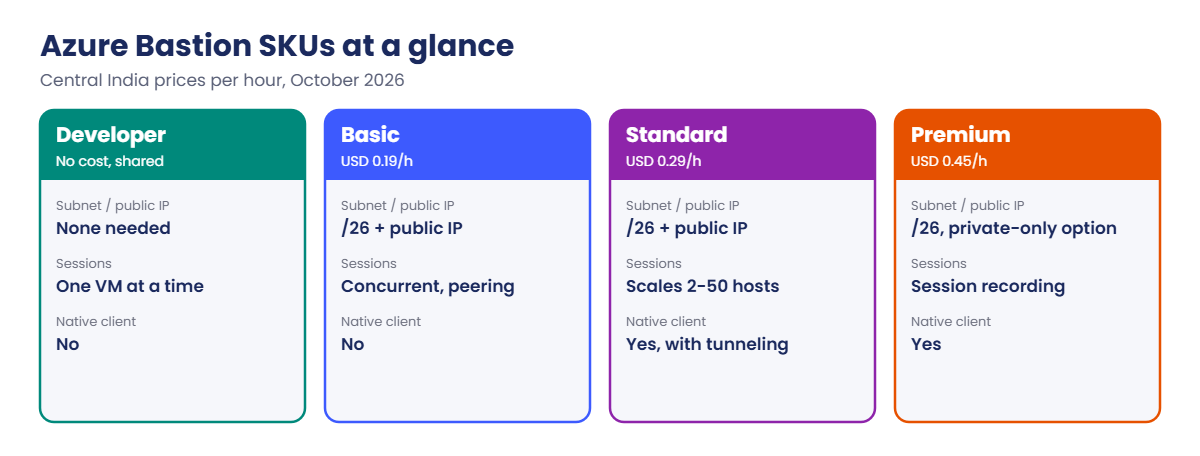
| Feature | Developer | Basic | Standard | Premium |
|---|---|---|---|---|
| Price (Central India) | No cost | USD 0.19/h | USD 0.29/h | USD 0.45/h |
| AzureBastionSubnet (/26) | No | Yes | Yes | Yes |
| Public IP | No | Yes | Yes | No (private-only option) |
| Concurrent sessions | One VM at a time | Yes | Yes | Yes |
| VNet peering | No | Yes | Yes | Yes |
| Native client (az network bastion rdp, tunnel) | No | No | Yes | Yes |
| Session recording | No | No | No | Yes |
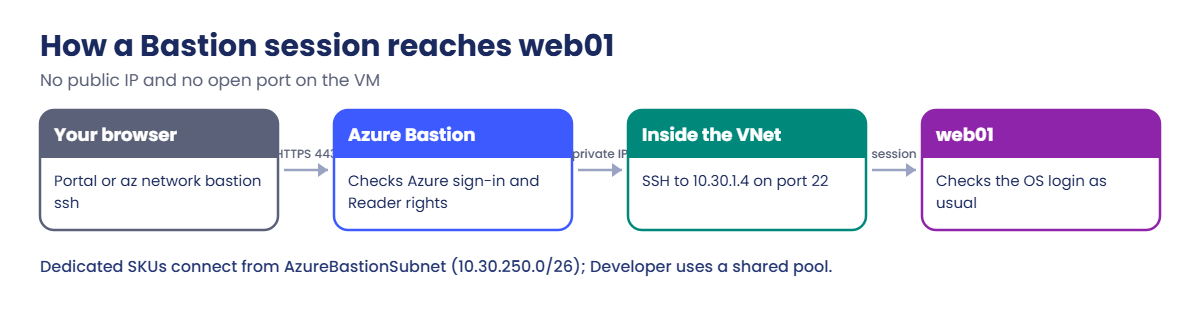
- How it connects: your browser or CLI talks to Bastion over HTTPS 443. Bastion opens RDP or SSH to the VM’s private IP inside the VNet. Dedicated SKUs connect from the AzureBastionSubnet addresses.
- VM side: the VM’s NSG must allow 3389 or 22 from the Bastion source. The default AllowVnetInBound rule usually covers dedicated SKUs.
- NSG on AzureBastionSubnet: optional, but if you add one it must include Microsoft’s required inbound and outbound rules, or Azure refuses it.
- Billing: dedicated SKUs bill per hour from deployment, whether anyone connects or not. Developer is a shared pool and is limited to some regions, including Central India and South India.
- Access control: users need Reader on the VM, its NIC and the Bastion resource to connect, plus a valid OS login.
How it works, step by step
What happens when you click Connect, Bastion on web01:
- The portal opens an HTTPS session to Bastion in your browser.
- Bastion checks you can read the VM and its NIC.
- It opens SSH to web01’s private IP, 10.30.1.4, from inside the VNet.
- You type the username and key or password; the VM checks them as usual.
- The terminal streams back to your browser tab. No port is open on web01 to the internet.
With Standard or Premium and native client support turned on, the CLI can do the same from your laptop: az network bastion ssh for Linux, az network bastion rdp for Windows, and az network bastion tunnel to forward any port.
One dedicated Bastion in a hub VNet can serve VMs in every peered spoke, which is how most companies run it (Lesson 46).
Hands-on lab: Azure Bastion Developer and Standard
Let the CLI install the Bastion extension by itself, and start both VMs:
az config set extension.use_dynamic_install=yes_without_prompt
az vm start --resource-group rg-saat-vms --name web01
az vm start --resource-group rg-saat-vms --name win01Part 1: Bastion Developer (no cost)
1Create a Developer Bastion
Run this (it takes seconds, not minutes):
az network bastion create --resource-group rg-saat-core --name bas-saat-dev --sku Developer --vnet-name vnet-saat --location centralindia --tags course=saatvedha-azure lesson=27 keep=true -o none
az network bastion show --resource-group rg-saat-core --name bas-saat-dev --query "{name:name, sku:sku.name, state:provisioningState}" -o tableYou should see this:
Name Sku State
------------ --------- ---------
bas-saat-dev Developer Succeeded2SSH to web01 from the portal
In the portal, open web01, then Connect, then Bastion. Choose Authentication type “SSH Private Key from Local File”, username azureuser, and your key file from C:\Users\<you>\.ssh\id_rsa. Click Connect.
In the browser terminal, run:
hostname; ip -4 -br addr show eth0You should see something like this:
web01
eth0 UP 10.30.1.4/24

3RDP to win01 from the portal
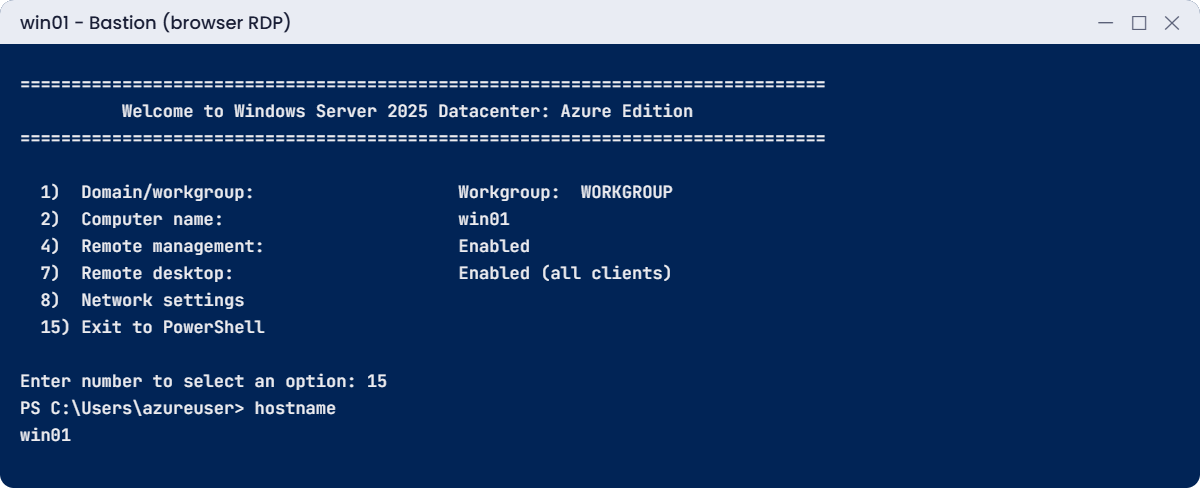
Close the web01 tab first: Developer allows one VM at a time. Open win01, Connect, Bastion, and sign in with the admin name and password you set in Lesson 16. Server Core opens a command prompt; type hostname.
Part 2: Bastion Standard with native client (paid, about 35 US cents)
4Create AzureBastionSubnet and its NSG
The subnet name must be exactly AzureBastionSubnet. Create the NSG with Microsoft’s required rules, then attach it:
az network vnet subnet create --resource-group rg-saat-core --vnet-name vnet-saat --name AzureBastionSubnet --address-prefixes 10.30.250.0/26 -o none
$rules = @(
@('AllowHttpsInbound', 100, 'Inbound', 'Internet', '*', '443'),
@('AllowGatewayManagerInbound', 110, 'Inbound', 'GatewayManager', '*', '443'),
@('AllowAzureLoadBalancerInbound', 120, 'Inbound', 'AzureLoadBalancer', '*', '443'),
@('AllowBastionHostCommunication', 130, 'Inbound', 'VirtualNetwork', 'VirtualNetwork', '8080 5701'),
@('AllowSshRdpOutbound', 100, 'Outbound', '*', 'VirtualNetwork', '22 3389'),
@('AllowAzureCloudOutbound', 110, 'Outbound', '*', 'AzureCloud', '443'),
@('AllowBastionCommunication', 120, 'Outbound', 'VirtualNetwork', 'VirtualNetwork', '8080 5701'),
@('AllowHttpOutbound', 130, 'Outbound', '*', 'Internet', '80')
)
az network nsg create --resource-group rg-saat-core --name nsg-saat-bastion --tags course=saatvedha-azure lesson=27 keep=true -o none
foreach ($x in $rules) {
az network nsg rule create --resource-group rg-saat-core --nsg-name nsg-saat-bastion --name $x[0] --priority $x[1] --direction $x[2] --source-address-prefixes $x[3] --destination-address-prefixes $x[4] --destination-port-ranges ($x[5] -split ' ') --protocol '*' --access Allow -o none
}
az network vnet subnet update --resource-group rg-saat-core --vnet-name vnet-saat --name AzureBastionSubnet --network-security-group nsg-saat-bastion -o none
az network nsg rule list --resource-group rg-saat-core --nsg-name nsg-saat-bastion --query "length([])"You should see this:
85Swap the Developer Bastion for Standard
One Bastion per VNet, so remove the Developer one first. The Standard deployment takes about 10 minutes:
az network bastion delete --resource-group rg-saat-core --name bas-saat-dev
az network public-ip create --resource-group rg-saat-core --name pip-saat-bastion --sku Standard --location centralindia --tags course=saatvedha-azure lesson=27 -o none
az network bastion create --resource-group rg-saat-core --name bas-saat --sku Standard --vnet-name vnet-saat --public-ip-address pip-saat-bastion --enable-tunneling true --location centralindia --tags course=saatvedha-azure lesson=27 -o none
az network bastion show --resource-group rg-saat-core --name bas-saat --query "{name:name, sku:sku.name, tunneling:enableTunneling, state:provisioningState}" -o tableYou should see this:
Name Sku Tunneling State
-------- -------- ----------- ---------
bas-saat Standard True Succeeded6SSH from your own terminal
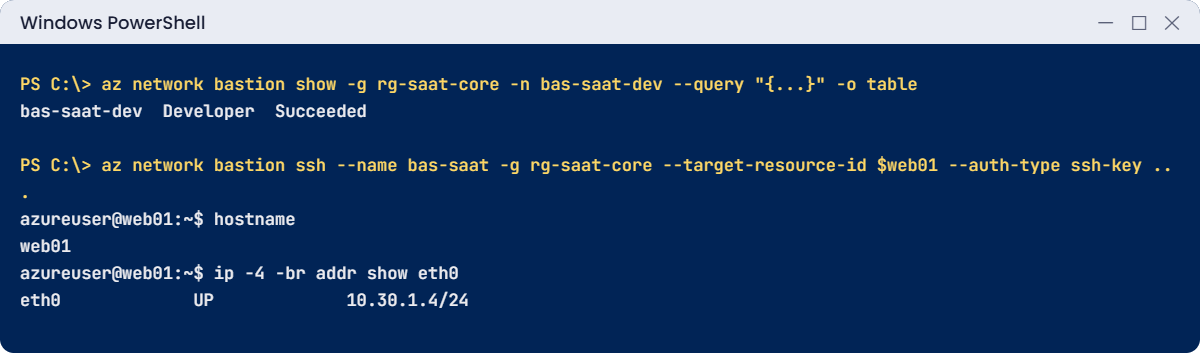
Run this, then type the commands inside the session:
$web01 = az vm show --resource-group rg-saat-vms --name web01 --query id -o tsv
az network bastion ssh --name bas-saat --resource-group rg-saat-core --target-resource-id $web01 --auth-type ssh-key --username azureuser --ssh-key $HOME\.ssh\id_rsaInside the session you should see something like this:
azureuser@web01:~$ hostname
web01
azureuser@web01:~$ exit
✅ Checkpoint: You reached web01 and win01 with no public IP on either, first from the portal and then from your own terminal.
Break It, Then Fix It
Both of these come up the first week a team adopts Bastion.
1Break it: native RDP with the wrong SKU
Run this before step 5, while only bas-saat-dev exists. (If you’re past step 5, just read along.)
$win01 = az vm show --resource-group rg-saat-vms --name win01 --query id -o tsv
az network bastion rdp --name bas-saat-dev --resource-group rg-saat-core --target-resource-id $win01You’ll get this error:
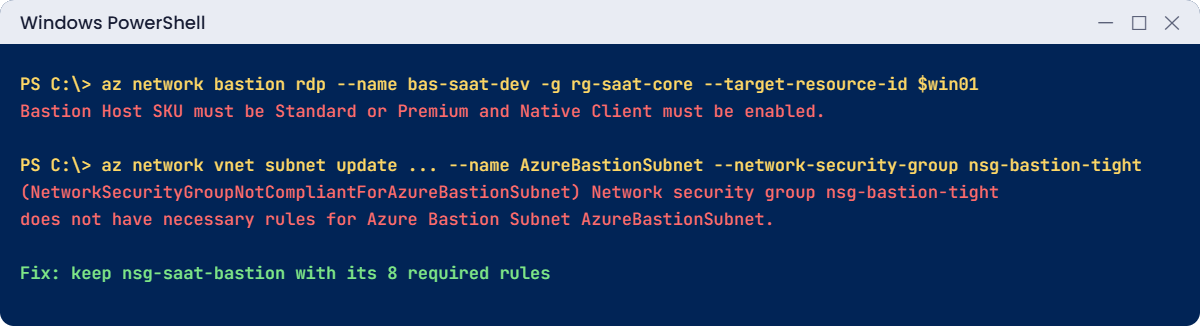
Bastion Host SKU must be Standard or Premium and Native Client must be enabled.The CLI checks the Bastion before trying. Developer and Basic only work through the portal, and Standard needs native client support (--enable-tunneling true) switched on.
Fix it: use the portal for Developer, or after step 5 point the command at the Standard Bastion:
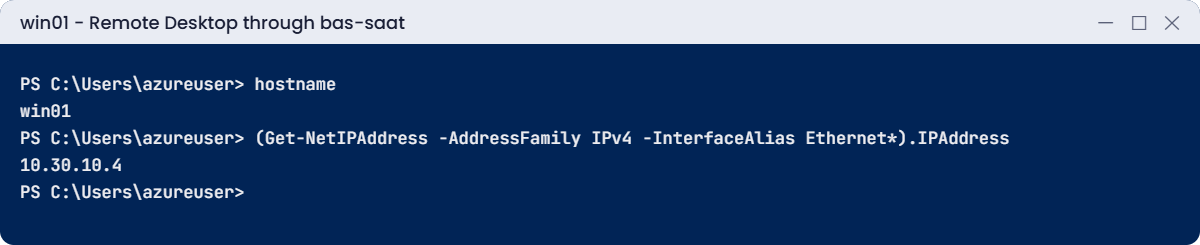
az network bastion rdp --name bas-saat --resource-group rg-saat-core --target-resource-id $win01Remote Desktop opens on your laptop and connects to win01 through Bastion.
2Break it: an NSG that blocks Bastion
A colleague creates a “tight” NSG with no rules of its own and attaches it to AzureBastionSubnet:
az network nsg create --resource-group rg-saat-core --name nsg-bastion-tight -o none
az network vnet subnet update --resource-group rg-saat-core --vnet-name vnet-saat --name AzureBastionSubnet --network-security-group nsg-bastion-tightYou’ll get an error like this:
(NetworkSecurityGroupNotCompliantForAzureBastionSubnet) Network security group nsg-bastion-tight does not have necessary rules for Azure Bastion Subnet AzureBastionSubnet.
Code: NetworkSecurityGroupNotCompliantForAzureBastionSubnetAzure won’t let an NSG on AzureBastionSubnet break the service. The NSG’s default rules aren’t enough; it needs the explicit inbound 443 rules and the outbound rules from step 4.
Fix it: keep the compliant NSG and delete the tight one. Then clean up the paid parts and put the Developer Bastion back:
az network nsg delete --resource-group rg-saat-core --name nsg-bastion-tight
az network bastion delete --resource-group rg-saat-core --name bas-saat
az network public-ip delete --resource-group rg-saat-core --name pip-saat-bastion
az network bastion create --resource-group rg-saat-core --name bas-saat-dev --sku Developer --vnet-name vnet-saat --location centralindia --tags course=saatvedha-azure lesson=27 keep=true -o none
az vm deallocate --resource-group rg-saat-vms --name web01
az vm deallocate --resource-group rg-saat-vms --name win01
az network bastion list --resource-group rg-saat-core --query "[].{name:name, sku:sku.name}" -o tableYou should see this:
Name Sku
------------ ---------
bas-saat-dev Developer
✅ Checkpoint: The Standard Bastion and its public IP are gone, bas-saat-dev is back for later lessons, and both VMs are deallocated.
AzureBastionSubnet and nsg-saat-bastion stay; they cost nothing and Lesson 46 uses them.
This happened at work
The RDP port that was “only open for a day”
A manufacturing company opened RDP to a Windows VM from the internet for a vendor’s urgent fix, planning to close it the next day. Nobody did. Six weeks later, monitoring showed the VM sending traffic to unknown addresses at night.
The security log had over 200,000 failed sign-ins from bots, then one success on a local account with a weak password. The attacker had installed a crypto miner and was trying other servers in the VNet.
What they changed: Bastion Standard in the hub VNet for all admin access, and an Azure Policy that denies any NSG rule allowing 3389 or 22 from the internet. Vendors now get time-limited access through Bastion with just-in-time approval (Lesson 28), and local admin passwords are rotated by LAPS.
Common mistakes and troubleshooting
| Mistake | What you see | What to do |
|---|---|---|
| Subnet not named AzureBastionSubnet | Bastion create fails | Exact name, /26 or larger. |
| NSG on the Bastion subnet without required rules | NetworkSecurityGroupNotCompliantForAzureBastionSubnet | Add Microsoft’s inbound and outbound rules. |
| VM NSG denies 22/3389 from the VNet | Bastion connects, then times out | Allow the Bastion source on the VM’s NSG. |
| Native client on Basic or Developer | “SKU must be Standard or Premium” | Standard with tunneling, or use the portal. |
| Leaving a Standard Bastion in a lab | Hourly bill keeps running | Delete it, or use Developer. |
| Expecting Developer to reach peered VNets | Spoke VMs not listed | Use Basic or higher in the hub. |
| User has no Reader on the VM or NIC | Connect option greyed out | Grant Reader on VM, NIC and Bastion. |
Interview questions
Click a question to open it. Each one is written the way an interviewer would ask it. Under it you will see why they ask it and one way you could answer, in your own words.
Fresher level
1. What is Azure Bastion?
Why they ask this: The basic concept.
How you might answer: A managed service that gives RDP and SSH access to VMs through Azure over HTTPS, so the VMs don’t need public IPs or open management ports on the internet.
2. What subnet does Azure Bastion need?
Why they ask this: A common configuration check.
How you might answer: For Basic, Standard and Premium, a subnet named exactly AzureBastionSubnet with a /26 or larger. The Developer SKU doesn’t need one.
3. Why is Bastion safer than a public IP with RDP open?
Why they ask this: They want the security reason.
How you might answer: No management port is exposed to the internet, so bots can’t brute-force it. Access goes through Azure sign-in and RBAC first, and sessions can be logged and, with Premium, recorded.
2–5 years experience
4. Users can open Bastion but the session times out. What do you check?
Why they ask this: A real troubleshooting path.
How you might answer: The VM’s NSG and any OS firewall for 3389 or 22 from the Bastion subnet, that the VM is running and listening, UDRs that might send return traffic elsewhere, and the NSG on AzureBastionSubnet if there is one.
5. Which Bastion SKU would you choose for a company, and why?
Why they ask this: They want cost and feature reasoning.
How you might answer: Standard in the hub VNet for most companies: native client, tunneling, peered VNets and scaling. Premium if we need session recording or a private-only deployment. Developer only for dev and test.
6. How do you connect to a VM with Bastion from the command line?
Why they ask this: They’re checking native client knowledge.
How you might answer: On a Standard or Premium Bastion with native client support on, az network bastion ssh for Linux, az network bastion rdp for Windows, or az network bastion tunnel to forward a port for other tools.
Senior level
7. How would you design admin access for 500 VMs across 20 VNets?
Why they ask this: They want an architecture answer.
How you might answer: Hub-and-spoke with one Standard or Premium Bastion in the hub, peered to all spokes. Entra ID sign-in and PIM for admin roles, an Azure Policy blocking public RDP and SSH, JIT where needed, and logs in Log Analytics.
8. What are the risks of Bastion’s shareable links?
Why they ask this: They want a security trade-off.
How you might answer: Anyone with the link can reach the VM’s login screen without Azure sign-in. That’s useful for vendors, but links must be short-lived, tracked and deleted, and the VM still needs strong credentials.
9. How would you audit who connected to which VM through Bastion?
Why they ask this: They want logging knowledge.
How you might answer: Send Bastion diagnostic logs to Log Analytics and query the audit logs for user, target VM, source IP and time. Premium adds session recordings stored in a storage account for full playback.
Quick quiz
Q1. Which Bastion SKU needs no AzureBastionSubnet?
- Developer
- Basic
- Standard
- Premium
Show answer
A — Developer uses a shared pool and no subnet.
Q2. What is the minimum size of AzureBastionSubnet?
- /29
- /27
- /26
- /24
Show answer
C — A /26 or larger is required.
Q3. Which SKUs support az network bastion rdp?
- All
- Developer and Basic
- Standard and Premium with native client on
- Premium only
Show answer
C — Native client needs Standard or Premium with tunneling.
Q4. An NSG with no custom rules is attached to AzureBastionSubnet. Result?
- Works
- NetworkSecurityGroupNotCompliantForAzureBastionSubnet
- Bastion upgrades
- VMs get public IPs
Show answer
B — Bastion subnet NSGs need Microsoft’s required rules.
Q5. How is a Standard Bastion billed?
- Per session
- Per hour from deployment
- Per GB only
- It costs nothing
Show answer
B — Hourly while it exists, used or not.
Quick recap
You can now reach any VM in the course without opening a single port to the internet.
- Bastion brings RDP and SSH to private VMs over HTTPS.
- Developer: no cost, one VM at a time, portal only, no peering.
- Basic and up need AzureBastionSubnet (/26) and a public IP.
- Native client needs Standard or Premium with tunneling.
- A Bastion subnet NSG must carry Microsoft’s required rules.
Next lesson
Lesson 28: Just-in-time VM access with Defender for Cloud → You open management ports only on request, for a few hours, from one IP.
Further reading: Azure Bastion
Want to go deeper into Azure Bastion? See Microsoft’s Bastion SKU comparison and Working with NSG access and Azure Bastion. You can also see the full plan for this course on the Azure Cloud Administration course page.
