Azure Load Balancer (Layer 4)

Azure Load Balancer spreads incoming TCP and UDP connections across a group of VMs and stops sending traffic to any VM that fails its health check. It works at Layer 4: it looks at IP addresses and ports, not at web pages or cookies.

Every web farm, SQL cluster and firewall pair in Azure uses one somewhere. Most problems with it aren’t in the load balancer at all, but in what’s around it: NSGs, health probes and outbound connections.

In this lab you build a public Standard load balancer in front of two web VMs with no public IPs, give them controlled outbound access, and then break it in the two ways that confuse teams the most.

TimeYou needCostBy the end you can
About 50 minutesA free account and the CLIAbout 6 US cents for an hour: Standard Load Balancer is USD 0.025 per hour for the first five rules plus USD 0.005 per GB (Azure Retail Prices API, October 2026), plus two small VMsBuild a Standard load balancer with probes, rules and outbound rules, and fix NSG and health probe faults

What it is, in one line

A load balancer gives many servers one front door and only sends visitors to servers that answer their health check.

In Simple Words

The ticket counter with many windows

A railway station has one entrance but six ticket windows. A staff member at the entrance points each new person to a window. Every few seconds she glances at each window: if a clerk has gone on a break, she stops sending people there.

She doesn’t care what ticket you’re buying; she only looks at which window is free and working. That’s Layer 4 load balancing.

And if the station’s security guard locks the entrance, it doesn’t matter how many clerks are working. People can’t get in, even though every window looks ready.

Engineer's View

What a Standard Load Balancer is made of

  • SKU: Standard is the only choice now; the Basic SKU was retired on 30 September 2025. Standard is zone-redundant, needs a Standard public IP, and is closed to inbound traffic unless an NSG allows it.
  • Frontend: a public IP (public load balancer) or a private IP in a subnet (internal load balancer).
  • Backend pool: the NICs or IP addresses that receive traffic.
  • Health probe: TCP, HTTP or HTTPS checks from the special address 168.63.129.16. A VM that fails stops receiving new flows.
  • Load-balancing rule: maps a frontend port to a backend port, using a 5-tuple hash (source IP and port, destination IP and port, protocol) to choose a VM.
  • Outbound rule: gives backend VMs internet access through the frontend IP with source NAT (SNAT), and sets how many SNAT ports each VM gets. Without one, NAT Gateway or a public IP, VMs in a private subnet have no outbound access.
  • Client IP: the load balancer doesn’t change the client’s source IP, so the backend NSG must allow traffic from the clients, not from the load balancer.

How it works, step by step

What happens when your laptop opens the site:

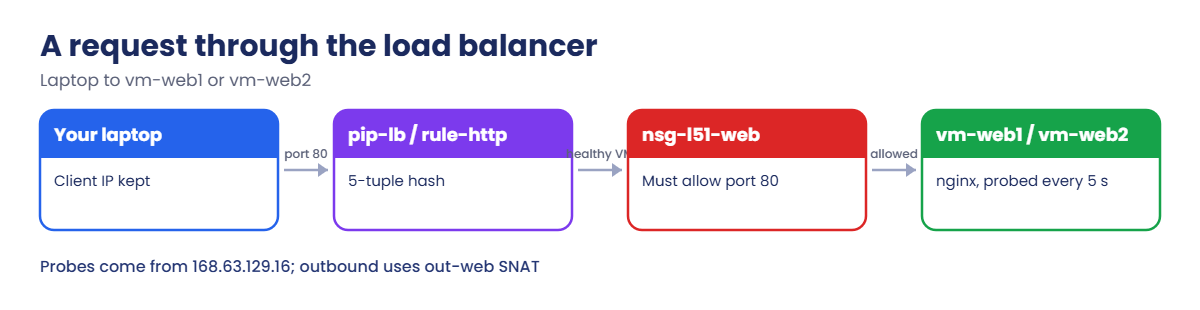
A request through Azure Standard Load Balancer to two web VMs
  1. Your browser connects to pip-lb on port 80.
  2. The load balancer matches rule-http and hashes the 5-tuple to pick vm-web1 or vm-web2 from the healthy members of pool-web.
  3. The packet arrives at the VM with your laptop’s IP as source, so nsg-l51-web must allow port 80 from the internet.
  4. nginx answers, and the reply goes back through the load balancer to you.
  5. Every 5 seconds, 168.63.129.16 sends an HTTP probe to each VM. Any VM that doesn’t answer 200 is taken out of rotation for new connections.

When the VMs run apt, their traffic leaves through the outbound rule, using the same public IP and a block of SNAT ports per VM.

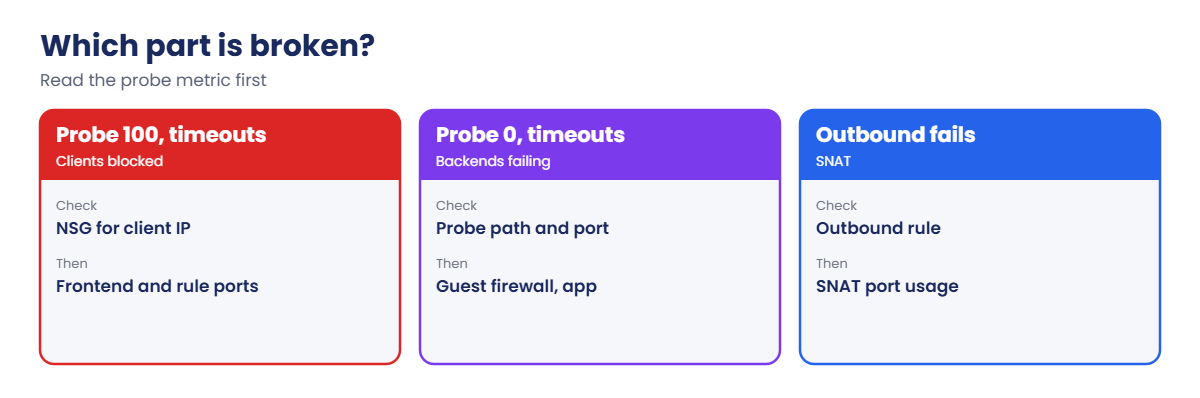
Use the health probe metric to find load balancer faults

That’s why the probe and the NSG are checked separately: probes come from 168.63.129.16, which the default NSG rule AllowAzureLoadBalancerInBound allows, while clients come from the internet, which you must allow yourself.

Build a Standard load balancer for two web VMs

1Build the network with an NSG

Create a resource group, an NSG that allows HTTP, and a private subnet:

az group create --name rg-saat-l51 --location centralindia --tags course=saatvedha-azure lesson=51 -o none
az network nsg create --resource-group rg-saat-l51 --name nsg-l51-web -o none
az network nsg rule create --resource-group rg-saat-l51 --nsg-name nsg-l51-web --name allow-http --priority 100 --direction Inbound --access Allow --protocol Tcp --source-address-prefixes Internet --destination-port-ranges 80 -o none
az network vnet create --resource-group rg-saat-l51 --name vnet-l51 --address-prefixes 10.51.0.0/16 --subnet-name snet-web --subnet-prefixes 10.51.1.0/24 --network-security-group nsg-l51-web -o none
az network vnet subnet update --resource-group rg-saat-l51 --vnet-name vnet-l51 --name snet-web --default-outbound-access false -o none

2Create the load balancer

A Standard public IP, the load balancer with its frontend and pool, a probe, a rule and an outbound rule:

az network public-ip create --resource-group rg-saat-l51 --name pip-lb --sku Standard --zone 1 2 3 -o none
az network lb create --resource-group rg-saat-l51 --name lb-web --sku Standard --public-ip-address pip-lb --frontend-ip-name fe-web --backend-pool-name pool-web -o none
az network lb probe create --resource-group rg-saat-l51 --lb-name lb-web --name probe-http --protocol Http --port 80 --path / --interval 5 -o none
az network lb rule create --resource-group rg-saat-l51 --lb-name lb-web --name rule-http --protocol Tcp --frontend-port 80 --backend-port 80 --frontend-ip-name fe-web --backend-pool-name pool-web --probe-name probe-http --disable-outbound-snat true -o none
az network lb outbound-rule create --resource-group rg-saat-l51 --lb-name lb-web --name out-web --frontend-ip-configs fe-web --protocol All --address-pool pool-web --outbound-ports 10000 -o none

disable-outbound-snat on the rule means outbound traffic only uses the outbound rule, which is what Microsoft recommends. Each VM gets 10,000 SNAT ports, a number you choose on purpose instead of a default.

3Add two web VMs

Create the VMs, put their NICs in the pool, and install nginx (about 6 minutes):

az vm create --resource-group rg-saat-l51 --name vm-web1 --image Canonical:ubuntu-24_04-lts:server:latest --size Standard_B1s --vnet-name vnet-l51 --subnet snet-web --public-ip-address '""' --nsg '""' --admin-username azureuser --generate-ssh-keys --tags course=saatvedha-azure lesson=51 -o none
az vm create --resource-group rg-saat-l51 --name vm-web2 --image Canonical:ubuntu-24_04-lts:server:latest --size Standard_B1s --vnet-name vnet-l51 --subnet snet-web --public-ip-address '""' --nsg '""' --admin-username azureuser --generate-ssh-keys --tags course=saatvedha-azure lesson=51 -o none
az network nic ip-config address-pool add --resource-group rg-saat-l51 --nic-name vm-web1VMNic --ip-config-name ipconfigvm-web1 --lb-name lb-web --address-pool pool-web -o none
az network nic ip-config address-pool add --resource-group rg-saat-l51 --nic-name vm-web2VMNic --ip-config-name ipconfigvm-web2 --lb-name lb-web --address-pool pool-web -o none
az vm run-command invoke --resource-group rg-saat-l51 --name vm-web1 --command-id RunShellScript --scripts 'apt-get update -qq > /dev/null; apt-get install -y -qq nginx > /dev/null 2>&1; hostname > /var/www/html/index.html; systemctl is-active nginx' --query "value[0].message" -o tsv
az vm run-command invoke --resource-group rg-saat-l51 --name vm-web2 --command-id RunShellScript --scripts 'apt-get update -qq > /dev/null; apt-get install -y -qq nginx > /dev/null 2>&1; hostname > /var/www/html/index.html; systemctl is-active nginx' --query "value[0].message" -o tsv

Each run should end with:

[stdout]
active

The VMs have no public IP and their subnet has no default outbound access. apt worked only because of the outbound rule.

4Test it from your laptop

Send six requests and read the probe metric:

$lbIp = az network public-ip show --resource-group rg-saat-l51 --name pip-lb --query ipAddress -o tsv
$lbId = az network lb show --resource-group rg-saat-l51 --name lb-web --query id -o tsv
1..6 | ForEach-Object { curl.exe -s --max-time 5 http://$lbIp/ }
az monitor metrics list --resource $lbId --metric DipAvailability --interval PT1M --aggregation Average --query "value[0].timeseries[0].data[-4:].average" -o tsv

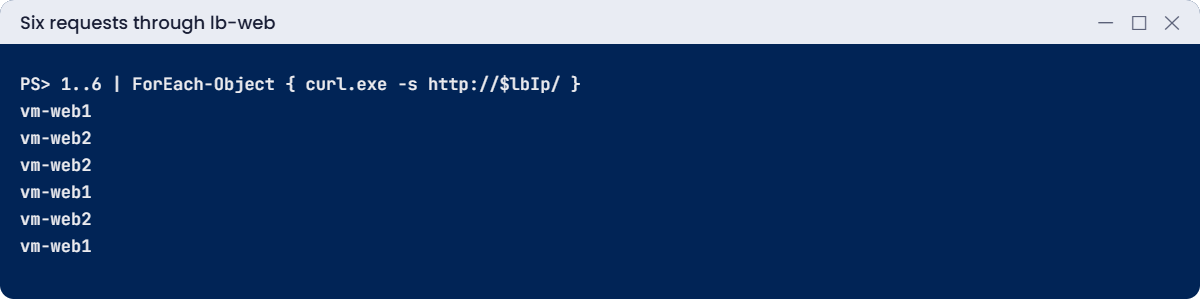
You should see something like this (the order varies, and the newest minute can be empty):

vm-web1
vm-web2
vm-web2
vm-web1
vm-web2
vm-web1
100.0
100.0
100.0

Both VMs answer, and DipAvailability (shown as Health Probe Status in the portal) is 100, meaning every backend passes its probe.
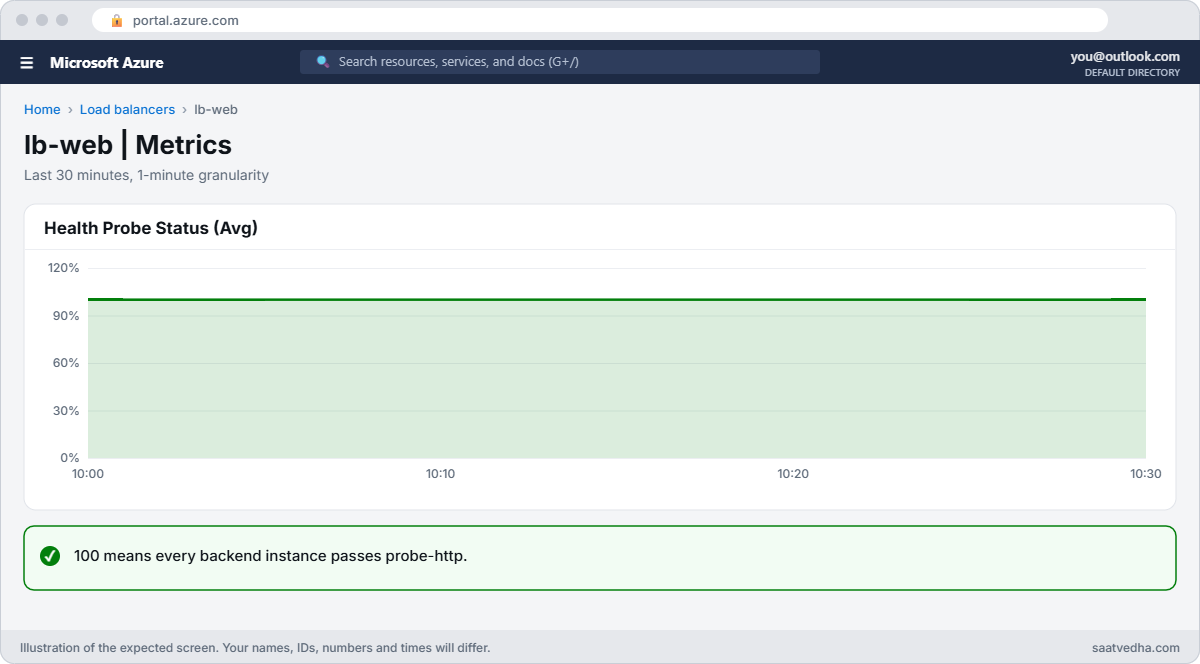
Azure Load Balancer health probe status at 100
lb-web Health Probe Status at 100.
Requests alternating between two backend VMs
Both backends answer through one public IP.

✅ Checkpoint: Requests reach both VMs through pip-lb, the VMs reach the internet only through out-web, and the probe metric shows 100.

Break It, Then Fix It

Keep everything running for both breaks.

1Break it: healthy backends, dead website

A security review “tightens” the NSG by removing the HTTP rule:

az network nsg rule delete --resource-group rg-saat-l51 --nsg-name nsg-l51-web --name allow-http
1..6 | ForEach-Object { curl.exe -s --max-time 5 http://$lbIp/ }
az monitor metrics list --resource $lbId --metric DipAvailability --interval PT1M --aggregation Average --query "value[0].timeseries[0].data[-4:].average" -o tsv

You should see something like this:

(no output for about 30 seconds: every request times out)
100.0
100.0
100.0

This one fools people. The probe metric stays at 100 because probes come from 168.63.129.16, which the default rule AllowAzureLoadBalancerInBound still lets in. Your requests come from your laptop’s IP, and the DenyAllInBound default rule drops them.

Fix it: allow HTTP from the internet again, then test:

az network nsg rule create --resource-group rg-saat-l51 --nsg-name nsg-l51-web --name allow-http --priority 100 --direction Inbound --access Allow --protocol Tcp --source-address-prefixes Internet --destination-port-ranges 80 -o none
1..6 | ForEach-Object { curl.exe -s --max-time 5 http://$lbIp/ }

Both VM names come back.

2Break it: a health page that doesn’t exist

The app team asks for a proper health endpoint, so the probe is changed to /health before anyone creates the page:

az network lb probe update --resource-group rg-saat-l51 --lb-name lb-web --name probe-http --path /health -o none
1..6 | ForEach-Object { curl.exe -s --max-time 5 http://$lbIp/ }

Wait two minutes, then check the metric:

az monitor metrics list --resource $lbId --metric DipAvailability --interval PT1M --aggregation Average --query "value[0].timeseries[0].data[-4:].average" -o tsv

You should see something like this:

(requests time out)
0.0
0.0

nginx answers /health with 404, so every VM fails its probe and the load balancer has no healthy backend to send new connections to. The NSG and VMs are fine; the check is wrong.

Fix it: create the health page on both VMs, then test again:

az vm run-command invoke --resource-group rg-saat-l51 --name vm-web1 --command-id RunShellScript --scripts 'echo ok > /var/www/html/health; curl -sI localhost/health | head -1' --query "value[0].message" -o tsv
az vm run-command invoke --resource-group rg-saat-l51 --name vm-web2 --command-id RunShellScript --scripts 'echo ok > /var/www/html/health; curl -sI localhost/health | head -1' --query "value[0].message" -o tsv
1..6 | ForEach-Object { curl.exe -s --max-time 5 http://$lbIp/ }

Each VM reports HTTP/1.1 200 OK, the probe metric climbs back to 100 within a minute or two, and both VM names come back.
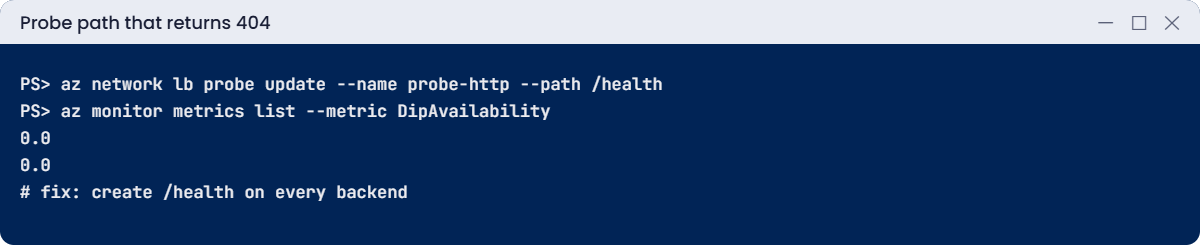
Health probe status 0 after a probe path change
Probe status 0 means no backend passes the check.

3Clean up

Delete the lab resource group:

az group delete --name rg-saat-l51 --yes
az resource list --tag lesson=51 -o table

The last command should print nothing.

✅ Checkpoint: You told an NSG problem from a probe problem using the probe metric, fixed both, and removed the lab.

This happened at work

The API calls that failed every afternoon

A payments company ran 40 VMs behind a Standard load balancer. Each VM called a partner’s API over the internet. Every afternoon at peak time, about 2 percent of calls failed with connection timeouts, and nobody could reproduce it in testing.

The VMs used the load balancer’s default outbound access, which gave each VM only a small block of SNAT ports to the same destination IP and port. At peak, each VM opened more connections to the partner than it had ports, so new connections waited and timed out. The load balancer metric SNAT Connection Count, split by state, showed the failed connections.

What they changed: an explicit outbound rule with a planned number of ports per VM and a second frontend IP for more ports, then later NAT Gateway on the subnet. The app reused HTTP connections instead of opening a new one for every call, and an alert now fires on failed SNAT connections.

Common mistakes and troubleshooting

MistakeWhat you seeWhat to do
NSG doesn’t allow client trafficProbe at 100, site times outAllow the client source and port in the NSG.
Probe path or port wrongProbe at 0, all requests failFix the probe or create the health endpoint.
Guest firewall blocks 168.63.129.16Probe fails on hardened VMsAllow the probe address in the OS firewall.
No outbound rule in a private subnetapt and API calls failAdd an outbound rule or NAT Gateway.
Default SNAT ports at high volumeIntermittent outbound timeoutsPlan outbound ports; reuse connections; use NAT Gateway.
Expecting cookie or URL routingUsers bounce between serversUse Application Gateway for Layer 7 features.

Interview questions

Click a question to open it. Each one is written the way an interviewer would ask it. Under it you will see why they ask it and one way you could answer, in your own words.

Fresher level

1. What does Azure Load Balancer do?

Why they ask this: The basic concept.

How you might answer: It distributes TCP and UDP flows across healthy backend VMs at Layer 4, using health probes to skip failed ones.

2. Public vs internal load balancer?

Why they ask this: Basic vocabulary.

How you might answer: A public one has a public IP frontend for internet traffic. An internal one has a private IP in a subnet for traffic inside your network.

3. Where do health probes come from?

Why they ask this: A detail that matters.

How you might answer: From the Azure IP 168.63.129.16. NSGs allow it through the default AllowAzureLoadBalancerInBound rule; guest firewalls must allow it too.

2–5 years experience

4. Backends are healthy but users can’t connect. Why?

Why they ask this: A real troubleshooting path.

How you might answer: Probes are allowed by a default rule, but client traffic isn’t. Check the NSG on the subnet and NIC for the client source and port, the frontend IP and rule ports, and any firewall in front.

5. What is SNAT port exhaustion?

Why they ask this: An operations classic.

How you might answer: Backends share a limited number of source ports on the frontend IP for outbound connections. Too many connections to the same destination use them up and new ones fail. Fix with outbound rules, more frontend IPs, NAT Gateway and connection reuse.

6. How does the load balancer pick a VM?

Why they ask this: They want the algorithm.

How you might answer: A 5-tuple hash by default, so one connection stays on one VM. Session persistence can use 2-tuple or 3-tuple (client IP, or client IP and protocol).

Senior level

7. Load Balancer, Application Gateway, Front Door or Traffic Manager?

Why they ask this: They want a design answer.

How you might answer: Load Balancer for Layer 4 inside a region, Application Gateway for Layer 7 and WAF in a region, Front Door for global HTTP with WAF and caching, Traffic Manager for DNS-based global routing of any protocol.

8. How do you make an internal load balancer highly available across zones?

Why they ask this: A zone design check.

How you might answer: Use a zone-redundant frontend, spread backend VMs across zones, keep probes meaningful, and make sure dependencies like databases are also zone-redundant.

9. When would you use HA ports?

Why they ask this: A senior networking detail.

How you might answer: On an internal Standard load balancer in front of network virtual appliances, to balance all ports and protocols with one rule, usually for active-active firewalls in a hub.

Quick quiz

Q1. Probe metric 100, site times out. Most likely?

  1. Probe path wrong
  2. NSG blocks client traffic
  3. VM stopped
  4. DNS
Show answer

B — Probes pass via a default rule; clients don’t.

Q2. Probe path returns 404. What happens?

  1. Nothing
  2. VMs leave rotation; traffic fails
  3. Load balancer restarts
  4. NSG changes
Show answer

B — Failed probes remove backends.

Q3. Where do health probes come from?

  1. The client
  2. 168.63.129.16
  3. The public IP
  4. 10.0.0.1
Show answer

B — That’s Azure’s platform IP.

Q4. VMs in a private subnet behind the load balancer need apt. What helps?

  1. An inbound rule
  2. An outbound rule
  3. A bigger VM
  4. A new probe
Show answer

B — Outbound rules give controlled SNAT.

Q5. Which SKU should you use today?

  1. Basic
  2. Standard
  3. Classic
  4. Gateway
Show answer

B — Basic was retired in September 2025.

Quick recap

You can now build, test and troubleshoot a Layer 4 load balancer the way it’s run in production.

  • Standard Load Balancer is closed by default; NSGs must allow clients.
  • Probes come from 168.63.129.16 and decide who gets traffic.
  • Probe at 100 with timeouts points to NSGs; probe at 0 points to the check.
  • Outbound rules give private VMs planned SNAT ports.
  • Use Application Gateway when you need Layer 7 features.

Next lesson

Lesson 52: Application Gateway with WAF (Layer 7) → You put Application Gateway with a Web Application Firewall in front of web servers and fix 502 errors and WAF blocks.

Further reading: Azure Load Balancer

Want to go deeper into Azure Load Balancer? See Microsoft’s What is Azure Load Balancer? and Outbound rules. You can also see the full plan for this course on the Azure Cloud Administration course page.

Scroll to Top