Azure cost management: budgets, Advisor, savings
-
Phase 0: Before you start
-
Phase 1: The foundation
-
Phase 2: Day-to-day operations
-
Phase 3: Enterprise architecture
-
Phase 4: Troubleshooting step by step
-
Phase 5: Final project and career
Azure cost management is the daily job of knowing what you spend, why, and what to change. Cost Management shows and forecasts the bill, budgets warn you before it grows, Advisor points at waste, and reservations, savings plans, Spot and Azure Hybrid Benefit cut the price of what you keep.
In most companies, the cloud bill is owned by “someone else” until it doubles. Admins who can answer “what costs money, and what can we switch off?” in ten minutes become very popular very fast.
In the lab you break this course’s spend down by resource group, add a budget that emails you, check Advisor, price real savings options, and then hunt down the two kinds of silent waste every subscription has.
| Time | You need | Cost | By the end you can |
|---|---|---|---|
| About 40 minutes | The CLI, ag-saat-email from Lesson 31 | No cost for the queries and budget; the orphan disk and IP in Break It cost a fraction of a cent for a few minutes | Analyse costs, set budgets with actions, read Advisor, compare savings options, and find orphaned resources |
What it is, in one line
Azure cost management means seeing, forecasting and cutting your Azure bill with Cost Management, budgets, Advisor and pricing options.
In Simple Words
The household electricity bill
When the electricity bill doubles, you walk round the house: who left the heater on, which old fridge in the garage is still plugged in? That walk is cost analysis, and the old fridge is an orphaned resource.
A note on the fridge door saying “we’ve used 80% of this month’s budget” is a budget alert. It warns you; it doesn’t switch anything off.
Paying a year in advance for a cheaper rate is a reservation. It only saves money if you really use the electricity all year.
Engineer's View
The cost toolbox, with real prices
- Cost analysis: actual cost (as billed) and amortized cost (reservations spread over their term), grouped by resource group, service, tag or meter. Data usually arrives within a day and can lag up to 72 hours.
- Budgets: monthly, quarterly or yearly amounts at subscription, resource group or management group scope, with alerts on actual or forecasted spend. They notify through email and action groups; they never stop resources by themselves.
- Advisor: cost recommendations such as right-sizing or shutting down underused VMs, buying reservations and deleting idle resources.
- Exports and Resource Graph: scheduled cost exports to storage for reports, and inventory queries for orphans.
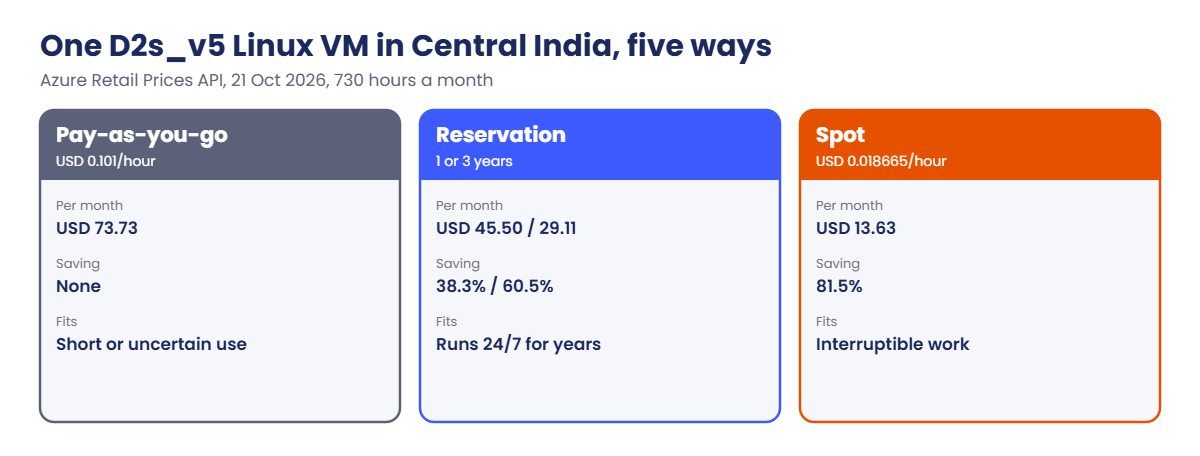
| Option for one D2s_v5 Linux VM, Central India | Cost | Saving vs pay-as-you-go |
|---|---|---|
| Pay-as-you-go, USD 0.101/hour | USD 73.73 a month | None |
| 1-year reservation, USD 546 | USD 45.50 a month | 38.3% |
| 3-year reservation, USD 1,048 | USD 29.11 a month | 60.5% |
| Spot, USD 0.018665/hour (can be evicted) | USD 13.63 a month | 81.5% |
| Windows on the same size, USD 0.193/hour | USD 140.89 a month | Azure Hybrid Benefit pays the Linux rate: 47.7% less |
Prices from the Azure Retail Prices API, 21 Oct 2026; months are 730 hours. Your agreement may differ.
- Savings plans for compute: commit to an hourly spend for 1 or 3 years across VM sizes and regions; more flexible than reservations, usually a bit less discount.
How it works, step by step
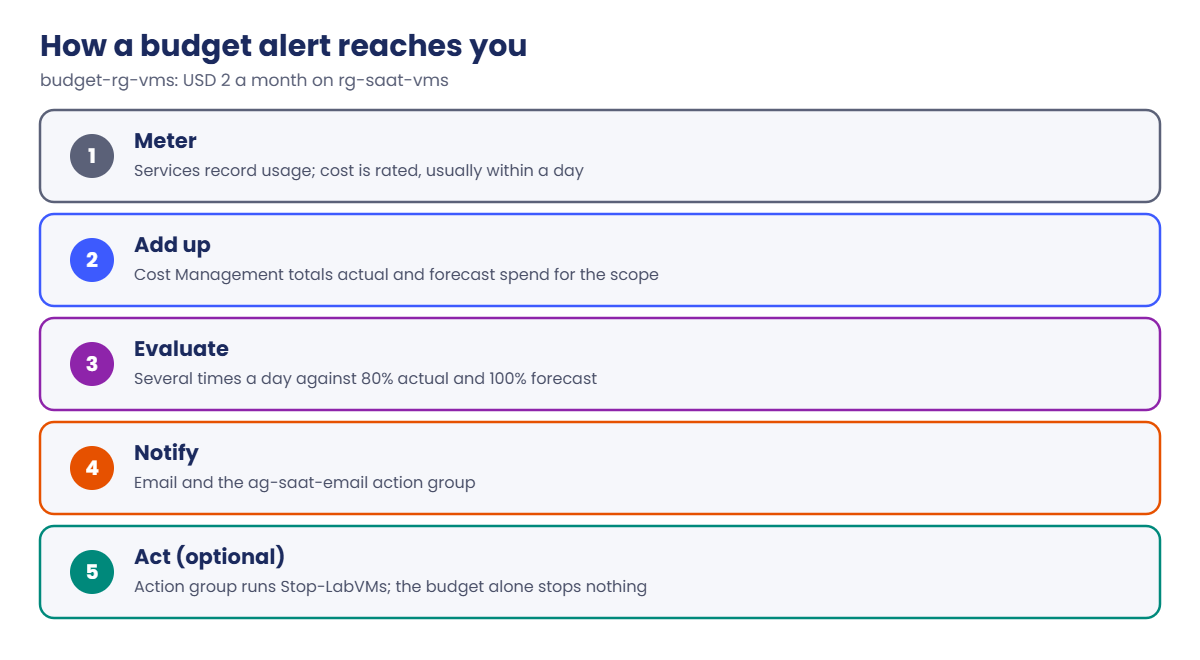
How a monthly budget alert reaches you:
- Usage is metered by each service and rated into cost, usually within a day.
- Cost Management adds it to the budget’s scope and works out actual and forecast spend.
- Budget evaluations run several times a day and compare against your thresholds.
- When one is crossed, the budget sends email and calls its action groups.
- An action group can run a runbook or Logic App to act; the budget itself never stops anything.
That delay matters: a mistake at 10:00 may only show in the budget the next day. Budgets catch slow leaks; for fast ones you need cost anomaly alerts and good guardrails.
The biggest savings usually come from the boring list: switch off what’s idle, delete what’s orphaned, right-size what’s too big, and only then buy reservations for what’s left running 24/7.
Hands-on lab: Azure cost management for the course subscription
Load your subscription ID:
$sub = az account show --query id -o tsv1See this month’s cost by resource group
Run the Cost Management query API (the same pattern as Lesson 4’s cost-by-lesson):
$q = @{
type = 'ActualCost'
timeframe = 'MonthToDate'
dataset = @{
granularity = 'None'
aggregation = @{ totalCost = @{ name = 'Cost'; function = 'Sum' } }
grouping = @(@{ type = 'Dimension'; name = 'ResourceGroupName' })
}
}
$q | ConvertTo-Json -Depth 6 | Set-Content -Path C:\azure-lab\cost-by-rg.json
$r = az rest --method post --url "https://management.azure.com/subscriptions/$sub/providers/Microsoft.CostManagement/query?api-version=2023-03-01" --body '@C:\azure-lab\cost-by-rg.json' | ConvertFrom-Json
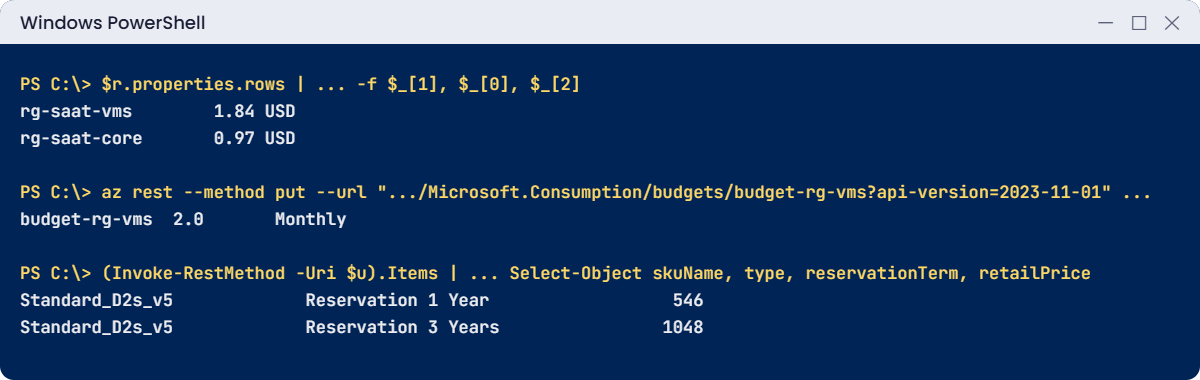
$r.properties.rows | Sort-Object { $_[0] } -Descending | ForEach-Object { '{0,-14} {1,8:N2} {2}' -f $_[1], $_[0], $_[2] }You should see something like this:
rg-saat-vms 1.84 USD
rg-saat-core 0.97 USD
rg-saat-data 0.06 USDYour numbers will differ. If a resource group you deleted still shows cost, that’s normal: it ran earlier this month.
2Add a budget that alerts your action group
A USD 2 monthly budget on rg-saat-vms, alerting at 80% actual and 100% forecast:
$ag = az monitor action-group show --resource-group rg-saat-core --name ag-saat-email --query id -o tsv
$start = (Get-Date -Day 1).ToString('yyyy-MM-01T00:00:00Z')
$b = @{ properties = @{
category = 'Cost'; amount = 2; timeGrain = 'Monthly'
timePeriod = @{ startDate = $start }
notifications = @{
actual80 = @{ enabled = $true; operator = 'GreaterThan'; threshold = 80; thresholdType = 'Actual'; contactGroups = @($ag) }
forecast100 = @{ enabled = $true; operator = 'GreaterThan'; threshold = 100; thresholdType = 'Forecasted'; contactGroups = @($ag) }
} } }
$b | ConvertTo-Json -Depth 6 | Set-Content -Path C:\azure-lab\budget-vms.json
az rest --method put --url "https://management.azure.com/subscriptions/$sub/resourceGroups/rg-saat-vms/providers/Microsoft.Consumption/budgets/budget-rg-vms?api-version=2023-11-01" --body '@C:\azure-lab\budget-vms.json' --query "{name:name, amount:properties.amount, grain:properties.timeGrain}" -o tableYou should see this:
Name Amount Grain
------------- -------- -------
budget-rg-vms 2.0 Monthly3Ask Advisor for cost recommendations
Run this:
az advisor recommendation list --category Cost --query "[].{impact:impact, problem:shortDescription.problem, resource:impactedValue}" -o tableYou may see nothing, or something like this:
Impact Problem Resource
-------- ----------------------------------------------------------- ----------
Medium Right-size or shutdown underutilized virtual machines web01Advisor needs a few days of usage data, and your lab VMs are mostly off, so an empty list is common here. In a real subscription, this list is the first place to look each month.
4Price the savings options yourself
Check the reservation and Spot prices for D2s_v5 in Central India:
$f = "serviceName eq 'Virtual Machines' and armRegionName eq 'centralindia' and armSkuName eq 'Standard_D2s_v5'"
$u = 'https://prices.azure.com/api/retail/prices?$filter=' + [uri]::EscapeDataString($f)
(Invoke-RestMethod -Uri $u).Items | Where-Object { $_.productName -notlike '*Windows*' } | Select-Object skuName, type, reservationTerm, retailPrice | Format-Table -AutoSizeYou should see something like this:
skuName type reservationTerm retailPrice
------- ---- --------------- -----------
Standard_D2s_v5 Spot Consumption 0.018665
Standard_D2s_v5 Low Priority Consumption 0.0202
Standard_D2s_v5 Consumption 0.101
Standard_D2s_v5 Reservation 1 Year 546
Standard_D2s_v5 Reservation 3 Years 1048Reservation prices are the total for the term, not per hour. That’s how the table in the Engineer’s View gets 38.3% and 60.5% savings.
Turn those numbers into a habit. Once a month, spend 20 minutes on Azure cost management: open Cost analysis grouped by resource group, compare with last month, and write down the top three changes and why they happened. Then read Advisor and the orphan query from Break It.
Most teams that do this every month never have a “why is the bill double?” meeting, because they see the change while it is still small.
✅ Checkpoint: You know which resource groups cost the most, budget-rg-vms emails ag-saat-email, and you can price reservations and Spot yourself.
Break It, Then Fix It
Both of these are silent: no error, just money.
1Break it: the leftovers nobody remembers
Create what a deleted VM often leaves behind: a detached disk and a public IP attached to nothing:
az disk create --resource-group rg-saat-core --name disk-orphan --size-gb 32 --sku Premium_LRS --tags course=saatvedha-azure lesson=44 -o none
az network public-ip create --resource-group rg-saat-core --name pip-orphan --sku Standard --tags course=saatvedha-azure lesson=44 -o none
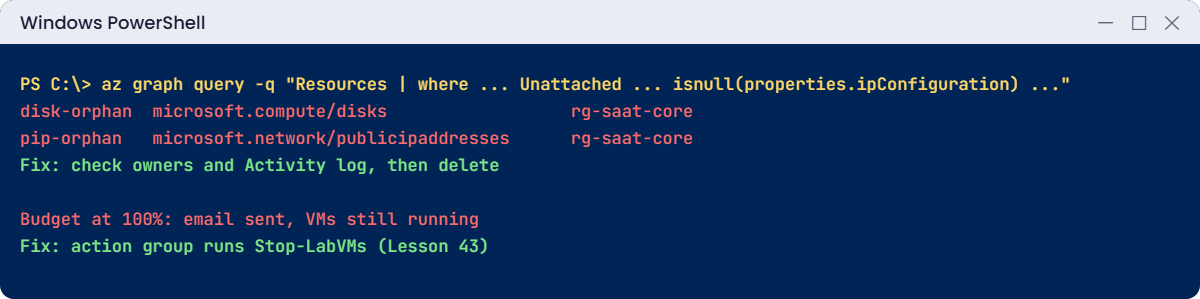
az graph query -q "Resources | where (type =~ 'microsoft.compute/disks' and properties.diskState =~ 'Unattached') or (type =~ 'microsoft.network/publicipaddresses' and isnull(properties.ipConfiguration)) | project name, type, resourceGroup" --query "data[].{name:name, type:type, group:resourceGroup}" -o tableYou should see something like this:
Name Type Group
----------- --------------------------------------- ------------
disk-orphan microsoft.compute/disks rg-saat-core
pip-orphan microsoft.network/publicipaddresses rg-saat-coreNeither shows up anywhere unless you look. A 32 GiB Premium disk and a static public IP bill every hour until deleted. In real subscriptions, this query often returns hundreds of rows after a migration.
Fix it: confirm nobody needs them (check tags, owners, and recent Activity log), then delete:
az disk delete --resource-group rg-saat-core --name disk-orphan --yes
az network public-ip delete --resource-group rg-saat-core --name pip-orphan
az graph query -q "Resources | where (type =~ 'microsoft.compute/disks' and properties.diskState =~ 'Unattached') or (type =~ 'microsoft.network/publicipaddresses' and isnull(properties.ipConfiguration)) | project name, type, resourceGroup" --query "data[].{name:name, type:type, group:resourceGroup}" -o tableThe last command prints nothing.
2Break it: “the budget will stop it”
A manager says: “We set a USD 2 budget on rg-saat-vms, so we can’t overspend.” Start web01 and win01 and leave them running overnight, and the budget will email at 80% and 100%. Nothing stops. Budgets alert; they don’t act.
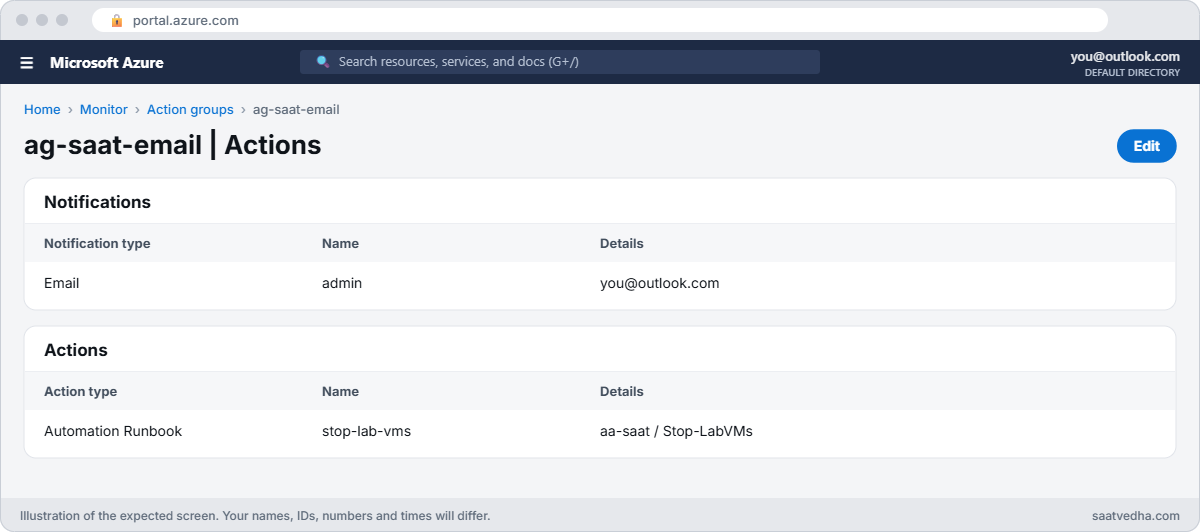
Fix it: give the budget an action. In the portal, open ag-saat-email, Actions, add an Automation Runbook action that runs Stop-LabVMs from Lesson 43 on aa-saat. Save. Now the forecast-100% alert stops your lab VMs as well as emailing you.
Keep the budget and the action. Delete the files the lab created if you like; they hold no secrets.
✅ Checkpoint: You found and removed two orphans with Resource Graph, and your budget now triggers a runbook instead of only an email.
This happened at work
The migration that left 600 disks behind
A media company moved its render farm from one VNet design to another, rebuilding 400 VMs from images. The project finished on time. Three months later, the monthly bill was 40% higher than before the migration.
Cost analysis grouped by service showed Storage, not Compute, had grown. A Resource Graph query found 612 unattached Premium disks and 150 unused public IPs: the old VMs had been deleted, but their disks and IPs had not.
What they changed: the decommission runbook now deletes disks, NICs and IPs with the VM, and a weekly report lists anything Unattached for more than 7 days. Every resource needs an owner tag by policy, and budgets per team call a runbook that tags offenders for review.
Common mistakes and troubleshooting
| Mistake | What you see | What to do |
|---|---|---|
| Expecting budgets to stop resources | Alerts arrive; spend continues | Add an action group with a runbook or Logic App. |
| Deleting VMs without their disks and IPs | Storage and IP costs grow | Query for Unattached disks and unused IPs weekly. |
| Buying reservations first | Paying for VMs that should be off | Clean up and right-size, then reserve. |
| Running Windows without Hybrid Benefit when licensed | Paying for Windows twice | Apply Azure Hybrid Benefit where you have licences. |
| Untagged resources | Nobody owns the cost | Require owner and cost-centre tags by policy. |
| Reading today’s cost as final | Numbers jump tomorrow | Allow for 24 to 72 hours of delay. |
Interview questions
Click a question to open it. Each one is written the way an interviewer would ask it. Under it you will see why they ask it and one way you could answer, in your own words.
Fresher level
1. What does Azure Cost Management do?
Why they ask this: The basic concept.
How you might answer: It shows, analyses and forecasts Azure spend by scope, service, resource group and tag, and provides budgets, alerts and exports.
2. Do budgets stop resources?
Why they ask this: A common misunderstanding.
How you might answer: No. Budgets send alerts by email and action groups. To act automatically, the action group must run a runbook, Function or Logic App.
3. What is a reservation?
Why they ask this: A pricing basics question.
How you might answer: A 1 or 3-year commitment to a VM size or service in a region, in exchange for a lower price. It saves money only if the resource really runs most of the time.
2–5 years experience
4. How do you find waste in a subscription?
Why they ask this: They want a method.
How you might answer: Cost analysis by service and resource group for trends, Advisor cost recommendations, Resource Graph for unattached disks, unused IPs and idle gateways, and metrics for underused VMs. Then clean up, right-size, schedule shutdowns, and only then reserve.
5. Reservation or savings plan: how do you choose?
Why they ask this: They want trade-offs.
How you might answer: Reservations give the deepest discount for a fixed size and region. Savings plans give a bit less but apply across sizes, series and regions. I’d use reservations for stable, predictable workloads and savings plans where sizes change.
6. When would you use Spot VMs?
Why they ask this: They want risk awareness.
How you might answer: For work that can be interrupted: batch jobs, rendering, CI agents, test environments. Spot can be evicted at short notice, so the app must handle losing a VM.
Senior level
7. How would you set up cost governance for a company?
Why they ask this: They want a framework.
How you might answer: Management group budgets, required tags for owner and cost centre by policy, monthly reviews with Advisor and Cost Management, showback reports per team, automated cleanup of orphans, and a reservation and savings plan strategy owned by FinOps.
8. How do you handle a cost spike found on Monday?
Why they ask this: They want incident thinking.
How you might answer: Use Cost analysis by day and resource to find the start, check the Activity log for what changed then, contain it (scale down, stop, delete), then add a guardrail: policy, budget action, or anomaly alert.
9. Actual vs amortized cost: when do you use each?
Why they ask this: A detail FinOps people check.
How you might answer: Actual shows purchases when billed, so a reservation appears as one big charge. Amortized spreads it over the term, which is better for showing teams what they really use each month.
Quick quiz
Q1. What does a budget do when its threshold is crossed?
- Stops VMs
- Sends alerts and calls action groups
- Deletes resources
- Nothing
Show answer
B — Budgets notify; actions need an action group.
Q2. 1-year reservation for D2s_v5 Linux in Central India costs USD 546. Monthly equivalent?
- USD 73.73
- USD 45.50
- USD 29.11
- USD 13.63
Show answer
B — 546 divided by 12.
Q3. Which tool finds unattached disks across subscriptions fast?
- Boot diagnostics
- Resource Graph
- Bastion
- Key Vault
Show answer
B — A Resource Graph query lists them.
Q4. Spot VMs are best for:
- Domain controllers
- Work that can be interrupted
- Databases
- Firewalls
Show answer
B — Spot can be evicted.
Q5. Azure Hybrid Benefit for Windows means:
- No Windows licence needed
- Paying the Linux rate with your own Windows licence
- A reservation
- Spot pricing
Show answer
B — You bring licences you already own.
Quick recap
You can now explain the bill, warn before it grows, and cut it safely.
- Cost analysis: actual vs amortized, grouped by what matters.
- Budgets alert; action groups make them act.
- Find orphans with Resource Graph; delete with care.
- Reserve only what runs all the time; use Spot for interruptible work.
- Clean up and right-size before you commit.
Next lesson
Lesson 45: Hub-and-spoke network design → You design a hub VNet with shared services and spokes for workloads, the layout most enterprises use.
Further reading: Azure cost management
Want to go deeper into Azure cost management? See Microsoft’s Cost Management overview and Advisor cost recommendations. You can also see the full plan for this course on the Azure Cloud Administration course page.
