Azure NetApp Files
-
Phase 0: Before you start
-
Phase 1: The foundation
-
Phase 2: Day-to-day operations
-
Phase 3: Enterprise architecture
-
Phase 4: Troubleshooting step by step
-
Phase 5: Final project and career
Azure NetApp Files (ANF) is NetApp’s enterprise file storage, run by Microsoft inside Azure. It gives VMs NFS and SMB shares with very low latency and high throughput, which is why SAP HANA, Oracle, EDA tools and big home-directory farms use it.
If you’ve worked with NetApp filers on premises, the ideas are familiar: volumes, export policies, snapshots. What’s new is how Azure charges and sizes it, and that’s where most production problems start.
ANF has no small trial size: a capacity pool starts at 1 TiB and bills by the hour. So this is a concept lesson with a simulated lab. You walk through the real Azure CLI flow, then rebuild an ANF-style NFS volume with its export policy on your laptop and break it the way ANF volumes break.
| Time | You need | Cost | By the end you can |
|---|---|---|---|
| About 60 minutes | For Part B, an Ubuntu 24.04 VM in VirtualBox | Nothing: Part A is a walkthrough and Part B runs on your laptop. For reference, a 1 TiB Standard pool costs about USD 167 a month in Central India (USD 0.000223 per GiB per hour, Azure Retail Prices API, October 2026) | Explain accounts, pools, volumes and service levels, size throughput correctly, and fix export policy and root access problems |
What it is, in one line
Azure NetApp Files gives Azure VMs fast NFS and SMB shares built on NetApp storage, sized by capacity pools and service levels.
In Simple Words
Renting a warehouse floor
You rent a whole floor of a warehouse, 1,000 square metres, whether you fill it or not. That’s the capacity pool. Inside, you mark out rooms for each team; those are volumes.
The warehouse gives you loading docks in proportion to the room size: a bigger room gets more docks, so goods move in and out faster. That’s throughput tied to volume size.
Each room has a guard with a list of which vans may unload there and whether the drivers may open sealed boxes. That’s the export policy and its root access setting.
Engineer's View
How Azure NetApp Files is organised
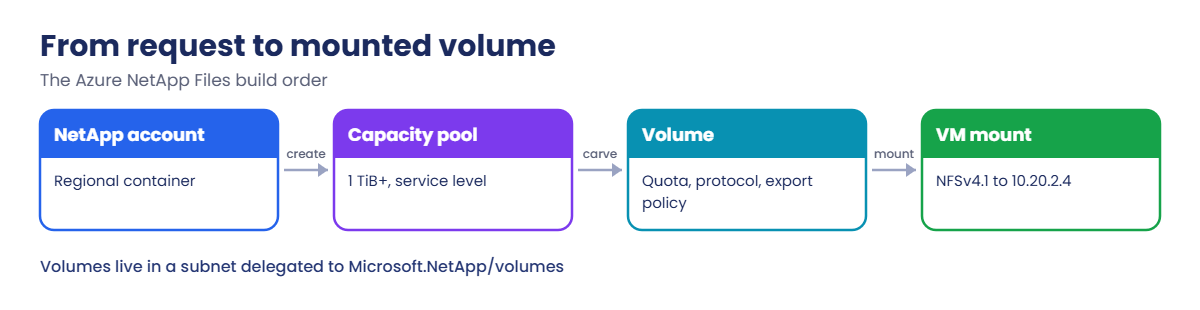
- NetApp account: a regional container for pools and settings such as Active Directory connections for SMB.
- Capacity pool: provisioned capacity you pay for, from 1 TiB, with a service level: Standard, Premium, Ultra or Flexible.
- Volume: a share carved from a pool, from 50 GiB to 100 TiB (large volumes go much higher), with a protocol: NFSv3, NFSv4.1, SMB or dual-protocol.
- Throughput: with automatic QoS, a volume gets throughput per TiB of its quota: about 16 MiB/s on Standard, 64 on Premium and 128 on Ultra. With manual QoS you assign throughput per volume from the pool’s total.
- Networking: volumes live in a subnet delegated to Microsoft.NetApp/volumes and get a private IP. No public endpoint.
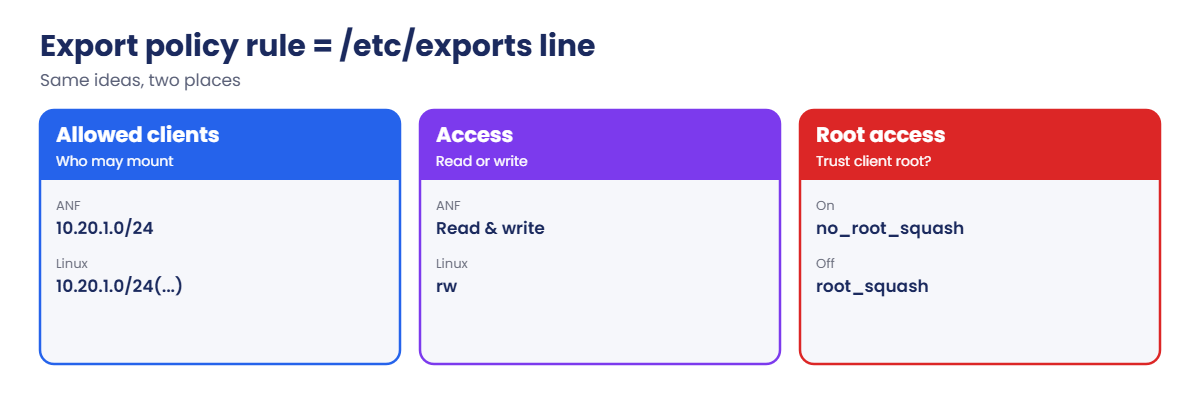
- Export policy: up to five rules per NFS volume: allowed clients, read-only or read-write, and root access on or off.
- Data protection: snapshots (instant, space-efficient), snapshot policies, backup and cross-region or cross-zone replication.
How it works, step by step
What happens from “we need shared storage for the app” to a mounted volume:
- You create a NetApp account in the region, then a capacity pool with a size and service level.
- You delegate a subnet in the app’s VNet to Microsoft.NetApp/volumes.
- You create a volume with a quota, a protocol, a file path and an export policy that allows the app subnet.
- ANF gives the volume a private IP in the delegated subnet.
- The VM mounts it with recommended options and reads and writes as if it were a local NFS filer.
The quota does two jobs: it limits space and, with automatic QoS, sets throughput. A 100 GiB Standard volume gets only about 1.6 MiB/s, which is why small ANF volumes often feel slow.
| Service level | Throughput per TiB | 1 TiB volume gets | 4 TiB volume gets |
|---|---|---|---|
| Standard | 16 MiB/s | 16 MiB/s | 64 MiB/s |
| Premium | 64 MiB/s | 64 MiB/s | 256 MiB/s |
| Ultra | 128 MiB/s | 128 MiB/s | 512 MiB/s |
When a team says “ANF is slow”, the first question is the volume’s quota and service level, not the network.
Walk through ANF and build an ANF-style NFS volume on your laptop
Part A walks through the real commands with simulated output. Part B is a hands-on NFS lab on your laptop that behaves like an ANF volume.
1Part A: account, pool and delegated subnet (simulated)
Don’t run these on a free account; the pool bills from creation. This is the order and the kind of output you’d see:
az netappfiles account create --resource-group rg-saat-anf --name anf-saat --location centralindia
az netappfiles pool create --resource-group rg-saat-anf --account-name anf-saat --name pool-std --location centralindia --size 1 --service-level Standard
az network vnet subnet create --resource-group rg-saat-anf --vnet-name vnet-app --name snet-anf --address-prefixes 10.20.2.0/28 --delegations Microsoft.NetApp/volumes2Part A: a volume with an export policy (simulated)
The volume allows only the app subnet, read-write, with root access on:
az netappfiles volume create --resource-group rg-saat-anf --account-name anf-saat --pool-name pool-std --name vol1 --location centralindia --service-level Standard --usage-threshold 1024 --file-path vol1 --vnet vnet-app --subnet snet-anf --protocol-types NFSv4.1 --allowed-clients 10.20.1.0/24 --rule-index 1 --unix-read-write true --has-root-access true --network-features Standard
az netappfiles volume show --resource-group rg-saat-anf --account-name anf-saat --pool-name pool-std --name vol1 --query "{ip:mountTargets[0].ipAddress, path:creationToken, quotaBytes:usageThreshold, mibps:actualThroughputMibps}"Simulated output:
{
"ip": "10.20.2.4",
"path": "vol1",
"quotaBytes": 1099511627776,
"mibps": 16.0
}Note the units: the CLI takes the quota in GiB but shows usageThreshold in bytes. 1 TiB on Standard gives 16 MiB/s. On a VM in 10.20.1.0/24, you’d mount it like this:
sudo mkdir -p /mnt/vol1
sudo mount -t nfs -o rw,hard,rsize=262144,wsize=262144,vers=4.1,tcp 10.20.2.4:/vol1 /mnt/vol13Part B: build an ANF-style volume on your laptop
In an Ubuntu 24.04 VirtualBox VM, install the NFS server and create a volume folder that looks like a new ANF volume (owned by root, mode 0770):
sudo apt update && sudo apt install -y nfs-kernel-server nfs-common
sudo mkdir -p /srv/anf/vol1 /mnt/vol1
sudo chmod 0770 /srv/anf/vol1
echo '/srv/anf/vol1 127.0.0.1(rw,sync,no_subtree_check,no_root_squash)' | sudo tee /etc/exports
sudo exportfs -ra
sudo exportfs -vYou should see something like this:
/srv/anf/vol1 127.0.0.1(sync,wdelay,hide,no_subtree_check,sec=sys,rw,secure,no_root_squash,no_all_squash)That line is your export policy: allowed client 127.0.0.1, read-write, root access on (no_root_squash). It maps one to one to an ANF export policy rule.
4Mount it and write a file
Mount with the same options as ANF recommends, then write as root:
sudo mount -t nfs -o rw,hard,rsize=262144,wsize=262144,vers=4.1,tcp 127.0.0.1:/srv/anf/vol1 /mnt/vol1
sudo touch /mnt/vol1/hello.txt
ls -l /mnt/vol1
findmnt /mnt/vol1 -o TARGET,SOURCE,FSTYPEYou should see something like this:
total 0
-rw-r--r-- 1 root root 0 Oct 21 10:20 hello.txt
TARGET SOURCE FSTYPE
/mnt/vol1 127.0.0.1:/srv/anf/vol1 nfs4The client mounted over NFSv4.1 and root could write, because root access is on.
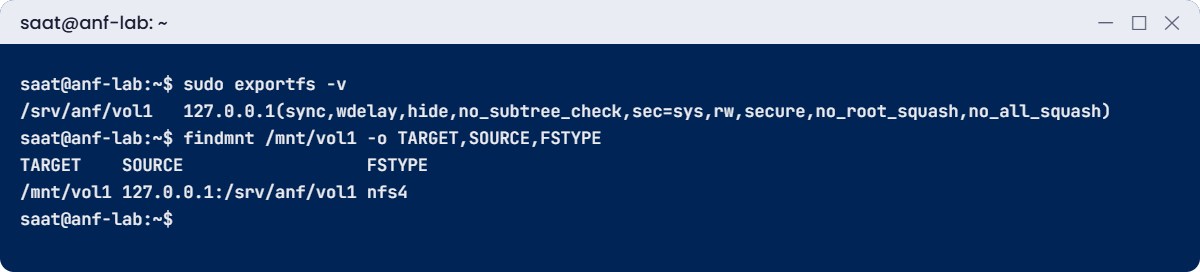

✅ Checkpoint: Your laptop serves an NFS volume with an export policy, and the client mounts it with NFSv4.1 and writes as root.
Break It, Then Fix It
Keep the VM running for both breaks.
1Break it: the client isn’t in the export policy
The storage team tightens the policy to the app subnet only, the way it’s usually written for ANF:
sudo umount /mnt/vol1
echo '/srv/anf/vol1 10.20.1.0/24(rw,sync,no_subtree_check,no_root_squash)' | sudo tee /etc/exports
sudo exportfs -ra
sudo mount -t nfs -o rw,hard,vers=4.1,tcp 127.0.0.1:/srv/anf/vol1 /mnt/vol1You’ll get an error like this:
mount.nfs: access denied by server while mounting 127.0.0.1:/srv/anf/vol1The network path is fine; the server answered and said no. On ANF you’d see the same message when a VM in a new subnet, or a new AKS node pool, isn’t covered by any export rule.
Fix it: add the client to the policy (on ANF, add a rule or widen allowed clients), then mount again:
echo '/srv/anf/vol1 127.0.0.1(rw,sync,no_subtree_check,no_root_squash) 10.20.1.0/24(rw,sync,no_subtree_check,no_root_squash)' | sudo tee /etc/exports
sudo exportfs -ra
sudo mount -t nfs -o rw,hard,vers=4.1,tcp 127.0.0.1:/srv/anf/vol1 /mnt/vol1
ls /mnt/vol1You should see hello.txt again.
2Break it: root access turned off
Security asks to turn root access off on every export, which is a good idea. Simulate it with root_squash, then try to write as root:
sudo umount /mnt/vol1
sudo sed -i 's/no_root_squash/root_squash/g' /etc/exports
sudo exportfs -ra
sudo mount -t nfs -o rw,hard,vers=4.1,tcp 127.0.0.1:/srv/anf/vol1 /mnt/vol1
sudo touch /mnt/vol1/root2.txtYou’ll get an error like this:
touch: cannot touch '/mnt/vol1/root2.txt': Permission deniedWith root squashed, root on the client becomes the anonymous user nobody, and the volume (root-owned, mode 0770) doesn’t let nobody write. The app had been running as root on the client, so it breaks.
Fix it the right way: give the volume to the app’s user ID, then run the app as that user. Turn root access on briefly to set ownership, then off again:
sudo useradd -u 1500 appuser
sudo sed -i 's/root_squash/no_root_squash/g' /etc/exports && sudo exportfs -ra
sudo chown 1500:1500 /mnt/vol1
sudo sed -i 's/no_root_squash/root_squash/g' /etc/exports && sudo exportfs -ra
sudo -u appuser touch /mnt/vol1/app.txt
ls -ln /mnt/vol1You should see something like this:
total 0
-rw-r--r-- 1 1500 1500 0 Oct 21 10:31 app.txt
-rw-r--r-- 1 0 0 0 Oct 21 10:20 hello.txtThe app writes as UID 1500, root stays squashed, and the volume is safer. On ANF the same steps are: root access on, chown from a client, root access off. The UID must be the same on every client that mounts the volume.

3Clean up
Unmount and remove the export:
sudo umount /mnt/vol1
echo '' | sudo tee /etc/exports && sudo exportfs -ra
sudo rm -rf /srv/anf /mnt/vol1
sudo userdel appuser✅ Checkpoint: You fixed an export policy that left out a client and a root squash problem with proper UID ownership.
This happened at work
The files that all belonged to nobody
A media company moved render farm storage from an on-premises filer to ANF with NFSv4.1. Mounts worked, but every file showed owner nobody and group nogroup, and render jobs failed to write their output folders.
NFSv4.1 sends user names with a domain, not plain numeric IDs. The Linux clients used their own DNS domain in /etc/idmapd.conf, while ANF expects defaultv4iddomain.com unless you use LDAP. The names didn’t match, so the client mapped every owner to nobody.
What they changed: they set Domain = defaultv4iddomain.com in /etc/idmapd.conf through their VM image, cleared the ID map cache with nfsidmap -c, and remounted. The migration checklist now includes the NFSv4.1 ID domain, UIDs that match across clients, and a test file written by the app user before go-live.
Common mistakes and troubleshooting
| Mistake | What you see | What to do |
|---|---|---|
| Client subnet missing from export policy | access denied by server while mounting | Add a rule for the client subnet. |
| Root access off, app runs as root | Permission denied on write | Run the app as a user that owns the files. |
| NFSv4.1 ID domain mismatch | Files owned by nobody | Set the idmapd domain to defaultv4iddomain.com, or use LDAP. |
| Small quota on Standard | Slow reads and writes | Raise the quota, change service level, or use manual QoS. |
| Subnet not delegated | Volume creation fails | Delegate a subnet to Microsoft.NetApp/volumes. |
| Mounting without hard and large rsize/wsize | Timeouts and poor throughput | Use Microsoft’s recommended mount options. |
Interview questions
Click a question to open it. Each one is written the way an interviewer would ask it. Under it you will see why they ask it and one way you could answer, in your own words.
Fresher level
1. What is Azure NetApp Files?
Why they ask this: The basic concept.
How you might answer: A first-party Azure service, built on NetApp, that provides high-performance NFS and SMB volumes for VMs and containers.
2. Account, pool, volume: what is each?
Why they ask this: Basic vocabulary.
How you might answer: The account is the regional container. The pool is provisioned capacity with a service level. Volumes are shares carved from the pool.
3. What is an export policy?
Why they ask this: NFS basics.
How you might answer: Rules on an NFS volume that list allowed clients, read or read-write access, and whether root access is allowed.
2–5 years experience
4. A VM gets access denied when mounting. What do you check?
Why they ask this: A real troubleshooting path.
How you might answer: The export policy rules for the VM’s IP or subnet, the protocol version in the mount command, network reachability to the mount IP, and NSGs or UDRs on the path.
5. How is ANF throughput decided?
Why they ask this: They want sizing knowledge.
How you might answer: With automatic QoS, quota times the service level’s MiB/s per TiB. With manual QoS, you assign throughput per volume from the pool total. Flexible decouples throughput from capacity.
6. Users see files owned by nobody on NFSv4.1. Why?
Why they ask this: A classic ANF issue.
How you might answer: The NFSv4 ID mapping domain on clients doesn’t match the server’s, so names can’t be mapped. Set the domain in idmapd.conf or use LDAP, then clear the cache and remount.
Senior level
7. ANF, Azure Files or Elastic SAN?
Why they ask this: They want a design answer.
How you might answer: ANF for high-performance NFS or SMB with NetApp features, Azure Files for general SMB and NFS shares at lower cost, Elastic SAN for block storage over iSCSI. Choose by protocol, latency, throughput and cost.
8. How do you protect ANF data against a regional outage?
Why they ask this: DR depth.
How you might answer: Snapshot policies, ANF backup, and cross-region replication to a volume in the paired region, with a tested failover runbook for mounts and DNS.
9. How do you keep ANF costs under control?
Why they ask this: FinOps thinking.
How you might answer: Right-size pools, move volumes between pools or levels, use cool access for cold data, manual QoS to avoid oversizing quota for throughput, and reserved capacity for steady workloads.
Quick quiz
Q1. Minimum size of a capacity pool (Standard network features)?
- 100 GiB
- 1 TiB
- 4 TiB
- 10 TiB
Show answer
B — 1 TiB is the minimum today.
Q2. A 2 TiB Premium volume with automatic QoS gets about?
- 16 MiB/s
- 128 MiB/s
- 512 MiB/s
- 1 GiB/s
Show answer
B — 64 MiB/s per TiB times 2.
Q3. mount.nfs: access denied by server means?
- Wrong DNS
- Client not allowed by export policy
- Disk full
- Wrong service level
Show answer
B — The server refused this client.
Q4. Root access off; root can’t write. Best fix?
- Turn root access on forever
- Give the volume to the app user ID
- Delete the volume
- Use SMB
Show answer
B — Run the app as a non-root owner.
Q5. Subnet requirement for ANF volumes?
- A public subnet
- Delegated to Microsoft.NetApp/volumes
- GatewaySubnet
- Any subnet with an NSG
Show answer
B — Volumes need a delegated subnet.
Quick recap
You now understand how ANF is built, sized and secured, and you’ve practised the two NFS faults that come up in every migration.
- Pools are paid capacity; volumes carve them up.
- Throughput follows quota and service level with automatic QoS.
- Export policies decide who can mount and whether root is trusted.
- Run apps as a real UID instead of relying on root access.
- For NFSv4.1, the ID domain must match or files show nobody.
Next lesson
Lesson 57: iSCSI and MPIO on Azure VMs → You build an iSCSI target with targetcli, connect to it over two paths with MPIO, and learn how Azure Elastic SAN fits in.
Further reading: Azure NetApp Files
Want to go deeper into Azure NetApp Files? See Microsoft’s What is Azure NetApp Files? and Resource limits for Azure NetApp Files. You can also see the full plan for this course on the Azure Cloud Administration course page.
