Load Balancer and Application Gateway 502 errors
-
Phase 0: Before you start
-
Phase 1: The foundation
-
Phase 2: Day-to-day operations
-
Phase 3: Enterprise architecture
-
Phase 4: Troubleshooting step by step
-
Phase 5: Final project and career
An Application Gateway 502 means the gateway couldn’t get a good answer from any backend for that request. In Lesson 52 the cause was simple: the app moved to another port and every backend went Unhealthy. In real life, 502s are often stranger: backends look Healthy and some requests still fail, or the app works fine but the probe says it’s dead.
This lesson goes deeper into both. You’ll meet the 502 that comes from a request timeout while backend health is green, and the 502 from a health probe that gets a valid but unexpected answer. Load Balancer has its own version of the second problem, which you met in Lesson 51.
In the lab you put Application Gateway in front of a small test app with a fast page, a slow page and a protected health page, then break and fix the gateway two ways.
| Time | You need | Cost | By the end you can |
|---|---|---|---|
| About 75 minutes | A free account and the CLI | About USD 0.40 if you finish within 75 minutes: Standard_v2 is USD 0.28 per hour plus USD 0.008 per capacity unit hour in Central India (Azure Retail Prices API, October 2026) | Tell probe failures from request timeouts, read backend health messages, and fix both |
What it is, in one line
A 502 from Application Gateway means no backend gave a valid answer in time: either probes marked them unhealthy, or the request itself failed or timed out.
In Simple Words
The restaurant waiter
A waiter takes your order to the kitchen. Two things can go wrong. The kitchen manager may have put up a sign saying “Kitchen closed” because the cook didn’t answer his check (a failed health probe), so the waiter won’t even try.
Or the kitchen is open, but your dish takes an hour and the waiter’s rule is to give up after 20 minutes (a request timeout).
Both times you hear “Sorry, your order failed.” Only the kitchen notes tell you which it was.
And sometimes the cook answers the manager’s check with “Who are you? Show me your ID!” The cook is fine, but the manager hears a strange answer and closes the kitchen anyway. That’s a health page that needs a login.
Engineer's View
Two different kinds of 502
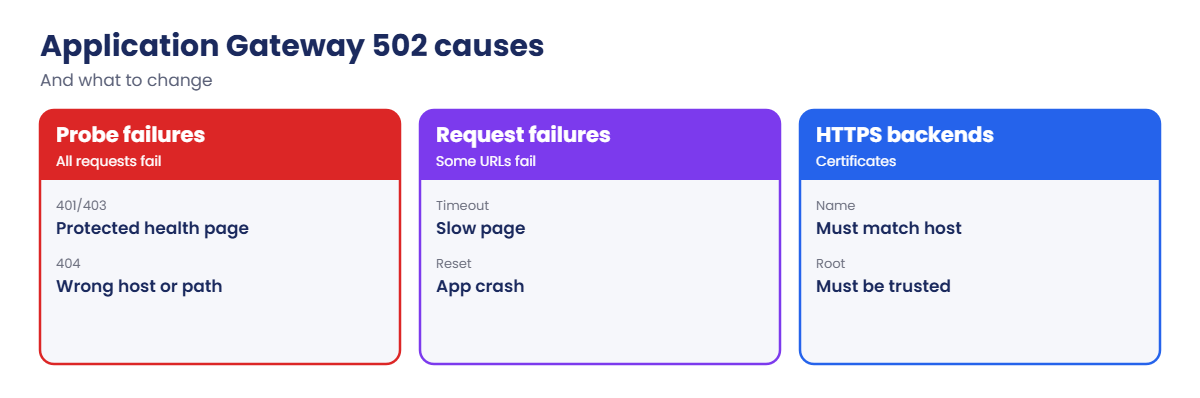
- Backend Unhealthy: probes fail, so the gateway has no healthy server and returns 502 for every request. Backend health shows the reason in healthProbeLog.
- Request failure with Healthy backends: the probe is fine, but this request times out (longer than the backend settings’ request timeout), the connection is reset, or the response is malformed. Only some URLs or some requests fail.
- Probe expectations: a healthy answer is a status code in the match range (200 to 399 by default) and, optionally, a body match. 401 or 403 from a protected health page counts as unhealthy.
- Host headers: probes and requests use the host name from backend settings or the probe. A backend that serves a different site per host name can answer the probe with 404.
- HTTPS backends: certificate name must match the host name and its root must be trusted (well-known CA or uploaded trusted root), or probes fail.
- Access logs: AGWAccessLogs show each request’s status, server status and timing; upstream timeouts appear in the error information.
- Load Balancer: a Layer 4 load balancer never returns 502; unhealthy backends there show up as timeouts or resets (Lesson 51).
How it works, step by step
How to tell the two kinds apart in two commands:
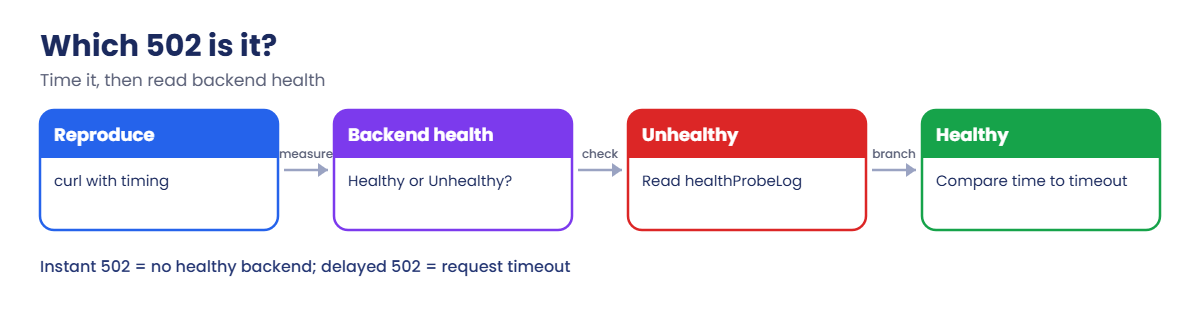
- Reproduce the 502 with curl and note the URL and how long it took.
- Run show-backend-health. If servers are Unhealthy, read healthProbeLog; the message names the reason.
- If servers are Healthy, the probe is fine and the failing request is the problem. Compare how long it took with the backend settings’ request timeout.
- Check whether the failing URL is slow, very large, or behaves differently from the probe path.
- Fix the app or adjust the timeout or probe, then test the same URL again.
A 502 that arrives after exactly 20 or 30 seconds is almost always a timeout. A 502 that arrives instantly is almost always no healthy backend.
Timing is the cheapest clue you have. Measure it every time with curl’s time output or the access logs.
Put Application Gateway in front of a test app
1Network, a backend VM and the test app
Create the network and VM, then save this as C:\azure-lab\l71\app.sh and run it on the VM:
az group create --name rg-saat-l71 --location centralindia --tags course=saatvedha-azure lesson=71 -o none
az network vnet create --resource-group rg-saat-l71 --name vnet-l71 --address-prefixes 10.71.0.0/16 --subnet-name snet-agw --subnet-prefixes 10.71.0.0/24 -o none
az network vnet subnet create --resource-group rg-saat-l71 --vnet-name vnet-l71 --name snet-web --address-prefixes 10.71.1.0/24 --default-outbound-access false -o none
az vm create --resource-group rg-saat-l71 --name vm-app1 --image Canonical:ubuntu-24_04-lts:server:latest --size Standard_B1s --vnet-name vnet-l71 --subnet snet-web --private-ip-address 10.71.1.4 --public-ip-address '""' --nsg '""' --admin-username azureuser --generate-ssh-keys --tags course=saatvedha-azure lesson=71 -o none#!/bin/bash
# A small test app: / is fast, /slow takes 90 seconds, /health needs a login, /healthz is open
mkdir -p /srv
cat > /srv/app.py <<'EOF'
import http.server, time
class H(http.server.BaseHTTPRequestHandler):
def do_GET(self):
if self.path == '/slow':
time.sleep(90)
if self.path == '/health':
self.send_response(401); self.end_headers(); return
body = b'ok\n' if self.path == '/healthz' else b'hello from vm-app1\n'
self.send_response(200)
self.send_header('Content-Length', str(len(body)))
self.end_headers()
self.wfile.write(body)
http.server.ThreadingHTTPServer(('', 80), H).serve_forever()
EOF
systemd-run --unit app python3 /srv/app.py
sleep 2
systemctl is-active appaz vm run-command invoke --resource-group rg-saat-l71 --name vm-app1 --command-id RunShellScript --scripts '@C:\azure-lab\l71\app.sh' --query "value[0].message" -o tsvYou should see active.
2Create the application gateway (about 8 minutes)
Standard_v2 is enough here; no WAF is needed for this lesson:
az network public-ip create --resource-group rg-saat-l71 --name pip-agw --sku Standard --zone 1 2 3 -o none
az network application-gateway create --resource-group rg-saat-l71 --name agw-l71 --sku Standard_v2 --min-capacity 0 --max-capacity 2 --vnet-name vnet-l71 --subnet snet-agw --public-ip-address pip-agw --servers 10.71.1.4 --frontend-port 80 --http-settings-port 80 --http-settings-protocol Http --priority 100 --tags course=saatvedha-azure lesson=71 -o none
$agwIp = az network public-ip show --resource-group rg-saat-l71 --name pip-agw --query ipAddress -o tsv
az network application-gateway http-settings show --resource-group rg-saat-l71 --gateway-name agw-l71 --name appGatewayBackendHttpSettings --query requestTimeout -o tsvThe last command prints the request timeout in seconds, for example 30. Remember it.
3Test the healthy path
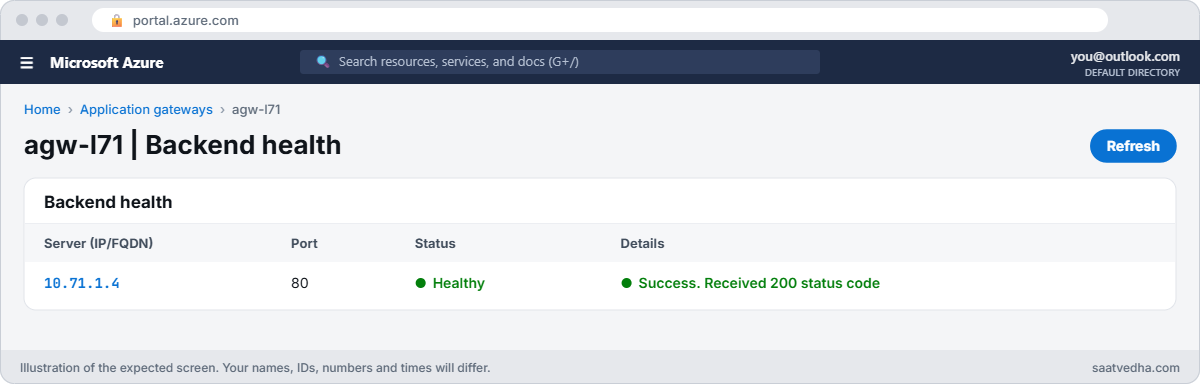
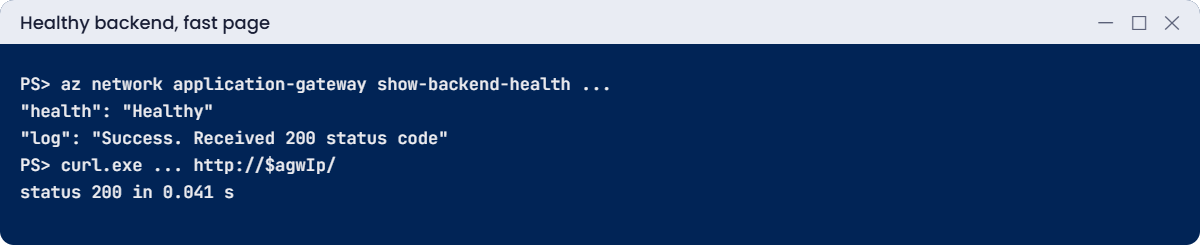
Check backend health and the fast page, with timing:
az network application-gateway show-backend-health --resource-group rg-saat-l71 --name agw-l71 --query "backendAddressPools[0].backendHttpSettingsCollection[0].servers[].{address:address, health:health, log:healthProbeLog}" -o json
curl.exe -s -o NUL -w "status %{http_code} in %{time_total} s" http://$agwIp/You should see something like this:
[
{
"address": "10.71.1.4",
"health": "Healthy",
"log": "Success. Received 200 status code"
}
]
status 200 in 0.041 s
✅ Checkpoint: agw-l71 serves the fast page through a Healthy backend, and you know its request timeout.
Break It, Then Fix It
Keep the gateway running for both breaks, then clean up.
1Break it: a slow report page
Users open a report that takes 90 seconds to build:
curl.exe -s -o NUL -w "status %{http_code} in %{time_total} s" http://$agwIp/slow
az network application-gateway show-backend-health --resource-group rg-saat-l71 --name agw-l71 --query "backendAddressPools[0].backendHttpSettingsCollection[0].servers[].{address:address, health:health, log:healthProbeLog}" -o jsonYou should see something like this:
status 502 in 30.112 s
[
{
"address": "10.71.1.4",
"health": "Healthy",
...The backend is Healthy and the home page works, yet /slow returns 502 after almost exactly the request timeout. The gateway gave up waiting; the app was still working on the report. That timing is the giveaway.
Fix it: the real fix is to make the report asynchronous or faster. If the business accepts a long wait, raise the request timeout for these settings and test again:
az network application-gateway http-settings update --resource-group rg-saat-l71 --gateway-name agw-l71 --name appGatewayBackendHttpSettings --timeout 120 -o none
curl.exe -s -o NUL -w "status %{http_code} in %{time_total} s" http://$agwIp/slowYou should see status 200 after about 90 seconds.
Long timeouts tie up connections, so in production put slow URLs on their own backend settings with a path-based rule, rather than raising the timeout for the whole site.
2Break it: a health page that needs a login
The app team asks for a proper health probe on /health. Create a custom probe and attach it to the backend settings:
az network application-gateway probe create --resource-group rg-saat-l71 --gateway-name agw-l71 --name probe-health --protocol Http --host localhost --path /health --interval 10 --timeout 5 --threshold 2 -o none
az network application-gateway http-settings update --resource-group rg-saat-l71 --gateway-name agw-l71 --name appGatewayBackendHttpSettings --probe probe-health -o none
curl.exe -s -o NUL -w "status %{http_code} in %{time_total} s" http://$agwIp/
az network application-gateway show-backend-health --resource-group rg-saat-l71 --name agw-l71 --query "backendAddressPools[0].backendHttpSettingsCollection[0].servers[].{address:address, health:health, log:healthProbeLog}" -o jsonAfter a minute you should see something like this:
status 502 in 0.012 s
[
{
"address": "10.71.1.4",
"health": "Unhealthy",
"log": "Received invalid status code: 401 in the backend server's HTTP response. As per the health probe configuration, 200-399 is the acceptable status code. Either modify probe configuration or resolve backend issues."
}
]An instant 502 on every page: no healthy backend. The app is running and answered the probe, but with 401, because /health sits behind the app’s login. The probe log says so plainly.
Fix it: point the probe at a health page that doesn’t need a login, and check:
az network application-gateway probe update --resource-group rg-saat-l71 --gateway-name agw-l71 --name probe-health --path /healthz -o none
az network application-gateway show-backend-health --resource-group rg-saat-l71 --name agw-l71 --query "backendAddressPools[0].backendHttpSettingsCollection[0].servers[].{address:address, health:health, log:healthProbeLog}" -o json
curl.exe -s -o NUL -w "status %{http_code} in %{time_total} s" http://$agwIp/Health is Healthy with a 200 from /healthz, and the home page returns 200 again.
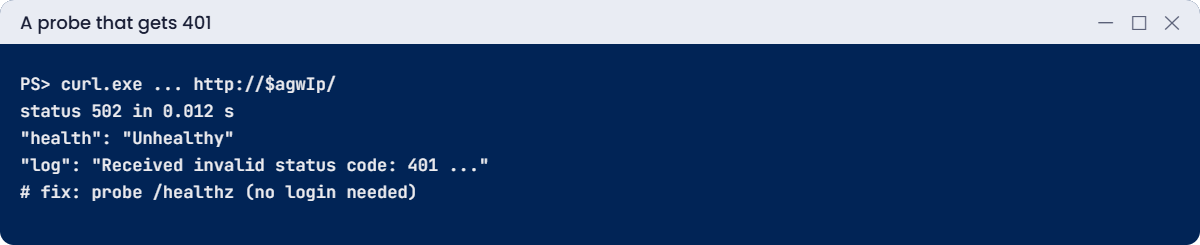
Accepting 401 in the probe’s status codes would also turn it green, but then the probe would stay green even when the app is broken. A dedicated, anonymous health page that checks the app’s real dependencies is the better design.
3Clean up
Delete the lab resource group (the gateway bills by the hour):
az group delete --name rg-saat-l71 --yes✅ Checkpoint: You told a timeout 502 from a probe 502 by timing and backend health, and fixed both properly.
This happened at work
The month-end 502s nobody could reproduce
A finance company’s reporting portal returned 502s on the last two days of every month, for a handful of users. The support team always found every backend Healthy and the home page fine, so tickets were closed as “could not reproduce”.
The access logs told the story. Every failed request was to the same export URL, and every one failed after 20.0 seconds, the gateway’s request timeout. At month-end, large exports took 25 to 40 seconds.
Probes hit a tiny health page and never noticed.
What they changed: exports became background jobs that email a download link, the export path got its own backend settings with a 120-second timeout as a safety net, and an alert now fires when the access logs show more than five upstream timeouts in ten minutes.
Common mistakes and troubleshooting
| Mistake | What you see | What to do |
|---|---|---|
| Raising the timeout for the whole site | Fewer 502s, more tied-up connections | Separate settings for slow paths; fix the app. |
| Probe on a protected page | Instant 502 everywhere, probe log shows 401 | Use an anonymous health endpoint. |
| Accepting 401 in probe codes | Probe always green, even when broken | Probe a page that reflects real health. |
| Wrong host header for the probe | 404 in the probe log | Set the probe host or pick it from settings. |
| HTTPS backend with a mismatched certificate | Unhealthy, certificate message in log | Match the certificate name and trust its root. |
| Not timing the 502 | Guessing between causes | Measure: instant means unhealthy; after timeout means slow. |
Interview questions
Click a question to open it. Each one is written the way an interviewer would ask it. Under it you will see why they ask it and one way you could answer, in your own words.
Fresher level
1. What does a 502 from Application Gateway mean?
Why they ask this: The basic concept.
How you might answer: The gateway couldn’t get a valid response from a backend for that request, because backends were unhealthy or the request failed or timed out.
2. What is backend health?
Why they ask this: Tool knowledge.
How you might answer: The gateway’s view of each backend server from its probes, with a status and a probe log message explaining failures.
3. What does a health probe consider healthy by default?
Why they ask this: A detail.
How you might answer: An HTTP status between 200 and 399 within the probe timeout.
2–5 years experience
4. Backends are Healthy but some requests return 502. Why?
Why they ask this: A real troubleshooting path.
How you might answer: Request timeouts on slow URLs, connection resets, large headers or responses, or backend errors only on certain paths. Check timing and the access logs for the failing URLs.
5. Probe shows 401 and backends are Unhealthy. What do you do?
Why they ask this: Practical fix.
How you might answer: Move the probe to an anonymous health endpoint, or one that the gateway can reach without a login, rather than accepting 401.
6. How do you find upstream timeouts after the fact?
Why they ask this: Logs skill.
How you might answer: Query AGWAccessLogs for 502s, their timing and server status, grouped by URL and backend.
Senior level
7. How would you design health probes for a multi-tier app?
Why they ask this: They want design.
How you might answer: A lightweight endpoint that checks critical dependencies with short timeouts, separate probes per backend pool, sensible thresholds, and alerts on unhealthy hosts before users notice.
8. How do you handle long-running requests behind a gateway?
Why they ask this: Architecture.
How you might answer: Make them asynchronous with job status endpoints, or route them to dedicated backend settings with longer timeouts, and set client expectations.
9. When do 502s point to the network rather than the app?
Why they ask this: Senior diagnosis.
How you might answer: When probes and requests fail together across all backends after a change: NSGs or UDRs on the gateway or backend subnets, DNS for FQDN backends, or certificate changes for HTTPS backends.
Quick quiz
Q1. Instant 502 on every page. Most likely?
- Slow page
- No healthy backend
- DNS
- WAF
Show answer
B — The gateway has nowhere to send it.
Q2. 502 after exactly the request timeout, backends Healthy. Cause?
- Probe path
- Request timeout on a slow URL
- NSG
- Certificate
Show answer
B — The backend didn’t answer in time.
Q3. Probe log shows 401. Best fix?
- Accept 401
- Use an anonymous health endpoint
- Remove the probe
- Restart the gateway
Show answer
B — Probe a page that needs no login.
Q4. Default healthy status range?
- 200 only
- 200 to 399
- 100 to 599
- Any
Show answer
B — 2xx and 3xx count as healthy.
Q5. Does Azure Load Balancer return 502?
- Yes
- No, it works at Layer 4
- Only with WAF
- Only for HTTPS
Show answer
B — It doesn’t speak HTTP.
Quick recap
You can now explain any 502 from Application Gateway in two commands, and fix the cause rather than the symptom.
- Time the 502: instant means unhealthy, delayed means slow.
- Backend health and its probe log explain unhealthy servers.
- Healthy backends plus 502 point at the request itself.
- Probe an anonymous health page, not a protected one.
- Give slow paths their own settings; fix the app where you can.
Next lesson
Lesson 72: Azure VM performance: credits and disk caps → You find why VMs are slow: B-series CPU credits, disk and VM throughput caps, and the metrics that prove it.
Further reading: Application Gateway 502
Want to go deeper into Application Gateway 502? See Microsoft’s Troubleshoot bad gateway errors in Application Gateway and Troubleshoot backend health issues. You can also see the full plan for this course on the Azure Cloud Administration course page.
