Hub-and-spoke network design

A hub-and-spoke network puts shared services (firewall, VPN or ExpressRoute gateway, Bastion, DNS) in one central VNet, the hub, and each application or team in its own VNet, a spoke, connected to the hub. It’s the layout most enterprises use in Azure, and Phase 3 builds on it lesson by lesson.

The design decisions are made once and live for years: the IP plan, what sits in the hub, how spokes talk to each other and to on-premises. Get the IP plan wrong and you’ll be renumbering production networks two years later.

In this lesson you plan the address space, check it for overlaps with a script, deploy the hub and two spokes with Bicep, and catch the two mistakes that break hub-and-spoke designs before they’re even connected.

TimeYou needCostBy the end you can
About 40 minutesThe CLI, Bicep, PowerShellNo cost: virtual networks and subnets are free; you pay for what you put in them laterPlan a hub-and-spoke IP space, check it for overlaps, and deploy it as code

What it is, in one line

In a hub-and-spoke network, shared network services live in a central hub VNet and every workload VNet connects only to that hub.

In Simple Words

A city bus station

A city has one central bus station: the ticket office, the security check and the long-distance coaches are all there. Every neighbourhood has its own small bus stop, connected to the station by its own road.

To go from one neighbourhood to another, you go through the station, where security can check you. The station is the hub, the neighbourhoods are spokes.

If two neighbourhoods share the same street names, the buses get confused. That’s an overlapping address range, and it’s the first thing to avoid.

Engineer's View

Hub-and-spoke design rules

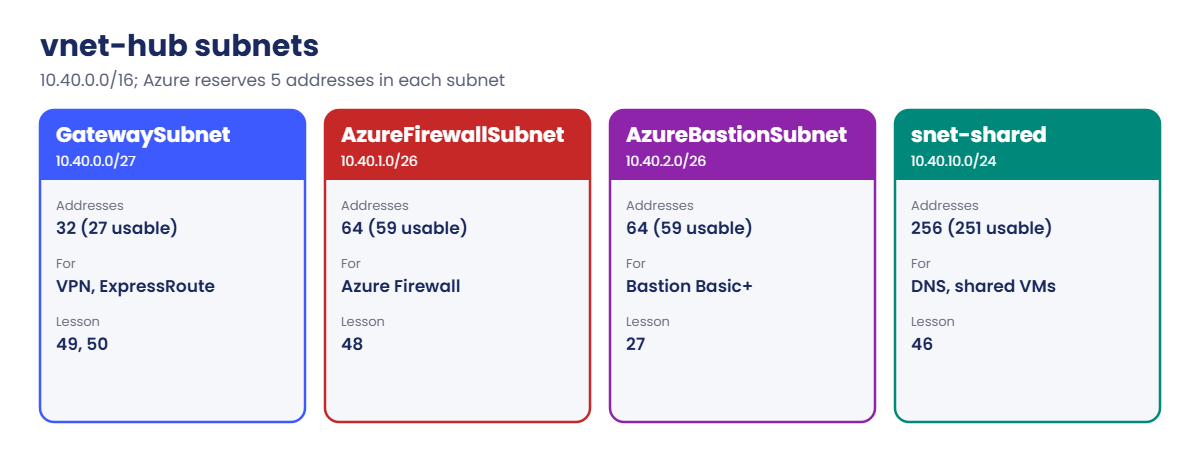
  • Hub: GatewaySubnet (VPN or ExpressRoute gateway, /27 or larger), AzureFirewallSubnet (/26), AzureBastionSubnet (/26), and subnets for shared services like DNS resolvers or domain controllers.
  • Spokes: one per app, environment or team, peered to the hub (Lesson 46). Spokes don’t peer with each other; their traffic goes through the hub firewall (Lessons 47 and 48).
  • IP plan: non-overlapping ranges across Azure, on-premises and partners. Peering and VPN routing fail with overlaps. Reserve room: a /16 per hub or spoke is common in labs; enterprises often use smaller spokes from a larger block.
  • Reserved addresses: Azure keeps 5 addresses in every subnet (first four and last), so a /27 has 27 usable, a /26 has 59, a /24 has 251.
  • Alternatives: Azure Virtual WAN (Microsoft-managed hubs) for many branches and regions; Azure Virtual Network Manager to create and manage hub-and-spoke connectivity and security rules at scale.
  • Course plan: hub 10.40.0.0/16, spokes 10.41.0.0/16 and 10.42.0.0/16, vnet-saat stays at 10.30.0.0/16, simulated on-premises at 10.80.0.0/16.

How it works, step by step

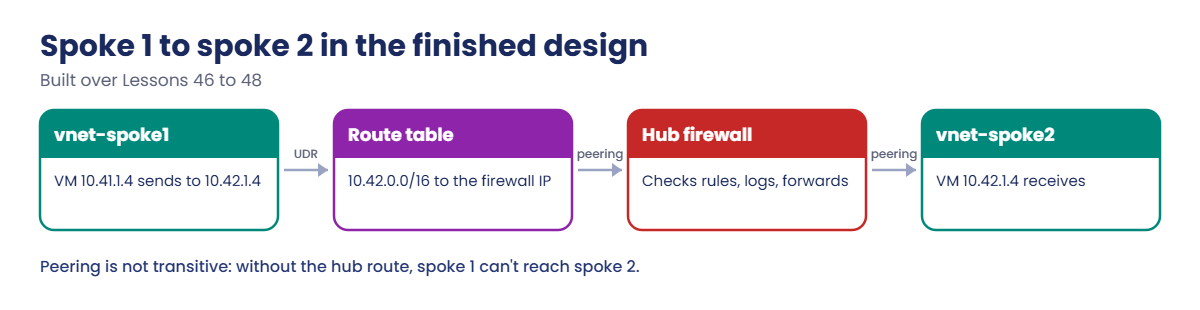
How a packet from spoke 1 reaches spoke 2 in the finished design (built over the next lessons):

Hub-and-spoke network: spoke to spoke traffic through the hub firewall
  1. A VM in vnet-spoke1 (10.41.1.4) sends to 10.42.1.4 in vnet-spoke2.
  2. A route table on its subnet sends 10.42.0.0/16 to the hub firewall’s private IP (Lesson 47).
  3. The packet crosses the peering to the hub and reaches Azure Firewall.
  4. The firewall checks its rules (Lesson 48) and, if allowed, forwards it over the hub-to-spoke2 peering.
  5. The reply comes back the same way, so the firewall sees both directions.

The same path handles traffic to on-premises through the hub’s gateway (Lesson 49) and to the internet through the firewall. One place to inspect, log and control.

Hub-and-spoke network hub subnets and their usable addresses

Peering is not transitive: spoke 1 peered to the hub and spoke 2 peered to the hub does not mean spoke 1 can reach spoke 2. That’s a feature, not a bug.

Hands-on lab: build a hub-and-spoke network with Bicep

Make a folder and save the IP plan checker:

New-Item -ItemType Directory -Path C:\azure-lab\hub -Force | Out-Null
Set-Location C:\azure-lab\hub
$t = @'
param([Parameter(Mandatory)][hashtable]$Plan)
function ConvertTo-Range([string]$Cidr) {
    $ip, $bits = $Cidr.Split('/')
    $b = ([Net.IPAddress]::Parse($ip)).GetAddressBytes(); [Array]::Reverse($b)
    $start = [BitConverter]::ToUInt32($b, 0)
    $size = [int64][math]::Pow(2, 32 - [int]$bits)
    [pscustomobject]@{ Start = [double]$start; End = [double]$start + $size - 1; Size = $size }
}
function ConvertTo-Ip([double]$n) {
    $b = [BitConverter]::GetBytes([uint32]$n); [Array]::Reverse($b); ([Net.IPAddress]::new($b)).ToString()
}
$rows = foreach ($name in ($Plan.Keys | Sort-Object)) {
    $r = ConvertTo-Range $Plan[$name]
    [pscustomobject]@{ Network = $name; Prefix = $Plan[$name]; First = ConvertTo-Ip $r.Start; Last = ConvertTo-Ip $r.End; Addresses = $r.Size; S = $r.Start; E = $r.End }
}
$rows | Select-Object Network, Prefix, First, Last, Addresses | Format-Table -AutoSize | Out-String -Width 150 | ForEach-Object { $_.Trim() }
$clash = for ($i = 0; $i -lt $rows.Count; $i++) { for ($j = $i + 1; $j -lt $rows.Count; $j++) {
    if ($rows[$i].S -le $rows[$j].E -and $rows[$j].S -le $rows[$i].E) { "OVERLAP: $($rows[$i].Network) $($rows[$i].Prefix) and $($rows[$j].Network) $($rows[$j].Prefix)" } } }
if ($clash) { $clash } else { 'No overlaps.' }
'@
Set-Content -Path C:\azure-lab\Test-IpPlan.ps1 -Value $t

1Check the course IP plan

Run the checker on every network the course will use:

C:\azure-lab\Test-IpPlan.ps1 -Plan @{ 'vnet-saat'='10.30.0.0/16'; 'vnet-hub'='10.40.0.0/16'; 'vnet-spoke1'='10.41.0.0/16'; 'vnet-spoke2'='10.42.0.0/16'; 'vnet-onprem'='10.80.0.0/16' }

You should see this:

Network     Prefix       First     Last          Addresses
-------     ------       -----     ----          ---------
vnet-hub    10.40.0.0/16 10.40.0.0 10.40.255.255     65536
vnet-onprem 10.80.0.0/16 10.80.0.0 10.80.255.255     65536
vnet-saat   10.30.0.0/16 10.30.0.0 10.30.255.255     65536
vnet-spoke1 10.41.0.0/16 10.41.0.0 10.41.255.255     65536
vnet-spoke2 10.42.0.0/16 10.42.0.0 10.42.255.255     65536
No overlaps.

2Check the hub’s subnets

The same script works for subnets inside one VNet:

C:\azure-lab\Test-IpPlan.ps1 -Plan @{ 'GatewaySubnet'='10.40.0.0/27'; 'AzureFirewallSubnet'='10.40.1.0/26'; 'AzureBastionSubnet'='10.40.2.0/26'; 'snet-shared'='10.40.10.0/24' }

You should see this:

Network             Prefix        First      Last         Addresses
-------             ------        -----      ----         ---------
AzureBastionSubnet  10.40.2.0/26  10.40.2.0  10.40.2.63          64
AzureFirewallSubnet 10.40.1.0/26  10.40.1.0  10.40.1.63          64
GatewaySubnet       10.40.0.0/27  10.40.0.0  10.40.0.31          32
snet-shared         10.40.10.0/24 10.40.10.0 10.40.10.255       256
No overlaps.

Take 5 off each for Azure’s reserved addresses: 59, 59, 27 and 251 usable. The gaps between them (10.40.3.0 to 10.40.9.255) are room to grow.

3Write the hub and spokes in Bicep

Save hub.bicep and build it:

$b = @'
@description('Azure region for all networks')
param location string = resourceGroup().location

@description('Spoke networks: name, address space and app subnet')
param spokes array = [
  {
    name: 'vnet-spoke1'
    prefix: '10.41.0.0/16'
    appSubnet: '10.41.1.0/24'
  }
  {
    name: 'vnet-spoke2'
    prefix: '10.42.0.0/16'
    appSubnet: '10.42.1.0/24'
  }
]

var tags = {
  course: 'saatvedha-azure'
  lesson: '45'
  keep: 'true'
}

resource hub 'Microsoft.Network/virtualNetworks@2024-05-01' = {
  name: 'vnet-hub'
  location: location
  tags: tags
  properties: {
    addressSpace: {
      addressPrefixes: [
        '10.40.0.0/16'
      ]
    }
    subnets: [
      {
        name: 'GatewaySubnet'
        properties: {
          addressPrefix: '10.40.0.0/27'
        }
      }
      {
        name: 'AzureFirewallSubnet'
        properties: {
          addressPrefix: '10.40.1.0/26'
        }
      }
      {
        name: 'AzureBastionSubnet'
        properties: {
          addressPrefix: '10.40.2.0/26'
        }
      }
      {
        name: 'snet-shared'
        properties: {
          addressPrefix: '10.40.10.0/24'
          defaultOutboundAccess: false
        }
      }
    ]
  }
}

resource spokeVnets 'Microsoft.Network/virtualNetworks@2024-05-01' = [for s in spokes: {
  name: s.name
  location: location
  tags: tags
  properties: {
    addressSpace: {
      addressPrefixes: [
        s.prefix
      ]
    }
    subnets: [
      {
        name: 'snet-app'
        properties: {
          addressPrefix: s.appSubnet
          defaultOutboundAccess: false
        }
      }
    ]
  }
}]

output hubId string = hub.id
output spokeIds array = [for (s, i) in spokes: spokeVnets[i].id]
'@
Set-Content -Path hub.bicep -Value $b
az bicep build --file hub.bicep
(Get-Content hub.bicep).Count

You should see this (no errors, no warnings):

87

The spokes are a loop over an array parameter, so adding a spoke later is one more entry, not another copy of the VNet code.

4Deploy it

The hub group stays for the rest of Phase 3:

az group create --name rg-saat-hub --location centralindia --tags course=saatvedha-azure lesson=45 keep=true -o none
az deployment group create --resource-group rg-saat-hub --name hub-spokes --template-file hub.bicep -o none
az network vnet list --resource-group rg-saat-hub --query "[].{name:name, space:addressSpace.addressPrefixes[0], subnets:length(subnets)}" -o table

You should see this:

Name         Space         Subnets
-----------  ------------  ---------
vnet-hub     10.40.0.0/16  4
vnet-spoke1  10.41.0.0/16  1
vnet-spoke2  10.42.0.0/16  1

Three VNets, no connections yet. In Lesson 46 you peer them.
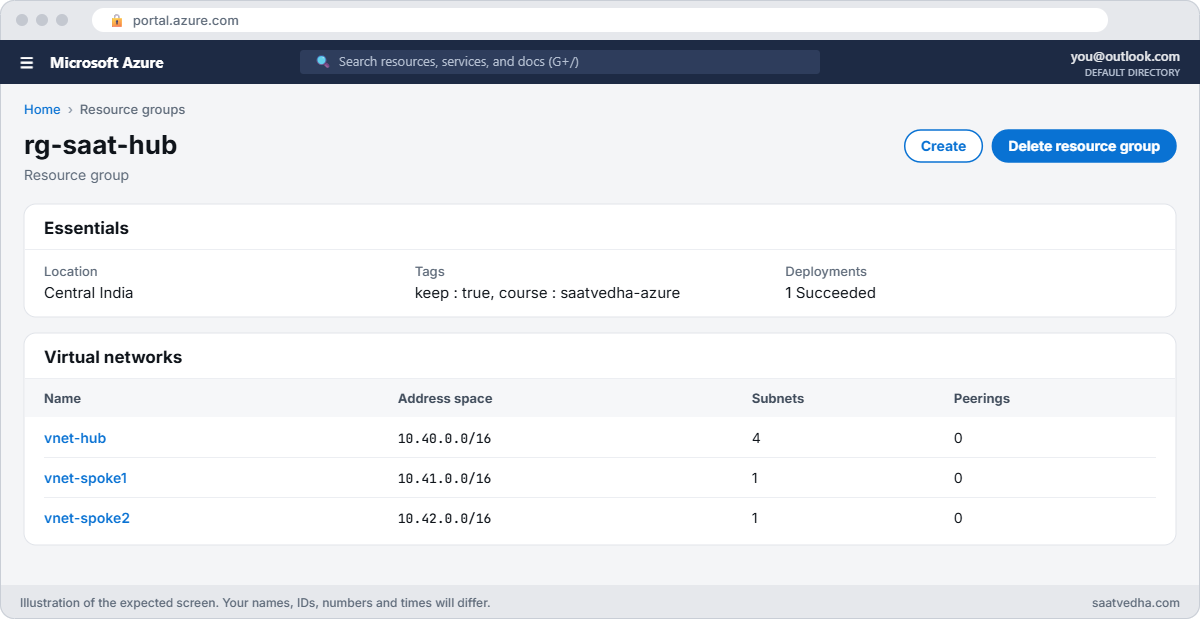
Hub-and-spoke network resource group with three VNets
rg-saat-hub: the hub and two spokes, not connected yet.

Write the plan down where the whole team can see it: one table with every range, its owner and its purpose, including the ones you haven’t used yet. In a real hub-and-spoke network, that table is checked before any new VNet, VPN or partner connection is approved, and it’s the first thing an engineer opens when a route looks wrong.
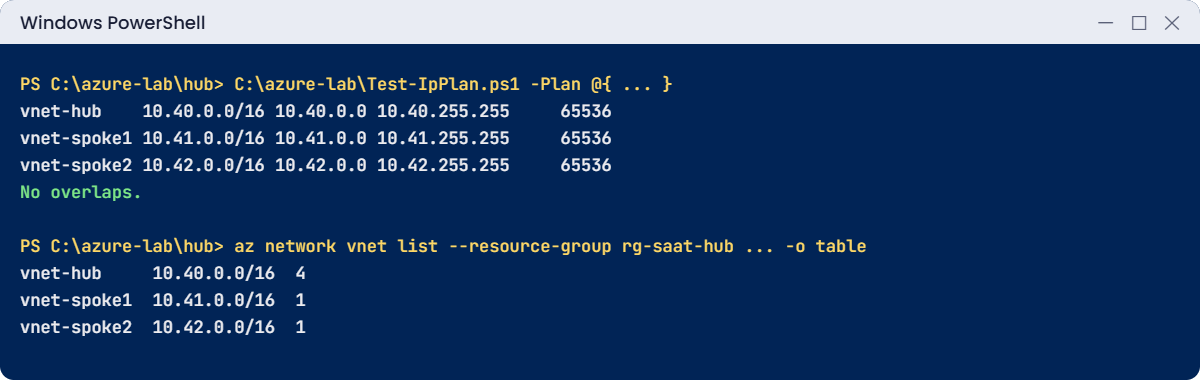
Hub-and-spoke network lab: IP plan check and deployed VNets
A clean IP plan and three VNets deployed from Bicep.

✅ Checkpoint: The IP plan has no overlaps, and vnet-hub, vnet-spoke1 and vnet-spoke2 exist in rg-saat-hub, deployed from Bicep.

Break It, Then Fix It

Both mistakes are cheap now and expensive later.

1Break it: a new spoke that overlaps

A new team asks for “a /17 somewhere in 10.30” for their app. Check it before anyone builds it:

C:\azure-lab\Test-IpPlan.ps1 -Plan @{ 'vnet-saat'='10.30.0.0/16'; 'vnet-hub'='10.40.0.0/16'; 'vnet-spoke1'='10.41.0.0/16'; 'vnet-spoke2'='10.42.0.0/16'; 'vnet-onprem'='10.80.0.0/16'; 'vnet-spoke3'='10.30.128.0/17' }

You should see this at the end:

vnet-spoke3 10.30.128.0/17 10.30.128.0 10.30.255.255     32768
OVERLAP: vnet-saat 10.30.0.0/16 and vnet-spoke3 10.30.128.0/17

Azure would happily create that VNet: an overlap is only rejected when you try to peer or route between the two. By then the team has built servers in it, and fixing it means moving them.

Fix it: give the team the next free range from the plan, 10.43.0.0/16, and run the check again. It should end with No overlaps. Keep the plan in one place (a spreadsheet, IPAM tool or Azure Virtual Network Manager IPAM) so every request is checked against it.

2Break it: a subnet outside its VNet

Add a third spoke through a parameters file, with a typo in its subnet:

Set-Content -Path bad.bicepparam -Value "using 'hub.bicep'`n`nparam spokes = [`n  { name: 'vnet-spoke3', prefix: '10.43.0.0/16', appSubnet: '10.44.1.0/24' }`n]"
az deployment group create --resource-group rg-saat-hub --name spoke3 --template-file hub.bicep --parameters bad.bicepparam

You’ll get an error like this:

(NetcfgSubnetRangeOutsideVnet) Subnet 'snet-app' is not valid because its IP address range is outside the IP address range of virtual network 'vnet-spoke3'.

Bicep can’t know that 10.44.1.0/24 isn’t inside 10.43.0.0/16, so Resource Manager catches it. Notice also that this parameters file lists only spoke3: in a normal deployment that doesn’t delete spoke1 and spoke2, but in a deployment stack with deleteResources it would. Always pass the full list.

Fix it: correct the subnet to 10.43.1.0/24, or in this lab simply delete the bad file. Then confirm the hub is unchanged:

Remove-Item bad.bicepparam
az network vnet list --resource-group rg-saat-hub --query "[].name" -o tsv

You should see this:

vnet-hub
vnet-spoke1
vnet-spoke2
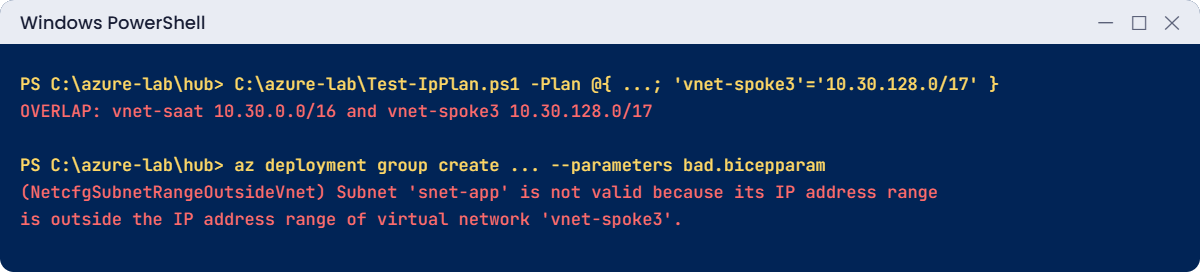
Hub-and-spoke network errors: overlapping range and subnet outside its VNet
An overlap caught by the checker, and a subnet Resource Manager rejects.

✅ Checkpoint: You caught an overlap before it was built and a subnet outside its VNet. rg-saat-hub stays for Lesson 46.

This happened at work

The acquisition that used the same 10.0.0.0/16

A retail group bought a smaller online shop and planned to connect the shop’s Azure VNets to its hub within a month. Both companies had started on Azure with the portal’s default VNet range, 10.0.0.0/16.

Peering was refused for overlapping address space, and the VPN to the shop’s office had the same problem. The integration took nine months: the shop’s networks had to be renumbered, servers rebuilt, firewall rules rewritten and partners told about new IPs.

What they changed: the group now runs a central IP plan with a block per company and region, managed in Azure Virtual Network Manager IPAM. Every new VNet request goes through a check like Test-IpPlan.ps1 in the pipeline, and the portal default range is blocked by policy.

Common mistakes and troubleshooting

MistakeWhat you seeWhat to do
Overlapping rangesPeering or VPN refused laterCheck every new range against a central plan.
Using portal defaults (10.0.0.0/16)Clashes after mergers and partnershipsAllocate from a planned block.
Hub subnets too smallGateway or Bastion can’t be createdGatewaySubnet /27+, Firewall and Bastion /26.
Spoke-to-spoke peering everywhereMesh nobody can auditRoute spoke traffic through the hub firewall.
Subnet outside the VNet rangeNetcfgSubnetRangeOutsideVnetKeep subnets inside the address space.
No room to growRenumbering laterLeave gaps in the hub and spare ranges in the plan.

Interview questions

Click a question to open it. Each one is written the way an interviewer would ask it. Under it you will see why they ask it and one way you could answer, in your own words.

Fresher level

1. What is a hub-and-spoke network?

Why they ask this: The basic concept.

How you might answer: A design where a central hub VNet holds shared services like firewalls and gateways, and workload VNets, the spokes, connect only to the hub, usually through peering.

2. Why must VNet address ranges not overlap?

Why they ask this: A fundamentals check.

How you might answer: Routing needs each address to be unique. Azure refuses peering between overlapping VNets, and VPN or ExpressRoute routing breaks too.

3. How many addresses does Azure reserve in a subnet?

Why they ask this: A classic detail.

How you might answer: Five: the network address, three for Azure services (default gateway and DNS), and the broadcast address. A /24 has 251 usable addresses.

2–5 years experience

4. How do spokes talk to each other in hub-and-spoke?

Why they ask this: They want the routing idea.

How you might answer: Not directly: peering isn’t transitive. Route tables on spoke subnets send other spokes’ ranges to a firewall or router in the hub, which forwards the traffic.

5. What goes in the hub?

Why they ask this: They want design sense.

How you might answer: Shared connectivity and security: VPN or ExpressRoute gateways, Azure Firewall, Bastion, DNS Private Resolver, and sometimes domain controllers or jump hosts. Workloads stay in spokes.

6. Hub-and-spoke or Virtual WAN?

Why they ask this: They want trade-offs.

How you might answer: Self-managed hub-and-spoke gives full control and suits a few regions. Virtual WAN gives Microsoft-managed hubs with built-in routing between many branches, regions and VPNs, at a higher base cost and with less low-level control.

Senior level

7. How would you design IP addressing for a large Azure estate?

Why they ask this: They want a plan.

How you might answer: Reserve a large block for Azure that doesn’t overlap on-premises or partners, split by region, then by environment and spoke, with room to grow. Manage it in an IPAM tool, check every request, and block default ranges by policy.

8. How do you manage hub-and-spoke for hundreds of spokes?

Why they ask this: They want scale.

How you might answer: Azure Virtual Network Manager to group VNets and create hub connectivity and security admin rules automatically, Bicep modules for spokes, and Azure Policy to enforce route tables and NSGs on new subnets.

9. What are the risks of a single hub?

Why they ask this: They want resilience thinking.

How you might answer: It’s a shared dependency: a firewall or gateway problem affects every spoke. I’d use zone-redundant firewalls and gateways, a hub per region, tested failover between regions, and careful change control on hub resources.

Quick quiz

Q1. Where do the firewall and VPN gateway usually live?

  1. In each spoke
  2. In the hub
  3. On-premises only
  4. Nowhere
Show answer

B — Shared services sit in the hub.

Q2. How many usable addresses does a /26 subnet have in Azure?

  1. 64
  2. 62
  3. 59
  4. 32
Show answer

C — 64 minus 5 reserved.

Q3. Is VNet peering transitive?

  1. Yes
  2. No
  3. Only in the same region
  4. Only with ExpressRoute
Show answer

B — Spoke to spoke needs routing through the hub.

Q4. 10.30.128.0/17 and 10.30.0.0/16:

  1. Don’t overlap
  2. Overlap
  3. Are the same size
  4. Can be peered
Show answer

B — The /17 sits inside the /16.

Q5. Minimum size for GatewaySubnet in this course?

  1. /29
  2. /28
  3. /27
  4. /24
Show answer

C — A /27 or larger is recommended.

Quick recap

Your hub-and-spoke foundation is in place, and its IP plan is clean.

  • The hub holds shared services; spokes hold workloads.
  • Plan non-overlapping ranges before building anything.
  • Azure reserves 5 addresses per subnet.
  • Peering isn’t transitive; spokes talk through the hub.
  • Deploy networks as code, with spokes in a loop.

Next lesson

Lesson 46: VNet peering and gateway transit → You peer the spokes to the hub, see why spoke-to-spoke fails, and set up gateway transit.

Further reading: hub-and-spoke network

Want to go deeper into hub-and-spoke network? See Microsoft’s Hub-spoke network topology in Azure and Azure Virtual Network FAQ. You can also see the full plan for this course on the Azure Cloud Administration course page.

Scroll to Top