VNet peering and gateway transit

Azure VNet peering connects two virtual networks so their VMs talk over Microsoft’s backbone with private IPs, as if they were one network. In a hub-and-spoke design, peering is the road between the hub and every spoke, and gateway transit lets spokes use the hub’s VPN or ExpressRoute gateway.

Peering looks like a single click, but it has rules that confuse people for years: it’s two links, not one; it isn’t transitive; and it has to be resynced when address spaces change.

In the lab you peer the hub to both spokes, prove that spokes can’t reach each other through the hub, read effective routes, and fix a peering that fell out of sync and one that asked for a gateway that doesn’t exist yet.

TimeYou needCostBy the end you can
About 50 minutesrg-saat-hub from Lesson 45, the CLIAbout 5 US cents: three small test VMs for under an hour; peering data inside one region costs about USD 0.01 per GB each wayCreate and check peerings, explain non-transitive routing, and fix sync and gateway transit problems

What it is, in one line

VNet peering links two virtual networks so their resources reach each other by private IP over Microsoft’s network.

In Simple Words

Gates between gardens

Three houses have gardens side by side. The middle house builds a gate to the left garden and another gate to the right garden. Children from the left can visit the middle garden, and so can children from the right.

But a child from the left garden can’t walk through the middle garden into the right one; the middle house didn’t agree to that. That’s non-transitive peering.

And each gate needs a latch on both sides. If only one family opens their side, nobody gets through. That’s a peering link that only exists in one direction.

Engineer's View

How peering works

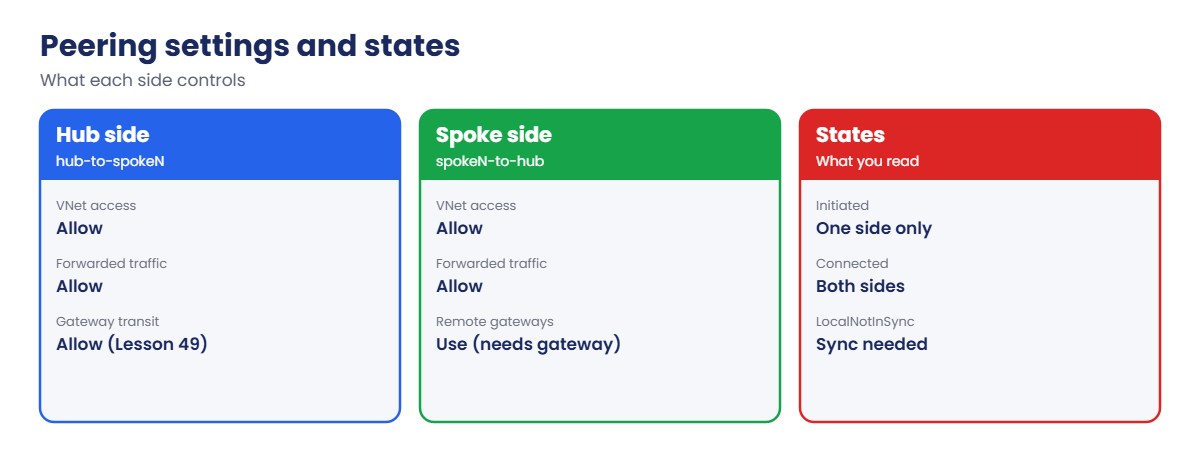
  • Two links: a peering is created on each VNet (hub-to-spoke1 and spoke1-to-hub). Until both exist, the state is Initiated; with both, it’s Connected.
  • Options per side: allow virtual network access, allow forwarded traffic (needed when a firewall or NVA forwards packets), allow gateway transit (on the hub) and use remote gateways (on the spoke).
  • Not transitive: spoke1 to hub and hub to spoke2 does not give spoke1 to spoke2. Use routing through a hub firewall (Lessons 47 and 48), direct peering, or Azure Virtual Network Manager.
  • Global peering: works across regions with the same features, at a higher data price.
  • Address changes: after adding or changing an address range on a peered VNet, the peering shows LocalNotInSync or RemoteNotInSync until you sync it.
  • Overlaps: peering between overlapping address spaces is refused, which is why Lesson 45’s IP plan matters.
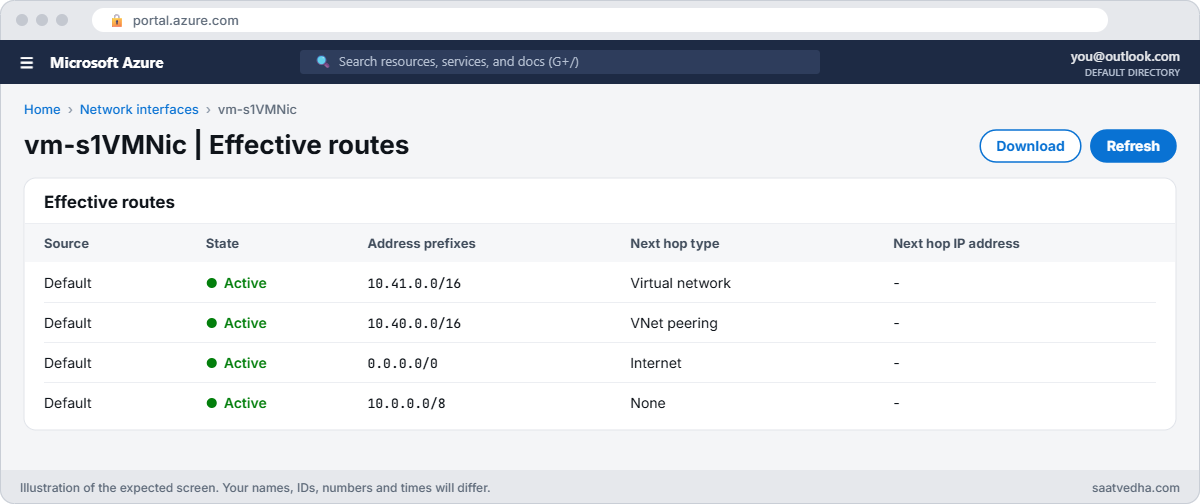
  • Effective routes: a NIC’s effective route table shows a VNetPeering route for each peered range.

How it works, step by step

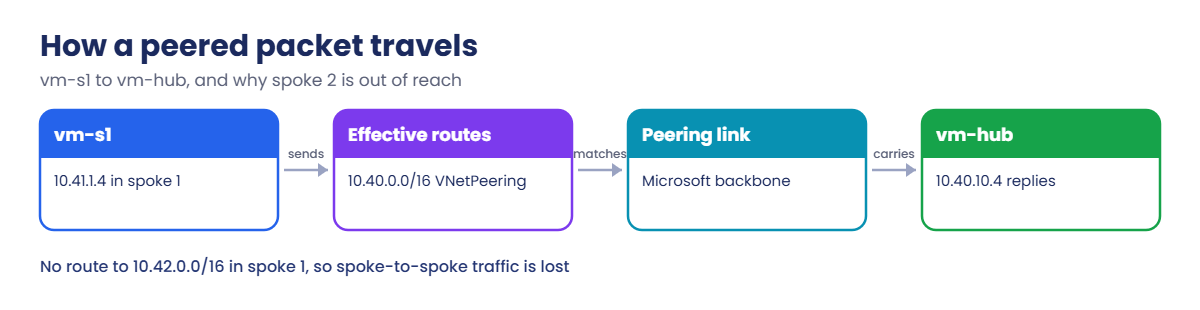
What happens when vm-s1 pings vm-hub:

How a packet travels over Azure VNet peering
  1. vm-s1 (10.41.1.4) sends to 10.40.10.4.
  2. Its NIC’s effective routes include 10.40.0.0/16 with next hop VNetPeering.
  3. Azure carries the packet over the peering to vnet-hub, staying on Microsoft’s backbone.
  4. No NSG blocks it (the VirtualNetwork tag includes peered ranges), so vm-hub replies the same way.
  5. For 10.42.1.4 there is no route in vm-s1’s table except the default to the internet, so the ping goes nowhere useful.

That last step is non-transitivity in practice: vm-s1 simply has no route to spoke 2.

Azure VNet peering settings and states

When something can’t reach something else across peerings, the effective route table is the first thing to read: no route, no traffic.

Peer the hub and spokes, then prove non-transitive routing

Create three small test VMs, one in the hub and one in each spoke (about 5 minutes):

az group create --name rg-saat-l46 --location centralindia --tags course=saatvedha-azure lesson=46 -o none
$hubSub = az network vnet subnet show --resource-group rg-saat-hub --vnet-name vnet-hub --name snet-shared --query id -o tsv
$s1Sub = az network vnet subnet show --resource-group rg-saat-hub --vnet-name vnet-spoke1 --name snet-app --query id -o tsv
$s2Sub = az network vnet subnet show --resource-group rg-saat-hub --vnet-name vnet-spoke2 --name snet-app --query id -o tsv
az vm create --resource-group rg-saat-l46 --name vm-hub --image Canonical:ubuntu-24_04-lts:server:latest --size Standard_B1s --subnet $hubSub --public-ip-address '""' --nsg '""' --admin-username azureuser --generate-ssh-keys --tags course=saatvedha-azure lesson=46 -o none
az vm create --resource-group rg-saat-l46 --name vm-s1 --image Canonical:ubuntu-24_04-lts:server:latest --size Standard_B1s --subnet $s1Sub --public-ip-address '""' --nsg '""' --admin-username azureuser --generate-ssh-keys --tags course=saatvedha-azure lesson=46 -o none
az vm create --resource-group rg-saat-l46 --name vm-s2 --image Canonical:ubuntu-24_04-lts:server:latest --size Standard_B1s --subnet $s2Sub --public-ip-address '""' --nsg '""' --admin-username azureuser --generate-ssh-keys --tags course=saatvedha-azure lesson=46 -o none
az vm list-ip-addresses --resource-group rg-saat-l46 --query "[].{vm:virtualMachine.name, ip:virtualMachine.network.privateIpAddresses[0]}" -o table

You should see this:

Vm      Ip
------  ----------
vm-hub  10.40.10.4
vm-s1   10.41.1.4
vm-s2   10.42.1.4

Standard_B1s (1 vCPU) keeps three VMs inside a free account’s regional vCPU limit. Before peering, none of them can reach the others.

1Create one side of a peering

Peer the hub to spoke 1, and look at the state:

az network vnet peering create --resource-group rg-saat-hub --name hub-to-spoke1 --vnet-name vnet-hub --remote-vnet vnet-spoke1 --allow-vnet-access true --allow-forwarded-traffic true -o none
az network vnet peering list --resource-group rg-saat-hub --vnet-name vnet-hub --query "[].{name:name, state:peeringState, sync:peeringSyncLevel}" -o table

You should see this:

Name           State      Sync
-------------  ---------  ------------
hub-to-spoke1  Initiated  FullyInSync

Initiated means only one side exists. No traffic flows yet.

2Complete it, and add spoke 2

Run this:

az network vnet peering create --resource-group rg-saat-hub --name spoke1-to-hub --vnet-name vnet-spoke1 --remote-vnet vnet-hub --allow-vnet-access true --allow-forwarded-traffic true -o none
az network vnet peering create --resource-group rg-saat-hub --name hub-to-spoke2 --vnet-name vnet-hub --remote-vnet vnet-spoke2 --allow-vnet-access true --allow-forwarded-traffic true -o none
az network vnet peering create --resource-group rg-saat-hub --name spoke2-to-hub --vnet-name vnet-spoke2 --remote-vnet vnet-hub --allow-vnet-access true --allow-forwarded-traffic true -o none
az network vnet peering list --resource-group rg-saat-hub --vnet-name vnet-hub --query "[].{name:name, state:peeringState, sync:peeringSyncLevel}" -o table

You should see this:

Name           State      Sync
-------------  ---------  -----------
hub-to-spoke1  Connected  FullyInSync
hub-to-spoke2  Connected  FullyInSync

3Test: spoke to hub works, spoke to spoke doesn’t

Ping from vm-s1 to the hub, then to spoke 2:

az vm run-command invoke --resource-group rg-saat-l46 --name vm-s1 --command-id RunShellScript --scripts 'ping -c 2 -W 2 10.40.10.4 | tail -2' --query "value[0].message" -o tsv
az vm run-command invoke --resource-group rg-saat-l46 --name vm-s1 --command-id RunShellScript --scripts 'ping -c 2 -W 2 10.42.1.4 | tail -2' --query "value[0].message" -o tsv

You should see something like this:

[stdout]
2 packets transmitted, 2 received, 0% packet loss, time 1001ms
rtt min/avg/max/mdev = 1.102/1.215/1.328/0.113 ms
[stdout]
2 packets transmitted, 0 received, 100% packet loss, time 1013ms

Spoke 1 and spoke 2 are both connected to the hub, yet they can’t reach each other. That’s peering working exactly as designed.

4Read vm-s1’s effective routes

Run this:

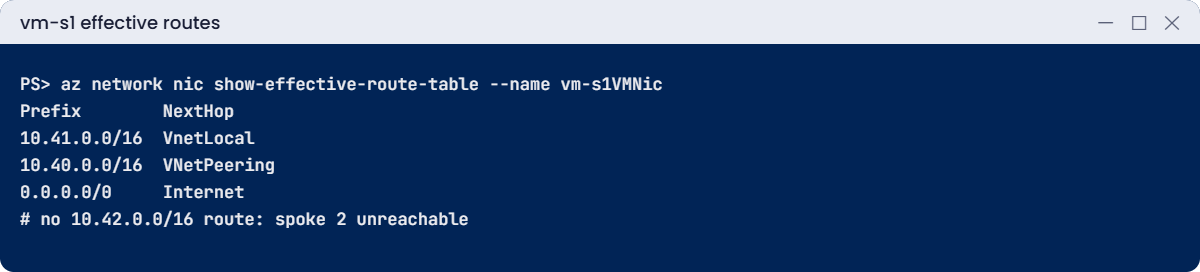
az network nic show-effective-route-table --resource-group rg-saat-l46 --name vm-s1VMNic --query "value[?nextHopType!='None'].{prefix:addressPrefix[0], nextHop:nextHopType}" -o table

You should see something like this:

Prefix        NextHop
------------  -----------
10.41.0.0/16  VnetLocal
10.40.0.0/16  VNetPeering
0.0.0.0/0     Internet

There’s a route to the hub, none to 10.42.0.0/16, so traffic to spoke 2 falls to the default route and is lost. Lesson 47 adds a route that sends spoke-to-spoke traffic to the hub.
Azure VNet peering routes on a spoke VM NIC
vm-s1 NIC: a peering route to the hub, nothing specific for spoke 2.
Effective routes showing VNetPeering next hop
vm-s1 has a route to the hub but none to spoke 2.

✅ Checkpoint: Both peerings are Connected, vm-s1 reaches the hub but not spoke 2, and the effective routes show why.

Break It, Then Fix It

Keep the test VMs running for both breaks.

1Break it: the hub grows and the peering goes stale

The network team adds a second range to the hub for new shared services:

az network vnet update --resource-group rg-saat-hub --name vnet-hub --add addressSpace.addressPrefixes 10.140.0.0/16 -o none
az network vnet peering list --resource-group rg-saat-hub --vnet-name vnet-hub --query "[].{name:name, state:peeringState, sync:peeringSyncLevel}" -o table

You should see something like this:

Name           State      Sync
-------------  ---------  ---------------
hub-to-spoke1  Connected  LocalNotInSync
hub-to-spoke2  Connected  LocalNotInSync

The peerings still say Connected, so dashboards look green, but the spokes don’t know about 10.140.0.0/16. Any VM placed there would be unreachable from the spokes.

Fix it: sync both sides of each peering, then check:

az network vnet peering sync --resource-group rg-saat-hub --vnet-name vnet-hub --name hub-to-spoke1 -o none
az network vnet peering sync --resource-group rg-saat-hub --vnet-name vnet-hub --name hub-to-spoke2 -o none
az network vnet peering sync --resource-group rg-saat-hub --vnet-name vnet-spoke1 --name spoke1-to-hub -o none
az network vnet peering sync --resource-group rg-saat-hub --vnet-name vnet-spoke2 --name spoke2-to-hub -o none
az network vnet peering list --resource-group rg-saat-hub --vnet-name vnet-hub --query "[].{name:name, state:peeringState, sync:peeringSyncLevel}" -o table

Both should show FullyInSync. Then remove the test range so the course plan stays clean:

az network vnet update --resource-group rg-saat-hub --name vnet-hub --remove addressSpace.addressPrefixes 1 -o none
az network vnet peering sync --resource-group rg-saat-hub --vnet-name vnet-hub --name hub-to-spoke1 -o none
az network vnet peering sync --resource-group rg-saat-hub --vnet-name vnet-hub --name hub-to-spoke2 -o none

2Break it: using a gateway that isn’t there

Spoke 1 should reach “on-premises” through the hub’s VPN gateway, so someone turns on gateway transit:

az network vnet peering update --resource-group rg-saat-hub --vnet-name vnet-spoke1 --name spoke1-to-hub --set useRemoteGateways=true

You’ll get an error like this:

(RemoteVnetHasNoGateways) Peering /subscriptions/.../vnet-spoke1/virtualNetworkPeerings/spoke1-to-hub cannot have UseRemoteGateway flag set to true because remote virtual network /subscriptions/.../vnet-hub referenced by the peering does not have any gateways.

Gateway transit needs a real VPN or ExpressRoute gateway in the hub, and allowGatewayTransit on the hub side. The hub gets its VPN gateway in Lesson 49, where you’ll switch this on properly.

Fix it: leave useRemoteGateways off until the gateway exists. Clean up the test VMs and keep the peerings for Lesson 47:

az group delete --name rg-saat-l46 --yes
az network vnet peering list --resource-group rg-saat-hub --vnet-name vnet-hub --query "[].{name:name, state:peeringState, sync:peeringSyncLevel}" -o table

You should see both peerings Connected and FullyInSync.
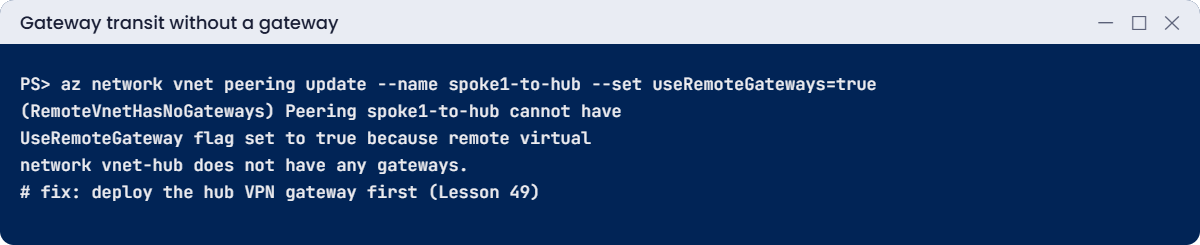
RemoteVnetHasNoGateways error on peering update
useRemoteGateways fails until the hub has a gateway.

✅ Checkpoint: You synced peerings after an address change and saw why gateway transit needs a gateway. The peerings stay; the test VMs are gone.

This happened at work

The new subnet nobody could reach

A logistics company ran out of space in its hub VNet and added a second address range for a new DNS resolver. The resolver came up fine, but VMs in 30 spokes couldn’t resolve anything through it, and only some new apps failed, which made the problem hard to spot.

Every hub peering showed Connected in the portal. The sync column, which nobody had added to their checks, said LocalNotInSync on all 30. The spokes had never learned the new range.

What they changed: address space changes on peered VNets now include a sync step in the runbook, done by script for every peering. Their monitoring queries Resource Graph daily for any peering whose sync level isn’t FullyInSync, and Azure Virtual Network Manager now manages hub connectivity for new spokes.

Common mistakes and troubleshooting

MistakeWhat you seeWhat to do
Creating only one sideState Initiated; no trafficCreate the peering on both VNets.
Expecting transitive routingSpoke to spoke failsRoute through a hub firewall or peer directly.
Changing address space without syncLocalNotInSync / RemoteNotInSyncRun az network vnet peering sync on both sides.
useRemoteGateways without a hub gatewayRemoteVnetHasNoGatewaysDeploy the gateway; allow gateway transit on the hub.
Allow forwarded traffic off with a firewallFirewall-forwarded traffic droppedTurn it on for peerings behind an NVA or firewall.
Overlapping rangesPeering refusedFix the IP plan first (Lesson 45).

Interview questions

Click a question to open it. Each one is written the way an interviewer would ask it. Under it you will see why they ask it and one way you could answer, in your own words.

Fresher level

1. What is VNet peering?

Why they ask this: The basic concept.

How you might answer: A connection between two VNets that lets resources communicate by private IP over Microsoft’s backbone, in the same region or across regions.

2. Why does a peering show Initiated?

Why they ask this: A practical check.

How you might answer: Only one side has been created. Peering needs a link on each VNet; once both exist, the state becomes Connected.

3. Is VNet peering transitive?

Why they ask this: A classic interview question.

How you might answer: No. If A peers with B and B peers with C, A can’t reach C through B unless you add routing through an appliance in B or peer A and C directly.

2–5 years experience

4. A VM in one spoke can’t reach a VM in another. What do you check?

Why they ask this: A real troubleshooting path.

How you might answer: The effective routes on the source NIC: if there’s no route to the other spoke, it’s non-transitive peering. If routes go to a hub firewall, check firewall rules, allow forwarded traffic on the peerings, NSGs, and the return route.

5. What does gateway transit do?

Why they ask this: They want the hybrid link.

How you might answer: It lets spokes use the hub’s VPN or ExpressRoute gateway to reach on-premises. The hub side allows gateway transit, the spoke side uses remote gateways, and a gateway must exist in the hub.

6. What happens after you add an address range to a peered VNet?

Why they ask this: A newer-feature check.

How you might answer: The peering keeps working for old ranges but shows not in sync. You sync each side so the peered VNets learn the new range.

Senior level

7. How would you connect 200 spokes to hubs in three regions?

Why they ask this: They want scale.

How you might answer: Azure Virtual Network Manager with hub-and-spoke connectivity configurations per region, or Virtual WAN. Network groups by tag add new spokes automatically, and global peering or the hub-to-hub links carry cross-region traffic through firewalls.

8. Peering or VPN between two VNets?

Why they ask this: They want trade-offs.

How you might answer: Peering: lower latency, higher bandwidth, no gateway cost, simple. VNet-to-VNet VPN: encrypted tunnels and transit features through gateways, but slower and paid by the hour. Peering is the default unless a specific requirement says otherwise.

9. How do you monitor peerings in production?

Why they ask this: They want operations thinking.

How you might answer: Resource Graph queries or Azure Policy for peering state and sync level, alerts when anything isn’t Connected and FullyInSync, Connection Monitor for real traffic tests, and change control on address spaces.

Quick quiz

Q1. Only hub-to-spoke1 exists. Peering state?

  1. Connected
  2. Initiated
  3. Disconnected
  4. Pending
Show answer

B — The other side is missing.

Q2. spoke1 and spoke2 are both peered to the hub. Can spoke1 reach spoke2?

  1. Yes
  2. No, not without routing
  3. Only with NSGs
  4. Only in another region
Show answer

B — Peering is not transitive.

Q3. After adding a range to the hub, peerings show LocalNotInSync. Fix?

  1. Delete the VNet
  2. az network vnet peering sync
  3. Restart VMs
  4. Add NSG rules
Show answer

B — Sync both sides of each peering.

Q4. useRemoteGateways fails with RemoteVnetHasNoGateways. Why?

  1. Wrong region
  2. No gateway in the hub
  3. Overlap
  4. Missing NSG
Show answer

B — Gateway transit needs a gateway.

Q5. Which NextHopType appears for a peered range?

  1. VnetLocal
  2. VNetPeering
  3. Internet
  4. None
Show answer

B — Effective routes show VNetPeering.

Quick recap

Your hub and spokes are now connected, and you know exactly what peering does and doesn’t do.

  • A peering needs a link on each side to be Connected.
  • Peering isn’t transitive; spokes need routing through the hub.
  • Read effective routes first when traffic fails.
  • Sync peerings after address space changes.
  • Gateway transit needs a gateway in the hub.

Next lesson

Lesson 47: Route tables and user-defined routes → You send spoke-to-spoke traffic through the hub with user-defined routes and fix asymmetric routing.

Further reading: Azure VNet peering

Want to go deeper into Azure VNet peering? See Microsoft’s Virtual network peering and Update the address space for a peered virtual network. You can also see the full plan for this course on the Azure Cloud Administration course page.

Scroll to Top