Azure Key Vault: secrets, certificates, soft delete
-
Phase 0: Before you start
-
Phase 1: The foundation
-
Phase 2: Day-to-day operations
-
Phase 3: Enterprise architecture
-
Phase 4: Troubleshooting step by step
-
Phase 5: Final project and career
Azure Key Vault stores secrets, keys and certificates in one protected place, so passwords and connection strings never sit in scripts, config files or VM images. Apps read them at run time with a managed identity, and every read is logged.
Two things trip up almost everyone: with Azure RBAC, creating a vault doesn’t give you permission to read what’s inside it, and deleting a secret doesn’t really delete it. Both are deliberate, and both cause tickets.
In this lab you create a vault with RBAC, store a password and a certificate, read the password from a VM with no stored credentials, and then hit and fix a permission error and a soft-delete conflict.
| Time | You need | Cost | By the end you can |
|---|---|---|---|
| About 45 minutes | A free account and the CLI | About 3 US cents: a small VM with a public IP for under an hour; Key Vault Standard costs USD 0.03 per 10,000 operations (Azure Retail Prices API, October 2026) | Use Key Vault with RBAC and managed identities, scope access to single secrets, and recover deleted secrets |
What it is, in one line
Key Vault is a locked safe for passwords, keys and certificates that apps open with their own identity.
In Simple Words
The bank locker
You keep your jewellery in a bank locker instead of under your mattress. To open it, you show your ID; the bank writes down every visit. You can let your brother open only one box, not the whole locker.
If you empty a box by mistake, the bank keeps its contents in a back room for a few weeks, so you can ask for them back. Nobody else can take that box number until then.
Key Vault is the bank, the VM’s managed identity is its ID card, a role on one secret is “only this box”, and soft delete is the back room.
Engineer's View
How Key Vault works
- Objects: secrets (any string, versioned), keys (RSA or EC, for encryption and signing) and certificates (with policies for renewal).
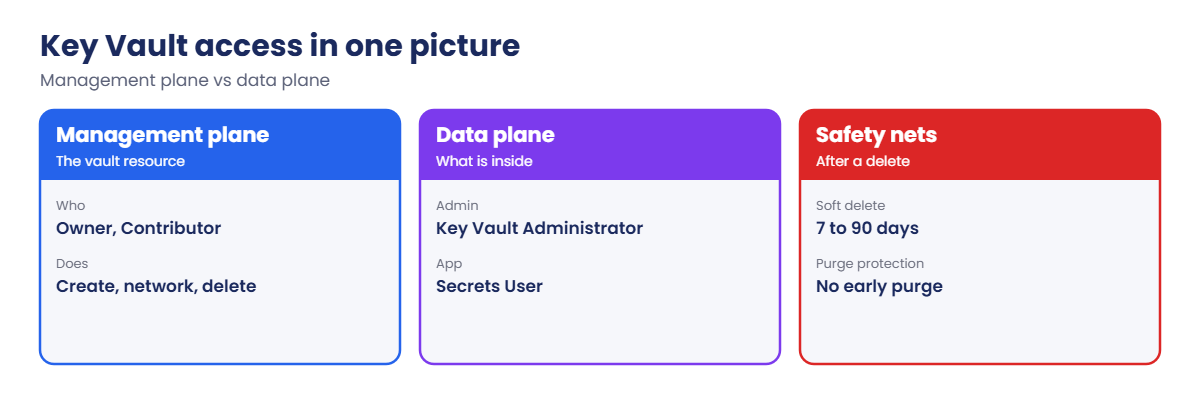
- Two planes: the management plane (create the vault, set networking) uses Azure RBAC on the resource. The data plane (read or write secrets) uses either Azure RBAC data roles or old-style access policies. RBAC is the recommended model.
- Data roles: Key Vault Administrator, Secrets Officer (manage secrets), Secrets User (read secret values), Certificates Officer, Crypto Officer and others. You can assign them at vault scope or on a single secret.
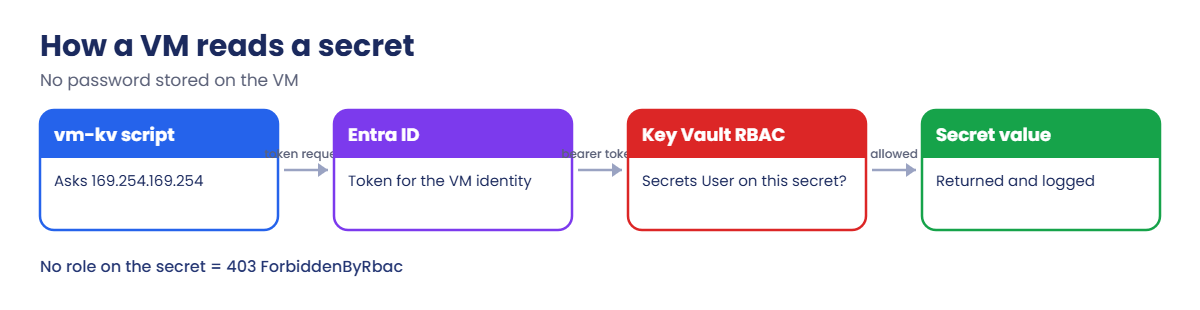
- Managed identity: a VM, function or app gets a token from the local metadata endpoint (169.254.169.254) and presents it to Key Vault. Nothing secret is stored on the VM.
- Soft delete: always on. Deleted vaults and objects are kept for 7 to 90 days and can be recovered. Their names can’t be reused until they are recovered or purged.
- Purge protection: optional, and can’t be turned off. Nobody, not even an owner, can purge before the retention period ends. Production vaults should use it.
How it works, step by step
What happens when the VM reads db-password:
- The script on vm-kv asks the local metadata endpoint for a token for https://vault.azure.net.
- Microsoft Entra ID issues a token for the VM’s system-assigned identity.
- The script calls the vault’s REST API with that token.
- Key Vault checks Azure RBAC: does this identity have Secrets User on this secret or the vault? If not, it returns 403 ForbiddenByRbac.
- If it does, Key Vault returns the current version of the secret and logs the read.
No password, key file or connection string is stored on the VM. If the VM is deleted, its identity is gone too, and nothing needs rotating.
Because roles can be scoped to one secret, a compromised app can only read what it was given, not every secret in the vault.
Store secrets in Key Vault and read them with a managed identity
1Create a vault with RBAC and give yourself access
Vault names are global, so add a random suffix. Then assign yourself Key Vault Administrator on the vault:
$sfx = Get-Random -Minimum 10000 -Maximum 99999
$kv = "kv-saat-$sfx"
az group create --name rg-saat-l55 --location centralindia --tags course=saatvedha-azure lesson=55 -o none
az keyvault create --resource-group rg-saat-l55 --name $kv --location centralindia --enable-rbac-authorization true --retention-days 7 --tags course=saatvedha-azure lesson=55 -o none
$kvId = az keyvault show --name $kv --query id -o tsv
$me = az ad signed-in-user show --query id -o tsv
az role assignment create --assignee-object-id $me --assignee-principal-type User --role "Key Vault Administrator" --scope $kvId -o noneCreating the vault made you its owner on the management plane, but with RBAC that doesn’t include reading or writing secrets. The data role does. Role assignments can take a minute or two to apply.
2Store a password and a certificate
Generate a random password, store it, and create a self-signed certificate from the default policy:
$pw = -join ((65..90) + (97..122) + (48..57) | Get-Random -Count 20 | ForEach-Object { [char]$_ })
az keyvault secret set --vault-name $kv --name db-password --value $pw --query name -o tsv
az keyvault certificate get-default-policy | Out-File -Encoding ascii C:\azure-lab\certpolicy.json
az keyvault certificate create --vault-name $kv --name web-cert --policy '@C:\azure-lab\certpolicy.json' -o none
az keyvault certificate show --vault-name $kv --name web-cert --query "{subject:policy.x509CertificateProperties.subject, expires:attributes.expires}" -o tableYou should see something like this:
db-password
Subject Expires
--------------------- -------------------------
CN=CLIGetDefaultPolicy 2027-10-21T09:14:02+00:00A real certificate would come from a certificate authority linked to the vault, with a policy that renews it automatically before it expires.
3A VM with a managed identity
Create a small VM with a system-assigned identity, and give that identity read access to one secret only:
az vm create --resource-group rg-saat-l55 --name vm-kv --image Canonical:ubuntu-24_04-lts:server:latest --size Standard_B1s --public-ip-sku Standard --nsg-rule NONE --assign-identity --admin-username azureuser --generate-ssh-keys --tags course=saatvedha-azure lesson=55 -o none
$vmId = az vm show --resource-group rg-saat-l55 --name vm-kv --query identity.principalId -o tsv
az role assignment create --assignee-object-id $vmId --assignee-principal-type ServicePrincipal --role "Key Vault Secrets User" --scope "$kvId/secrets/db-password" -o noneThe VM has a public IP only so it can reach the vault’s public endpoint; no inbound port is open. In production you’d use a private endpoint, as in Lesson 26.
4Read the secret from the VM
Save this script as C:\azure-lab\read-secret.sh. KVNAME and SECRETNAME are filled in before each run:
#!/bin/bash
# Read one Key Vault secret with the VM's managed identity (no passwords on the VM)
TOKEN=$(curl -s -H Metadata:true 'http://169.254.169.254/metadata/identity/oauth2/token?api-version=2018-02-01&resource=https://vault.azure.net' | python3 -c 'import sys,json; print(json.load(sys.stdin)["access_token"])')
curl -s -H "Authorization: Bearer $TOKEN" 'https://KVNAME.vault.azure.net/secrets/SECRETNAME?api-version=7.4' | python3 -c 'import sys,json; d=json.load(sys.stdin); print(d.get("value") or d["error"]["code"] + " / " + d["error"]["innererror"]["code"])'Run it for db-password (wait a couple of minutes after the role assignment):
(Get-Content C:\azure-lab\read-secret.sh -Raw) -replace 'KVNAME', $kv -replace 'SECRETNAME', 'db-password' | Set-Content C:\azure-lab\read-now.sh
az vm run-command invoke --resource-group rg-saat-l55 --name vm-kv --command-id RunShellScript --scripts '@C:\azure-lab\read-now.sh' --query "value[0].message" -o tsvYou should see something like this (your password is different):
Enable succeeded:
[stdout]
Qm7Rt2KpX9aLw4ZsN8vB
[stderr]The value matches $pw. The VM proved who it was with a token, not with a password.
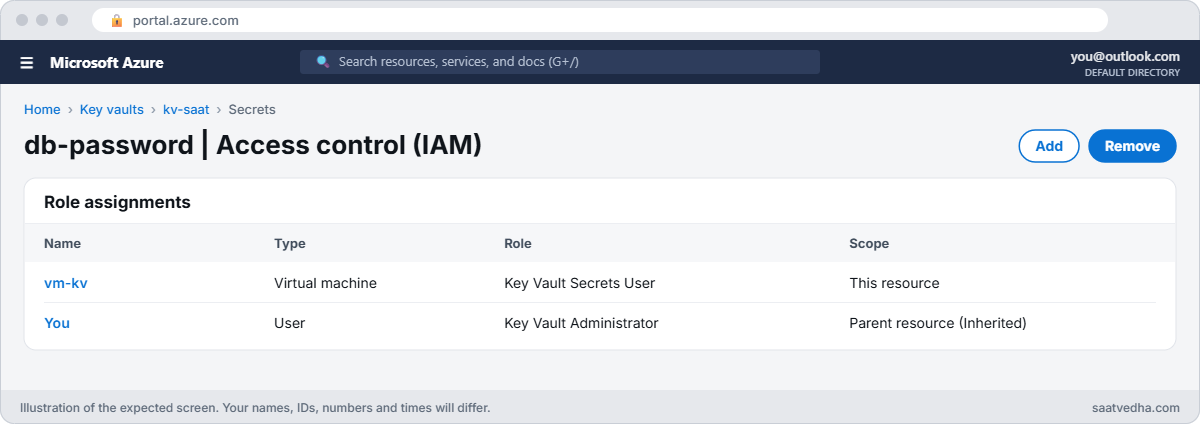

✅ Checkpoint: The vault uses RBAC, holds db-password and web-cert, and vm-kv reads db-password with its managed identity.
Break It, Then Fix It
1Break it: a new secret the app can’t read
The app team adds an API key and updates the app to read it:
az keyvault secret set --vault-name $kv --name api-key --value demo-key-123 -o none
(Get-Content C:\azure-lab\read-secret.sh -Raw) -replace 'KVNAME', $kv -replace 'SECRETNAME', 'api-key' | Set-Content C:\azure-lab\read-now.sh
az vm run-command invoke --resource-group rg-saat-l55 --name vm-kv --command-id RunShellScript --scripts '@C:\azure-lab\read-now.sh' --query "value[0].message" -o tsvYou should see something like this:
[stdout]
Forbidden / ForbiddenByRbacThe vault works and the identity works. The role was given on db-password only, which is exactly what least privilege means. The full error from Key Vault also names the action it refused: Microsoft.KeyVault/vaults/secrets/getSecret/action.
Fix it: give the VM the same role on the new secret, wait a minute or two, and read again:
az role assignment create --assignee-object-id $vmId --assignee-principal-type ServicePrincipal --role "Key Vault Secrets User" --scope "$kvId/secrets/api-key" -o none
(Get-Content C:\azure-lab\read-secret.sh -Raw) -replace 'KVNAME', $kv -replace 'SECRETNAME', 'api-key' | Set-Content C:\azure-lab\read-now.sh
az vm run-command invoke --resource-group rg-saat-l55 --name vm-kv --command-id RunShellScript --scripts '@C:\azure-lab\read-now.sh' --query "value[0].message" -o tsvThe script prints demo-key-123. If the app will read many secrets, a separate vault per app with the role at vault scope is simpler than one role per secret.
2Break it: a secret that can’t be recreated
Someone deletes db-password while tidying up, then tries to put it back:
az keyvault secret delete --vault-name $kv --name db-password -o none
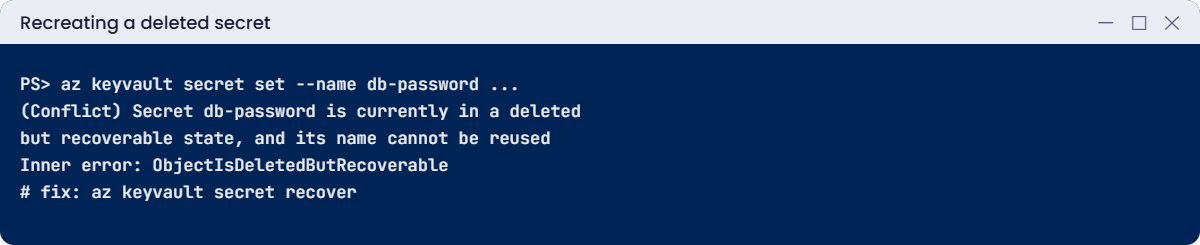
az keyvault secret set --vault-name $kv --name db-password --value $pwYou’ll get an error like this:
(Conflict) Secret db-password is currently in a deleted but recoverable state, and its name cannot be reused; in this state, the secret can only be recovered or purged.
Code: Conflict
Inner error: {
"code": "ObjectIsDeletedButRecoverable"
}This is soft delete protecting you. The secret, its versions and its value still exist in a deleted state. Recreating it would lose the history, so Key Vault refuses.
Fix it: recover the secret, then check that the VM can read it again:
az keyvault secret list-deleted --vault-name $kv --query "[].{name:name, purge:scheduledPurgeDate}" -o table
az keyvault secret recover --vault-name $kv --name db-password -o none
(Get-Content C:\azure-lab\read-secret.sh -Raw) -replace 'KVNAME', $kv -replace 'SECRETNAME', 'db-password' | Set-Content C:\azure-lab\read-now.sh
az vm run-command invoke --resource-group rg-saat-l55 --name vm-kv --command-id RunShellScript --scripts '@C:\azure-lab\read-now.sh' --query "value[0].message" -o tsvThe VM prints the original password. Recovery kept the secret’s ID, so the role assignment on it still applies.
3Clean up
Delete the resource group, then purge the soft-deleted vault so its name is released:
az group delete --name rg-saat-l55 --yes
az keyvault list-deleted --query "[?name=='$kv'].name" -o tsv
az keyvault purge --name $kvAfter the purge, az keyvault list-deleted no longer shows the vault. Without purge protection, purging is allowed; with it, you’d wait out the retention days.
✅ Checkpoint: You scoped secret access to one secret, fixed a ForbiddenByRbac error, recovered a deleted secret, and removed the lab.
This happened at work
The vault that couldn’t be recreated by the pipeline
A logistics company rebuilt its test environment every night with a pipeline: delete the resource group, deploy everything again from Bicep. After a security review turned on purge protection for all vaults, the nightly build failed every night with a conflict on the vault name.
Deleting the resource group soft-deleted the vault, and purge protection meant nobody could purge it for 90 days. The template tried to create a new vault with the same name and Azure refused. Meanwhile 90 days of soft-deleted test vaults piled up.
What they changed: test vaults now live in a resource group that the nightly job doesn’t delete; the pipeline reuses the vault and only replaces secrets. Production keeps purge protection, test does not, and the policy that requires purge protection exempts the test subscription with a documented reason.
Common mistakes and troubleshooting
| Mistake | What you see | What to do |
|---|---|---|
| Assuming vault owner can read secrets | 403 ForbiddenByRbac for yourself | Assign a Key Vault data role, such as Secrets Officer. |
| Role on one secret, app needs another | 403 on the new secret only | Add the role on that secret or use a vault per app. |
| Recreating a deleted secret | Conflict, ObjectIsDeletedButRecoverable | Recover it, or purge it if it truly must go. |
| Purge protection on test vaults | Pipelines can’t reuse names for 90 days | Reuse vaults or use unique names in test. |
| Secrets in VM images or scripts | Leaked passwords during audits | Read secrets at run time with a managed identity. |
| Forgetting role propagation | 403 right after assigning | Wait a few minutes and retry. |
Interview questions
Click a question to open it. Each one is written the way an interviewer would ask it. Under it you will see why they ask it and one way you could answer, in your own words.
Fresher level
1. What is Azure Key Vault?
Why they ask this: The basic concept.
How you might answer: A managed service to store and control access to secrets, keys and certificates, with logging and soft delete.
2. What is soft delete?
Why they ask this: A must-know feature.
How you might answer: Deleted vaults and objects are kept for 7 to 90 days and can be recovered. It’s always on for Key Vault.
3. Secret vs key vs certificate?
Why they ask this: Basic vocabulary.
How you might answer: A secret is any string such as a password. A key is a cryptographic key used inside the vault for encrypting or signing. A certificate combines a key, a public certificate and a renewal policy.
2–5 years experience
4. An app gets 403 from Key Vault. How do you troubleshoot?
Why they ask this: A real troubleshooting path.
How you might answer: Check which identity the app uses, the permission model (RBAC or access policies), role assignments at the vault and secret scope, recent changes and propagation, then networking: firewall, private endpoint and DNS.
5. RBAC or access policies?
Why they ask this: They want the modern answer.
How you might answer: RBAC: one model with Azure, roles can be scoped to single objects, managed with PIM and Policy. Access policies are older and vault-wide only. Microsoft recommends RBAC.
6. How do you rotate a database password stored in Key Vault?
Why they ask this: Operations practice.
How you might answer: Create a new secret version, update the database, let apps pick up the latest version (or a specific version via config), then disable the old version. Event Grid notifications or a rotation function can automate it.
Senior level
7. How would you design Key Vault for 30 applications?
Why they ask this: They want architecture.
How you might answer: One vault per app per environment, RBAC with managed identities, private endpoints, purge protection in production, diagnostic logs to Log Analytics, and Azure Policy to enforce these settings.
8. What happens to TLS certificates in Application Gateway when they renew in Key Vault?
Why they ask this: Integration depth.
How you might answer: Application Gateway references the versionless secret ID and polls Key Vault, so it picks up the renewed certificate automatically, provided its identity can still read the vault.
9. How do you protect against someone deleting a production vault?
Why they ask this: Security thinking.
How you might answer: Purge protection, a CanNotDelete resource lock, RBAC that limits who can delete, alerts on delete operations, and soft delete recovery in the runbook.
Quick quiz
Q1. You created the vault but can’t set a secret. Why?
- Vault is full
- No data-plane role with RBAC
- Soft delete
- Wrong region
Show answer
B — Creating the vault doesn’t grant data access.
Q2. Least-privilege role for an app that only reads secrets?
- Key Vault Administrator
- Key Vault Secrets User
- Contributor
- Owner
Show answer
B — Secrets User reads secret values.
Q3. ObjectIsDeletedButRecoverable means?
- The vault is gone
- The secret is soft-deleted; recover or purge it
- The role is missing
- The VM is stopped
Show answer
B — Soft delete keeps the name reserved.
Q4. How does vm-kv authenticate to Key Vault?
- A stored password
- A token from its managed identity
- An SSH key
- A SAS token
Show answer
B — The metadata endpoint gives it a token.
Q5. What does purge protection prevent?
- Reading secrets
- Purging before retention ends
- Creating vaults
- Soft delete
Show answer
B — Nobody can purge early.
Quick recap
You can now keep secrets out of code and VMs, give apps exactly the access they need, and undo accidental deletes.
- With RBAC, vault owners still need a data role.
- Managed identities read secrets with tokens, not passwords.
- Roles can be scoped to one secret; plan for new secrets.
- Soft delete reserves names; recover or purge.
- Use purge protection in production, not in throwaway test vaults.
Next lesson
Lesson 56: Azure NetApp Files → You learn how Azure NetApp Files capacity pools, service levels and volumes work, with a simulated lab for NFS and SMB.
Further reading: Azure Key Vault
Want to go deeper into Azure Key Vault? See Microsoft’s Provide access to Key Vault with Azure RBAC and Key Vault soft-delete overview. You can also see the full plan for this course on the Azure Cloud Administration course page.
