Storage account 403 errors

An Azure storage 403 error means the storage service received your request and refused it. That sounds like one problem, but it’s at least four: the network rules said no, your identity has no data role, your SAS token is wrong or expired, or the account doesn’t accept the kind of key you used.

The good news is that Azure tells you which one, in the error code. AuthorizationPermissionMismatch, AuthorizationFailure and AuthenticationFailed each point to a different layer. Most people read only “403 Forbidden” and start changing things at random.

In this lab you create a storage account, trigger each of the three most common 403s on purpose, and fix each one from its error code.

TimeYou needCostBy the end you can
About 40 minutesA free account, the CLI and PowerShellUnder 1 US cent: an empty storage account and a few requestsDecode storage 403 errors by error code and fix RBAC, firewall and SAS causes

What it is, in one line

A storage 403 means the request reached Azure Storage and was refused; the error code tells you whether network, RBAC, SAS or key settings refused it.

In Simple Words

The locker room with three guards

A gym’s locker room has three guards. The first checks you came through the right gate (network rules). The second checks your membership card allows the locker room (your role).

The third checks the day pass you were given hasn’t expired (SAS token).

Each guard says no in a different way: “Wrong entrance”, “Your plan doesn’t include lockers”, “This pass expired yesterday”. If you only hear “No”, you might renew your membership when the real problem was the gate.

Azure Storage’s guards say no with different error codes. Read the code, and you know which guard stopped you.

Engineer's View

Decoding storage 403s

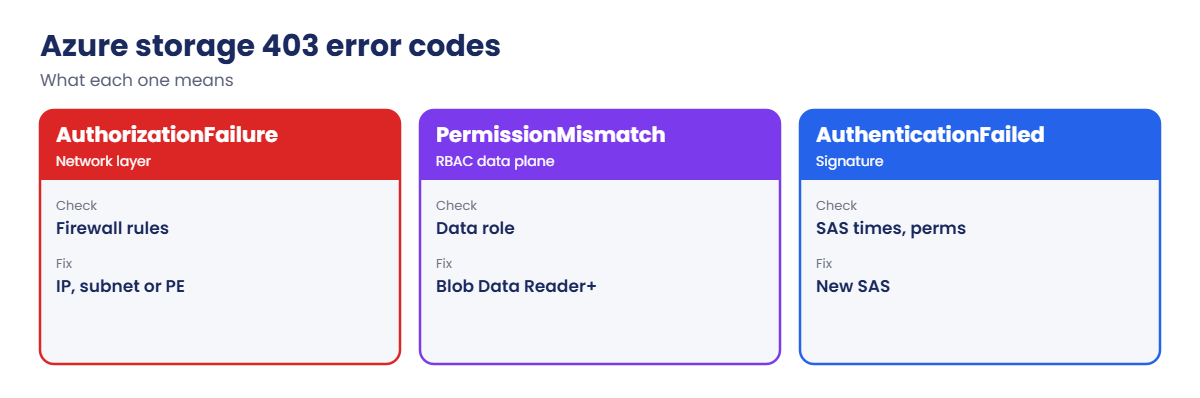
  • AuthorizationPermissionMismatch: you authenticated with Microsoft Entra ID (--auth-mode login, a managed identity), but you have no data role, such as Storage Blob Data Reader or Contributor. Owner or Contributor on the account is not enough.
  • AuthorizationFailure: the storage firewall blocked you: public network access is restricted and your IP or subnet isn’t allowed, or a private endpoint is required.
  • AuthenticationFailed: the signature is wrong: an expired or not-yet-valid SAS, a SAS with the wrong permissions or resource, a revoked user delegation key, or a big clock difference.
  • KeyBasedAuthenticationNotPermitted: the account has shared key access disabled, so account keys and account SAS are refused.
  • Where to see them: in the CLI or SDK error, the HTTP response body (XML with Code and AuthenticationErrorDetail), and StorageBlobLogs if diagnostic settings are on.
  • Propagation: new role assignments can take a few minutes; firewall rule changes up to a few minutes too.

How it works, step by step

What happens when you list blobs with --auth-mode login:

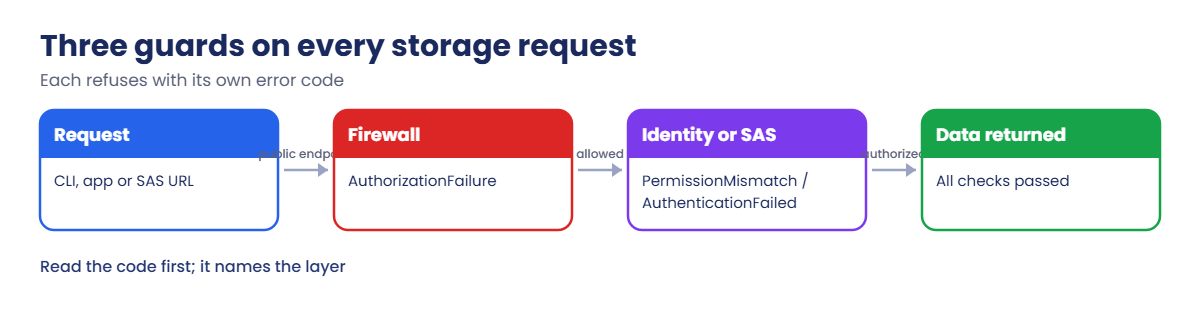
Azure storage 403 error: the three checks on every request
  1. The CLI gets a token for storage from Microsoft Entra ID.
  2. The request reaches the storage account’s public endpoint.
  3. The firewall checks your source IP or subnet. If public access is restricted and you’re not allowed: 403 AuthorizationFailure.
  4. Storage checks your token’s data permissions for this container. No data role: 403 AuthorizationPermissionMismatch.
  5. If both pass, you get the list.

With a SAS URL, step 4 is replaced by checking the signature, times and permissions inside the URL. Problems there return 403 AuthenticationFailed.

Storage 403 error codes and what each one means
Error codeLayerFirst thing to check
AuthorizationFailureNetworkStorage firewall and private endpoints
AuthorizationPermissionMismatchRBAC data planeStorage Blob Data role at the right scope
AuthenticationFailedSAS or key signatureExpiry, start time, permissions, clock
KeyBasedAuthenticationNotPermittedAccount settingShared key access disabled

See every 403, not just your own

Your own error message tells you about your request. To see what is failing for apps, partners and backup software, send the blob service logs to Log Analytics. The diagnostic setting goes on the blob service, not the account:

'[{"category":"StorageRead","enabled":true},{"category":"StorageWrite","enabled":true},{"category":"StorageDelete","enabled":true}]' | Set-Content C:\azure-lab\bloblogs.json
az monitor diagnostic-settings create --name blob-to-law --resource "$stId/blobServices/default" --workspace $lawId --logs '@C:\azure-lab\bloblogs.json' -o none

Then one query shows who is being refused, and why:

StorageBlobLogs
| where TimeGenerated > ago(1d) and StatusCode == 403
| summarize requests = count() by StatusText, CallerIpAddress, AuthenticationType
| order by requests desc

StatusText carries the same error codes you met above. AuthenticationType tells you whether the caller used OAuth (Entra ID), SAS or an account key, and CallerIpAddress shows where the request came from. Put this query behind a log search alert (Lesson 34) and a new 403 pattern is visible the same day, not the next time someone complains.

Trigger and decode the common storage 403s

1A storage account and the first 403

Create an account and a container, then try to list it with your Entra ID login:

$sfx = Get-Random -Minimum 10000 -Maximum 99999
$st = "stl64$sfx"
az group create --name rg-saat-l64 --location centralindia --tags course=saatvedha-azure lesson=64 -o none
az storage account create --resource-group rg-saat-l64 --name $st --sku Standard_LRS --min-tls-version TLS1_2 --allow-blob-public-access false -o none
az storage container create --account-name $st --name lab --auth-mode login -o none

You’ll get an error like this:

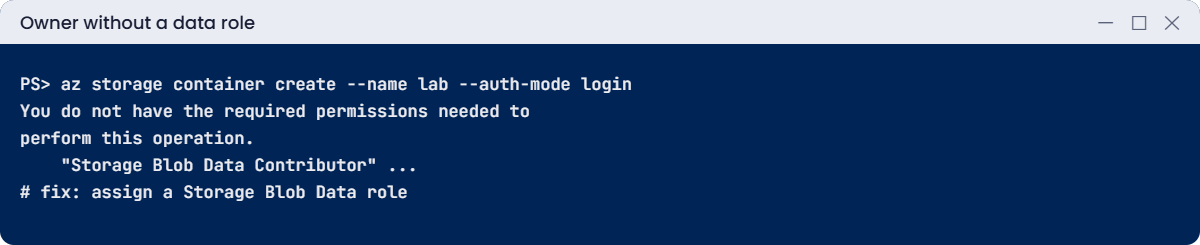
You do not have the required permissions needed to perform this operation.
Depending on your operation, you may need to be assigned one of the following roles:
    "Storage Blob Data Owner"
    "Storage Blob Data Contributor"
    "Storage Blob Data Reader"
    ...
If you want to use the old authentication method and allow querying for the right account key, please use the "--auth-mode" parameter and "key" value.

That’s the CLI’s friendly wording of AuthorizationPermissionMismatch. You created the account, so you’re its Owner, but Owner is a management role. Reading and writing blobs needs a data role.

2Give yourself a data role

Assign Storage Blob Data Contributor on the account, wait two minutes, then try again:

$stId = az storage account show --resource-group rg-saat-l64 --name $st --query id -o tsv
$me = az ad signed-in-user show --query id -o tsv
az role assignment create --assignee-object-id $me --assignee-principal-type User --role "Storage Blob Data Contributor" --scope $stId -o none
az storage container create --account-name $st --name lab --auth-mode login -o none
az storage blob upload --account-name $st --container-name lab --name hello.txt --data "hello from lesson 64" --auth-mode login -o none
az storage blob list --account-name $st --container-name lab --auth-mode login --query "[].name" -o tsv

You should see:

hello.txt
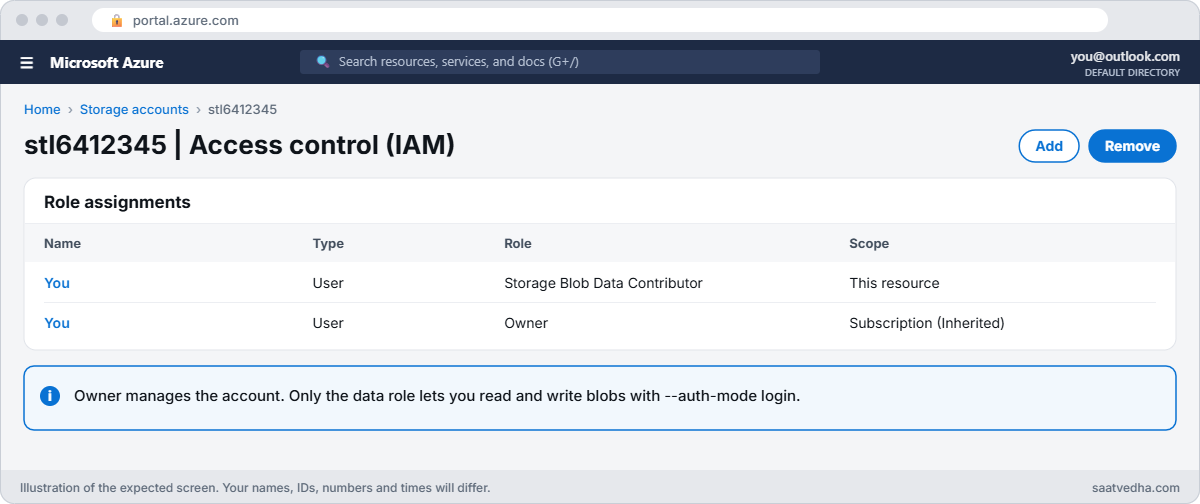
Azure storage 403 error fix with a data role assignment
Your Storage Blob Data Contributor assignment on the storage account.
Missing Storage Blob Data role error in the CLI
Owner manages the account; a data role reads the blobs.

✅ Checkpoint: You can create containers and upload blobs with your Entra ID login, and you know what a missing data role looks like.

Break It, Then Fix It

Keep the storage account for both breaks.

1Break it: the firewall locks you out

A security baseline sets the storage firewall to deny by default:

az storage account update --resource-group rg-saat-l64 --name $st --default-action Deny -o none
az storage blob list --account-name $st --container-name lab --auth-mode login --query "[].name" -o tsv

After a minute you should see something like this:

This request is not authorized to perform this operation.
RequestId:...
ErrorCode:AuthorizationFailure

Same identity, same role, same command, different error code. AuthorizationFailure points at the network layer, not at permissions. Adding more roles would change nothing.

Check the network rules, add your current public IP, wait a minute and retry:

az storage account show --resource-group rg-saat-l64 --name $st --query "networkRuleSet.{default:defaultAction, ips:ipRules[].ipAddressOrRange, vnets:virtualNetworkRules[].virtualNetworkResourceId}" -o json
$myIp = (Invoke-RestMethod https://api.ipify.org)
az storage account network-rule add --resource-group rg-saat-l64 --account-name $st --ip-address $myIp -o none
az storage blob list --account-name $st --container-name lab --auth-mode login --query "[].name" -o tsv

hello.txt is listed again. In production, servers usually come in through service endpoints or private endpoints (Lessons 26 and 65), and people through a VPN or Bastion, rather than personal IPs.

One trap catches many teams here. When a VM reaches storage through a service endpoint, the request arrives with the VM’s private IP, not its public IP. An IP rule for the VM’s public address then never matches, and the VM keeps getting AuthorizationFailure.

For VNet traffic, add a virtual network rule for the subnet; IP rules are for traffic that really comes from the internet. Requests from Azure services in the same region also follow different paths, which is why private endpoints are the cleanest answer for servers.

2Break it: a SAS link that stopped working

A partner gets a short-lived read link. Create a user delegation SAS that expires in 2 minutes and test it:

$exp = (Get-Date).ToUniversalTime().AddMinutes(2).ToString('yyyy-MM-ddTHH:mmZ')
$uri = az storage blob generate-sas --account-name $st --container-name lab --name hello.txt --permissions r --expiry $exp --auth-mode login --as-user --full-uri -o tsv
curl.exe -s $uri

You should see hello from lesson 64. Wait 3 minutes, then run the same request:

curl.exe -s $uri

You should see something like this:

<?xml version="1.0" encoding="utf-8"?><Error><Code>AuthenticationFailed</Code><Message>Server failed to authenticate the request. Make sure the value of Authorization header is formed correctly including the signature.
RequestId:...
Time:2026-10-21T06:14:09.1234567Z</Message><AuthenticationErrorDetail>Signature not valid in the specified time frame: Start [Tue, 21 Oct 2026 06:05:31 GMT] - Expiry [Tue, 21 Oct 2026 06:12:00 GMT] - Current [Tue, 21 Oct 2026 06:14:09 GMT]</AuthenticationErrorDetail></Error>

AuthenticationFailed means the signature itself is no longer valid. The AuthenticationErrorDetail element names the reason, here the expiry time. Note that the request still came from your allowed IP: a SAS doesn’t bypass the firewall.

Fix it: issue a new SAS with an expiry that matches the partner’s real need, and keep it as short as possible:

$exp = (Get-Date).ToUniversalTime().AddHours(4).ToString('yyyy-MM-ddTHH:mmZ')
$uri = az storage blob generate-sas --account-name $st --container-name lab --name hello.txt --permissions r --expiry $exp --auth-mode login --as-user --full-uri -o tsv
curl.exe -s $uri

You should see hello from lesson 64 again.

AuthorizationFailure from the storage firewall
AuthorizationFailure means the network layer said no.

3Clean up

Delete the lab resource group:

az group delete --name rg-saat-l64 --yes

✅ Checkpoint: You fixed a missing data role, a firewall block and an expired SAS, each from its own error code.

This happened at work

The backup job that failed every Sunday

A media company’s backup software wrote to an Azure storage account every night. It worked from Monday to Saturday and failed every Sunday with 403 errors. The backup team blamed the software; the cloud team saw nothing wrong with the account.

StorageBlobLogs showed the Sunday requests came from a different public IP, because the full backup ran from a second media server behind another internet link. Its IP had never been added to the storage firewall, so it got AuthorizationFailure. The Monday-to-Saturday incrementals came from the first server.

What they changed: both media servers reach the account through a private endpoint over their ExpressRoute link, public access is disabled, and a log search alert fires on any 403 in StorageBlobLogs, grouped by caller IP and error code, so the next mismatch is visible the same day.

Common mistakes and troubleshooting

MistakeWhat you seeWhat to do
Expecting Owner to read blobsAuthorizationPermissionMismatchAssign a Storage Blob Data role.
Adding roles for a firewall blockAuthorizationFailure staysFix network rules or use a private endpoint.
SAS without enough time or permissionsAuthenticationFailedCheck AuthenticationErrorDetail; reissue the SAS.
Using keys when shared key is disabledKeyBasedAuthenticationNotPermittedUse Entra ID or user delegation SAS.
Testing right after a changeOld error still returnedWait a few minutes for roles and rules.
No storage logsCan’t see who got 403Enable StorageBlobLogs to Log Analytics.

Interview questions

Click a question to open it. Each one is written the way an interviewer would ask it. Under it you will see why they ask it and one way you could answer, in your own words.

Fresher level

1. What does a 403 from Azure Storage mean?

Why they ask this: The basic concept.

How you might answer: The request reached the service and was refused, because of network rules, permissions, an invalid signature or account settings.

2. Why can an Owner not read blobs with Entra ID?

Why they ask this: A classic question.

How you might answer: Owner is a management-plane role. Data access needs a data role such as Storage Blob Data Reader or Contributor.

3. What is a user delegation SAS?

Why they ask this: Security vocabulary.

How you might answer: A SAS signed with a key obtained through Entra ID instead of the account key, so it can be revoked and audited and works when shared keys are disabled.

2–5 years experience

4. How do you troubleshoot a storage 403?

Why they ask this: A real troubleshooting path.

How you might answer: Read the error code: AuthorizationFailure is network, AuthorizationPermissionMismatch is RBAC, AuthenticationFailed is the signature. Then check the matching layer, and StorageBlobLogs for caller IP and auth type.

5. A VM in a VNet gets AuthorizationFailure. What do you check?

Why they ask this: Network depth.

How you might answer: The storage firewall rules for the subnet (service endpoint) or a private endpoint, DNS resolving to the private IP, and whether the traffic actually leaves through the expected path.

6. How would you find all 403s in the last day?

Why they ask this: Logs skill.

How you might answer: Query StorageBlobLogs where StatusCode is 403, summarised by StatusText, CallerIpAddress and AuthenticationType.

Senior level

7. How would you secure a storage account for production?

Why they ask this: They want a baseline.

How you might answer: Disable public access or restrict it, private endpoints, shared key access disabled, Entra ID with least-privilege data roles, user delegation SAS only, diagnostic logs, and Azure Policy to enforce it.

8. Why disable shared key access?

Why they ask this: Security reasoning.

How you might answer: Account keys give full access and aren’t tied to an identity. Disabling them forces Entra ID, which can be scoped, audited and protected with Conditional Access.

9. How do you migrate apps away from account keys?

Why they ask this: Migration thinking.

How you might answer: Inventory key usage from logs, move apps to managed identities and data roles, replace account SAS with user delegation SAS, then disable shared key access and watch for KeyBasedAuthenticationNotPermitted.

Quick quiz

Q1. Owner on the account, 403 AuthorizationPermissionMismatch. Fix?

  1. Add your IP
  2. Assign a Storage Blob Data role
  3. Regenerate keys
  4. New SAS
Show answer

B — Data access needs a data role.

Q2. 403 AuthorizationFailure points to?

  1. RBAC
  2. The storage firewall
  3. SAS expiry
  4. Shared key setting
Show answer

B — The network rules refused the request.

Q3. Expired SAS returns which code?

  1. AuthorizationFailure
  2. AuthenticationFailed
  3. NotFound
  4. Conflict
Show answer

B — The signature is no longer valid.

Q4. Does a valid SAS bypass the storage firewall?

  1. Yes
  2. No
  3. Only for reads
  4. Only with HTTPS
Show answer

B — Network rules still apply.

Q5. Shared key access disabled; account SAS fails with?

  1. AuthorizationFailure
  2. KeyBasedAuthenticationNotPermitted
  3. InvalidUri
  4. Throttled
Show answer

B — Keys and account SAS are refused.

Quick recap

You can now decode any storage 403 and go straight to the layer that refused it.

  • Read the error code before changing anything.
  • AuthorizationFailure is network; fix firewall or private endpoint.
  • AuthorizationPermissionMismatch is RBAC; add a data role.
  • AuthenticationFailed is the signature; check the SAS details.
  • Turn on StorageBlobLogs to see every 403.

Next lesson

Lesson 65: Private endpoint DNS problems → You fix private endpoints that resolve to the public IP, the DNS problem behind most private endpoint tickets.

Further reading: Azure storage 403 error

Want to go deeper into Azure storage 403 error? See Microsoft’s Troubleshoot 403 errors in Azure Blob Storage and Azure Storage firewall rules. You can also see the full plan for this course on the Azure Cloud Administration course page.

Scroll to Top