Storage for SQL Server: gp3 vs io2, tempdb
-
Phase 0: Before you start
-
Phase 1: The foundation
-
Phase 2: Operations and security
-
Phase 3: SQL Server on AWS
-
Phase 4: Troubleshooting step by step
-
Phase 5: Final project and career
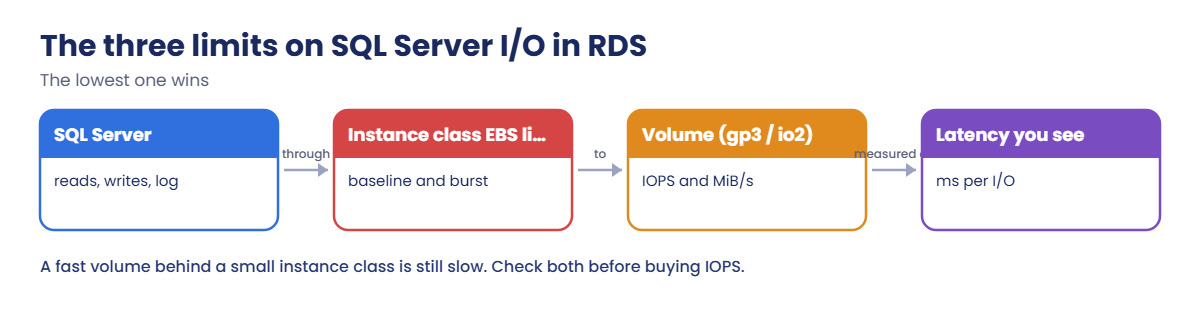
“The database is slow” is very often “the storage is slow”, and on AWS that usually means a limit someone didn’t know about. SQL Server storage on AWS has three: the volume (gp3 or io2), the instance class’s own EBS bandwidth, and how SQL Server lays out data, log and tempdb files.
You’ll check saat-sql’s storage and instance limits, push real I/O through it, read per-file latency inside SQL Server and the matching CloudWatch metrics, find where tempdb lives, and turn on storage autoscaling. Then you’ll hit two walls: io2’s minimum size and Express’s 10 GB limit.
| Time | You need | By the end you can |
|---|---|---|
| 50 minutes | Lesson 42 done (saat-sql, Start-SqlLab.ps1, Stop-SqlLab.ps1), your laptop signed in as saat-admin. Cost: about USD 0.20 for the session; nothing is upgraded. | Read RDS storage settings and instance EBS limits, generate and measure SQL Server I/O with sys.dm_io_virtual_file_stats and CloudWatch, understand gp3, io2 and instance store tempdb, and configure storage autoscaling. |
What it is, in one line
SQL Server storage on AWS is the EBS volume type and size behind your database, limited by both the volume’s IOPS and throughput and the instance class’s EBS bandwidth.
In Simple Words
A water tank, a pipe and a tap
A big water tank (the volume) is useless if the pipe from it (the instance’s EBS bandwidth) is thin. Customers turning on taps (queries) only get what the thinnest part allows.
Small instance classes have a thin pipe that can widen for short bursts, like a pipe that stretches for a few minutes and then shrinks back. When the stretch is used up, everything slows down.
tempdb is the kitchen sink everyone uses at once. Putting it on its own fast local tap (instance store) keeps it from slowing down the main supply.
Engineer's View
How storage really behaves for RDS SQL Server
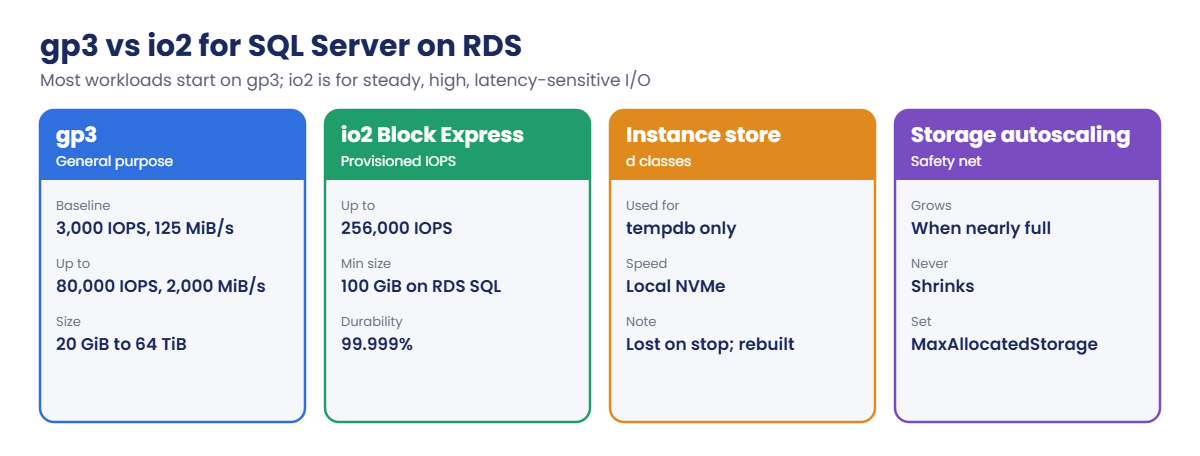
gp3 includes a baseline of 3,000 IOPS and 125 MiB/s and, since June 2026 on RDS for SQL Server, scales to 64 TiB, 80,000 IOPS and 2,000 MiB/s. io2 Block Express provisions IOPS up to 256,000 with sub-millisecond latency and 99.999% durability; on RDS SQL Server it needs at least 100 GiB. Storage can grow but never shrink, and after a storage change you must wait (usually six hours) before the next one.
Every instance class has its own EBS bandwidth and IOPS limits. Burstable classes such as db.t3 have a low baseline and burst credits; CloudWatch’s EBSIOBalance% and EBSByteBalance% show how much burst is left. When they hit zero, I/O drops to the baseline whatever the volume could do.
On RDS, data, log and tempdb share the instance’s storage, except on classes with local NVMe instance store (for example db.m5d, db.r5d, db.x2iedn), where RDS places tempdb on the fast local disk. Inside SQL Server, sys.dm_io_virtual_file_stats gives per-file read and write latency; as a rough guide, data under 10 ms and log under 2 ms is healthy. Storage autoscaling grows the volume when free space runs low, up to MaxAllocatedStorage.
How it works, step by step
Here is what limits a write from SQL Server.
1SQL Server issues the I/O
Log writes must finish before a transaction commits, so log latency is felt directly by users. Data writes happen in the background at checkpoints.
2The instance class carries it
db.t3.micro has a baseline of about 87 Mbps (roughly 11 MB/s) and 500 IOPS, bursting much higher for a while. That is far below what even a basic gp3 volume can do.
3The volume serves it
gp3 gives 3,000 IOPS and 125 MiB/s without extra charges. Raising volume IOPS on a burstable instance often changes nothing.
4Pick the right storage
Here’s how the options compare:
Before paying for io2, check the instance class limits and the burst balances. The cheapest fix is often a non-burstable class with higher EBS bandwidth, or a d class for tempdb-heavy work.
✅ Checkpoint: You can name the three I/O limits, explain burst balance, say where tempdb lives on RDS, and when io2 is worth it.
Hands-on lab: measure SQL Server storage on AWS
Sign in and start the SQL lab (saat-sql starts if it’s stopped; allow 5 to 10 minutes):
cd C:\aws-lab
aws login --profile saat-admin
$env:AWS_PROFILE = 'saat-admin'
.\Start-SqlLab.ps1You should see something like this:
Tunnel ready on 127.0.0.1,11433 for saatadmin (password is in SQLCMDPASSWORD for this window)1Read the storage and instance limits
Paste this whole block:
aws rds describe-db-instances --db-instance-identifier saat-sql --query "DBInstances[0].[DBInstanceClass,StorageType,AllocatedStorage,Iops,StorageThroughput,MaxAllocatedStorage]" --output text
aws ec2 describe-instance-types --instance-types t3.micro --query "InstanceTypes[0].EbsInfo.EbsOptimizedInfo.[BaselineBandwidthInMbps,MaximumBandwidthInMbps,BaselineIops,MaximumIops]" --output textYou should see something like this:
db.t3.micro gp3 20 3000 125 None
87 2085 500 11800The volume offers 3,000 IOPS and 125 MiB/s. The instance underneath (db.t3.micro uses the same hardware as t3.micro) has a baseline of only 500 IOPS and 87 Mbps, bursting to 11,800 IOPS and 2,085 Mbps while credits last. MaxAllocatedStorage None means autoscaling is off.
2Push real I/O through SQL Server
Paste this whole block. It writes about 200 MB of rows (one to two minutes on this small instance):
@'
SET NOCOUNT ON;
IF OBJECT_ID('dbo.Big') IS NULL CREATE TABLE dbo.Big (Id int IDENTITY PRIMARY KEY, Pad char(4000) NOT NULL DEFAULT 'x');
INSERT dbo.Big (Pad) SELECT TOP (50000) 'x' FROM sys.all_objects a CROSS JOIN sys.all_objects b;
CHECKPOINT;
SELECT COUNT(*) AS big_rows, CAST(SUM(DATALENGTH(Pad)) / 1048576.0 AS decimal(10,1)) AS approx_mb FROM dbo.Big;
'@ | Set-Content io-work.sql
sqlcmd -S "127.0.0.1,11433" -U saatadmin -C -d SaatShop -i io-work.sql -WYou should see something like this:
big_rows approx_mb
50000 190.73Measure latency inside SQL Server and in CloudWatch
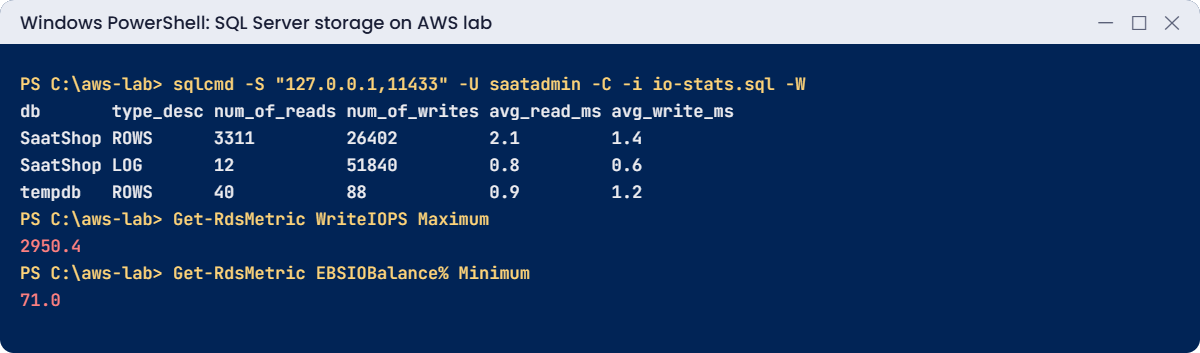
Paste this whole block. Wait a minute or two first so CloudWatch has the datapoints:
@'
SET NOCOUNT ON;
SELECT DB_NAME(vfs.database_id) AS db, mf.type_desc, vfs.num_of_reads, vfs.num_of_writes,
CAST(vfs.io_stall_read_ms * 1.0 / NULLIF(vfs.num_of_reads, 0) AS decimal(10,1)) AS avg_read_ms,
CAST(vfs.io_stall_write_ms * 1.0 / NULLIF(vfs.num_of_writes, 0) AS decimal(10,1)) AS avg_write_ms
FROM sys.dm_io_virtual_file_stats(NULL, NULL) vfs
JOIN sys.master_files mf ON mf.database_id = vfs.database_id AND mf.file_id = vfs.file_id
WHERE vfs.database_id IN (DB_ID('SaatShop'), 2) AND mf.type_desc IN ('ROWS', 'LOG')
ORDER BY db, mf.type_desc;
'@ | Set-Content io-stats.sql
sqlcmd -S "127.0.0.1,11433" -U saatadmin -C -i io-stats.sql -W
function Get-RdsMetric([string]$Name, [string]$Stat = 'Average', [int]$Minutes = 15) {
$end = (Get-Date).ToUniversalTime(); $start = $end.AddMinutes(-$Minutes)
$vals = aws cloudwatch get-metric-statistics --namespace AWS/RDS --metric-name $Name --dimensions Name=DBInstanceIdentifier,Value=saat-sql --start-time $start.ToString('o') --end-time $end.ToString('o') --period 60 --statistics $Stat --query "Datapoints[].$Stat" --output text
if ($Stat -eq 'Minimum') { ($vals -split '\s+' | ForEach-Object { [double]$_ } | Measure-Object -Minimum).Minimum } else { ($vals -split '\s+' | ForEach-Object { [double]$_ } | Measure-Object -Maximum).Maximum }
}
"WriteIOPS max: $(Get-RdsMetric WriteIOPS Maximum)"
"WriteLatency max s: $(Get-RdsMetric WriteLatency Maximum)"
"EBSIOBalance% min: $(Get-RdsMetric EBSIOBalance% Minimum)"You should see something like this:
db type_desc num_of_reads num_of_writes avg_read_ms avg_write_ms
SaatShop LOG 12 51840 0.8 0.6
SaatShop ROWS 3311 26402 2.1 1.4
tempdb LOG 9 61 0.7 0.9
tempdb ROWS 40 88 0.9 1.2
WriteIOPS max: 2950.4
WriteLatency max s: 0.0021
EBSIOBalance% min: 71Latency is fine because the instance was bursting: a few minutes of load used almost a third of its I/O burst balance. A real daytime workload on db.t3.micro would drain it, and then the same writes would queue. That’s the pattern behind many “it was fast this morning” tickets.
4Find tempdb and turn on autoscaling
Paste this whole block:
sqlcmd -S "127.0.0.1,11433" -U saatadmin -C -d tempdb -W -Q "SET NOCOUNT ON; SELECT name, physical_name, size * 8 / 1024 AS size_mb FROM sys.database_files"
aws rds modify-db-instance --db-instance-identifier saat-sql --max-allocated-storage 100 --apply-immediately --query "DBInstance.PendingModifiedValues" --output json | Out-Null
Start-Sleep 30
aws rds describe-db-instances --db-instance-identifier saat-sql --query "DBInstances[0].MaxAllocatedStorage" --output textYou should see something like this:
name physical_name size_mb
tempdev D:\rdsdbdata\DATA\tempdb.mdf 8
templog D:\rdsdbdata\DATA\templog.ldf 8
temp2 D:\rdsdbdata\DATA\tempdb2.ndf 8
100tempdb shares the D: data volume here. On a class with instance store, the same query shows tempdb on a separate fast local drive. Autoscaling now grows saat-sql up to 100 GiB if it runs low on space, instead of the database stopping with “disk full”.
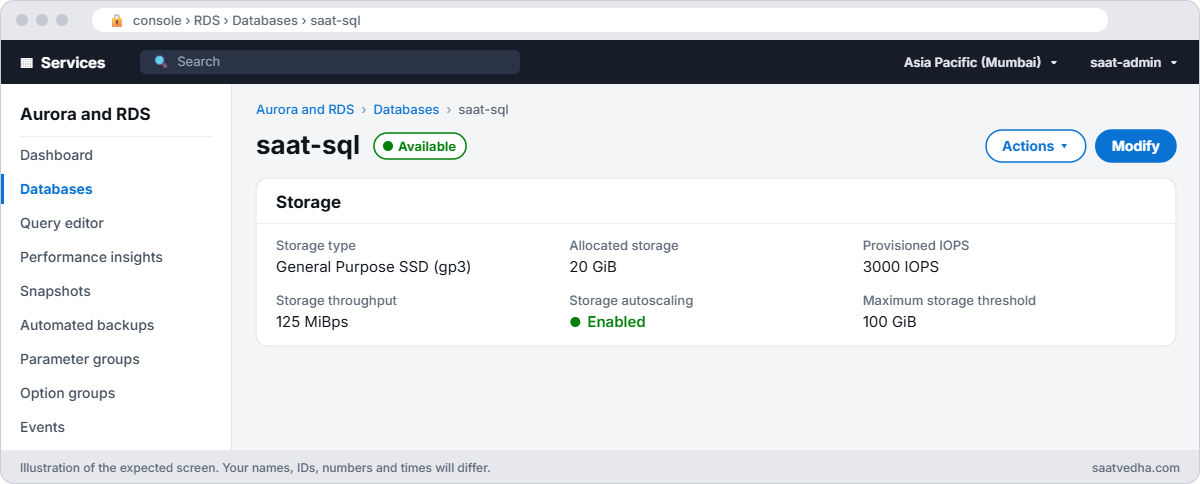
✅ Checkpoint: You read the gp3 volume and the much lower instance baseline, generated about 200 MB of writes, measured per-file latency and EBSIOBalance%, found tempdb on D:, and set MaxAllocatedStorage to 100.
Break It, Then Fix It
Two storage walls that are much cheaper to know about than to hit.
1Break it: switch a small volume to io2
Try to move the 20 GiB volume to io2 with 1,000 IOPS:
aws rds modify-db-instance --db-instance-identifier saat-sql --storage-type io2 --iops 1000 --apply-immediatelyYou’ll get this error:
An error occurred (InvalidParameterCombination) when calling the ModifyDBInstance operation: Invalid storage size for engine name sqlserver-ex and storage type io2: 20
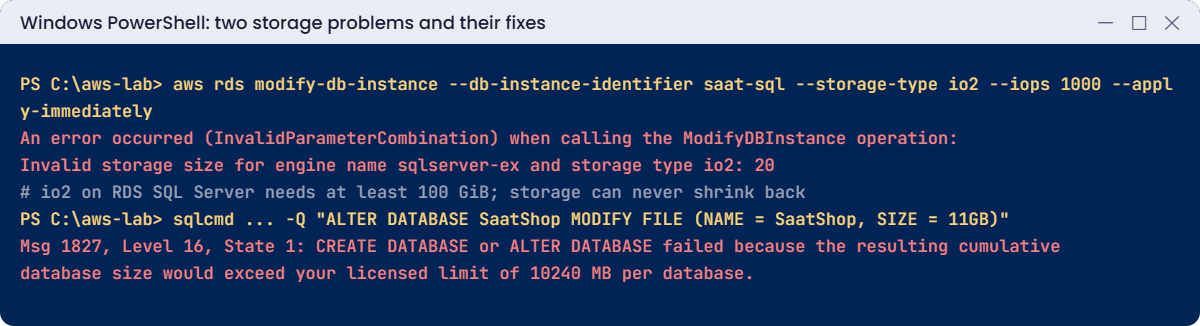
io2 on RDS for SQL Server starts at 100 GiB. And there’s a trap behind the fix: if you grow the volume to 100 GiB to make io2 possible, you can never shrink it back, so you pay for 100 GiB from then on. Fix: check limits before changing storage, and test io2 on a restored copy (Lesson 52), not on the original:
$v22 = aws rds describe-db-instances --db-instance-identifier saat-sql --query "DBInstances[0].EngineVersion" --output text
aws rds describe-orderable-db-instance-options --engine sqlserver-ex --engine-version $v22 --db-instance-class db.t3.micro --query "OrderableDBInstanceOptions[?StorageType=='io2'] | [0].[MinStorageSize,MinIopsPerDbInstance]" --output textYou should see something like this:
100 10002Break it: grow a database past the Express limit
Try to pre-size SaatShop’s data file to 11 GB:
sqlcmd -S "127.0.0.1,11433" -U saatadmin -C -Q "ALTER DATABASE SaatShop MODIFY FILE (NAME = SaatShop, SIZE = 11GB)"You’ll get an error like this:
Msg 1827, Level 16, State 1, Server EC2AMAZ-ABC123, Line 1
CREATE DATABASE or ALTER DATABASE failed because the resulting cumulative database size would exceed your licensed limit of 10240 MB per database.Express caps each database at 10 GB of data, however big the volume is. In production this appears at the worst time: inserts fail with error 1105 or 1827 when the database tries to grow. Fix: Express only for small, non-critical databases; move to Standard (Lesson 53 covers changing editions through snapshot restore).
Now clean up the test data and stop the lab:
sqlcmd -S "127.0.0.1,11433" -U saatadmin -C -d SaatShop -Q "DROP TABLE dbo.Big; DBCC SHRINKFILE (SaatShop_log, 64);"
Remove-Item io-work.sql, io-stats.sql
.\Stop-SqlLab.ps1You should see something like this:
DBCC execution completed. If DBCC printed error messages, contact your system administrator.
stopping
Close the tunnel window if it is still open.✅ Checkpoint: You saw io2 refused below 100 GiB and Express refuse an 11 GB file. The test table is gone, autoscaling is on, and saat-sql is stopping.
This happened at work
The faster disk that didn’t help
An accounting firm’s month-end close ran on RDS SQL Server, db.t3.xlarge with 500 GiB gp2. Every month-end, reports slowed to a crawl after about 30 minutes. The team bought io1 with 10,000 IOPS, doubling the storage bill.
Month-end was still slow. CloudWatch showed why: EBSIOBalance% and EBSByteBalance% dropped to zero 30 minutes into the run, and from then on the instance class’s baseline bandwidth capped everything, far below what the io1 volume could do. Read latency jumped from 2 ms to over 40 ms.
They moved to db.r6i.xlarge (non-burstable, with much higher EBS bandwidth) on gp3 with 6,000 IOPS, cheaper than the io1 setup, and month-end finished in under an hour. They now alarm on burst balance below 30 percent for any burstable database.
Common mistakes and troubleshooting
| Mistake | What happens | What to do |
|---|---|---|
| Buying volume IOPS for a burstable instance | No improvement once burst credits run out | Check EBSIOBalance% and instance limits first |
| Growing storage to try io2 | Can never shrink back; permanent cost | Test on a restored copy |
| Express for growing databases | Error 1827 at 10 GB | Standard or above for anything that grows |
| No storage autoscaling | Database stops on a full disk | Set MaxAllocatedStorage with an alarm on FreeStorageSpace |
| Ignoring log latency | Slow commits for every user | Watch avg_write_ms on log files; keep it low |
| tempdb-heavy work on non-d classes | tempdb contention on shared storage | Consider d classes with instance store tempdb |
Interview questions
Click a question to open it. Each one is written the way an interviewer would ask it. Under it you will see why they ask it and one way you could answer, in your own words.
Fresher level
1. What’s the difference between gp3 and io2 storage, and when would you pick each for SQL Server?
Why they ask this: They want to know you understand the main storage options and their cost. Storage choice has a big effect on database speed and on the bill.
How you might answer: gp3 gives a baseline of 3,000 IOPS and 125 MiB/s, and you can scale IOPS and throughput separately, at a low cost. io2 lets you provision IOPS for consistent, very high performance and higher durability, but it costs more.
For most SQL Server workloads I’d start with gp3, and move to io2 only when the latency needs really demand it.
2. A developer says the database feels slow and asks if the disks are the problem. How would you check SQL Server file latency?
Why they ask this: They are checking basic DBA skills. They want to see that you measure before blaming the storage.
How you might answer: I’d query sys.dm_io_virtual_file_stats and divide io_stall_read_ms and io_stall_write_ms by the number of reads and writes for each file. That gives me the average latency per file, so I can see if data or log files are slow.
3. You gave an RDS instance far more storage than it needs. Can you shrink it back down?
Why they ask this: They want to know you understand RDS storage limits. This affects how carefully you size storage at the start.
How you might answer: No, RDS storage can only grow, not shrink. To get smaller storage I’d have to migrate the database to a new instance, so I size it carefully and let autoscaling grow it when needed.
2–5 years experience
4. Database I/O is slow, but the volume still has spare IOPS. What would you check next?
Why they ask this: They want to see that you look beyond the volume settings. Many I/O problems come from the instance class or the workload, not the disk.
How you might answer: I’d check the instance class EBS limits and its burst balances, EBSIOBalance% and EBSByteBalance%. I’d also compare throughput with IOPS limits and look at queue depth.
Then I’d check for CPU or memory pressure causing extra reads, and whether the workload is limited by the log writes.
5. Where does tempdb live on RDS for SQL Server?
Why they ask this: They are checking that you know how RDS lays out SQL Server internally. tempdb placement affects performance for heavy workloads.
How you might answer: By default tempdb sits on the data volume, the D: drive. On instance classes that have instance store, RDS puts tempdb on the local NVMe disk, which is faster.
6. How would you explain storage autoscaling on RDS to a new team member?
Why they ask this: They want to see that you know how to prevent outages from full disks. A full disk takes a database down quickly.
How you might answer: I’d say it watches free space, and when free space gets low, RDS increases the allocated storage on its own, up to the MaxAllocatedStorage limit we set. That way the database doesn’t go down just because the disk filled up overnight.
Senior level
7. You’re asked to design storage for a 4 TB OLTP SQL Server on RDS that peaks at 20,000 IOPS. How would you approach it?
Why they ask this: They want to see capacity planning across instance, storage and monitoring. They are checking that you test your design instead of guessing.
How you might answer: I’d pick a non-burstable instance class whose EBS bandwidth covers the peak throughput, because the instance can be the limit even if the disk isn’t. For storage I’d use gp3 with provisioned IOPS and throughput, or io2 if the latency SLAs demand it.
I’d turn on autoscaling with headroom, set alarms on latency, queue depth and free space, and load test on a restored copy before go-live.
8. Someone wants to move a database to io2 because it should be faster. How would you prove it’s worth the extra cost?
Why they ask this: They want to see evidence-based decisions. io2 costs more, and they want to know you test before spending.
How you might answer: I’d restore a snapshot to a test instance and replay a captured workload, first on gp3 with tuned IOPS, then on io2. I’d compare latency percentiles and throughput between the two.
I’d also check whether the instance class is the real limit, because then io2 won’t help at all.
Quick quiz
Q1. What baseline does gp3 include?
- 100 IOPS
- 3,000 IOPS and 125 MiB/s
- 16,000 IOPS
- None
Show answer
B — gp3 includes 3,000 IOPS and 125 MiB/s.
Q2. Why might more volume IOPS not help a db.t3 instance?
- gp3 is broken
- The instance class EBS limit is lower
- SQL Server ignores IOPS
- Express blocks it
Show answer
B — Burstable classes have low baselines.
Q3. What is the minimum io2 size on RDS for SQL Server?
- 20 GiB
- 50 GiB
- 100 GiB
- 1 TiB
Show answer
C — And storage can never shrink.
Q4. What limit did Express hit at 11 GB?
- Volume size
- 10 GB per database licence limit
- IOPS
- tempdb
Show answer
B — Error 1827.
Q5. Where does RDS put tempdb on d instance classes?
- S3
- Local NVMe instance store
- A second gp3 volume
- Memory only
Show answer
B — Fast local disk for tempdb.
Quick recap
- I/O is limited by the instance class, the volume and file layout; the lowest wins.
- Watch EBSIOBalance% and EBSByteBalance% on burstable classes.
- gp3 covers most workloads; io2 starts at 100 GiB and storage never shrinks.
- Measure latency with sys.dm_io_virtual_file_stats and CloudWatch.
- Turn on storage autoscaling; Express stops at 10 GB per database.
Next lesson
Lesson 44: Secure RDS SQL Server: KMS, TLS, security groups → You’ll force encrypted connections, verify the server certificate properly, and lock down network access to saat-sql.
Further reading: SQL Server storage on AWS
Want to go deeper into SQL Server storage on AWS? Read Amazon RDS DB instance storage and Instance store support for the tempdb database on Amazon RDS for SQL Server. You can also see the full plan for this course on the AWS Cloud Administration course page.
