
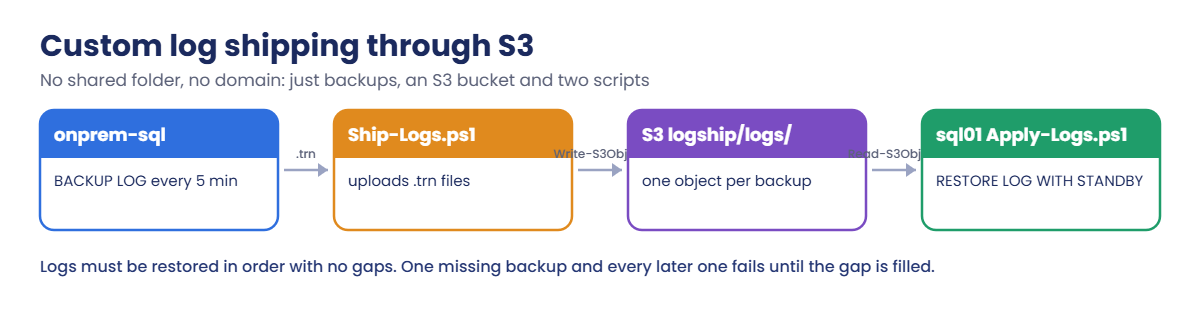
Sign in, start onprem-sql and add the helpers. Invoke-Win runs a script on a Windows instance with Run Command; Add-Orders writes new orders on the primary:
cd C:\aws-lab
aws login --profile saat-admin
$env:AWS_PROFILE = 'saat-admin'
$v = Get-Content C:\aws-lab\saat-vpc.json | ConvertFrom-Json
$acct = aws sts get-caller-identity --query Account --output text
$bak = "saat-sqlbak-$acct-ap-south-1-an"
.\Start-SsmEndpoints.ps1
$pri = aws ec2 describe-instances --filters "Name=tag:Name,Values=onprem-sql" "Name=instance-state-name,Values=stopped,running" --query "Reservations[0].Instances[0].InstanceId" --output text
aws ec2 start-instances --instance-ids $pri | Out-Null
do { Start-Sleep 20; $p = aws ssm describe-instance-information --filters "Key=InstanceIds,Values=$pri" --query "InstanceInformationList[0].PingStatus" --output text } until ($p -eq 'Online')
function Invoke-Win([string]$Id, [string]$Script) {
  @{ commands = @($Script -split "`r?`n"); executionTimeout = @('1800') } | ConvertTo-Json | Set-Content win-cmd.json
  $cmd = aws ssm send-command --document-name AWS-RunPowerShellScript --instance-ids $Id --parameters file://win-cmd.json --query Command.CommandId --output text
  do { Start-Sleep 10; $st = aws ssm get-command-invocation --command-id $cmd --instance-id $Id --query Status --output text 2>$null } until ($st -in 'Success', 'Failed', 'TimedOut')
  aws ssm get-command-invocation --command-id $cmd --instance-id $Id --query StandardOutputContent --output text
}
function Get-Count([string]$Id) { (Invoke-Win $Id 'sqlcmd -S . -E -C -h -1 -W -Q "SET NOCOUNT ON; SELECT COUNT(*) FROM SaatShop.dbo.Orders"').Trim() }
$shipCmd = 'powershell -NoProfile -ExecutionPolicy Bypass -File C:\sqlbak\Ship-Logs.ps1'
$applyCmd = 'powershell -NoProfile -ExecutionPolicy Bypass -File C:\sqlbak\Apply-Logs.ps1'
function Add-Orders([int]$N) { Invoke-Win $pri ("sqlcmd -S . -E -C -b -d SaatShop -Q ""INSERT dbo.Orders (Customer, Amount, CustomerId) SELECT TOP ($N) CONCAT(N'Ship ', ROW_NUMBER() OVER (ORDER BY (SELECT NULL))), 75.00, 1 FROM sys.all_objects"" | Out-Null; 'added $N'") }
Get-Count $pri
You should see something like this:
501021Write the shipping scripts and give both servers S3 access
Paste this whole block. The scripts go to S3 so both servers can download them:
$ship = @'
param([string]$Bucket = 'BAK_HERE')
New-Item C:\sqlbak\logs, C:\sqlbak\shipped -ItemType Directory -Force | Out-Null
$f = "C:\sqlbak\logs\SaatShop_$(Get-Date -Format yyyyMMddHHmmssfff).trn"
sqlcmd -S . -E -C -b -Q "BACKUP LOG SaatShop TO DISK = '$f' WITH CHECKSUM, COMPRESSION" | Out-Null
Get-ChildItem C:\sqlbak\logs\*.trn | ForEach-Object {
  Write-S3Object -BucketName $Bucket -Key "logship/logs/$($_.Name)" -File $_.FullName
  Move-Item $_.FullName C:\sqlbak\shipped\ -Force
}
"shipped $(Split-Path $f -Leaf)"
'@
$apply = @'
param([string]$Bucket = 'BAK_HERE')
New-Item C:\sqlbak\in -ItemType Directory -Force | Out-Null
$done = 'C:\sqlbak\applied.txt'
if (-not (Test-Path $done)) { New-Item $done -ItemType File | Out-Null }
$applied = @(Get-Content $done)
$keys = @(Get-S3Object -BucketName $Bucket -KeyPrefix logship/logs/ | Sort-Object Key | Where-Object { $applied -notcontains $_.Key })
$n = 0
foreach ($k in $keys) {
  $file = "C:\sqlbak\in\$(Split-Path $k.Key -Leaf)"
  Read-S3Object -BucketName $Bucket -Key $k.Key -File $file | Out-Null
  $o = sqlcmd -S . -E -C -b -Q "RESTORE LOG SaatShop FROM DISK = '$file' WITH STANDBY = 'L:\SQLLog\SaatShop_undo.tuf'"
  if ($LASTEXITCODE -ne 0) { "applied $n, FAILED on $($k.Key)"; $o | Select-Object -First 2; return }
  Add-Content $done $k.Key
  $n++
}
"applied $n new log backups"
'@
$ship -replace 'BAK_HERE', $bak | Set-Content Ship-Logs.ps1
$apply -replace 'BAK_HERE', $bak | Set-Content Apply-Logs.ps1
aws s3 cp Ship-Logs.ps1 "s3://$bak/logship/scripts/Ship-Logs.ps1" --only-show-errors
aws s3 cp Apply-Logs.ps1 "s3://$bak/logship/scripts/Apply-Logs.ps1" --only-show-errors
@{ Version = '2012-10-17'; Statement = @(
  @{ Effect = 'Allow'; Action = 's3:ListBucket'; Resource = "arn:aws:s3:::$bak" },
  @{ Effect = 'Allow'; Action = @('s3:GetObject', 's3:PutObject'); Resource = "arn:aws:s3:::$bak/logship/*" }) } | ConvertTo-Json -Depth 5 | Set-Content logship-s3.json
aws iam put-role-policy --role-name saat-ec2-ssm-role --policy-name saat-logship-s3 --policy-document file://logship-s3.json
aws s3 ls "s3://$bak/logship/scripts/"
You should see something like this:
2026-10-20 15:02:11        512 Apply-Logs.ps1
2026-10-20 15:02:10        498 Ship-Logs.ps1
Instance access is limited to the logship/ prefix of one bucket. Real log shipping between companies or accounts often looks exactly like this: no shared folder, no domain trust, just an encrypted bucket.
2Build sql01 with separate data and log volumes
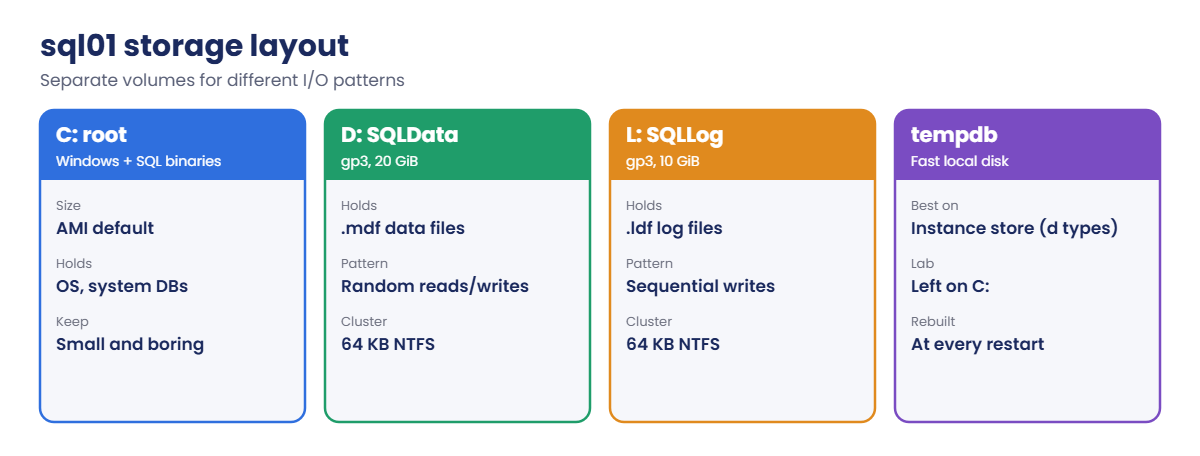
Paste this whole block. It launches SQL Server 2022 Standard with two extra gp3 volumes and prepares them (about 10 minutes):
'[{"DeviceName":"xvdb","Ebs":{"VolumeSize":20,"VolumeType":"gp3","Encrypted":true,"DeleteOnTermination":true}},{"DeviceName":"xvdc","Ebs":{"VolumeSize":10,"VolumeType":"gp3","Encrypted":true,"DeleteOnTermination":true}}]' | Set-Content bdm.json
$sqlAmi = aws ssm get-parameter --name /aws/service/ami-windows-latest/Windows_Server-2022-English-Full-SQL_2022_Standard --query Parameter.Value --output text
$sec = aws ec2 run-instances --image-id $sqlAmi --instance-type t3.xlarge --subnet-id $v.PrivateB --security-group-ids $v.AppSg --iam-instance-profile Name=saat-ec2-ssm-profile --metadata-options HttpTokens=required --block-device-mappings file://bdm.json --tag-specifications 'ResourceType=instance,Tags=[{Key=Name,Value=sql01},{Key=course,Value=saatvedha-aws},{Key=lesson,Value=50}]' 'ResourceType=volume,Tags=[{Key=course,Value=saatvedha-aws},{Key=lesson,Value=50}]' --query "Instances[0].InstanceId" --output text
do { Start-Sleep 30; $p = aws ssm describe-instance-information --filters "Key=InstanceIds,Values=$sec" --query "InstanceInformationList[0].PingStatus" --output text } until ($p -eq 'Online')
$setup = @'
foreach ($d in Get-Disk | Where-Object PartitionStyle -eq 'RAW') {
  $letter = if ($d.Size -gt 15GB) { 'D' } else { 'L' }
  $label = if ($letter -eq 'D') { 'SQLData' } else { 'SQLLog' }
  Initialize-Disk -Number $d.Number -PartitionStyle GPT -PassThru | New-Partition -DriveLetter $letter -UseMaximumSize | Format-Volume -FileSystem NTFS -AllocationUnitSize 65536 -NewFileSystemLabel $label -Confirm:$false | Out-Null
}
New-Item D:\SQLData, L:\SQLLog, C:\sqlbak -ItemType Directory -Force | Out-Null
icacls D:\SQLData /grant 'NT SERVICE\MSSQLSERVER:(OI)(CI)F' | Out-Null
icacls L:\SQLLog /grant 'NT SERVICE\MSSQLSERVER:(OI)(CI)F' | Out-Null
$inst = (Get-ItemProperty 'HKLM:\SOFTWARE\Microsoft\Microsoft SQL Server\Instance Names\SQL').MSSQLSERVER
$reg = "HKLM:\SOFTWARE\Microsoft\Microsoft SQL Server\$inst\MSSQLServer"
Set-ItemProperty $reg -Name DefaultData -Value 'D:\SQLData'
Set-ItemProperty $reg -Name DefaultLog -Value 'L:\SQLLog'
Stop-Service MSSQLSERVER -Force
net start MSSQLSERVER /mSQLCMD | Out-Null
Start-Sleep 15
sqlcmd -S . -E -C -b -Q "IF SUSER_ID('NT AUTHORITY\SYSTEM') IS NULL CREATE LOGIN [NT AUTHORITY\SYSTEM] FROM WINDOWS; ALTER SERVER ROLE sysadmin ADD MEMBER [NT AUTHORITY\SYSTEM];" | Out-Null
Stop-Service MSSQLSERVER -Force
Start-Service MSSQLSERVER
Get-Volume -DriveLetter D, L | ForEach-Object { "$($_.DriveLetter): $($_.FileSystemLabel) $($_.AllocationUnitSize / 1KB) KB clusters" }
sqlcmd -S . -E -C -h -1 -W -Q "SET NOCOUNT ON; SELECT CONCAT('data ', SERVERPROPERTY('InstanceDefaultDataPath'), ' | log ', SERVERPROPERTY('InstanceDefaultLogPath'))"
'@
Invoke-Win $sec $setup
You should see something like this:
D: SQLData 64 KB clusters
L: SQLLog 64 KB clusters
data D:\SQLData\ | log L:\SQLLog\
sql01 is in a different Availability Zone from onprem-sql, with data and log on their own volumes and 64 KB clusters. New databases now default to D: and L:. The same script makes Run Command’s account sysadmin, as you did on onprem-sql in Lesson 47.
3Seed sql01 with a full backup
Paste this whole block:
$priSeed = @'
sqlcmd -S . -E -C -b -Q "ALTER DATABASE SaatShop SET RECOVERY FULL; BACKUP DATABASE SaatShop TO DISK = 'C:\sqlbak\ls-full.bak' WITH INIT, COMPRESSION, CHECKSUM" | Out-Null
Write-S3Object -BucketName 'BAK_HERE' -Key logship/ls-full.bak -File C:\sqlbak\ls-full.bak
Read-S3Object -BucketName 'BAK_HERE' -Key logship/scripts/Ship-Logs.ps1 -File C:\sqlbak\Ship-Logs.ps1 | Out-Null
"full backup uploaded"
'@
Invoke-Win $pri ($priSeed -replace 'BAK_HERE', $bak)
$seed = @'
Read-S3Object -BucketName 'BAK_HERE' -Key logship/scripts/Apply-Logs.ps1 -File C:\sqlbak\Apply-Logs.ps1 | Out-Null
Read-S3Object -BucketName 'BAK_HERE' -Key logship/FULL_HERE -File C:\sqlbak\seed.bak | Out-Null
$files = sqlcmd -S . -E -C -h -1 -W -s "|" -Q "SET NOCOUNT ON; RESTORE FILELISTONLY FROM DISK = 'C:\sqlbak\seed.bak'" | Where-Object { $_ -match '\|' }
$moves = foreach ($l in $files) { $p = $l -split '\|'; if ($p[2] -eq 'L') { "MOVE '$($p[0])' TO 'L:\SQLLog\$($p[0]).ldf'" } else { "MOVE '$($p[0])' TO 'D:\SQLData\$($p[0]).mdf'" } }
sqlcmd -S . -E -C -b -Q "RESTORE DATABASE SaatShop FROM DISK = 'C:\sqlbak\seed.bak' WITH $($moves -join ', '), REPLACE, STANDBY = 'L:\SQLLog\SaatShop_undo.tuf'" | Out-Null
sqlcmd -S . -E -C -h -1 -W -Q "SET NOCOUNT ON; SELECT CONCAT(name, ' | ', state_desc, ' | standby ', is_in_standby, ' | ', (SELECT COUNT(*) FROM SaatShop.dbo.Orders), ' orders') FROM sys.databases WHERE name = 'SaatShop'"
'@
Invoke-Win $sec ($seed -replace 'BAK_HERE', $bak -replace 'FULL_HERE', 'ls-full.bak')
You should see something like this:
full backup uploaded
SaatShop | ONLINE | standby 1 | 50102 orders
sql01’s copy is in standby: readable, but waiting for the next log backup. The data file went to D:\SQLData and the log to L:\SQLLog because of the MOVE clauses.
4Ship and apply logs, by hand then on a schedule
Paste this whole block. It does one cycle by hand, then schedules both scripts every 5 minutes and waits for two cycles:
Add-Orders 200
Invoke-Win $pri $shipCmd
Invoke-Win $sec $applyCmd
"primary $(Get-Count $pri)  secondary $(Get-Count $sec)"
$task = 'Register-ScheduledTask -TaskName SaatLogShip -Action (New-ScheduledTaskAction -Execute powershell.exe -Argument "-NoProfile -ExecutionPolicy Bypass -File C:\sqlbak\SCRIPT.ps1") -Trigger (New-ScheduledTaskTrigger -Once -At (Get-Date) -RepetitionInterval (New-TimeSpan -Minutes 5)) -User SYSTEM -RunLevel Highest -Force | Out-Null; (Get-ScheduledTask SaatLogShip).State'
Invoke-Win $pri ($task -replace 'SCRIPT', 'Ship-Logs')
Invoke-Win $sec ($task -replace 'SCRIPT', 'Apply-Logs')
Add-Orders 50
Start-Sleep 660
"primary $(Get-Count $pri)  secondary $(Get-Count $sec)"
You should see something like this:
added 200
shipped SaatShop_20261020150912345.trn
applied 1 new log backups
primary 50302  secondary 50302
Ready
Ready
added 50
primary 50352  secondary 50352
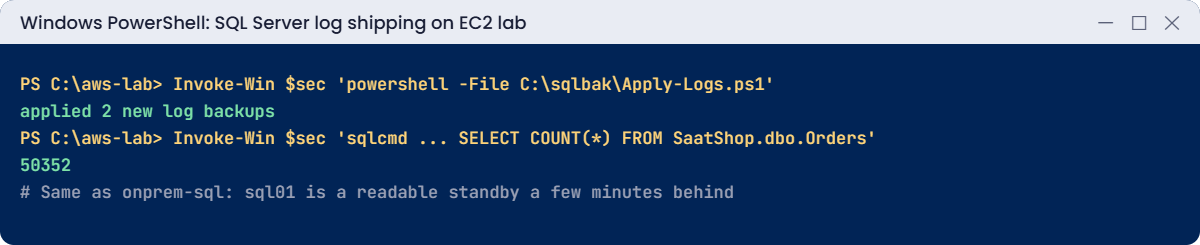
Both servers now run their script every 5 minutes, and sql01 follows onprem-sql with nobody touching it. In a real setup you’d also alert when the newest applied file is older than, say, 15 minutes.
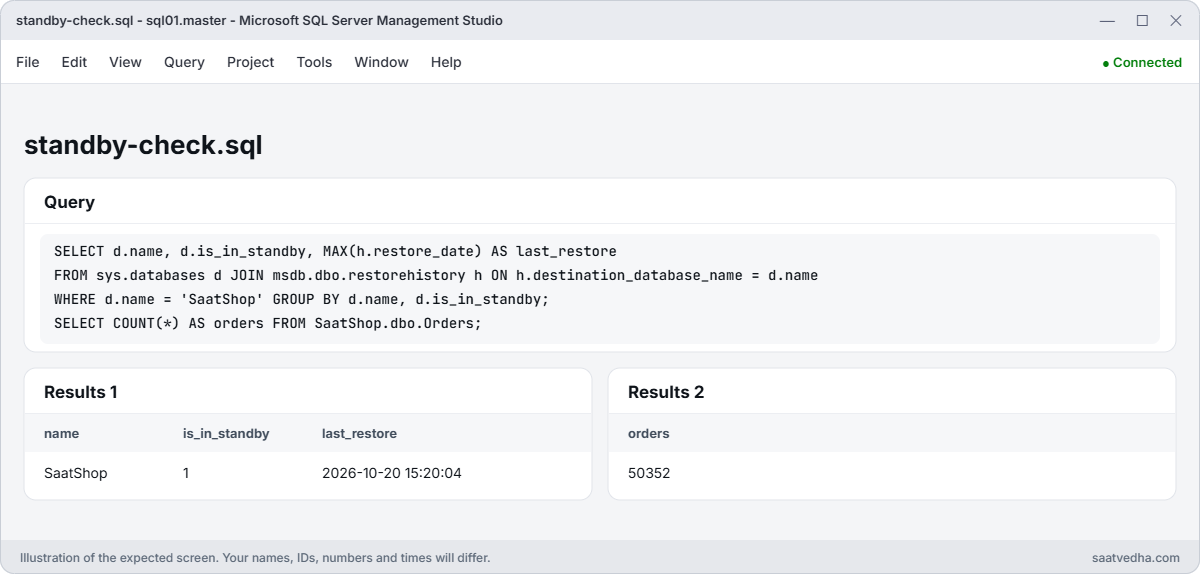
✅ Checkpoint: sql01 has D: SQLData and L: SQLLog with 64 KB clusters, SaatShop on sql01 is in standby, and after the scheduled cycles both servers show 50,352 orders.
Two ways the log chain breaks in real life. First pause the schedules so only your commands run:
Invoke-Win $pri 'Disable-ScheduledTask SaatLogShip | Out-Null; "paused"'
Invoke-Win $sec 'Disable-ScheduledTask SaatLogShip | Out-Null; "paused"'
Invoke-Win $sec $applyCmd
You should see something like this:
paused
paused
applied 0 new log backups1Break it: an ad-hoc log backup
Take a log backup outside the shipping folder, as backup software or a hurried DBA would, then ship as normal:
Invoke-Win $pri '$f = "C:\sqlbak\SaatShop_$(Get-Date -Format yyyyMMddHHmmssfff).trn"; sqlcmd -S . -E -C -b -Q "BACKUP LOG SaatShop TO DISK = ''$f''" | Out-Null; Split-Path $f -Leaf'
Add-Orders 10
Invoke-Win $pri $shipCmd
Invoke-Win $sec $applyCmd
You’ll get something like this:
SaatShop_20261020153001122.trn
added 10
shipped SaatShop_20261020153044871.trn
applied 0, FAILED on logship/logs/SaatShop_20261020153044871.trn
Msg 4305, Level 16, State 1, Server EC2AMAZ-SQL01, Line 1
The log in this backup set begins at LSN 41000000062400001, which is too recent to apply to the database. An earlier log backup that includes LSN 41000000061600001 can be restored.
The ad-hoc backup took some log records and truncated them, so the next shipped file starts after a gap. SQL Server even tells you the LSN it’s missing. Fix: find that backup and ship it; Apply-Logs sorts by time stamp, so it applies the missing file first:
Invoke-Win $pri ('Get-ChildItem C:\sqlbak\SaatShop_*.trn | ForEach-Object { Write-S3Object -BucketName BAK_HERE -Key "logship/logs/$($_.Name)" -File $_.FullName; Move-Item $_.FullName C:\sqlbak\shipped\ -Force; "uploaded $($_.Name)" }' -replace 'BAK_HERE', $bak)
Invoke-Win $sec $applyCmd
"primary $(Get-Count $pri)  secondary $(Get-Count $sec)"
You should see something like this:
uploaded SaatShop_20261020153001122.trn
applied 2 new log backups
primary 50362  secondary 50362
To stop this happening again, any backup outside the shipping process must use WITH COPY_ONLY, which doesn’t affect the log chain.
2Break it: someone recovers the standby
Bring sql01’s copy online, as someone “just checking” might, then ship another log:
Invoke-Win $sec 'sqlcmd -S . -E -C -b -Q "RESTORE DATABASE SaatShop WITH RECOVERY" | Out-Null; "recovered"'
Add-Orders 5
Invoke-Win $pri $shipCmd
Invoke-Win $sec $applyCmd
You’ll get something like this:
recovered
added 5
shipped SaatShop_20261020153512004.trn
applied 0, FAILED on logship/logs/SaatShop_20261020153512004.trn
Msg 3117, Level 16, State 1, Server EC2AMAZ-SQL01, Line 1
The log or differential backup cannot be restored because no files are ready to rollforward.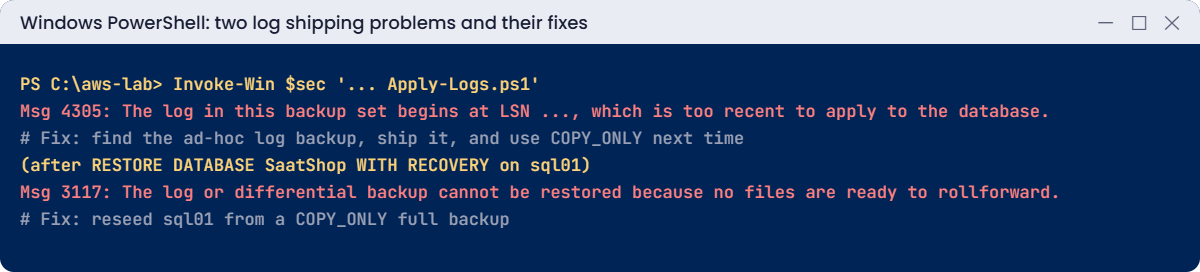
RESTORE WITH RECOVERY ends the restore sequence for good. It’s the right command at a planned cutover, after a tail-log backup WITH NORECOVERY on the primary, and the wrong one at any other time. Fix: reseed sql01 from a COPY_ONLY full backup, mark the older logs as done, then ship again:
$reseed = @'
sqlcmd -S . -E -C -b -Q "BACKUP DATABASE SaatShop TO DISK = 'C:\sqlbak\ls-reseed.bak' WITH INIT, COPY_ONLY, COMPRESSION, CHECKSUM" | Out-Null
Write-S3Object -BucketName 'BAK_HERE' -Key logship/ls-reseed.bak -File C:\sqlbak\ls-reseed.bak
"reseed backup uploaded"
'@
Invoke-Win $pri ($reseed -replace 'BAK_HERE', $bak)
Invoke-Win $sec ($seed -replace 'BAK_HERE', $bak -replace 'FULL_HERE', 'ls-reseed.bak')
Invoke-Win $sec "(Get-S3Object -BucketName '$bak' -KeyPrefix logship/logs/).Key | Set-Content C:\sqlbak\applied.txt; 'older logs marked as applied'"
Add-Orders 5
Invoke-Win $pri $shipCmd
Invoke-Win $sec $applyCmd
"primary $(Get-Count $pri)  secondary $(Get-Count $sec)"
You should see something like this:
reseed backup uploaded
SaatShop | ONLINE | standby 1 | 50367 orders
older logs marked as applied
added 5
shipped SaatShop_20261020154201733.trn
applied 1 new log backups
primary 50372  secondary 50372
Now clean up. sql01 and its volumes go; onprem-sql goes back to simple recovery and stays stopped:
Invoke-Win $pri 'Unregister-ScheduledTask SaatLogShip -Confirm:$false; sqlcmd -S . -E -C -b -Q "ALTER DATABASE SaatShop SET RECOVERY SIMPLE" | Out-Null; Remove-Item C:\sqlbak\logs, C:\sqlbak\shipped, C:\sqlbak\ls-*.bak -Recurse -Force; "clean"'
aws ec2 terminate-instances --instance-ids $sec | Out-Null
aws ec2 stop-instances --instance-ids $pri | Out-Null
aws s3 rm "s3://$bak/logship/" --recursive --only-show-errors
aws iam delete-role-policy --role-name saat-ec2-ssm-role --policy-name saat-logship-s3
.\Stop-SsmEndpoints.ps1
Remove-Item Ship-Logs.ps1, Apply-Logs.ps1, logship-s3.json, bdm.json, win-cmd.json
✅ Checkpoint: You fixed a broken chain by shipping the missing log backup and a recovered standby by reseeding from a COPY_ONLY full. sql01 is terminated with its volumes, the logship/ prefix and the policy are gone, and onprem-sql is stopping.