
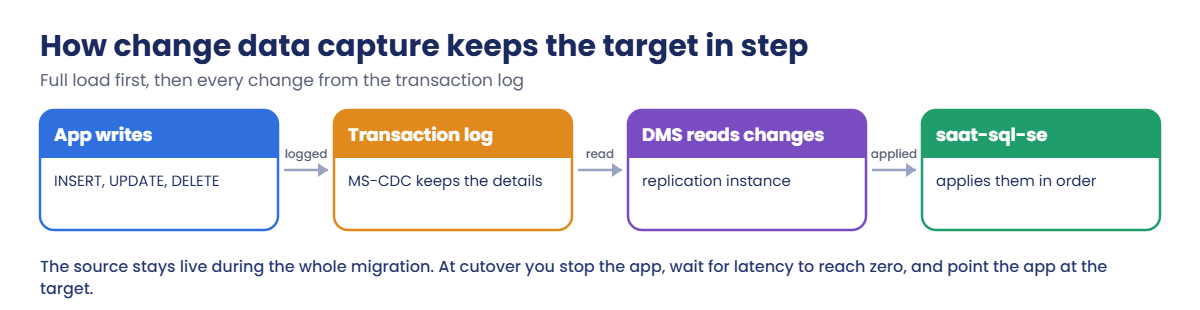
Sign in, start both servers and look up what Lesson 47 left:
cd C:\aws-lab
aws login --profile saat-admin
$env:AWS_PROFILE = 'saat-admin'
$v = Get-Content C:\aws-lab\saat-vpc.json | ConvertFrom-Json
$src = aws ec2 describe-instances --filters "Name=tag:Name,Values=onprem-sql" "Name=instance-state-name,Values=stopped,running" --query "Reservations[0].Instances[0].InstanceId" --output text
aws ec2 start-instances --instance-ids $src | Out-Null
.\Start-SqlLab.ps1 -Db saat-sql-se -LocalPort 11434
do { Start-Sleep 20; $p = aws ssm describe-instance-information --filters "Key=InstanceIds,Values=$src" --query "InstanceInformationList[0].PingStatus" --output text } until ($p -eq 'Online')
$dmsSg = aws ec2 describe-security-groups --filters "Name=group-name,Values=saat-dms-sg" --query "SecurityGroups[0].GroupId" --output text
$srcSg = aws ec2 describe-security-groups --filters "Name=group-name,Values=saat-onprem-sql-sg" --query "SecurityGroups[0].GroupId" --output text
$srcEp = aws dms describe-endpoints --filters "Name=endpoint-id,Values=saat-onprem-src" --query "Endpoints[0].EndpointArn" --output text
$tgtEp = aws dms describe-endpoints --filters "Name=endpoint-id,Values=saat-rds-se-tgt" --query "Endpoints[0].EndpointArn" --output text
"$src $dmsSg $srcSg"
You should see something like this:
Tunnel ready on 127.0.0.1,11434 for saatadmin (password is in SQLCMDPASSWORD for this window)
i-0a1b2c3d4e5f60718 sg-0d1e2f3a4b5c6d7e8 sg-0a9b8c7d6e5f4a3b2
If you deleted saat-sql-se after Lesson 47, recreate it with the first command from that lesson and create the SaatShop database before going on.
1Prepare the source for CDC
Paste this whole block. It adds a helper that runs SQL on onprem-sql, resets dms_user’s password, and turns on MS-CDC:
function Invoke-Src([string]$Sql) {
  $line = 'sqlcmd -S . -E -C -h -1 -W -d SaatShop -Q "SET NOCOUNT ON; ' + $Sql + '"'
  @{ commands = @($line) } | ConvertTo-Json | Set-Content src-cmd.json
  $cmd = aws ssm send-command --document-name AWS-RunPowerShellScript --instance-ids $src --parameters file://src-cmd.json --query Command.CommandId --output text
  do { Start-Sleep 5; $st = aws ssm get-command-invocation --command-id $cmd --instance-id $src --query Status --output text 2>$null } until ($st -in 'Success', 'Failed', 'TimedOut')
  aws ssm get-command-invocation --command-id $cmd --instance-id $src --query StandardOutputContent --output text
}
$dmsPw = aws secretsmanager get-random-password --password-length 20 --exclude-punctuation --require-each-included-type --query RandomPassword --output text
Invoke-Src "ALTER LOGIN dms_user WITH PASSWORD = '$dmsPw'; ALTER SERVER ROLE sysadmin ADD MEMBER dms_user;" | Out-Null
aws dms modify-endpoint --endpoint-arn $srcEp --password $dmsPw | Out-Null
aws dms modify-endpoint --endpoint-arn $tgtEp --password $env:SQLCMDPASSWORD | Out-Null
Invoke-Src "ALTER DATABASE SaatShop SET RECOVERY FULL; BACKUP DATABASE SaatShop TO DISK = 'C:\sqlbak\saatshop-cdc.bak' WITH INIT; EXEC sys.sp_cdc_enable_db; EXEC sys.sp_cdc_enable_table @source_schema = N'dbo', @source_name = N'Orders', @role_name = NULL, @supports_net_changes = 1; SELECT CONCAT(name, ' | ', recovery_model_desc, ' | cdc ', is_cdc_enabled) FROM sys.databases WHERE name = 'SaatShop';"
You should see something like this (the last lines):
BACKUP DATABASE successfully processed 6330 pages in 0.412 seconds (120.017 MB/sec).
Job 'cdc.SaatShop_capture' started successfully.
Job 'cdc.SaatShop_cleanup' started successfully.
SaatShop | FULL | cdc 1
The full backup starts the log chain, and MS-CDC creates two SQL Agent jobs: one captures changes, the other cleans old ones. Both endpoints now have current passwords.
The target’s managed password rotates every 7 days, which is why you refresh it each session. dms_user is sysadmin to keep the lab short; production uses the non-sysadmin setup from the DMS guide.
2Start the replication instance and the CDC task
Paste this whole block (about 15 minutes, most of it the replication instance):
$ri = aws dms create-replication-instance --replication-instance-identifier saat-dms --replication-instance-class dms.t3.medium --allocated-storage 20 --replication-subnet-group-identifier saat-dms-subnets --vpc-security-group-ids $dmsSg --no-publicly-accessible --no-multi-az --tags Key=course,Value=saatvedha-aws Key=lesson,Value=48 --query ReplicationInstance.ReplicationInstanceArn --output text
aws dms wait replication-instance-available --filters "Name=replication-instance-arn,Values=$ri"
foreach ($ep in $srcEp, $tgtEp) { aws dms test-connection --replication-instance-arn $ri --endpoint-arn $ep | Out-Null }
foreach ($ep in $srcEp, $tgtEp) { aws dms wait test-connection-succeeds --filters "Name=endpoint-arn,Values=$ep" }
'{ "rules": [ { "rule-type": "selection", "rule-id": "1", "rule-name": "dbo-all", "object-locator": { "schema-name": "dbo", "table-name": "%" }, "rule-action": "include" } ] }' | Set-Content mappings.json
'{ "Logging": { "EnableLogging": true }, "FullLoadSettings": { "TargetTablePrepMode": "TRUNCATE_BEFORE_LOAD" }, "ValidationSettings": { "EnableValidation": true } }' | Set-Content task-cdc.json
$task = aws dms create-replication-task --replication-task-identifier saat-shop-cdc --source-endpoint-arn $srcEp --target-endpoint-arn $tgtEp --replication-instance-arn $ri --migration-type full-load-and-cdc --table-mappings file://mappings.json --replication-task-settings file://task-cdc.json --query ReplicationTask.ReplicationTaskArn --output text
aws dms wait replication-task-ready --filters "Name=replication-task-arn,Values=$task"
aws dms start-replication-task --replication-task-arn $task --start-replication-task-type start-replication | Out-Null
aws dms wait replication-task-running --filters "Name=replication-task-arn,Values=$task"
do { Start-Sleep 20; $ts = aws dms describe-table-statistics --replication-task-arn $task --query "TableStatistics[0].[TableState,FullLoadRows,ValidationState]" --output text; $ts } until ($ts -match 'Table completed' -and $ts -match 'Validated')
You should see something like this:
Before load     0       Not enabled
Full load       21504   Pending records
Table completed 50003   Pending records
Table completed 50003   Validated
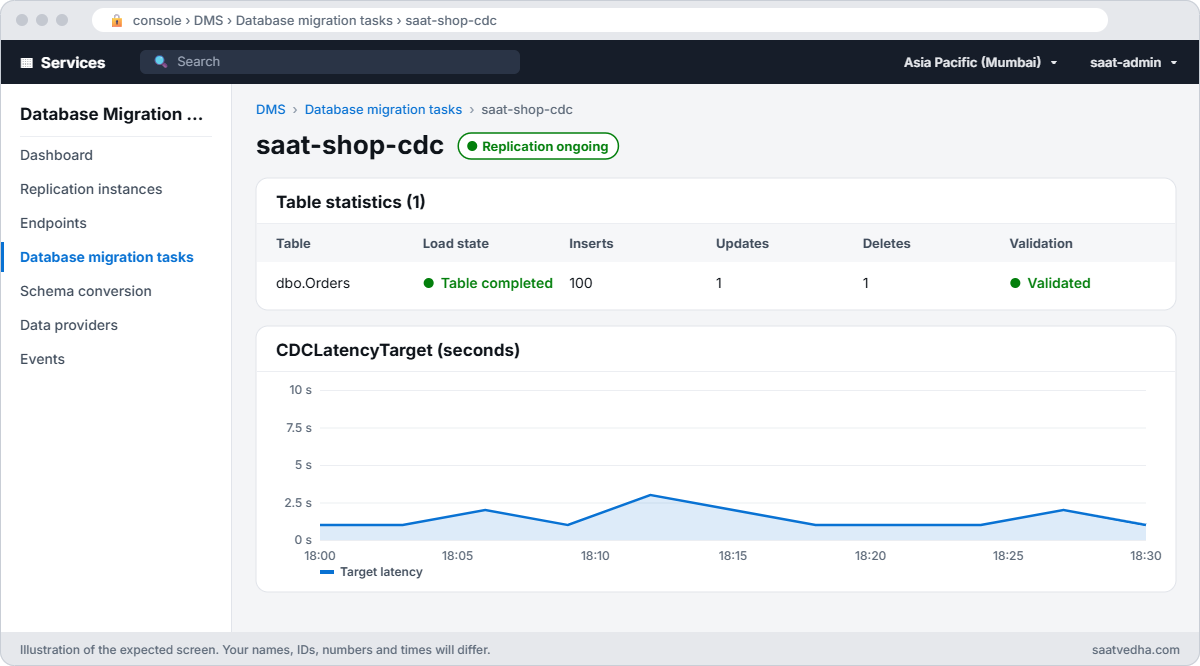
The full load finished and validation confirmed all 50,003 rows match. The task is still running: it’s now following the source’s transaction log.
3Make live changes and watch them arrive
Paste this whole block:
Invoke-Src "INSERT dbo.Orders (Customer, Amount) SELECT TOP (100) CONCAT(N'Live ', ROW_NUMBER() OVER (ORDER BY (SELECT NULL))), 150.00 FROM sys.all_objects; UPDATE dbo.Orders SET Amount = 2999.00 WHERE OrderId = 1; DELETE dbo.Orders WHERE OrderId = 2; SELECT COUNT(*) FROM dbo.Orders;"
Start-Sleep 60
aws dms describe-table-statistics --replication-task-arn $task --query "TableStatistics[].[TableName,Inserts,Updates,Deletes,ValidationState]" --output text
sqlcmd -S "127.0.0.1,11434" -U saatadmin -C -d SaatShop -h -1 -Q "SET NOCOUNT ON; SELECT COUNT(*) FROM dbo.Orders; SELECT Amount FROM dbo.Orders WHERE OrderId = 1;"
You should see something like this:
50102
Orders  100     1       1       Validated
      50102
    2999.00
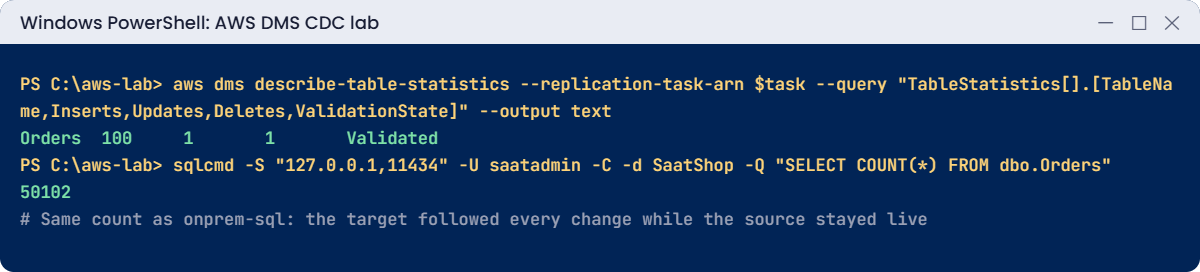
100 inserts, one update and one delete reached saat-sql-se within a minute, and the counts match. The app on onprem-sql never stopped.
4Practise the cutover
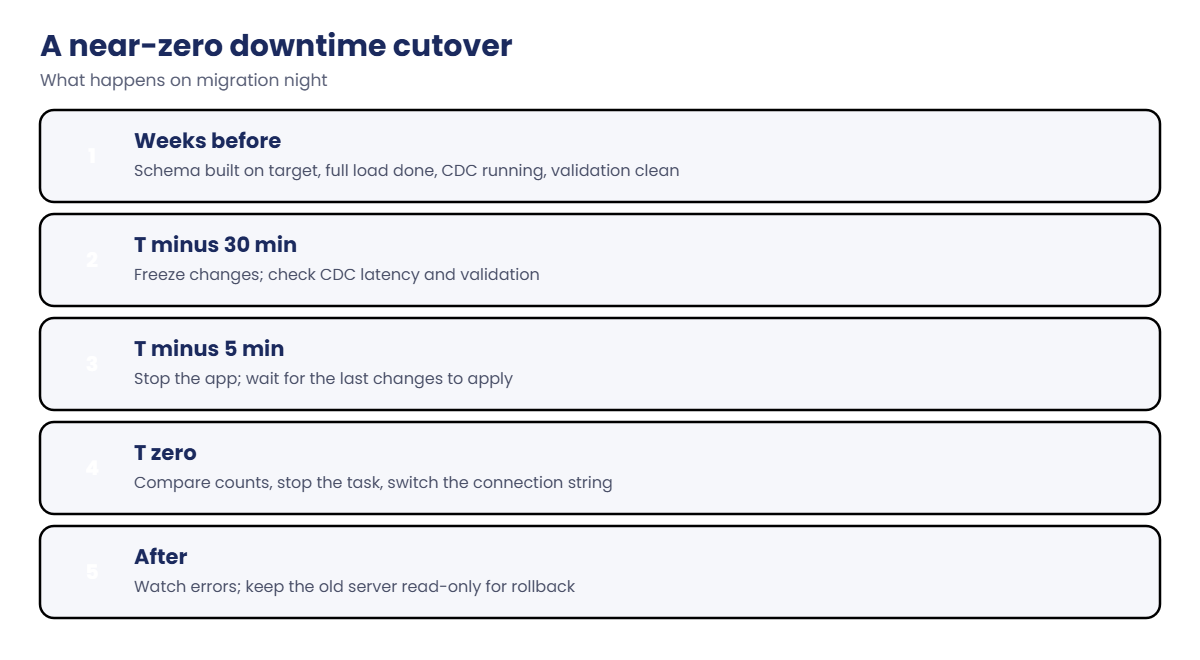
In real life you stop the app first. Here nothing else writes, so check, compare and stop the task:
$srcCount = (Invoke-Src "SELECT COUNT(*) FROM dbo.Orders;").Trim()
$tgtCount = (sqlcmd -S "127.0.0.1,11434" -U saatadmin -C -d SaatShop -h -1 -W -Q "SET NOCOUNT ON; SELECT COUNT(*) FROM dbo.Orders;" | Select-Object -First 1).Trim()
"source $srcCount  target $tgtCount"
aws dms stop-replication-task --replication-task-arn $task | Out-Null
aws dms wait replication-task-stopped --filters "Name=replication-task-arn,Values=$task"
aws dms describe-replication-tasks --filters "Name=replication-task-arn,Values=$task" --query "ReplicationTasks[0].Status" --output text
You should see something like this:
source 50102  target 50102
stopped
That’s the cutover moment: counts match, validation is clean, and the task is stopped. Next you’d change the app’s connection string to the RDS endpoint. In a real move, the target would already have the full schema from Lesson 49, with identity columns, defaults and indexes.
✅ Checkpoint: MS-CDC is on for SaatShop, the task ran full-load-and-cdc with validation, 100 inserts, 1 update and 1 delete arrived, both sides show 50,102 orders, and the task is stopped.
Two problems that turn up on real migrations.
1Break it: the target password rotates
Rotate saat-sql-se’s managed master password, as AWS does every 7 days, then test the target endpoint:
$secretArn = aws rds describe-db-instances --db-instance-identifier saat-sql-se --query "DBInstances[0].MasterUserSecret.SecretArn" --output text
aws secretsmanager rotate-secret --secret-id $secretArn | Out-Null
Start-Sleep 90
aws dms test-connection --replication-instance-arn $ri --endpoint-arn $tgtEp | Out-Null
do { Start-Sleep 15; $cs = aws dms describe-connections --filters "Name=endpoint-arn,Values=$tgtEp" --query "Connections[0].Status" --output text } until ($cs -ne 'testing')
aws dms describe-connections --filters "Name=endpoint-arn,Values=$tgtEp" --query "Connections[0].[Status,LastFailureMessage]" --output text
You’ll get something like this:
failed Test Endpoint failed: Application-Status: 1020912, Application-Message: Cannot connect to ODBC provider ODBC general error., Application-Detailed-Message: RetCode: SQL_ERROR SqlState: 28000 NativeError: 18456 Message: [unixODBC][Microsoft][ODBC Driver for SQL Server][SQL Server]Login failed for user 'saatadmin'.The endpoint still holds last week’s password. A task that is already running keeps its connections, but it fails the next time it reconnects, often at 3 a.m. Fix: read the new password and update the endpoint (production endpoints should read the secret from Secrets Manager instead, so rotation can’t break them):
$s = aws secretsmanager get-secret-value --secret-id $secretArn --query SecretString --output text | ConvertFrom-Json
$env:SQLCMDPASSWORD = $s.password
aws dms modify-endpoint --endpoint-arn $tgtEp --password $s.password | Out-Null
aws dms test-connection --replication-instance-arn $ri --endpoint-arn $tgtEp | Out-Null
aws dms wait test-connection-succeeds --filters "Name=endpoint-arn,Values=$tgtEp"
aws dms describe-connections --filters "Name=endpoint-arn,Values=$tgtEp" --query "Connections[0].Status" --output text
You should see this:
successful2Break it: someone writes to the target before cutover
Resume the task, change a row on the target directly, then ask DMS to revalidate:
aws dms start-replication-task --replication-task-arn $task --start-replication-task-type resume-processing | Out-Null
aws dms wait replication-task-running --filters "Name=replication-task-arn,Values=$task"
sqlcmd -S "127.0.0.1,11434" -U saatadmin -C -d SaatShop -Q "UPDATE dbo.Orders SET Amount = 1.00 WHERE OrderId = 3;"
aws dms reload-tables --replication-task-arn $task --tables-to-reload SchemaName=dbo,TableName=Orders --reload-option validate-only | Out-Null
do { Start-Sleep 20; $vs = aws dms describe-table-statistics --replication-task-arn $task --query "TableStatistics[0].[ValidationState,ValidationFailedRecords]" --output text; $vs } until ($vs -notmatch 'Pending')
sqlcmd -S "127.0.0.1,11434" -U saatadmin -C -d SaatShop -Q "SELECT TABLE_NAME, [KEY], FAILURE_TYPE FROM awsdms_validation_failures_v1"
You’ll get something like this:
Mismatched records      1
TABLE_NAME KEY                 FAILURE_TYPE
---------- ------------------- ------------
Orders     {"OrderId": 3}      RECORD_DIFF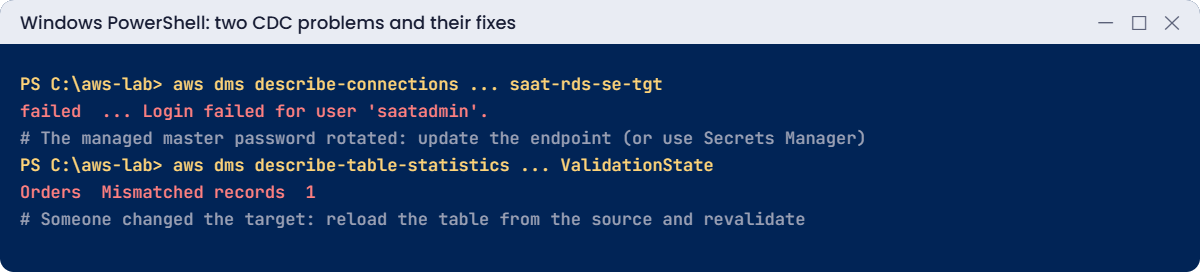
Someone “just tested” the app against the new server, and now one row differs from the source. CDC won’t repair it on its own, because nothing changed that row on the source.
Validation is how you catch this before go-live. Fix: reload the table from the source; validation then runs again:
aws dms reload-tables --replication-task-arn $task --tables-to-reload SchemaName=dbo,TableName=Orders --reload-option data-reload | Out-Null
do { Start-Sleep 20; $vs = aws dms describe-table-statistics --replication-task-arn $task --query "TableStatistics[0].[TableState,ValidationState]" --output text; $vs } until ($vs -match 'Table completed' -and $vs -match 'Validated')
sqlcmd -S "127.0.0.1,11434" -U saatadmin -C -d SaatShop -h -1 -Q "SET NOCOUNT ON; SELECT Amount FROM dbo.Orders WHERE OrderId = 3;"
You should see something like this:
Table completed Validated
    3200.00
Now clean up everything DMS used. onprem-sql goes back to normal (CDC off, no sysadmin for dms_user, simple recovery) and stays stopped for Lessons 49 and 50:
aws dms stop-replication-task --replication-task-arn $task | Out-Null
aws dms wait replication-task-stopped --filters "Name=replication-task-arn,Values=$task"
aws dms delete-replication-task --replication-task-arn $task | Out-Null
aws dms wait replication-task-deleted --filters "Name=replication-task-arn,Values=$task"
aws dms delete-replication-instance --replication-instance-arn $ri | Out-Null
aws dms delete-endpoint --endpoint-arn $srcEp | Out-Null
aws dms delete-endpoint --endpoint-arn $tgtEp | Out-Null
aws dms wait replication-instance-deleted --filters "Name=replication-instance-arn,Values=$ri"
aws dms delete-replication-subnet-group --replication-subnet-group-identifier saat-dms-subnets
Invoke-Src "EXEC sys.sp_cdc_disable_db; ALTER SERVER ROLE sysadmin DROP MEMBER dms_user; ALTER DATABASE SaatShop SET RECOVERY SIMPLE; DROP TABLE IF EXISTS dbo.awsdms_truncation_safeguard;" | Out-Null
aws ec2 revoke-security-group-ingress --group-id $srcSg --ip-permissions "IpProtocol=tcp,FromPort=1433,ToPort=1433,UserIdGroupPairs=[{GroupId=$dmsSg}]" | Out-Null
aws ec2 revoke-security-group-ingress --group-id $v.DbSg --ip-permissions "IpProtocol=tcp,FromPort=1433,ToPort=1433,UserIdGroupPairs=[{GroupId=$dmsSg}]" | Out-Null
aws ec2 delete-security-group --group-id $dmsSg
aws ec2 stop-instances --instance-ids $src | Out-Null
.\Stop-SqlLab.ps1 -Db saat-sql-se -KeepDbRunning
aws rds delete-db-instance --db-instance-identifier saat-sql-se --skip-final-snapshot --query "DBInstance.DBInstanceStatus" --output text
Remove-Item mappings.json, task-cdc.json, src-cmd.json
✅ Checkpoint: You fixed a rotated password by updating the endpoint and a validation mismatch by reloading the table. The DMS task, instance, endpoints, subnet group and saat-dms-sg are gone, saat-sql-se is deleting, and onprem-sql is stopping with CDC turned off.