
Sign in, start onprem-sql and the endpoints, and add the helpers. Invoke-Sql runs T-SQL on onprem-sql; Get-DmsHealth shows the task, its tables and both row counts:
cd C:\aws-lab
aws login --profile saat-admin
$env:AWS_PROFILE = 'saat-admin'
$v = Get-Content C:\aws-lab\saat-vpc.json | ConvertFrom-Json
.\Start-SsmEndpoints.ps1
$src = aws ec2 describe-instances --filters "Name=tag:Name,Values=onprem-sql" "Name=instance-state-name,Values=stopped,running" --query "Reservations[0].Instances[0].InstanceId" --output text
$srcIp = aws ec2 describe-instances --instance-ids $src --query "Reservations[0].Instances[0].PrivateIpAddress" --output text
$srcSg = aws ec2 describe-security-groups --filters "Name=group-name,Values=saat-onprem-sql-sg" --query "SecurityGroups[0].GroupId" --output text
aws ec2 start-instances --instance-ids $src | Out-Null
do { Start-Sleep 20; $p = aws ssm describe-instance-information --filters "Key=InstanceIds,Values=$src" --query "InstanceInformationList[0].PingStatus" --output text } until ($p -eq 'Online')
function Invoke-Ps([string]$Line) {
  @{ commands = @($Line) } | ConvertTo-Json | Set-Content src-cmd.json
  $cmd = aws ssm send-command --document-name AWS-RunPowerShellScript --instance-ids $src --parameters file://src-cmd.json --query Command.CommandId --output text
  do { Start-Sleep 5; $st = aws ssm get-command-invocation --command-id $cmd --instance-id $src --query Status --output text 2>$null } until ($st -in 'Success', 'Failed', 'TimedOut')
  (aws ssm get-command-invocation --command-id $cmd --instance-id $src --query StandardOutputContent --output text).Trim()
}
function Invoke-Sql([string]$Database, [string]$Sql) { Invoke-Ps ('sqlcmd -S . -E -C -h -1 -W -s " " -d ' + $Database + ' -Q "SET NOCOUNT ON; ' + $Sql + '"') }
function Get-DmsHealth {
  aws dms describe-replication-tasks --filters "Name=replication-task-arn,Values=$task" --query "ReplicationTasks[0].[Status,StopReason,LastFailureMessage]" --output text
  aws dms describe-table-statistics --replication-task-arn $task --query "TableStatistics[].[TableName,TableState,Inserts,AppliedInserts]" --output text
  "source $(Invoke-Sql SaatShop 'SELECT COUNT(*) FROM dbo.Orders;')  target $(Invoke-Sql SaatShopReplica 'SELECT COUNT(*) FROM dbo.Orders;')"
}
Invoke-Sql SaatShop 'SELECT COUNT(*) FROM dbo.Orders;'
You should see something like this:
503721Prepare the source and the replica database
Paste this whole block. It sets a new password for dms_user, turns on FULL recovery and MS-CDC, and creates the target database:
$dmsPw = aws secretsmanager get-random-password --password-length 20 --exclude-punctuation --require-each-included-type --query RandomPassword --output text
Invoke-Sql master "ALTER LOGIN dms_user WITH PASSWORD = '$dmsPw'; ALTER SERVER ROLE sysadmin ADD MEMBER dms_user; CREATE DATABASE SaatShopReplica;" | Out-Null
Invoke-Sql SaatShop "ALTER DATABASE SaatShop SET RECOVERY FULL; BACKUP DATABASE SaatShop TO DISK = 'C:\sqlbak\dms64-full.bak' WITH INIT; EXEC sys.sp_cdc_enable_db;" | Out-Null
foreach ($t in 'Orders', 'Customers', 'OrderAudit') { Invoke-Sql SaatShop "EXEC sys.sp_cdc_enable_table @source_schema = N'dbo', @source_name = N'$t', @role_name = NULL, @supports_net_changes = 1;" | Out-Null }
Invoke-Sql SaatShop "SELECT name + ' ' + CAST(is_tracked_by_cdc AS varchar(1)) FROM sys.tables WHERE schema_id = SCHEMA_ID('dbo') ORDER BY name;"
You should see something like this:
Customers 1
OrderAudit 1
Orders 1
All three tables are tracked, the log chain has started, and SaatShopReplica waits as the target. Using the same server for both keeps the bill down; DMS treats them as two separate endpoints.
2Start the replication instance and endpoints
Paste this whole block (about 15 minutes):
$dmsSg = aws ec2 create-security-group --group-name saat-dms-sg --description "DMS replication instance" --vpc-id $v.VpcId --query GroupId --output text
aws ec2 authorize-security-group-ingress --group-id $srcSg --ip-permissions "IpProtocol=tcp,FromPort=1433,ToPort=1433,UserIdGroupPairs=[{GroupId=$dmsSg,Description=1433-from-dms}]" | Out-Null
aws dms create-replication-subnet-group --replication-subnet-group-identifier saat-dms-subnets --replication-subnet-group-description "saat-vpc private subnets" --subnet-ids $v.PrivateA $v.PrivateB | Out-Null
$ri = aws dms create-replication-instance --replication-instance-identifier saat-dms --replication-instance-class dms.t3.medium --allocated-storage 20 --replication-subnet-group-identifier saat-dms-subnets --vpc-security-group-ids $dmsSg --no-publicly-accessible --no-multi-az --tags Key=course,Value=saatvedha-aws Key=lesson,Value=64 --query ReplicationInstance.ReplicationInstanceArn --output text
aws dms wait replication-instance-available --filters "Name=replication-instance-arn,Values=$ri"
$srcEp = aws dms create-endpoint --endpoint-identifier saat-shop-src --endpoint-type source --engine-name sqlserver --server-name $srcIp --port 1433 --database-name SaatShop --username dms_user --password $dmsPw --query Endpoint.EndpointArn --output text
$tgtEp = aws dms create-endpoint --endpoint-identifier saat-replica-tgt --endpoint-type target --engine-name sqlserver --server-name $srcIp --port 1433 --database-name SaatShopReplica --username dms_user --password $dmsPw --query Endpoint.EndpointArn --output text
foreach ($ep in $srcEp, $tgtEp) { aws dms test-connection --replication-instance-arn $ri --endpoint-arn $ep | Out-Null }
foreach ($ep in $srcEp, $tgtEp) { aws dms wait test-connection-succeeds --filters "Name=endpoint-arn,Values=$ep" }
aws dms describe-connections --filters "Name=replication-instance-arn,Values=$ri" --query "Connections[].[EndpointIdentifier,Status]" --output text
You should see something like this:
saat-shop-src  successful
saat-replica-tgt        successful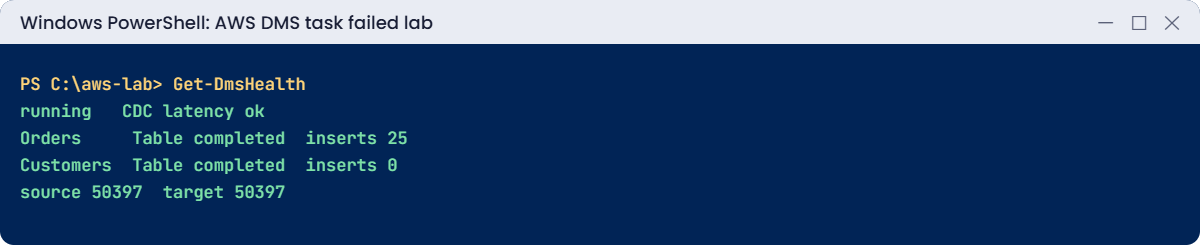
3Run full load and CDC, and check its health
Paste this whole block. The mapping excludes DMS’s own control tables:
'{ "rules": [ { "rule-type": "selection", "rule-id": "1", "rule-name": "dbo-all", "object-locator": { "schema-name": "dbo", "table-name": "%" }, "rule-action": "include" }, { "rule-type": "selection", "rule-id": "2", "rule-name": "no-dms-tables", "object-locator": { "schema-name": "dbo", "table-name": "awsdms%" }, "rule-action": "exclude" } ] }' | Set-Content mappings64.json
'{ "Logging": { "EnableLogging": true }, "FullLoadSettings": { "TargetTablePrepMode": "DROP_AND_CREATE" } }' | Set-Content task64.json
$task = aws dms create-replication-task --replication-task-identifier saat-shop-cdc64 --source-endpoint-arn $srcEp --target-endpoint-arn $tgtEp --replication-instance-arn $ri --migration-type full-load-and-cdc --table-mappings file://mappings64.json --replication-task-settings file://task64.json --query ReplicationTask.ReplicationTaskArn --output text
aws dms wait replication-task-ready --filters "Name=replication-task-arn,Values=$task"
aws dms start-replication-task --replication-task-arn $task --start-replication-task-type start-replication | Out-Null
aws dms wait replication-task-running --filters "Name=replication-task-arn,Values=$task"
do { Start-Sleep 30; $ts = aws dms describe-table-statistics --replication-task-arn $task --query "TableStatistics[?TableName=='Orders'].TableState | [0]" --output text } until ($ts -eq 'Table completed')
Invoke-Sql SaatShop "INSERT dbo.Orders (Customer, Amount, CustomerId) SELECT TOP (25) CONCAT(N'CDC ', ROW_NUMBER() OVER (ORDER BY (SELECT NULL))), 99.00, 1 FROM sys.all_objects;" | Out-Null
Start-Sleep 60
Get-DmsHealth
You should see something like this:
running None    None
Orders  Table completed 25      25
Customers       Table completed 0       0
OrderAudit      Table completed 0       0
source 50397  target 50397
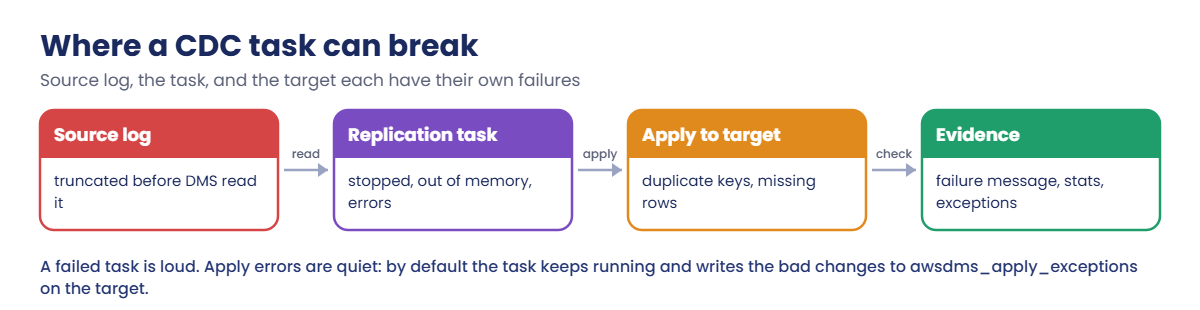
The task is running with no failure message, the 25 new orders were captured and applied, and the counts match. This is the picture you want to see every morning.
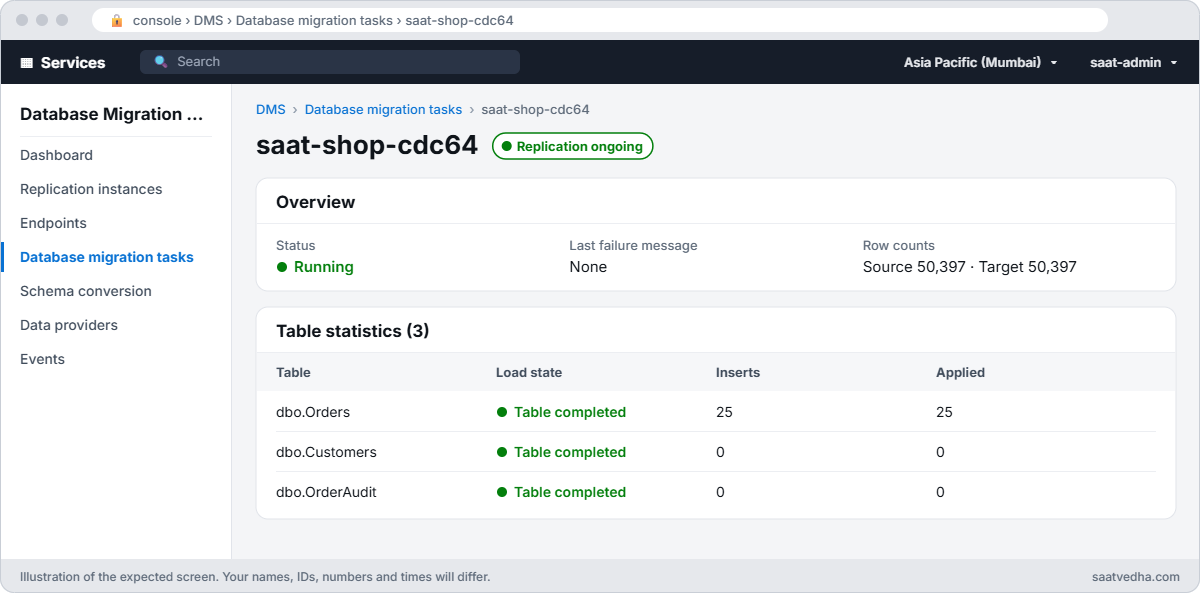
✅ Checkpoint: Both endpoints test successful, the task is running after full load, Orders shows 25 inserts applied, and source and target both have 50,397 orders.
Two classic CDC failures, one loud and one quiet.
1Break it: log backups deleted while the task was stopped
Stop the task as if for a weekend, make changes, take log backups and delete them as an aggressive clean-up job might, then resume:
aws dms stop-replication-task --replication-task-arn $task | Out-Null
aws dms wait replication-task-stopped --filters "Name=replication-task-arn,Values=$task"
foreach ($n in 1..3) {
  Invoke-Sql SaatShop "INSERT dbo.Orders (Customer, Amount, CustomerId) SELECT TOP (500) N'Weekend', 10.00, 2 FROM sys.all_objects; CHECKPOINT; BACKUP LOG SaatShop TO DISK = 'C:\sqlbak\weekend$n.trn' WITH INIT;" | Out-Null
  Invoke-Ps "Remove-Item C:\sqlbak\weekend$n.trn" | Out-Null
}
aws dms start-replication-task --replication-task-arn $task --start-replication-task-type resume-processing | Out-Null
Start-Sleep 120
aws dms describe-replication-tasks --filters "Name=replication-task-arn,Values=$task" --query "ReplicationTasks[0].[Status,LastFailureMessage]" --output text
You’ll get something like this:
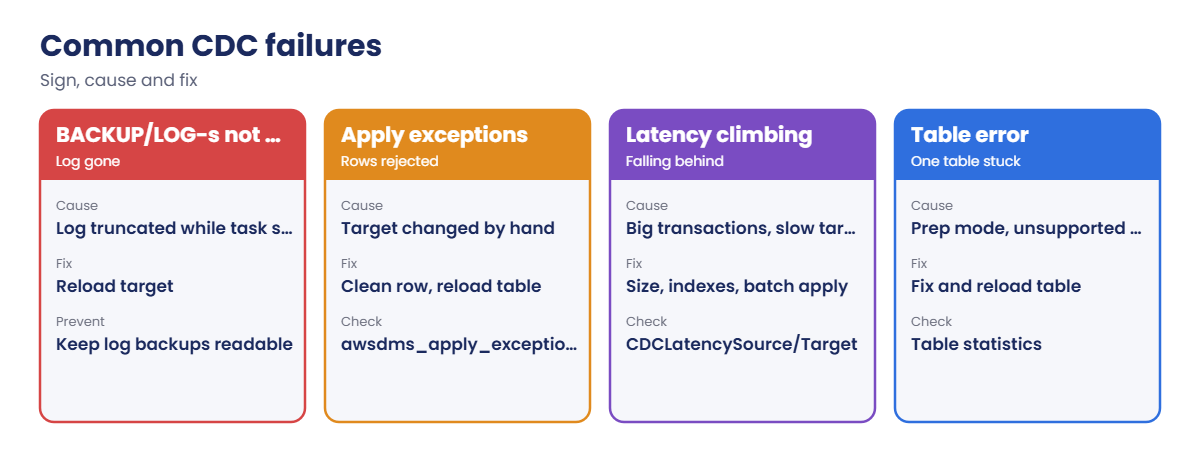
failed Last Error Failed to access LSN '000000a4:00003c10:0001' in the backup log sets since BACKUP/LOG-s are not available. Task error notification received from subtask 0, thread 0 [reptask/replicationtask.c:2883] [1020465]In real life, a backup job that moves .trn files to tape or deletes them after an hour does exactly this. Fix: the place in the log is gone for good, so reload the target and continue from now:
aws dms start-replication-task --replication-task-arn $task --start-replication-task-type reload-target | Out-Null
aws dms wait replication-task-running --filters "Name=replication-task-arn,Values=$task"
do { Start-Sleep 30; $ts = aws dms describe-table-statistics --replication-task-arn $task --query "TableStatistics[?TableName=='Orders'].TableState | [0]" --output text } until ($ts -eq 'Table completed')
Get-DmsHealth
You should see something like this:
running None    None
Orders  Table completed 0       0
Customers       Table completed 0       0
OrderAudit      Table completed 0       0
source 51897  target 51897
The reload brought in all 1,500 weekend orders. To prevent it: don’t leave CDC tasks stopped for long, keep log backups on the server until DMS has read past them, and alert when a task leaves the running state.
2Break it: someone writes to the target
Insert a row into the replica with the ID the source will use next, then add an order on the source:
$next = Invoke-Sql SaatShop "SELECT CAST(IDENT_CURRENT('dbo.Orders') + 1 AS varchar(20));"
Invoke-Sql SaatShopReplica "INSERT dbo.Orders (OrderId, Customer, Amount, CustomerId) VALUES ($next, N'Manual test', 1.00, 1);" | Out-Null
Invoke-Sql SaatShop "INSERT dbo.Orders (Customer, Amount, CustomerId) VALUES (N'Real order', 4500.00, 3);" | Out-Null
Start-Sleep 90
aws dms describe-replication-tasks --filters "Name=replication-task-arn,Values=$task" --query "ReplicationTasks[0].Status" --output text
Invoke-Sql SaatShopReplica "SELECT TOP 1 TABLE_NAME + ': ' + LEFT(ERROR, 120) FROM dbo.awsdms_apply_exceptions ORDER BY ERROR_TIME DESC;"
Invoke-Sql SaatShopReplica "SELECT Customer FROM dbo.Orders WHERE OrderId = $next;"
You’ll get something like this:
running
Orders: RetCode: SQL_ERROR  SqlState: 23000 NativeError: 2627 Message: [Microsoft][ODBC Driver 18 for SQL Server][SQL Server]Violation of PRIMARY KEY
Manual test
The task still says running, but the real order never reached the target; the test row sits in its place. Only the apply exceptions table tells you.
Teams that never query it can run for weeks with silently different data. Fix: remove the stray row and reload the table from the source:
Invoke-Sql SaatShopReplica "DELETE dbo.Orders WHERE OrderId = $next;" | Out-Null
aws dms reload-tables --replication-task-arn $task --tables-to-reload SchemaName=dbo,TableName=Orders --reload-option data-reload | Out-Null
Start-Sleep 30
do { Start-Sleep 20; $ts = aws dms describe-table-statistics --replication-task-arn $task --query "TableStatistics[?TableName=='Orders'].TableState | [0]" --output text } until ($ts -eq 'Table completed')
Invoke-Sql SaatShopReplica "SELECT Customer FROM dbo.Orders WHERE OrderId = $next;"
"source $(Invoke-Sql SaatShop 'SELECT COUNT(*) FROM dbo.Orders;')  target $(Invoke-Sql SaatShopReplica 'SELECT COUNT(*) FROM dbo.Orders;')"
You should see something like this:
Real order
source 51898  target 51898
Now clean up. onprem-sql goes back to its normal state and stays stopped:
aws dms stop-replication-task --replication-task-arn $task | Out-Null
aws dms wait replication-task-stopped --filters "Name=replication-task-arn,Values=$task"
aws dms delete-replication-task --replication-task-arn $task | Out-Null
aws dms wait replication-task-deleted --filters "Name=replication-task-arn,Values=$task"
aws dms delete-replication-instance --replication-instance-arn $ri | Out-Null
aws dms delete-endpoint --endpoint-arn $srcEp | Out-Null
aws dms delete-endpoint --endpoint-arn $tgtEp | Out-Null
aws dms wait replication-instance-deleted --filters "Name=replication-instance-arn,Values=$ri"
aws dms delete-replication-subnet-group --replication-subnet-group-identifier saat-dms-subnets
Invoke-Sql master "ALTER DATABASE SaatShopReplica SET SINGLE_USER WITH ROLLBACK IMMEDIATE; DROP DATABASE SaatShopReplica; ALTER SERVER ROLE sysadmin DROP MEMBER dms_user;" | Out-Null
Invoke-Sql SaatShop "EXEC sys.sp_cdc_disable_db; DROP TABLE IF EXISTS dbo.awsdms_truncation_safeguard; ALTER DATABASE SaatShop SET RECOVERY SIMPLE;" | Out-Null
aws ec2 revoke-security-group-ingress --group-id $srcSg --ip-permissions "IpProtocol=tcp,FromPort=1433,ToPort=1433,UserIdGroupPairs=[{GroupId=$dmsSg}]" | Out-Null
aws ec2 delete-security-group --group-id $dmsSg
aws ec2 stop-instances --instance-ids $src | Out-Null
.\Stop-SsmEndpoints.ps1
Remove-Item mappings64.json, task64.json, src-cmd.json
✅ Checkpoint: You recovered a task that lost its log position with reload-target, and found and fixed a silent primary key conflict through awsdms_apply_exceptions. The DMS pieces and SaatShopReplica are gone, CDC is off, and onprem-sql is stopping.